Jeste li se ikada zapitali što se događa s vašom torbom ako se odvoji od vas u zračnoj luci? S običnom papirnatom oznakom, stranac mora naglas pročitati vaše osobne podatke samo da bi je vratio. QR kod na vašoj oznaci za prtljagu u potpunosti mijenja tu jednadžbu, omogućujući bilo kome s pametnim telefonom da vas kontaktira bez izlaganja vaših privatnih podataka svakom prolazniku u terminalu.
Zašto standardne oznake za prtljagu nisu dovoljne
Američki prijevoznici izvijestili su o stopi pogrešno rukovane prtljage od 0,55% u 2024. godini, što zvuči malo dok ne uzmete u obzir ogroman volumen prijavljenih torbi koje se obrađuju svaki dan. Izgubljene, odgođene ili oštećene torbe rutinska su putna glavobolja, a prva linija obrane je čitljiva, korisna oznaka za prtljagu.
Problem s tradicionalnim oznakama je kompromis s privatnošću. Putni stručnjaci dosljedno savjetuju da ne navodite svoju kućnu adresu na vanjskoj oznaci, jer to signalizira svakome tko gleda da je vaša kuća prazna. Također upozoravaju na uključivanje osjetljivih identifikatora poput brojeva putovnica ili brojeva vozačkih dozvola. Ipak, oznaka i dalje treba dovoljno detalja da vas pronalazač ili agent zrakoplovne tvrtke stvarno može dohvatiti.
Većina putnika završava s neugodnim kompromisom: previše izloženih informacija, ili nedovoljno da bi bile korisne.
Kako QR kod rješava problem
QR kod na oznaci za prtljagu funkcionira kao sloj privatnosti između vaših kontakt podataka i javnosti. Umjesto da ispisujete svoj telefonski broj i e-poštu velikim tekstom da bi ih svatko mogao pročitati dok vaša torba kruži na traci, te informacije kodirate u uzorak koji se može skenirati. Pronalazač skenira kod, dolazi na stranicu za kontakt ili unaprijed ispunjenu poruku i dolazi do vas – a da nikada ne vidi vaše sirove osobne podatke prikazane na otvorenom.
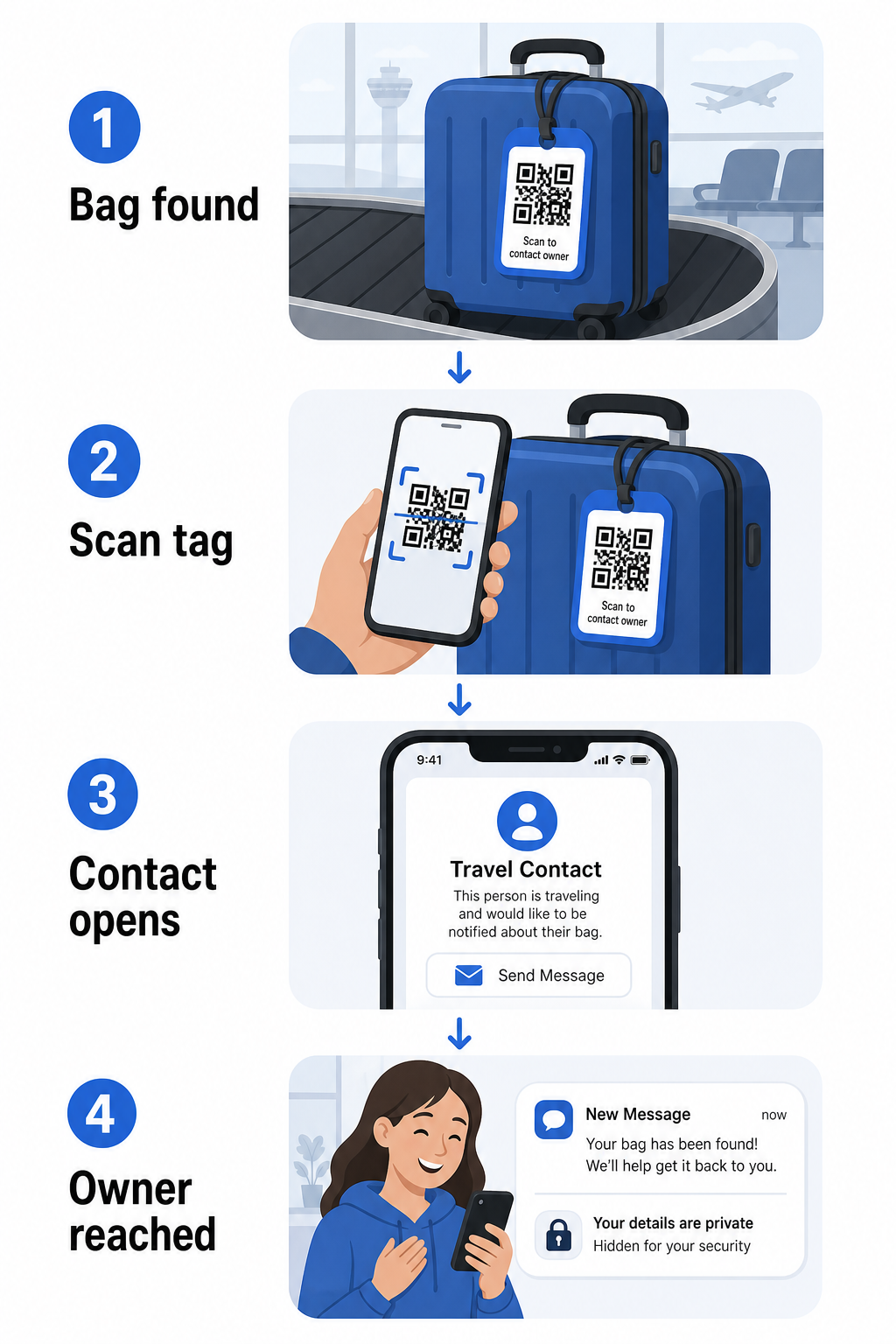
Postoji nekoliko formata koje vrijedi razmotriti, ovisno o tome koliko informacija želite podijeliti:
- vCard QR kôd: Kodira vaše ime, telefonski broj i e-poštu u vCard formatu. Kada se skenira, telefon pronalazača ih potiče da vaše kontakt podatke spremi izravno u svoj adresar pomoću vCard QR kod generator. Nije potrebno tipkanje i nema vidljivih osobnih podataka na samoj oznaci.
- QR kod e-poštom: Otvara unaprijed ispunjenu e-poštu adresiranu na vas kada se skenira. Pronalazač jednostavno pritisne pošalji. To možete postaviti pomoću QR kod za e-mail generator i držati svoju stvarnu adresu skrivenom od pogleda.
- QR kod za poveznicu: Usmjerava pronalazača na web stranicu koju kontrolirate – jednostavan obrazac za kontakt ili stranicu s vašim podacima o putovanju. Koristite generator QR koda veze da usmjerite kod na bilo koji URL koji odaberete.
Svaki pristup održava vaše kontakt podatke funkcionalnima za potrebe oporavka, istovremeno smanjujući ono što bilo koji slučajni promatrač može pročitati s vaše oznake u prometnom terminalu.
Stvorite QR kod za oznaku za prtljagu prilagođen privatnosti Jeste li spremni postaviti QR kod koji štiti vaše podatke, a istovremeno omogućuje pronalaženje vaše torbe? Koristite Generator QR kodova za početak – besplatno, bez potrebnog tehničkog znanja.
Koje informacije uključiti (i koje izostaviti)
Putni stručnjaci preporučuju da informacije na oznaci za prtljagu budu minimalne, ali učinkovite. Praktični konsenzus je:
- Uključiti: Vaše puno ime, broj mobilnog telefona s pozivnim brojem države ako putujete međunarodno, i adresu e-pošte
- Preskočite: Vašu kućnu adresu (koristite poslovnu adresu ili poštanski pretinac ako se adresa čini potrebnom), brojeve putovnica, brojeve državnih iskaznica i brojeve kućnih fiksnih telefona
- Razmislite o: Adresi e-pošte specifičnoj za putovanja umjesto vašeg primarnog osobnog računa, tako da svaki neželjeni kontakt ostane ograničen
Pristup QR kodom olakšava praćenje ovih smjernica. Kodirate samo ono što je potrebno i kontrolirate metodu kontakta koju pronalazač koristi – bilo da je to obrazac e-pošte, spremanje vCard-a ili stranica za kontakt.
Višestruki putni izvori također preporučuju postavljanje rezervnih kontakt podataka unutar vaše torbe, tako da se torba i dalje može identificirati ako se vanjska oznaka izgubi ili ošteti. Oznaka s QR kodom u kombinaciji s unutarnjom papirnatom karticom daje vam najbolju pokrivenost na oba fronta.
Zašto je dinamički QR kod vrijedan korištenja
A dinamički QR kod ima jednu značajnu prednost u odnosu na statički za korištenje oznake za prtljagu: možete ažurirati odredište bez ponovnog ispisa oznake.
Dinamički QR kodovi funkcioniraju putem trajne kratke URL adrese za preusmjeravanje. Sam QR kod se nikada ne mijenja, ali stranica na koju pokazuje može se ažurirati bilo kada s vaše nadzorne ploče. To znači da ako se vaš telefonski broj promijeni, dobijete novu adresu e-pošte ili želite zamijeniti vCard za obrazac za kontakt, ažurirate odredište – i svako skeniranje iste fizičke oznake doseže nove informacije.
Za oznaku za prtljagu koju koristite iz godine u godinu, ova je fleksibilnost praktična. Oznaku ispišete jednom i zadržavate kontrolu nad kontakt podacima koje ona prikazuje neograničeno.
Dinamički kodovi također vam omogućuju praćenje aktivnosti skeniranja. Ako se vaša torba izgubi i netko skenira vašu oznaku, možete vidjeti da je skeniranje izvršeno, kada i na kojoj lokaciji – korisni kontekst pri koordinaciji s zrakoplovnom tvrtkom. Kako biste razumjeli širu ulogu koju QR kodovi igraju u zračnom prometu, pregled zrakoplovnih tvrtki i zračnih luka pokriva kako ih prijevoznici koriste tijekom putovanja putnika, uključujući praćenje prtljage.
Održavajte svoju oznaku ažurnom bez ponovnog ispisa Koristiti Dinamični QR kod generator za izradu QR koda za oznaku prtljage koji možete ažurirati bilo kada – promijenite svoje kontakt podatke ili URL odredišta bez dodirivanja fizičke oznake.
Ispis vaše QR kod oznake: Veličina i format
QR kod koji se ne može skenirati gubi svrhu. Nekoliko praktičnih smjernica primjenjuje se pri ispisu za oznaku prtljage:
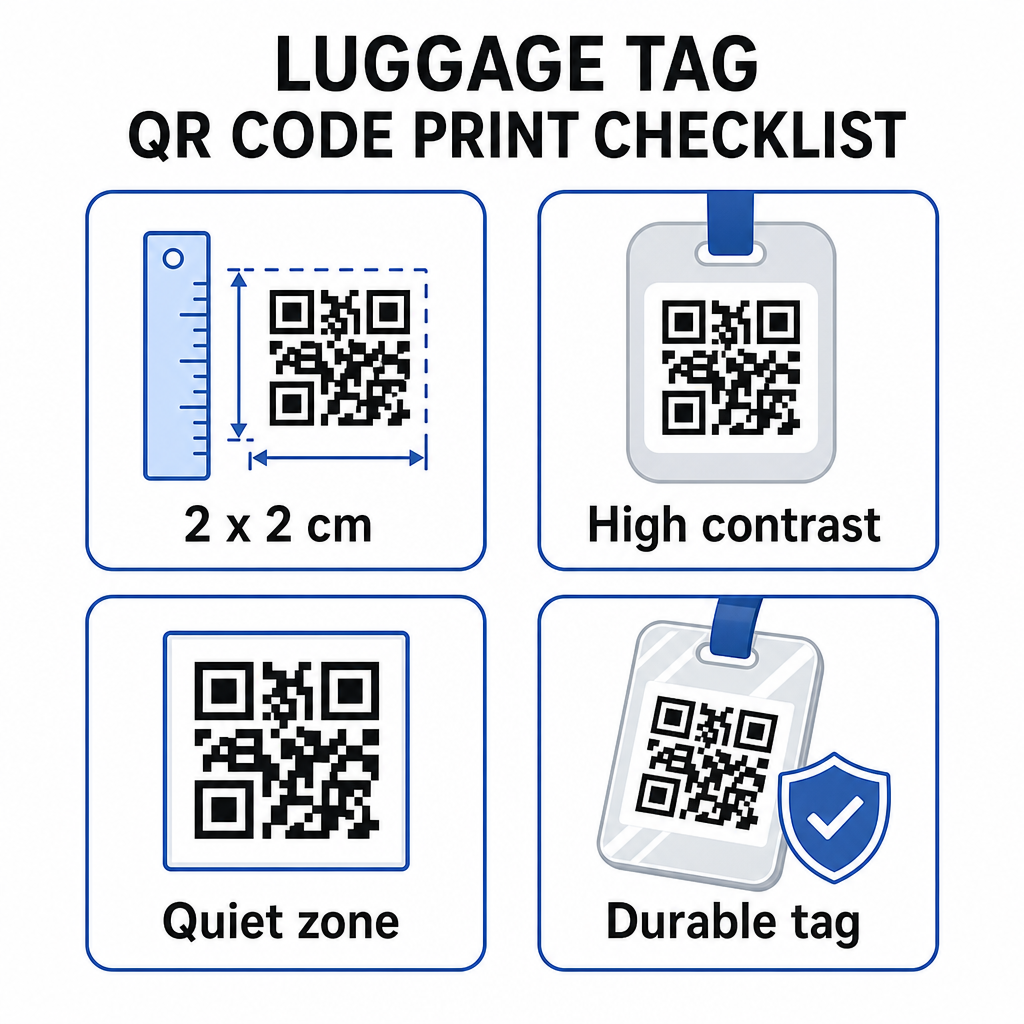
- Minimalna veličina: Ciljajte na najmanje 2 × 2 cm (otprilike 0,8 × 0,8 inča). Manje od toga smanjuje pouzdanost skeniranja, pogotovo pri slabom osvjetljenju. Pogledajte vodič za dimenzioniranje QR koda za tiskane materijale za preporuke specifične za površinu.
- Format datoteke: PNG dobro funkcionira za male veličine ispisa. Za laminiranu ili profesionalno otisnutu oznaku, SVG ili PDF izvozi daju oštrije rubove u bilo kojoj veličini.
- Kontrast: Koristite tamni uzorak na svijetloj pozadini. Nizak kontrast jedan je od najčešćih razloga zašto se QR kodovi ne mogu skenirati.
- Tiha zona: Ostavite jasan obrub oko koda – najmanje četiri modula širine sa svih strana – kako bi skener mogao razlikovati kod od okolne grafike ili teksta.
- Ispravljanje pogrešaka: Više razine ispravljanja pogrešaka omogućuju da kod ostane skeniran čak i ako je dio izgreban ili istrošen, što je važno za oznaku koja se intenzivno koristi na više putovanja.
Za detaljne upute o pripremi QR koda za fizičke naljepnice, vodič za ispis QR kodova na naljepnicama detaljno pokriva postupak.
Čuvanje vaših osobnih podataka privatnima
Postavljanje bilo kakvih kontaktnih podataka na javno dostupnu oznaku uključuje određena razmatranja privatnosti. Nekoliko praksi smanjuje taj rizik pri korištenju QR kodova:
- Koristite obrazac za kontakt ili vCard umjesto kodiranja sirovog telefonskog broja kao običnog teksta, tako da informacije nisu odmah vidljive nikome tko pregleda sadržaj koda
- Odaberite e-mail adresu specifičnu za putovanja za oznaku kako bi vaš primarni račun ostao odvojen od bilo kakvog kontakta vezanog uz prtljagu
- Ako koristite dinamički kod, možete deaktivirati ili preusmjeriti vezu ako želite povući oznaku ili promijeniti način na koji vas pronalazači kontaktiraju
- Kodirajte samo ono što je potrebno za povrat prtljage – vaše ime i jedna metoda kontakta su dovoljni
Za dublji uvid u upravljanje privatnošću pri korištenju QR kodova, vodič za rizike privatnosti QR koda i sigurne najbolje prakse generiranja QR koda pokriva ključna razmatranja. Za širi kontekst o tome kako QR kodovi preoblikuju cjelokupno iskustvo putovanja, kako QR kodovi poboljšavaju iskustva putovanja je korisna referenca.
QR kod oznaka za prtljagu je jednostavna nadogradnja u odnosu na tiskanu oznaku: ona održava vaše kontakt podatke funkcionalnima za svakoga tko treba vratiti vašu torbu, istovremeno štiteći te detalje od slučajnog promatranja. Koristite dinamički kod kako biste oznaku mogli ažurirati kroz više putovanja, pravilno je dimenzionirajte za pouzdano skeniranje i kodirajte samo metodu kontakta koju želite da pronalazači koriste.
Izradite svoju QR kod oznaku za prtljagu danas Postavite vCard, e-mail ili link QR kod za svoju prtljagu u nekoliko minuta. Započnite s Pageloot Generator QR kodova – besplatna proba, kreditna kartica nije potrebna.
Često postavljana pitanja
vCard QR kod je praktičan izbor jer omogućuje pronalazaču da spremi vaše kontakt podatke direktno na svoj telefon jednim dodirom. Ako preferirate više kontrole nad time koje se informacije dijele, QR kod veze koji vodi na jednostavan obrazac za kontakt također dobro funkcionira. Dinamičke verzije bilo kojeg od njih omogućuju vam da ažurirate odredište bez ponovnog ispisa oznake.
Dobro konfiguriran QR kod na oznaci za prtljagu dijeli samo ono što vi odaberete kodirati – obično ime, telefonski broj ili e-mail adresu. Izbjegavajte kodiranje osjetljivih identifikatora poput brojeva putovnica ili osobnih iskaznica. Korištenje stranice s obrascem za kontakt umjesto sirovih osobnih podataka dodaje još jedan sloj razdvajanja, a pridržavanje najboljih praksi privatnosti QR koda osigurava da vaša postavka ograničava nepotrebno izlaganje.
Ne ako koristite dinamički QR kod. Dinamički kodovi upućuju na URL za preusmjeravanje koji možete ažurirati bilo kada s vaše Pageloot nadzorne ploče. Fizička oznaka ostaje ista, ali kontaktne informacije koje prikazuje mogu se promijeniti kad god vam zatreba – čineći ga praktičnim dugoročnim rješenjem za česte putnike.