Vai esat kādreiz domājuši, kas notiek ar jūsu somu, ja tā atdalās no jums lidostā? Ar standarta papīra birku svešiniekam ir skaļi jālasa jūsu personas dati, lai to atdotu. QR kods uz jūsu bagāžas birkas pilnībā maina šo vienādojumu, ļaujot ikvienam ar viedtālruni sazināties ar jums, neatklājot jūsu privāto informāciju katram garāmgājējam terminālī.
Kāpēc standarta bagāžas birkas izrādas nepietiekamas
ASV ziņojošie pārvadātāji 2024. gadā uzrādīja nepareizi apstrādātas bagāžas rādītāju 0,55% apmērā, kas šķiet maz, līdz jūs apsverat katru dienu apstrādāto reģistrēto bagāžas vienību milzīgo apjomu. Pazaudētas, aizkavētas vai bojātas somas ir ikdienišķas ceļojumu galvassāpes, un pirmā aizsardzības līnija ir salasāma, noderīga bagāžas birka.
Problēma ar tradicionālajām birkām ir privātuma kompromiss. Ceļojumu eksperti pastāvīgi iesaka nenorādīt jūsu mājas adresi uz ārējās birkas, jo tas signalizē ikvienam, kas vēro, ka jūsu māja ir tukša. Viņi arī brīdina neiekļaut sensitīvus identifikatorus, piemēram, pases numurus vai autovadītāja apliecības numurus. Tomēr birkai joprojām ir nepieciešams pietiekami daudz detaļu, lai atradējs vai aviokompānijas aģents varētu ar jums sazināties.
Lielākā daļa ceļotāju nonāk neērtā kompromisā: pārāk daudz atklātas informācijas, vai nepietiekami, lai būtu noderīga.
Kā QR kods atrisina problēmu
QR kods uz bagāžas birkas darbojas kā privātuma slānis starp jūsu kontaktinformāciju un sabiedrību. Tā vietā, lai drukātu jūsu tālruņa numuru un e-pastu lielā tekstā, ko ikviens varētu lasīt, kamēr jūsu soma ripo pa bagāžas lenti, jūs kodējat šo informāciju skenējamā rakstā. Atradējs skenē kodu, nonāk uz kontaktu lapas vai iepriekš aizpildītas ziņas, un sazinās ar jums – nekad neredzot jūsu neapstrādātus personas datus, kas tiek rādīti atklāti.
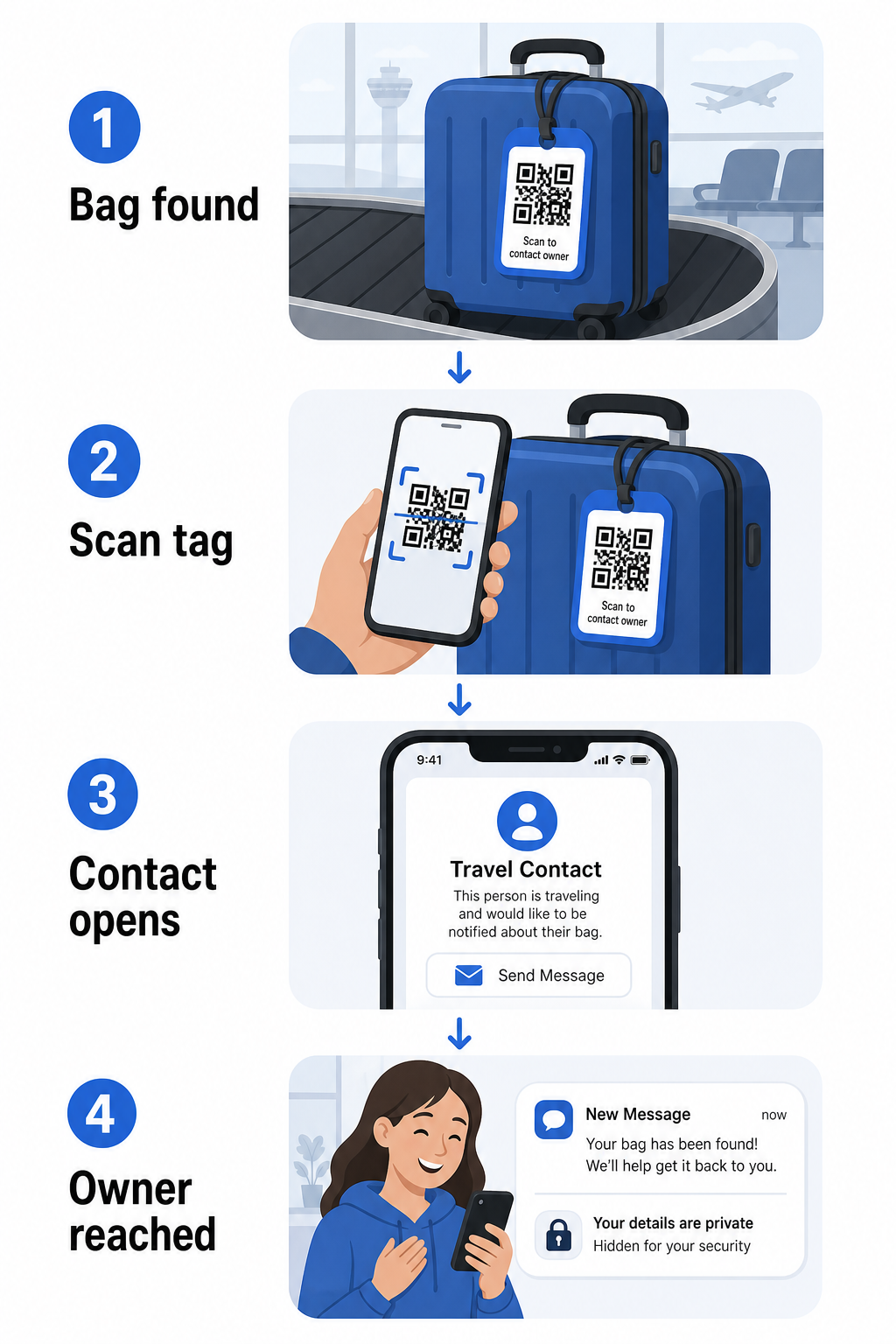
Ir daži formāti, ko vērts apsvērt, atkarībā no tā, cik daudz informācijas vēlaties kopīgot:
- vCard QR kods: Kodē jūsu vārdu, tālruņa numuru un e-pastu vCard formātā. Skenējot, atradēja tālrunis aicina viņus saglabāt jūsu kontaktinformāciju tieši savā adrešu grāmatā, izmantojot vCard QR koda ģenerators. Nav nepieciešama rakstīšana, un nav redzamu personas datu uz pašas birkas.
- E-pasta QR kods: Atver iepriekš aizpildītu e-pastu, kas adresēts jums, kad tas tiek skenēts. Atradējs vienkārši nospiež sūtīt. Jūs varat to iestatīt ar E-pasta QR kodu ģenerators un saglabāt jūsu faktisko adresi paslēptu no redzesloka.
- saites QR kodam: Novirza atradēju uz tīmekļa lapu, ko jūs kontrolējat – vienkāršu kontaktu veidlapu vai lapu ar jūsu ceļojuma detaļām. Izmantojiet saites QR koda ģenerators lai norādītu kodu uz jebkuru URL, ko izvēlaties.
Katra pieeja saglabā jūsu kontaktinformāciju funkcionālu atgūšanas nolūkiem, vienlaikus samazinot to, ko jebkurš nejaušs novērotājs var nolasīt no jūsu birkas aizņemtā terminālī.
Izveidojiet privātumam draudzīgu bagāžas birkas QR kodu Gatavs iestatīt QR kodu, kas aizsargā jūsu datus, vienlaikus saglabājot jūsu somu atrodāmu? Izmantojiet QR kodu ģenerators lai sāktu – bez maksas, bez nepieciešamām tehniskām zināšanām.
Kāda informācija jāiekļauj (un ko izlaist)
Ceļojumu eksperti iesaka saglabāt bagāžas birkas informāciju minimālu, bet efektīvu. Praktiskais konsensuss ir:
- Iekļaut: Jūsu pilns vārds, mobilā tālruņa numurs ar valsts kodu, ja ceļojat starptautiski, un e-pasta adrese
- Izlaist: Jūsu mājas adrese (izmantojiet darba adresi vai pasta kastīti, ja adrese šķiet nepieciešama), pases numuri, valsts ID numuri un mājas fiksētā tālruņa numuri
- Apsveriet: Ceļojumiem paredzēta e-pasta adrese, nevis jūsu primārais personīgais konts, lai jebkura nevēlama saziņa paliktu ierobežota
QR koda pieeja atvieglo šo norādījumu ievērošanu. Jūs kodējat tikai to, kas ir nepieciešams, un jūs kontrolējat saziņas metodi, ko izmanto atradējs – vai tā ir e-pasta veidlapa, vCard saglabāšana vai kontaktu lapa.
Vairāki ceļojumu avoti arī iesaka ievietot rezerves kontaktinformāciju jūsu somas iekšpusē, lai somu joprojām varētu identificēt, ja ārējā birka tiek pazaudēta vai bojāta. QR koda birka apvienojumā ar iekšējo papīra karti sniedz jums vislabāko pārklājumu abās jomās.
Kāpēc dinamisks QR kods ir vērts izmantot
A dinamiskais QR kods ir viena būtiska priekšrocība salīdzinājumā ar statisko bagāžas birkas lietošanai: jūs varat atjaunināt galamērķi, nepārprintējot birku.
Dinamiskie QR kodi darbojas, izmantojot pastāvīgu īsu novirzīšanas URL. Pats QR kods nekad nemainās, bet lapa, uz kuru tas norāda, var tikt atjaunināta jebkurā laikā no jūsu vadības paneļa. Tas nozīmē, ka, ja jūsu tālruņa numurs mainās, jūs iegūstat jaunu e-pasta adresi, vai vēlaties apmainīt vCard pret kontaktu veidlapu, jūs atjaunojat galamērķi – un katra tās pašas fiziskās birkas skenēšana sasniedz jauno informāciju.
Bagāžas birkai, ko izmantojat gadu no gada, šī elastība ir praktiska. Jūs izdrukājat birku vienreiz un saglabājat kontroli pār kontaktinformāciju, ko tā parāda, uz nenoteiktu laiku.
Dinamiskie kodi arī ļauj jums uzraudzīt skenēšanas aktivitāti. Ja jūsu soma pazūd un kāds skenē jūsu birku, jūs varat redzēt, ka skenēšana notika, kad un kurā vietā – noderīgs konteksts, koordinējot ar aviokompāniju. Lai saprastu plašāku lomu, ko QR kodi spēlē gaisa ceļojumos, the aviokompāniju un lidostu pārskats aptver, kā pārvadātāji tos izmanto visā pasažieru ceļojumā, ieskaitot bagāžas izsekošanu.
Saglabājiet savu birku aktuālu bez atkārtotas drukāšanas Izmantojiet Dinamisks QR kodu ģenerators lai izveidotu bagāžas birkas QR kodu, ko varat atjaunināt jebkurā laikā – mainiet savus kontaktinformāciju vai galamērķa URL, nepieskaroties fiziskajai birkai.
Jūsu QR koda birkas drukāšana: izmērs un formāts
QR
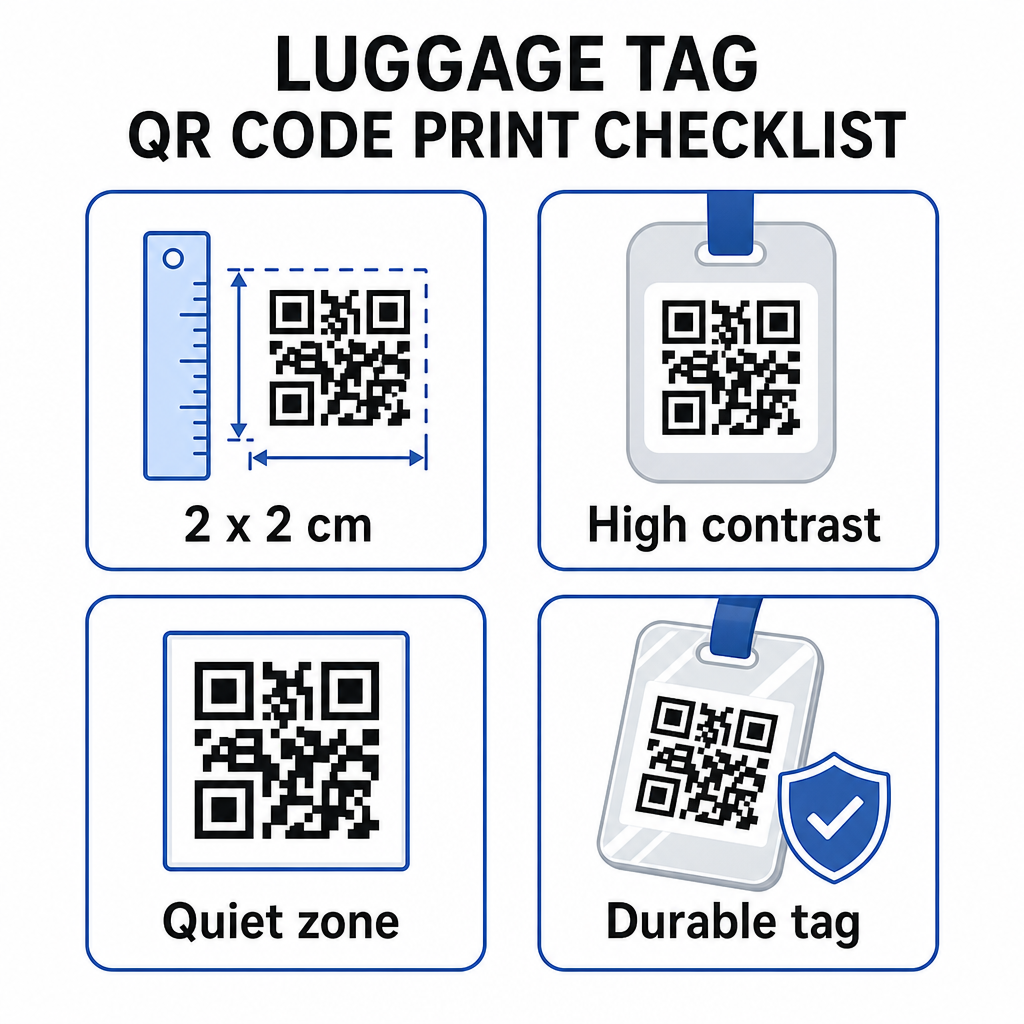
- Minimālais izmērs: Mērķējiet uz vismaz 2 × 2 cm (aptuveni 0,8 × 0,8 collas). Mazāks izmērs samazina skenēšanas uzticamību, īpaši vājā apgaismojumā. Skatiet QR koda izmēru ceļvedis drukas materiāliem ieteikumus par virsmu specifiku.
- Failu formāts: PNG labi der maziem drukas izmēriem. Laminētai vai profesionāli drukātai birkai SVG vai PDF eksports nodrošina asākas malas jebkurā izmērā.
- Kontrasts: Izmantojiet tumšu rakstu uz gaiša fona. Zems kontrasts ir viens no visbiežākajiem iemesliem, kāpēc QR kodi netiek skenēti.
- Klusā zona: Atstājiet skaidru apmali ap kodu – vismaz četru moduļu platumā no visām pusēm –, lai skeneris varētu atšķirt kodu no apkārtējās grafikas vai teksta.
- Kļūdu labošana: Augstāki kļūdu labošanas līmeņi ļauj kodam palikt skenējamam pat tad, ja daļa no tā ir saskrāpēta vai nodilusi, kas ir svarīgi birkai, kas tiek intensīvi izmantota vairākos ceļojumos.
Lai iegūtu soli pa solim norādījumus par QR koda sagatavošanu fiziskām etiķetēm, QR kodu drukāšanas uz etiķetēm ceļvedis detalizēti apraksta procesu.
Personas datu saglabāšana privātā
Jebkuras kontaktinformācijas ievietošana publiski pieejamā birkā ietver zināmus privātuma apsvērumus. Dažas prakses samazina šo risku, izmantojot QR kodus:
- Izmantojiet kontaktu veidlapu vai vCard, nevis kodējiet neapstrādātu tālruņa numuru kā vienkāršu tekstu, lai informācija nebūtu nekavējoties redzama ikvienam, kurš pārbauda koda saturu
- Izvēlieties ceļojumiem paredzētu e-pasta adresi birkai, lai jūsu primārais konts paliktu atsevišķi no jebkādiem ar bagāžu saistītiem kontaktiem
- Ja izmantojat dinamisku kodu, varat deaktivizēt vai pāradresēt saiti, ja vēlaties birku vairs neizmantot vai mainīt veidu, kā atradēji ar jums sazinās
- Kodējiet tikai to, kas ir nepieciešams somas atgūšanai – jūsu vārds un viena saziņas metode ir pietiekama
Lai dziļāk aplūkotu privātuma pārvaldību, izmantojot QR kodus, QR kodu privātuma risku ceļvedis un Drošu QR kodu ģenerēšanas labākā prakse aptver galvenos apsvērumus. Lai iegūtu plašāku kontekstu par to, kā QR kodi kopumā pārveido ceļošanas pieredzi, kā QR kodi uzlabo ceļošanas pieredzi ir noderīga atsauce.
QR koda bagāžas birka ir vienkāršs uzlabojums salīdzinājumā ar drukātu birku: tā saglabā jūsu kontaktinformāciju funkcionālu ikvienam, kam nepieciešams atgriezt jūsu somu, vienlaikus pasargājot šīs detaļas no nejaušas novērošanas. Izmantojiet dinamisku kodu, lai birka būtu aktuāla vairākos ceļojumos, pareizi to izmērojiet uzticamai skenēšanai un kodējiet tikai to saziņas metodi, kuru vēlaties, lai atradēji izmantotu.
Izveidojiet savu bagāžas birkas QR kodu jau šodien Iestatiet vCard, e-pasta vai saites QR kodu savai bagāžai dažu minūšu laikā. Sāciet ar Pageloot QR kodu ģenerators – bezmaksas izmēģinājums, nav nepieciešama kredītkarte.
Biežāk uzdotie jautājumi
vCard QR kods ir praktiska izvēle, jo tas ļauj atradējam saglabāt jūsu kontaktinformāciju tieši savā tālrunī ar vienu pieskārienu. Ja jūs dodat priekšroku lielākai kontrolei pār to, kāda informācija tiek koplietota, saites QR kods, kas norāda uz vienkāršu kontaktu veidlapu, arī labi darbojas. Dinamiskās versijas abiem ļauj jums atjaunināt galamērķi bez birkas atkārtotas drukāšanas.
Labi konfigurēts QR kods uz bagāžas birkas kopīgo tikai to, ko jūs izvēlaties kodēt – parasti vārdu, tālruņa numuru vai e-pasta adresi. Izvairieties kodēt sensitīvus identifikatorus, piemēram, pases vai ID numurus. Izmantojot kontaktu veidlapas lapu, nevis neapstrādātus personas datus, tiek pievienots vēl viens atdalīšanas slānis, un, ievērojot QR koda privātuma labāko praksi, tiek nodrošināts, ka jūsu iestatījums ierobežo nevajadzīgu atklāšanu.
Ne, ja jūs izmantojat dinamisku QR kodu. Dinamiskie kodi norāda uz novirzīšanas URL, ko jūs varat atjaunināt jebkurā laikā no sava Pageloot informācijas paneļa. Fiziskā birka paliek nemainīga, bet kontaktinformāciju, ko tā parāda, var mainīt, kad vien jums nepieciešams – padarot to par praktisku ilgtermiņa risinājumu biežiem ceļotājiem.