Bạn đã bao giờ tự hỏi điều gì sẽ xảy ra với hành lý của bạn nếu nó bị tách khỏi bạn tại sân bay chưa? Với thẻ giấy tiêu chuẩn, một người lạ phải đọc to thông tin cá nhân của bạn chỉ để trả lại. Mã QR trên thẻ hành lý của bạn thay đổi hoàn toàn phương trình đó, cho phép bất kỳ ai có điện thoại thông minh liên hệ với bạn mà không tiết lộ thông tin riêng tư của bạn cho mọi người qua lại trong nhà ga.
Tại sao thẻ hành lý tiêu chuẩn không hiệu quả
Các hãng vận chuyển báo cáo của Hoa Kỳ đã công bố tỷ lệ hành lý bị xử lý sai là 0,55% vào năm 2024, nghe có vẻ nhỏ cho đến khi bạn xem xét khối lượng lớn hành lý ký gửi được xử lý mỗi ngày. Hành lý bị mất, chậm trễ hoặc hư hỏng là một rắc rối du lịch thường xuyên, và tuyến phòng thủ đầu tiên là một thẻ hành lý dễ đọc, hữu ích.
Vấn đề với thẻ truyền thống là sự đánh đổi về quyền riêng tư. Các chuyên gia du lịch luôn khuyên không nên liệt kê địa chỉ nhà của bạn trên một thẻ bên ngoài, vì nó báo hiệu cho bất kỳ ai đang theo dõi rằng nhà của bạn đang trống. Họ cũng cảnh báo không nên bao gồm các thông tin nhận dạng nhạy cảm như số hộ chiếu hoặc số giấy phép lái xe. Tuy nhiên, thẻ vẫn cần đủ chi tiết để người tìm thấy hoặc nhân viên hãng hàng không có thể thực sự liên hệ với bạn.
Hầu hết du khách cuối cùng phải đối mặt với một sự thỏa hiệp không thoải mái: quá nhiều thông tin bị lộ, hoặc không đủ để hữu ích.
Mã QR giải quyết vấn đề như thế nào
Mã QR trên thẻ hành lý hoạt động như một lớp bảo mật giữa thông tin liên hệ của bạn và công chúng. Thay vì in số điện thoại và email của bạn bằng chữ lớn cho bất kỳ ai đọc trong khi hành lý của bạn đang chạy trên băng chuyền, bạn mã hóa thông tin đó thành một mẫu có thể quét được. Người tìm thấy quét mã, truy cập vào một trang liên hệ hoặc tin nhắn được điền sẵn, và liên hệ với bạn – mà không bao giờ nhìn thấy dữ liệu cá nhân thô của bạn được hiển thị công khai.
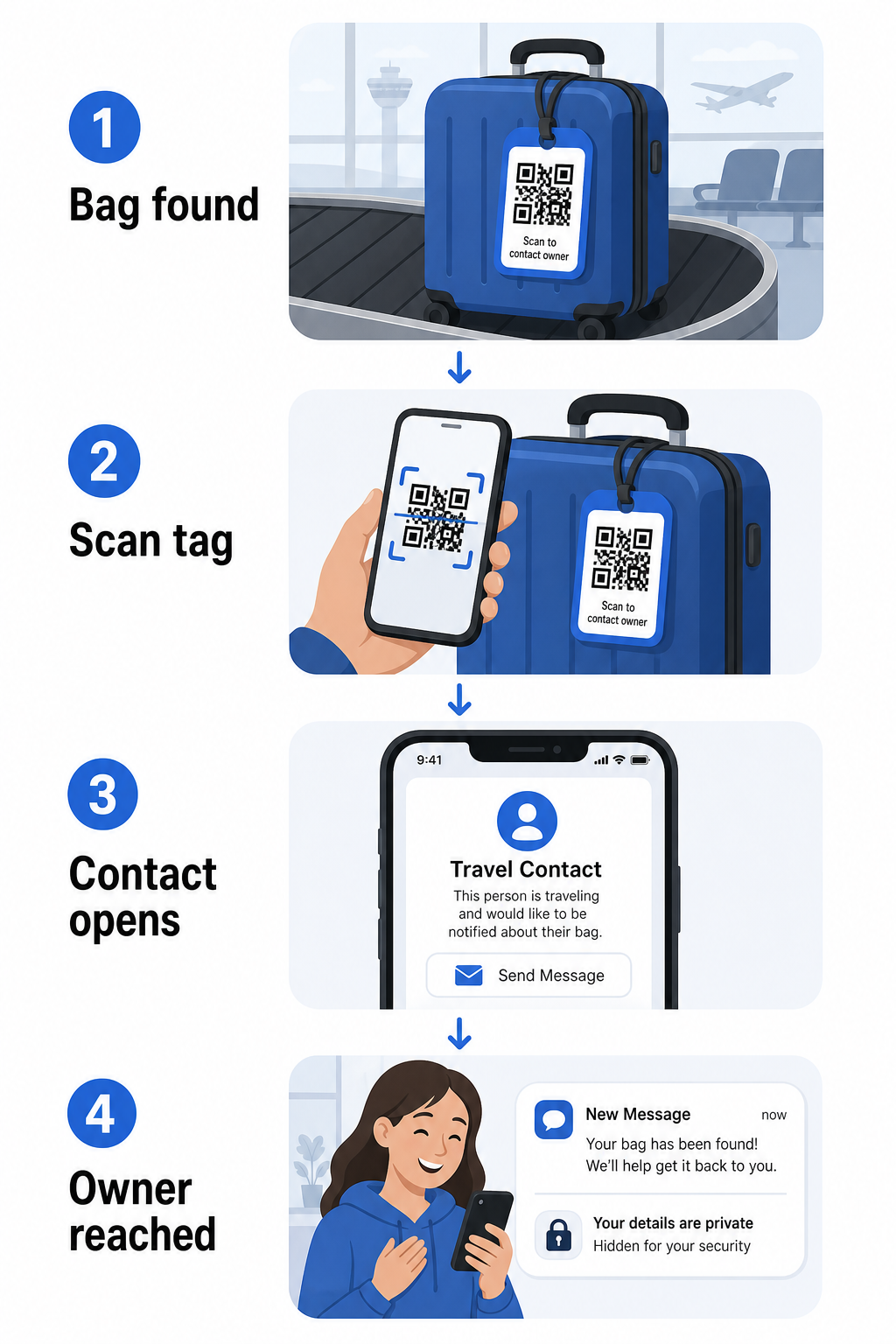
Có một vài định dạng đáng cân nhắc, tùy thuộc vào lượng thông tin bạn muốn chia sẻ:
- vCard mã QR: Mã hóa tên, số điện thoại và email của bạn ở định dạng vCard. Khi được quét, điện thoại của người tìm thấy sẽ nhắc họ lưu thông tin liên hệ của bạn trực tiếp vào danh bạ của họ bằng cách sử dụng Tạo mã QR vCard. Không cần nhập liệu, và không có dữ liệu cá nhân hiển thị trên chính thẻ.
- Mã QR email: Mở một email được điền sẵn gửi đến bạn khi được quét. Người tìm thấy chỉ cần nhấn gửi. Bạn có thể thiết lập điều này với Tạo mã QR email và giữ địa chỉ thực của bạn ẩn khỏi tầm nhìn.
- mã QR link: Hướng người tìm thấy đến một trang web bạn kiểm soát – một biểu mẫu liên hệ đơn giản hoặc một trang với chi tiết chuyến đi của bạn. Sử dụng trình tạo mã QR liên kết để trỏ mã đến bất kỳ URL nào bạn chọn.
Mỗi cách tiếp cận giữ cho thông tin liên hệ của bạn hoạt động hiệu quả cho mục đích khôi phục trong khi giảm thiểu những gì bất kỳ người quan sát ngẫu nhiên nào có thể đọc từ thẻ của bạn trong một nhà ga bận rộn.
Tạo mã QR thẻ hành lý thân thiện với quyền riêng tư Sẵn sàng thiết lập một mã QR bảo vệ thông tin của bạn trong khi vẫn giữ cho hành lý của bạn có thể tìm thấy được? Sử dụng Trình tạo mã QR để bắt đầu – miễn phí, không yêu cầu kiến thức kỹ thuật.
Thông tin nên bao gồm (và nên bỏ qua)
Các chuyên gia du lịch khuyên nên giữ thông tin trên thẻ hành lý tối thiểu nhưng hiệu quả. Sự đồng thuận thực tế là:
- Bao gồm: Tên đầy đủ của bạn, số điện thoại di động có mã quốc gia nếu đi du lịch quốc tế, và một địa chỉ email
- Bỏ qua: Địa chỉ nhà của bạn (sử dụng địa chỉ công ty hoặc hộp thư bưu điện nếu cảm thấy cần một địa chỉ), số hộ chiếu, số ID chính phủ, và số điện thoại cố định tại nhà
- Cân nhắc: Một địa chỉ email dành riêng cho du lịch thay vì tài khoản cá nhân chính của bạn, để mọi liên hệ không mong muốn được kiểm soát
Một cách tiếp cận bằng mã QR giúp việc tuân thủ hướng dẫn này dễ dàng hơn. Bạn chỉ mã hóa những gì cần thiết, và bạn kiểm soát phương thức liên hệ mà người tìm thấy sử dụng – cho dù đó là một biểu mẫu email, một bản lưu vCard, hoặc một trang liên hệ.
Nhiều nguồn du lịch cũng khuyên nên đặt thông tin liên hệ dự phòng bên trong hành lý của bạn, để hành lý vẫn có thể được nhận dạng nếu thẻ bên ngoài bị mất hoặc hư hỏng. Một thẻ mã QR kết hợp với một thẻ giấy bên trong mang lại cho bạn sự bảo vệ tốt nhất trên cả hai mặt.
Tại sao mã QR động đáng để sử dụng
A mã QR động có một lợi thế đáng kể so với mã tĩnh khi sử dụng cho thẻ hành lý: bạn có thể cập nhật điểm đến mà không cần in lại thẻ.
Mã QR động hoạt động thông qua một URL chuyển hướng ngắn vĩnh viễn. Bản thân mã QR không bao giờ thay đổi, nhưng trang mà nó trỏ đến có thể được cập nhật bất cứ lúc nào từ bảng điều khiển của bạn. Điều này có nghĩa là nếu số điện thoại của bạn thay đổi, bạn có một địa chỉ email mới, hoặc bạn muốn đổi vCard lấy một biểu mẫu liên hệ, bạn cập nhật điểm đến – và mỗi lần quét cùng một thẻ vật lý sẽ truy cập thông tin mới.
Đối với một thẻ hành lý bạn sử dụng năm này qua năm khác, sự linh hoạt này rất thiết thực. Bạn in thẻ một lần và duy trì quyền kiểm soát các chi tiết liên hệ mà nó hiển thị vô thời hạn.
Mã động cũng cho phép bạn theo dõi hoạt động quét. Nếu hành lý của bạn bị thất lạc và ai đó quét thẻ của bạn, bạn có thể thấy rằng một lần quét đã xảy ra, khi nào và ở vị trí nào – ngữ cảnh hữu ích khi phối hợp với hãng hàng không. Để hiểu vai trò rộng lớn hơn của mã QR trong du lịch hàng không, tổng quan về các hãng hàng không và sân bay đề cập cách các hãng vận chuyển đang sử dụng chúng trong suốt hành trình của hành khách, bao gồm theo dõi hành lý.
Giữ Thẻ Của Bạn Luôn Cập Nhật Mà Không Cần In Lại Sử dụng Tạo mã QR động để tạo một mã QR thẻ hành lý bạn có thể cập nhật bất cứ lúc nào – thay đổi chi tiết liên hệ của bạn hoặc URL đích mà không cần chạm vào thẻ vật lý.
In Thẻ Mã QR Của Bạn: Kích thước và Định dạng
Một mã QR không thể quét được sẽ mất đi mục đích. Một vài hướng dẫn thực tế áp dụng khi in cho thẻ hành lý:
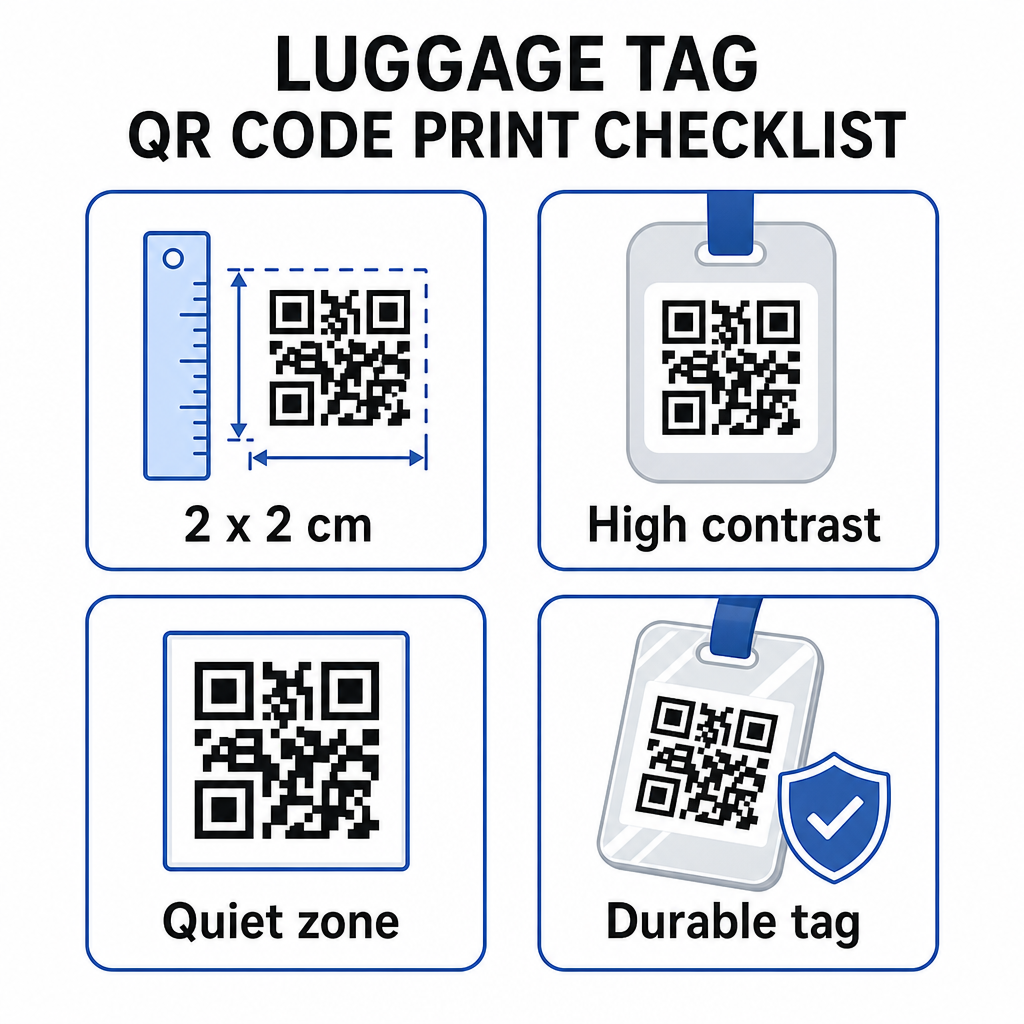
- Kích thước tối thiểu: Nhắm đến ít nhất 2 × 2 cm (khoảng 0.8 × 0.8 inch). Nhỏ hơn kích thước này và độ tin cậy quét giảm, đặc biệt trong điều kiện ánh sáng kém. Xem hướng dẫn kích thước mã QR cho vật liệu in để biết các khuyến nghị cụ thể theo bề mặt.
- Định dạng tệp: PNG hoạt động tốt cho các kích thước in nhỏ. Đối với thẻ được ép hoặc in chuyên nghiệp, xuất SVG hoặc PDF mang lại các cạnh sắc nét hơn ở mọi kích thước.
- Sự tương phản: Sử dụng mẫu tối trên nền sáng. Độ tương phản thấp là một trong những lý do phổ biến nhất khiến mã QR không quét được.
- Vùng yên tĩnh: Để lại một đường viền rõ ràng xung quanh mã – ít nhất bốn mô-đun rộng ở tất cả các cạnh – để máy quét có thể phân biệt mã với đồ họa hoặc văn bản xung quanh.
- Sửa lỗi: Mức độ sửa lỗi cao hơn cho phép mã vẫn có thể quét được ngay cả khi một phần của nó bị trầy xước hoặc mòn, điều này quan trọng đối với một thẻ được sử dụng nhiều trong nhiều chuyến đi.
Để được hướng dẫn từng bước về việc chuẩn bị mã QR cho nhãn vật lý, hướng dẫn in mã QR trên nhãn đề cập chi tiết quy trình.
Giữ Dữ Liệu Cá Nhân Của Bạn Riêng Tư
Việc đặt bất kỳ thông tin liên hệ nào trên một thẻ công khai liên quan đến một số cân nhắc về quyền riêng tư. Một vài thực hành giảm thiểu rủi ro đó khi sử dụng mã QR:
- Sử dụng biểu mẫu liên hệ hoặc vCard thay vì mã hóa số điện thoại thô dưới dạng văn bản thuần túy, để thông tin không hiển thị ngay lập tức cho bất kỳ ai kiểm tra nội dung của mã
- Chọn một địa chỉ email dành riêng cho du lịch cho thẻ để tài khoản chính của bạn vẫn tách biệt khỏi bất kỳ liên hệ nào liên quan đến hành lý
- Nếu sử dụng mã động, bạn có thể hủy kích hoạt hoặc chuyển hướng liên kết nếu bạn muốn ngừng sử dụng thẻ hoặc thay đổi cách người tìm liên hệ với bạn
- Chỉ mã hóa những gì cần thiết để khôi phục hành lý – tên của bạn và một phương thức liên hệ là đủ
Để tìm hiểu sâu hơn về việc quản lý quyền riêng tư khi sử dụng mã QR, hướng dẫn rủi ro quyền riêng tư của mã QR và các phương pháp hay nhất để tạo mã QR an toàn đề cập các cân nhắc chính. Để có bối cảnh rộng hơn về cách mã QR đang định hình lại trải nghiệm du lịch nói chung, cách mã QR cải thiện trải nghiệm du lịch là một tài liệu tham khảo hữu ích.
Một thẻ hành lý mã QR là một nâng cấp đơn giản so với thẻ in: nó giữ cho thông tin liên hệ của bạn hoạt động cho bất kỳ ai cần trả lại hành lý của bạn đồng thời che chắn những chi tiết đó khỏi sự quan sát thông thường. Sử dụng mã động để bạn có thể giữ thẻ luôn cập nhật qua nhiều chuyến đi, định kích thước chính xác để quét đáng tin cậy và chỉ mã hóa phương thức liên hệ bạn muốn người tìm sử dụng.
Tạo Mã QR Thẻ Hành lý Của Bạn Ngay Hôm Nay Thiết lập vCard, email hoặc mã QR liên kết cho hành lý của bạn trong vài phút. Bắt đầu với Trình tạo mã QR Pageloot – dùng thử miễn phí, không yêu cầu thẻ tín dụng.
Câu hỏi thường gặp
Mã QR vCard là một lựa chọn thiết thực bởi vì nó cho phép người tìm thấy lưu thông tin liên hệ của bạn trực tiếp vào điện thoại của họ chỉ với một lần chạm. Nếu bạn muốn kiểm soát nhiều hơn đối với thông tin được chia sẻ, một mã QR liên kết trỏ đến một biểu mẫu liên hệ đơn giản cũng hoạt động tốt. Các phiên bản động của cả hai loại này cho phép bạn cập nhật đích đến mà không cần in lại thẻ.
Một mã QR được cấu hình tốt trên thẻ hành lý chỉ chia sẻ những gì bạn chọn mã hóa – thường là tên, số điện thoại hoặc địa chỉ email. Tránh mã hóa các định danh nhạy cảm như số hộ chiếu hoặc số CMND/CCCD. Sử dụng một trang biểu mẫu liên hệ thay vì dữ liệu cá nhân thô thêm một lớp tách biệt nữa, và tuân thủ các thực hành tốt nhất về quyền riêng tư của mã QR đảm bảo thiết lập của bạn hạn chế sự phơi nhiễm không cần thiết.
Không nếu bạn sử dụng mã QR động. Mã động trỏ đến một URL chuyển hướng mà bạn có thể cập nhật bất cứ lúc nào từ bảng điều khiển Pageloot của bạn. Thẻ vật lý vẫn giữ nguyên, nhưng thông tin liên hệ mà nó hiển thị có thể được thay đổi bất cứ khi nào bạn cần – biến nó thành một giải pháp lâu dài thiết thực cho những người thường xuyên đi du lịch.