Heb je je ooit afgevraagd wat er met je tas gebeurt als die van je gescheiden raakt op de luchthaven? Met een standaard papieren label moet een vreemde je persoonlijke gegevens hardop voorlezen om het terug te geven. Een QR-code op je bagagelabel verandert die vergelijking volledig, waardoor iedereen met een smartphone contact met je kan opnemen zonder je privé-informatie bloot te stellen aan elke voorbijganger in de terminal.
Waarom Standaard Bagagelabels Tekortschieten
Amerikaanse rapporterende luchtvaartmaatschappijen meldden een percentage van 0,55% zoekgeraakte bagage in 2024, wat klein klinkt totdat je het enorme volume ingecheckte bagage in overweging neemt dat elke dag wordt verwerkt. Verloren, vertraagde of beschadigde tassen zijn een routineuze reisfrustratie, en de eerste verdedigingslinie is een leesbaar, bruikbaar bagagelabel.
Het probleem met traditionele labels is de afweging met privacy. Reisexco's adviseren consequent om je huisadres niet te vermelden op een extern label, aangezien het aan iedereen die meekijkt signaleert dat je huis leeg is. Ze waarschuwen ook tegen het opnemen van gevoelige identificatiegegevens zoals paspoortnummers of rijbewijsnummers. Toch heeft het label nog steeds voldoende details nodig zodat een vinder of luchtvaartmedewerker je daadwerkelijk kan bereiken.
De meeste reizigers eindigen met een ongemakkelijk compromis: te veel informatie blootgesteld, of niet genoeg om bruikbaar te zijn.
Hoe een QR-code het probleem oplost
Een QR-code op een bagagelabel werkt als een privacylaag tussen je contactgegevens en het publiek. In plaats van je telefoonnummer en e-mailadres in grote tekst af te drukken zodat iedereen het kan lezen terwijl je tas op een bagageband rijdt, codeer je die informatie in een scanbaar patroon. Een vinder scant de code, komt op een contactpagina of een vooraf ingevuld bericht terecht, en bereikt je – zonder ooit je ruwe persoonlijke gegevens openbaar te zien.
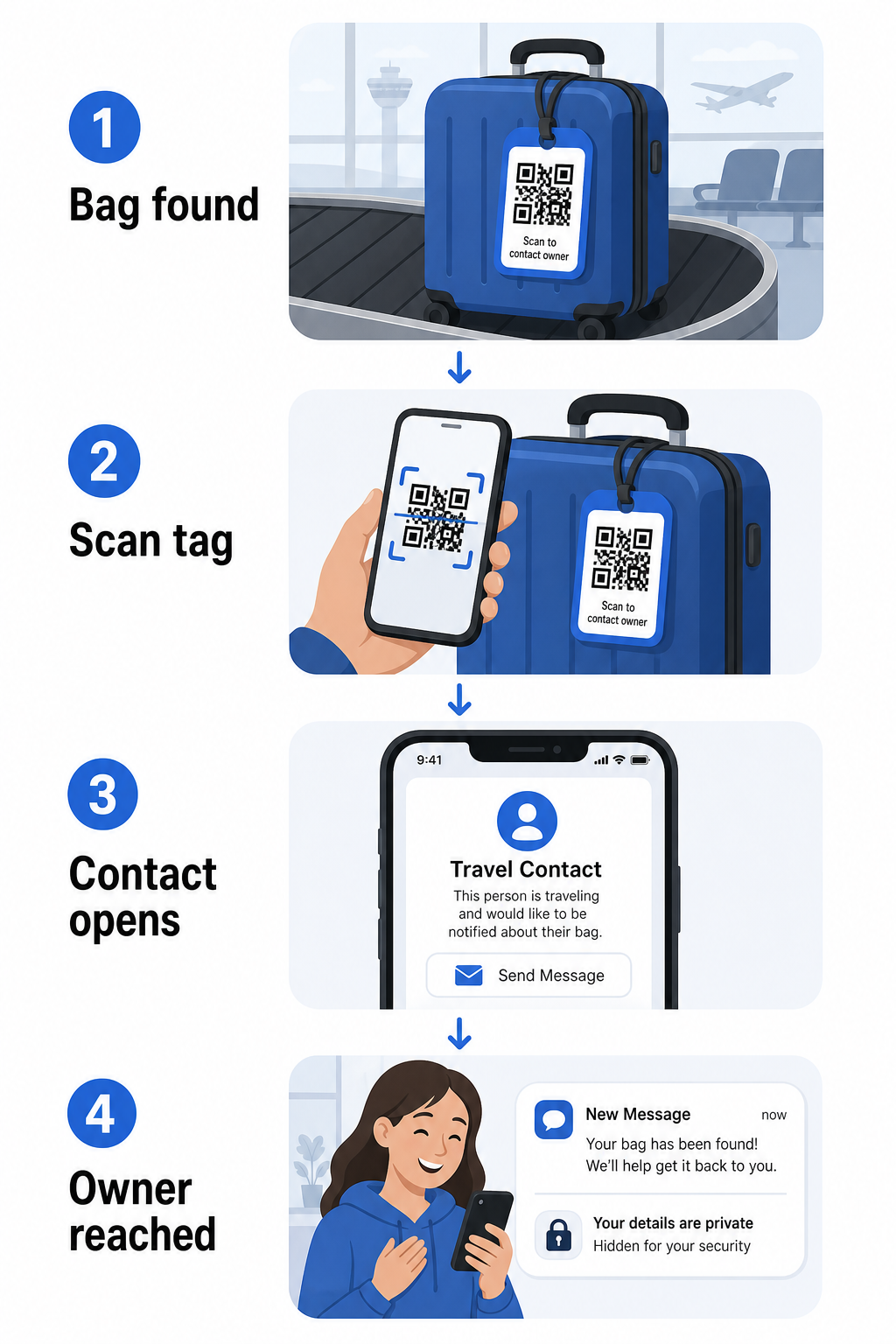
Er zijn een paar formaten die het overwegen waard zijn, afhankelijk van hoeveel informatie je wilt delen:
- vCard QR-code: Codeert je naam, telefoonnummer en e-mailadres in vCard-formaat. Wanneer gescand, vraagt de telefoon van de vinder hen om je contactgegevens direct in hun adresboek op te slaan met behulp van de vCard QR-code generator voor contactgegevens. Geen typen vereist, en geen zichtbare persoonlijke gegevens op het label zelf.
- E-mail QR code: Opent een vooraf ingevulde e-mail aan jou gericht wanneer gescand. De vinder hoeft alleen maar op verzenden te drukken. Je kunt dit instellen met de QR code voor e-mail maken en je werkelijke adres verborgen houden.
- link-QR-code: Leidt de vinder naar een webpagina die je beheert – een eenvoudig contactformulier of een pagina met je reisgegevens. Gebruik de link QR-codegenerator om de code naar elke gewenste URL te laten verwijzen.
Elke benadering houdt je contactgegevens functioneel voor hersteldoeleinden, terwijl het vermindert wat een willekeurige waarnemer van je label kan aflezen in een drukke terminal.
Maak een privacyvriendelijke QR-code voor bagagelabels Klaar om een QR-code in te stellen die je gegevens beschermt terwijl je tas vindbaar blijft? Gebruik de QR-codegenerator om te beginnen – gratis, zonder technische kennis vereist.
Welke informatie op te nemen (en wat weg te laten)
Reisexco's raden aan bagagelabelinformatie minimaal maar effectief te houden. De praktische consensus is:
- Erbij betrekken: Je volledige naam, een mobiel telefoonnummer met landcode indien internationaal reizend, en een e-mailadres
- Overslaan: Je huisadres (gebruik een werkadres of postbus als een adres noodzakelijk lijkt), paspoortnummers, overheids-ID-nummers en vaste telefoonnummers thuis
- Overweeg: Een reisspecifiek e-mailadres in plaats van je primaire persoonlijke account, zodat ongewenst contact beperkt blijft
Een QR-code benadering maakt deze richtlijn gemakkelijker te volgen. Je codeert alleen wat nodig is, en je beheert de contactmethode die de vinder gebruikt – of dat nu een e-mailformulier, een vCard-opslaan of een contactpagina is.
Meerdere reisbronnen raden ook aan reserve contactinformatie in je tas te plaatsen, zodat de tas nog steeds kan worden geïdentificeerd als het externe label verloren of beschadigd raakt. Een QR-codelabel gecombineerd met een interne papieren kaart geeft je de beste dekking op beide fronten.
Waarom een dynamische QR-code het waard is om te gebruiken
EEN dynamische QR-code heeft één significant voordeel ten opzichte van een statische voor gebruik als bagagelabel: je kunt de bestemming bijwerken zonder het label opnieuw af te drukken.
Dynamische QR-codes werken via een permanente korte omleidings-URL. De QR-code zelf verandert nooit, maar de pagina waarnaar deze verwijst, kan op elk moment vanuit je dashboard worden bijgewerkt. Dit betekent dat als je telefoonnummer verandert, je een nieuw e-mailadres krijgt, of je een vCard wilt ruilen voor een contactformulier, je de bestemming bijwerkt – en elke scan van hetzelfde fysieke label de nieuwe informatie bereikt.
Voor een bagagelabel dat je jaar na jaar gebruikt, is deze flexibiliteit praktisch. Je drukt het label één keer af en behoudt de controle over de contactgegevens die het onbeperkt toont.
Dynamische codes laten u ook toe om scanactiviteit te monitoren. Als uw tas zoekraakt en iemand scant uw tag, kunt u zien dat er een scan heeft plaatsgevonden, wanneer en op welke locatie – nuttige context bij het coördineren met een luchtvaartmaatschappij. Om de bredere rol te begrijpen die QR-codes spelen in vliegreizen, de overzicht van luchtvaartmaatschappijen en luchthavens behandelt hoe vervoerders ze gebruiken gedurende de hele passagiersreis, inclusief bagagetracking.
Houd Uw Tag Actueel Zonder Opnieuw te Printen Gebruik de Dynamische QR code generator om een bagagelabel QR-code te maken die u op elk moment kunt bijwerken – wijzig uw contactgegevens of bestemmings-URL zonder de fysieke tag aan te raken.
Uw QR-code Tag Printen: Grootte en Formaat
Een QR-code die niet gescand kan worden, doet het doel teniet. Een paar praktische richtlijnen zijn van toepassing bij het printen voor een bagagelabel:
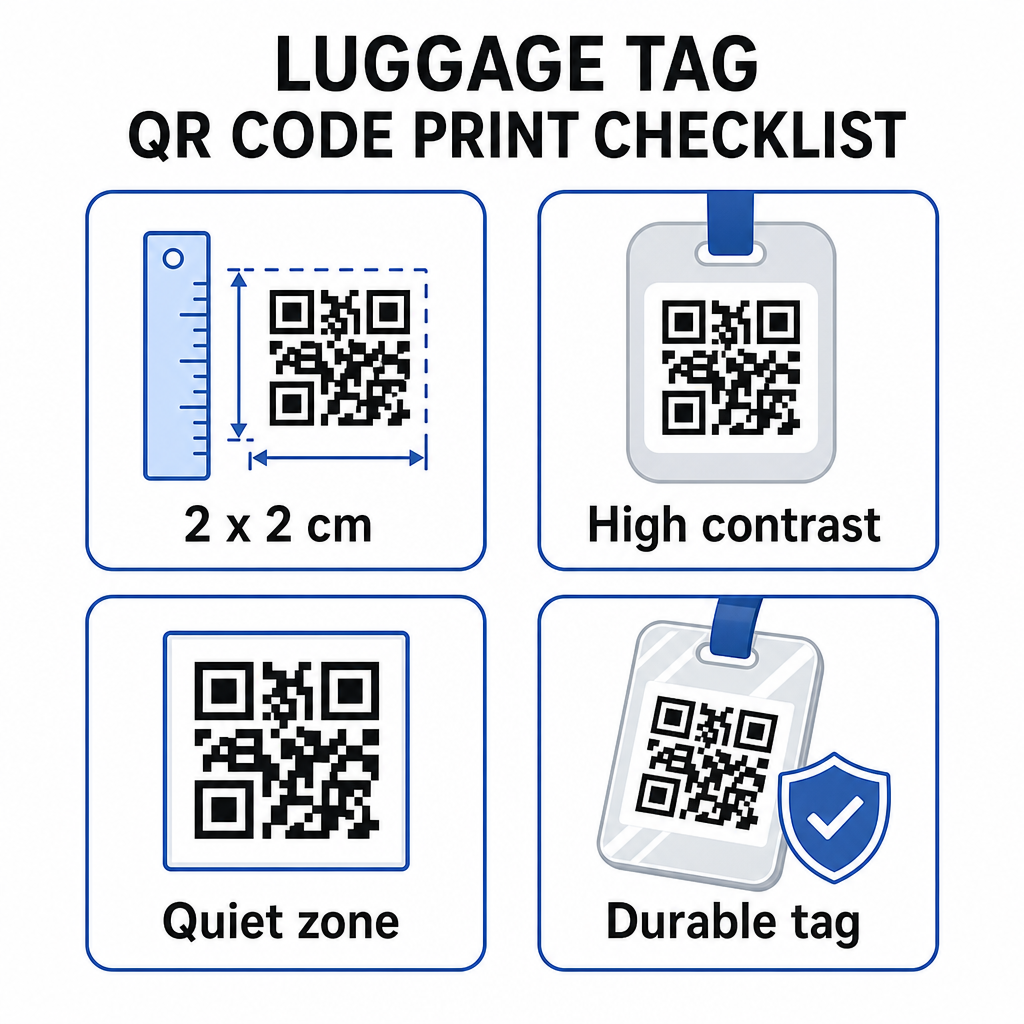
- Minimale grootte: Streef naar minimaal 2 × 2 cm (ongeveer 0.8 × 0.8 inch). Kleiner dan dit en de scanbetrouwbaarheid neemt af, vooral bij slechte verlichting. Zie de QR-code maatvoeringgids voor printmaterialen voor oppervlaktespecifieke aanbevelingen.
- Bestandsformaat: PNG werkt goed voor kleine printformaten. Voor een gelamineerde of professioneel geprinte tag, geven SVG- of PDF-exports scherpere randen op elk formaat.
- Contrast: Gebruik een donker patroon op een lichte achtergrond. Laag contrast is een van de meest voorkomende redenen dat QR-codes niet scannen.
- Stille zone: Laat een duidelijke rand rond de code – minimaal vier modules breed aan alle zijden – zodat een scanner de code kan onderscheiden van omringende afbeeldingen of tekst.
- Foutcorrectie: Hogere foutcorrectieniveaus zorgen ervoor dat de code scanbaar blijft, zelfs als een deel ervan bekrast of versleten is, wat belangrijk is voor een tag die intensief wordt gebruikt tijdens meerdere reizen.
Voor stapsgewijze begeleiding bij het voorbereiden van een QR-code voor fysieke labels, de gids voor het printen van QR-codes op labels behandelt het proces in detail.
Uw Persoonlijke Gegevens Privé Houden
Het plaatsen van contactinformatie op een openbaar zichtbare tag brengt enige privacyoverweging met zich mee. Een paar praktijken verminderen dat risico bij het gebruik van QR-codes:
- Gebruik een contactformulier of vCard in plaats van een onbewerkt telefoonnummer als platte tekst te coderen, zodat de informatie niet direct zichtbaar is voor iedereen die de inhoud van de code inspecteert
- Kies een reisspecifiek e-mailadres voor de tag, zodat uw primaire account gescheiden blijft van elk bagagegerelateerd contact
- Als u een dynamische code gebruikt, kunt u de link deactiveren of omleiden als u een tag wilt buiten gebruik stellen of wilt wijzigen hoe vinders u bereiken
- Codeer alleen wat nodig is voor bagageherstel – uw naam en één contactmethode zijn voldoende
Voor een diepere blik op het beheren van privacy bij het gebruik van QR-codes, de gids voor QR-code privacyrisico's en beste praktijken voor veilige QR-codegeneratie behandelt de belangrijkste overwegingen. Voor een bredere context over hoe QR-codes de reiservaring in het algemeen hervormen, Hoe QR-codes reiservaringen verbeteren een nuttige referentie.
Een QR-code bagagelabel is een eenvoudige upgrade ten opzichte van een geprinte tag: het houdt uw contactgegevens functioneel voor iedereen die uw tas moet terugbrengen, terwijl die details worden afgeschermd van terloopse observatie. Gebruik een dynamische code zodat u de tag actueel kunt houden voor meerdere reizen, formatteer het correct voor betrouwbaar scannen, en codeer alleen de contactmethode die u wilt dat vinders gebruiken.
Maak Uw Bagagelabel QR-code Vandaag Nog Stel een vCard, e-mail of link QR-code in voor uw bagage in enkele minuten. Begin met de Pageloot QR-codegenerator – gratis proefperiode, geen creditcard vereist.
Veelgestelde vragen
Een vCard QR-code is een praktische keuze omdat het de vinder jouw contactgegevens direct op hun telefoon laat opslaan met één tik. Als je de voorkeur geeft aan meer controle over welke informatie wordt gedeeld, werkt een link QR-code die verwijst naar een eenvoudig contactformulier ook goed. Dynamische versies van beide stellen je in staat om de bestemming bij te werken zonder de tag opnieuw af te drukken.
Een goed geconfigureerde QR-code op een bagagelabel deelt alleen wat u kiest te coderen – meestal een naam, telefoonnummer of e-mailadres. Vermijd het coderen van gevoelige identificatiegegevens zoals paspoort- of ID-nummers. Het gebruik van een contactformulierpagina in plaats van ruwe persoonlijke gegevens voegt een extra laag van scheiding toe, en het volgen van de beste praktijken voor QR-code privacy zorgt ervoor dat uw configuratie onnodige blootstelling beperkt.
Niet als u een dynamische QR-code gebruikt. Dynamische codes wijzen naar een omleidings-URL die u op elk moment kunt bijwerken vanuit uw Pageloot-dashboard. De fysieke tag blijft hetzelfde, maar de contactinformatie die het toont, kunt u wijzigen wanneer u maar wilt – waardoor het een praktische langetermijnoplossing is voor frequente reizigers.