Chcesz udostępnić swoje dane kontaktowe w momencie poznania kogoś nowego? Tradycyjne papierowe wizytówki gubią się, są wyrzucane lub ręcznie wpisywane z błędami. Kod QR wizytówki rozwiązuje wszystkie te problemy – jedno skanowanie natychmiast zapisuje Twój pełny profil kontaktowy na dowolnym smartfonie.
Czym jest kod QR wizytówki?
Kod QR wizytówki to skanowalny kod wydrukowany lub wyświetlony na Twojej wizytówce, który koduje Twoje dane kontaktowe w formacie vCard (VCF). Kiedy ktoś skieruje na niego aparat swojego smartfona, urządzenie odczytuje wzór i natychmiast prosi o zapisanie Twojego imienia, stanowiska, firmy, numeru telefonu, adresu e-mail, strony internetowej i linków do mediów społecznościowych bezpośrednio do kontaktów – bez konieczności wpisywania.
Dwa główne typy to statyczne oraz Dynamiczny. Kody statyczne przechowują dane na stałe wewnątrz wzoru. Kody dynamiczne używają linku przekierowującego, co oznacza, że możesz aktualizować swoje dane kontaktowe w dowolnym momencie bez ponownego drukowania wizytówek – to znacząca zaleta, jeśli zmieni się Twój numer telefonu lub stanowisko.
Utwórz kod QR vCard dla swojej wizytówki Wprowadź swoje dane kontaktowe, dostosuj projekt do swojej marki i pobierz plik gotowy do druku w kilka minut za pomocą Generator kodów QR vCard.
Dlaczego warto dodać kod QR do swojej wizytówki?
Fizyczne wizytówki nadal mają znaczenie – badania sugerują, że 78% profesjonalistów nadal ich używa, a ponad połowa rozdaje je co tydzień. Jednak prawie 88% papierowych wizytówek jest wyrzucanych w ciągu tygodnia. Dodanie kodu QR daje odbiorcom natychmiastowy, bezproblemowy sposób na cyfrowe zapisanie Twoich danych, zmniejszając szansę, że Twoje informacje trafią do kosza.
Oto główne zalety:
- Natychmiastowe zapisywanie kontaktów – Odbiorcy skanują raz, a Twoja pełna wizytówka vCard jest gotowa do zapisania, eliminując ręczne wprowadzanie danych i błędy transkrypcji.
- Dynamiczne aktualizacje – Zmień swój numer telefonu, stanowisko lub firmę bez zamawiania nowego nakładu; kod QR zawsze wskazuje na Twoje aktualne dane.
- Analityka skanów – Śledź, ile razy Twój kod został zeskanowany, kiedy i z jakich lokalizacji, dzięki wbudowanemu panelowi wydajności.
- Konfigurowalny projekt – Dopasuj kolory, kształt i logo kodu QR do swojej osobistej lub firmowej marki, aby wyglądał jak naturalna część projektu wizytówki.
- Ekologiczny networking – Mniej przedruków i mniej zmarnowanego papieru na wizytówki, gdy Twoje informacje się zmieniają.
- Linki wykraczające poza dane kontaktowe – Połącz odbiorców bezpośrednio z Twoim profilem LinkedIn, portfolio, e-mailem lub dowolnym adresem URL za pomocą jednego skanu.
Co możesz zakodować w kodzie QR na wizytówce
Twój kod QR nie musi ograniczać się do numeru telefonu i adresu e-mail. W zależności od Twoich celów możesz zakodować:
- A vCard z Twoim pełnym profilem kontaktowym (imię, stanowisko, firma, telefon, e-mail, strona internetowa, linki do mediów społecznościowych)
- Bezpośredni link do Twojego profilu LinkedIn do profesjonalnego networkingu
- A URL wskazujący na Twoje portfolio, stronę docelową lub kalendarz rezerwacji
- A wstępnie wypełniony e-mail aby odbiorcy mogli natychmiast wysłać Ci wiadomość po zeskanowaniu
- A strona wizytówki która wyświetla Twój pełny cyfrowy profil na stronie docelowej przyjaznej dla urządzeń mobilnych
Wybór odpowiedniego typu zależy od kontekstu Twojego networkingu. Dla większości profesjonalistów kod QR vCard jest najsilniejszym domyślnym rozwiązaniem, ponieważ działa natywnie z każdą nowoczesną kamerą smartfona – iOS 11 i nowsze oraz większość urządzeń z systemem Android automatycznie analizuje plik VCF i prosi użytkownika o dodanie kontaktu.
Jak stworzyć kod QR wizytówki z Pageloot
Proces zajmuje tylko kilka minut:
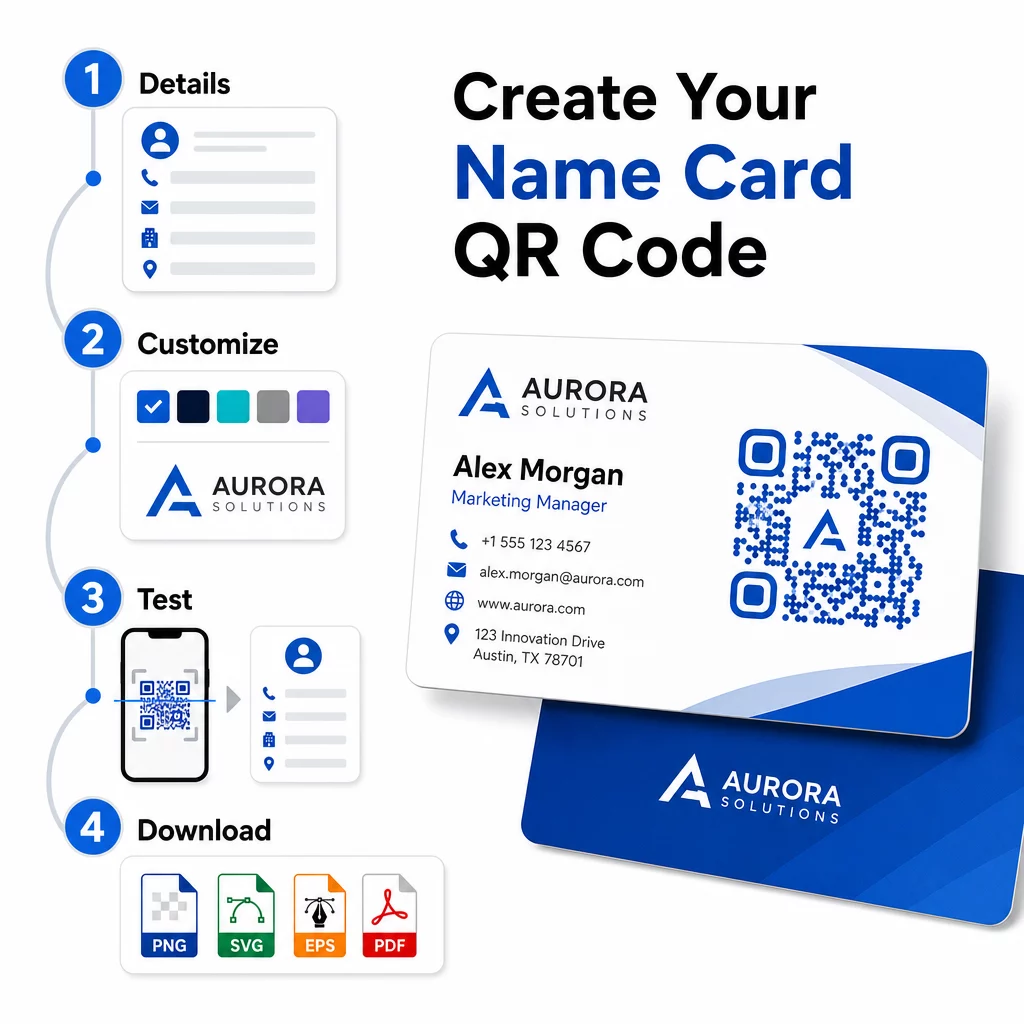
- Wprowadź swoje dane – Otwórz Generator kodów QR vCard i wypełnij swoje imię, stanowisko, firmę, numer telefonu, adres e-mail i stronę internetową. Minimalnie potrzebujesz imienia i jednej metody kontaktu.
- Dostosuj wygląd – Wybierz kolory pasujące do Twojej marki, wybierz styl korpusu i kształt krawędzi oraz prześlij swoje logo, aby umieścić je w centrum kodu. To Generator kodów QR z logo sprawia, że markowe kody są bardziej wyróżniające się wizualnie i może zwiększyć wskaźniki skanowania.
- Wygeneruj i przetestuj – Pageloot natychmiast generuje kod. Zeskanuj go samodzielnie na wielu urządzeniach przed sfinalizowaniem plików do druku, aby potwierdzić, że działa poprawnie.
- Pobierz plik gotowy do druku – Eksportuj w formatach PNG, SVG, EPS lub PDF. Do druku wizytówek zalecane są formaty wektorowe (SVG lub EPS), ponieważ skalują się bez utraty jakości. Możesz również pobrać przezroczysty plik PNG aby nałożyć na złożone tła wizytówek.
Chcesz w pełni markowy kod QR wizytówki? Dodaj swoje logo, wybierz kolory marki i wyeksportuj plik gotowy do druku, używając Generator kodów QR – darmowe na początek, karta kredytowa nie jest wymagana.
Wytyczne dotyczące rozmiaru i umiejscowienia wydruku
Prawidłowe wymiary fizyczne są kluczowe dla niezawodnego skanowania. Wytyczne Pageloot dotyczące kodów QR na wizytówkach zalecają:
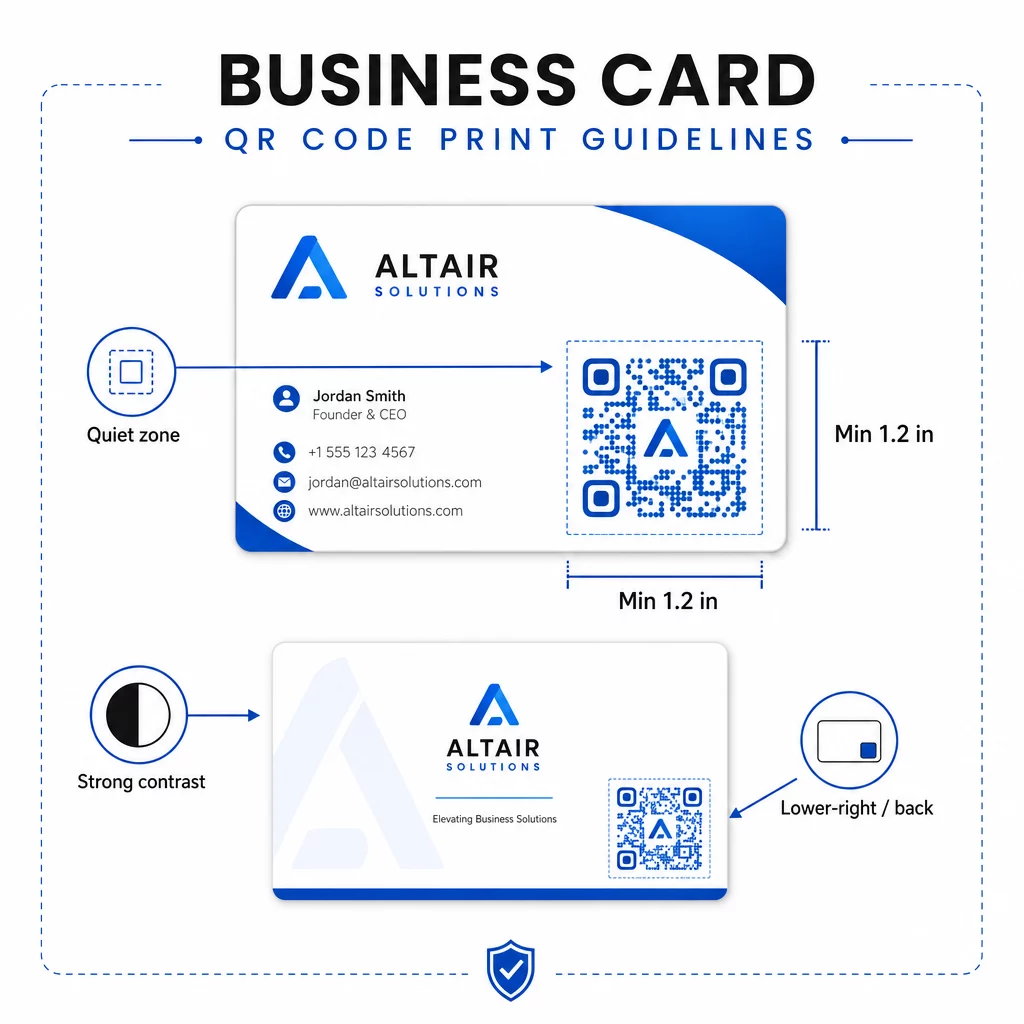
- Minimalny rozmiar: 0.8 × 0.8 cala (2 × 2 cm) dla prostych danych, takich jak adres URL lub krótka wizytówka vCard
- Zalecany rozmiar dla szczegółowych wizytówek vCard: co najmniej 1.2 × 1.2 cala (3 × 3 cm), aby poszczególne moduły były wystarczająco duże do czystego skanowania
- Strefa ciszy: pozostaw co najmniej 0.25 cala wolnej białej przestrzeni wokół wszystkich czterech stron kodu – ta pusta ramka pomaga aplikacjom skanującym zlokalizować krawędzie wzoru
- Kontrast: dąż do minimalnego współczynnika kontrastu 4:1 między kodem a jego tłem; unikaj jasnych na ciemnym (odwróconych) wzorów, których wiele starszych aplikacji skanujących nie jest w stanie odczytać
- Rozdzielczość druku: eksportuj w rozdzielczości 300–600 DPI dla druku offsetowego lub cyfrowego
Większość profesjonalistów umieszcza kod QR na odwrocie wizytówki, aby zachować przejrzysty projekt przodu, lub w prawym dolnym rogu przodu dla natychmiastowej widoczności. Kod powinien zajmować około 20% powierzchni wizytówki – wystarczająco widoczny, aby go zauważyć, nie przytłaczając jednocześnie Twojego imienia i nazwiska oraz stanowiska.
Aby uzyskać głębsze spojrzenie na rozmiary w różnych materiałach drukowanych, zobacz pełne Wytyczne dotyczące rozmiaru kodu QR dla wizytówek oraz przewodnik po projekt wizytówki z kodami QR.
Śledzenie wydajności za pomocą dynamicznych kodów QR na wizytówkach
Statyczne kody QR działają dobrze, jeśli Twoje dane kontaktowe nigdy się nie zmieniają i nie potrzebujesz danych o użytkowaniu. Kody dynamiczne dodają dwie kluczowe możliwości:
- Edytowalne miejsce docelowe – Aktualizuj swoją wizytówkę vCard, adres URL lub połączoną stronę w dowolnym momencie za pośrednictwem panelu Pageloot. Wydrukowany kod pozostaje taki sam; zmienia się tylko miejsce docelowe.
- Analityka skanów – Wyświetlaj liczbę skanów, znaczniki czasu, lokalizacje geograficzne i typy urządzeń w czasie rzeczywistym, dając wymierny wgląd w to, jak skutecznie działają Twoje materiały networkingowe.
Jeśli regularnie uczestniczysz w konferencjach, targach lub wydarzeniach branżowych, kody dynamiczne pozwalają zrozumieć, które wydarzenia generują najwięcej dalszych działań i odpowiednio dostosować dystrybucję. Zarejestruj się na 14-dniowy bezpłatny okres próbny, aby uzyskać dostęp do kodów dynamicznych i pulpitu analitycznego – karta kredytowa nie jest wymagana.
Aby uzyskać więcej informacji na temat używania dynamicznych kodów QR i śledzenia kampanii, zobacz ostatecznym przewodniku po kodach QR vCard oraz przewodnik dotyczący rozmiaru kodu QR dla różnych materiałów do druku.
Najczęściej zadawane pytania
Możesz dołączyć pełne dane swojej wizytówki vCard – imię i nazwisko, stanowisko, firmę, numer telefonu, adres e-mail, stronę internetową i linki do mediów społecznościowych. Możesz również linkować bezpośrednio do profilu LinkedIn, strony portfolio lub wstępnie wypełnionego e-maila. Format vCard jest najbardziej wszechstronną opcją, ponieważ nowoczesne smartfony odczytują go natywnie i zachęcają użytkowników do zapisania kontaktu jednym dotknięciem.
Tak, jeśli używasz dynamicznego kodu QR. Kody dynamiczne używają przekierowania, więc możesz zmienić powiązane informacje kontaktowe lub docelowy adres URL w dowolnym momencie za pośrednictwem panelu Pageloot bez dotykania wydrukowanego kodu. Kody statyczne przechowują dane na stałe we wzorze i nie można ich edytować po utworzeniu.
Dla prostych danych, takich jak adres URL, wystarczające jest minimum 0,8 × 0,8 cala (2 × 2 cm). Dla szczegółowej wizytówki vCard z wieloma polami, użyj co najmniej 1,2 × 1,2 cala (3 × 3 cm), aby moduły były wystarczająco duże do niezawodnego skanowania. Zawsze pozostaw wyraźną białą ramkę o szerokości co najmniej 0,25 cala wokół kodu i przetestuj go na wielu urządzeniach przed wydrukowaniem całej partii.