Kas soovite jagada oma kontaktandmeid kohe, kui kohtute kellegi uuega? Traditsioonilised paberkaardid lähevad kaduma, visatakse minema või sisestatakse käsitsi valesti. Nimekaardi QR-kood lahendab kõik selle – üks skaneering salvestab koheselt teie täieliku kontaktprofiili igasse nutitelefoni.
Mis on nimekaardi QR-kood?
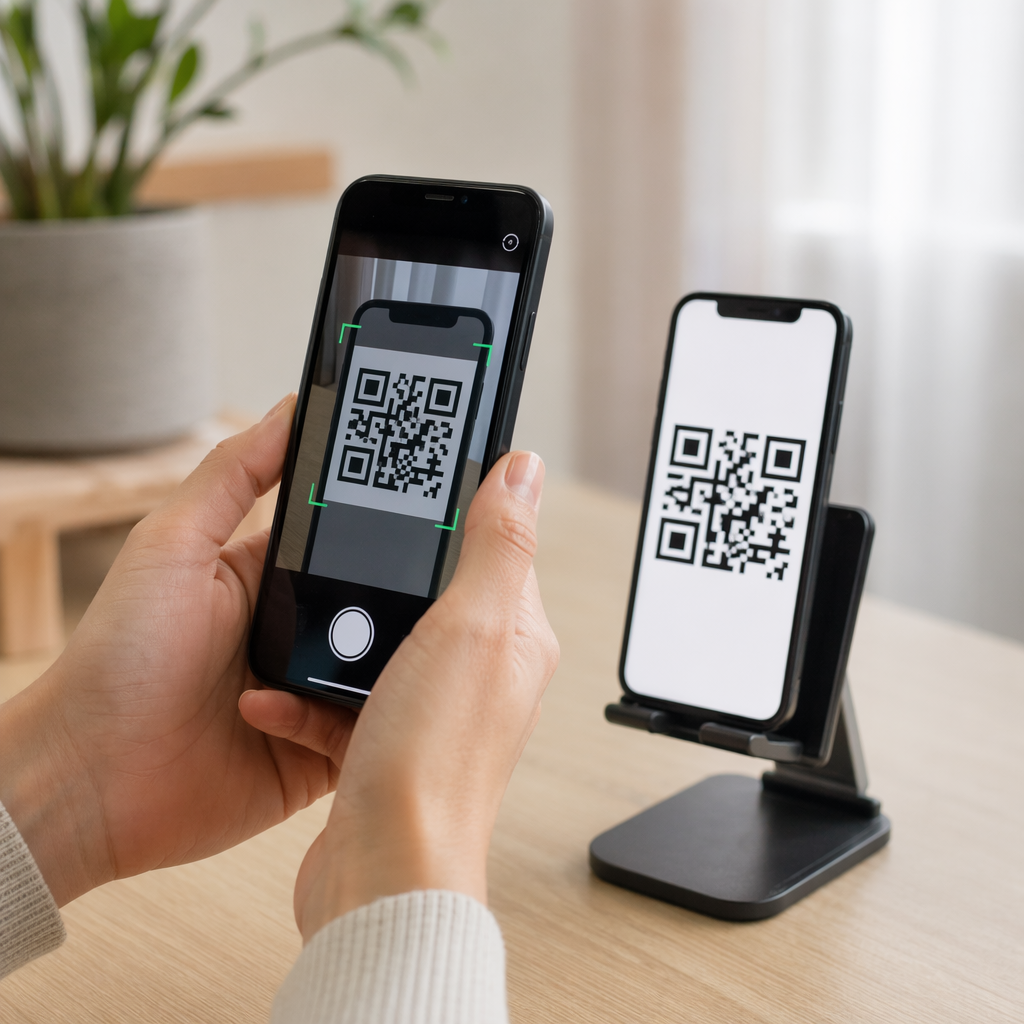
Nimekaardi QR-kood on skaneeritav kood, mis on trükitud või kuvatud teie visiitkaardile ja mis kodeerib teie kontaktandmed vCard (VCF) formaadis. Kui keegi suunab oma nutitelefoni kaamera sellele, loeb seade mustri ja palub neil koheselt salvestada teie nimi, ametinimetus, ettevõte, telefoninumber, e-posti aadress, veebisait ja sotsiaalmeedia lingid otse oma kontaktidesse – sisestamist pole vaja.
Kaks peamist tüüpi on staatiline ja Dünaamiline. Staatilised koodid salvestavad andmed püsivalt mustrisse. Dünaamilised koodid kasutavad ümbersuunamislinki, mis tähendab, et saate oma kontaktandmeid igal ajal värskendada ilma kaarte uuesti trükkimata – see on märkimisväärne eelis, kui teie telefoninumber või ametinimetus muutub.
Looge oma nimekaardile vCard QR-kood Sisestage oma kontaktandmed, kohandage disaini oma brändiga sobivaks ja laadige minutitega alla printimiseks valmis fail koos vCard QR-koodi generaator.
Miks lisada oma nimekaardile QR-kood?
Füüsilistel visiitkaartidel on endiselt kaalu – uuringud näitavad, et 78% professionaalidest kasutab neid endiselt ja üle poole jagab neid iganädalaselt. Kuid ligi 88% paberkaartidest visatakse nädala jooksul minema. QR-koodi lisamine annab vastuvõtjatele kohese ja hõõrdumatu viisi teie andmete digitaalseks salvestamiseks, vähendades võimalust, et teie teave prügikasti satub.
Siin on peamised eelised:
- Kohene kontaktide salvestamine – Vastuvõtjad skaneerivad korra ja teie täielik vCard on salvestamiseks valmis, välistades käsitsi andmesisestuse ja transkriptsioonivead.
- Dünaamilised uuendused – Muutke oma telefoninumbrit, ametinimetust või ettevõtet ilma uut trükki tellimata; QR-kood osutab alati teie praegustele andmetele.
- Skaneerimise analüütika – Jälgige sisseehitatud jõudlusarmatuurlaua kaudu, mitu korda teie koodi skaneeriti, millal ja millistest asukohtadest.
- Kohandatav disain – Kohandage QR-koodi värve, kuju ja logo oma isikliku või ettevõtte brändiga, et see tunduks kaardikujunduse loomuliku osana.
- Keskkonnasõbralik võrgustikutöö – Vähem kordustrükke ja vähem raisatud kaardimaterjali, kui teie teave areneb.
- Lingid kontaktandmetest kaugemale – Ühendage vastuvõtjad ühe skaneerimisega otse oma LinkedIni profiili, portfoolio, e-posti või mis tahes URL-iga.
Mida saate nimekaardi QR-koodile kodeerida
Teie QR-kood ei pea piirduma telefoninumbri ja e-posti aadressiga. Sõltuvalt teie eesmärkidest saate kodeerida:
- A Vcard oma täieliku kontaktprofiiliga (nimi, ametinimetus, ettevõte, telefon, e-post, veebisait, sotsiaalsed lingid)
- Otselink teie LinkedIni profiilile professionaalseks võrgustikutööks
- A URL mis viitab teie portfooliole, sihtlehele või broneerimiskalendrile
- A eeltäidetud e-posti aadress et vastuvõtjad saaksid teile kohe pärast skaneerimist sõnumi saata
- A visiitkaardi leht mis kuvab teie täieliku digitaalse profiili mobiilisõbralikul sihtlehel
Õige tüübi valik sõltub teie võrgustikutöö kontekstist. Enamiku professionaalide jaoks on vCard QR-kood tugevaim vaikimisi valik, sest see töötab loomulikult iga kaasaegse nutitelefoni kaameraga – iOS 11 ja uuemad ning enamik Android-seadmeid parsimivad VCF-faili automaatselt ja paluvad kasutajal kontakti lisada.
Kuidas luua nimekaardi QR-koodi Pagelootiga
Protsess võtab vaid mõne minuti:
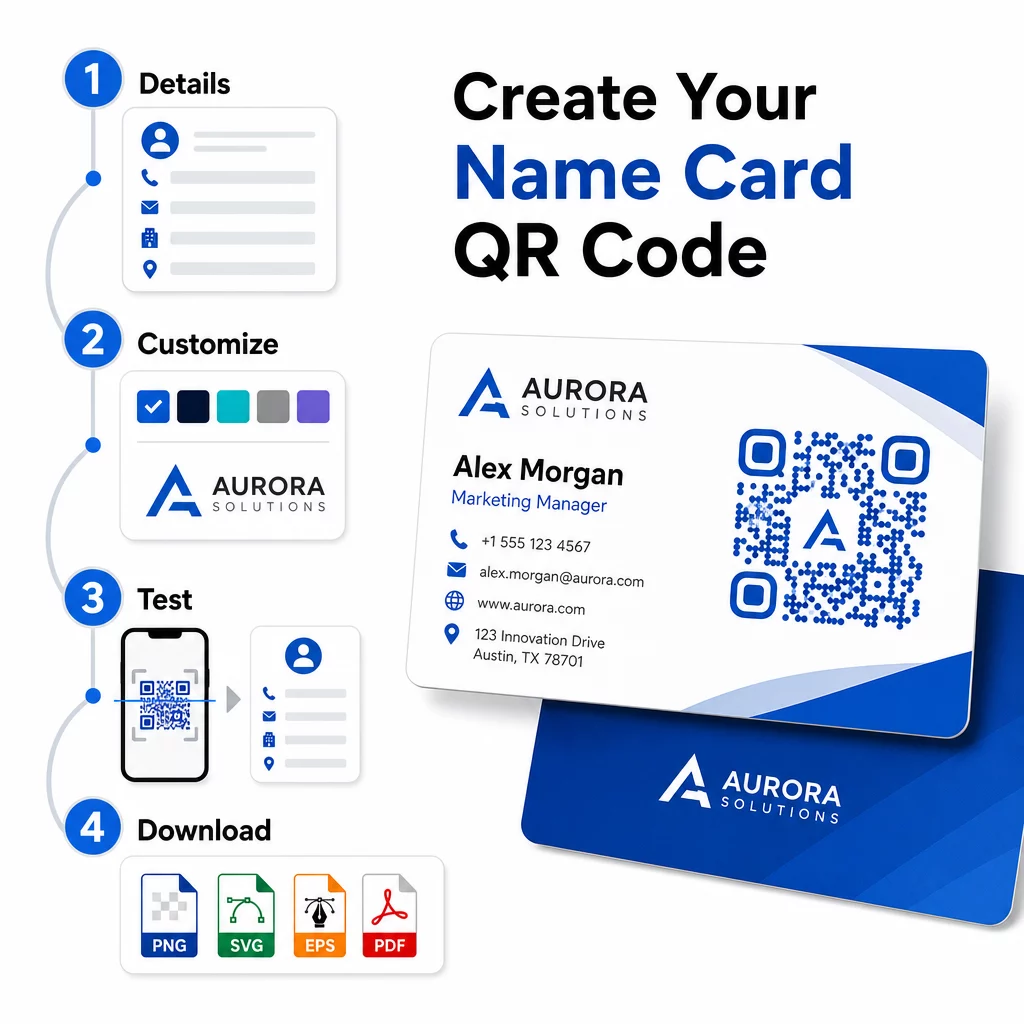
- Sisestage oma andmed – Avage vCard QR-koodi generaator ja täitke oma nimi, ametinimetus, ettevõte, telefoninumber, e-posti aadress ja veebisait. Minimaalselt vajate nime ja ühte kontaktmeetodit.
- Disaini kohandamine – Valige oma brändiga sobivad värvid, valige keha stiil ja serva kuju ning laadige üles oma logo, et paigutada see koodi keskele. See QR-koodi generaator logoga muudab bränditud koodid visuaalselt eristuvamaks ja võib suurendada skaneerimismäärasid.
- Genereerige ja testige – Pageloot loob koodi koheselt. Skaneerige seda ise mitmel seadmel enne trükifailide lõplikku vormistamist, et veenduda selle õiges toimimises.
- Laadige alla trükivalmis fail – Eksportige PNG, SVG, EPS või PDF-vormingus. Visiitkaartide trükkimiseks on soovitatav kasutada vektorformaate (SVG või EPS), kuna need skaleeruvad kvaliteedikaota. Saate ka alla laadida läbipaistva PNG et asetada see keerukatele kaarditaustadele.
Soovite täielikult bränditud nimekaardi QR-koodi? Lisage oma logo, valige brändivärvid ja eksportige trükivalmis fail, kasutades QR-koodi generaator – tasuta alustamiseks, krediitkaarti pole vaja.
Trükisuuruse ja paigutuse juhised
Füüsiliste mõõtmete õige seadistamine on usaldusväärse skaneerimise jaoks hädavajalik. Pagelooti juhised visiitkaardi QR-koodidele soovitavad:
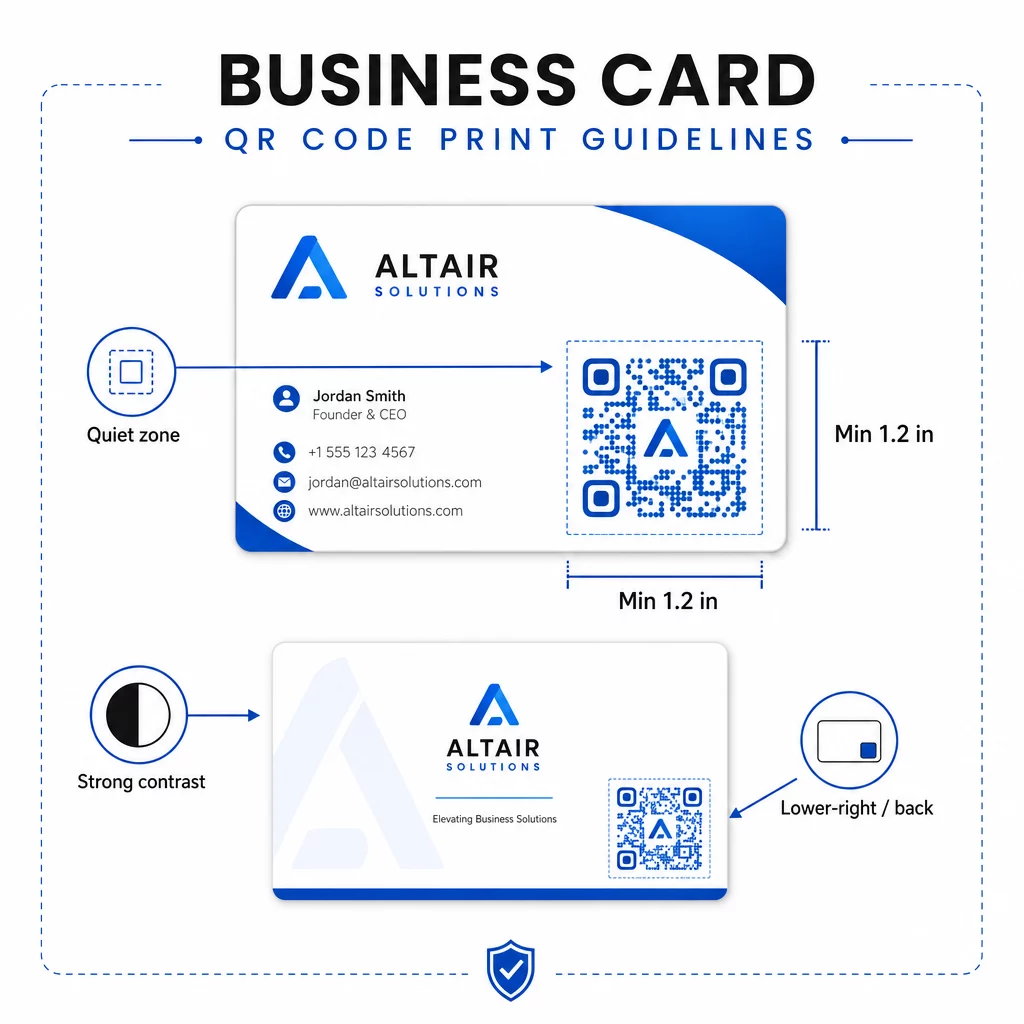
- Minimaalne suurus: 0,8 × 0,8 tolli (2 × 2 cm) lihtsate andmete, näiteks URL-i või lühikese vCardi jaoks
- Soovitatav suurus detailsete vCardide jaoks: vähemalt 1,2 × 1,2 tolli (3 × 3 cm), et hoida üksikud moodulid piisavalt suured puhtaks skaneerimiseks
- Vaikne tsoon: jäta koodi kõigi nelja külje ümber vähemalt 0,25 tolli selget valget ruumi – see tühi äär aitab skaneerimisrakendustel mustri servi leida
- Kontrast: püüa saavutada koodi ja selle tausta vahel vähemalt 4:1 kontrastsussuhe; väldi heledal taustal tumedaid (inverteeritud) kujundusi, mida paljud vanemad skannerirakendused ei suuda lugeda
- Trükkimise resolutsioon: eksportida 300–600 DPI-ga ofset- või digitaaltrüki jaoks
Enamik professionaale paigutab QR-koodi kaardi tagaküljele, et esikülg oleks korras, või esikülje paremasse alanurka kohese nähtavuse tagamiseks. Kood peaks hõlmama umbes 20% kaardi pinnast – piisavalt silmapaistev, et seda märgata, ilma et see varjutaks teie nime ja ametinimetust.
Erinevate trükimaterjalide suuruse kohta põhjalikuma ülevaate saamiseks vaadake täielikku QR-koodi suuruse juhised visiitkaartidele ja juhendist visiitkaardi kujundus QR-koodidega.
Jõudluse jälgimine dünaamiliste nimekaardi QR-koodidega
Staatilised QR-koodid toimivad hästi, kui teie kontaktandmed kunagi ei muutu ja te ei vaja kasutusandmeid. Dünaamilised koodid lisavad kaks kriitilist võimalust:
- Muudetav sihtkoht – Uuendage oma vCardi, URL-i või lingitud lehte igal ajal Pagelooti armatuurlaua kaudu. Trükitud kood jääb samaks; muutub ainult sihtkoht.
- Skaneerimise analüütika – Vaadake reaalajas skannimiste arvu, ajatempleid, geograafilisi asukohti ja seadmetüüpe, andes teile mõõdetava ülevaate sellest, kui tõhusalt teie võrgumaterjalid toimivad.
Kui osalete regulaarselt konverentsidel, messidel või tööstusüritustel, aitavad dünaamilised koodid teil mõista, millised üritused tekitavad kõige rohkem järeltegevust ja vastavalt sellele oma levitamist kohandada. Registreeruge 14-päevasele tasuta prooviperioodile dünaamiliste koodide ja analüütika armatuurlauale juurdepääsuks – krediitkaarti pole vaja.
Dünaamiliste QR-koodide kasutamise ja kampaaniate jälgimise kohta lisateabe saamiseks vaadake ülimast juhendist vCard QR-koodide kohta ja juhendit teemal QR-koodi suuruse määramine erinevatele trükimaterjalidele.
Korduma kippuvad küsimused
Saate lisada oma täielikud vCardi andmed – nimi, ametinimetus, ettevõte, telefoninumber, e-posti aadress, veebisait ja sotsiaalmeedia lingid. Samuti saate linkida otse LinkedIni profiilile, portfoolio lehele või eeltäidetud e-kirjale. vCardi formaat on kõige mitmekülgsem valik, sest kaasaegsed nutitelefonid loevad seda loomulikult ja paluvad kasutajatel kontakti ühe puudutusega salvestada.
Jah, kui kasutate dünaamilist QR-koodi. Dünaamilised koodid kasutavad ümbersuunamist, nii et saate lingitud kontaktteavet või sihtkoha URL-i igal ajal Pagelooti juhtpaneeli kaudu muuta, ilma prinditud koodi puudutamata. Staatilised koodid salvestavad andmed püsivalt mustrisse ja neid ei saa pärast loomist redigeerida.
Lihtsate andmete, näiteks URL-i puhul, piisab minimaalselt 0,8 × 0,8 tollist (2 × 2 cm). Üksikasjaliku, mitme väljaga vCardi puhul kasutage vähemalt 1,2 × 1,2 tolli (3 × 3 cm), et moodulid oleksid piisavalt suured, et neid usaldusväärselt skannida. Jätke koodi ümber alati vähemalt 0,25 tolli laiune selge valge äär ja testige seda mitmel seadmel enne täieliku tiraaži printimist.