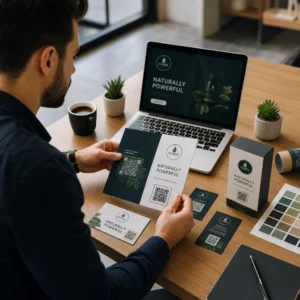
Vuoi condividere i tuoi dettagli di contatto nel momento in cui incontri qualcuno di nuovo? I tradizionali biglietti di carta si perdono, vengono buttati via o digitati manualmente in modo errato. Un codice QR per biglietti da visita risolve tutto questo – una scansione salva istantaneamente il tuo profilo di contatto completo su qualsiasi smartphone.
Cos'è un codice QR per biglietti da visita?
Un codice QR per biglietti da visita è un codice scansionabile stampato o visualizzato sul tuo biglietto da visita che codifica i tuoi dettagli di contatto in formato vCard (VCF). Quando qualcuno punta la fotocamera del proprio smartphone su di esso, il dispositivo legge il modello e li invita immediatamente a salvare il tuo nome, titolo professionale, azienda, numero di telefono, indirizzo email, sito web e link social direttamente nei loro contatti – nessuna digitazione richiesta.
I due tipi principali sono statico e Dinamico. I codici statici memorizzano i dati permanentemente all'interno del modello. I codici dinamici utilizzano un link di reindirizzamento, il che significa che puoi aggiornare le tue informazioni di contatto in qualsiasi momento senza ristampare i tuoi biglietti – un vantaggio significativo se il tuo numero di telefono o il tuo titolo cambiano.
Crea un codice QR vCard per il tuo biglietto da visita Inserisci i tuoi dettagli di contatto, personalizza il design per abbinarlo al tuo brand e scarica un file pronto per la stampa in pochi minuti con il Generatore di QR code vCard.
Perché aggiungere un codice QR al tuo biglietto da visita?
I biglietti da visita fisici hanno ancora un peso – i sondaggi suggeriscono che il 78% dei professionisti li usa ancora e più della metà li distribuisce settimanalmente. Ma quasi l'88% dei biglietti di carta viene scartato entro una settimana. L'aggiunta di un codice QR offre ai destinatari un modo istantaneo e senza attriti per salvare i tuoi dettagli digitalmente, riducendo la possibilità che le tue informazioni finiscano nel cestino.
Ecco i vantaggi principali:
- Salvataggio istantaneo dei contatti – I destinatari scansionano una volta e la tua vCard completa è pronta per essere salvata, eliminando l'inserimento manuale dei dati e gli errori di trascrizione.
- Aggiornamenti dinamici – Cambia il tuo numero di telefono, titolo o azienda senza ordinare una nuova tiratura di stampa; il codice QR punta sempre ai tuoi dettagli attuali.
- Analisi delle scansioni – Tieni traccia di quante volte il tuo codice è stato scansionato, quando e da quali posizioni tramite una dashboard di performance integrata.
- Design personalizzabile – Abbina i colori, la forma e il logo del codice QR al tuo brand personale o aziendale in modo che sembri una parte naturale del design del biglietto.
- Networking ecologico – Meno ristampe e meno spreco di cartoncino quando le tue informazioni si evolvono.
- Link oltre i dettagli di contatto – Collega i destinatari direttamente al tuo profilo LinkedIn, portfolio, email o qualsiasi URL con una singola scansione.
Cosa puoi codificare su un codice QR per biglietto da visita
Il tuo codice QR non deve essere limitato a un numero di telefono e un'email. A seconda dei tuoi obiettivi, puoi codificare:
- UN vCard con il tuo profilo di contatto completo (nome, titolo, azienda, telefono, email, sito web, link social)
- Un link diretto al tuo profilo LinkedIn per il networking professionale
- UN URL che punta al tuo portfolio, landing page o calendario di prenotazione
- UN precompilato e-mail in modo che i destinatari possano inviarti un messaggio immediatamente dopo la scansione
- UN pagina del biglietto da visita che mostra il tuo profilo digitale completo su una landing page ottimizzata per dispositivi mobili
Scegliere il tipo giusto dipende dal tuo contesto di networking. Per la maggior parte dei professionisti, un codice QR vCard è l'opzione predefinita più forte perché funziona nativamente con ogni moderna fotocamera per smartphone – iOS 11 e successivi e la maggior parte dei dispositivi Android analizzano automaticamente il file VCF e chiedono all'utente di aggiungere il contatto.
Come creare un codice QR per biglietto da visita con Pageloot
Il processo richiede solo pochi minuti:
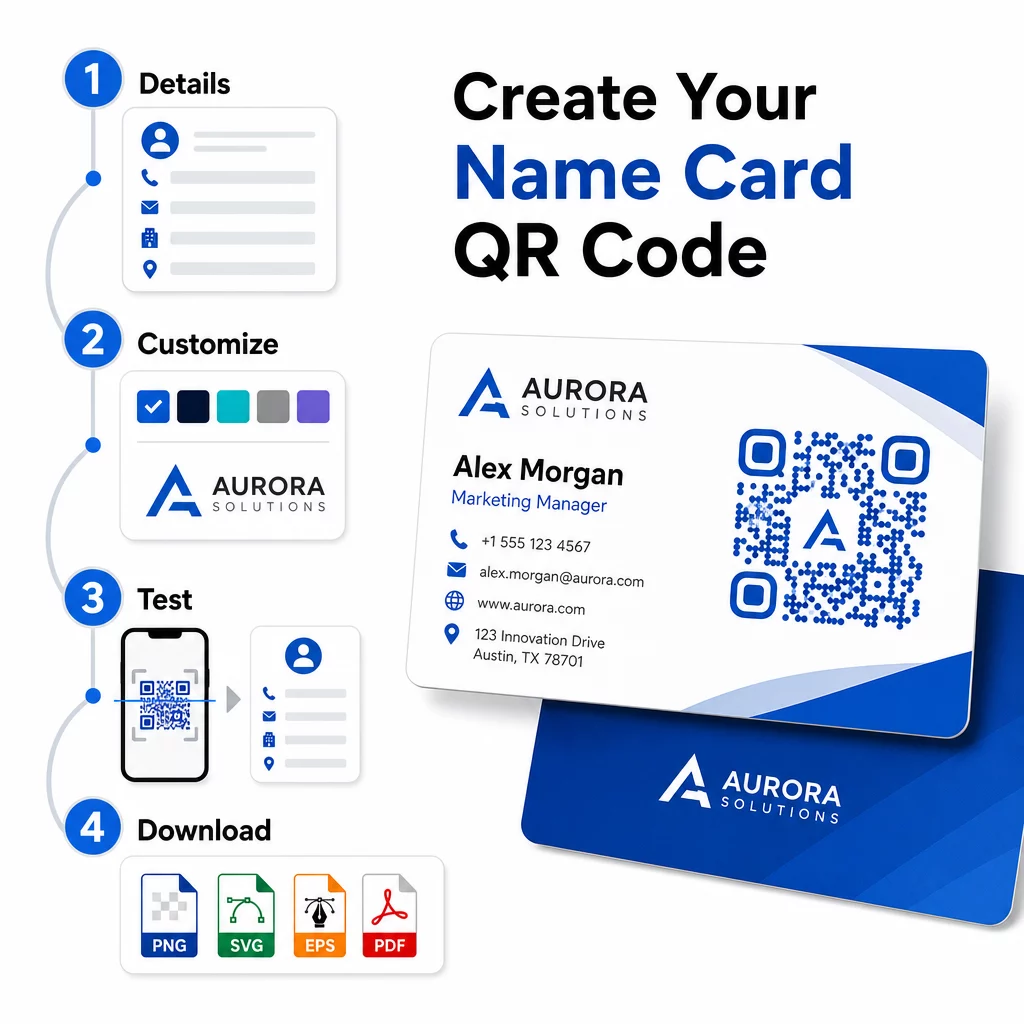
- Inserisci i tuoi dettagli – Apri il Generatore di QR code vCard e inserisci il tuo nome, la qualifica, l'azienda, il numero di telefono, l'indirizzo email e il sito web. Al minimo hai bisogno di un nome e di un metodo di contatto.
- Personalizza il design – Scegli i colori che corrispondono al tuo brand, seleziona uno stile del corpo e una forma del bordo, e carica il tuo logo da posizionare al centro del codice. Il Generatore di QR code con logo rende i codici brandizzati più distintivi visivamente e può aumentare i tassi di scansione.
- Genera e testa – Pageloot produce il codice istantaneamente. Scansionalo tu stesso su più dispositivi prima di finalizzare qualsiasi file di stampa per confermare che si risolva correttamente.
- Scarica un file pronto per la stampa – Esporta in PNG, SVG, EPS o PDF. Per la stampa di biglietti da visita, i formati vettoriali (SVG o EPS) sono raccomandati perché si scalano senza perdita di qualità. Puoi anche scaricare un PNG trasparente da sovrapporre su sfondi complessi di biglietti.
Vuoi un codice QR per biglietto da visita completamente brandizzato? Aggiungi il tuo logo, scegli i colori del brand ed esporta un file pronto per la stampa usando il Generatore di codici QR – gratuito per iniziare, nessuna carta di credito richiesta.
Dimensioni di stampa e linee guida per il posizionamento
Ottenere le dimensioni fisiche corrette è essenziale per una scansione affidabile. Le linee guida di Pageloot per i codici QR sui biglietti da visita raccomandano:
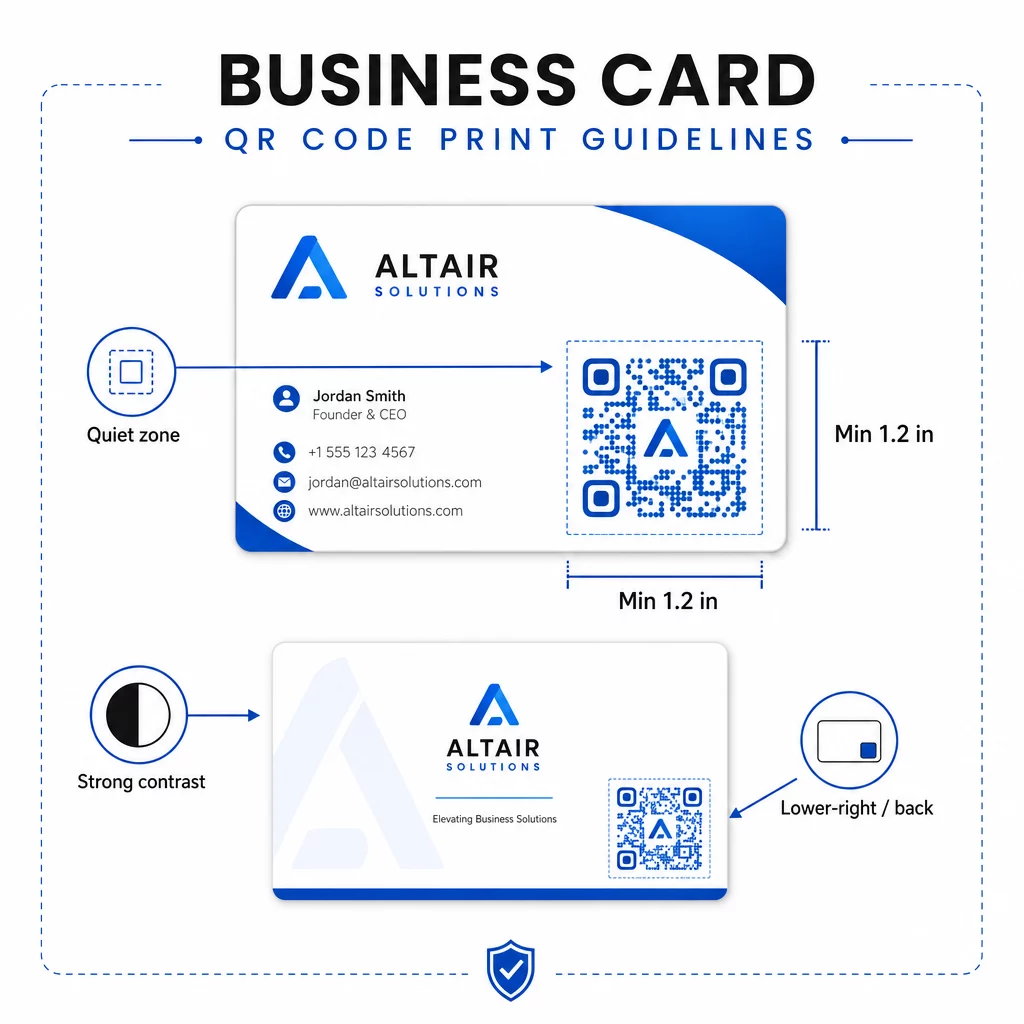
- Dimensione minima: 0,8 × 0,8 pollici (2 × 2 cm) per dati semplici come un URL o una vCard breve
- Dimensione consigliata per vCard dettagliate: almeno 1,2 × 1,2 pollici (3 × 3 cm) per mantenere i singoli moduli sufficientemente grandi da essere scansionati in modo pulito
- Zona di silenzio: lasciare almeno 0,25 pollici di spazio bianco chiaro su tutti e quattro i lati del codice – questo bordo vuoto aiuta le app di scansione a localizzare i bordi del pattern
- Contrasto: puntare a un rapporto di contrasto minimo di 4:1 tra il codice e il suo sfondo; evitare design chiari su scuri (invertiti), che molte app di scanner più vecchie non riescono a leggere
- Risoluzione di stampa: esportare a 300–600 DPI per la stampa offset o digitale
La maggior parte dei professionisti posiziona il codice QR sul retro del biglietto per mantenere il design frontale ordinato, o nell'angolo in basso a destra del fronte per una visibilità immediata. Il codice dovrebbe occupare circa il 20% dell'area del biglietto – abbastanza prominente da essere notato senza sovrastare il tuo nome e titolo.
Per uno sguardo più approfondito alle dimensioni su diversi materiali di stampa, consulta le complete linee guida sulle dimensioni dei codici QR per biglietti da visita e la guida a design di biglietti da visita con codici QR.
Monitoraggio delle prestazioni con codici QR dinamici per biglietti da visita
I codici QR statici vanno bene se i tuoi dettagli di contatto non cambiano mai e non hai bisogno di dati di utilizzo. I codici dinamici aggiungono due capacità critiche:
- Destinazione modificabile – Aggiorna la tua vCard, URL o pagina collegata in qualsiasi momento tramite la dashboard di Pageloot. Il codice stampato rimane lo stesso; solo la destinazione cambia.
- Analisi delle scansioni – Visualizza il numero di scansioni, i timestamp, le posizioni geografiche e i tipi di dispositivo in tempo reale, fornendoti informazioni misurabili su quanto efficacemente stanno performando i tuoi materiali di networking.
Se partecipi regolarmente a conferenze, fiere o eventi di settore, i codici dinamici ti permettono di capire quali eventi generano il maggior seguito e di adattare la tua distribuzione di conseguenza. Iscriviti per una prova gratuita di 14 giorni per accedere ai codici dinamici e alla dashboard di analisi – nessuna carta di credito richiesta.
Per maggiori informazioni sull'utilizzo di codici QR dinamici e sul tracciamento delle campagne, consulta il guida definitiva ai codici QR vCard e la guida su dimensionamento del codice QR per diversi materiali di stampa.
Domande frequenti
Puoi includere i dettagli completi della tua vCard – nome, qualifica, azienda, numero di telefono, indirizzo email, sito web e link ai social media. Puoi anche collegarti direttamente a un profilo LinkedIn, a una pagina portfolio o a un'email precompilata. Il formato vCard è l'opzione più versatile perché gli smartphone moderni lo leggono nativamente e invitano gli utenti a salvare il contatto con un solo tocco.
Sì, se utilizzi un codice QR dinamico. I codici dinamici utilizzano un reindirizzamento, così puoi modificare le informazioni di contatto collegate o l'URL di destinazione in qualsiasi momento tramite la dashboard di Pageloot senza toccare il codice stampato. I codici statici memorizzano i dati in modo permanente nel modello e non possono essere modificati dopo la creazione.
Per dati semplici come un URL, è sufficiente un minimo di 0,8 × 0,8 pollici (2 × 2 cm). Per una vCard dettagliata con più campi, utilizzare almeno 1,2 × 1,2 pollici (3 × 3 cm) per mantenere i moduli sufficientemente grandi da essere scansionati in modo affidabile. Lasciare sempre un bordo bianco chiaro di almeno 0,25 pollici attorno al codice e testarlo su più dispositivi prima di stampare l'intera tiratura.