רוצה לשתף את פרטי הקשר שלך ברגע שאתה פוגש מישהו חדש? כרטיסי נייר מסורתיים הולכים לאיבוד, נזרקים, או מוקלדים ידנית באופן שגוי. קוד QR של כרטיס ביקור פותר את כל זה – סריקה אחת שומרת באופן מיידי את פרופיל הקשר המלא שלך לכל סמארטפון.
מהו קוד QR של כרטיס ביקור?
קוד QR של כרטיס ביקור הוא קוד סריקה המודפס או מוצג על כרטיס הביקור שלך, המקודד את פרטי הקשר שלך בפורמט vCard (VCF). כאשר מישהו מכוון אליו את מצלמת הסמארטפון שלו, המכשיר קורא את התבנית ומבקש ממנו מיד לשמור את שמך, תפקידך, חברתך, מספר הטלפון, כתובת הדוא"ל, אתר האינטרנט וקישורי הרשתות החברתיות שלך ישירות לאנשי הקשר שלו – ללא צורך בהקלדה.
שני הסוגים העיקריים הם סטטי ו דינמי. קודים סטטיים מאחסנים את הנתונים באופן קבוע בתוך התבנית. קודים דינמיים משתמשים בקישור הפניה מחדש, מה שאומר שתוכל לעדכן את פרטי הקשר שלך בכל עת מבלי להדפיס מחדש את הכרטיסים שלך – יתרון משמעותי אם מספר הטלפון או התפקיד שלך משתנים.
צור קוד QR של vCard עבור כרטיס הביקור שלך הזן את פרטי הקשר שלך, התאם אישית את העיצוב כך שיתאים למותג שלך, והורד קובץ מוכן להדפסה תוך דקות עם ה V card בקוד QR.
למה להוסיף קוד QR לכרטיס הביקור שלך?
לכרטיסי ביקור פיזיים עדיין יש משקל – סקרים מצביעים על כך ש-78% מהמקצוענים עדיין משתמשים בהם ויותר ממחצית מחלקים אותם מדי שבוע. אך כמעט 88% מכרטיסי הנייר נזרקים תוך שבוע. הוספת קוד QR מעניקה למקבלים דרך מיידית וחלקה לשמור את פרטיך באופן דיגיטלי, ומפחיתה את הסיכוי שהמידע שלך יגיע לפח.
הנה היתרונות העיקריים:
- שמירת איש קשר מיידית – הנמענים סורקים פעם אחת וכרטיס ה-vCard המלא שלך מוכן לשמירה, מה שמבטל הזנת נתונים ידנית ושגיאות תעתיק.
- עדכונים דינמיים – שנה את מספר הטלפון, התפקיד או החברה שלך מבלי להזמין הדפסה חדשה; קוד ה-QR תמיד מצביע על הפרטים העדכניים שלך.
- ניתוח סריקות – עקוב אחר כמה פעמים הקוד שלך נסרק, מתי, ומאילו מיקומים באמצעות לוח מחוונים מובנה של ביצועים.
- עיצוב הניתן להתאמה אישית – התאם את הצבעים, הצורה והלוגו של קוד ה-QR למותג האישי או החברתי שלך כך שירגיש כחלק טבעי מעיצוב הכרטיס.
- נטוורקינג ידידותי לסביבה – פחות הדפסות חוזרות ופחות בזבוז של מלאי כרטיסים כשהמידע שלך מתפתח.
- קישורים מעבר לפרטי קשר – חבר נמענים ישירות לפרופיל הלינקדאין שלך, לתיק העבודות, למייל או לכל כתובת URL בסריקה אחת.
מה ניתן לקודד בקוד QR של כרטיס ביקור
קוד ה-QR שלך לא חייב להיות מוגבל למספר טלפון ודוא"ל. בהתאם למטרות שלך, תוכל לקודד:
- א vCard עם פרופיל הקשר המלא שלך (שם, תפקיד, חברה, טלפון, דוא"ל, אתר אינטרנט, קישורים חברתיים)
- קישור ישיר ל- פרופיל הלינקדאין שלך לנטוורקינג מקצועי
- א כתובת אתר המצביע על תיק העבודות שלך, דף נחיתה או יומן הזמנות
- א ממולא מראש אֶלֶקטרוֹנִי כך שנמענים יוכלו לשלוח לך הודעה מיד לאחר הסריקה
- א דף כרטיס ביקור המציג את הפרופיל הדיגיטלי המלא שלך בדף נחיתה ידידותי למובייל
בחירת הסוג הנכון תלויה בהקשר הנטוורקינג שלך. עבור רוב אנשי המקצוע, קוד QR מסוג vCard הוא ברירת המחדל החזקה ביותר מכיוון שהוא עובד באופן טבעי עם כל מצלמת סמארטפון מודרנית – iOS 11 ואילך ורוב מכשירי האנדרואיד מנתחים את קובץ ה-VCF באופן אוטומטי ומבקשים מהמשתמש להוסיף את איש הקשר.
איך ליצור קוד QR של כרטיס ביקור עם Pageloot
התהליך אורך דקות ספורות בלבד:
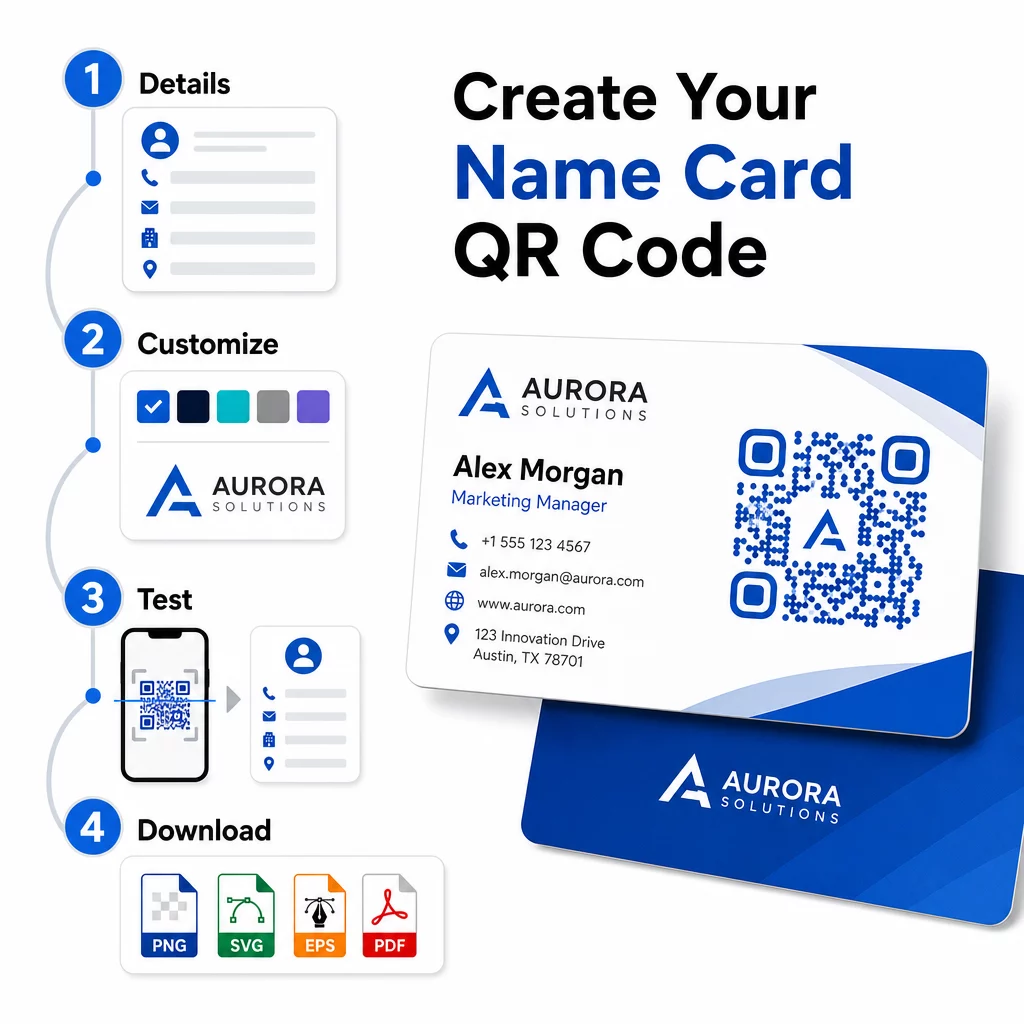
- הזן את פרטיך – פתח את ה V card בקוד QR ומלא את שמך, תפקידך, חברתך, מספר הטלפון, כתובת הדוא"ל והאתר שלך. לכל הפחות, עליך להזין שם ושיטת יצירת קשר אחת.
- התאם אישית את העיצוב – בחר צבעים התואמים את המותג שלך, בחר סגנון גוף וצורת קצה, והעלה את הלוגו שלך כדי למקם אותו במרכז הקוד. ה יצירת QR מעוצב עם לוגו הופך קודים ממותגים למובחנים יותר מבחינה ויזואלית ויכול להגדיל את שיעורי הסריקה.
- צור ובדוק – Pageloot מייצר את הקוד באופן מיידי. סרוק אותו בעצמך במספר מכשירים לפני סיום קבצי הדפסה כלשהם כדי לוודא שהוא נפתר כהלכה.
- הורד קובץ מוכן להדפסה – ייצא בפורמט PNG, SVG, EPS או PDF. להדפסת כרטיסי ביקור, מומלצים פורמטים וקטוריים (SVG או EPS) מכיוון שהם ניתנים להגדלה ללא אובדן איכות. תוכל גם להוריד PNG שקוף כדי להניח על רקעים מורכבים של כרטיסים.
רוצה קוד QR של כרטיס ביקור ממותג במלואו? הוסף את הלוגו שלך, בחר צבעי מותג, וייצא קובץ מוכן להדפסה באמצעות ה מחולל קודי QR – חינם להתחלה, ללא צורך בכרטיס אשראי.
גודל הדפסה והנחיות מיקום
קבלת המידות הפיזיות הנכונות חיונית לסריקה אמינה. ההנחיות של Pageloot לקודי QR בכרטיסי ביקור ממליצות:
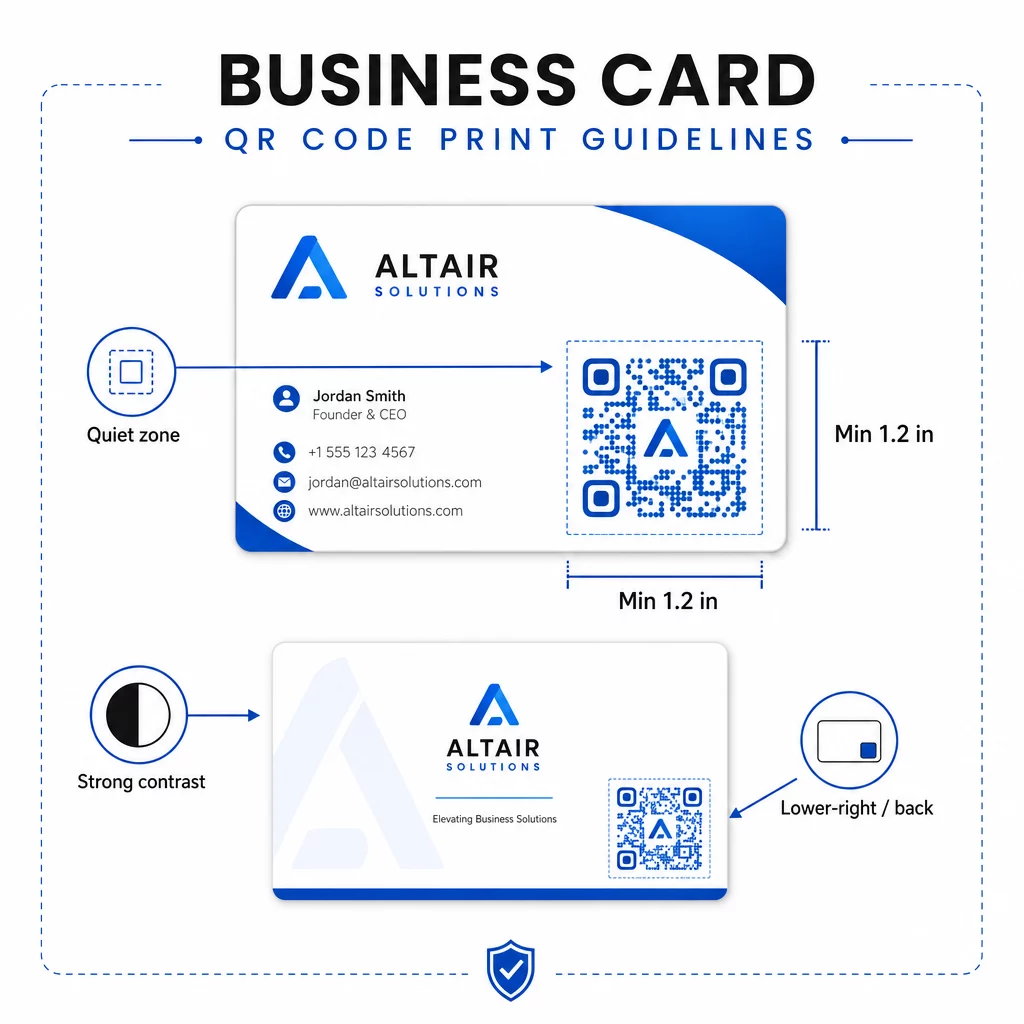
- גודל מינימלי: 0.8 × 0.8 אינץ' (2 × 2 ס"מ) עבור נתונים פשוטים כמו כתובת אתר (URL) או vCard קצר
- גודל מומלץ עבור vCards מפורטים: לפחות 1.2 × 1.2 אינץ' (3 × 3 ס"מ) כדי לשמור על מודולים בודדים גדולים מספיק לסריקה נקייה
- אזור שקט: השאר לפחות 0.25 אינץ' של שטח לבן נקי מסביב לכל ארבעת צידי הקוד – גבול ריק זה עוזר לאפליקציות סריקה לאתר את קצוות התבנית
- ניגודיות: שאף ליחס ניגודיות מינימלי של 4:1 בין הקוד לרקע שלו; הימנע מעיצובים בהירים על רקע כהה (הפוכים), שאפליקציות סורק רבות ישנות יותר אינן מצליחות לקרוא
- רזולוציית הדפסה: ייצא ב-300–600 DPI להדפסת אופסט או דיגיטלית
רוב המקצוענים ממקמים את קוד ה-QR בגב הכרטיס כדי לשמור על עיצוב חזיתי נקי, או בפינה הימנית התחתונה של החזית לנראות מיידית. הקוד צריך לתפוס בערך 20% משטח הכרטיס – בולט מספיק כדי לשים לב אליו מבלי להאפיל על שמך ותוארך.
למבט מעמיק יותר על גדלים בחומרי הדפסה שונים, ראה את המלא הנחיות גודל קוד QR לכרטיסי ביקור ואת המדריך ל עיצוב כרטיס ביקור עם קודי QR.
מעקב אחר ביצועים עם קודי QR דינמיים לכרטיסי שם
קודי QR סטטיים עובדים מצוין אם פרטי הקשר שלך לעולם אינם משתנים ואינך זקוק לנתוני שימוש. קודים דינמיים מוסיפים שתי יכולות קריטיות:
- יעד ניתן לעריכה – עדכן את ה-vCard, כתובת האתר (URL) או העמוד המקושר שלך בכל עת דרך לוח המחוונים של Pageloot. הקוד המודפס נשאר זהה; רק היעד משתנה.
- ניתוח סריקות – צפה בספירת סריקות, חותמות זמן, מיקומים גאוגרפיים וסוגי מכשירים בזמן אמת, ומעניק לך תובנה מדידה לגבי מידת היעילות של חומרי הנטוורקינג שלך.
אם אתה משתתף באופן קבוע בכנסים, תערוכות או אירועים בתעשייה, קודים דינמיים מאפשרים לך להבין אילו אירועים מייצרים את מירב ההמשכיות ולהתאים את ההפצה שלך בהתאם. הירשם לניסיון חינם למשך 14 יום כדי לגשת לקודים דינמיים וללוח המחוונים של הניתוח – אין צורך בכרטיס אשראי.
להקשר נוסף על שימוש בקודי QR דינמיים ומעקב אחר קמפיינים, ראה את ה המדריך המקיף שלנו לקודי QR מסוג vCard ואת המדריך בנושא גודל קוד QR עבור חומרי הדפסה שונים.
שאלות נפוצות
באפשרותך לכלול את פרטי ה-vCard המלאים שלך – שם, תפקיד, חברה, מספר טלפון, כתובת אימייל, אתר אינטרנט וקישורי מדיה חברתית. באפשרותך גם לקשר ישירות לפרופיל לינקדאין, לדף תיק עבודות, או לאימייל ממולא מראש. פורמט ה-vCard הוא האפשרות המגוונת ביותר מכיוון שסמארטפונים מודרניים קוראים אותו באופן טבעי ומבקשים ממשתמשים לשמור את איש הקשר בלחיצה אחת.
כן, אם אתה משתמש בקוד QR דינמי. קודים דינמיים משתמשים בהפניה מחדש, כך שתוכל לשנות את פרטי הקשר המקושרים או את כתובת ה-URL היעד בכל עת דרך לוח המחוונים של Pageloot מבלי לגעת בקוד המודפס. קודים סטטיים מאחסנים את הנתונים לצמיתות בתבנית ולא ניתן לערוך אותם לאחר היצירה.
עבור נתונים פשוטים כמו כתובת אתר (URL), מינימום של 0.8 × 0.8 אינץ' (2 × 2 ס"מ) מספיק. עבור vCard מפורט עם שדות מרובים, השתמשו בלפחות 1.2 × 1.2 אינץ' (3 × 3 ס"מ) כדי לשמור על המודולים גדולים מספיק לסריקה אמינה. השאירו תמיד גבול לבן ברור של לפחות 0.25 אינץ' סביב הקוד, ובדקו אותו במספר מכשירים לפני הדפסת כל הכמות.