Wilt u uw contactgegevens delen op het moment dat u iemand nieuws ontmoet? Traditionele papieren kaarten raken zoek, worden weggegooid of handmatig verkeerd ingevoerd. Een naamkaartje QR-code lost dit allemaal op – één scan slaat uw volledige contactprofiel direct op elke smartphone op.
Wat is een naamkaartje QR-code?
Een naamkaartje QR-code is een scanbare code die op uw visitekaartje is afgedrukt of weergegeven en die uw contactgegevens codeert in vCard (VCF) formaat. Wanneer iemand zijn smartphonecamera erop richt, leest het apparaat het patroon en vraagt het hen onmiddellijk om uw naam, functie, bedrijf, telefoonnummer, e-mailadres, website en sociale links direct op te slaan in hun contacten – geen typen vereist.
De twee belangrijkste typen zijn statisch en Dynamisch. Statische codes slaan de gegevens permanent op in het patroon. Dynamische codes gebruiken een omleidingslink, wat betekent dat u uw contactgegevens op elk moment kunt bijwerken zonder uw kaarten opnieuw af te drukken – een aanzienlijk voordeel als uw telefoonnummer of functie verandert.
Maak een vCard QR-code voor uw naamkaartje Voer uw contactgegevens in, pas het ontwerp aan uw merk aan en download binnen enkele minuten een printklaar bestand met de vCard QR-code generator voor contactgegevens.
Waarom een QR-code toevoegen aan uw naamkaartje?
Fysieke visitekaartjes hebben nog steeds waarde – enquêtes suggereren dat 78% van de professionals ze nog steeds gebruikt en meer dan de helft deelt ze wekelijks uit. Maar bijna 88% van de papieren kaarten wordt binnen een week weggegooid. Het toevoegen van een QR-code geeft ontvangers een directe, wrijvingsloze manier om uw gegevens digitaal op te slaan, waardoor de kans kleiner wordt dat uw informatie in de prullenbak belandt.
Hier zijn de belangrijkste voordelen:
- Direct contact opslaan – Ontvangers scannen één keer en uw volledige vCard is klaar om op te slaan, waardoor handmatige gegevensinvoer en transcriptiefouten worden geëlimineerd.
- Dynamische updates – Wijzig uw telefoonnummer, functie of bedrijf zonder een nieuwe printrun te bestellen; de QR-code verwijst altijd naar uw huidige gegevens.
- Scananalyse – Volg hoe vaak uw code is gescand, wanneer en vanaf welke locaties via een ingebouwd prestatiedashboard.
- Aanpasbaar ontwerp – Stem de kleuren, vorm en het logo van de QR-code af op uw persoonlijke of bedrijfsmerk, zodat het aanvoelt als een natuurlijk onderdeel van het kaartontwerp.
- Milieuvriendelijk netwerken – Minder herdrukken en minder verspilling van kaartmateriaal wanneer uw informatie verandert.
- Links verder dan contactgegevens – Verbind ontvangers direct met uw LinkedIn-profiel, portfolio, e-mail of elke URL met één enkele scan.
Wat u kunt coderen op een naamkaartje QR-code
Uw QR-code hoeft niet beperkt te zijn tot een telefoonnummer en e-mail. Afhankelijk van uw doelen kunt u coderen:
- EEN vCard met uw volledige contactprofiel (naam, titel, bedrijf, telefoon, e-mail, website, sociale links)
- Een directe link naar uw LinkedIn-profiel voor professioneel netwerken
- EEN URL verwijzend naar uw portfolio, landingspagina of boekingskalender
- EEN vooraf ingevuld e-mail zodat ontvangers u direct na het scannen een bericht kunnen sturen
- EEN visitekaartje pagina die uw volledige digitale profiel weergeeft op een mobielvriendelijke landingspagina
Het kiezen van het juiste type hangt af van uw netwerkcontext. Voor de meeste professionals is een vCard QR-code de sterkste standaard, omdat deze native werkt met elke moderne smartphonecamera – iOS 11 en later en de meeste Android-apparaten parseren het VCF-bestand automatisch en vragen de gebruiker om het contact toe te voegen.
Hoe maak je een naamkaartje QR-code met Pageloot
Het proces duurt slechts enkele minuten:
- Voer uw gegevens in – Open de vCard QR-code generator voor contactgegevens en vul uw naam, functie, bedrijf, telefoonnummer, e-mailadres en website in. Minimaal heeft u een naam en één contactmethode nodig.
- Ontwerp aanpassen – Kies kleuren die bij uw merk passen, selecteer een lichaamsstijl en randvorm, en upload uw logo om in het midden van de code te plaatsen. De QR code met logo maken maakt merkcodes visueel onderscheidender en kan de scanpercentages verhogen.
- Genereren en testen – Pageloot produceert de code direct. Scan deze zelf op meerdere apparaten voordat u printbestanden definitief maakt om te bevestigen dat deze correct werkt.
- Download een printklaar bestand – Exporteer in PNG, SVG, EPS of PDF. Voor het afdrukken van visitekaartjes worden vectorformaten (SVG of EPS) aanbevolen omdat ze schalen zonder kwaliteitsverlies. U kunt ook een transparante PNG downloaden om over complexe kaartachtergronden te leggen.
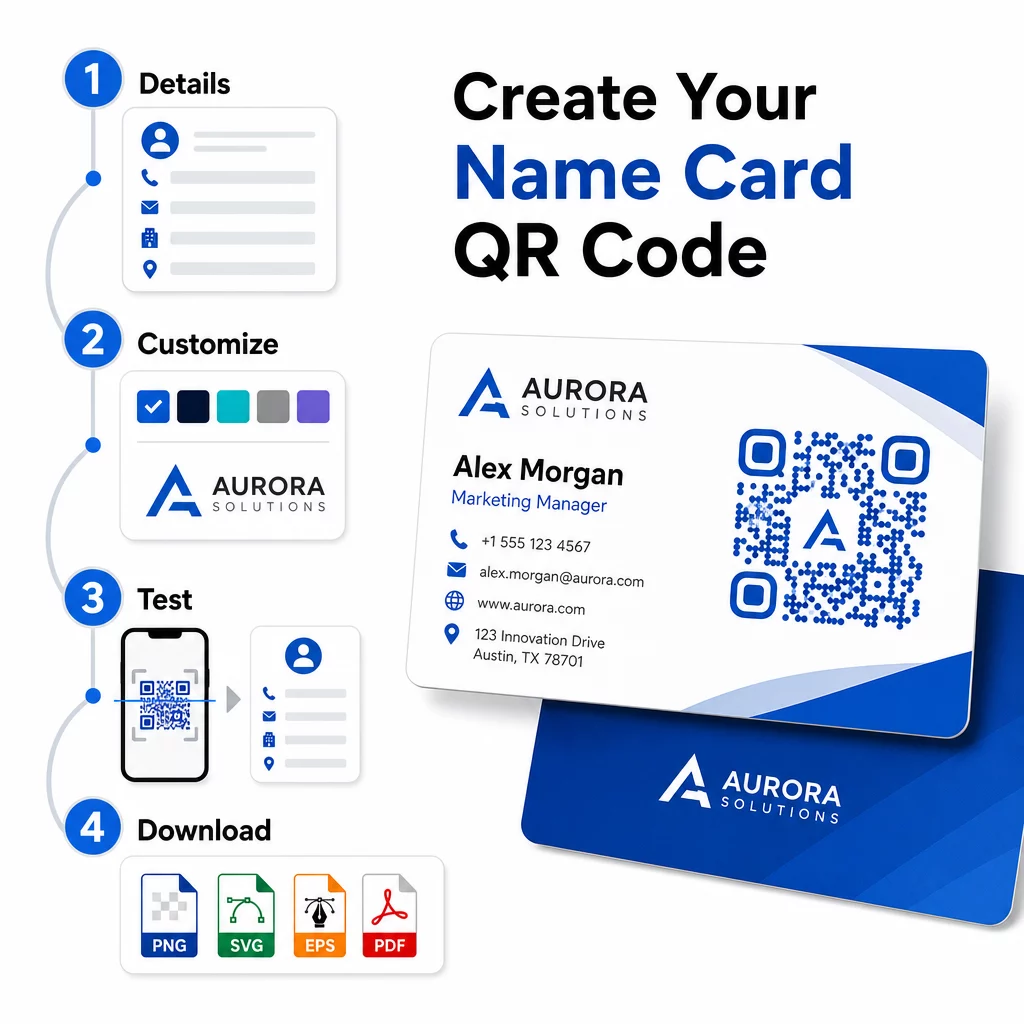
Wilt u een volledig gebrande naamkaartje QR-code? Voeg uw logo toe, kies merkkleuren en exporteer een printklaar bestand met behulp van de QR-codegenerator – gratis om te beginnen, geen creditcard vereist.
Richtlijnen voor afdrukformaat en plaatsing
De juiste fysieke afmetingen zijn essentieel voor betrouwbaar scannen. De richtlijnen van Pageloot voor QR-codes op visitekaartjes adviseren:
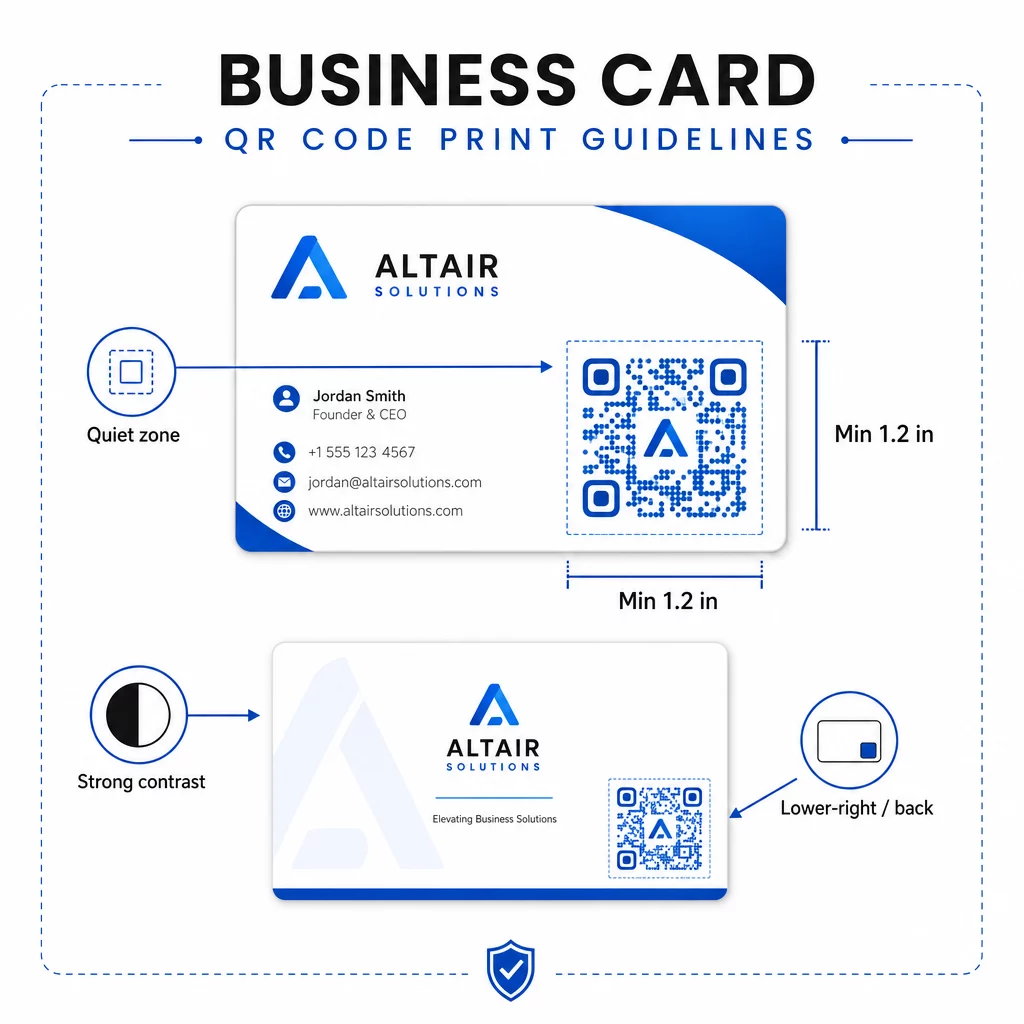
- Minimale grootte: 0,8 × 0,8 inch (2 × 2 cm) voor eenvoudige gegevens zoals een URL of korte vCard
- Aanbevolen formaat voor gedetailleerde vCards: minimaal 1,2 × 1,2 inch (3 × 3 cm) om individuele modules groot genoeg te houden voor een schone scan
- Stille zone: laat minimaal 0,25 inch (0,635 cm) vrije witte ruimte rond alle vier de zijden van de code – deze lege rand helpt scan-apps de randen van het patroon te lokaliseren
- Contrast: streef naar een minimale contrastverhouding van 4:1 tussen de code en de achtergrond; vermijd licht-op-donker (geïnverteerde) ontwerpen, die veel oudere scanner-apps niet kunnen lezen
- Afdrukresolutie: exporteren met 300–600 DPI voor offset- of digitaal drukwerk
De meeste professionals plaatsen de QR-code op de achterkant van het kaartje om het ontwerp aan de voorkant overzichtelijk te houden, of in de rechterbenedenhoek van de voorkant voor onmiddellijke zichtbaarheid. De code moet ongeveer 20% van het kaartoppervlak innemen – prominent genoeg om op te vallen zonder uw naam en titel te overheersen.
Voor een diepere blik op de maatvoering voor verschillende drukmaterialen, zie de volledige Richtlijnen voor QR-codeformaat voor visitekaartjes en de gids voor ontwerp van visitekaartjes met QR-codes.
Prestaties volgen met dynamische QR-codes voor naamkaartjes
Statische QR-codes werken prima als uw contactgegevens nooit veranderen en u geen gebruiksgegevens nodig heeft. Dynamische codes voegen twee cruciale mogelijkheden toe:
- Bewerkbare bestemming – Werk uw vCard, URL of gekoppelde pagina op elk moment bij via het dashboard van Pageloot. De afgedrukte code blijft hetzelfde; alleen de bestemming verandert.
- Scananalyse – Bekijk scanaantallen, tijdstempels, geografische locaties en apparaattypen in realtime, waardoor u meetbaar inzicht krijgt in hoe effectief uw netwerkmateriaal presteert.
Als u regelmatig conferenties, beurzen of branche-evenementen bijwoont, laten dynamische codes u begrijpen welke evenementen de meeste opvolging genereren en kunt u uw distributie dienovereenkomstig aanpassen. Meld u aan voor een gratis proefperiode van 14 dagen om toegang te krijgen tot dynamische codes en het analysedashboard – geen creditcard vereist.
Voor meer context over het gebruik van dynamische QR-codes en het volgen van campagnes, zie de ultieme gids voor vCard QR-codes en de gids over QR-code formaat voor verschillende printmaterialen.
Veelgestelde vragen
U kunt uw volledige vCard-gegevens opnemen – naam, functie, bedrijf, telefoonnummer, e-mailadres, website en links naar sociale media. U kunt ook rechtstreeks linken naar een LinkedIn-profiel, een portfolio-pagina of een vooraf ingevulde e-mail. Het vCard-formaat is de meest veelzijdige optie omdat moderne smartphones het native lezen en gebruikers vragen om het contact met één tik op te slaan.
Ja, als u een dynamische QR-code gebruikt. Dynamische codes maken gebruik van een omleiding, zodat u de gekoppelde contactinformatie of bestemmings-URL op elk moment via het Pageloot-dashboard kunt wijzigen zonder de geprinte code aan te raken. Statische codes slaan de gegevens permanent op in het patroon en kunnen na aanmaak niet meer worden bewerkt.
Voor eenvoudige gegevens zoals een URL is een minimum van 0,8 × 0,8 inch (2 × 2 cm) voldoende. Voor een gedetailleerde vCard met meerdere velden, gebruik dan minstens 1,2 × 1,2 inch (3 × 3 cm) om de modules groot genoeg te houden om betrouwbaar te kunnen scannen. Laat altijd een duidelijke witte rand van minstens 0,25 inch rond de code, en test deze op meerdere apparaten voordat u uw volledige oplage afdrukt.