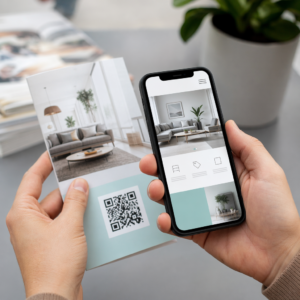
क्या आप किसी नए व्यक्ति से मिलते ही अपनी संपर्क जानकारी साझा करना चाहते हैं? पारंपरिक कागज़ के कार्ड खो जाते हैं, फेंक दिए जाते हैं, या गलत तरीके से मैन्युअल रूप से टाइप किए जाते हैं। एक नेम कार्ड क्यूआर कोड इन सभी समस्याओं को हल करता है – एक स्कैन तुरंत आपकी पूरी संपर्क प्रोफ़ाइल को किसी भी स्मार्टफोन में सहेज लेता है।.
नेम कार्ड क्यूआर कोड क्या है?
एक नेम कार्ड क्यूआर कोड आपके बिजनेस कार्ड पर मुद्रित या प्रदर्शित होने वाला एक स्कैन करने योग्य कोड है जो आपकी संपर्क जानकारी को vCard (VCF) प्रारूप में एन्कोड करता है। जब कोई व्यक्ति अपने स्मार्टफोन कैमरे को उस पर इंगित करता है, तो डिवाइस पैटर्न को पढ़ता है और तुरंत उन्हें आपका नाम, पदनाम, कंपनी, फोन नंबर, ईमेल पता, वेबसाइट और सोशल लिंक सीधे उनके संपर्कों में सहेजने के लिए प्रेरित करता है – किसी टाइपिंग की आवश्यकता नहीं होती है।.
दो मुख्य प्रकार हैं स्थैतिक तथा डायनामिक. स्टैटिक कोड डेटा को पैटर्न के अंदर स्थायी रूप से संग्रहीत करते हैं। डायनामिक कोड एक रीडायरेक्ट लिंक का उपयोग करते हैं, जिसका अर्थ है कि आप अपने कार्ड को दोबारा प्रिंट किए बिना किसी भी समय अपनी संपर्क जानकारी अपडेट कर सकते हैं – यदि आपका फोन नंबर या पदनाम बदलता है तो यह एक महत्वपूर्ण लाभ है।.
अपने नेम कार्ड के लिए एक vCard क्यूआर कोड बनाएं अपनी संपर्क जानकारी दर्ज करें, अपने ब्रांड से मेल खाने के लिए डिज़ाइन को अनुकूलित करें, और मिनटों में एक प्रिंट-रेडी फ़ाइल डाउनलोड करें vCard QR कोड जनरेटर.
अपने नेम कार्ड में क्यूआर कोड क्यों जोड़ें?
भौतिक बिजनेस कार्ड अभी भी महत्वपूर्ण हैं – सर्वेक्षणों से पता चलता है कि 78% पेशेवर अभी भी उनका उपयोग करते हैं और आधे से अधिक उन्हें साप्ताहिक रूप से वितरित करते हैं। लेकिन लगभग 88% कागज़ के कार्ड एक सप्ताह के भीतर फेंक दिए जाते हैं। क्यूआर कोड जोड़ने से प्राप्तकर्ताओं को आपकी जानकारी को डिजिटल रूप से सहेजने का एक त्वरित, घर्षण रहित तरीका मिलता है, जिससे आपकी जानकारी कूड़ेदान में जाने की संभावना कम हो जाती है।.
यहाँ मुख्य लाभ दिए गए हैं:
- तत्काल संपर्क बचत – प्राप्तकर्ता एक बार स्कैन करते हैं और आपका पूरा vCard सहेजने के लिए तैयार होता है, जिससे मैन्युअल डेटा प्रविष्टि और प्रतिलेखन त्रुटियां समाप्त हो जाती हैं।.
- डायनामिक अपडेट – नया प्रिंट ऑर्डर किए बिना अपना फोन नंबर, पदनाम या कंपनी बदलें; क्यूआर कोड हमेशा आपके वर्तमान विवरणों को इंगित करता है।.
- स्कैन एनालिटिक्स – एक अंतर्निहित प्रदर्शन डैशबोर्ड के माध्यम से ट्रैक करें कि आपका कोड कितनी बार स्कैन किया गया, कब, और किन स्थानों से।.
- अनुकूलन योग्य डिज़ाइन – क्यूआर कोड के रंगों, आकार और लोगो को अपने व्यक्तिगत या कंपनी ब्रांड से मिलाएं ताकि यह कार्ड डिज़ाइन का एक स्वाभाविक हिस्सा लगे।.
- पर्यावरण-अनुकूल नेटवर्किंग – जब आपकी जानकारी विकसित होती है, तो कम पुनर्मुद्रण और कम बर्बाद कार्ड स्टॉक।.
- संपर्क विवरण से परे लिंक – प्राप्तकर्ताओं को सीधे आपके लिंक्डइन प्रोफाइल, पोर्टफोलियो, ईमेल, या किसी भी यूआरएल से एक ही स्कैन से कनेक्ट करें।.
आप नाम कार्ड क्यूआर कोड पर क्या एन्कोड कर सकते हैं
आपका क्यूआर कोड केवल फोन नंबर और ईमेल तक सीमित नहीं होना चाहिए। आपके लक्ष्यों के आधार पर, आप एन्कोड कर सकते हैं:
- ए vCard आपके पूर्ण संपर्क प्रोफाइल के साथ (नाम, पद, कंपनी, फोन, ईमेल, वेबसाइट, सोशल लिंक)
- आपके लिए एक सीधा लिंक लिंक्डइन प्रोफाइल पेशेवर नेटवर्किंग के लिए
- ए यूआरएल आपके पोर्टफोलियो, लैंडिंग पेज, या बुकिंग कैलेंडर की ओर इशारा करते हुए
- ए पहले से भरा हुआ ईमेल ताकि प्राप्तकर्ता स्कैन करने के तुरंत बाद आपको संदेश भेज सकें
- ए बिजनेस कार्ड पेज जो आपकी पूरी डिजिटल प्रोफाइल को मोबाइल-अनुकूल लैंडिंग पेज पर प्रदर्शित करता है
सही प्रकार का चुनाव आपके नेटवर्किंग संदर्भ पर निर्भर करता है। अधिकांश पेशेवरों के लिए, एक vCard क्यूआर कोड सबसे मजबूत डिफ़ॉल्ट है क्योंकि यह हर आधुनिक स्मार्टफोन कैमरे के साथ मूल रूप से काम करता है – iOS 11 और बाद के संस्करण और अधिकांश एंड्रॉइड डिवाइस VCF फ़ाइल को स्वचालित रूप से पार्स करते हैं और उपयोगकर्ता को संपर्क जोड़ने के लिए प्रेरित करते हैं।.
Pageloot के साथ नाम कार्ड QR कोड कैसे बनाएं
प्रक्रिया में केवल कुछ मिनट लगते हैं:
- अपना विवरण दर्ज करें – खोलें vCard QR कोड जनरेटर और अपना नाम, पदनाम, कंपनी, फ़ोन नंबर, ईमेल पता और वेबसाइट भरें। न्यूनतम आपको एक नाम और एक संपर्क विधि की आवश्यकता है।.
- डिज़ाइन को अनुकूलित करें – ऐसे रंग चुनें जो आपके ब्रांड से मेल खाते हों, एक बॉडी स्टाइल और किनारे का आकार चुनें, और कोड के केंद्र में रखने के लिए अपना लोगो अपलोड करें। यह लोगो के साथ QR कोड जनरेटर ब्रांडेड कोड को अधिक विशिष्ट बनाता है और स्कैन दरों को बढ़ा सकता है।.
- जनरेट करें और परीक्षण करें – Pageloot तुरंत कोड बनाता है। किसी भी प्रिंट फ़ाइल को अंतिम रूप देने से पहले यह पुष्टि करने के लिए कि यह सही ढंग से हल होता है, इसे कई उपकरणों पर स्वयं स्कैन करें।.
- प्रिंट-रेडी फ़ाइल डाउनलोड करें – PNG, SVG, EPS, या PDF में निर्यात करें। बिज़नेस कार्ड प्रिंटिंग के लिए, वेक्टर प्रारूप (SVG या EPS) अनुशंसित हैं क्योंकि वे गुणवत्ता हानि के बिना स्केल होते हैं। आप भी एक पारदर्शी PNG डाउनलोड कर सकते हैं जटिल कार्ड पृष्ठभूमि पर ओवरले करने के लिए।.
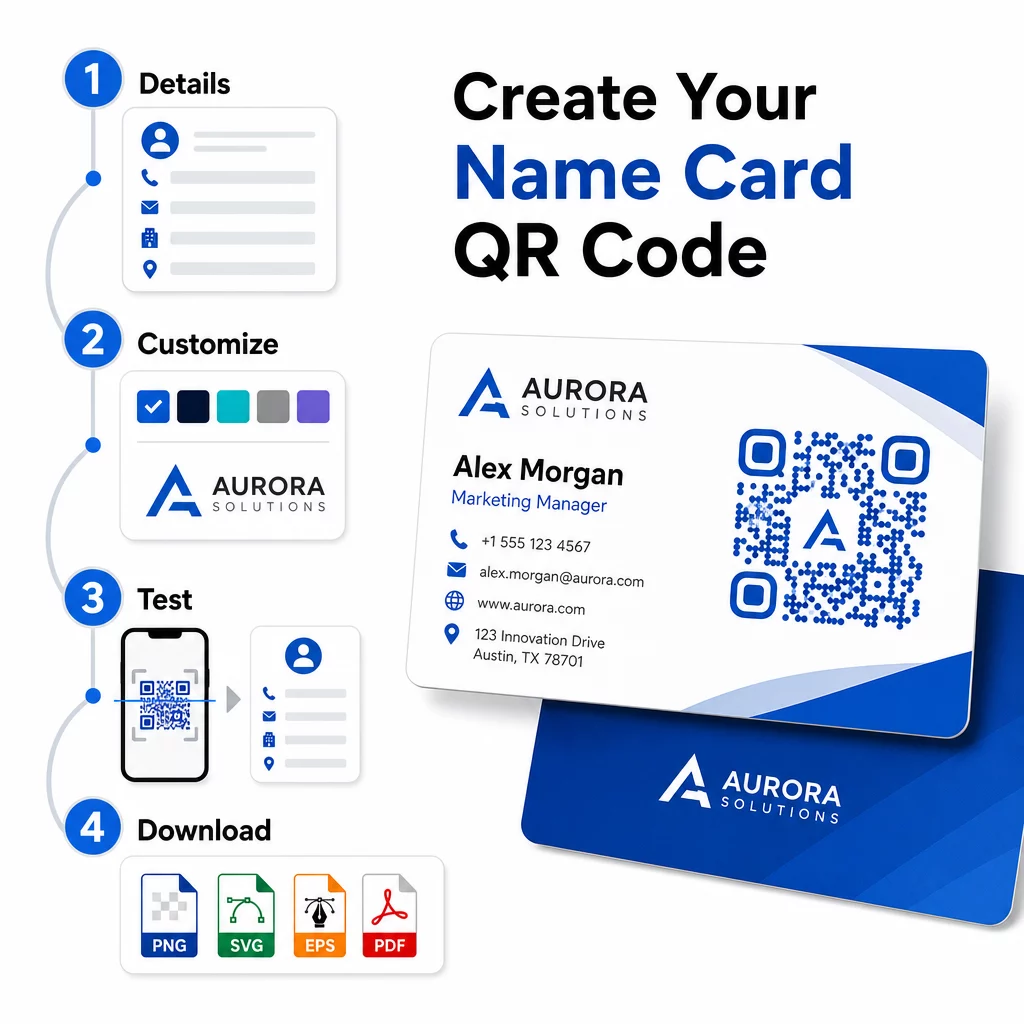
पूरी तरह से ब्रांडेड नाम कार्ड QR कोड चाहते हैं? अपना लोगो जोड़ें, ब्रांड रंग चुनें, और का उपयोग करके एक प्रिंट-रेडी फ़ाइल निर्यात करें क्यूआर कोड जनरेटर – शुरू करने के लिए निःशुल्क, कोई क्रेडिट कार्ड आवश्यक नहीं।.
प्रिंट आकार और प्लेसमेंट दिशानिर्देश
विश्वसनीय स्कैनिंग के लिए भौतिक आयामों को सही रखना आवश्यक है। बिजनेस कार्ड क्यूआर कोड के लिए पेज्लूट के दिशानिर्देशों में शामिल हैं:
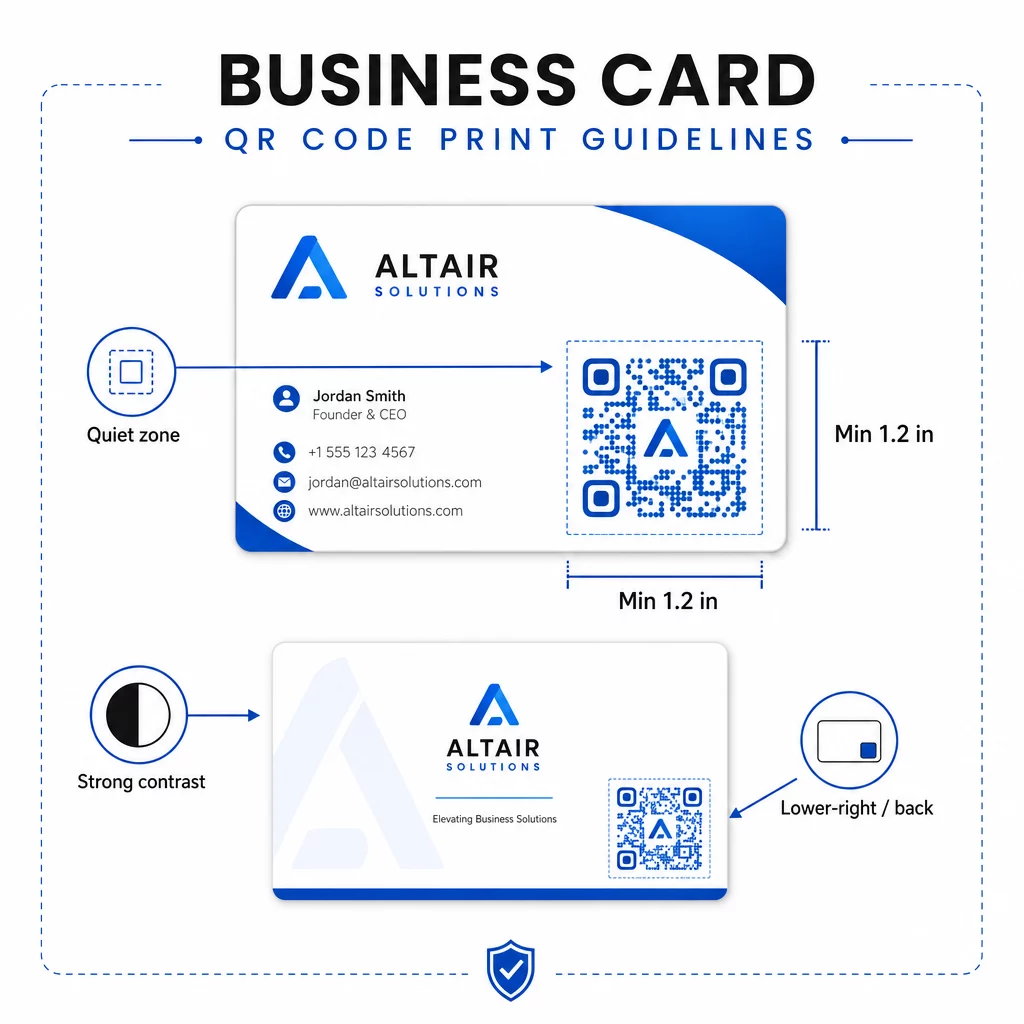
- न्यूनतम आकार: यूआरएल या छोटे वीकार्ड जैसे सरल डेटा के लिए 0.8 × 0.8 इंच (2 × 2 सेमी)
- विस्तृत वीकार्ड के लिए अनुशंसित आकार: व्यक्तिगत मॉड्यूल को साफ स्कैन करने के लिए पर्याप्त बड़ा रखने के लिए कम से कम 1.2 × 1.2 इंच (3 × 3 सेमी)
- शांत क्षेत्र: कोड के चारों ओर कम से कम 0.25 इंच का स्पष्ट सफेद स्थान छोड़ें – यह खाली बॉर्डर स्कैनिंग ऐप्स को पैटर्न के किनारों का पता लगाने में मदद करता है
- कंट्रास्ट: कोड और उसकी पृष्ठभूमि के बीच न्यूनतम 4:1 कंट्रास्ट अनुपात का लक्ष्य रखें; हल्के-पर-गहरे (उल्टे) डिज़ाइनों से बचें, जिन्हें कई पुराने स्कैनर ऐप पढ़ने में विफल रहते हैं
- प्रिंट रिज़ॉल्यूशन: ऑफसेट या डिजिटल प्रिंटिंग के लिए 300-600 डीपीआई पर निर्यात करें
अधिकांश पेशेवर क्यूआर कोड को कार्ड के पीछे रखते हैं ताकि सामने का डिज़ाइन अव्यवस्थित न हो, या तत्काल दृश्यता के लिए सामने के निचले-दाएं कोने में रखते हैं। कोड को कार्ड क्षेत्र का लगभग 20% हिस्सा घेरना चाहिए – इतना प्रमुख कि आपके नाम और शीर्षक को अभिभूत किए बिना ध्यान दिया जा सके।.
विभिन्न प्रिंट सामग्रियों में आकार निर्धारण पर गहन जानकारी के लिए, पूरा देखें बिजनेस कार्ड के लिए क्यूआर कोड आकार दिशानिर्देश और की मार्गदर्शिका क्यूआर कोड के साथ बिजनेस कार्ड डिज़ाइन.
डायनामिक नेम कार्ड क्यूआर कोड के साथ प्रदर्शन को ट्रैक करना
यदि आपके संपर्क विवरण कभी नहीं बदलते हैं और आपको उपयोग डेटा की आवश्यकता नहीं है, तो स्टैटिक क्यूआर कोड ठीक काम करते हैं। डायनामिक कोड दो महत्वपूर्ण क्षमताएं जोड़ते हैं:
- संपादन योग्य गंतव्य – पेज्लूट के डैशबोर्ड के माध्यम से किसी भी समय अपने वीकार्ड, यूआरएल या लिंक किए गए पेज को अपडेट करें। मुद्रित कोड वही रहता है; केवल गंतव्य बदलता है।.
- स्कैन एनालिटिक्स – वास्तविक समय में स्कैन गणना, टाइमस्टैम्प, भौगोलिक स्थान और डिवाइस प्रकार देखें, जिससे आपको यह मापने योग्य अंतर्दृष्टि मिलती है कि आपकी नेटवर्किंग सामग्री कितनी प्रभावी ढंग से प्रदर्शन कर रही है।.
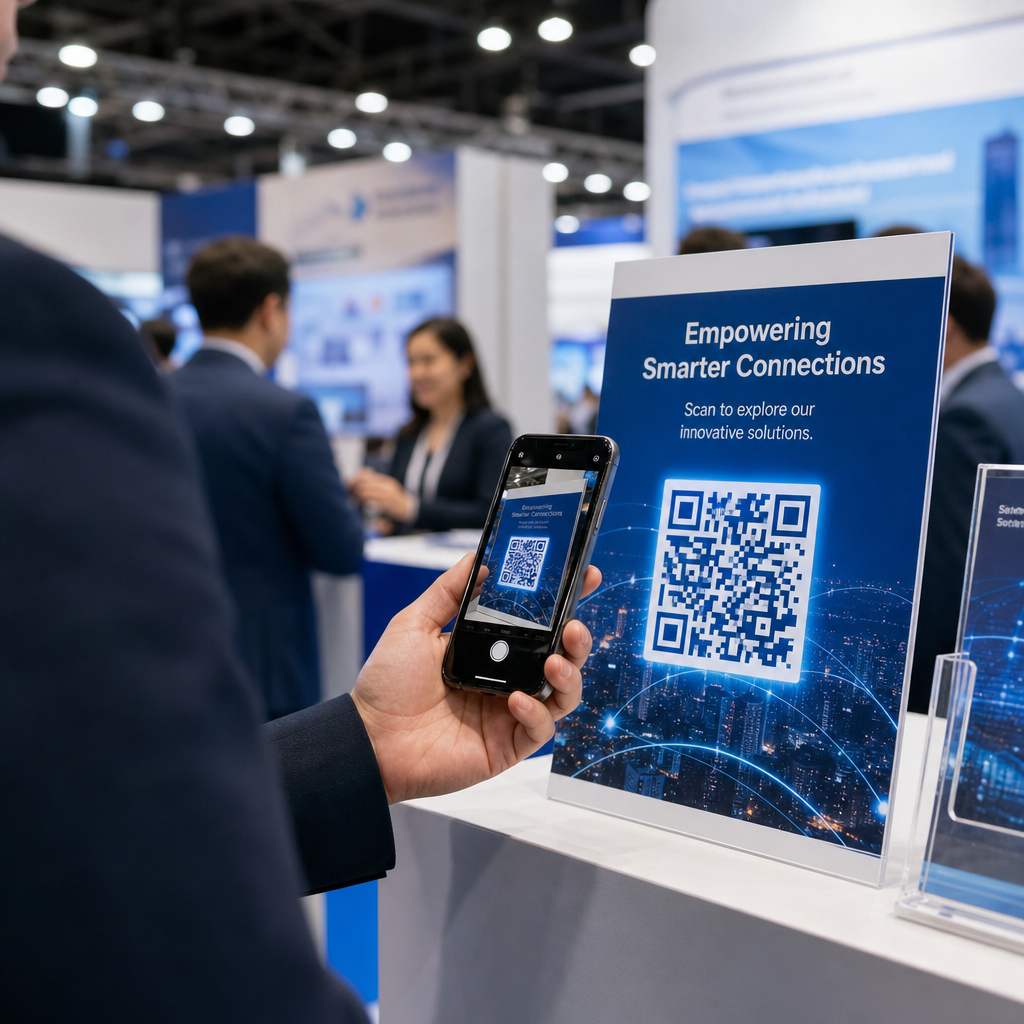
यदि आप नियमित रूप से सम्मेलनों, व्यापार मेलों या उद्योग आयोजनों में भाग लेते हैं, तो डायनामिक कोड आपको यह समझने में मदद करते हैं कि कौन से आयोजन सबसे अधिक फॉलो-थ्रू उत्पन्न करते हैं और तदनुसार अपने वितरण को समायोजित करें। डायनामिक कोड और एनालिटिक्स डैशबोर्ड तक पहुँचने के लिए 14-दिवसीय निःशुल्क परीक्षण के लिए साइन अप करें – किसी क्रेडिट कार्ड की आवश्यकता नहीं है।.
डायनामिक क्यूआर कोड का उपयोग करने और अभियानों को ट्रैक करने के बारे में अधिक संदर्भ के लिए, देखें vCard क्यूआर कोड के लिए अंतिम मार्गदर्शिका और पर मार्गदर्शिका विभिन्न प्रिंट सामग्रियों के लिए QR कोड का आकार निर्धारण.
अक्सर पूछे जाने वाले सवाल
आप अपने पूरे vCard विवरण शामिल कर सकते हैं – नाम, पद, कंपनी, फ़ोन नंबर, ईमेल पता, वेबसाइट और सोशल मीडिया लिंक। आप सीधे लिंक्डइन प्रोफ़ाइल, एक पोर्टफोलियो पेज, या एक पहले से भरे हुए ईमेल से भी लिंक कर सकते हैं। vCard प्रारूप सबसे बहुमुखी विकल्प है क्योंकि आधुनिक स्मार्टफोन इसे मूल रूप से पढ़ते हैं और उपयोगकर्ताओं को एक टैप में संपर्क सहेजने के लिए प्रेरित करते हैं।.
हाँ, यदि आप एक डायनामिक क्यूआर कोड का उपयोग करते हैं। डायनामिक कोड रीडायरेक्ट का उपयोग करते हैं, जिससे आप प्रिंट किए गए कोड को छुए बिना किसी भी समय पेजेलूट डैशबोर्ड के माध्यम से लिंक की गई संपर्क जानकारी या गंतव्य यूआरएल को बदल सकते हैं। स्टैटिक कोड डेटा को पैटर्न में स्थायी रूप से संग्रहीत करते हैं और निर्माण के बाद संपादित नहीं किए जा सकते हैं।.
URL जैसे साधारण डेटा के लिए, न्यूनतम 0.8 × 0.8 इंच (2 × 2 सेमी) पर्याप्त है। कई फ़ील्ड वाले विस्तृत vCard के लिए, मॉड्यूल को विश्वसनीय रूप से स्कैन करने के लिए पर्याप्त बड़ा रखने के लिए कम से कम 1.2 × 1.2 इंच (3 × 3 सेमी) का उपयोग करें। कोड के चारों ओर हमेशा कम से कम 0.25 इंच का एक स्पष्ट सफेद बॉर्डर छोड़ें, और अपनी पूरी छपाई से पहले इसे कई उपकरणों पर परीक्षण करें।.