Szeretné megosztani elérhetőségeit abban a pillanatban, amikor valaki újjal találkozik? A hagyományos papírkártyák elvesznek, kidobják őket, vagy rosszul gépelik be manuálisan. Egy névjegykártya QR-kód mindezt megoldja – egyetlen szkenneléssel azonnal elmenti teljes kapcsolati profilját bármely okostelefonra.
Mi az a névjegykártya QR-kód?
A névjegykártya QR-kód egy szkennelhető kód, amelyet a névjegykártyájára nyomtatnak vagy azon jelenítenek meg, és amely vCard (VCF) formátumban kódolja az elérhetőségeit. Amikor valaki az okostelefonja kameráját ráirányítja, az eszköz leolvassa a mintát, és azonnal felkéri, hogy mentse el nevét, beosztását, cégét, telefonszámát, e-mail címét, weboldalát és közösségi linkjeit közvetlenül a névjegyei közé – gépelés nélkül.
A két fő típus a következő: statikus és Dinamikus. A statikus kódok tartósan tárolják az adatokat a mintán belül. A dinamikus kódok átirányítási linket használnak, ami azt jelenti, hogy bármikor frissítheti elérhetőségeit anélkül, hogy újra kellene nyomtatnia kártyáit – ez jelentős előny, ha telefonszáma vagy beosztása megváltozik.
Hozzon létre vCard QR-kódot névjegykártyájához Adja meg elérhetőségeit, szabja testre a designt márkájához, és töltsön le egy nyomtatásra kész fájlt percek alatt a vCard QR kód generátor.
Miért érdemes QR-kódot tenni a névjegykártyájára?
A fizikai névjegykártyák még mindig fontosak – felmérések szerint a szakemberek 78%-a még mindig használja őket, és több mint a fele hetente osztogatja. Azonban a papírkártyák közel 88%-át egy héten belül kidobják. A QR-kód hozzáadása azonnali, súrlódásmentes módot biztosít a címzetteknek az adatok digitális mentésére, csökkentve annak esélyét, hogy az információi a kukában landoljanak.
Íme a fő előnyök:
- Azonnali névjegymentés – A címzettek egyszer beolvassák, és a teljes vCardja készen áll a mentésre, kiküszöbölve a kézi adatbevitelt és az átírási hibákat.
- Dinamikus frissítések – Változtassa meg telefonszámát, beosztását vagy cégét anélkül, hogy új nyomtatást kellene rendelnie; a QR-kód mindig az aktuális adataira mutat.
- Szkennelési analitika – Kövesse nyomon, hányszor, mikor és mely helyekről szkennelték be a kódját egy beépített teljesítmény-irányítópulton keresztül.
- Testreszabható design – Illessze a QR-kód színeit, alakját és logóját személyes vagy céges márkájához, hogy az a kártya designjának természetes részének tűnjön.
- Környezetbarát hálózatépítés – Kevesebb újranyomtatás és kevesebb elpazarolt kártyaanyag, amikor az információi változnak.
- Linkek a kapcsolattartási adatokon túl – Kapcsolja össze a címzetteket közvetlenül a LinkedIn profiljával, portfóliójával, e-mailjével vagy bármely URL-lel egyetlen szkenneléssel.
Mit kódolhat egy névjegykártya QR-kódjára
A QR-kódja nem korlátozódik telefonszámra és e-mailre. Céljaitól függően kódolhatja:
- A vCard teljes kapcsolati profiljával (név, beosztás, cég, telefon, e-mail, weboldal, közösségi linkek)
- Közvetlen link a LinkedIn profiljához professzionális hálózatépítéshez
- A URL portfóliójára, céloldalára vagy foglalási naptárára mutató
- A előre kitöltött e-mail így a címzettek azonnal üzenhetnek Önnek a szkennelés után
- A névjegykártya oldal amely megjeleníti teljes digitális profilját egy mobilbarát céloldalon
A megfelelő típus kiválasztása a hálózatépítési kontextustól függ. A legtöbb szakember számára a vCard QR-kód a legerősebb alapértelmezett, mert natívan működik minden modern okostelefon kamerával – az iOS 11 és újabb, valamint a legtöbb Android eszköz automatikusan elemzi a VCF fájlt, és felkéri a felhasználót a névjegy hozzáadására.
Hogyan hozzunk létre névjegykártya QR-kódot a Pageloot segítségével
A folyamat mindössze néhány percet vesz igénybe:
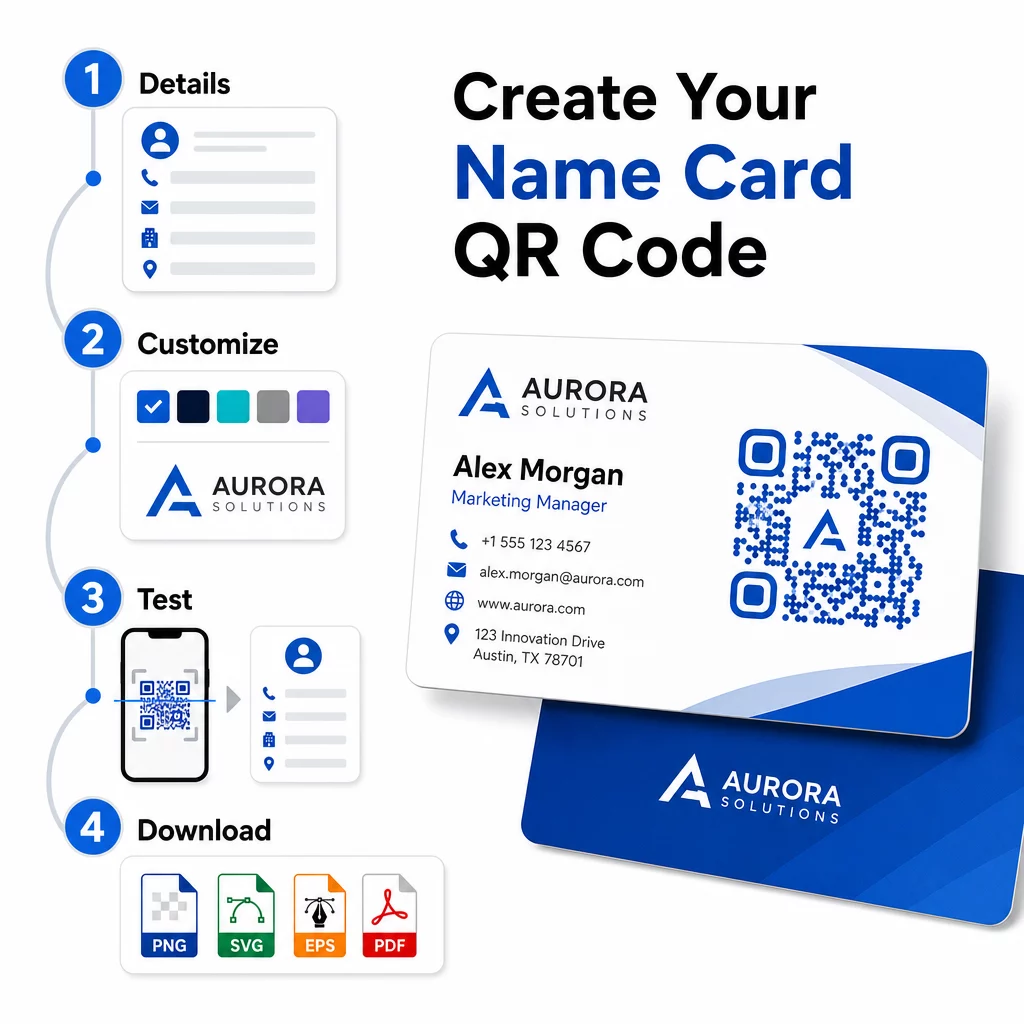
- Adja meg adatait – Nyissa meg a vCard QR kód generátor és adja meg nevét, beosztását, cégét, telefonszámát, e-mail címét és weboldalát. Minimum egy névre és egy elérhetőségre van szüksége.
- A design testreszabása – Válasszon a márkájához illő színeket, válasszon törzsstílust és élszínformát, és töltse fel logóját, hogy a kód közepére helyezze. A QR kód generálás logóval vizuálisan megkülönböztethetőbbé teszi a márkás kódokat, és növelheti a beolvasási arányt.
- Generálás és tesztelés – A Pageloot azonnal elkészíti a kódot. Olvassa be saját maga több eszközön, mielőtt véglegesítené a nyomtatási fájlokat, hogy megbizonyosodjon a helyes feloldásról.
- Nyomtatásra kész fájl letöltése – Exportálás PNG, SVG, EPS vagy PDF formátumban. Névjegykártya nyomtatáshoz a vektoros formátumok (SVG vagy EPS) ajánlottak, mivel minőségromlás nélkül méretezhetők. Azt is megteheti, letölthet átlátszó PNG-t összetett kártyahátterekre való ráhelyezéshez.
Teljesen márkás névjegykártya QR-kódot szeretne? Adja hozzá logóját, válasszon márkaszíneket, és exportáljon nyomtatásra kész fájlt a QR Kód Generátor – ingyenesen indítható, hitelkártya nem szükséges.
Nyomtatási méret és elhelyezési útmutató
A fizikai méretek pontos beállítása elengedhetetlen a megbízható szkenneléshez. A Pageloot névjegykártya QR-kódokra vonatkozó útmutatója a következőket javasolja:
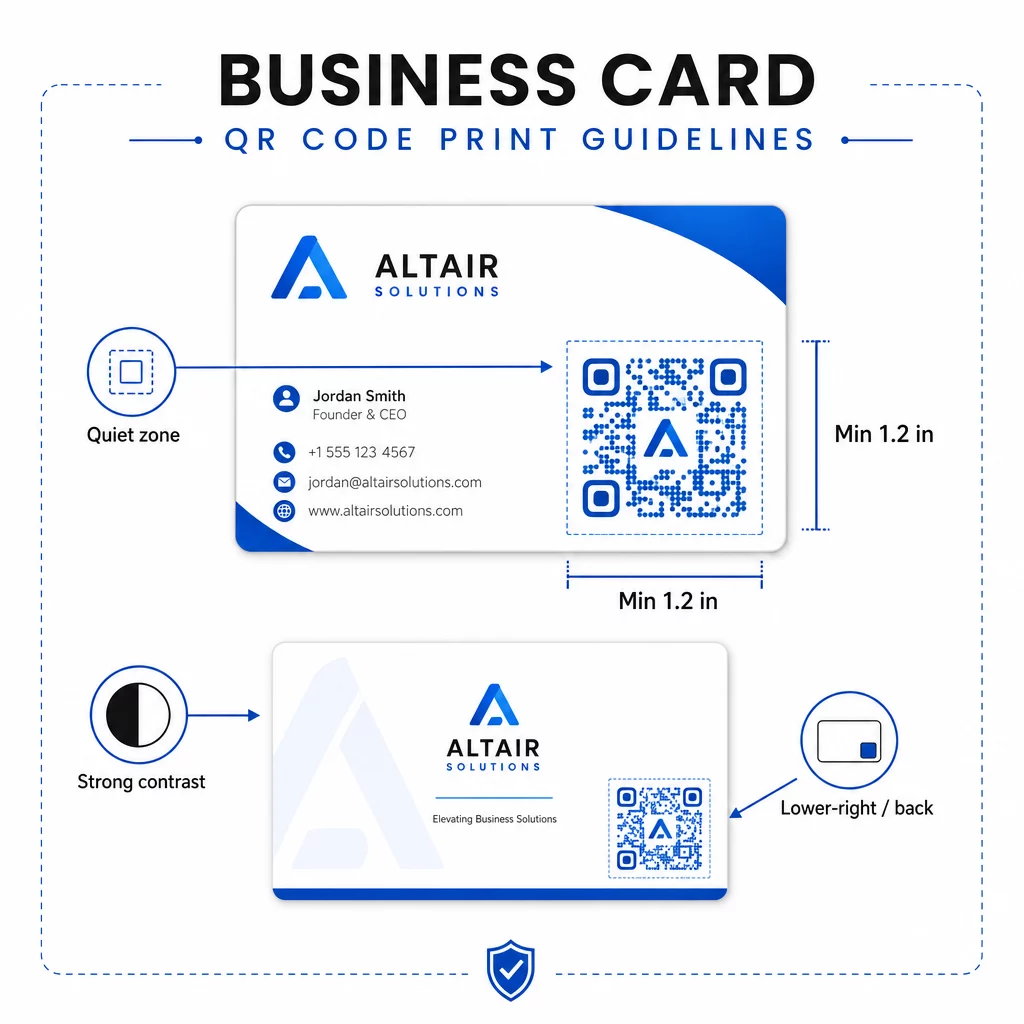
- Minimális méret: 0,8 × 0,8 hüvelyk (2 × 2 cm) egyszerű adatokhoz, például URL-hez vagy rövid vCardhoz
- Ajánlott méret részletes vCardokhoz: legalább 1,2 × 1,2 hüvelyk (3 × 3 cm), hogy az egyes modulok elég nagyok legyenek a tiszta szkenneléshez
- Csendes zóna: hagyjon legalább 0,25 hüvelyk tiszta fehér teret a kód mind a négy oldala körül – ez az üres szegély segít a szkennelő alkalmazásoknak megtalálni a minta széleit
- Kontraszt: törekedjen legalább 4:1 kontrasztarányra a kód és a háttere között; kerülje a világos alapon sötét (invertált) mintákat, amelyeket sok régebbi szkennelő alkalmazás nem tud beolvasni
- Nyomtatási felbontás: exportálja 300–600 DPI felbontással ofszet vagy digitális nyomtatáshoz
A legtöbb szakember a kártya hátuljára helyezi a QR-kódot, hogy az előlap dizájnja rendezett maradjon, vagy az előlap jobb alsó sarkába az azonnali láthatóság érdekében. A kódnak a kártya területének nagyjából 20%-át kell elfoglalnia – elég feltűnőnek kell lennie ahhoz, hogy észrevegyék, anélkül, hogy elnyomná a nevét és beosztását.
A különböző nyomtatási anyagok méretezésének részletesebb áttekintéséhez lásd a teljes QR-kód méretezési útmutató névjegykártyákhoz és az útmutatót a névjegykártya-tervezés QR-kódokkal.
Teljesítmény nyomon követése dinamikus névjegykártya QR-kódokkal
A statikus QR-kódok jól működnek, ha az elérhetőségei soha nem változnak, és nincs szüksége használati adatokra. A dinamikus kódok két kritikus képességgel bővülnek:
- Szerkeszthető cél – Frissítse vCardját, URL-jét vagy linkelt oldalát bármikor a Pageloot irányítópultján keresztül. A nyomtatott kód változatlan marad; csak a cél változik.
- Szkennelési analitika – Megtekintheti a szkennelések számát, az időbélyegeket, a földrajzi helyeket és az eszköz típusait valós időben, mérhető betekintést nyújtva abba, hogy milyen hatékonyan teljesítenek a hálózati anyagai.
Ha rendszeresen részt vesz konferenciákon, szakkiállításokon vagy iparági eseményeken, a dinamikus kódok segítségével megértheti, mely események generálják a legtöbb nyomon követést, és ennek megfelelően módosíthatja a terjesztést. Regisztráljon egy 14 napos ingyenes próbaverzióra a dinamikus kódokhoz és az analitikai irányítópulthoz való hozzáféréshez – hitelkártya nem szükséges.
A dinamikus QR-kódok használatával és a kampányok nyomon követésével kapcsolatos további információkért lásd a végső útmutatónkban a vCard QR-kódokhoz és az útmutatót a QR-kód méretezése különböző nyomtatási anyagokhoz témakörben található..
Gyakori kérdések
Felveheti teljes vCard adatait – név, munkakör, cég, telefonszám, e-mail cím, weboldal és közösségi média linkek. Közvetlenül hivatkozhat LinkedIn profilra, portfólió oldalra vagy előre kitöltött e-mailre is. A vCard formátum a legsokoldalúbb lehetőség, mert a modern okostelefonok natívan olvassák, és egyetlen érintéssel felkérik a felhasználókat a névjegy mentésére.
Igen, ha dinamikus QR-kódot használ. A dinamikus kódok átirányítást használnak, így a Pageloot irányítópultján keresztül bármikor megváltoztathatja a hozzájuk kapcsolt kapcsolattartási adatokat vagy cél URL-t anélkül, hogy hozzáérne a kinyomtatott kódhoz. A statikus kódok véglegesen tárolják az adatokat a mintázatban, és létrehozásuk után nem szerkeszthetők.
Egyszerű adatokhoz, például egy URL-hez, minimum 0,8 × 0,8 hüvelyk (2 × 2 cm) elegendő. Részletes, több mezős vCard esetén használjon legalább 1,2 × 1,2 hüvelyket (3 × 3 cm), hogy a modulok elég nagyok legyenek a megbízható szkenneléshez. Mindig hagyjon legalább 0,25 hüvelyk tiszta fehér szegélyt a kód körül, és tesztelje több eszközön, mielőtt kinyomtatja a teljes mennyiséget.