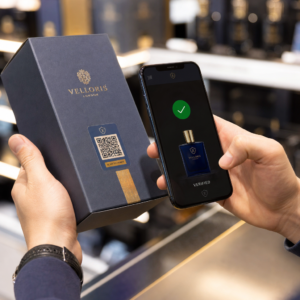
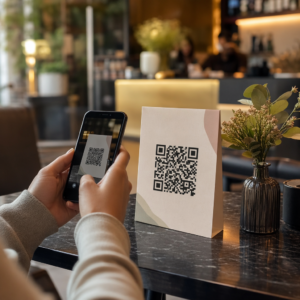
ต้องการแบ่งปันรายละเอียดการติดต่อของคุณทันทีที่คุณพบใครบางคนใหม่หรือไม่? นามบัตรกระดาษแบบดั้งเดิมมักจะหาย ถูกทิ้ง หรือพิมพ์ผิดพลาดด้วยตนเอง รหัส QR ของนามบัตรช่วยแก้ปัญหาทั้งหมดนั้นได้ – เพียงสแกนครั้งเดียวก็สามารถบันทึกโปรไฟล์การติดต่อทั้งหมดของคุณลงในสมาร์ทโฟนเครื่องใดก็ได้ทันที.
รหัส QR ของนามบัตรคืออะไร?
รหัส QR ของนามบัตรคือรหัสที่สามารถสแกนได้ซึ่งพิมพ์หรือแสดงบนนามบัตรของคุณ โดยเข้ารหัสรายละเอียดการติดต่อของคุณในรูปแบบ vCard (VCF) เมื่อมีคนใช้กล้องสมาร์ทโฟนสแกน อุปกรณ์จะอ่านรูปแบบและแจ้งให้พวกเขาสามารถบันทึกชื่อ ตำแหน่งงาน บริษัท หมายเลขโทรศัพท์ ที่อยู่อีเมล เว็บไซต์ และลิงก์โซเชียลของคุณลงในรายชื่อติดต่อของพวกเขาได้ทันที – ไม่ต้องพิมพ์.
ประเภทหลักสองประเภทคือ แบบคงที่ (static) และ ไดนามิก. รหัสแบบคงที่ (Static codes) จะเก็บข้อมูลไว้อย่างถาวรภายในรูปแบบ รหัสแบบไดนามิก (Dynamic codes) ใช้ลิงก์เปลี่ยนเส้นทาง ซึ่งหมายความว่าคุณสามารถอัปเดตข้อมูลติดต่อของคุณได้ตลอดเวลาโดยไม่ต้องพิมพ์นามบัตรใหม่ – ซึ่งเป็นข้อได้เปรียบที่สำคัญหากหมายเลขโทรศัพท์หรือตำแหน่งของคุณมีการเปลี่ยนแปลง.
สร้างรหัส QR vCard สำหรับนามบัตรของคุณ ป้อนรายละเอียดการติดต่อของคุณ ปรับแต่งการออกแบบให้เข้ากับแบรนด์ของคุณ และดาวน์โหลดไฟล์พร้อมพิมพ์ได้ในไม่กี่นาทีด้วย vCard คืออะไร สร้าง QR Code vCard.
ทำไมต้องเพิ่มรหัส QR ลงในนามบัตรของคุณ?
นามบัตรจริงยังคงมีความสำคัญ – ผลสำรวจชี้ว่า 78% ของมืออาชีพยังคงใช้นามบัตร และมากกว่าครึ่งหนึ่งแจกนามบัตรทุกสัปดาห์ แต่เกือบ 88% ของนามบัตรกระดาษถูกทิ้งภายในหนึ่งสัปดาห์ การเพิ่มรหัส QR ช่วยให้ผู้รับสามารถบันทึกรายละเอียดของคุณแบบดิจิทัลได้อย่างรวดเร็วและง่ายดาย ลดโอกาสที่ข้อมูลของคุณจะถูกทิ้งลงถังขยะ.
นี่คือข้อดีหลักๆ:
- บันทึกรายชื่อติดต่อได้ทันที – ผู้รับสแกนเพียงครั้งเดียว vCard ของคุณก็พร้อมบันทึก ช่วยลดการป้อนข้อมูลด้วยตนเองและข้อผิดพลาดในการคัดลอก.
- การอัปเดตแบบไดนามิก – เปลี่ยนหมายเลขโทรศัพท์ ตำแหน่ง หรือบริษัทของคุณได้โดยไม่ต้องสั่งพิมพ์ใหม่ รหัส QR จะชี้ไปยังรายละเอียดปัจจุบันของคุณเสมอ.
- การวิเคราะห์การสแกน – ติดตามจำนวนครั้งที่รหัสของคุณถูกสแกน เมื่อใด และจากที่ใดผ่านแดชบอร์ดประสิทธิภาพในตัว.
- การออกแบบที่ปรับแต่งได้ – จับคู่สี รูปร่าง และโลโก้ของรหัส QR ให้เข้ากับแบรนด์ส่วนตัวหรือบริษัทของคุณ เพื่อให้รู้สึกว่าเป็นส่วนหนึ่งของการออกแบบนามบัตรอย่างเป็นธรรมชาติ.
- การสร้างเครือข่ายที่เป็นมิตรต่อสิ่งแวดล้อม – ลดการพิมพ์ซ้ำและลดการสิ้นเปลืองกระดาษเมื่อข้อมูลของคุณมีการเปลี่ยนแปลง.
- ลิงก์ที่นอกเหนือจากรายละเอียดการติดต่อ – เชื่อมต่อผู้รับโดยตรงกับโปรไฟล์ LinkedIn, ผลงาน, อีเมล หรือ URL ใดๆ ของคุณด้วยการสแกนเพียงครั้งเดียว.
สิ่งที่คุณสามารถเข้ารหัสบน QR โค้ดนามบัตร
QR โค้ดของคุณไม่จำเป็นต้องจำกัดอยู่แค่เบอร์โทรศัพท์และอีเมล ขึ้นอยู่กับเป้าหมายของคุณ คุณสามารถเข้ารหัส:
- ก vCard ด้วยโปรไฟล์ติดต่อฉบับเต็มของคุณ (ชื่อ, ตำแหน่ง, บริษัท, โทรศัพท์, อีเมล, เว็บไซต์, ลิงก์โซเชียล)
- ลิงก์โดยตรงไปยัง โปรไฟล์ LinkedIn ของคุณ สำหรับการสร้างเครือข่ายมืออาชีพ
- ก URL ชี้ไปยังผลงาน, หน้า Landing Page หรือปฏิทินการจองของคุณ
- ก ที่กรอกข้อมูลไว้ล่วงหน้า อีเมล เพื่อให้ผู้รับสามารถส่งข้อความถึงคุณได้ทันทีหลังจากสแกน
- ก หน้าบัตรธุรกิจ ที่แสดงโปรไฟล์ดิจิทัลฉบับเต็มของคุณบนหน้า Landing Page ที่เหมาะกับมือถือ
การเลือกประเภทที่เหมาะสมขึ้นอยู่กับบริบทการสร้างเครือข่ายของคุณ สำหรับมืออาชีพส่วนใหญ่ QR โค้ด vCard เป็นค่าเริ่มต้นที่แข็งแกร่งที่สุด เนื่องจากทำงานร่วมกับกล้องสมาร์ทโฟนที่ทันสมัยทุกรุ่นได้อย่างเป็นธรรมชาติ – iOS 11 และใหม่กว่า และอุปกรณ์ Android ส่วนใหญ่จะแยกวิเคราะห์ไฟล์ VCF โดยอัตโนมัติและแจ้งให้ผู้ใช้เพิ่มผู้ติดต่อ.
วิธีสร้าง QR โค้ดนามบัตรด้วย Pageloot
กระบวนการใช้เวลาเพียงไม่กี่นาที:
- ป้อนรายละเอียดของคุณ – เปิด vCard คืออะไร สร้าง QR Code vCard และกรอกชื่อ, ตำแหน่งงาน, บริษัท, เบอร์โทรศัพท์, ที่อยู่อีเมล และเว็บไซต์ของคุณ อย่างน้อยที่สุดคุณต้องมีชื่อและวิธีการติดต่อหนึ่งวิธี.
- ปรับแต่งการออกแบบ – เลือกสีที่เข้ากับแบรนด์ของคุณ, เลือกรูปแบบตัวโค้ดและรูปร่างขอบ, และอัปโหลดโลโก้ของคุณเพื่อวางไว้ตรงกลางโค้ด สร้าง QR Code ใส่โลโก้ ทำให้โค้ดที่มีแบรนด์โดดเด่นยิ่งขึ้นและสามารถเพิ่มอัตราการสแกนได้.
- สร้างและทดสอบ – Pageloot สร้างโค้ดได้ทันที สแกนด้วยตัวคุณเองบนอุปกรณ์หลายเครื่องก่อนที่จะสรุปไฟล์สำหรับพิมพ์ใดๆ เพื่อยืนยันว่าโค้ดทำงานได้อย่างถูกต้อง.
- ดาวน์โหลดไฟล์พร้อมพิมพ์ – ส่งออกในรูปแบบ PNG, SVG, EPS หรือ PDF สำหรับการพิมพ์นามบัตร แนะนำให้ใช้รูปแบบเวกเตอร์ (SVG หรือ EPS) เนื่องจากสามารถปรับขนาดได้โดยไม่สูญเสียคุณภาพ คุณยังสามารถ ดาวน์โหลดไฟล์ PNG แบบโปร่งใส เพื่อวางซ้อนบนพื้นหลังนามบัตรที่ซับซ้อน.
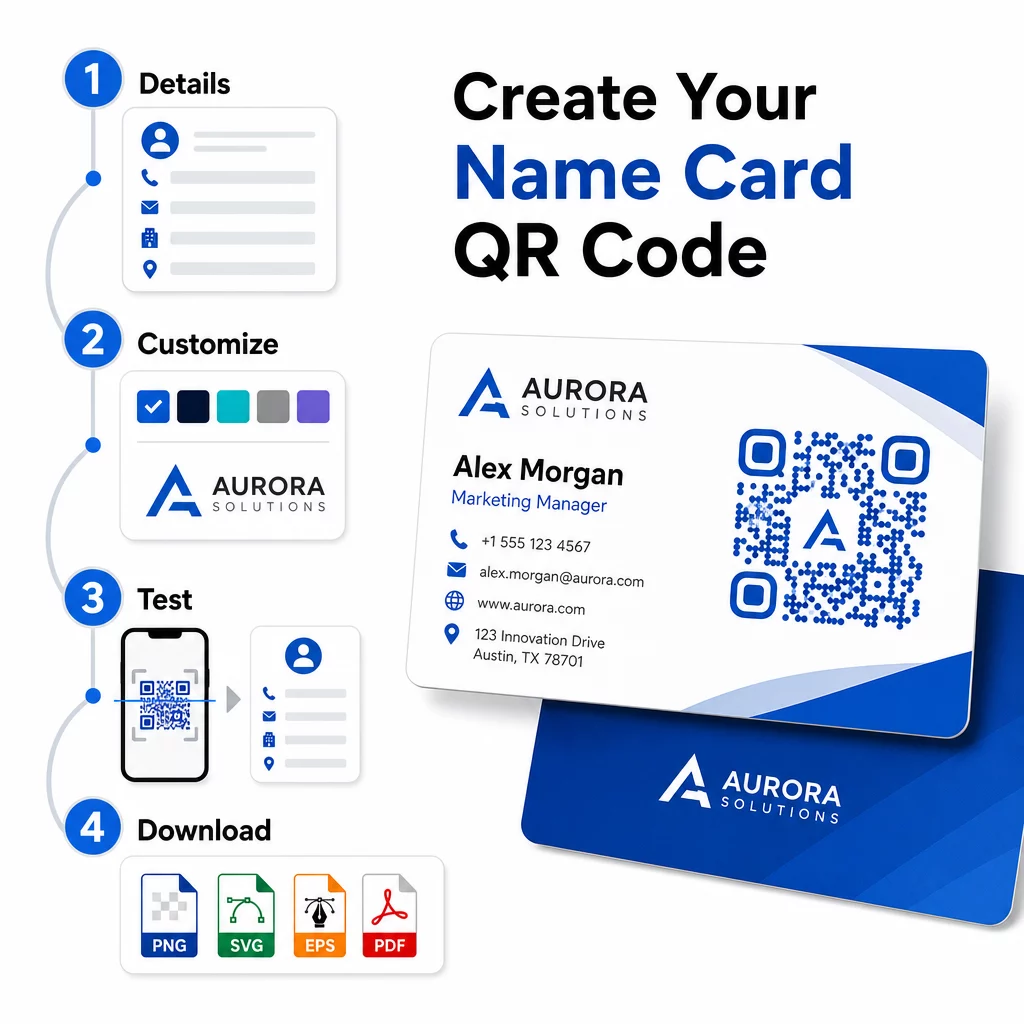
ต้องการ QR โค้ดนามบัตรที่มีแบรนด์ครบถ้วนหรือไม่? เพิ่มโลโก้ของคุณ, เลือกสีแบรนด์, และส่งออกไฟล์พร้อมพิมพ์โดยใช้ เครื่องสร้างรหัส QR – เริ่มต้นฟรี ไม่ต้องใช้บัตรเครดิต.
ขนาดการพิมพ์และแนวทางการจัดวาง
การกำหนดขนาดทางกายภาพให้ถูกต้องเป็นสิ่งสำคัญสำหรับการสแกนที่เชื่อถือได้ แนวทางของ Pageloot สำหรับรหัส QR บนนามบัตรแนะนำ:
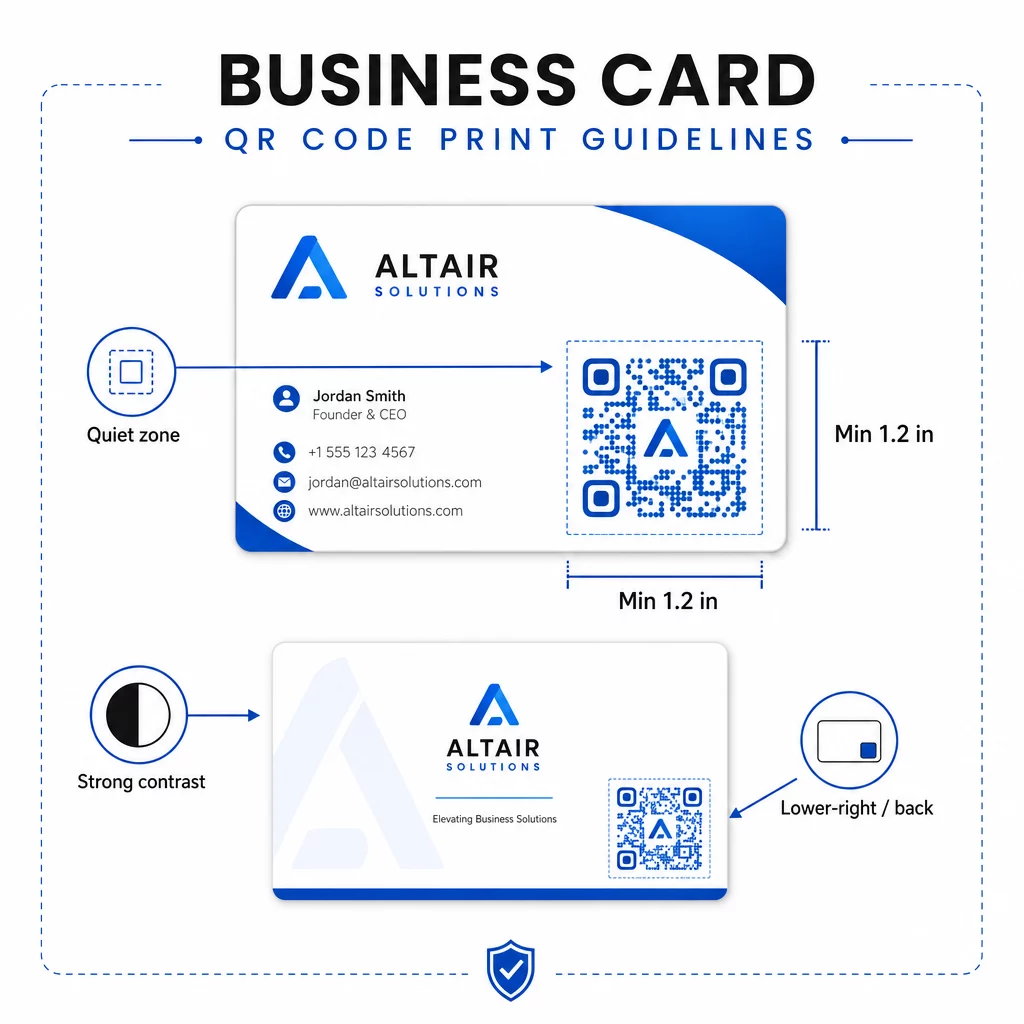
- ขนาดขั้นต่ำ: 0.8 × 0.8 นิ้ว (2 × 2 ซม.) สำหรับข้อมูลที่เรียบง่าย เช่น URL หรือ vCard แบบสั้น
- ขนาดที่แนะนำสำหรับ vCard แบบละเอียด: อย่างน้อย 1.2 × 1.2 นิ้ว (3 × 3 ซม.) เพื่อให้โมดูลแต่ละส่วนมีขนาดใหญ่พอที่จะสแกนได้อย่างชัดเจน
- พื้นที่ว่างรอบโค้ด (Quiet zone): เว้นพื้นที่สีขาวที่ชัดเจนอย่างน้อย 0.25 นิ้วรอบทั้งสี่ด้านของรหัส – ขอบว่างนี้ช่วยให้แอปสแกนระบุขอบของรูปแบบได้
- ความคมชัด: ตั้งเป้าอัตราส่วนคอนทราสต์ขั้นต่ำ 4:1 ระหว่างรหัสและพื้นหลัง หลีกเลี่ยงการออกแบบแบบสว่างบนพื้นเข้ม (กลับด้าน) ซึ่งแอปสแกนรุ่นเก่าจำนวนมากไม่สามารถอ่านได้
- ความละเอียดในการพิมพ์: ส่งออกที่ 300–600 DPI สำหรับการพิมพ์แบบออฟเซ็ตหรือดิจิทัล
ผู้เชี่ยวชาญส่วนใหญ่จะวางรหัส QR ไว้ที่ด้านหลังของนามบัตรเพื่อไม่ให้การออกแบบด้านหน้าดูรก หรือวางไว้ที่มุมล่างขวาของด้านหน้าเพื่อให้มองเห็นได้ทันที รหัสควรครอบคลุมพื้นที่ประมาณ 20% ของนามบัตร – โดดเด่นพอที่จะสังเกตเห็นได้โดยไม่บดบังชื่อและตำแหน่งของคุณ.
สำหรับข้อมูลเชิงลึกเพิ่มเติมเกี่ยวกับการปรับขนาดในวัสดุการพิมพ์ที่แตกต่างกัน โปรดดูฉบับเต็ม แนวทางการปรับขนาดรหัส QR สำหรับนามบัตร และคู่มือสำหรับ การออกแบบนามบัตรที่มีรหัส QR.
การติดตามประสิทธิภาพด้วยรหัส QR นามบัตรแบบไดนามิก
รหัส QR แบบคงที่ใช้งานได้ดีหากรายละเอียดการติดต่อของคุณไม่เคยเปลี่ยนแปลงและคุณไม่ต้องการข้อมูลการใช้งาน รหัสแบบไดนามิกเพิ่มความสามารถที่สำคัญสองประการ:
- ปลายทางที่แก้ไขได้ – อัปเดต vCard, URL หรือหน้าเว็บที่เชื่อมโยงของคุณได้ตลอดเวลาผ่านแดชบอร์ดของ Pageloot รหัสที่พิมพ์ยังคงเหมือนเดิม มีเพียงปลายทางเท่านั้นที่เปลี่ยนแปลง.
- การวิเคราะห์การสแกน – ดูจำนวนการสแกน, การประทับเวลา, ตำแหน่งทางภูมิศาสตร์ และประเภทอุปกรณ์แบบเรียลไทม์ ทำให้คุณได้รับข้อมูลเชิงลึกที่วัดผลได้ว่าสื่อเครือข่ายของคุณมีประสิทธิภาพเพียงใด.
หากคุณเข้าร่วมการประชุม, งานแสดงสินค้า หรือกิจกรรมอุตสาหกรรมเป็นประจำ รหัสไดนามิกจะช่วยให้คุณเข้าใจว่ากิจกรรมใดสร้างการติดตามผลได้มากที่สุด และปรับการแจกจ่ายของคุณให้เหมาะสม ลงทะเบียนเพื่อทดลองใช้ฟรี 14 วันเพื่อเข้าถึงรหัสไดนามิกและแดชบอร์ดการวิเคราะห์ – ไม่ต้องใช้บัตรเครดิต.
สำหรับข้อมูลเพิ่มเติมเกี่ยวกับการใช้คิวอาร์โค้ดแบบไดนามิกและการติดตามแคมเปญ โปรดดูที่ คู่มือฉบับสมบูรณ์เกี่ยวกับรหัส QR vCard และคู่มือเกี่ยวกับ การปรับขนาดรหัส QR สำหรับวัสดุการพิมพ์ที่แตกต่างกัน.
คำถามที่พบบ่อย
คุณสามารถใส่รายละเอียด vCard แบบเต็มของคุณได้ – ชื่อ, ตำแหน่งงาน, บริษัท, หมายเลขโทรศัพท์, ที่อยู่อีเมล, เว็บไซต์ และลิงก์โซเชียลมีเดีย คุณยังสามารถเชื่อมโยงโดยตรงไปยังโปรไฟล์ LinkedIn, หน้าผลงาน หรืออีเมลที่กรอกไว้ล่วงหน้าได้ รูปแบบ vCard เป็นตัวเลือกที่หลากหลายที่สุด เนื่องจากสมาร์ทโฟนสมัยใหม่สามารถอ่านได้โดยตรงและแจ้งให้ผู้ใช้บันทึกผู้ติดต่อได้ในแตะเดียว.
ใช่ หากคุณใช้คิวอาร์โค้ดแบบไดนามิก โค้ดแบบไดนามิกใช้การเปลี่ยนเส้นทาง ดังนั้นคุณจึงสามารถเปลี่ยนข้อมูลติดต่อที่เชื่อมโยงหรือ URL ปลายทางได้ตลอดเวลาผ่านแดชบอร์ด Pageloot โดยไม่ต้องแก้ไขโค้ดที่พิมพ์ออกมา โค้ดแบบคงที่จัดเก็บข้อมูลอย่างถาวรในรูปแบบและไม่สามารถแก้ไขได้หลังจากสร้างแล้ว.
สำหรับข้อมูลที่เรียบง่าย เช่น URL ขนาดขั้นต่ำ 0.8 × 0.8 นิ้ว (2 × 2 ซม.) ก็เพียงพอแล้ว สำหรับ vCard ที่มีรายละเอียดและมีหลายฟิลด์ ให้ใช้ขนาดอย่างน้อย 1.2 × 1.2 นิ้ว (3 × 3 ซม.) เพื่อให้โมดูลมีขนาดใหญ่พอที่จะสแกนได้อย่างน่าเชื่อถือ ควรเว้นขอบสีขาวที่ชัดเจนอย่างน้อย 0.25 นิ้วรอบโค้ดเสมอ และทดสอบบนอุปกรณ์หลายเครื่องก่อนที่จะพิมพ์ทั้งหมด.