> 가이드 > Create a Name Card with a QR Code Generator
QR 명함 스캔

Create a Name Card with a QR Code Generator

Generate a name card QR code to share contact details instantly. Create branded vCards, track scans, and update your details anytime without reprinting cards.
Updated on 6월 10, 2026
목차

Want to share your contact details the moment you meet someone new? Traditional paper cards get lost, thrown away, or manually typed in wrong. A name card QR code solves all of that – one scan instantly saves your full contact profile to any smartphone.

What is a name card QR code?

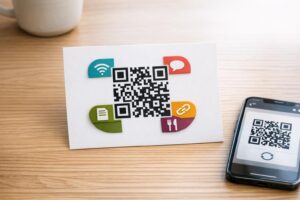
A name card QR code is a scannable code printed or displayed on your business card that encodes your contact details in vCard (VCF) format. When someone points their smartphone camera at it, the device reads the pattern and immediately prompts them to save your name, job title, company, phone number, email address, website, and social links directly to their contacts – no typing required.

The two main types are 정적동적. Static codes store the data permanently inside the pattern. Dynamic codes use a redirect link, which means you can update your contact information at any time without reprinting your cards – a significant advantage if your phone number or title changes.

Create a vCard QR Code for Your Name Card Enter your contact details, customize the design to match your brand, and download a print-ready file in minutes with the vCard QR 코드 생성기.

Why add a QR code to your name card?

Physical business cards still carry weight – surveys suggest that 78% of professionals still use them and more than half hand them out weekly. But nearly 88% of paper cards are discarded within a week. Adding a QR code gives recipients an instant, frictionless way to save your details digitally, reducing the chance your information ends up in the bin.

Here are the core advantages:

  • Instant contact saving – Recipients scan once and your full vCard is ready to save, eliminating manual data entry and transcription errors.
  • Dynamic updates – Change your phone number, title, or company without ordering a new print run; the QR code always points to your current details.
  • 스캔 분석 – Track how many times your code was scanned, when, and from which locations through a built-in performance dashboard.
  • Customizable design – Match the QR code’s colors, shape, and logo to your personal or company brand so it feels like a natural part of the card design.
  • Eco-friendly networking – Fewer reprints and less wasted card stock when your information evolves.
  • Links beyond contact details – Connect recipients directly to your LinkedIn profile, portfolio, email, or any URL with a single scan.

What you can encode on a name card QR code

Your QR code does not have to be limited to a phone number and email. Depending on your goals, you can encode:

  • vCard with your full contact profile (name, title, company, phone, email, website, social links)
  • A direct link to your LinkedIn profile for professional networking
  • URL pointing to your portfolio, landing page, or booking calendar
  • prefilled 이메일 so recipients can message you immediately after scanning
  • business card page that displays your full digital profile on a mobile-friendly landing page

Choosing the right type depends on your networking context. For most professionals, a vCard QR code is the strongest default because it works natively with every modern smartphone camera – iOS 11 and later and most Android devices parse the VCF file automatically and prompt the user to add the contact.

How to create a name card QR code with Pageloot

The process takes only a few minutes:

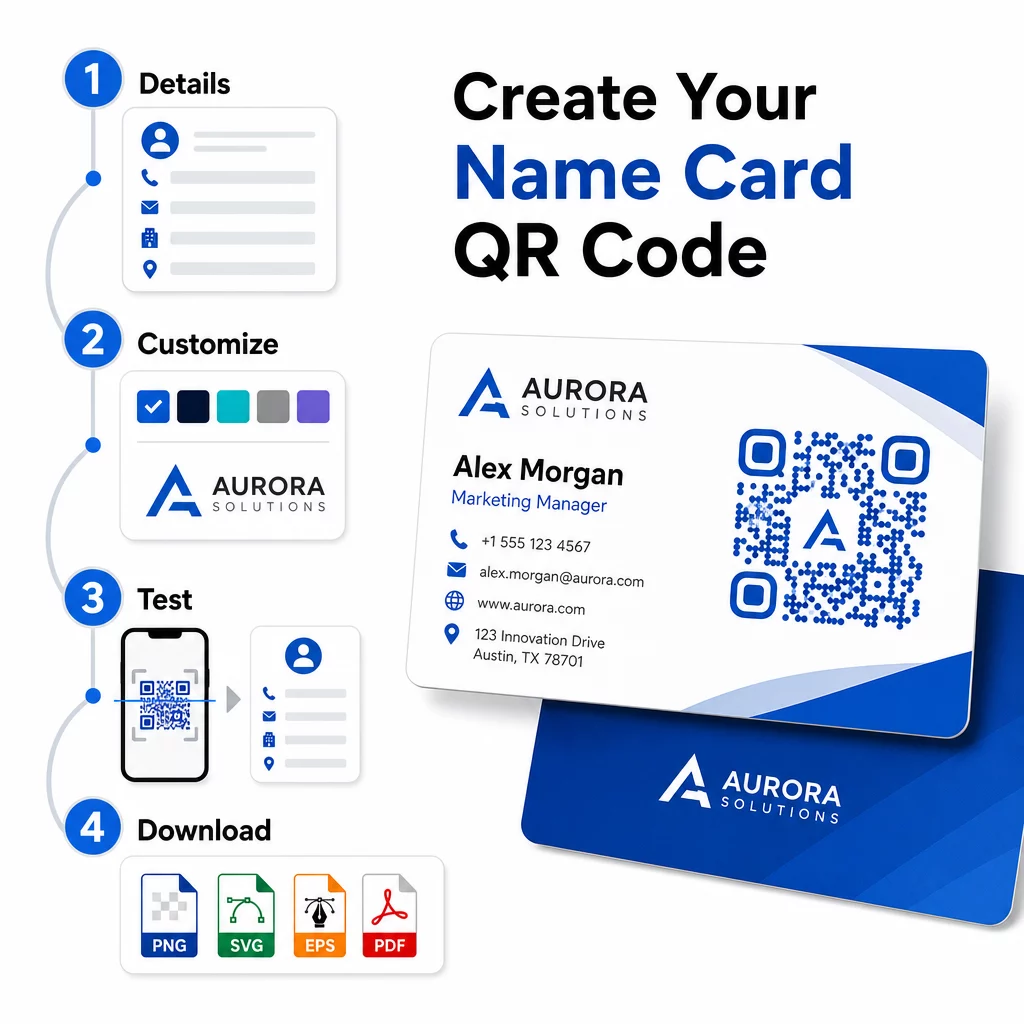
  • Enter your details – Open the vCard QR 코드 생성기 and fill in your name, job title, company, phone number, email address, and website. At minimum you need a name and one contact method.
  • 디자인 사용자 지정 – Choose colors that match your brand, select a body style and edge shape, and upload your logo to place in the center of the code. The 로고가 있는 QR 코드 생성기 makes branded codes more visually distinctive and can increase scan rates.
  • Generate and test – Pageloot produces the code instantly. Scan it yourself on multiple devices before finalizing any print files to confirm it resolves correctly.
  • Download a print-ready file – Export in PNG, SVG, EPS, or PDF. For business card printing, vector formats (SVG or EPS) are recommended because they scale without quality loss. You can also download a transparent PNG to overlay on complex card backgrounds.
QR code creation steps

Want a fully branded name card QR code? Add your logo, pick brand colors, and export a print-ready file using the QR 코드 생성기 – free to start, no credit card required.

Print size and placement guidelines

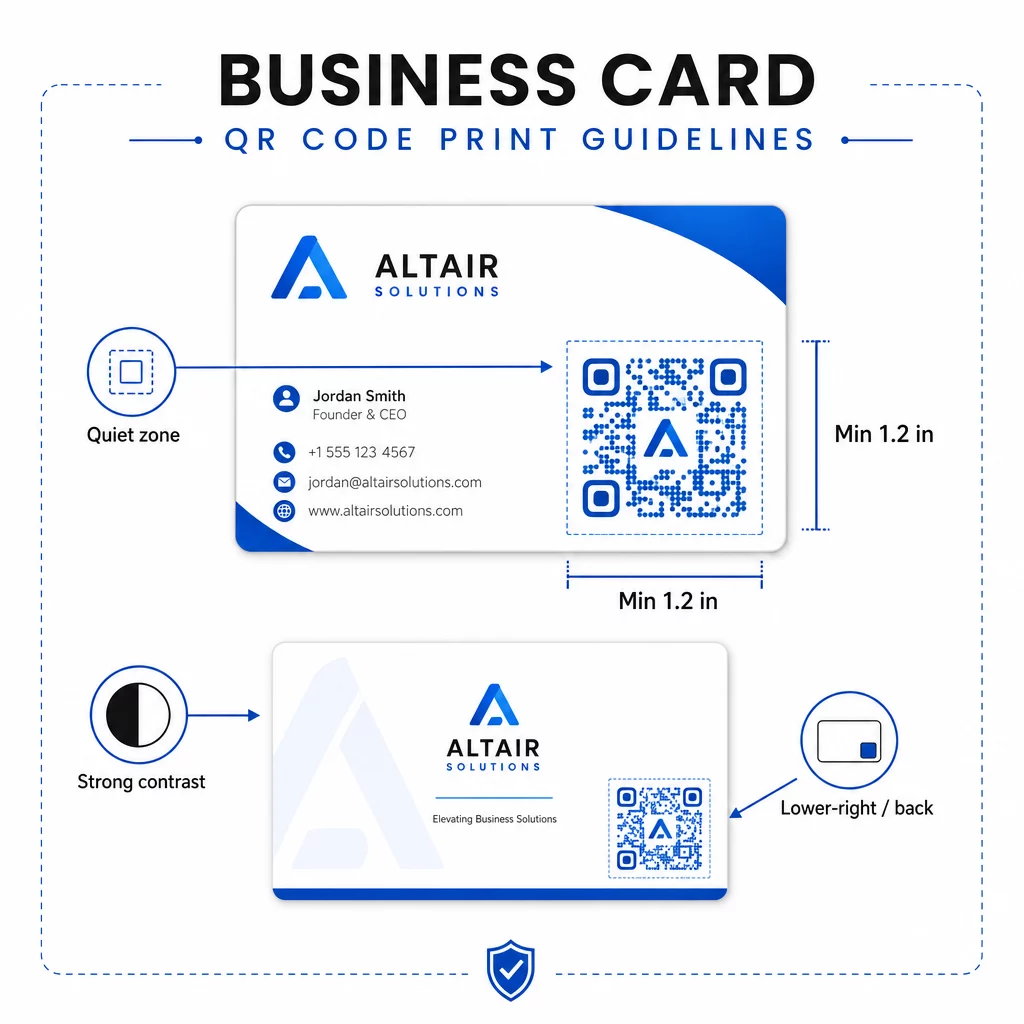
Getting the physical dimensions right is essential for reliable scanning. Pageloot’s guidelines for business card QR codes recommend:

Name card QR guidelines
  • 최소 크기: 0.8 × 0.8 inches (2 × 2 cm) for simple data like a URL or short vCard
  • Recommended size for detailed vCards: at least 1.2 × 1.2 inches (3 × 3 cm) to keep individual modules large enough to scan cleanly
  • 콰이어트 존: leave at least 0.25 inches of clear white space around all four sides of the code – this empty border helps scanning apps locate the pattern’s edges
  • 대비: aim for a minimum 4:1 contrast ratio between the code and its background; avoid light-on-dark (inverted) designs, which many older scanner apps fail to read
  • Print resolution: export at 300–600 DPI for offset or digital printing

Most professionals place the QR code on the back of the card to keep the front design uncluttered, or in the lower-right corner of the front for immediate visibility. The code should occupy roughly 20% of the card area – prominent enough to notice without overwhelming your name and title.

For a deeper look at sizing across different print materials, see the full QR code size guidelines for business cards and the guide to QR 코드가 있는 명함 디자인.

Tracking performance with dynamic name card QR codes

Static QR codes work fine if your contact details never change and you do not need usage data. Dynamic codes add two critical capabilities:

  • Editable destination – Update your vCard, URL, or linked page at any time through Pageloot’s dashboard. The printed code stays the same; only the destination changes.
  • 스캔 분석 – View scan counts, timestamps, geographic locations, and device types in real time, giving you measurable insight into how effectively your networking materials are performing.

If you attend conferences, trade shows, or industry events regularly, dynamic codes let you understand which events generate the most follow-through and adjust your distribution accordingly. Sign up for a 14-day free trial to access dynamic codes and the analytics dashboard – no credit card required.

For more context on using dynamic QR codes and tracking campaigns, see the vCard QR 코드 최종 가이드 and the guide on 다양한 인쇄 재료에 대한 QR 코드 크기 조정.

자주 묻는 질문

What information can I include in a name card QR code?

You can include your full vCard details – name, job title, company, phone number, email address, website, and social media links. You can also link directly to a LinkedIn profile, a portfolio page, or a prefilled email. The vCard format is the most versatile option because modern smartphones read it natively and prompt users to save the contact in one tap.

Can I update the QR code after my cards are already printed?

Yes, if you use a dynamic QR code. Dynamic codes use a redirect, so you can change the linked contact information or destination URL at any time through the Pageloot dashboard without touching the printed code. Static codes store the data permanently in the pattern and cannot be edited after creation.

What size should a QR code be on a name card?

For simple data like a URL, a minimum of 0.8 × 0.8 inches (2 × 2 cm) is sufficient. For a detailed vCard with multiple fields, use at least 1.2 × 1.2 inches (3 × 3 cm) to keep the modules large enough to scan reliably. Always leave a clear white border of at least 0.25 inches around the code, and test it on multiple devices before printing your full run.

작성자 정보

시임 코스타비는 페이지루트의 콘텐츠 책임자입니다. 그는 페이지루트의 혁신적인 QR 코드 생성 서비스에 대한 글을 쓰고 있습니다. 5년 이상 QR 코드 분야에서 쌓아온 깊이 있는 전문 지식을 바탕으로, 시임은 이 분야의 전문가로 인정받고 있습니다. 그는 QR 기술을 활용하여 디지털 상호작용을 간소화하고 향상시키는 데 크게 기여하고 있습니다.

범주
에 대해 자세히 알아보기
QR 코드 마케팅
QR 코드 마케팅 가능성

온라인으로 QR 코드를 생성해야하는 경우 QR 코드 만들기 무료로 여기!
Pageloot는 #1 Go-To 솔루션 QR 코드를 만들고 스캔합니다.

HT-56

블로그 세대

20,000개 이상의 브랜드로부터 신뢰를 받아 더 많은 매출, 리뷰, 팔로워를 확보했습니다.

클라이언트 로고
최고 브랜드의 신뢰
5 중 4.8 평가

4.86 / 5 별점

휴고 로랑
휴고 로랑
레스토랑 주인
가장 쉽고 안정적인 QR 코드 생성기. PDF 파일을 즉시 업로드할 수 있습니다. 이제 레스토랑 메뉴가 디지털화되었습니다.
루카스 얀센
루카스 얀센
부동산 개발사
이것은 훌륭한 도구이며 QR 코드를 사용하면 원하는 곳으로 이동할 수 있습니다. 우리는 위치 QR 코드만 사용하지만 유용한 기능이 너무 많습니다.
엠마 모레티
엠마 모레티
소매 제품
사용하기 쉽고 빠릅니다. 그것은 훌륭하게 작동하고 완벽한 이미지를 생성하므로 직원들이 내 vCard를 다운로드할 수 있습니다.
휴고 로랑
휴고 로랑
레스토랑 주인
가장 쉽고 안정적인 QR 코드 생성기. PDF 파일을 즉시 업로드할 수 있습니다. 이제 레스토랑 메뉴가 디지털화되었습니다.
루카스 얀센
루카스 얀센
부동산 개발사
이것은 훌륭한 도구이며 QR 코드를 사용하면 원하는 곳으로 이동할 수 있습니다. 우리는 위치 QR 코드만 사용하지만 유용한 기능이 너무 많습니다.
엠마 모레티
엠마 모레티
소매 제품
사용하기 쉽고 빠릅니다. 그것은 훌륭하게 작동하고 완벽한 이미지를 생성하므로 직원들이 내 vCard를 다운로드할 수 있습니다.
더 많은 QR 코드보기
휴대폰 로그인 QR 스캔
QR 코드 만들기 Gmail
무엇이든 디지털 경험으로 전환하세요 3분 이내에.

14일 무료 체험.

신용카드는 필요 없습니다.

첫 구매 시 30% 할인

코드를 사용하세요:

MP3 파일 공유

PDF QR 코드를 생성하려면 가입하세요

필요한 모든 것을 업로드하고 표시합니다.

  • 오디오 파일
  • 팟캐스트
  • 음악

가입 시 14일 무료 체험.
체험 기간 후 QR 코드 만료.

오디오 mp3 QR 코드를 생성하려면 가입하세요

프레임으로 더 많은 스캔 확보

QR 코드에 더 많은 프레임을 추가하려면 가입하세요

클릭 유도 문안 프레임은 고객이 QR 코드와 쉽게 상호 작용할 수 있도록 도와줍니다. 사용해 보세요!

가입 시 14일 무료 체험.
체험 기간 후 QR 코드 만료.

QR 코드에 더 많은 프레임을 추가하려면 가입하세요

도형으로 더 많은 스타일 추가

더 많은 도형을 만들려면 가입하세요

QR 코드는 정사각형일 필요가 없습니다. 브랜드 이미지에 맞게 전환해 보세요.

가입 시 14일 무료 체험.
체험 기간 후 QR 코드 만료.

더 많은 도형을 만들려면 가입하세요

QR 코드에 로고 추가

QR 코드에 로고를 추가하려면 가입하세요

로고와 브랜드를 추가하여 QR 코드를 돋보이게 만드세요.

가입 시 14일 무료 체험.
체험 기간 후 QR 코드 만료.

QR 코드에 로고를 추가하려면 가입하세요

스마트 앱 스토어 리디렉션

앱 스토어 QR 코드를 생성하려면 가입하세요

스마트 앱 스토어 QR 코드에 앱 링크를 추가하세요. 사용자는 장치에 따라 리디렉션됩니다.

가입 시 14일 무료 체험.
체험 기간 후 QR 코드 만료.

앱 스토어 QR 코드를 생성하려면 가입하세요

QR 코드에 이미지 업로드

이미지 QR 코드를 생성하려면 가입하세요

이미지를 쉽게 공유하세요. 몇 초 안에 동적으로 이미지를 변경하십시오.

가입 시 14일 무료 체험.
체험 기간 후 QR 코드 만료.

이미지 QR 코드를 생성하려면 가입하세요

PDF 파일 공유

PDF QR 코드를 생성하려면 가입하세요

필요한 모든 것을 업로드하고 표시합니다.

  • 메뉴 및 가격표
  • 명령
  • 모든 문서

가입 시 14일 무료 체험.
체험 기간 후 QR 코드 만료.

PDF QR 코드를 생성하려면 가입하세요

인쇄 없이 나중에 편집

다시 인쇄하지 않고 QR 코드를 편집하려면 가입하세요

동적 QR 코드를 사용하면 새 QR 코드를 인쇄하지 않고도 QR 코드의 내용을 변경할 수 있습니다.

가입 시 14일 무료 체험.
체험 기간 후 QR 코드 만료.

다시 인쇄하지 않고 QR 코드를 편집하려면 가입하세요

언제? 어디서? QR 코드 스캔 추적

QR 코드를 추적하려면 가입하세요

어떤 QR 코드가 가장 많이 스캔되고 무엇이 고객을 가장 흥분시키는지 알아보십시오.

가입 시 14일 무료 체험.
체험 기간 후 QR 코드 만료.

QR 코드를 추적하려면 가입하세요

인쇄 준비 파일 제공

PDF 및 SVG와 같은 벡터 QR 코드를 생성하려면 가입하세요.

.EPS, .PDF, .SVG

HD 해상도로 QR 코드를 다운로드하고 싶으신가요? 인쇄할 준비가 된 벡터 또는 픽셀 형식을 가져옵니다.

가입 시 14일 무료 체험.
체험 기간 후 QR 코드 만료.

PDF 및 SVG와 같은 벡터 QR 코드를 생성하려면 가입하세요.

기다리세요. 귀하의 QR 코드는 로드 중... 로드 중...

나만의 것으로 만들기

나중을 위해 QR 코드를 저장하려면 가입하세요.

다양한 색상, 로고 및 클릭 유도문안 프레임으로 멋진 QR 코드를 만들어 더 많은 스캔을 받으세요.

가입 시 14일 무료 체험.
체험 기간 후 QR 코드 만료.

나중을 위해 QR 코드를 저장하려면 가입하세요.