ホーム > ガイド > Create a Name Card with a QR Code Generator
QR name card scan

Create a Name Card with a QR Code Generator

Generate a name card QR code to share contact details instantly. Create branded vCards, track scans, and update your details anytime without reprinting cards.
Updated on 6月 10, 2026
目次

Want to share your contact details the moment you meet someone new? Traditional paper cards get lost, thrown away, or manually typed in wrong. A name card QR code solves all of that – one scan instantly saves your full contact profile to any smartphone.

What is a name card QR code?

A name card QR code is a scannable code printed or displayed on your business card that encodes your contact details in vCard (VCF) format. When someone points their smartphone camera at it, the device reads the pattern and immediately prompts them to save your name, job title, company, phone number, email address, website, and social links directly to their contacts – no typing required.

The two main types are 静的 そして 動的. Static codes store the data permanently inside the pattern. Dynamic codes use a redirect link, which means you can update your contact information at any time without reprinting your cards – a significant advantage if your phone number or title changes.

Create a vCard QR Code for Your Name Card Enter your contact details, customize the design to match your brand, and download a print-ready file in minutes with the vCardのQRコードジェネレータ.

Why add a QR code to your name card?

Physical business cards still carry weight – surveys suggest that 78% of professionals still use them and more than half hand them out weekly. But nearly 88% of paper cards are discarded within a week. Adding a QR code gives recipients an instant, frictionless way to save your details digitally, reducing the chance your information ends up in the bin.

Here are the core advantages:

  • Instant contact saving – Recipients scan once and your full vCard is ready to save, eliminating manual data entry and transcription errors.
  • Dynamic updates – Change your phone number, title, or company without ordering a new print run; the QR code always points to your current details.
  • スキャン分析 – Track how many times your code was scanned, when, and from which locations through a built-in performance dashboard.
  • Customizable design – Match the QR code’s colors, shape, and logo to your personal or company brand so it feels like a natural part of the card design.
  • Eco-friendly networking – Fewer reprints and less wasted card stock when your information evolves.
  • Links beyond contact details – Connect recipients directly to your LinkedIn profile, portfolio, email, or any URL with a single scan.

What you can encode on a name card QR code

Your QR code does not have to be limited to a phone number and email. Depending on your goals, you can encode:

  • ブイカード with your full contact profile (name, title, company, phone, email, website, social links)
  • A direct link to your LinkedIn profile for professional networking
  • URL pointing to your portfolio, landing page, or booking calendar
  • prefilled 電子メール so recipients can message you immediately after scanning
  • business card page that displays your full digital profile on a mobile-friendly landing page

Choosing the right type depends on your networking context. For most professionals, a vCard QR code is the strongest default because it works natively with every modern smartphone camera – iOS 11 and later and most Android devices parse the VCF file automatically and prompt the user to add the contact.

How to create a name card QR code with Pageloot

The process takes only a few minutes:

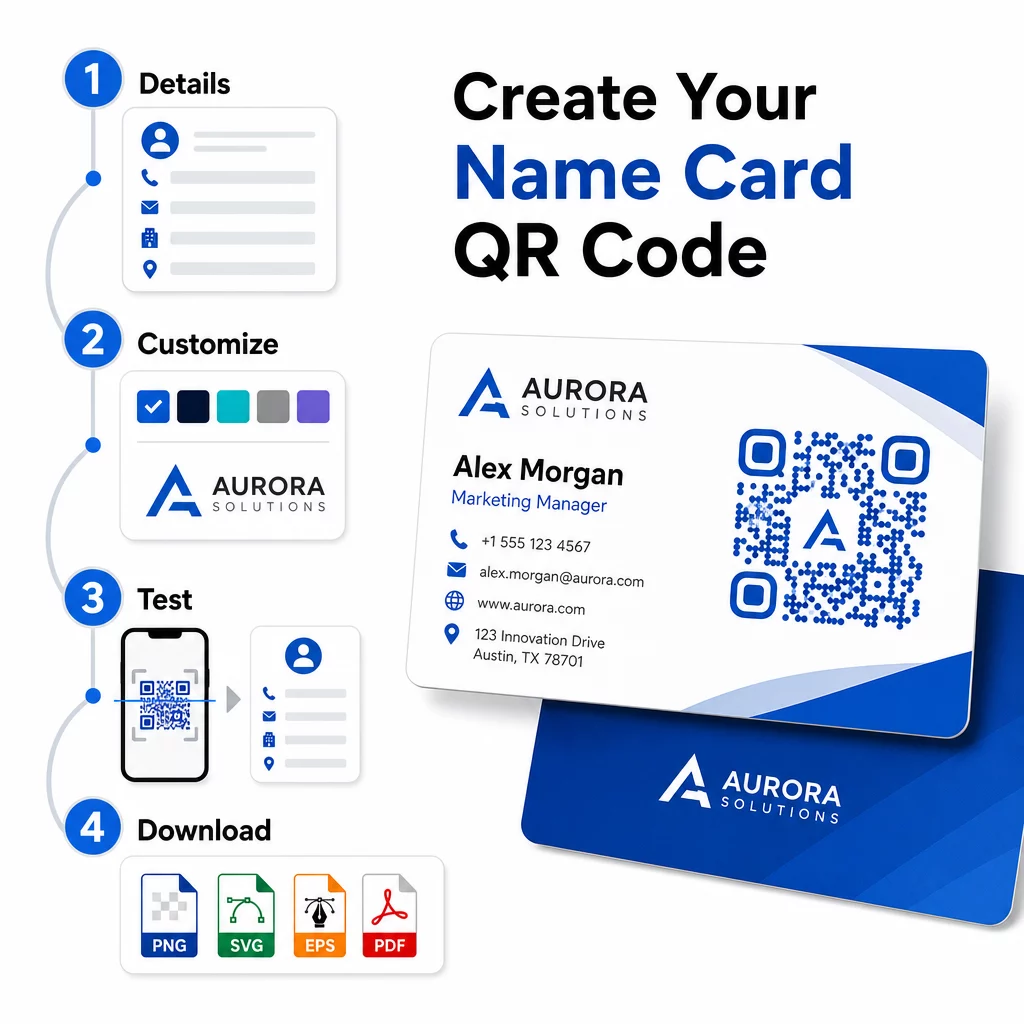
  • Enter your details – Open the vCardのQRコードジェネレータ and fill in your name, job title, company, phone number, email address, and website. At minimum you need a name and one contact method.
  • デザインをカスタマイズする – Choose colors that match your brand, select a body style and edge shape, and upload your logo to place in the center of the code. The ロゴ付きQRコードジェネレーター makes branded codes more visually distinctive and can increase scan rates.
  • Generate and test – Pageloot produces the code instantly. Scan it yourself on multiple devices before finalizing any print files to confirm it resolves correctly.
  • Download a print-ready file – Export in PNG, SVG, EPS, or PDF. For business card printing, vector formats (SVG or EPS) are recommended because they scale without quality loss. You can also download a transparent PNG to overlay on complex card backgrounds.
QR code creation steps

Want a fully branded name card QR code? Add your logo, pick brand colors, and export a print-ready file using the QRコードジェネレーター – free to start, no credit card required.

Print size and placement guidelines

Getting the physical dimensions right is essential for reliable scanning. Pageloot’s guidelines for business card QR codes recommend:

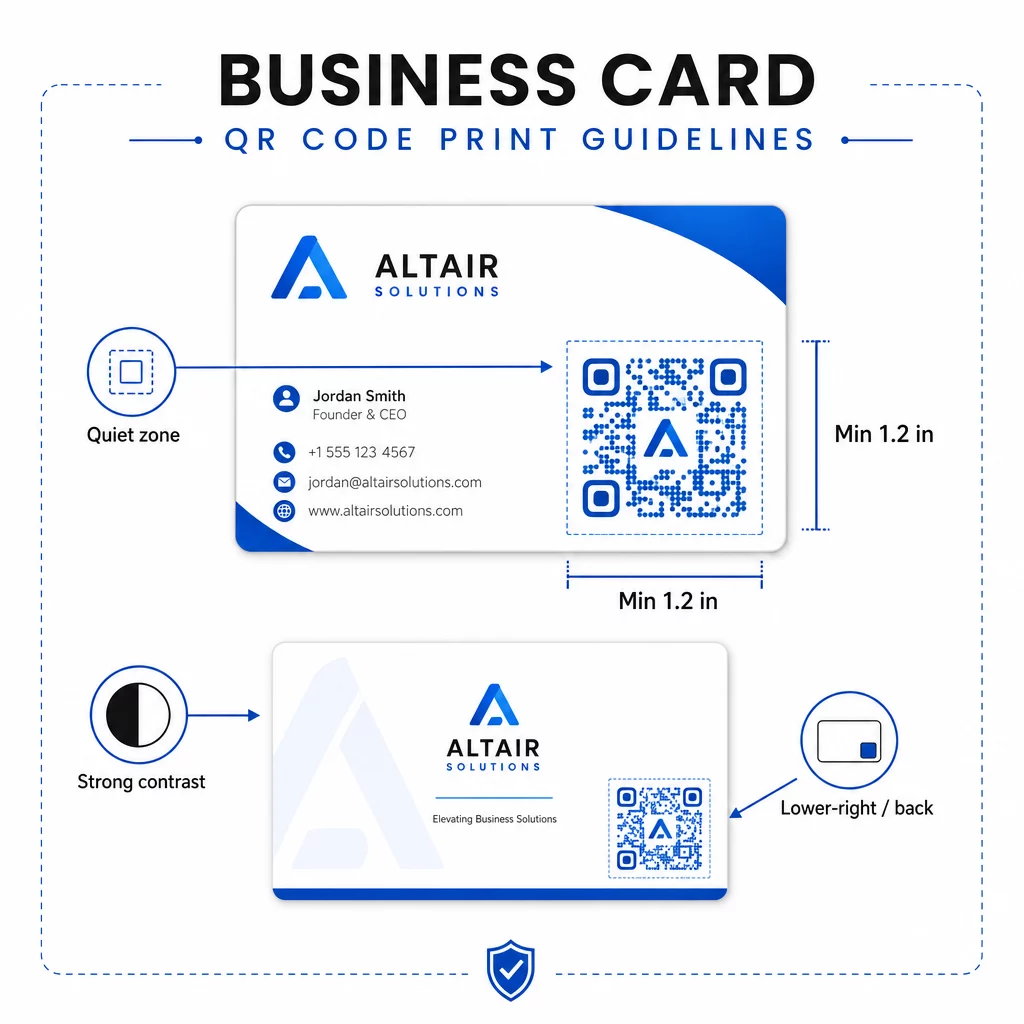
Name card QR guidelines
  • 最小サイズ: 0.8 × 0.8 inches (2 × 2 cm) for simple data like a URL or short vCard
  • Recommended size for detailed vCards: at least 1.2 × 1.2 inches (3 × 3 cm) to keep individual modules large enough to scan cleanly
  • クワイエットゾーン: leave at least 0.25 inches of clear white space around all four sides of the code – this empty border helps scanning apps locate the pattern’s edges
  • コントラスト: aim for a minimum 4:1 contrast ratio between the code and its background; avoid light-on-dark (inverted) designs, which many older scanner apps fail to read
  • Print resolution: export at 300–600 DPI for offset or digital printing

Most professionals place the QR code on the back of the card to keep the front design uncluttered, or in the lower-right corner of the front for immediate visibility. The code should occupy roughly 20% of the card area – prominent enough to notice without overwhelming your name and title.

For a deeper look at sizing across different print materials, see the full QR code size guidelines for business cards and the guide to QRコード付き名刺のデザイン.

Tracking performance with dynamic name card QR codes

Static QR codes work fine if your contact details never change and you do not need usage data. Dynamic codes add two critical capabilities:

  • Editable destination – Update your vCard, URL, or linked page at any time through Pageloot’s dashboard. The printed code stays the same; only the destination changes.
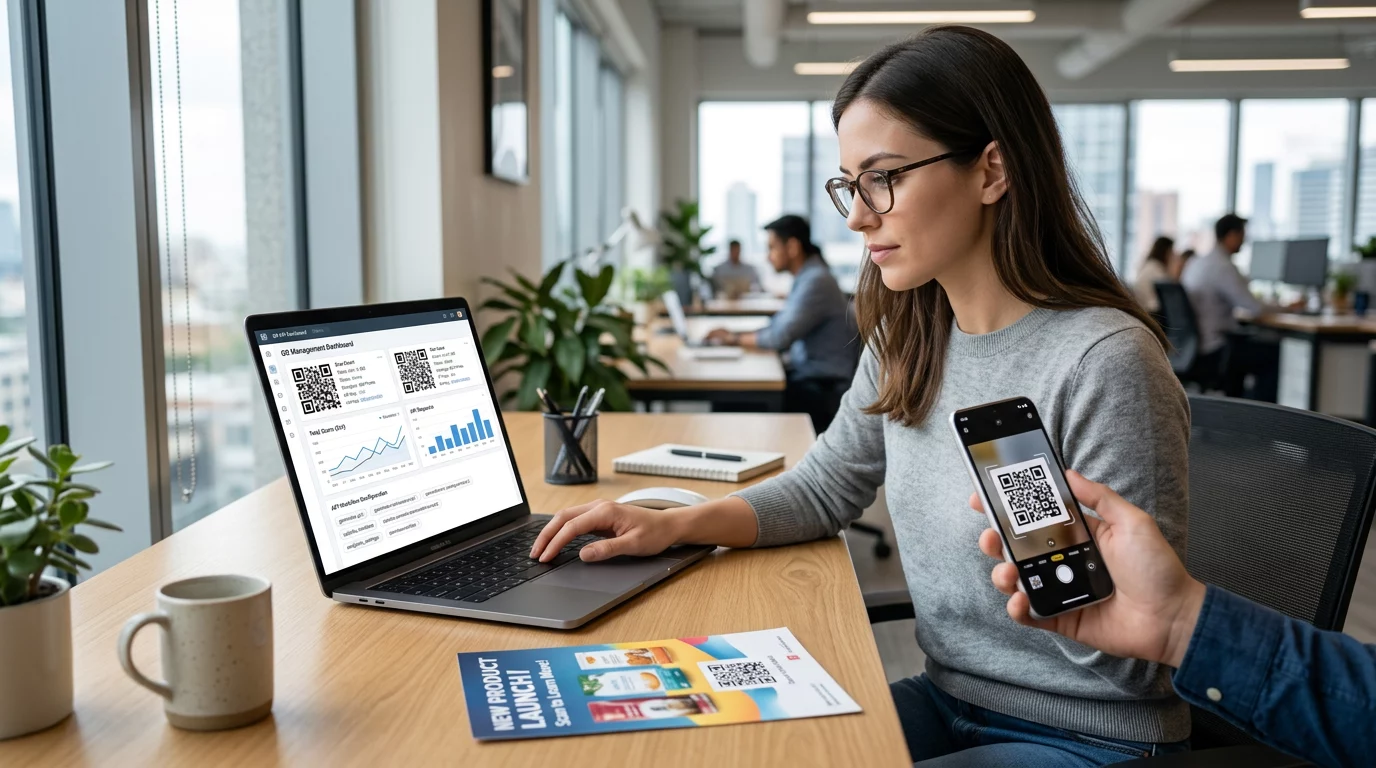
  • スキャン分析 – View scan counts, timestamps, geographic locations, and device types in real time, giving you measurable insight into how effectively your networking materials are performing.

If you attend conferences, trade shows, or industry events regularly, dynamic codes let you understand which events generate the most follow-through and adjust your distribution accordingly. Sign up for a 14-day free trial to access dynamic codes and the analytics dashboard – no credit card required.

For more context on using dynamic QR codes and tracking campaigns, see the vCard QRコードの究極ガイド and the guide on 異なる印刷素材におけるQRコードのサイズ設定.

よくある質問

What information can I include in a name card QR code?

You can include your full vCard details – name, job title, company, phone number, email address, website, and social media links. You can also link directly to a LinkedIn profile, a portfolio page, or a prefilled email. The vCard format is the most versatile option because modern smartphones read it natively and prompt users to save the contact in one tap.

Can I update the QR code after my cards are already printed?

Yes, if you use a dynamic QR code. Dynamic codes use a redirect, so you can change the linked contact information or destination URL at any time through the Pageloot dashboard without touching the printed code. Static codes store the data permanently in the pattern and cannot be edited after creation.

What size should a QR code be on a name card?

For simple data like a URL, a minimum of 0.8 × 0.8 inches (2 × 2 cm) is sufficient. For a detailed vCard with multiple fields, use at least 1.2 × 1.2 inches (3 × 3 cm) to keep the modules large enough to scan reliably. Always leave a clear white border of at least 0.25 inches around the code, and test it on multiple devices before printing your full run.

著者について

Siim KostabiはPagelootのコンテンツリードです。Pagelootの革新的なQRコード生成サービスについて執筆しています。5年以上にわたるQRコードに関する深い専門知識を持つSiimは、この分野の専門家です。QRテクノロジーを活用してデジタルインタラクションを簡素化・拡張する上で、大きな進歩を遂げています。.

カテゴリー
について詳しくはこちら
✅ QRコードの#1ソリューション

オンラインでQRコードを作成する必要がある場合は QRコードを作る ここで無料で
ページルートは #1のGo-Toソリューション でQRコードを作成してスキャンすることができます。

HT-56

ブログジェネ

売上、レビュー、フォロワーを増やすために 20,000 を超えるブランドから信頼されています。

クライアントのロゴ
トップブランドから信頼される
5 のうち 4.8 と評価しました

4.86 / 5つ星評価

ユーゴ・ローラン
ユーゴ・ローラン
レストランオーナー
最も簡単で信頼性の高いQRコードジェネレータです。PDFファイルを即座にアップロードできます。レストランのメニューがデジタル化されました。
ルーカス・ジャンセン
ルーカス・ジャンセン
不動産開発業者
これは優れたツールで、QRコードでちょうど欲しいところに連れて行ってくれます。私たちは位置情報のQRコードしか使っていませんが、とても便利な機能がたくさんあります。
エマ・モレッティ
エマ・モレッティ
小売製品
使いやすいし、早い。素晴らしい機能で、完璧な画像を作成してくれるので、社員は私のvCardをダウンロードすることができます。
ユーゴ・ローラン
ユーゴ・ローラン
レストランオーナー
最も簡単で信頼性の高いQRコードジェネレータです。PDFファイルを即座にアップロードできます。レストランのメニューがデジタル化されました。
ルーカス・ジャンセン
ルーカス・ジャンセン
不動産開発業者
これは優れたツールで、QRコードでちょうど欲しいところに連れて行ってくれます。私たちは位置情報のQRコードしか使っていませんが、とても便利な機能がたくさんあります。
エマ・モレッティ
エマ・モレッティ
小売製品
使いやすいし、早い。素晴らしい機能で、完璧な画像を作成してくれるので、社員は私のvCardをダウンロードすることができます。
QRコードをもっと見る
QRマーケティングチラシのスキャン
QRコード Wix
Wedding QR code
のQRコード ウェディング
あらゆるものをデジタル体験に変えよう 3分以内に。

14日間の無料トライアル。

クレジットカードは必要ありません。

初回購入で30%オフ

次のコードを使用してください:

MP3ファイルを共有

PDF QRコードを作成するにはサインアップしてください

必要なものをすべてアップロードして表示する。

  • オーディオファイル
  • ポッドキャスト
  • 音楽

サインアップで14日間無料トライアル。.
トライアル終了後、QRコードは期限切れになります。.

オーディオmp3 QRコードを作成するにはサインアップしてください

フレームでより多くのスキャンを獲得

QRコードにフレームを追加するにはサインアップしてください

コールトゥアクションフレームは、お客様が簡単にQRコードと対話できるようにします。ぜひお試しください。

サインアップで14日間無料トライアル。.
トライアル終了後、QRコードは期限切れになります。.

QRコードにフレームを追加するにはサインアップしてください

シェイプでスタイルを追加

より多くの図形を作成するにはサインアップしてください

QRコードは四角いものである必要はありません。あなたのブランドのイメージに合わせて変えてみてください。

サインアップで14日間無料トライアル。.
トライアル終了後、QRコードは期限切れになります。.

より多くの図形を作成するにはサインアップしてください

QRコードにロゴを追加

QRコードにロゴを追加するにはサインアップしてください

QRコードにロゴやブランドを入れることで、目立たせることができます。

サインアップで14日間無料トライアル。.
トライアル終了後、QRコードは期限切れになります。.

QRコードにロゴを追加するにはサインアップしてください

スマートなApp Storeリダイレクト

アプリストアのQRコードを作成するにはサインアップしてください

スマートなApp StoreのQRコードに、あなたのアプリのリンクを追加します。ユーザーは、デバイスに応じてリダイレクトされます。

サインアップで14日間無料トライアル。.
トライアル終了後、QRコードは期限切れになります。.

アプリストアのQRコードを作成するにはサインアップしてください

QRコードに画像をアップロード

画像QRコードを作成するにはサインアップしてください

画像を簡単に共有できます。どんな画像も、数秒でダイナミックに変化します。

サインアップで14日間無料トライアル。.
トライアル終了後、QRコードは期限切れになります。.

画像QRコードを作成するにはサインアップしてください

PDFファイルを共有

PDF QRコードを作成するにはサインアップしてください

必要なものをすべてアップロードして表示する。

  • メニュー&プライスリスト
  • 指示
  • 任意の書類

サインアップで14日間無料トライアル。.
トライアル終了後、QRコードは期限切れになります。.

PDF QRコードを作成するにはサインアップしてください

印刷せずに後で編集

再度印刷せずにQRコードを編集するにはサインアップしてください

ダイナミックQRコードは、新たにQRコードを印刷することなく、QRコードの内容を変更することができます。

サインアップで14日間無料トライアル。.
トライアル終了後、QRコードは期限切れになります。.

再度印刷せずにQRコードを編集するにはサインアップしてください

いつ?どこで?QRコードのスキャンを追跡

QRコードを追跡するにはサインアップしてください

どのQRコードが最も多くスキャンされ、何が最も顧客を喜ばせているのかを知ることができます。

サインアップで14日間無料トライアル。.
トライアル終了後、QRコードは期限切れになります。.

QRコードを追跡するにはサインアップしてください

印刷可能なファイルが利用可能

PDFやSVGのようなベクターQRコードを作成するにはサインアップしてください

.eps、.pdf、.svg

QRコードをHD解像度でダウンロードしたいですか?すぐに印刷できるベクターまたはピクセル形式を入手しましょう。

サインアップで14日間無料トライアル。.
トライアル終了後、QRコードは期限切れになります。.

PDFやSVGのようなベクターQRコードを作成するにはサインアップしてください

しばらくお待ちください。あなたのQRコードは ロード... ロード...

あなただけのものに

サインアップしてQRコードを後で保存してください

異なる色、ロゴ、コールトゥアクションフレームで素晴らしいQRコードを作成することで、より多くのスキャンを得ることができます。

サインアップで14日間無料トライアル。.
トライアル終了後、QRコードは期限切れになります。.

サインアップしてQRコードを後で保存してください