Vai vēlaties dalīties ar saviem kontaktiem brīdī, kad satiekat kādu jaunu? Tradicionālās papīra kartītes pazūd, tiek izmestas vai manuāli ievadītas nepareizi. Vārda kartītes QR kods atrisina visu to – viena skenēšana uzreiz saglabā jūsu pilnu kontakta profilu jebkurā viedtālrunī.
Kas ir vārda kartītes QR kods?
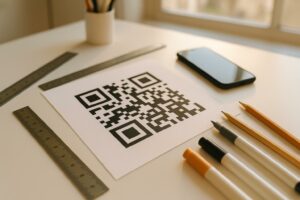
Vārda kartītes QR kods ir skenējams kods, kas drukāts vai attēlots uz jūsu vizītkartes un kodē jūsu kontaktinformāciju vCard (VCF) formātā. Kad kāds pavērš savu viedtālruņa kameru pret to, ierīce nolasa modeli un nekavējoties piedāvā saglabāt jūsu vārdu, amatu, uzņēmumu, tālruņa numuru, e-pasta adresi, vietni un sociālo tīklu saites tieši viņu kontaktos – nav nepieciešama rakstīšana.
Divi galvenie veidi ir statiskie un Dinamisks. Statiskie kodi saglabā datus pastāvīgi modeļa iekšpusē. Dinamiskie kodi izmanto pāradresācijas saiti, kas nozīmē, ka jūs varat atjaunināt savu kontaktinformāciju jebkurā laikā, nepārprintējot savas kartītes – ievērojama priekšrocība, ja mainās jūsu tālruņa numurs vai amats.
Izveidojiet vCard QR kodu savai vārda kartītei Ievadiet savus kontaktus, pielāgojiet dizainu, lai tas atbilstu jūsu zīmolam, un lejupielādējiet drukāšanai gatavu failu dažu minūšu laikā ar vCard QR koda ģenerators.
Kāpēc pievienot QR kodu savai vārda kartītei?
Fiziskajām vizītkartēm joprojām ir nozīme – aptaujas liecina, ka 78% profesionāļu tās joprojām izmanto un vairāk nekā puse tās izsniedz katru nedēļu. Taču gandrīz 88% papīra kartīšu tiek izmestas nedēļas laikā. QR koda pievienošana sniedz saņēmējiem tūlītēju, bezberzības veidu, kā digitāli saglabāt jūsu datus, samazinot iespēju, ka jūsu informācija nonāks atkritumu tvertnē.
Šeit ir galvenās priekšrocības:
- Tūlītēja kontaktu saglabāšana – Saņēmēji skenē vienreiz, un jūsu pilna vCard ir gatava saglabāšanai, novēršot manuālu datu ievadi un pārrakstīšanās kļūdas.
- Dinamiski atjauninājumi – Mainiet savu tālruņa numuru, amatu vai uzņēmumu, nepasūtot jaunu drukas partiju; QR kods vienmēr norāda uz jūsu pašreizējiem datiem.
- Skenēšanas analītika – Izsekojiet, cik reizes jūsu kods tika skenēts, kad un no kurām vietām, izmantojot iebūvētu veiktspējas informācijas paneli.
- Pielāgojams dizains – Saskaņojiet QR koda krāsas, formu un logotipu ar savu personīgo vai uzņēmuma zīmolu, lai tas izskatītos kā dabiska kartītes dizaina sastāvdaļa.
- Ekoloģiska tīklošanās – Mazāk atkārtotu druku un mazāk izšķērdēta kartona, kad jūsu informācija mainās.
- Saites ārpus kontaktinformācijas – Savienojiet saņēmējus tieši ar jūsu LinkedIn profilu, portfolio, e-pastu vai jebkuru URL ar vienu skenēšanu.
Ko varat kodēt uz vizītkartes QR koda
Jūsu QR kodam nav jāaprobežojas tikai ar tālruņa numuru un e-pastu. Atkarībā no jūsu mērķiem, varat kodēt:
- A vCard ar jūsu pilnu kontakta profilu (vārds, amats, uzņēmums, tālrunis, e-pasts, vietne, sociālās saites)
- Tieša saite uz jūsu LinkedIn profilu profesionālai tīklošanai
- A URL norādot uz jūsu portfolio, galveno lapu vai rezervācijas kalendāru
- A iepriekš aizpildīts e-pastu lai saņēmēji varētu jums nekavējoties nosūtīt ziņu pēc skenēšanas
- A vizītkartes lapa kas parāda jūsu pilnu digitālo profilu mobilajām ierīcēm draudzīgā galvenajā lapā
Pareizā veida izvēle ir atkarīga no jūsu tīklošanās konteksta. Lielākajai daļai profesionāļu vCard QR kods ir spēcīgākais noklusējuma variants, jo tas darbojas dabiski ar katru mūsdienu viedtālruņa kameru – iOS 11 un jaunākas versijas, kā arī lielākā daļa Android ierīču automātiski parsē VCF failu un aicina lietotāju pievienot kontaktu.
Kā izveidot vizītkartes QR kodu ar Pageloot
Process aizņem tikai dažas minūtes:
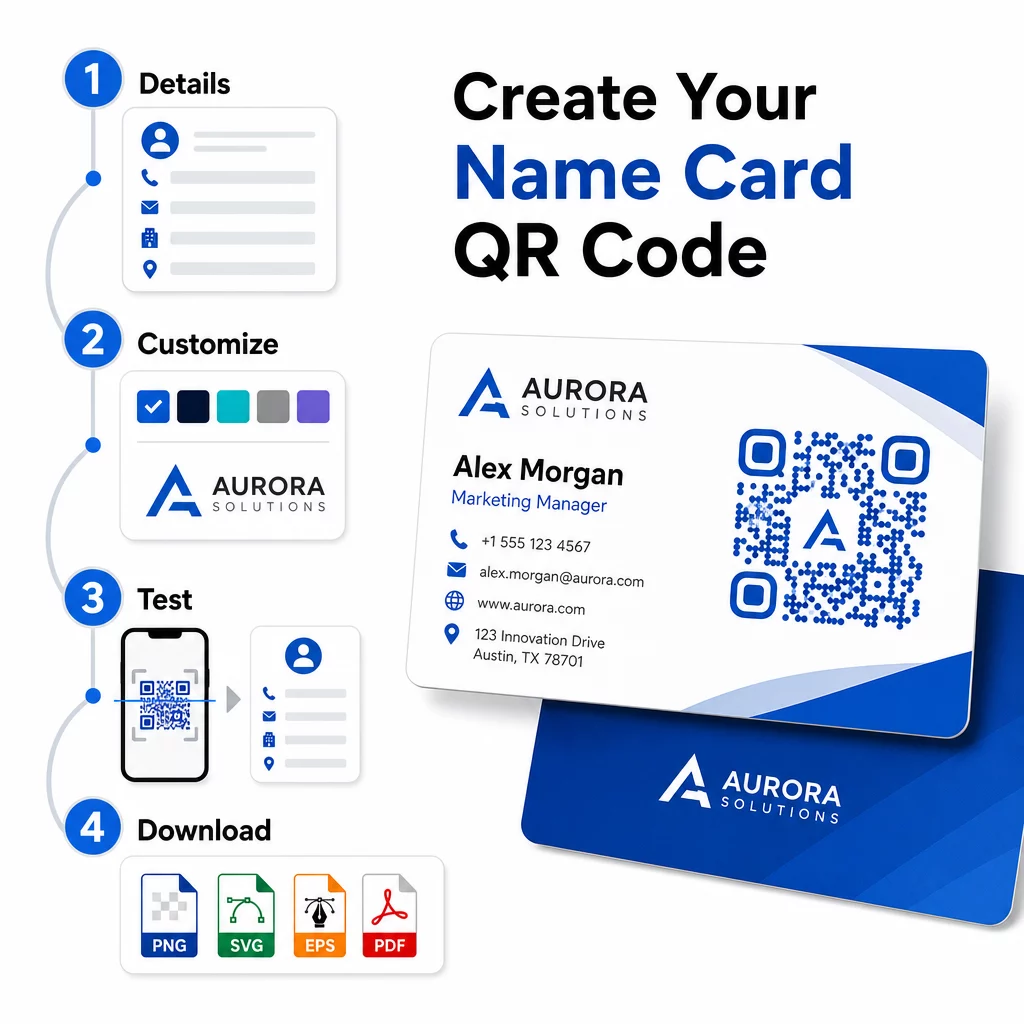
- Ievadiet savus datus – Atveriet vCard QR koda ģenerators un aizpildiet savu vārdu, amatu, uzņēmumu, tālruņa numuru, e-pasta adresi un vietni. Minimāli nepieciešams vārds un viena saziņas metode.
- Pielāgojiet dizainu – Izvēlieties krāsas, kas atbilst jūsu zīmolam, izvēlieties korpusa stilu un malu formu, un augšupielādējiet savu logotipu, lai novietotu koda centrā. Tas QR koda ģenerators ar logotipu padara zīmolotus kodus vizuāli atšķirīgākus un var palielināt skenēšanas biežumu.
- Ģenerējiet un pārbaudiet – Pageloot nekavējoties ģenerē kodu. Skenējiet to pats vairākās ierīcēs pirms drukāšanas failu pabeigšanas, lai pārliecinātos, ka tas darbojas pareizi.
- Lejupielādējiet drukai gatavu failu – Eksportējiet PNG, SVG, EPS vai PDF formātā. Vizītkaršu drukāšanai vektoru formāti (SVG vai EPS) ir ieteicami, jo tie mērogojas bez kvalitātes zudumiem. Varat arī lejupielādēt caurspīdīgu PNG lai uzklātu uz sarežģītiem karšu foniem.
Vēlaties pilnībā zīmolotu vizītkartes QR kodu? Pievienojiet savu logotipu, izvēlieties zīmola krāsas un eksportējiet drukai gatavu failu, izmantojot QR kodu ģenerators – bez maksas sākumā, nav nepieciešama kredītkarte.
Drukas izmēra un izvietojuma vadlīnijas
Pareizu fizisko izmēru nodrošināšana ir būtiska uzticamai skenēšanai. Pageloot vadlīnijas vizītkaršu QR kodiem iesaka:
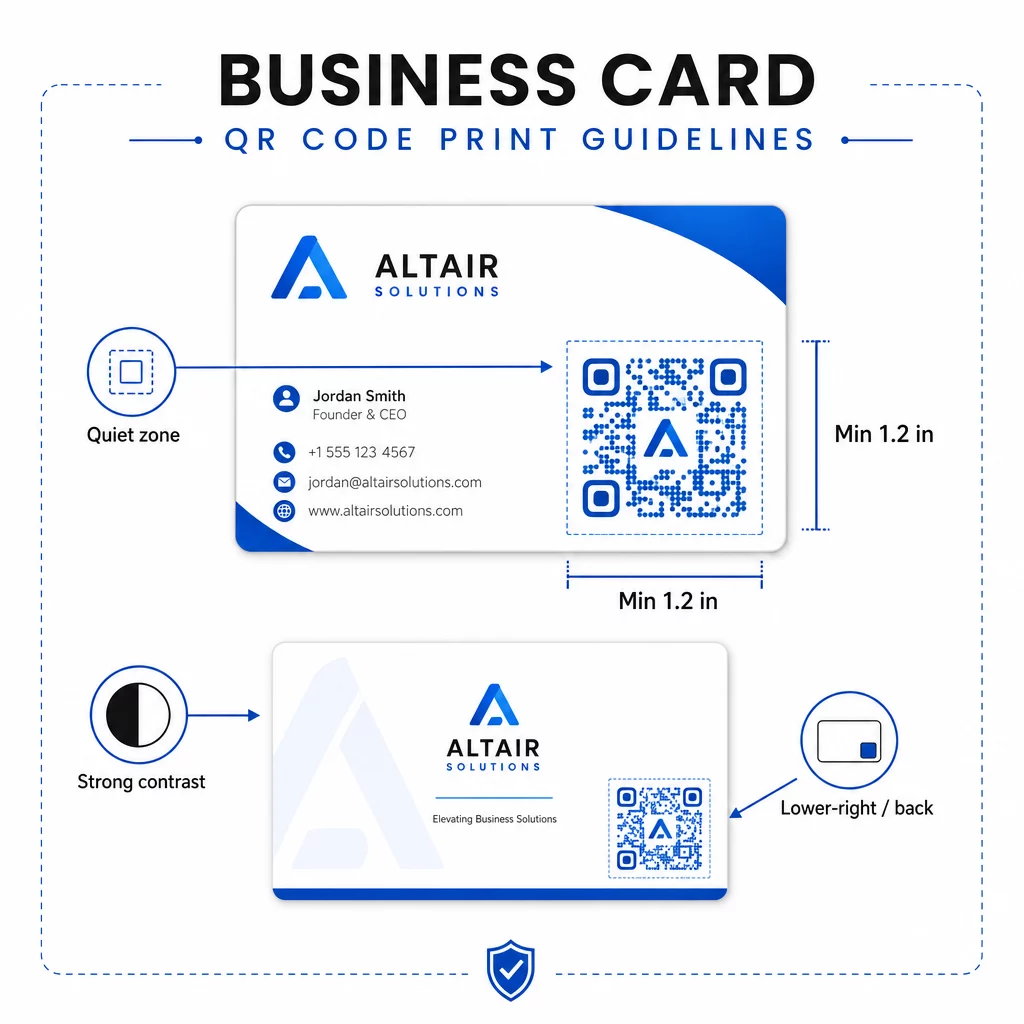
- Minimālais izmērs: 0,8 × 0,8 collas (2 × 2 cm) vienkāršiem datiem, piemēram, URL vai īsai vCard
- Ieteicamais izmērs detalizētām vCard kartēm: vismaz 1,2 × 1,2 collas (3 × 3 cm), lai atsevišķi moduļi būtu pietiekami lieli, lai tos varētu tīri skenēt
- Klusā zona: atstājiet vismaz 0,25 collas brīvas baltas vietas ap visām četrām koda pusēm – šī tukšā apmale palīdz skenēšanas lietotnēm atrast raksta malas
- Kontrasts: tiecieties uz minimālo 4:1 kontrasta attiecību starp kodu un tā fonu; izvairieties no gaišiem uz tumšiem (apgrieztiem) dizainiem, kurus daudzas vecākas skeneru lietotnes nespēj nolasīt
- Drukas izšķirtspēja: eksportējiet ar 300–600 DPI ofseta vai digitālajai drukai
Lielākā daļa profesionāļu novieto QR kodu kartes aizmugurē, lai priekšpuses dizains būtu nepārblīvēts, vai priekšpuses apakšējā labajā stūrī tūlītējai redzamībai. Kodam vajadzētu aizņemt aptuveni 20% no kartes laukuma – pietiekami pamanāmam, lai to pamanītu, nepārslogojot jūsu vārdu un amatu.
Lai iegūtu padziļinātu ieskatu par izmēriem dažādiem drukas materiāliem, skatiet pilnu QR koda izmēra vadlīnijas vizītkartēm un ceļvedi par vizītkaršu dizains ar QR kodiem.
Veiktspējas izsekošana ar dinamiskām vizītkaršu QR kodiem
Statiskie QR kodi darbojas labi, ja jūsu kontaktinformācija nekad nemainās un jums nav nepieciešami lietošanas dati. Dinamiskie kodi pievieno divas kritiskas iespējas:
- Rediģējams galamērķis – Atjauniniet savu vCard, URL vai saistīto lapu jebkurā laikā, izmantojot Pageloot informācijas paneli. Izdrukātais kods paliek nemainīgs; mainās tikai galamērķis.
- Skenēšanas analītika – Skatiet skenēšanas skaitu, laika zīmogus, ģeogrāfiskās atrašanās vietas un ierīču veidus reāllaikā, sniedzot jums izmērāmu ieskatu par to, cik efektīvi darbojas jūsu tīklošanas materiāli.
Ja regulāri apmeklējat konferences, izstādes vai nozares pasākumus, dinamiskie kodi ļauj jums saprast, kuri pasākumi rada vislielāko atsaucību un attiecīgi pielāgot savu izplatīšanu. Reģistrējieties 14 dienu bezmaksas izmēģinājumam, lai piekļūtu dinamiskajiem kodiem un analītikas informācijas panelim – kredītkarte nav nepieciešama.
Lai iegūtu plašāku informāciju par dinamisko QR kodu izmantošanu un kampaņu izsekošanu, skatiet galīgajā vCard QR kodu ceļvedī un ceļvedi par QR koda izmēri dažādiem drukas materiāliem.
Biežāk uzdotie jautājumi
Jūs varat iekļaut savu pilno vCard informāciju – vārdu, amatu, uzņēmumu, tālruņa numuru, e-pasta adresi, vietni un sociālo mediju saites. Jūs varat arī tieši saistīt ar LinkedIn profilu, portfolio lapu vai iepriekš aizpildītu e-pastu. vCard formāts ir visdaudzpusīgākā opcija, jo mūsdienu viedtālruņi to lasa dabiski un aicina lietotājus saglabāt kontaktu ar vienu pieskārienu.
Jā, ja izmantojat dinamisku QR kodu. Dinamiskie kodi izmanto pāradresāciju, lai jūs varētu mainīt saistīto kontaktinformāciju vai galamērķa URL jebkurā laikā, izmantojot Pageloot informācijas paneli, nepieskaroties izdrukātajam kodam. Statiskie kodi datus glabā pastāvīgi rakstā un tos nevar rediģēt pēc izveides.
Vienkāršiem datiem, piemēram, URL, pietiek ar minimālo izmēru 0,8 × 0,8 collas (2 × 2 cm). Detalizētai vCard ar vairākiem laukiem izmantojiet vismaz 1,2 × 1,2 collas (3 × 3 cm), lai moduļi būtu pietiekami lieli, lai tos varētu droši skenēt. Vienmēr atstājiet skaidru baltu apmali vismaz 0,25 collu platumā ap kodu un pārbaudiet to vairākās ierīcēs pirms pilnas tirāžas drukāšanas.