Kā jūs zināt, vai jūsu uz atrašanās vietu balstītā QR kampaņa patiešām darbojas? Bez pareizajiem rādītājiem jūs tērējat naudu drukātiem materiāliem, nespējot pierādīt to ietekmi. Šis ceļvedis izskaidro septiņus rādītājus, kas sniedz skaidru, uz datiem balstītu priekšstatu par kampaņas veiktspēju – no pirmās skenēšanas līdz galīgajai konversijai.
Kas padara uz atrašanās vietu balstītas QR kampaņas izmērāmas
Uz atrašanās vietu balstītas QR kodu kampaņas savieno bezsaistes izvietojumus – plakātus, iepakojumus, veikalu displejus, pasākumu materiālus – ar digitālajām pieredzēm. Atšķirībā no vietnes datplūsmas, šīs mijiedarbības sākas fiziskajā pasaulē, kas rada atribūcijas izaicinājumu: kā jūs sasaistāt skenēšanu Ostinā ar pirkumu jūsu e-komercijas platformā?
Atbilde ir dinamiskie QR kodi. Atšķirībā no statiskajiem kodiem, dinamiskie QR kodi novirza skenējumus caur novirzīšanas serveri, kas reģistrē datus pirms lietotāja nosūtīšanas uz galamērķi. Šis starpposms padara izsekošanu iespējamu. Jūs varat fiksēt, kad, kur un kā notika skenēšana – un atjaunināt galamērķa URL, nepārprintējot nevienu materiālu.
QR koda izsekošana darbojas, katram kodam piešķirot unikālu novirzīšanas saiti, kas saistīta ar jūsu kampaņu. Katra skenēšana ģenerē datu notikumu, ko reģistrē jūsu analītikas platforma. Savienojiet to ar UTM parametriem, kas iegulti galamērķa URL, un jūs varat tieši pārsūtīt skenēšanas datus uz Google Analytics 4, jūsu CRM vai mārketinga automatizācijas rīku.
Ar šo pamatu, lūk, septiņi rādītāji, ko ir vērts izsekot.
1. Kopējais skenējumu skaits
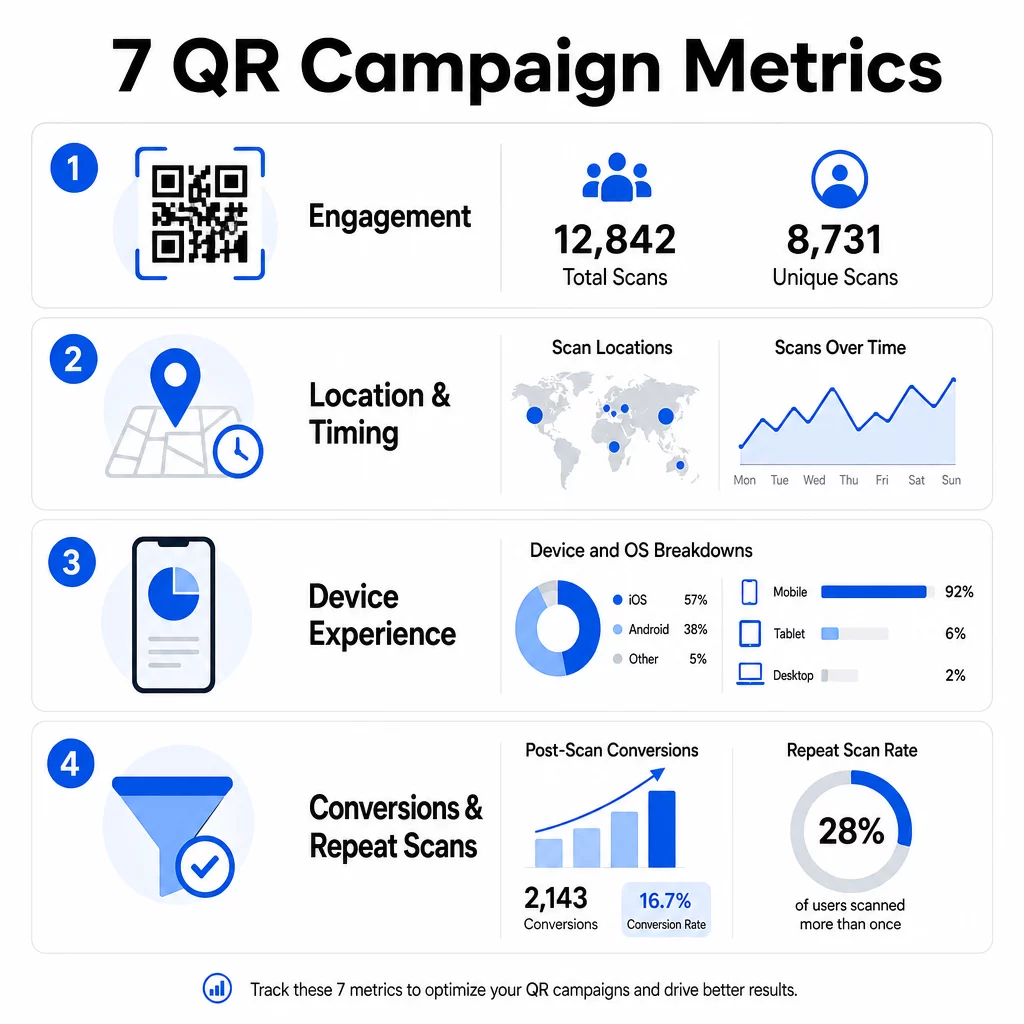
Kopējais skenējumu skaits ietver katru mijiedarbību ar jūsu QR kodu, ieskaitot vairākas skenēšanas no vienas un tās pašas personas. Tas ir jūsu pamata iesaistes rādītājs – tas parāda, vai jūsu izvietojums ir pietiekami redzams un pārliecinošs, lai mudinātu uz darbību.
Skenēšanas rādītāji ievērojami atšķiras atkarībā no konteksta:
- Drukātās reklāmās skenēšanas rādītāji parasti ir 1–3%
- Produktu iepakojums parasti sasniedz 2–5%
- Veikalu displeji bieži ģenerē 5–10%
- Pasākumu materiāli var sasniegt 10–20%
Kopējā skenējumu skaita pieaugums pēc kampaņas uzsākšanas ir pozitīvs signāls, taču ir vērts atzīmēt, ka 70% no visiem skenējumiem parasti notiek pirmo 30 dienu laikā. Spēcīga ieviešana ir svarīga. Skaidrs aicinājums uz darbību, piemēram, “Skenējiet, lai saņemtu 10% atlaidi”, rada ievērojami vairāk agrīnu skenējumu nekā kods, kas novietots bez konteksta.
Izvietošanai novietojiet QR kodus acu līmenī – aptuveni 4 līdz 5 pēdu augstumā – un pārliecinieties, ka tie ir vismaz 1 collu lieli, lai nodrošinātu uzticamu skenēšanu. Kopējais skenējumu skaits sniedz jums sasniedzamību; zemāk esošie rādītāji jums pateiks, ko ar to darīt.
Sekojiet savām QR kampaņām reāllaikā Skatiet kopējo skenējumu skaitu, unikālos apmeklētājus un ģeogrāfiskās tendences, tiklīdz tās notiek. Izpētiet QR kodu analītikas un izsekošanas funkcijas lai sāktu mērīt to, kas ir svarīgs.
2. Unikālie skenējumi
Unikālie skenējumi filtrē atkārtotas mijiedarbības, skaitot tikai atšķirīgas ierīces vai lietotājus. Atšķirība starp kopējo un unikālo skenējumu skaitu ir viens no informatīvākajiem rādītājiem jūsu analītikā.
Ja jums ir 10 000 kopējo skenējumu un 8 000 unikālo skenējumu, 20% no jūsu mijiedarbībām ir atkārtoti apmeklējumi. Vai tas ir labi vai slikti, ir atkarīgs no jūsu mērķa. Lojalitātes programmai vai digitālajai ēdienkartei atkārtoti skenējumi ir galvenais. Izpratnes veidošanas kampaņai, kas paredzēta jaunu cilvēku sasniegšanai, zems unikālo skenējumu skaits liecina, ka jūs nepalielināt savu auditoriju.
Dinamiskie QR kodi ir nepieciešami unikālu skenējumu izsekošanai. Platformas izmanto ierīces līmeņa identifikatorus vai uz IP balstītus signālus, lai atšķirtu individuālus lietotājus, vienlaikus saglabājot datus anonīmus. Šī atšķirība ir svarīga arī operatīvi – ja sinhronizējat skenēšanas datus ar CRM, unikālie skenējumi novērš dublētus ierakstus un palielinātu potenciālo klientu skaitu.
Praktisks signāls: lietotāji, kuri skenē vienu un to pašu kodu divreiz 48 stundu laikā, bieži vien uzrāda augstāku pirkuma nodomu, padarot tos par noderīgu segmentu turpmākai mērķēšanai vai potenciālo klientu vērtēšanai.
3. Skenēšanas vietas
Ģeogrāfiskie skenēšanas dati precīzi parāda, kur tiek piekļūts jūsu kodiem, parasti līdz pilsētas līmenim. Šeit uz atrašanās vietu balstītas kampaņas iegūst savu nosaukumu – un šeit budžeta lēmumus ir daudz vieglāk pamatot.
Lielākā daļa QR analītikas informācijas paneļu attēlo atrašanās vietas datus kā siltuma kartes vai pilsētas līmeņa sadalījumus, ļaujot jums identificēt, kuri izvietojumi dod rezultātus un kuri reģioni atpaliek attiecībā pret ieguldījumiem. Nacionālai kampaņai ar vienmērīgu izplatību atrašanās vietas dati bieži atklāj pārsteidzošu koncentrāciju. Skrejlapu kampaņa vairākos štatos var radīt 500 skenējumus vienā vidēja lieluma pilsētā un mazāk nekā 100 lielākajos tirgos – ieskats, kas būtu neredzams bez atrašanās vietas izsekošanas.
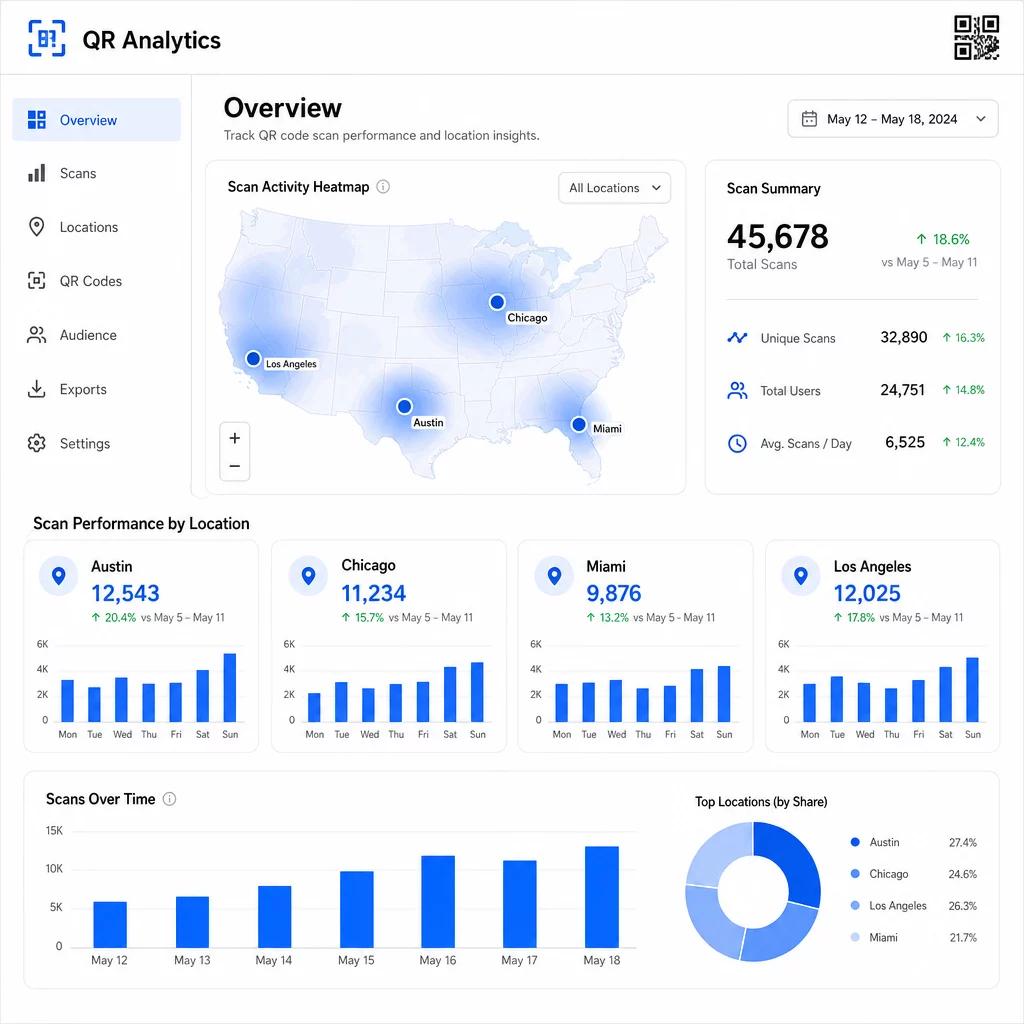
Unikālu QR kodu piešķiršana katram izvietojumam ir visuzticamākais veids, kā izolēt atrašanās vietas veiktspēju. Viens kods vairākās vietās sniedz jums apkopotus datus; unikāli kodi sniedz tiešu salīdzinājumu.
Atrašanās vietas dati arī nodrošina personalizāciju. Ģeogrāfiski mērķēti QR kodi var novirzīt lietotājus uz dažādām galvenajām lapām, pamatojoties uz viņu skenēšanas atrašanās vietu – piemēram, pārtikas preču veikalu tīkls var reklamēt karstus dzērienus vēsākos reģionos un aukstus dzērienus, kur temperatūra ir augstāka, neizdrukājot atsevišķus materiālus.
Piezīme par privātumu: Saskaņā ar Kalifornijas Patērētāju privātuma likumu precīzi ģeogrāfiskās atrašanās vietas dati – definēti kā atrašanās vieta aptuveni 1850 pēdu rādiusā – tiek klasificēti kā sensitīva personiskā informācija. Pilsētas līmeņa IP balstīta izsekošana parasti neietilpst šajā slieksnī, taču GPS balstīta izsekošana prasa skaidru lietotāja piekrišanu. Pārskatiet savas platformas datu praksi un iegūstiet atbilstošu piekrišanu pirms detalizētu atrašanās vietas datu vākšanas.
4. Skenēšana laika gaitā
Laika dati atklāj modeļus, kā jūsu auditorija iesaistās – un kad. Skenēšanas apjoma aplūkošana pa stundām, dienām un nedēļām palīdz jums saprast ne tikai to, cik daudz cilvēku skenē, bet arī to, kad viņi visdrīzāk rīkosies.
Vispārējie modeļi atšķiras atkarībā no kampaņas veida:
- B2B kampaņas parasti sasniedz maksimumu no otrdienas līdz ceturtdienai, no pulksten 12:00 līdz 14:00
- B2C kampaņās vislielākā aktivitāte parasti vērojama no piektdienas līdz svētdienai, no pulksten 18:00 līdz 20:00
Taču vietējie apstākļi ir svarīgāki par vispārējiem etaloniem. Kafijas veikala displejs varētu piedzīvot pīķus pulksten 8:00; pasākuma norises vietas QR kods varētu sasniegt maksimumu 30 minūtes pirms durvju atvēršanas. Skenēšanas ātruma – skenēšanas ātruma stundā – izsekošana palīdz jums pamanīt šos modeļus un agrīnas kampaņas sabrukuma pazīmes, kad interese sāk samazināties pēc sākotnējā palaišanas perioda.
Laika dati kļūst izmantojami, ja tos apvieno ar satura kontroli. Dinamiskie QR kodi ļauj jums reāllaikā atjaunināt galamērķa URL, lai jūs varētu rīkot zibakcijas vai laika ziņā ierobežotas akcijas, kas saskan ar maksimālās iesaistes periodiem, nepārprintējot materiālus. Sociālo mediju vai e-pasta paziņojumu plānošana tieši pirms jūsu maksimālās skenēšanas stundām var pastiprināt efektu.
Pastāvīgiem izvietojumiem pārskatiet laika datus reizi mēnesī. Aktīvām kampaņām bieži vien pietiek ar iknedēļas pārskatiem, lai pamanītu būtiskas izmaiņas.
5. Ierīču un OS sadalījums
Ierīces dati stāsta, ko jūsu auditorija izmanto skenēšanai – un vai jūsu galvenā lapa viņiem patiešām darbojas. Līdz 2025. gadam mobilās ierīces veidos aptuveni 96% no visām QR kodu skenēšanām, un iOS un Android sadalīs lielāko daļu šīs datplūsmas.
Šim sadalījumam ir tiešas tehniskas sekas. Galvenā lapa, kas tīri ielādējas Safari/iOS, var darboties atšķirīgi Chrome/Android, īpaši, ja tajā ir video, veidlapu elementi vai lietotņu lejupielādes uzvednes. Ierīces dati ļauj jums pamanīt šīs problēmas, pirms tās jums izmaksā konversijas.
Praktisks piemērs: kampaņa, kas reklamē mobilo lietotni, varētu novirzīt iOS lietotājus tieši uz Apple App Store un Android lietotājus uz Google Play. Šāda veida viedā maršrutēšana – balstīta uz noteikto ierīces tipu – novērš berzi un uzlabo instalēšanas rādītājus. Pageloot analītikas panelis parāda ierīču un OS sadalījumu kopā ar skenēšanas datiem, lai jūs varētu veikt šīs optimizācijas bez minējumiem.
Vērts atzīmēt arī: 78% lietotāju tagad skenē QR kodus, izmantojot tālruņa iebūvēto kameras lietotni, nevis īpašu skeneri. Jūsu saturam ir jādarbojas nevainojami ar iebūvētajām kameras lietotnēm dažādās platformās, nevis tikai ar trešo pušu lietotnēm.
Ja pamanāt augstu atlēcienu līmeni no konkrēta ierīces veida, vispirms meklējiet veiktspējas problēmas – lielas attēlu faili, neoptimizēti video vai veidlapas, kas netiek pareizi attēlotas noteiktos ekrāna izmēros, ir bieži vaininieki.
6. Konversijas pēc skenēšanas
Konversijas pēc skenēšanas ir vieta, kur iesaiste pārvēršas ieņēmumos. Katrs rādītājs pirms šī mēra uzmanību; šis mēra rezultātus – pirkumus, reģistrācijas, lietotņu lejupielādes vai jebkuru citu darbību, ko jūsu kampaņa ir paredzēta veicināt.
Biežākie konversijas etaloni pēc darbības veida:
- Sociālo tīklu sekotāji: 20–30%
- E-pasta reģistrācijas: 15–25%
- Lietotņu lejupielādes: 10–15%
- Pirkumi: 2–5%
Ja jūsu rādītāji ievērojami atpaliek no šiem diapazoniem, problēma parasti ir pēcscenēšanas pieredzē: lēni ielādējoša lapa, pārāk sarežģīta veidlapa vai galamērķis, kas neatbilst QR koda solītajam.
Konversiju izsekošanas iestatīšana prasa divu lietu sadarbību. Pirmkārt, pievienojiet UTM parametrus saviem galamērķa URL – piemēram, `utmsource=storedisplay&utmvide=QRkods&utmcampaign=springpromo` – lai Google Analytics 4 varētu attiecināt datplūsmu uz jūsu QR kampaņu. Otrkārt, konfigurējiet GA4 notikumu izsekošanu, lai reģistrētu konkrētās darbības, kas jums ir svarīgas: pogu klikšķus, veidlapu iesniegšanu, video pabeigšanu vai pirkumus. Šis UTM parametru ceļvedis QR kodiem detalizēti izskaidro šo iestatīšanu.
Lai iegūtu dziļāku attiecināmību, saistiet savus QR skenēšanas datus ar CRM vai mārketinga automatizācijas platformu. Tas ļauj jums sūtīt personalizētus pēcpārbaudes ziņojumus, pamatojoties uz skenēšanas uzvedību, un izsekot konversijām vairākās sesijās, nevis tikai tūlītējā pēcscenēšanas periodā.
ROI aprēķināšana kad jums ir konversijas dati, ir vienkārši: atņemiet kopējās kampaņas izmaksas (dizains, drukāšana, platformas maksas) no gūtajiem ieņēmumiem, daliet ar izmaksām un reiziniet ar 100. Kampaņa, kas maksā $500 un rada $2,000 pārdošanas apjomu, atgriež 300%.
Savienojiet QR skenēšanu ar turpmākajām konversijām Izmantojiet QR koda izsekošana ar UTM parametriem, lai katru skenēšanu saistītu ar kampaņu un mērītu, kas notiek pēc skenēšanas.
7. Atkārtotas skenēšanas biežums
Atkārtotas skenēšanas biežums mēra, cik bieži lietotāji atgriežas, lai skenētu kodu pēc pirmās mijiedarbības. Tas ir satura vērtības signāls – ja lietotāji atgriežas, pieredze sniedz kaut ko, kā dēļ ir vērts atgriezties.
Pareizais atkārtotas skenēšanas biežums ir pilnībā atkarīgs no tā, ko jūs veicat. Lojalitātes programmas, digitālās ēdienkartes un produktu rokasgrāmatas ir paredzētas atkārtotai mijiedarbībai. Izpratnes veidošanas kampaņas un vienreizējas akcijas parasti ir vērstas uz plašu unikālu sasniedzamību, nevis atkārtotu iesaisti. Jūsu atkārtotas skenēšanas biežuma salīdzināšana ar jūsu kampaņas veidu parāda, vai šī uzvedība ir gaidāma vai liecina par problēmu.
| Atkārtotas skenēšanas biežums | Ko tas signalizē | Ieteicamā darbība |
|---|---|---|
| Augsts | Saturs ir vērtīgs; lietotāji atgriežas apzināti | Paplašināt uz līdzīgām vietām; pievienot lojalitātes balvas; atkārtoti mērķēt uz iesaistītajiem lietotājiem |
| Zema | Saturs izraisa vienreizēju interesi, bet trūkst turpmākas pievilcības | Uzlabot galvenās lapas saturu; vienkāršot lietotāja ceļu; testēt jaunus aicinājumus uz darbību (CTA) |
| Augsts kopējais / zems unikālais | Maza, bet ļoti iesaistīta auditorija | Koncentrējieties uz nišas auditorijas veidošanu; piedāvājiet personalizētus piedāvājumus labākajiem lietotājiem |
Vērojiet anomālijas: ārkārtīgi ātri atkārtoti skenējumi – vairāki trāpījumi dažu sekunžu laikā – var liecināt par botu aktivitāti, nevis patiesu lietotāja uzvedību. Ja jūsu atkārtojumu biežums ir augsts, bet konversijas ir zemas, saturs ir saistošs, taču konversijas ceļā ir berze.
Savienojiet atkārtotu skenēšanas laika zīmogus ar saviem laika datiem, lai identificētu visaktīvākos lietotājus. Kāds, kurš skenē divreiz 48 stundu laikā, izrāda spēcīgu nodomu – noderīgs ierosinātājs CRM balstītai pēcpārbaudei vai personalizētai saziņai.
Veiktspējas salīdzināšana dažādās atrašanās vietās
Viens no praktiskākajiem QR analītikas pielietojumiem ir izvietojumu salīdzināšana blakus. Piešķirot unikālus kodus katrai atrašanās vietai, jūs varat tieši attiecināt veiktspēju – nevis tikai minēt, kurš veikals vai pilsēta darbojas.
Lūk, piemērs, kā šis salīdzinājums varētu izskatīties:
| Skenēšanas vieta | KOPĒJIE SKENĒJUMI | Unikālas skenēšanas reizes | Konversijas rādītājs | Ieteicamā darbība |
|---|---|---|---|---|
| Ostina, Teksasa | 500 | 420 | 12% | Palieliniet vietējo reklāmas budžetu; pastipriniet pašreizējo piedāvājumu |
| Čikāga, Ilinoisa | 95 | 80 | 3% | Pārvērtējiet izvietojumu; pārbaudiet spēcīgāku aicinājumu uz darbību (CTA) |
| Maiami, Florida | 88 | 75 | 2.5% | Pārvirziet budžetu uz reģioniem ar augstāku veiktspēju |
| Losandželosa, Kalifornija | 450 | 390 | 10% | Uzturiet stratēģiju; izmantojiet kā etalonu citiem pilsētu tirgiem |
Liels skenēšanas apjoms ar zemām konversijām bieži norāda uz problēmu ar pēcsienas pieredzi. Zems skenēšanas skaits augstas satiksmes zonās parasti norāda uz redzamības vai izvietojuma problēmu – mēģiniet palielināt kodu, pārvietot to acu līmenī vai padarīt CTA pamanāmāku.
Regulāra šī salīdzinājuma pārskatīšana pārvērš neapstrādātus skaitļus budžeta lēmumos. Lai dziļāk aplūkotu, kā nolasīt ģeogrāfiskās skenēšanas tendences, skatiet QR koda analītikas informācijas paneļa ceļvedis aptver iestatīšanu un interpretāciju detalizēti.
Visu apkopojot
Šo septiņu rādītāju izsekošana pārveido uz atrašanās vietu balstītas QR koda kampaņas no "izdrukā un ceri" taktikas par izmērāmu, optimizējamu sistēmu. Kopējais un unikālais skenējumu skaits sniedz informāciju par sasniedzamību. Atrašanās vietas un laika dati norāda, kur un kad koncentrēties. Ierīču sadalījums nodrošina, ka jūsu saturs patiešām darbojas. Konversijas saista skenējumus ar ieņēmumiem. Un atkārtotu skenējumu biežums norāda, vai lietotāji atrod pietiekami daudz vērtības, lai atgrieztos.
Visa pamatā ir dinamisku QR kodu izmantošana – bez tiem lielākā daļa šo rādītāju vienkārši nav pieejami. Kampaņas, kas konsekventi izseko šos datus, var ātrāk identificēt augstas veiktspējas izvietojumus, novērst zemas veiktspējas izvietojumus, pirms tie iztērē budžetu, un izveidot skaidrāku priekšstatu par bezsaistes IA nekā vairums tradicionālo mediju kanālu to atļauj.
Sāciet izsekot savai uz atrašanās vietu balstītajai kampaņai Izveidojiet dinamiskus QR kodus, uzraugiet reāllaika skenēšanas datus un salīdziniet veiktspēju pēc atrašanās vietas – viss no viena informācijas paneļa. Izmēģiniet Dinamisks QR kodu ģenerators bez maksas 14 dienas.
Biežāk uzdotie jautājumi
Kopējais skenējumu skaits ietver katru mijiedarbību ar jūsu QR kodu, ieskaitot vairākus skenējumus no vienas un tās pašas personas. Unikālie skenējumi ietver tikai atšķirīgas ierīces vai lietotājus, sniedzot skaidrāku priekšstatu par to, cik individuālu cilvēku ir iesaistījušies jūsu kampaņā. Atšķirība starp abiem rādītājiem norāda, cik daudz atkārtotas iesaistes jūs ģenerējat.
Jā. Statiskie QR kodi iegulst fiksētu URL un nerada analītikas datus. Dinamiskie QR kodi novirza skenējumus caur pāradresācijas serveri, kas reģistrē skenēšanas laiku, atrašanās vietu, ierīces veidu un citus metadatus. Bez dinamiskajiem kodiem nav pieejami tādi rādītāji kā unikāli skenējumi, atrašanās vietas dati un skenēšanas laiks.
Pievienojiet UTM parametrus savam galamērķa URL – piemēram, `utmsource=storedisplay&utmmedium=qrcode&utmcampaign=campaignname` – lai GA4 varētu attiecināt ienākošo datplūsmu uz jūsu QR kodu. Pēc tam konfigurējiet GA4 notikumu izsekošanu, lai reģistrētu konkrētās darbības, kuras vēlaties mērīt, piemēram, veidlapu iesniegšanu vai pirkumus. Dinamiskie QR kodi to atvieglo, jo varat atjaunināt vai labot UTM parametrus, nepārprintējot savus materiālus.