Labākās QR koda krāsas ir tumši moduļi (kvadrāti) uz gaiša fona, un jā, QR kodi var būt krāsaini. Noteikums ir vienkāršs: moduļiem jābūt ievērojami tumšākiem par fonu. Melns uz balta nodrošina 21:1 kontrasta attiecību un ir drošākā izvēle. Zīmola kodam mērķējiet uz vismaz 4:1, un izmantojiet 7:1 vai vairāk āra izkārtnēm, kur saules gaisma un attālums samazina efektīvo kontrastu. Šī rokasgrāmata sniedz skaitļus, krāsu tabulu un testēšanas kārtību.
Kādas QR koda krāsas darbojas un vai QR kodi var būt krāsaini?
QR kods var būt gandrīz jebkādā krāsā, un tas var izmantot dažādas krāsas moduļiem un fonam. Tālruņa kamera neredz toni. Tā pārveido attēlu pelēktoņos un kvadrātu pa kvadrātam izlemj, kas ir tumšs un kas ir gaišs. Tātad jautājums nav par to, kādu krāsu izvēlaties, bet gan par to, cik atšķirīgas ir abas pelēktoņu vērtības.
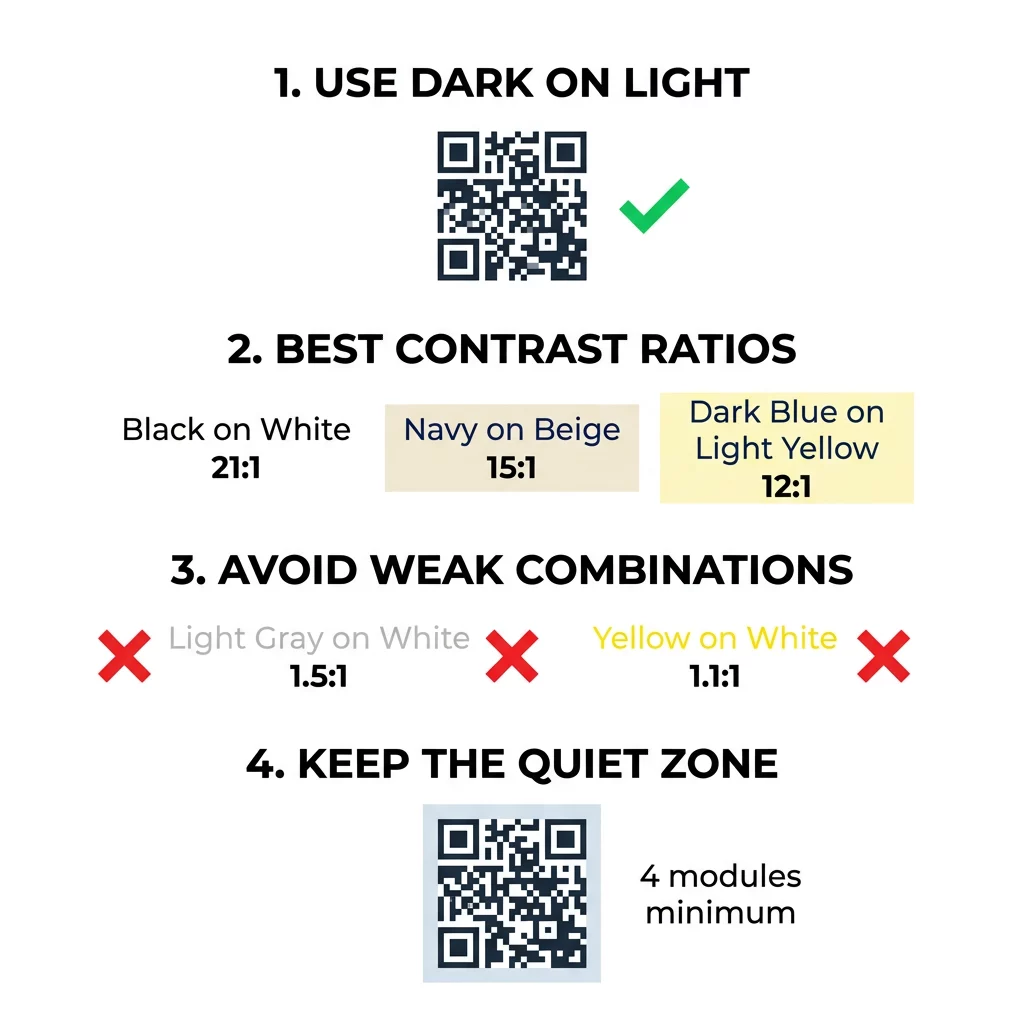
- Darbojas: tumši zili, tumši zaļi, ogļu pelēki, tumši violeti, tumši brūni vai melni moduļi uz balta, krēmkrāsas vai cita ļoti gaiša fona.
- Darbojas ar testu: tumši sarkans, tumši tirkīza un tumši oranžs uz balta. Vispirms pārbaudiet attiecību un skenējiet izdrukātu paraugu.
- Nestradā: dzelteni, gaiši pelēki, pasteļtoņu vai neona moduļi, un jebkurš krāsu pāris ar vienādu spilgtumu, piemēram, vidēji zaļš uz vidēji sarkana.
- Riskanti: gaiši moduļi uz tumša fona (apgriezti kodi). Daudzas skenera lietotnes tos nolasa, bet dažas nē, tāpēc izvairieties no tiem visā, kas ir svarīgs.
Kāpēc kontrasts nosaka QR koda skenēšanas iespējas
Optiskie sensori nolasa QR kodus, mērot atstarošanās atšķirību starp tumšajiem un gaišajiem moduļiem. QR koda standarts, ISO/IEC 18004, pieņem tumšus moduļus uz gaiša fona. Tumšie moduļi absorbē gaismu, un gaišais fons to atstaro. Ja atšķirība ir pārāk maza, dekodētājs nevar atdalīt datu modeli no fona.
Svītrkodu testēšanā (ISO/IEC 15415) simbola kontrasts ir starpība starp spilgtāko un tumšāko atstarošanu kodā. Simbola kontrasts 70% vai vairāk nopelna augstāko pakāpi, bet zem 20% – neveiksmi. Vērtētāji pārbauda arī modulāciju, kas parāda, cik vienmērīgi gaismas un tumšie moduļi atstarojas visā simbolā. Nevienmērīgas krāsas vai vāja atdalīšana liek skenerim palaist garām moduļu malas.
Normāla polaritāte, ar tumšiem moduļiem uz gaiša fona, darbojas katrā ierīcē. Dažas iebūvētās tālruņa kameras lietotnes nespēj nolasīt gaišus kodus uz tumša fona, un atbalsts atšķiras atkarībā no tālruņa modeļa un programmatūras versijas. Izmantojiet normālu polaritāti, ja vien neesat pārbaudījis apgriezto versiju uz ierīcēm, ko izmanto jūsu auditorija.
Krāsu kontrasta attiecību un sliekšņu novērtēšana
Kontrasta attiecība ir skaitlis no 1:1 (bez atšķirības) līdz 21:1 (melns uz balta). Attiecība nāk no pieejamības noteikumiem Tīmekļa satura pieejamības vadlīnijās (WCAG), kas tika rakstītas tekstam, bet ir praktisks veids, kā pārbaudīt QR krāsas. Kontrasta pārbaudītājs (meklējiet "WCAG contrast checker") pieņem divus heksakodus un atgriež attiecību. Lai uzzinātu vairāk par iekļaujošu dizainu, lasiet mūsu ceļvedi par kā padarīt QR kodus ADA saderīgus.
Izmantojiet šos mērķus. Vismaz 4:1 ir minimālais iekštelpu drukai un ekrāniem. 7:1 vai vairāk ir drošāk iepakojumiem, skrejlapām un jebkam, kas fotografēts dažādā apgaismojumā. 10:1 vai vairāk ir mērķis āra izkārtnēm. Zemāk norādītās attiecības ir aptuvenas un atkarīgas no precīza toņa.
| Krāsu kombinācija | Aptuvenā kontrasta attiecība | Skenējamības novērtējums |
|---|---|---|
| Melns uz balta | 21:1 | Optimāls (nozares standarts) |
| Tumši zils uz bēša | ~15:1 | Lielisks |
| Tumši zils uz gaiši dzeltena | ~12:1 | Ļoti labi |
| Tumši brūns uz gandrīz balta | ~8:1 | Labs |
| Tīri sarkans (#FF0000) uz balta | ~4:1 | Robežsituācija, pārbaudiet pirms drukāšanas |
| Tumši sarkans (#8B0000) uz balta | ~11:1 | Ļoti labi |
| Gaiši pelēks uz balta | ~1.5:1 | Vājš (biežas skenēšanas kļūmes) |
| Dzeltens uz balta | ~1.1:1 | Neskenējams |
Pielāgojiet kodus, nezaudējot skenējamību Pārbaudiet krāsas un priekšskatiet savu dizainu reāllaikā, izmantojot mūsu QR koda ģenerators ar logotipu lai līdzsvarotu zīmola estētiku ar uzticamu skenēšanu.
Labākā QR koda kontrasta attiecība āra izkārtnēm
Nav standarta, kas noteiktu obligāto attiecību āra QR kodiem, taču āra apstākļi samazina kontrastu trīs veidos: tieša saule izbalina gaišās zonas, atspīdums paslēpj daļu koda un attālums izpludina mazos moduļus. Plānojiet lielāku drošības rezervi nekā telpās.
- Izmantojiet melnu vai ļoti tumšu krāsu uz balta fona. Tiecieties uz attiecību 10:1 vai augstāku.
- Drukājiet uz matēta materiāla vai pievienojiet matētu laminātu. Spīdīgs vinils un stikls atstaro sauli un izjauc rakstu.
- Izmērojiet kodu atbilstoši skenēšanas attālumam. Parasti tiek pieņemts likums: 1 koda platuma vienība uz katrām 10 attāluma vienībām, tāpēc kodam, kas skenēts no 2 metriem (apmēram 6,5 pēdas), jābūt apmēram 20 cm (8 collas) platam.
- Saglabājiet pilnu kluso zonu un novietojiet kodu uz viendabīga gaiša paneļa, nevis uz fotoattēla.
- Izvairieties novietot kodu vietā, kur uz to spīd zema saule vai tas atrodas aiz stikla, un pirms pilnas tirāžas pasūtīšanas noskenējiet izdrukāto zīmi faktiskajā vietā.
Svītrkoda kontrasts: QR kodi pret lineārajiem svītrkodiem
Tie paši kontrasta noteikumi attiecas arī uz citiem augsta kontrasta svītrkodiem, piemēram, Code 128 vai EAN. Mazumtirdzniecības skeneri bieži izmanto sarkanu lāzeru, un sarkana gaisma neredz sarkanās svītras vai sarkano tinti kā tumšu. Lineārajiem svītrkodiem drukājiet svītras melnā, tumši zilā vai tumši zaļā krāsā uz balta fona, un nekad sarkanā vai oranžā krāsā. Tālruņa kameras nolasītie QR kodi ir mazāk jutīgi pret nokrāsu, taču tas pats padoms nodrošina uzticamāko rezultātu abiem.
Klusās zonas un koda izmēru nodrošināšana
Augstam kontrastam jāsniedzas līdz koda malai. Tukšā mala ap rakstu ir klusā zona. Tā kamerai norāda, kur sākas kods un kur beidzas cits mākslas darbs.
- Nodrošiniet kluso zonu, kas ir vismaz četru moduļu platumā visās četrās pusēs.
- Saglabājiet šo malu brīvu no teksta, ilustrācijām un apmalēm.
- Saskaņojiet kluso zonu ar jūsu gaišo fona krāsu, lai robeža būtu tīra.
- Drukājiet kodus vismaz 2 x 2 cm (0,8 x 0,8 collas) tuvai, rokas skenēšanai. Palieliniet izmēru garākām saitēm, jo vairāk datu nozīmē mazākus moduļus.
- Dodiet priekšroku īsai saitei. Īss URL veido vienkāršāku rakstu ar lielākiem moduļiem, kas labāk skenējas vājā apgaismojumā.
Teksts vai attēls klusajā zonā ir biežs skenēšanas kļūdu cēlonis uz zīmolu materiāliem. Mūsu ceļvedis par labāko praksi QR kodu lasāmībā parāda, kā saglabāt malas, pielāgojot izkārtojumu.
Izvairīšanās no biežām krāsu un stila kļūdām
Koda pielāgošana var pasliktināt lasāmību. Kameras attēlu pārveido pelēktoņos, tāpēc divi dažādi toņi var beigties ar vienādu spilgtumu un saplūst vienā pelēkā.
- Izvairieties no pasteļtoņu moduļiem, piemēram, gaiši zilas, piparmētru vai gaiši dzeltenas krāsas.
- Izvairieties no spilgti sarkaniem vai oranžiem moduļiem. Lāzerskenētāji sarkano krāsu uztver kā gaišu, un kontrasta attiecība bieži ir zemāka par 5:1. Tumši sarkans tonis, piemēram, bordo, ir daudz drošāks.
- Izvairieties no gradientiem, kur moduļa krāsas gaišākā daļa ir tuvu fonam.
- Izvairieties no caurspīdīgiem foniem virs fotogrāfijām, teksturēta papīra vai rakstaina iepakojuma. Novietojiet kodu uz cieta, gaiša paneļa.
- Izvairieties no apgrieztiem dizainiem ar gaišiem moduļiem uz tumša fona, ja vien tos neesat pārbaudījis ar tālruņiem, ko izmanto jūsu auditorija.
- Izvairieties no lieliem logotipiem. Logotips, kas aptver pārāk daudz moduļu, var pārsniegt koda kļūdu korekcijas spējas.
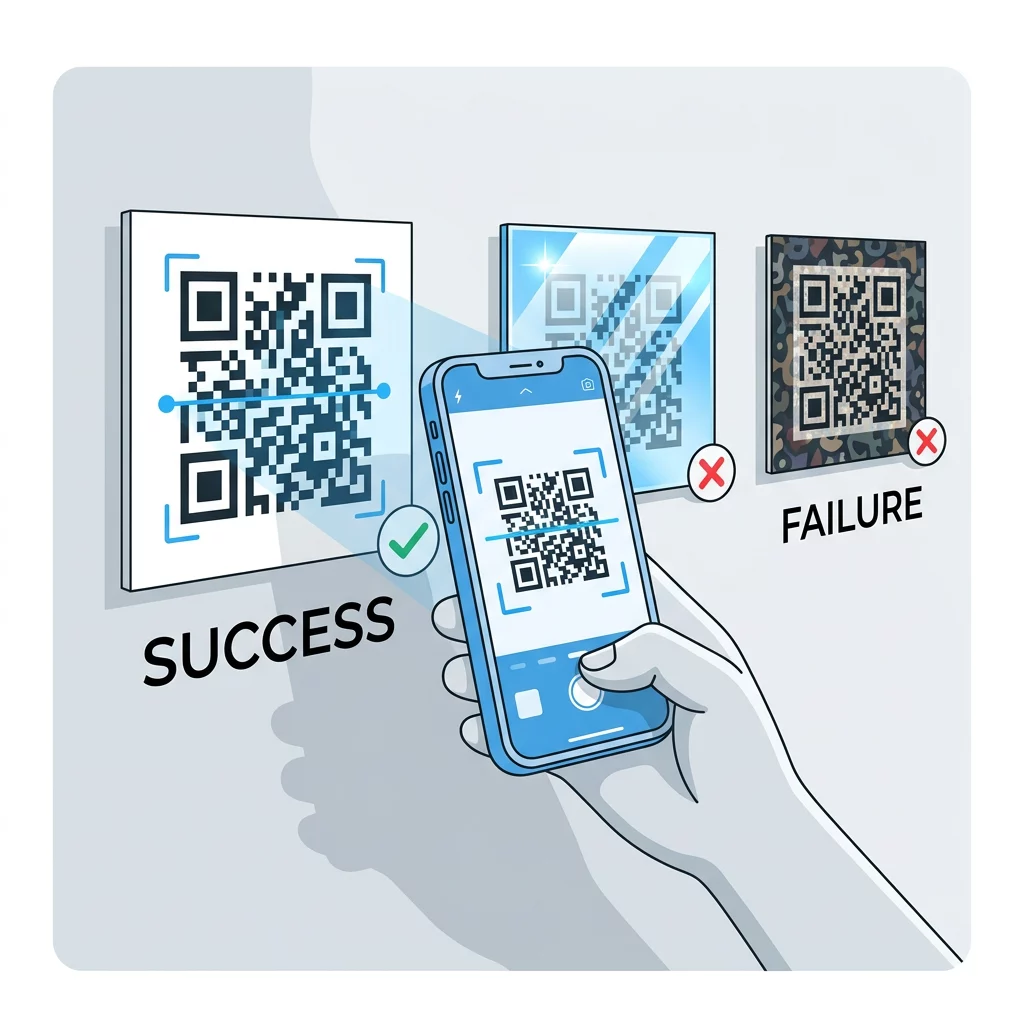
Zinot šos ierobežojumus, jūs varat apgūt kā izveidot pielāgotu QR kodu kas parāda jūsu zīmolu, nesalaužot dekodēšanu.
Testēšana un apstiprināšana reālās pasaules apstākļos
Kods, kas skenējas no spilgta monitora, var neizdoties uz papīra. Telpas apgaismojums, skatīšanās leņķis un materiāla tekstūra — tas viss maina kontrastu, kas sasniedz objektīvu. Tieša saules gaisma izbalina mazas krāsu atšķirības, blāvas telpas samazina sensora spēju atdalīt moduļus, un glancētas virsmas rada atspīdumu.
Veiciet šo pārbaudi pirms katra drukāšanas darba:
- Pārbaudiet krāsu pāri kontrasta pārbaudītājā. Attiecībai jābūt vismaz 4:1, un 7:1 vai vairāk iepakojumam un lietošanai ārpus telpām.
- Izdrukājiet paraugu uz reālā materiāla, reālā izmērā, ar reālu apdari.
- Skenējiet to ar iebūvēto kameru vismaz vienā iPhone un vienā Android tālrunī, vienā vecākā tālrunī, ja iespējams, un pārlūkprogrammas balstītā Skenēt QR kodu tiešsaistē.
- Skenējiet sliktākajā apgaismojumā, ar kādu kods saskarsies: vājā telpā, tiešā saulē un leņķī.
- Ja tas vilcinās, palieliniet kontrastu, palieliniet kodu, saīsiniet saiti vai atjaunojiet kluso zonu.
Mūsu ceļvedis par kā pārbaudīt QR kodu pirms drukāšanas aptver šo jautājumu sīkāk, un kā uzlabot QR koda lasāmību aptver labojumus kodiem, kas nedarbojas.
QR koda uzticamības un iesaistes maksimizēšana
Uztveriet kontrastu kā tehnisku prasību, nevis pēdējo pieskārienu. Izvēlieties tumšu krāsu uz gaiša fona, saglabājiet kluso zonu un pārbaudiet izdrukātu paraugu apgaismojumā, ar kādu tas saskarsies. Tas pasargā jūsu drukas budžetu no kodiem, kas netiek skenēti.
Izveidojiet savu augsta kontrasta kodu ar mūsu QR kodu ģenerators. Iestatiet moduļa un fona krāsas un lejupielādējiet PNG, SVG vai PDF. Ja drukājat kodu un vēlāk var būt nepieciešams mainīt saiti, izmantojiet dinamisku kodu: jūs varat rediģēt galamērķi pēc drukāšanas un redzēt skenēšanas statistiku. Dinamiskie kodi nāk ar 14 dienu bezmaksas izmēģinājuma periodu, un plāni ir uzskaitīti šeit: https://pageloot.com/pricing/.
Biežāk uzdotie jautājumi
Tiecieties uz vismaz 4:1 attiecību starp moduļiem un fonu. Iepakojumiem un skrejlapām izmantojiet 7:1 vai vairāk, un āra izkārtnēm – 10:1 vai vairāk. Melns uz balta ir 21:1.
Jā. Jebkura krāsa der, ja moduļi ir acīmredzami tumšāki par fonu. Tumši zils, meža zaļš, ogļu pelēks un bordo uz balta vai krēmkrāsas fona darbojas labi. Dzeltens, gaiši pelēks un pasteļtoņi neder.
Moduļi un fons var būt dažādās krāsās, un varat izmantot jebkuru toni, bet svarīga ir tikai spilgtuma atšķirība. Tālrunis nolasa kodu pelēktoņos, tāpēc divas vienāda spilgtuma krāsas nedarbosies. Pārbaudiet attiecību un noskenējiet izdrukātu paraugu.
Nav oficiāla standarta. Drošs mērķis ir attiecība 10:1 vai augstāka, piemēram, melns uz balta. Izmantojiet matētu apdari, lai samazinātu atspīdumu, iestatiet koda izmēru aptuveni 1/10 no skenēšanas attāluma, un pārbaudiet to uz vietas.
Jā, ja jūsu zīmola krāsa ir pietiekami tumša, piemēram, dziļi tumši zila, meža zaļa vai ogles pelēka, un atrodas uz viendabīga gaiša fona. Ja jūsu zīmola krāsa ir gaiša, izmantojiet tās tumšu toni moduļiem.
QR standarts definē tumšus moduļus uz gaiša fona. Daudzas kameru lietotnes vispirms meklē šo rakstu, un dažas nevar nolasīt gaišus moduļus uz tumša fona. Atbalsts atšķiras atkarībā no tālruņa, tāpēc pārbaudiet pirms drukāšanas.
Jā. Lineārajiem svītrkodiem, piemēram, Code 128 vai EAN, arī ir nepieciešamas tumšas svītras uz gaiša fona. Mazumtirdzniecības lāzerskeneri izmanto sarkanu gaismu, tāpēc nekad nedrukājiet svītras sarkanā vai oranžā krāsā.