Inviare un codice QR in stampa senza testarlo prima è uno degli errori più comuni – e costosi – nel marketing di stampa. Un codice che appare perfetto sullo schermo può fallire completamente una volta che arriva su carta, vinile o imballaggio. Questa guida ti accompagna attraverso ogni controllo che devi eseguire prima di approvare una tiratura di stampa.
Perché i codici QR falliscono dopo la stampa
Un codice QR che scansiona correttamente sul tuo monitor può fallire nel mondo reale per ragioni che diventano visibili solo dopo la stampa. Comprendere questi punti di fallimento ti aiuta a costruire una checklist pre-stampa affidabile.
I colpevoli più comuni sono:
- Dimensioni troppo piccole per la distanza di scansione prevista
- Bassa risoluzione che causa moduli sfocati o pixelati
- Contrasto insufficiente tra il codice e il suo sfondo
- Zona di silenzio mancante (il bordo chiaro che circonda il codice)
- Elevata densità di dati che crea un motivo troppo fine per essere letto dalle fotocamere
- Formato file sbagliato utilizzato per l'output di stampa
Ognuno di questi problemi è interamente prevenibile se lo si individua prima che la stampa venga eseguita. Le sezioni seguenti affrontano ciascuno di essi in sequenza.
Controlla le dimensioni del tuo codice QR rispetto alla distanza di scansione
La dimensione è la ragione più comune per cui un codice QR stampato fallisce. La regola standard è la rapporto 10:1: la larghezza del codice QR dovrebbe essere di almeno 1 cm (o 1 pollice) per ogni 10 cm (o 10 pollici) di distanza di scansione prevista. Un codice su un biglietto da visita tenuto a distanza di braccio necessita di una dimensione molto diversa rispetto a uno su un poster letto da tutta la stanza.
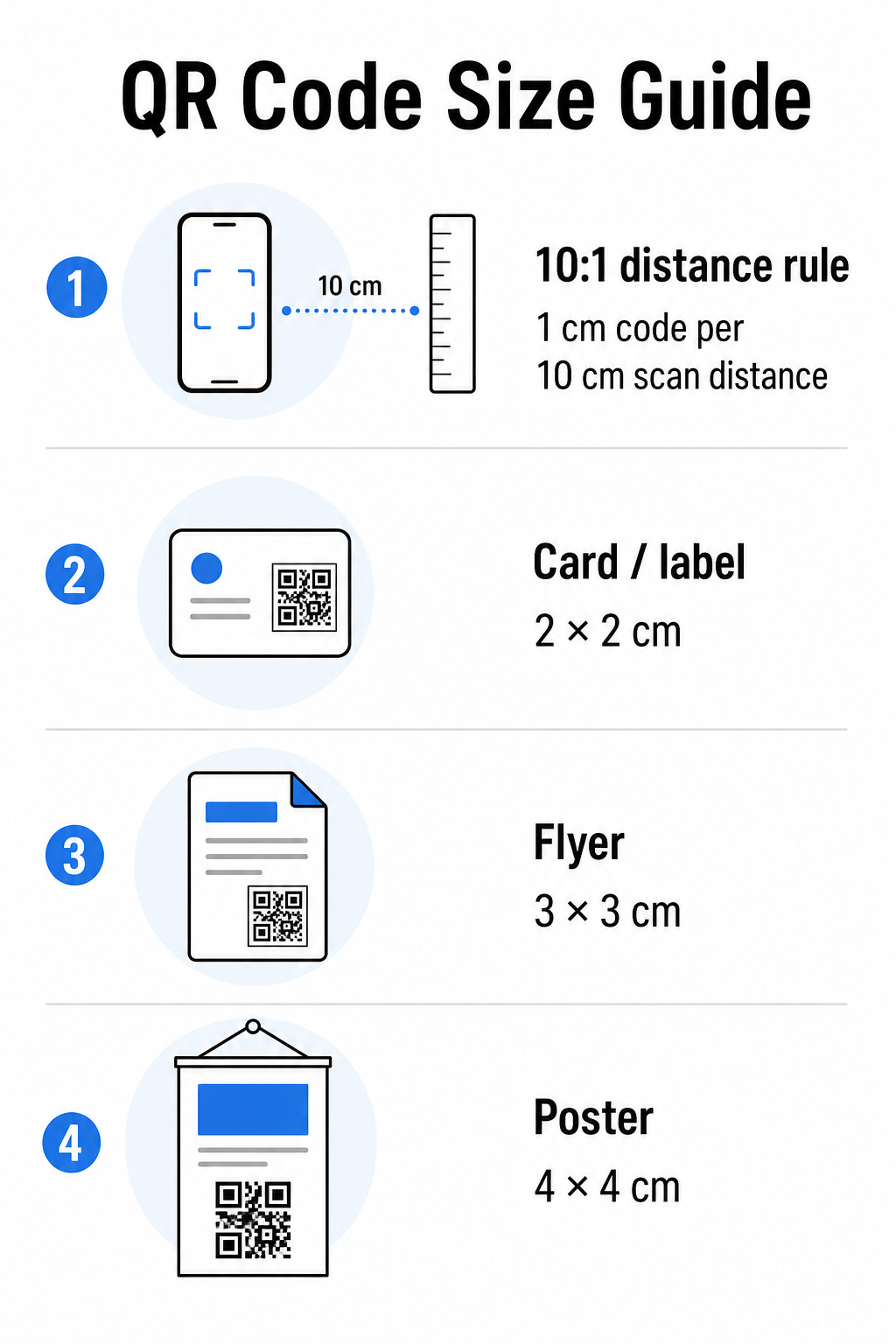
Usa questa tabella come punto di partenza per i materiali di stampa comuni:
| Materiale di stampa | Dimensione Minima Raccomandata | Distanza di Scansione Tipica |
|---|---|---|
| Biglietto da visita / etichetta | 2 × 2 cm (0,8 × 0,8 pollici) | 20–30 cm (8–12 pollici) |
| Brochure / volantino | 3 × 3 cm (1,2 × 1,2 pollici) | 30 cm (12 pollici) |
| Poster / segnaletica | 4 × 4 cm (1,6 × 1,6 pollici) | 40 cm (16 pollici) |
| Cartellone / striscione | 40 × 40 cm (16 × 16 pollici) | 4 m (13 piedi) |
Prima di approvare qualsiasi file di stampa, conferma che le dimensioni del codice corrispondano al tuo caso d'uso previsto. Il guida alle dimensioni dei codici QR fornisce una ripartizione completa per tipo di materiale, inclusa la modalità in cui la densità dei dati influisce sulla dimensione minima praticabile.
Verifica il formato del file e la risoluzione di stampa
Il formato che esporti è importante quanto il design stesso. Le immagini raster come PNG e JPEG sono composte da pixel. Quando ingrandite per la stampa di grande formato, diventano sfocate e i moduli fini in un codice QR perdono i loro bordi netti – rendendo il codice difficile o impossibile da scansionare.
Per qualsiasi codice QR stampato, usa formati vettoriali: SVG, EPS o PDF. I file vettoriali si adattano a qualsiasi dimensione senza perdere qualità perché sono definiti matematicamente piuttosto che pixel per pixel. Se devi usare un formato raster, assicurati che la risoluzione sia almeno 300 DPI alla dimensione di stampa prevista – non alla dimensione di anteprima dello schermo.
Un rapido controllo della risoluzione: apri il tuo file immagine, annota le sue dimensioni in pixel e dividi per la dimensione di stampa prevista in pollici. Se un codice QR da 1 pollice viene salvato come immagine di 100 × 100 pixel, è solo 100 DPI – ben al di sotto del minimo di 300 DPI e quasi garantito per stampare sfocato.
Per uno sguardo più approfondito su questo argomento, il guida alla risoluzione di stampa dei codici QR copre i requisiti DPI e le scelte di formato in dettaglio.
Crea codici QR pronti per la stampa in pochi secondi Il sito Generatore di codici QR di Pageloot ti permette di scaricare i tuoi codici nei formati SVG, EPS e PDF – pronti per qualsiasi dimensione di stampa senza perdita di qualità.
Testa il contrasto prima di andare in stampa
Gli scanner di codici QR funzionano distinguendo i moduli scuri da uno sfondo chiaro. Quando il contrasto è troppo basso, lo scanner non può identificare in modo affidabile il modello – anche se il codice appare a posto all'occhio umano.
Il benchmark tecnico da soddisfare è un rapporto di contrasto minimo di 4:1 tra i moduli scuri e lo sfondo chiaro. Per applicazioni di pagamento o casi d'uso focalizzati sull'accessibilità, punta a 5:1 o superiore. I moduli neri su sfondo bianco producono un rapporto di 21:1 – lo standard aureo rispetto al quale viene misurata ogni altra combinazione di colori.
Errori comuni di contrasto da controllare prima della stampa:
- Moduli grigio chiaro su bianco: contrasto insufficiente che fallirà in condizioni di scarsa illuminazione
- Colori invertiti (codice chiaro su sfondo scuro): alcuni scanner lo gestiscono, molti no – non farci mai affidamento
- Riempimenti sfumati sui moduli: crea un contrasto irregolare che confonde gli scanner
- Colori del marchio troppo simili nel tono: testa con una conversione in scala di grigi per vedere il vero contrasto
Un test pratico pre-stampa consiste nel convertire l'immagine del tuo codice QR in scala di grigi e verificare se i moduli sono ancora chiaramente distinguibili dallo sfondo. Se iniziano a fondersi in scala di grigi, falliranno su un'ampia gamma di fotocamere di dispositivi e condizioni di illuminazione. Il guida alle migliori pratiche di contrasto colore per codici QR include una tabella di combinazioni di colori che mostra i rapporti di contrasto e i risultati di scansione previsti per le accoppiate comuni.
Conferma che la Quiet Zone è intatta
Il sito zona silenziosa è il margine bianco che circonda tutti e quattro i lati di un codice QR. Non è una preferenza di design – è un requisito tecnico definito dallo standard ISO/IEC 18004. Senza di esso, gli scanner non possono individuare dove il codice inizia e finisce, e la scansione fallirà.
La zona di silenzio deve essere larga almeno quattro moduli su tutti i lati, dove un modulo è uno dei piccoli quadrati nella griglia del codice. Come riferimento pratico:
- Per un' codice QR da 1 pollice, lasciare circa 0,15 pollici di spazio libero su tutti i lati
- Per un' biglietto da visita codice QR, mantenere una zona di silenzio di almeno 0,25 pollici
Prima di inviare alla stampa, ingrandisci il tuo file di layout e conferma che nessun testo, immagine, bordo o motivo di sfondo invada questa zona. Posizionare un codice troppo vicino al bordo di un design o sovrapporlo con elementi decorativi è una delle cause più comuni di fallimenti di scansione che emergono solo dopo che il lavoro è stato stampato.
Controlla il Livello di Correzione degli Errori
I codici QR hanno un sistema di recupero integrato chiamato correzione degli errori, che permette al codice di essere letto anche se parte di esso è danneggiata, oscurata o usurata. Ci sono quattro livelli, ognuno dei quali offre un diverso compromesso tra resilienza e densità dei dati:
| Livello | Capacità di recupero | Miglior caso d'uso |
|---|---|---|
| L (Basso) | ~7% | Superfici pulite e intatte; massima densità di dati |
| M (Medio) | ~15% | Materiali di stampa standard con un po' di usura |
| Q (Quartile) | ~25% | Codici con sovrapposizioni di logo o rischio moderato di danneggiamento |
| H (Alto) | ~30% | Uso esterno, imballaggio, codici con grandi sovrapposizioni di logo |
Se il tuo codice QR include un logo sovrapposto al motivo – una scelta comune di branding – hai bisogno di almeno livello Q, e idealmente livello H. Il logo oscura efficacemente parte del codice, quindi la correzione degli errori deve compensare. Conferma con quale livello è stato generato il tuo codice prima di finalizzare, e testa sempre un codice brandizzato con la sovrapposizione al suo posto. Il guida alle migliori pratiche per la leggibilità dei codici QR copre in dettaglio come la correzione degli errori interagisce con il posizionamento del logo.
Esegui un Test di Stampa Fisico Prima della Stampa Completa
Nessuna quantità di controllo su schermo sostituisce la stampa di una prova fisica. Stampa una singola copia alla dimensione finale esatta sul materiale esatto che intendi utilizzare, quindi testalo in condizioni che riflettano l'uso nel mondo reale.
Il tuo test fisico dovrebbe coprire:
- Dispositivi multipli: testa su almeno due smartphone diversi – uno iOS e uno Android – utilizzando sia l'app fotocamera nativa che uno scanner di terze parti
- Distanze multiple: scansiona dalla distanza tipica dell'utente, e anche da una distanza leggermente maggiore per confermare che ci sia un margine di errore
- Condizioni di illuminazione multiple: testa in luce naturale intensa, illuminazione interna standard, e scarsa illuminazione se il codice apparirà in uno di questi ambienti
- La superficie effettiva: le superfici lucide riflettono la luce e possono causare fallimenti di scansione anche quando il design del codice è corretto; le finiture opache si comportano in modo più affidabile in diverse condizioni
Puoi anche verificare il codice digitalmente caricando un'immagine del tuo design sul Pageloot QR Code Scanner per confermare che decodifica correttamente prima di impegnarti in una stampa completa. Se il tuo codice fallisce uno di questi test, usa la guida comune alla risoluzione dei problemi del codice QR per diagnosticare il punto di fallimento specifico prima di regolare e ritestare.
Per una panoramica strutturata di ciò che il test mobile dovrebbe coprire, la guida al test dei codici QR per l'usabilità mobile illustra in dettaglio la compatibilità dei dispositivi, gli angoli di scansione e le prestazioni della destinazione.
Considera il Tuo Metodo di Stampa e la Superficie
Il modo in cui un codice QR viene stampato influisce sulla scansionabilità indipendentemente dal design del codice stesso. Metodi diversi producono diversi livelli di nitidezza dei moduli, e diverse superfici interagiscono con la luce in modi che possono aiutare o ostacolare la scansione.
Considerazioni chiave per metodo e materiale:
- Finiture opache diffondono la luce anziché rifletterla, rendendole quasi sempre superiori alle finiture lucide per l'affidabilità della scansione
- Stampa offset produce bordi dei moduli molto nitidi ed è ben adatta a tirature di stampa ad alto volume
- Stampa digitale funziona bene per tirature brevi e codici personalizzati, ma la qualità dell'inchiostro varia e può sbiadire nel tempo
- Stampa termica è economica per le etichette ma può sfocare i bordi sottili dei moduli – aumenta la dimensione del codice per compensare
- Superfici testurizzate o curve introducono distorsioni che possono confondere gli scanner; usa un codice più grande per tenerne conto
Per una ripartizione completa di come ogni tecnica influisce sulla scansionabilità, la guida su come le tecniche di stampa influenzano la scansionabilità dei codici QR copre la selezione del metodo, la preparazione del substrato e la durabilità dell'inchiostro.
Usa un Codice QR Dinamico per Proteggere dai Cambiamenti Post-Stampa
Anche un codice QR perfettamente testato può fallire dopo la stampa se l'URL di destinazione cambia, la pagina collegata viene rimossa o il contenuto della campagna necessita di aggiornamenti. Con un codice QR statico, qualsiasi modifica alla destinazione significa ristampare tutto.
Codici QR dinamici Questo si risolve codificando un breve URL di reindirizzamento piuttosto che la destinazione finale direttamente. Il reindirizzamento può essere aggiornato in qualsiasi momento dalla tua dashboard, così il codice stampato rimane valido anche quando la tua campagna si evolve. Questo significa anche che puoi correggere un link interrotto immediatamente dopo la distribuzione – senza ristampare un singolo pezzo.
Oltre la prevenzione degli errori, i codici dinamici ti danno accesso all'analisi delle scansioni: scansioni totali, posizioni di scansione, ora della scansione e tipi di dispositivo. Questi dati ti dicono se i tuoi materiali stampati stanno effettivamente funzionando sul campo e dove concentrare l'ottimizzazione. Il guida all'utilizzo dei codici QR nei media stampati copre come i codici dinamici si inseriscono in una strategia di campagna di stampa più ampia.
Proteggi il tuo investimento di stampa Creare un Codice QR dinamico per mantenere i tuoi materiali stampati aggiornati e monitorare le prestazioni di scansione nel mondo reale – senza mai tornare in stampa.
Lista di controllo per il test del codice QR pre-stampa
Prima di approvare qualsiasi codice QR per la produzione di stampa, esamina ciascuno dei seguenti:
- La dimensione del codice corrisponde alla regola 10:1 per la distanza di scansione prevista
- Il file è esportato in formato SVG, EPS o PDF (o raster a un minimo di 300 DPI alla dimensione di stampa finale)
- Il rapporto di contrasto tra moduli e sfondo soddisfa almeno 4:1
- La zona di silenzio di almeno quattro moduli è chiara su tutti i lati
- Il livello di correzione degli errori è appropriato (Q o H se è presente una sovrapposizione di logo)
- Il codice decodifica correttamente quando scansionato da un'immagine caricata
- Prova fisica testata su dispositivi iOS e Android
- Prova fisica testata in condizioni di illuminazione realistiche e sul materiale di stampa effettivo
- L'URL di destinazione è attivo, ottimizzato per dispositivi mobili e si carica rapidamente
- Codice QR dinamico utilizzato se la destinazione potrebbe dover cambiare dopo la stampa
Eseguire questi controlli prima di ogni lavoro di stampa richiede molto meno tempo che riordinare una tiratura di stampa. Una buona performance del codice QR inizia con il file, non con lo scanner. Ottieni la dimensione, il formato, il contrasto e la zona di silenzio corretti in fase di progettazione, stampa una prova sul materiale reale e testalo nel modo in cui il tuo pubblico lo userà effettivamente.
Domande frequenti
Il minimo affidabile per la scansione a distanza ravvicinata – come su biglietti da visita o etichette di prodotti – è di 2 × 2 cm (0,8 × 0,8 pollici). Per materiali stampati più grandi, applicare la regola 10:1: la larghezza del codice dovrebbe essere di almeno 1 cm per ogni 10 cm di distanza di scansione prevista. Un poster scansionato da 1 metro di distanza, ad esempio, necessita di un codice largo almeno 10 cm.
Usa sempre un formato vettoriale – SVG, EPS, o PDF – per la stampa. I file vettoriali si adattano a qualsiasi dimensione senza diventare sfocati o pixelati. Se devi usare un formato raster come PNG, assicurati che la risoluzione sia di almeno 300 DPI alla dimensione di stampa finale. I file raster a bassa risoluzione sono una delle cause più comuni di codici QR stampati illeggibili.
Stampa una singola prova alla dimensione esatta prevista sul materiale esatto che intendi utilizzare, quindi testala su almeno due dispositivi diversi (iOS e Android) in condizioni di illuminazione realistiche. Puoi anche caricare un'immagine del tuo codice sullo scanner di codici QR Pageloot per verificare che decodifichi correttamente prima di andare in stampa. L'utilizzo di un codice QR dinamico aggiunge un ulteriore livello di protezione – se qualcosa deve cambiare dopo la stampa, puoi aggiornare la destinazione senza ristampare.