Có phải bản thiết kế giấy, tập tài liệu an toàn và nhật ký thiết bị thủ công đang làm chậm tiến độ của đội ngũ của bạn? Khi công nhân dành thời gian tìm kiếm tài liệu phù hợp thay vì xây dựng, toàn bộ dự án sẽ phải trả giá. Hướng dẫn này giải thích cách mã QR giải quyết vấn đề đó – và nơi chúng mang lại giá trị lớn nhất tại công trường.
Tại sao việc truy cập tài liệu là một vấn đề thực sự tại công trường
Quản lý tài liệu xây dựng là một trong những phần tốn thời gian nhất của bất kỳ dự án nào. Nghiên cứu trong ngành đã chỉ ra rằng một chuyên gia xây dựng trung bình dành khoảng 5,5 giờ mỗi tuần chỉ để tìm kiếm dữ liệu dự án – đó là hơn 10% thời gian của một đội ngũ bị mất vào việc tìm kiếm thay vì xây dựng.
Chi phí không chỉ là những giờ làm việc bị mất. Các đội ngũ làm việc dựa trên bản vẽ lỗi thời sẽ mắc lỗi. Các quy trình an toàn nằm trong tập tài liệu tại văn phòng công trường không giúp ích gì cho một công nhân ở tầng ba. Thiết bị thiếu hồ sơ bảo trì dễ tiếp cận sẽ bị sử dụng sai mục đích hoặc bỏ qua dịch vụ theo lịch trình.
Mã QR – mã vạch hai chiều mà bất kỳ camera điện thoại thông minh nào cũng có thể đọc trong vài giây – mang đến cho bạn một cầu nối trực tiếp giữa một vị trí vật lý và một tài liệu kỹ thuật số. Dán một mã lên tường, gắn một mã vào một thiết bị, hoặc in một mã lên biển báo tại lối vào công trường, và công nhân có thể truy cập chính xác tệp họ cần mà không cần gọi văn phòng hay tìm kiếm trong các thư mục giấy.
Cách mã QR hoạt động trong bối cảnh xây dựng
Mã QR là một mẫu có thể quét được mã hóa một địa chỉ web hoặc liên kết tệp. Khi một công nhân hướng camera điện thoại của họ vào đó, thiết bị sẽ tự động mở liên kết đó – không cần ứng dụng trên hầu hết các điện thoại thông minh hiện đại.
Loại hữu ích nhất cho xây dựng là một mã QR động, mà đích đến có thể được cập nhật bất cứ lúc nào thông qua bảng điều khiển quản lý mà không cần thay đổi hoặc in lại mã vật lý. Điều này quan trọng tại công trường vì tài liệu thay đổi liên tục: bản vẽ được sửa đổi, quy trình an toàn được cập nhật và thông số kỹ thuật thiết bị phát triển. Với mã động, nhãn dán hoặc biển báo vật lý vẫn giữ nguyên vị trí trong khi nội dung được liên kết được làm mới trong vài giây.
Chia sẻ kế hoạch cập nhật mà không cần in lại Cần giữ cho đội ngũ hiện trường luôn cập nhật bản sửa đổi bản vẽ mới nhất? Sử dụng Chuyển PDF sang QR để liên kết trực tiếp đến các kế hoạch hiện tại của bạn và cập nhật đích đến bất cứ khi nào có bản sửa đổi được ban hành.
Các ứng dụng thực tế của mã QR tại công trường xây dựng
Bản vẽ và thông số kỹ thuật hiện hành
Dán các biển báo QR chống chịu thời tiết tại lối vào dự án, trong từng phòng và tại các khu vực làm việc chuyên biệt theo ngành nghề. Công nhân quét để mở bộ kế hoạch và thông số kỹ thuật mới nhất trực tiếp trên điện thoại của họ. Khi có bản sửa đổi bản vẽ được ban hành, hãy cập nhật tệp được liên kết – không cần biển báo mới.
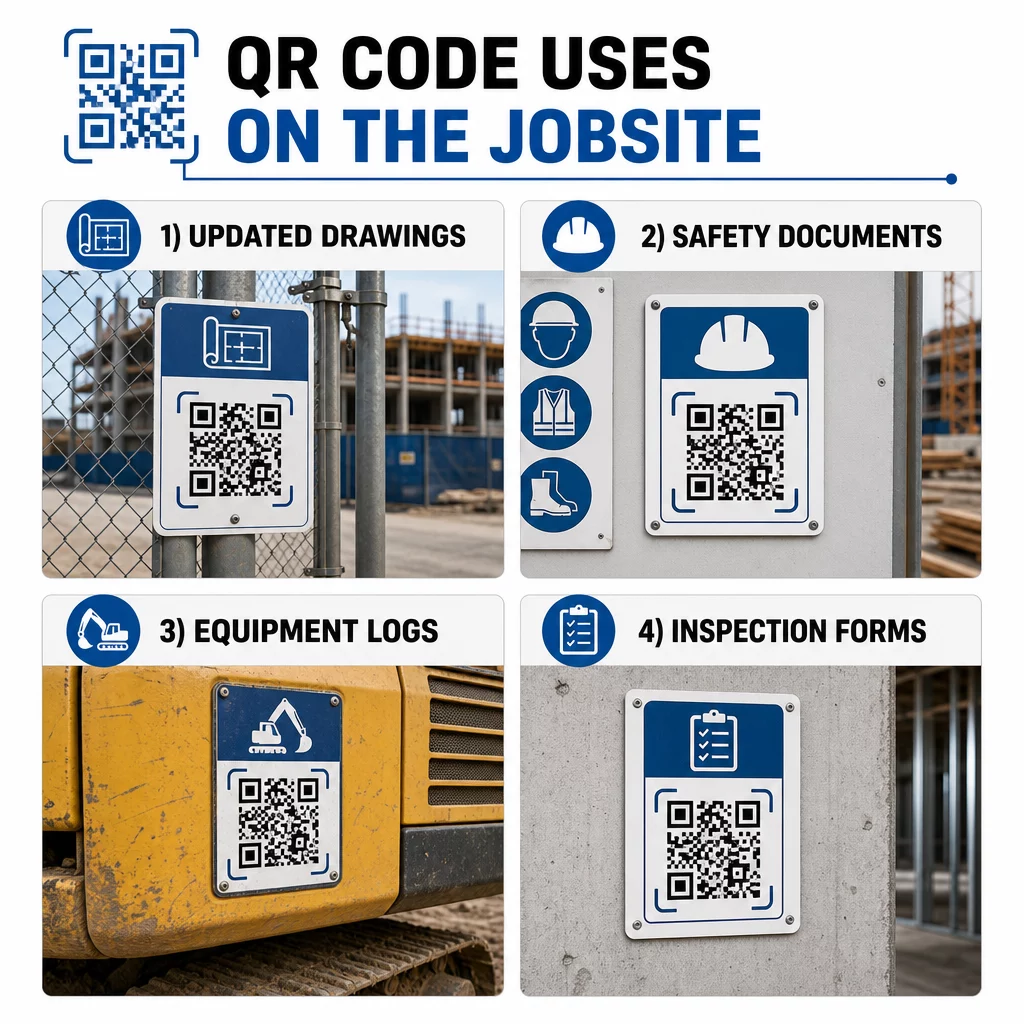
Cách tiếp cận này loại bỏ rủi ro các đội ngũ làm việc dựa trên bản vẽ đã bị thay thế, đây là một trong những nguyên nhân phổ biến và tốn kém nhất gây ra việc làm lại.
Tài liệu An toàn và Hồ sơ OSHA
Đính kèm mã QR vào biển báo công trường, tủ an toàn và điểm kiểm tra ra vào liên kết đến:
- Bảng dữ liệu an toàn cho vật liệu nguy hiểm
- Quy trình khẩn cấp và kế hoạch sơ tán công trường
- Yêu cầu an toàn cụ thể theo ngành nghề
- Hồ sơ tai nạn và bệnh tật của OSHA mà người lao động có quyền truy cập
Một mã QR tổng tại lối vào dự án có thể dẫn đến một trung tâm tài liệu an toàn bao gồm tất cả các mục trên. Vì mã này là động, bạn có thể thêm tài liệu mới hoặc cập nhật tài liệu hiện có mà không cần thay thế biển báo. Để biết thêm về cách cải thiện việc nhà thầu phụ được thông báo về các yêu cầu an toàn, hãy xem 5 cách mã QR cải thiện giao tiếp với nhà thầu phụ.
Nhật ký thiết bị và Hồ sơ bảo trì
Đính kèm mã QR trực tiếp vào từng thiết bị. Người lao động và người vận hành quét mã để truy cập:
- Sổ tay vận hành và quy trình xử lý an toàn
- Nhật ký bảo trì và lịch sử dịch vụ
- Ngày kiểm tra và lịch trình dịch vụ sắp tới
- Hướng dẫn khắc phục sự cố
Điều này thay thế các sổ tay giấy dễ bị thất lạc và cung cấp cho người quản lý một hồ sơ tập trung về tình trạng của từng tài sản. Khi thiết bị di chuyển giữa các công việc, lịch sử bảo trì của nó cũng di chuyển theo.
Trình độ chuyên môn và Hồ sơ đào tạo của người lao động
Đặt mã QR duy nhất lên thẻ nhân viên, mũ bảo hộ hoặc áo bảo hộ lao động liên kết đến chứng nhận đào tạo và hồ sơ trình độ của từng công nhân. Giám sát viên có thể quét tại chỗ để xác nhận rằng một công nhân được chứng nhận cho một nhiệm vụ cụ thể và kiểm tra xem có chứng chỉ nào sắp hết hạn hay không.
Kiểm tra, Danh sách kiểm tra và Kiểm soát chất lượng
Liên kết mã QR đặt tại các điểm kiểm tra hoặc trên bản vẽ với các biểu mẫu kỹ thuật số. Thanh tra viên quét, hoàn thành danh sách kiểm tra trên điện thoại của họ và gửi. Tất cả hồ sơ được lưu trữ tập trung và gắn với vị trí hoặc tài liệu cụ thể. Sử dụng một Mã QR của Google Form là một cách đơn giản để triển khai danh sách kiểm tra kỹ thuật số mà không cần xây dựng một hệ thống tùy chỉnh.
Báo cáo tiến độ cũng hoạt động tương tự: công nhân quét mã trên bản vẽ, nhập dữ liệu công việc đã hoàn thành và người quản lý có được khả năng hiển thị theo thời gian thực về các mốc quan trọng của dự án.
Tài liệu dự án và Nhật ký hàng ngày
Mã QR tại các trạm đăng ký vào công trường cho phép công nhân quét để ghi lại sự có mặt, truy cập kế hoạch trong ngày và mở danh sách kiểm tra nhiệm vụ hàng ngày. Các nhật ký đã hoàn thành được gửi kỹ thuật số, thay thế bảng thông báo giấy và giảm khả năng mất hồ sơ.
Chia sẻ các tài liệu dự án lớn hơn – hồ sơ trình nộp, thông số kỹ thuật, yêu cầu thông tin (RFI) – hoạt động tốt với một mã QR Google Doc, chuyển hướng trực tiếp đến một tài liệu được chia sẻ có thể được cập nhật mà không cần cấp mã mới.
Theo dõi vấn đề và Danh sách công việc cần hoàn thành
Đính kèm mã QR vào một hạng mục bị lỗi hoặc vị trí có vấn đề. Quét sẽ mở một phiếu kỹ thuật số hiển thị mô tả vấn đề, mức độ ưu tiên, kỹ thuật viên được giao và lịch sử công việc. Các ghi chú mới được lưu trữ tập trung để người quản lý và đội ngũ hiện trường luôn thấy trạng thái hiện tại. Điều này giúp các hạng mục trong danh sách công việc cần hoàn thành không bị bỏ sót giữa các lần bàn giao.
Tấm chắn công trường cũng có thể mang một mã QR mở ra hình ảnh phối cảnh bên ngoài của dự án đã hoàn thành, để hàng xóm, người mua và người qua đường có thể thấy những gì đang được xây dựng.
Triển khai mã QR thực sự được quét
Một mã QR mà công nhân không thể đọc được tại hiện trường sẽ làm mất đi mục đích. Một vài cân nhắc thực tế:
- Kích thước và khoảng cách quét. Đối với biển báo tại công trường xây dựng, mã phải rộng ít nhất 1–2 inch để quét ở cự ly gần và lớn hơn đối với các biển báo nhìn từ vài feet. Tuân thủ nguyên tắc rộng khoảng 1 inch mã cho mỗi 10 inch khoảng cách xem. Xem kích thước mã QR cho các vật liệu in khác nhau để được hướng dẫn cụ thể về vật liệu.
- Bề mặt và vị trí đặt. Các bề mặt phẳng, mờ quét đáng tin cậy hơn so với các bề mặt bóng, cong hoặc lượn sóng. Tránh đặt mã ở nơi có bóng râm, ánh nắng chói trực tiếp hoặc vật cản vật lý có thể gây nhiễu.
- Chống chịu thời tiết. Nhãn dán được cán màng hoặc chống chịu thời tiết sẽ bền bỉ trong điều kiện ngoài trời. Mã bị hỏng hoặc bong tróc sẽ ngừng hoạt động.
- Độ tương phản. Mẫu tối trên nền sáng là sự kết hợp đáng tin cậy nhất. Xem lại các phương pháp hay nhất để đọc mã QR trước khi quyết định thiết kế.
- Bảo mật. Đối với các mã liên kết đến tài liệu nhạy cảm – hồ sơ nhân sự, hồ sơ hợp đồng, thông số kỹ thuật độc quyền – hãy sử dụng kiểm soát truy cập và liên kết HTTPS. Để được hướng dẫn, xem các phương pháp hay nhất để tạo mã QR an toàn.
Theo dõi mã nào đang được sử dụng
Mã QR động không chỉ cho phép bạn cập nhật đích đến – chúng còn thu thập dữ liệu quét. Thông qua bảng điều khiển quản lý, bạn có thể xem mỗi mã đã được quét bao nhiêu lần, khi nào, trên loại thiết bị nào và từ vị trí nào. Điều này cho bạn biết công nhân thực sự đang truy cập tài liệu nào, mã an toàn nào gần khu vực nguy hiểm đang bị bỏ qua và hồ sơ thiết bị nào cần được chú ý.
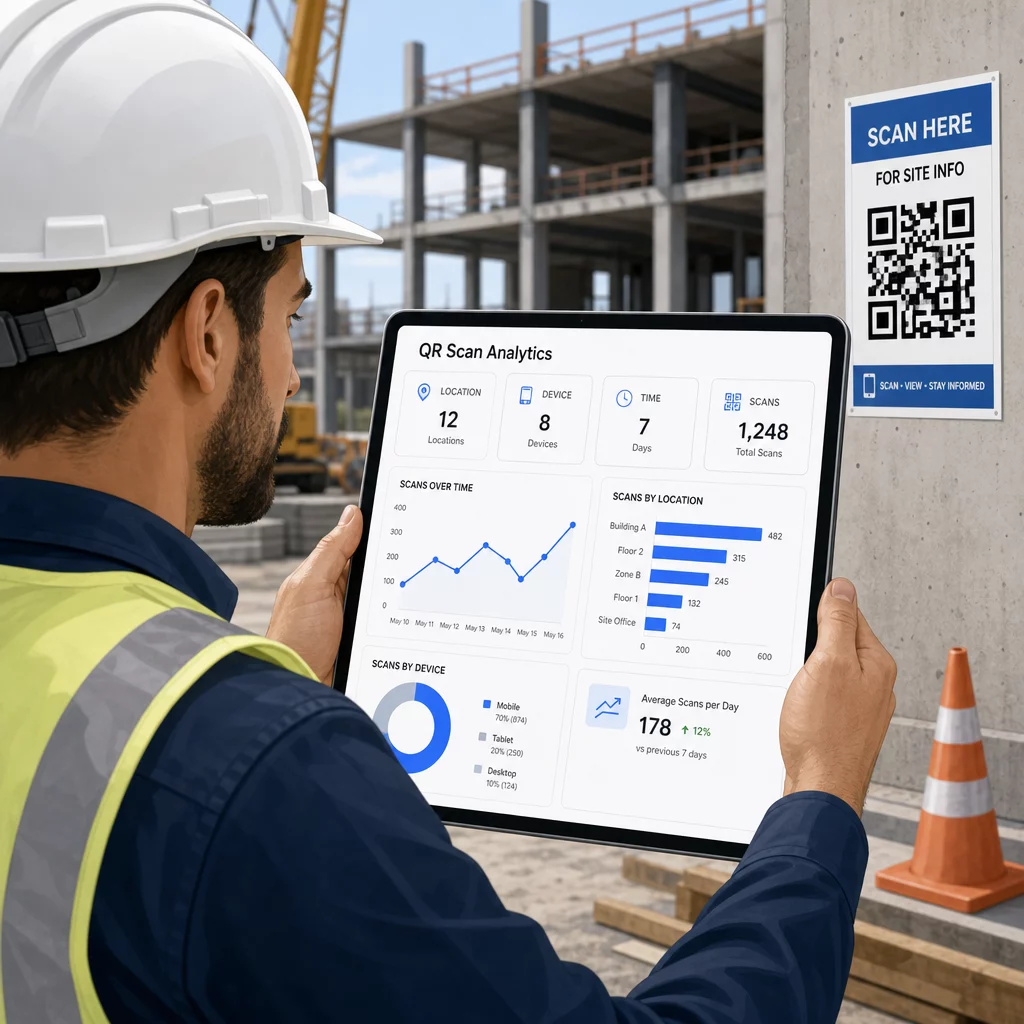
Dữ liệu đó giúp các quản lý công trường đưa ra quyết định sáng suốt về những nơi còn thiếu tài liệu và mã nào cần được đặt hoặc quảng bá tốt hơn.
Xem công nhân đang quét ở đâu và khi nào Sử dụng Trình tạo mã QR liên kết để tạo mã động có thể theo dõi cho bất kỳ nội dung dựa trên URL nào và giám sát hoạt động quét trên toàn bộ công trường của bạn từ một bảng điều khiển duy nhất.
Câu hỏi thường gặp
Không. Ứng dụng camera tích hợp sẵn trên hầu hết các điện thoại thông minh iOS và Android hiện đại có thể đọc mã QR mà không cần tải xuống bất kỳ thứ gì bổ sung. Người dùng chỉ cần hướng camera của họ vào mã và chạm vào thông báo xuất hiện.
Với mã QR động, mã vật lý vẫn giữ nguyên. Bạn cập nhật tệp đích hoặc URL thông qua bảng điều khiển quản lý mã QR của mình, và lần quét tiếp theo sẽ tự động mở phiên bản mới. Đây là lý do tại sao mã động được ưu tiên mạnh mẽ cho các tài liệu xây dựng, vốn được sửa đổi thường xuyên.
In trên vật liệu chống chịu thời tiết hoặc vật liệu cán màng, đặt mã trên các bề mặt phẳng được bảo vệ khỏi tiếp xúc trực tiếp với tia UV nếu có thể, và sử dụng thiết kế có độ tương phản cao để vẫn đọc được ngay cả khi bề mặt hơi bẩn. Kiểm tra hướng dẫn về kích thước và khả năng đọc của mã QR để biết các khuyến nghị cụ thể về mức độ sửa lỗi giúp mã vẫn có thể quét được ngay cả khi bị hư hỏng một phần.