Замедляют ли вашу команду бумажные чертежи, папки с документами по безопасности и журналы ручного учета оборудования? Когда работники тратят время на поиск нужного документа вместо строительства, весь проект платит за это. Это руководство объясняет, как QR-коды решают эту проблему – и где на стройплощадке они приносят наибольшую пользу.
Почему доступ к документам является реальной проблемой на стройплощадках
Управление строительной документацией является одной из самых трудоемких частей любого проекта. Отраслевые исследования показали, что среднестатистический специалист по строительству тратит примерно 5,5 часов в неделю просто на поиск проектных данных – это более 10% времени команды, потерянного на поиск, а не на строительство.
Стоимость – это не только потерянные часы. Бригады, работающие по устаревшим чертежам, совершают ошибки. Протоколы безопасности, хранящиеся в папке в офисе на стройплощадке, не помогут работнику на третьем этаже. Оборудование, не имеющее доступных записей о техническом обслуживании, используется неправильно или пропускает плановое обслуживание.
QR-коды – двухмерные штрих-коды, которые любая камера смартфона может прочитать за секунды – обеспечивают прямой мост между физическим местоположением и цифровым документом. Разместите один на стене, прикрепите к оборудованию или напечатайте на вывеске у входа на объект, и работники смогут получить именно тот файл, который им нужен, не звоня в офис и не роясь в бумажных папках.
Как QR-коды работают в строительном контексте
QR-код – это сканируемый шаблон, который кодирует веб-адрес или ссылку на файл. Когда работник наводит на него камеру своего телефона, устройство автоматически открывает эту ссылку – приложение не требуется на большинстве современных смартфонов.
Наиболее полезным типом для строительства является динамический QR-код, чье назначение может быть обновлено в любое время через панель управления без изменения или перепечатки физического кода. Это важно на стройплощадке, потому что документы постоянно меняются: чертежи пересматриваются, протоколы безопасности обновляются, а спецификации оборудования развиваются. С динамическим кодом физическая наклейка или вывеска остается на месте, в то время как связанный контент обновляется за считанные секунды.
Делитесь обновленными планами без перепечатки Нужно, чтобы полевые бригады работали по последней редакции чертежей? Используйте QR код на пдф файл для прямой ссылки на ваши текущие планы и обновления назначения каждый раз, когда выпускается новая редакция.
Практическое применение QR-кодов на строительной площадке
Актуальные чертежи и спецификации
Разместите всепогодные QR-вывески у входа на объект, в отдельных помещениях и в специализированных рабочих зонах. Работники сканируют их, чтобы открыть последний набор планов и спецификаций прямо на своих телефонах. Когда выпускается новая редакция чертежа, обновите связанный файл – новые вывески не требуются.
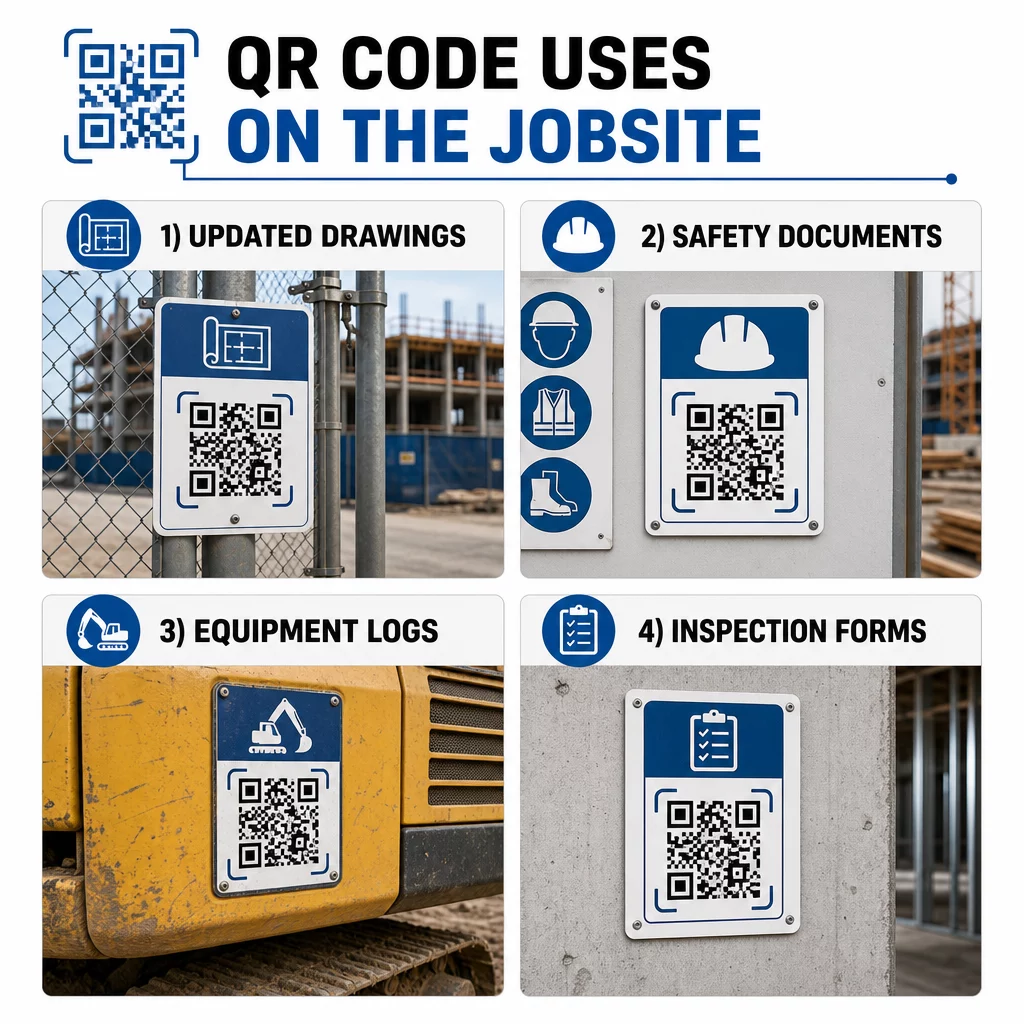
Такой подход исключает риск работы бригад по устаревшим чертежам, что является одним из наиболее распространенных и дорогостоящих источников переделок.
Документы по безопасности и записи OSHA
Прикрепите QR-коды к вывескам на объекте, шкафам безопасности и контрольно-пропускным пунктам, ссылающимся на:
- Паспорта безопасности для опасных материалов
- Аварийные процедуры и планы эвакуации с объекта
- Специфические для профессии требования безопасности
- Записи OSHA о травмах и заболеваниях, к которым работники имеют право доступа
Главный QR-код на входе в проект может указывать на центр документов по безопасности, охватывающий все вышеперечисленное. Поскольку код динамический, вы можете добавлять новые документы или обновлять существующие без замены вывески. Для получения дополнительной информации о том, как улучшить информирование субподрядчиков о требованиях безопасности, см. 5 способов, которыми QR-коды улучшают связь с субподрядчиками.
Журналы оборудования и записи о техническом обслуживании
Прикрепите QR-код непосредственно к каждой единице оборудования. Работники и операторы сканируют его для доступа к:
- Руководства по эксплуатации и процедуры безопасного обращения
- Журналы технического обслуживания и история обслуживания
- Даты проверок и предстоящие графики обслуживания
- Руководства по устранению неполадок
Это заменяет бумажные руководства, которые теряются, и предоставляет менеджерам централизованную запись о состоянии каждого актива. По мере перемещения оборудования между объектами, его история обслуживания перемещается вместе с ним.
Квалификация работников и записи об обучении
Размещайте уникальные QR-коды на пропусках сотрудников, касках или защитных жилетах, которые ссылаются на сертификаты обучения и записи о квалификации каждого работника. Руководители могут сканировать на месте, чтобы подтвердить, что работник сертифицирован для выполнения конкретной задачи, и проверить, не истекает ли срок действия каких-либо учетных данных.
Инспекции, контрольные списки и контроль качества
Привяжите QR-коды, размещенные в точках проверки или на чертежах, к цифровым формам. Инспекторы сканируют, заполняют контрольный список на своем телефоне и отправляют. Все записи хранятся централизованно и привязаны к конкретному месту или документу. Использование QR-код формы Google — это простой способ развертывания цифровых контрольных списков инспекций без создания пользовательской системы.
Отчетность о ходе работ работает так же: работники сканируют код на чертеже, вводят данные о выполненной работе, и менеджеры получают информацию о вехах проекта в режиме реального времени.
Проектная документация и ежедневные журналы
QR-коды на станциях регистрации на объекте позволяют работникам сканировать для записи посещаемости, доступа к планам на день и открытия ежедневных контрольных списков задач. Заполненные журналы отправляются в цифровом виде, заменяя бумажные доски объявлений и уменьшая вероятность потери записей.
Обмен крупными проектными документами – заявками, спецификациями, запросами информации – хорошо работает с QR-код Google Документа, который перенаправляет непосредственно к общему документу, который можно обновлять без выдачи нового кода.
Отслеживание проблем и списки недоделок
Прикрепите QR-код к дефектному элементу или проблемному месту. Сканирование открывает цифровой билет, показывающий описание проблемы, приоритет, назначенного техника и историю работ. Новые заметки сохраняются централизованно, поэтому менеджеры и выездные бригады всегда видят текущий статус. Это предотвращает потерю пунктов списка недоделок при передаче.
Ограждения строительных площадок также могут содержать QR-код, который открывает внешние визуализации завершенного проекта, чтобы соседи, покупатели и прохожие могли видеть, что строится.
Развертывание QR-кодов, которые действительно сканируются
QR-код, который работники не могут прочитать на месте, теряет смысл. Несколько практических соображений:
- Размер и расстояние сканирования. Для вывесок на строительной площадке код должен быть шириной не менее 1–2 дюймов для сканирования с близкого расстояния и больше для вывесок, просматриваемых с нескольких футов. Следуйте правилу: примерно 1 дюйм ширины кода на каждые 10 дюймов расстояния просмотра. См. размеру QR-кода для различных печатных материалов для рекомендаций по конкретным материалам.
- Поверхность и размещение. Плоские, матовые поверхности сканируются надежнее, чем глянцевые, изогнутые или гофрированные. Избегайте размещения кодов там, где тени, прямые солнечные блики или физические препятствия будут мешать.
- Защита от атмосферных воздействий. Ламинированные или атмосферостойкие этикетки выдерживают внешние условия. Поврежденный или отслаивающийся код перестает работать.
- Контраст. Темный узор на светлом фоне — наиболее надежная комбинация. Проверьте лучшим практикам читаемости QR-кодов перед утверждением дизайна.
- Безопасность. Для кодов, ссылающихся на конфиденциальные документы – кадровые записи, файлы контрактов, проприетарные спецификации – используйте контроль доступа и ссылки HTTPS. Для получения рекомендаций см. лучшие практики безопасной генерации QR-кодов.
Отслеживание используемых кодов
Динамические QR-коды не только позволяют обновлять пункты назначения – они также собирают данные сканирования. Через панель управления вы можете видеть, сколько раз каждый код был отсканирован, когда, на каком типе устройства и из какого местоположения. Это показывает, к каким документам работники действительно обращаются, какие коды безопасности вблизи опасных зон игнорируются и какие записи об оборудовании требуют внимания.
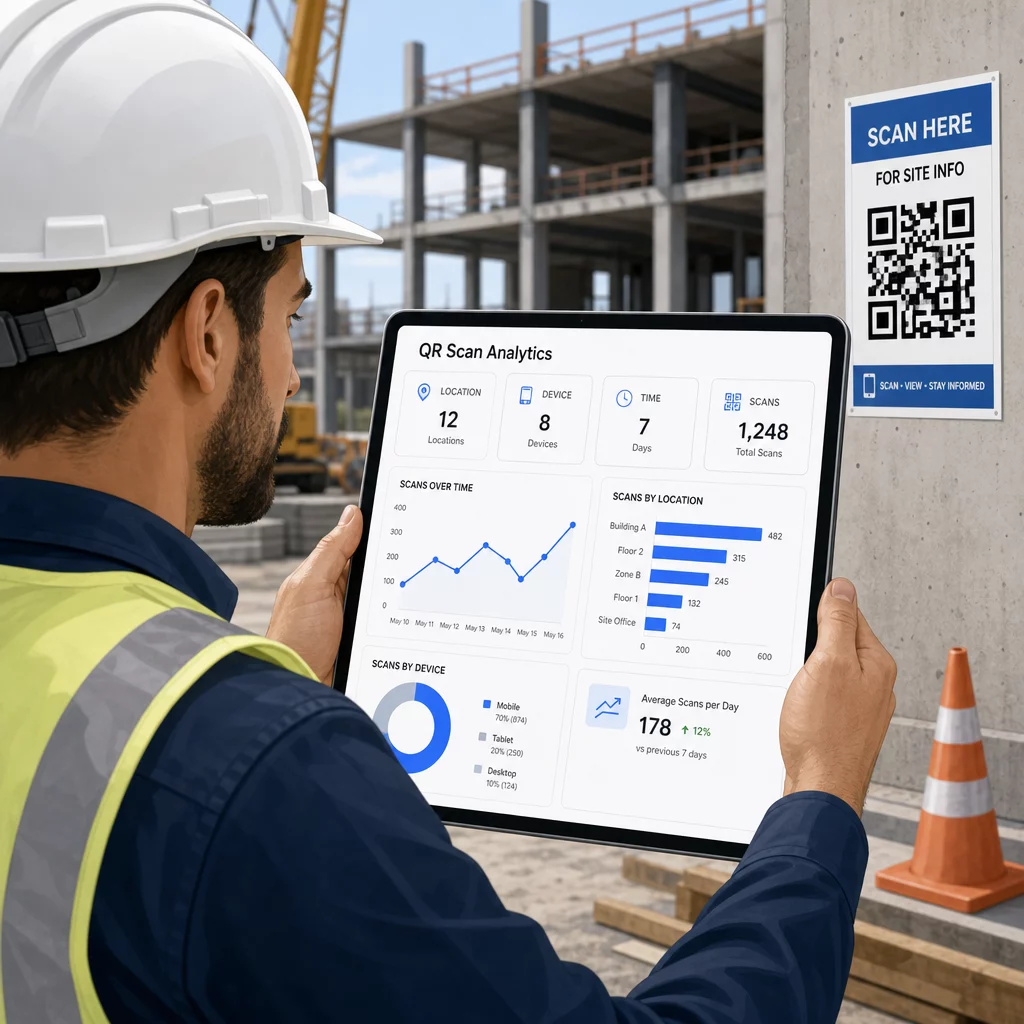
Эти данные помогают руководителям объектов принимать обоснованные решения о том, где существуют пробелы в документации и какие коды нуждаются в лучшем размещении или продвижении.
Смотрите, где и когда работники сканируют Использовать Генератор QR-кодов для ссылок для создания отслеживаемых динамических кодов для любого контента на основе URL и мониторинга активности сканирования на вашем рабочем месте с единой панели управления.
Часто задаваемые вопросы
Нет. Встроенное приложение камеры на большинстве современных смартфонов iOS и Android может считывать QR-коды без загрузки чего-либо дополнительного. Работники просто наводят камеру на код и нажимают на появившееся уведомление.
С динамическим QR-кодом физический код остается неизменным. Вы обновляете целевой файл или URL-адрес через панель управления QR-кодами, и следующее сканирование автоматически открывает новую версию. Вот почему динамические коды настоятельно рекомендуются для строительной документации, которая часто пересматривается.
Печатайте на атмосферостойких или ламинированных материалах, размещайте коды на плоских поверхностях, по возможности защищенных от прямого УФ-излучения, и используйте высококонтрастные дизайны, которые остаются читаемыми, даже если поверхность немного загрязнится. Проверьте рекомендации по размеру и читаемости QR-кодов для конкретных рекомендаций по уровням коррекции ошибок, которые помогают кодам оставаться сканируемыми даже при частичном повреждении.