Saknar pappersritningar, pärmar fulla med säkerhetsdokument och manuella utrustningsloggar din besättning? När arbetare lägger tid på att leta efter rätt dokument istället för att bygga, betalar hela projektet priset. Denna guide förklarar hur QR-koder löser det problemet – och var på arbetsplatsen de levererar mest värde.
Varför dokumentåtkomst är ett verkligt problem på arbetsplatser
Att hantera byggdokument är en av de mest tidskrävande delarna av alla projekt. Branschforskning har visat att den genomsnittliga byggproffsen spenderar ungefär 5,5 timmar per vecka enbart på att leta efter projektdata – det är mer än 10% av ett teams tid som går förlorad till sökning istället för byggande.
Kostnaden är inte bara förlorade timmar. Besättningar som arbetar med föråldrade ritningar gör misstag. Säkerhetsprotokoll som finns i en pärm på platskontoret hjälper inte en arbetare på tredje våningen. Utrustning som saknar tillgängliga underhållsregister missbrukas eller missar planerad service.
QR-koder – tvådimensionella streckkoder som vilken smartphonekamera som helst kan läsa på några sekunder – ger dig en direkt brygga mellan en fysisk plats och ett digitalt dokument. Sätt upp en på en vägg, fäst en på en utrustning, eller skriv ut en på en skylt vid platsens ingång, så kan arbetare få fram exakt den fil de behöver utan att ringa kontoret eller leta igenom pappersmappar.
Hur QR-koder fungerar i ett byggsammanhang
En QR-kod är ett skanningsbart mönster som kodar en webbadress eller fillänk. När en arbetare riktar sin telefonkamera mot den, öppnar enheten den länken automatiskt – ingen app krävs på de flesta moderna smartphones.
Den mest användbara typen för byggnation är en dynamisk QR-kod, vars destination kan uppdateras när som helst via en hanteringspanel utan att ändra eller trycka om den fysiska koden. Detta är viktigt på en arbetsplats eftersom dokument ständigt ändras: ritningar revideras, säkerhetsprotokoll uppdateras och utrustningsspecifikationer utvecklas. Med en dynamisk kod stannar den fysiska dekalen eller skylten på plats medan det länkade innehållet uppdateras på några sekunder.
Dela uppdaterade planer utan att trycka om Behöver du hålla fältbesättningar uppdaterade med den senaste ritningsrevisionen? Använd QR-kodgenerator för PDF för att länka direkt till dina aktuella planer och uppdatera destinationen när en revision utfärdas.
Praktiska användningsområden för QR-koder på en byggarbetsplats
Aktuella ritningar och specifikationer
Sätt upp väderbeständiga QR-skyltar vid projektets ingång, i enskilda rum och vid yrkesspecifika arbetsområden. Arbetare skannar för att öppna den senaste uppsättningen planer och specifikationer direkt på sina telefoner. När en ritningsrevision utfärdas, uppdatera den länkade filen – inga nya skyltar krävs.
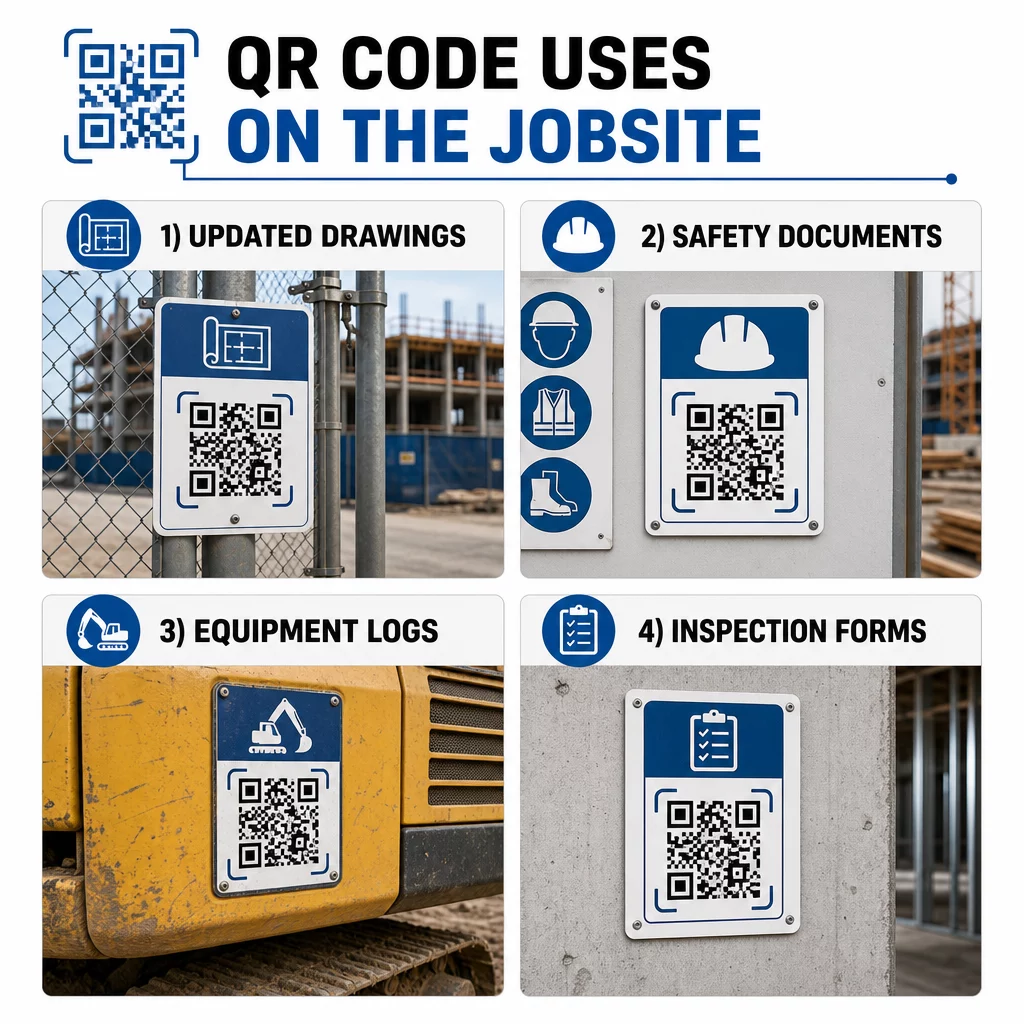
Detta tillvägagångssätt eliminerar risken för att besättningar arbetar med ersatta ritningar, vilket är en av de vanligaste och mest kostsamma källorna till omarbetning.
Säkerhetsdokument och OSHA-register
Fäst QR-koder på platsens skyltning, säkerhetsskåp och inpasseringskontroller som länkar till:
- Säkerhetsdatablad för farliga material
- Nödprocedurer och platsens evakueringsplaner
- Branschspecifika säkerhetskrav
- OSHA-register över skador och sjukdomar som arbetare har rätt att få tillgång till
En huvud-QR-kod vid projektets ingång kan peka till ett nav för säkerhetsdokument som täcker allt ovanstående. Eftersom koden är dynamisk kan du lägga till nya dokument eller uppdatera befintliga utan att byta ut skylten. För mer om hur man kan förbättra hur underentreprenörer håller sig informerade om säkerhetskrav, se 5 sätt QR-koder förbättrar kommunikationen med underentreprenörer.
Utrustningsloggar och underhållsregister
Fäst en QR-kod direkt på varje utrustningsdel. Arbetare och operatörer skannar den för att få tillgång till:
- Bruksanvisningar och säkra hanteringsprocedurer
- Underhållsloggar och servicehistorik
- Inspektionsdatum och kommande serviceplaner
- Felsökningsguider
Detta ersätter pappersmanualer som försvinner och ger chefer ett centraliserat register över varje tillgångs status. När utrustning flyttas mellan jobb följer dess underhållshistorik med.
Arbetarkvalifikationer och utbildningsregister
Placera unika QR-koder på anställdas ID-brickor, bygghjälmar eller säkerhetsvästar som länkar till varje arbetares utbildningscertifikat och kvalifikationsregister. Arbetsledare kan skanna på plats för att bekräfta att en arbetare är certifierad för en specifik uppgift och kontrollera om några behörigheter närmar sig utgångsdatum.
Inspektioner, checklistor och kvalitetskontroll
Länka QR-koder placerade vid inspektionspunkter eller på ritningar till digitala formulär. Inspektörer skannar, fyller i checklistan på sin telefon och skickar in. Alla register lagras centralt och är kopplade till den specifika platsen eller dokumentet. Att använda en QR-kod för Google-formulär är ett enkelt sätt att implementera digitala inspektionschecklistor utan att bygga ett anpassat system.
Framstegsrapportering fungerar på samma sätt: arbetare skannar en kod på en ritning, anger data för slutfört arbete, och chefer får realtidsinsyn i projektets milstolpar.
Projektdokumentation och dagliga loggar
QR-koder vid incheckningsstationer på plats låter arbetare skanna för att registrera närvaro, komma åt planer för dagen och öppna dagliga uppgiftschecklistor. Slutförda loggar skickas in digitalt, vilket ersätter anslagstavlor av papper och minskar risken för förlorade register.
Att dela större projektdokument – inlämningar, specifikationer, förfrågningar om information (RFIs) – fungerar bra med en Google Doc QR-kod, som omdirigerar direkt till ett delat dokument som kan uppdateras utan att utfärda en ny kod.
Ärendehantering och anmärkningar
Fäst en QR-kod på en defekt artikel eller problemplats. Skanning öppnar en digital ärendebiljett som visar problembeskrivning, prioritet, tilldelad tekniker och arbetshistorik. Nya anteckningar sparas centralt så att chefer och fältpersonal alltid ser den aktuella statusen. Detta förhindrar att anmärkningspunkter faller mellan stolarna vid överlämningar.
Byggnadsplank kan också ha en QR-kod som öppnar exteriöra visualiseringar av det färdiga projektet, så att grannar, köpare och förbipasserande kan se vad som byggs.
Implementera QR-koder som faktiskt skannas
En QR-kod som arbetare inte kan läsa i fält motverkar syftet. Några praktiska överväganden:
- Storlek och skanningsavstånd. För skyltning på en byggarbetsplats bör en kod vara minst 1–2 tum bred för skanning på nära håll, och större för skyltar som ses från flera fots avstånd. Följ riktlinjen om ungefär 1 tums kodbredd för varje 10 tums visningsavstånd. Se QR-kodstorlek för olika tryckmaterial för materialspecifik vägledning.
- Yta och placering. Plana, matta ytor skannas mer tillförlitligt än glansiga, böjda eller korrugerade. Undvik att placera koder där skuggor, direkt solljus eller fysiska hinder kan störa.
- Väderbeständighet. Laminerade eller väderbeständiga etiketter håller i utomhusförhållanden. En skadad eller avskalad kod slutar fungera.
- Kontrast. Mörkt mönster på ljus bakgrund är den mest tillförlitliga kombinationen. Granska bästa praxis för läsbarhet av QR-koder innan du bestämmer dig för en design.
- Säkerhet. För koder som länkar till känsliga dokument – HR-register, kontraktsfiler, proprietära specifikationer – använd åtkomstkontroller och HTTPS-länkar. För vägledning, se säkra bästa praxis för generering av QR-koder.
Spåra vilka koder som används
Dynamiska QR-koder låter dig inte bara uppdatera destinationer – de samlar också in skanningsdata. Via en hanteringspanel kan du se hur många gånger varje kod skannades, när, på vilken typ av enhet och från vilken plats. Detta berättar vilka dokument arbetare faktiskt kommer åt, vilka säkerhetskoder nära riskområden som ignoreras och vilka utrustningsregister som behöver uppmärksamhet.
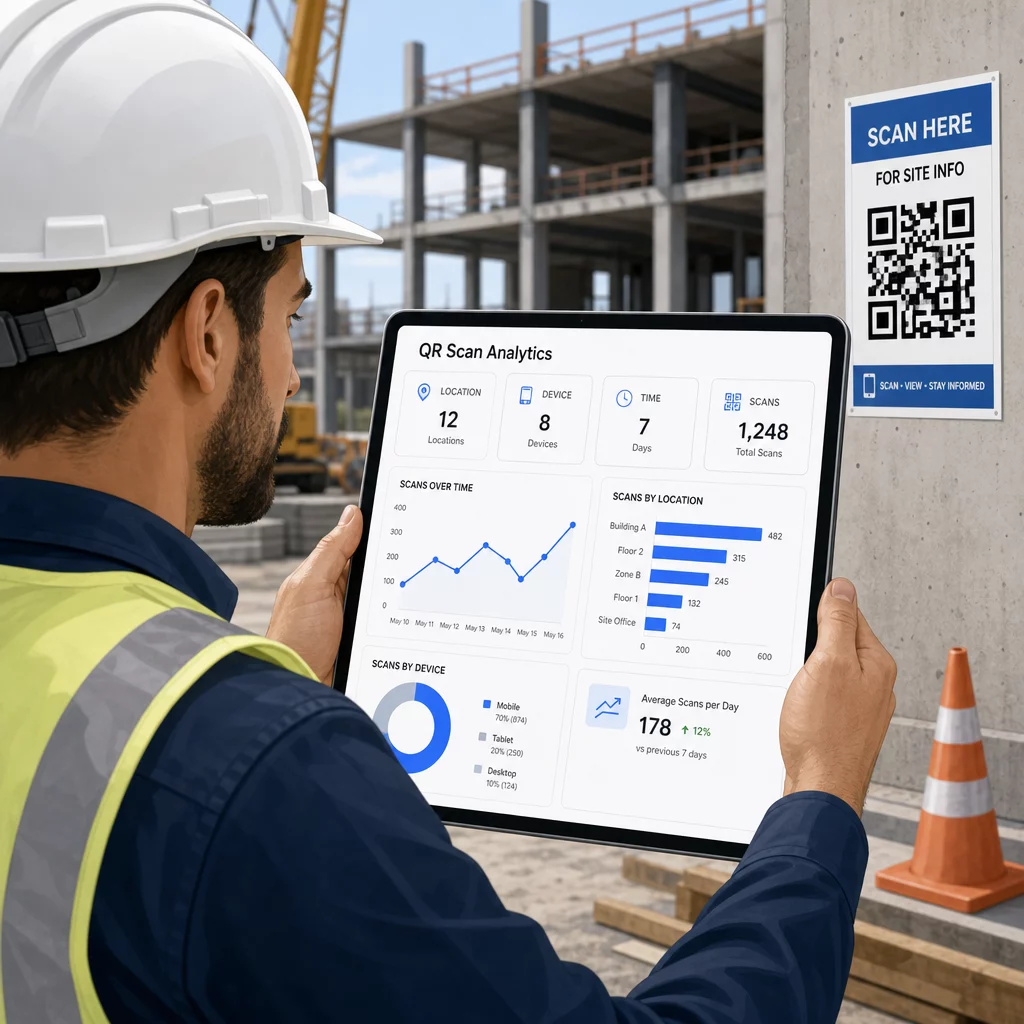
Denna data hjälper platschefer att fatta välgrundade beslut om var dokumentationsluckor finns och vilka koder som behöver bättre placering eller marknadsföring.
Se var och när arbetare skannar Använd Länk QR-kodgenerator för att skapa spårbara dynamiska koder för allt URL-baserat innehåll och övervaka skanningsaktivitet på din arbetsplats från en enda panel.
Vanliga frågor
Nej. Den inbyggda kameraappen på de flesta moderna iOS- och Android-smartphones kan läsa QR-koder utan att ladda ner något extra. Anställda pekar helt enkelt sin kamera mot koden och trycker på aviseringen som visas.
Med en dynamisk QR-kod förblir den fysiska koden densamma. Du uppdaterar destinationsfilen eller URL:en via din hanteringspanel för QR-koder, och nästa skanning öppnar automatiskt den nya versionen. Detta är anledningen till att dynamiska koder starkt föredras för byggdokument, som revideras ofta.
Skriv ut på väderbeständiga eller laminerade material, placera koder på plana ytor skyddade från direkt UV-exponering där det är möjligt, och använd högkontrastdesigner som förblir läsbara även om ytan blir något smutsig. Kontrollera riktlinjer för QR-kodstorlek och läsbarhet för specifika rekommendationer om felkorrigeringsnivåer som hjälper koder att förbli skanningsbara även när de är delvis skadade.