Are paper blueprints, binders full of safety docs, and manual equipment logs slowing your crew down? When workers spend time hunting for the right document instead of building, the whole project pays the price. This guide explains how QR codes solve that problem – and where on the jobsite they deliver the most value.
Why Document Access Is a Real Problem on Jobsites
Managing construction documents is one of the most time-consuming parts of any project. Industry research has found that the average construction professional spends roughly 5.5 hours per week simply looking for project data – that’s more than 10% of a team’s time lost to searching rather than building.
The cost isn’t just lost hours. Crews working from outdated drawings make mistakes. Safety protocols that live in a binder at the site office don’t help a worker on the third floor. Equipment that lacks accessible maintenance records gets misused or skips scheduled service.
QR codes – two-dimensional barcodes that any smartphone camera can read in seconds – give you a direct bridge between a physical location and a digital document. Post one on a wall, attach one to a piece of equipment, or print one on a sign at the site entrance, and workers can pull up exactly the file they need without calling the office or hunting through paper folders.
How QR Codes Work in a Construction Context
A QR code is a scannable pattern that encodes a web address or file link. When a worker points their phone camera at it, the device opens that link automatically – no app required on most modern smartphones.
The most useful type for construction is a 动态二维码, whose destination can be updated at any time through a management dashboard without changing or reprinting the physical code. This matters on a jobsite because documents change constantly: drawings get revised, safety protocols are updated, and equipment specs evolve. With a dynamic code, the physical sticker or sign stays in place while the linked content is refreshed in seconds.
Share Updated Plans Without Reprinting Need to keep field crews on the latest drawing revision? Use the PDF QR 码生成器 to link directly to your current plans and update the destination any time a revision is issued.
Practical Uses for QR Codes on a Construction Site
Current Drawings and Specifications
Post weatherproof QR signs at the project entrance, in individual rooms, and at trade-specific work areas. Workers scan to open the latest set of plans and specifications directly on their phones. When a drawing revision is issued, update the linked file – no new signs required.
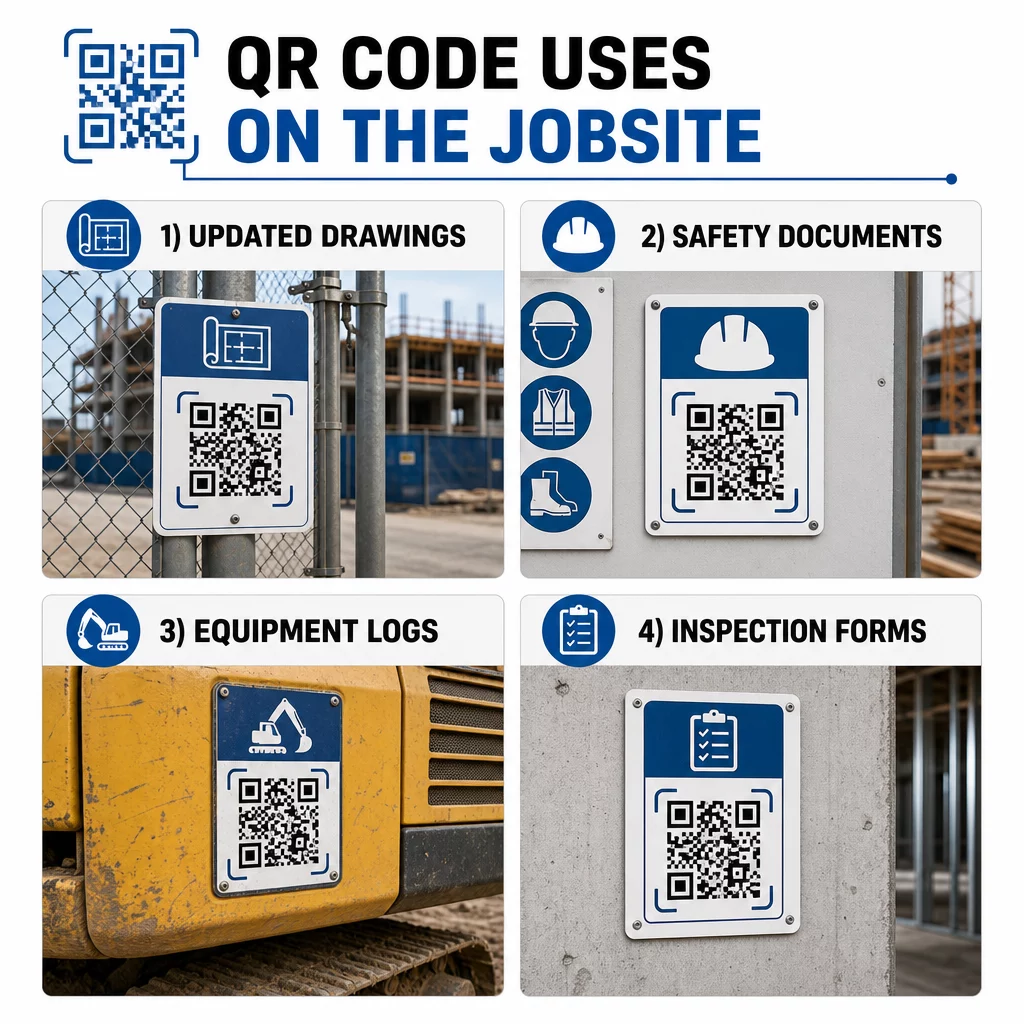
This approach eliminates the risk of crews working from superseded drawings, which is one of the most common and costly sources of rework.
Safety Documents and OSHA Records
Attach QR codes to site signage, safety cabinets, and entry checkpoints linking to:
- Safety data sheets for hazardous materials
- Emergency procedures and site evacuation plans
- Trade-specific safety requirements
- OSHA injury and illness records that workers have a right to access
A master QR code at the project entrance can point to a safety document hub covering all of the above. Because the code is dynamic, you can add new documents or update existing ones without replacing the sign. For more on improving how subcontractors stay informed about safety requirements, see 5 ways QR codes improve subcontractor communication.
Equipment Logs and Maintenance Records
Attach a QR code directly to each piece of equipment. Workers and operators scan it to access:
- Operating manuals and safe handling procedures
- Maintenance logs and service history
- Inspection dates and upcoming service schedules
- Troubleshooting guides
This replaces paper manuals that go missing and gives managers a centralized record of each asset’s status. As equipment moves between jobs, its maintenance history moves with it.
Worker Qualifications and Training Records
Place unique QR codes on employee badges, hard hats, or safety vests that link to each worker’s training certifications and qualification records. Supervisors can scan on-site to confirm that a worker is certified for a specific task and check whether any credentials are approaching expiration.
Inspections, Checklists, and Quality Control
Link QR codes placed at inspection points or on drawings to digital forms. Inspectors scan, complete the checklist on their phone, and submit. All records are stored centrally and tied to the specific location or document. Using a 谷歌表格二维码 is a straightforward way to deploy digital inspection checklists without building a custom system.
Progress reporting works the same way: workers scan a code on a drawing, enter completed-work data, and managers get real-time visibility into project milestones.
Project Documentation and Daily Logs
QR codes at site check-in stations let workers scan to record attendance, access plans for the day, and open daily task checklists. Completed logs are submitted digitally, replacing paper bulletin boards and reducing the chance of lost records.
Sharing larger project documents – submittals, specifications, RFIs – works well with a Google Doc QR code, which redirects directly to a shared document that can be updated without issuing a new code.
Issue Tracking and Punch Lists
Attach a QR code to a defective item or problem location. Scanning opens a digital ticket showing the issue description, priority, assigned technician, and work history. New notes are saved centrally so managers and field crews always see the current status. This keeps punch list items from falling through the cracks between handoffs.
Site hoardings can also carry a QR code that opens exterior renderings of the finished project, so neighbors, buyers and passers-by can see what is being built.
Deploying QR Codes That Actually Get Scanned
A QR code that workers can’t read in the field defeats the purpose. A few practical considerations:
- Size and scanning distance. For signage on a construction site, a code should be at least 1–2 inches wide for close-range scanning, and larger for signs viewed from several feet away. Follow the guideline of roughly 1 inch of code width for every 10 inches of viewing distance. See 不同印刷材料的二维码尺寸 for material-specific guidance.
- Surface and placement. Flat, matte surfaces scan more reliably than glossy, curved, or corrugated ones. Avoid placing codes where shadows, direct sun glare, or physical obstruction will interfere.
- Weatherproofing. Laminated or weatherproof labels hold up through outdoor conditions. A damaged or peeling code stops working.
- Contrast. Dark pattern on a light background is the most reliable combination. Review 二维码可读性的最佳实践 before committing to a design.
- Security. For codes linking to sensitive documents – HR records, contract files, proprietary specs – use access controls and HTTPS links. For guidance, see 安全二维码生成最佳实践.
Tracking Which Codes Are Being Used
Dynamic QR codes don’t just let you update destinations – they also capture scan data. Through a management dashboard, you can see how many times each code was scanned, when, on what type of device, and from which location. This tells you which documents workers are actually accessing, which safety codes near hazardous areas are getting ignored, and which equipment records need attention.
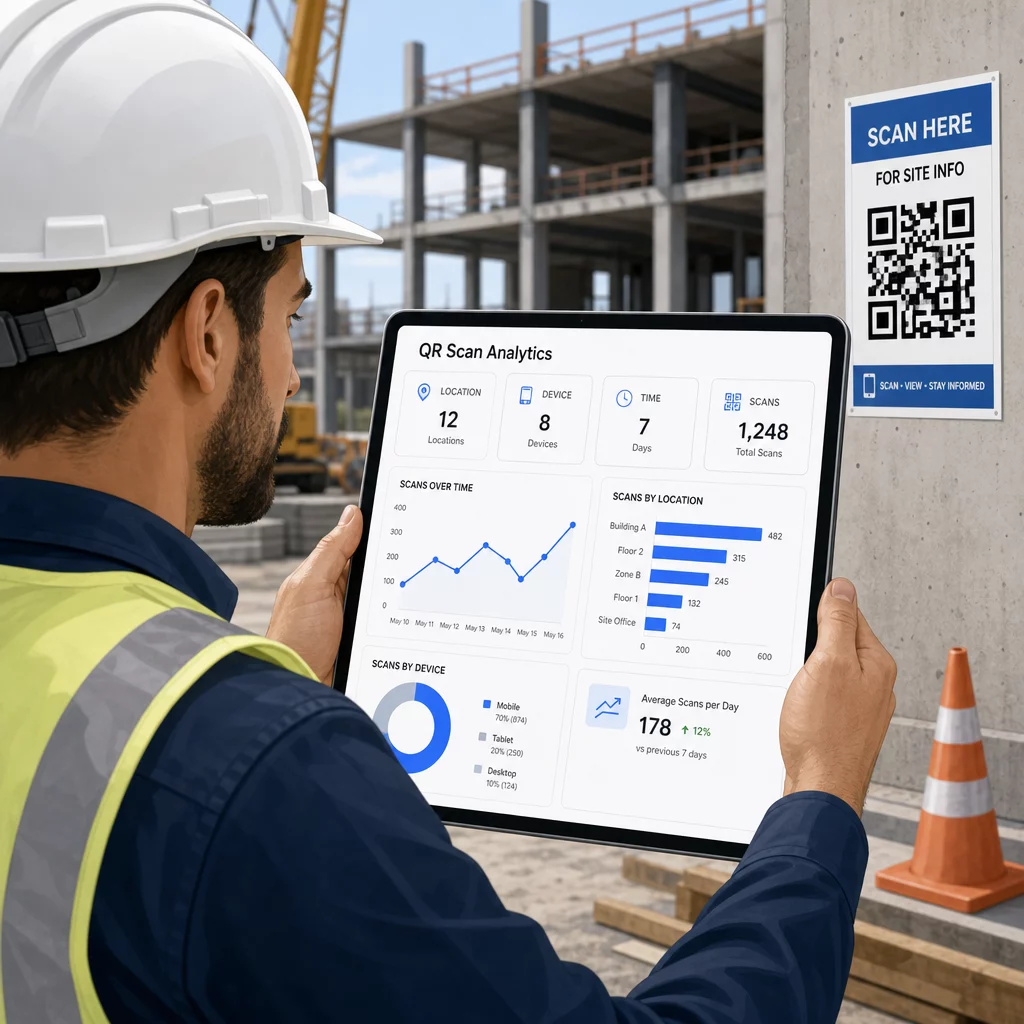
That data helps site managers make informed decisions about where documentation gaps exist and which codes need better placement or promotion.
See Where and When Workers Are Scanning 使用 链接二维码生成器 to create trackable dynamic codes for any URL-based content and monitor scan activity across your jobsite from a single dashboard.
常见问题
No. The built-in camera app on most modern iOS and Android smartphones can read QR codes without downloading anything additional. Workers simply point their camera at the code and tap the notification that appears.
With a dynamic QR code, the physical code stays the same. You update the destination file or URL through your QR code management dashboard, and the next scan automatically opens the new version. This is why dynamic codes are strongly preferred for construction documents, which are revised frequently.
Print on weatherproof or laminated materials, place codes on flat surfaces protected from direct UV exposure where possible, and use high-contrast designs that remain readable if the surface gets slightly dirty. Check QR code sizing and readability guidelines for specific recommendations on error correction levels that help codes stay scannable even when partially damaged.