A papír alaprajzok, a biztonsági dokumentumokkal teli mappák és a kézi berendezésnaplók lassítják a csapatát? Amikor a dolgozók a megfelelő dokumentum keresésével töltik az időt az építés helyett, az egész projekt megfizeti az árát. Ez az útmutató elmagyarázza, hogyan oldják meg a QR-kódok ezt a problémát – és hol nyújtanak a legnagyobb értéket a munkaterületen.
Miért jelent valós problémát a dokumentumokhoz való hozzáférés az építkezéseken
Az építési dokumentumok kezelése az egyik legidőigényesebb része bármely projektnek. Az iparági kutatások szerint az átlagos építőipari szakember hetente körülbelül 5,5 órát tölt pusztán projektadatok keresésével – ez a csapat idejének több mint 10%-a, ami kereséssel, nem pedig építéssel telik el.
A költség nem csak az elvesztegetett órákban mérhető. Az elavult rajzok alapján dolgozó csapatok hibákat követnek el. A helyszíni irodában egy mappában tárolt biztonsági protokollok nem segítenek a harmadik emeleten dolgozó munkásnak. Azok a berendezések, amelyekhez nem állnak rendelkezésre karbantartási nyilvántartások, helytelenül használhatók, vagy kihagyják az ütemezett szervizelést.
A QR-kódok – kétdimenziós vonalkódok, amelyeket bármely okostelefon kamerája másodpercek alatt leolvashat – közvetlen hidat képeznek egy fizikai helyszín és egy digitális dokumentum között. Helyezzen el egyet a falra, rögzítsen egyet egy berendezéshez, vagy nyomtasson egyet egy táblára a bejáratnál, és a dolgozók előhívhatják pontosan azt a fájlt, amire szükségük van anélkül, hogy felhívnák az irodát vagy papírmappákban kutatnának.
Hogyan működnek a QR-kódok az építőiparban
A QR-kód egy beolvasható minta, amely egy webcímet vagy fájllinket kódol. Amikor egy dolgozó a telefonja kameráját ráirányítja, az eszköz automatikusan megnyitja azt a linket – a legtöbb modern okostelefonon nincs szükség alkalmazásra.
Az építőiparban a leghasznosabb típus a dinamikus QR-kód, amelynek célállomása bármikor frissíthető egy kezelőfelületen keresztül anélkül, hogy a fizikai kódot meg kellene változtatni vagy újra kellene nyomtatni. Ez azért fontos egy építkezésen, mert a dokumentumok folyamatosan változnak: a rajzokat felülvizsgálják, a biztonsági protokollokat frissítik, és a berendezések specifikációi fejlődnek. Dinamikus kóddal a fizikai matrica vagy tábla a helyén marad, miközben a hivatkozott tartalom másodpercek alatt frissül.
Frissített tervek megosztása újranyomtatás nélkül Szüksége van arra, hogy a helyszíni csapatok a legújabb rajzrevízión dolgozzanak? Használja a PDF QR kód generátor a közvetlen hivatkozáshoz az aktuális terveihez, és frissítse a célállomást bármikor, amikor új revízió jelenik meg.
A QR-kódok gyakorlati felhasználása építkezésen
Aktuális rajzok és specifikációk
Helyezzen ki időjárásálló QR-táblákat a projekt bejáratánál, az egyes helyiségekben és a szakmaspecifikus munkaterületeken. A dolgozók beolvassák, hogy közvetlenül a telefonjukon nyissák meg a legújabb tervrajzokat és specifikációkat. Amikor egy rajzrevízió megjelenik, frissítse a hivatkozott fájlt – nincs szükség új táblákra.
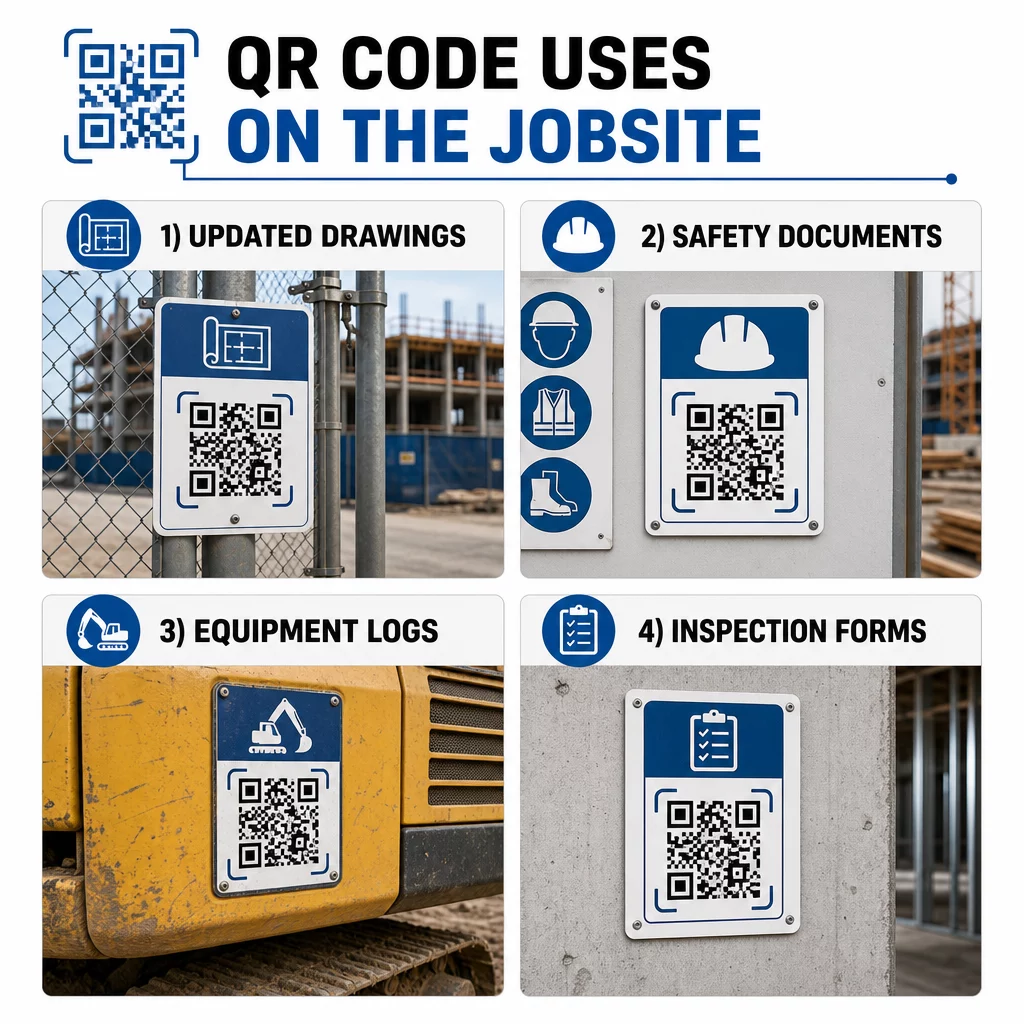
Ez a megközelítés kiküszöböli annak kockázatát, hogy a csapatok felülírt rajzok alapján dolgozzanak, ami az egyik leggyakoribb és legköltségesebb forrása az utómunkálatoknak.
Biztonsági dokumentumok és OSHA nyilvántartások
Rögzítsen QR-kódokat a helyszíni táblákra, biztonsági szekrényekre és belépési ellenőrzőpontokra, amelyek a következőkre mutatnak:
- Veszélyes anyagok biztonsági adatlapjai
- Vészhelyzeti eljárások és helyszíni evakuálási tervek
- Szakmaspecifikus biztonsági követelmények
- OSHA sérülési és betegségi nyilvántartások, amelyekhez a munkavállalóknak joguk van hozzáférni
A projekt bejáratánál elhelyezett fő QR-kód egy biztonsági dokumentumközpontra mutathat, amely mindezt lefedi. Mivel a kód dinamikus, új dokumentumokat adhat hozzá vagy frissítheti a meglévőket anélkül, hogy lecserélné a táblát. Ha többet szeretne megtudni arról, hogyan javítható az alvállalkozók tájékoztatása a biztonsági követelményekről, lásd: 5 módja annak, hogy a QR-kódok javítják az alvállalkozói kommunikációt.
Berendezésnaplók és karbantartási nyilvántartások
Rögzítsen QR-kódot közvetlenül minden egyes berendezéshez. A munkavállalók és kezelők beolvassák, hogy hozzáférjenek a következőkhöz:
- Kezelési útmutatók és biztonságos kezelési eljárások
- Karbantartási naplók és szerviztörténet
- Ellenőrzési dátumok és közelgő szerviztervek
- Hibaelhárítási útmutatók
Ez felváltja az elvesző papír alapú kézikönyveket, és központosított nyilvántartást biztosít a vezetőknek az egyes eszközök állapotáról. Ahogy a berendezés munkahelyek között mozog, karbantartási előzményei is vele együtt mozognak.
Munkavállalói képesítések és képzési nyilvántartások
Helyezzen egyedi QR-kódokat az alkalmazotti jelvényekre, védősisakokra vagy biztonsági mellényekre, amelyek minden dolgozó képzési tanúsítványaihoz és képesítési nyilvántartásaihoz kapcsolódnak. A felügyelők a helyszínen beolvashatják, hogy megerősítsék, a dolgozó rendelkezik-e a szükséges tanúsítvánnyal egy adott feladathoz, és ellenőrizhetik, hogy közeledik-e bármelyik hitelesítő adat lejárata.
Ellenőrzések, ellenőrzőlisták és minőségellenőrzés
Kapcsolja össze az ellenőrzési pontokon vagy rajzokon elhelyezett QR-kódokat digitális űrlapokkal. Az ellenőrök beolvassák, kitöltik az ellenőrzőlistát a telefonjukon, és elküldik. Minden rekord központilag tárolódik, és az adott helyhez vagy dokumentumhoz kapcsolódik. Egy Google Form QR-kód egyszerű módja a digitális ellenőrzőlisták bevezetésének egyedi rendszer építése nélkül.
A haladásjelentés ugyanígy működik: a dolgozók beolvasnak egy kódot egy rajzon, beírják az elvégzett munka adatait, és a vezetők valós idejű betekintést kapnak a projekt mérföldköveibe.
Projekt dokumentáció és napi naplók
A helyszíni bejelentkezési pontokon elhelyezett QR-kódok lehetővé teszik a dolgozók számára, hogy beolvassák a jelenlét rögzítéséhez, hozzáférjenek a napi tervekhez, és megnyissák a napi feladatlistákat. Az elkészült naplók digitálisan kerülnek benyújtásra, felváltva a papír alapú hirdetőtáblákat és csökkentve az elveszett rekordok esélyét.
Nagyobb projekt dokumentumok – benyújtások, specifikációk, RFI-k – megosztása jól működik egy Google Doc QR-kóddal, amely közvetlenül egy megosztott dokumentumra irányít át, és amely új kód kiadása nélkül frissíthető.
Problémakövetés és hiánylista
Csatoljon QR-kódot egy hibás elemhez vagy problémás helyhez. A beolvasás megnyit egy digitális jegyet, amely tartalmazza a probléma leírását, prioritását, a kijelölt technikust és a munkatörténetet. Az új jegyzetek központilag kerülnek mentésre, így a vezetők és a helyszíni csapatok mindig látják az aktuális állapotot. Ez megakadályozza, hogy a hiánylista tételei elveszjenek az átadások során.
Az építési palánkok tartalmazhatnak egy QR-kódot is, amely megnyitja a kész projekt külső látványterveit, így a szomszédok, vevők és járókelők láthatják, hogy mi épül.
Olyan QR-kódok telepítése, amelyeket ténylegesen beolvasnak
Egy QR-kód, amelyet a dolgozók nem tudnak beolvasni a terepen, értelmét veszti. Néhány gyakorlati szempont:
- Méret és beolvasási távolság. Egy építkezési táblánál a kódnak legalább 1-2 hüvelyk szélesnek kell lennie a közeli beolvasáshoz, és nagyobbnak a több láb távolságból nézett táblákhoz. Kövesse azt az irányelvet, hogy nagyjából 1 hüvelyk kód szélesség jusson minden 10 hüvelyk megtekintési távolságra. Lásd QR-kód méretezése különböző nyomtatási anyagokhoz témakörben található. anyag-specifikus útmutatásért.
- Felület és elhelyezés. A lapos, matt felületek megbízhatóbban olvashatók be, mint a fényes, ívelt vagy hullámos felületek. Kerülje a kódok elhelyezését olyan helyeken, ahol árnyékok, közvetlen napfény vagy fizikai akadályok zavarhatják a beolvasást.
- Időjárásállóság. A laminált vagy időjárásálló címkék ellenállnak a kültéri körülményeknek. Egy sérült vagy hámló kód nem működik.
- Kontraszt. Sötét minta világos háttéren a legmegbízhatóbb kombináció. Tekintse át a QR-kód olvashatóságára vonatkozó legjobb gyakorlatokat mielőtt elkötelezné magát egy terv mellett.
- Biztonság. Az érzékeny dokumentumokra – HR nyilvántartások, szerződéses fájlok, saját specifikációk – mutató kódokhoz használjon hozzáférés-vezérlést és HTTPS linkeket. Útmutatásért lásd biztonságos QR-kód generálási legjobb gyakorlatok.
Annak nyomon követése, hogy mely kódokat használják
A dinamikus QR-kódok nemcsak a célhelyek frissítését teszik lehetővé – hanem beolvasási adatokat is rögzítenek. Egy kezelőfelületen keresztül láthatja, hogy hányszor, mikor, milyen típusú eszközön és melyik helyről olvasták be az egyes kódokat. Ez megmutatja, hogy a dolgozók valójában mely dokumentumokat érik el, mely veszélyes területek közelében lévő biztonsági kódokat hagyják figyelmen kívül, és mely berendezés-nyilvántartások igényelnek figyelmet.
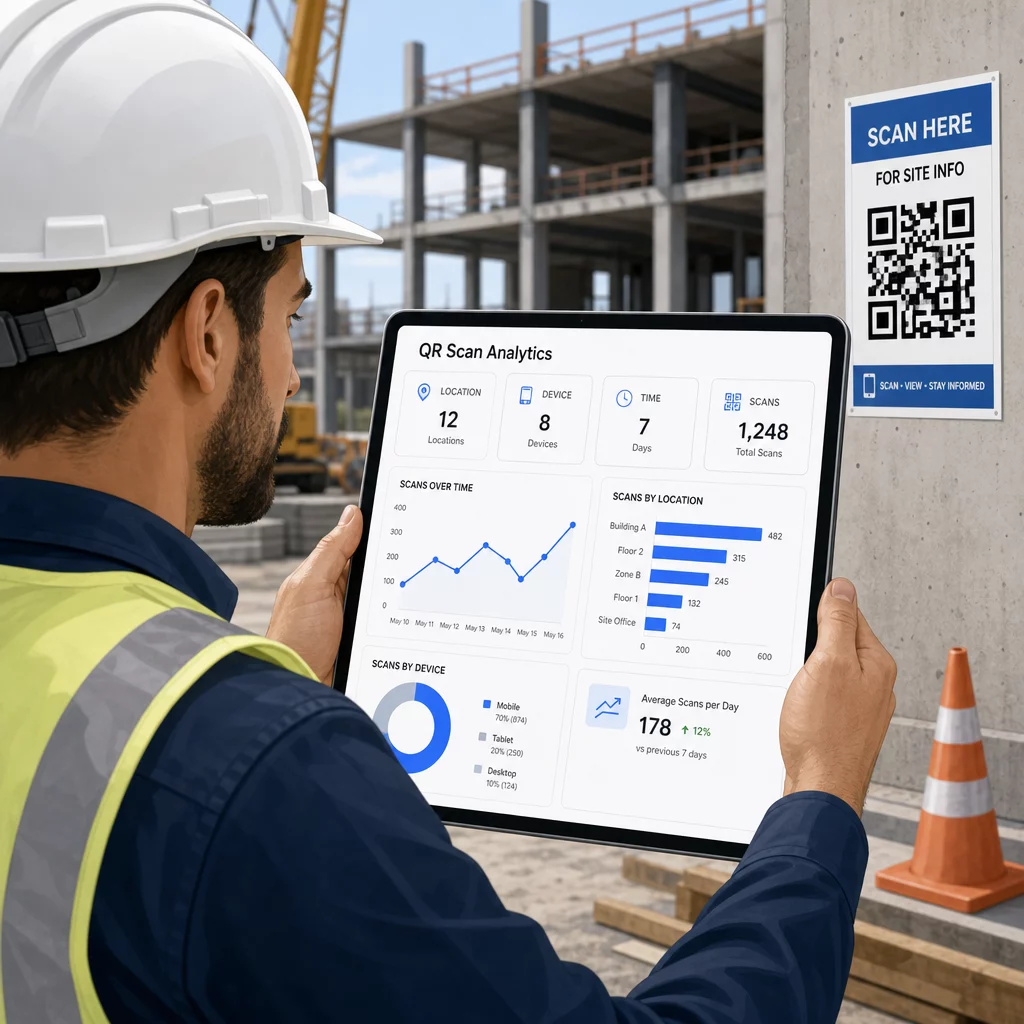
Ezek az adatok segítenek a helyszíni vezetőknek megalapozott döntéseket hozni arról, hogy hol vannak dokumentációs hiányosságok, és mely kódok igényelnek jobb elhelyezést vagy promóciót.
Lássa, hol és mikor szkennelnek a dolgozók Használja a Link QR-kód generátor nyomon követhető dinamikus kódok létrehozásához bármilyen URL-alapú tartalomhoz, és a beolvasási tevékenység figyelemmel kíséréséhez a munkaterületen egyetlen irányítópultról.
Gyakori kérdések
Nem. A legtöbb modern iOS és Android okostelefon beépített kamera alkalmazása képes QR-kódokat olvasni anélkül, hogy bármi extrát le kellene tölteni. A dolgozók egyszerűen a kódra irányítják a kamerájukat és megérintik a megjelenő értesítést.
Dinamikus QR-kóddal a fizikai kód változatlan marad. A célfájlt vagy URL-t a QR-kód kezelőfelületén keresztül frissíti, és a következő beolvasás automatikusan megnyitja az új verziót. Ezért erősen előnyben részesítik a dinamikus kódokat az építési dokumentumokhoz, amelyeket gyakran felülvizsgálnak.
Nyomtasson időjárásálló vagy laminált anyagokra, helyezze el a kódokat sík felületeken, ahol lehetséges, védve a közvetlen UV sugárzástól, és használjon nagy kontrasztú mintákat, amelyek olvashatók maradnak, ha a felület enyhén szennyeződik. Ellenőrizze a QR-kód méretezési és olvashatósági irányelveit a hibajavítási szintekre vonatkozó konkrét ajánlásokért, amelyek segítenek a kódoknak beolvashatóknak maradni még részleges sérülés esetén is.