> 산업 > QR Codes for Construction: How to Improve Jobsite Efficiency and Safety
Worker scanning QR code

QR Codes for Construction: How to Improve Jobsite Efficiency and Safety

Learn how QR codes for construction improve jobsite safety and efficiency. Give crews instant access to current drawings, equipment logs, and safety documents.
Updated on 6월 10, 2026
목차

Are paper blueprints, binders full of safety docs, and manual equipment logs slowing your crew down? When workers spend time hunting for the right document instead of building, the whole project pays the price. This guide explains how QR codes solve that problem – and where on the jobsite they deliver the most value.

Why Document Access Is a Real Problem on Jobsites

Managing construction documents is one of the most time-consuming parts of any project. Industry research has found that the average construction professional spends roughly 5.5 hours per week simply looking for project data – that’s more than 10% of a team’s time lost to searching rather than building.

The cost isn’t just lost hours. Crews working from outdated drawings make mistakes. Safety protocols that live in a binder at the site office don’t help a worker on the third floor. Equipment that lacks accessible maintenance records gets misused or skips scheduled service.

QR codes – two-dimensional barcodes that any smartphone camera can read in seconds – give you a direct bridge between a physical location and a digital document. Post one on a wall, attach one to a piece of equipment, or print one on a sign at the site entrance, and workers can pull up exactly the file they need without calling the office or hunting through paper folders.

How QR Codes Work in a Construction Context

A QR code is a scannable pattern that encodes a web address or file link. When a worker points their phone camera at it, the device opens that link automatically – no app required on most modern smartphones.

The most useful type for construction is a 동적 QR 코드, whose destination can be updated at any time through a management dashboard without changing or reprinting the physical code. This matters on a jobsite because documents change constantly: drawings get revised, safety protocols are updated, and equipment specs evolve. With a dynamic code, the physical sticker or sign stays in place while the linked content is refreshed in seconds.

Share Updated Plans Without Reprinting Need to keep field crews on the latest drawing revision? Use the PDF QR 코드 생성기 to link directly to your current plans and update the destination any time a revision is issued.

Practical Uses for QR Codes on a Construction Site

Current Drawings and Specifications

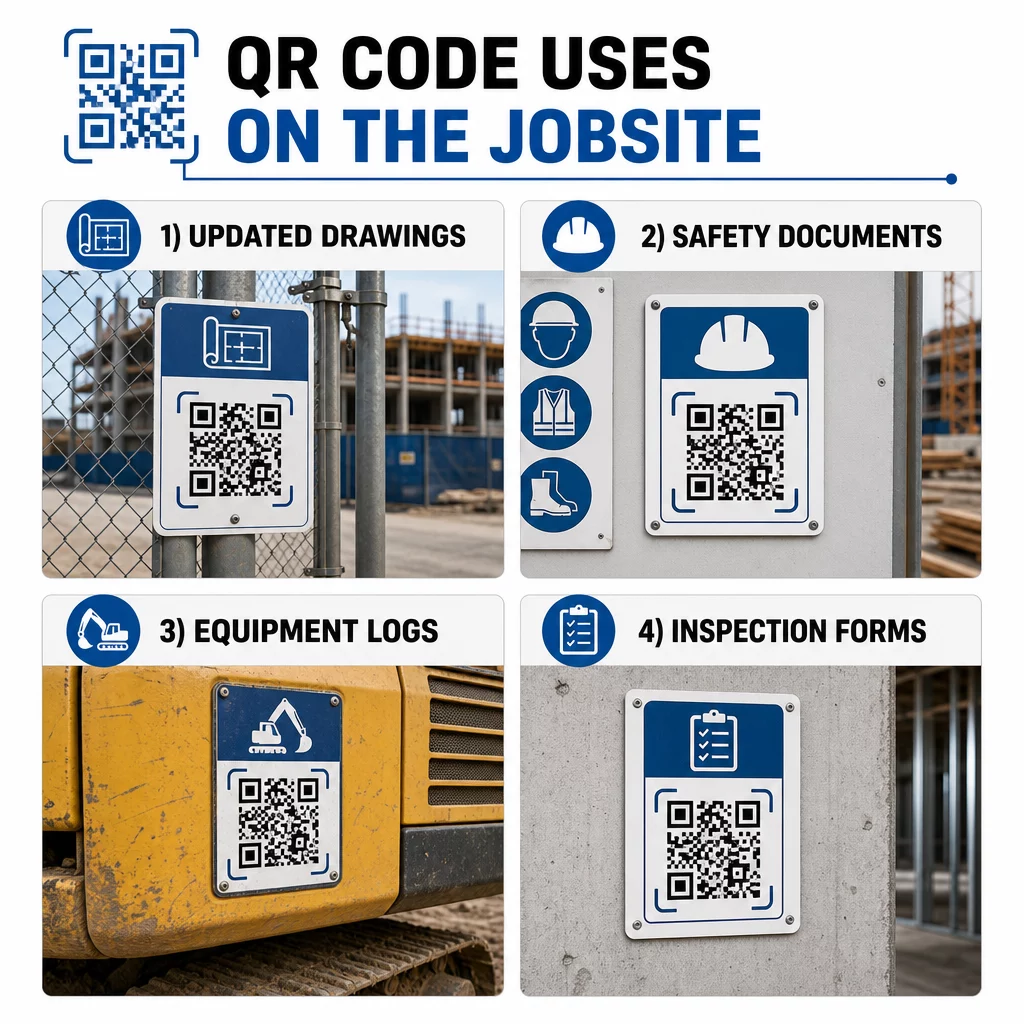
Post weatherproof QR signs at the project entrance, in individual rooms, and at trade-specific work areas. Workers scan to open the latest set of plans and specifications directly on their phones. When a drawing revision is issued, update the linked file – no new signs required.

Construction QR code uses

This approach eliminates the risk of crews working from superseded drawings, which is one of the most common and costly sources of rework.

Safety Documents and OSHA Records

Attach QR codes to site signage, safety cabinets, and entry checkpoints linking to:

  • Safety data sheets for hazardous materials
  • Emergency procedures and site evacuation plans
  • Trade-specific safety requirements
  • OSHA injury and illness records that workers have a right to access

A master QR code at the project entrance can point to a safety document hub covering all of the above. Because the code is dynamic, you can add new documents or update existing ones without replacing the sign. For more on improving how subcontractors stay informed about safety requirements, see 5 ways QR codes improve subcontractor communication.

Equipment Logs and Maintenance Records

Attach a QR code directly to each piece of equipment. Workers and operators scan it to access:

  • Operating manuals and safe handling procedures
  • Maintenance logs and service history
  • Inspection dates and upcoming service schedules
  • Troubleshooting guides

This replaces paper manuals that go missing and gives managers a centralized record of each asset’s status. As equipment moves between jobs, its maintenance history moves with it.

Worker Qualifications and Training Records

Place unique QR codes on employee badges, hard hats, or safety vests that link to each worker’s training certifications and qualification records. Supervisors can scan on-site to confirm that a worker is certified for a specific task and check whether any credentials are approaching expiration.

Inspections, Checklists, and Quality Control

Link QR codes placed at inspection points or on drawings to digital forms. Inspectors scan, complete the checklist on their phone, and submit. All records are stored centrally and tied to the specific location or document. Using a Google Forms QR 코드 is a straightforward way to deploy digital inspection checklists without building a custom system.

Progress reporting works the same way: workers scan a code on a drawing, enter completed-work data, and managers get real-time visibility into project milestones.

Project Documentation and Daily Logs

QR codes at site check-in stations let workers scan to record attendance, access plans for the day, and open daily task checklists. Completed logs are submitted digitally, replacing paper bulletin boards and reducing the chance of lost records.

Sharing larger project documents – submittals, specifications, RFIs – works well with a Google Doc QR code, which redirects directly to a shared document that can be updated without issuing a new code.

Issue Tracking and Punch Lists

Attach a QR code to a defective item or problem location. Scanning opens a digital ticket showing the issue description, priority, assigned technician, and work history. New notes are saved centrally so managers and field crews always see the current status. This keeps punch list items from falling through the cracks between handoffs.

Deploying QR Codes That Actually Get Scanned

A QR code that workers can’t read in the field defeats the purpose. A few practical considerations:

  • Size and scanning distance. For signage on a construction site, a code should be at least 1–2 inches wide for close-range scanning, and larger for signs viewed from several feet away. Follow the guideline of roughly 1 inch of code width for every 10 inches of viewing distance. See 다양한 인쇄 재료에 대한 QR 코드 크기 조정 for material-specific guidance.
  • Surface and placement. Flat, matte surfaces scan more reliably than glossy, curved, or corrugated ones. Avoid placing codes where shadows, direct sun glare, or physical obstruction will interfere.
  • Weatherproofing. Laminated or weatherproof labels hold up through outdoor conditions. A damaged or peeling code stops working.
  • Contrast. Dark pattern on a light background is the most reliable combination. Review QR 코드 가독성을 위한 모범 사례 before committing to a design.
  • Security. For codes linking to sensitive documents – HR records, contract files, proprietary specs – use access controls and HTTPS links. For guidance, see 보안 QR 코드 생성 모범 사례.

Tracking Which Codes Are Being Used

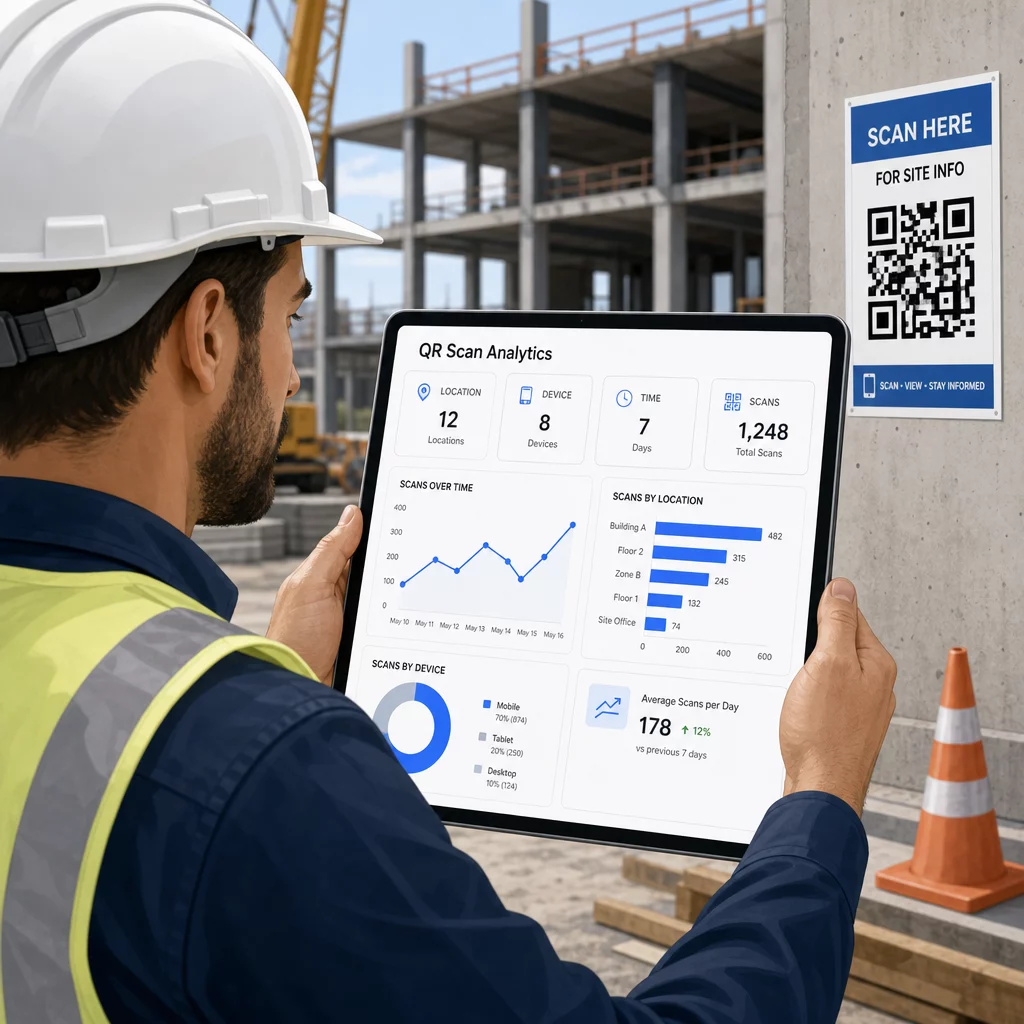
Dynamic QR codes don’t just let you update destinations – they also capture scan data. Through a management dashboard, you can see how many times each code was scanned, when, on what type of device, and from which location. This tells you which documents workers are actually accessing, which safety codes near hazardous areas are getting ignored, and which equipment records need attention.

QR 스캔 분석

That data helps site managers make informed decisions about where documentation gaps exist and which codes need better placement or promotion.

See Where and When Workers Are Scanning 사용 링크 QR 코드 생성기 to create trackable dynamic codes for any URL-based content and monitor scan activity across your jobsite from a single dashboard.

자주 묻는 질문

Do construction workers need a special app to scan QR codes?

No. The built-in camera app on most modern iOS and Android smartphones can read QR codes without downloading anything additional. Workers simply point their camera at the code and tap the notification that appears.

What happens to a printed QR code when the linked document is updated?

With a dynamic QR code, the physical code stays the same. You update the destination file or URL through your QR code management dashboard, and the next scan automatically opens the new version. This is why dynamic codes are strongly preferred for construction documents, which are revised frequently.

How do you make sure QR codes on a construction site are durable enough to last?

Print on weatherproof or laminated materials, place codes on flat surfaces protected from direct UV exposure where possible, and use high-contrast designs that remain readable if the surface gets slightly dirty. Check QR code sizing and readability guidelines for specific recommendations on error correction levels that help codes stay scannable even when partially damaged.

작성자 정보

시임 코스타비는 페이지루트의 콘텐츠 책임자입니다. 그는 페이지루트의 혁신적인 QR 코드 생성 서비스에 대한 글을 쓰고 있습니다. 5년 이상 QR 코드 분야에서 쌓아온 깊이 있는 전문 지식을 바탕으로, 시임은 이 분야의 전문가로 인정받고 있습니다. 그는 QR 기술을 활용하여 디지털 상호작용을 간소화하고 향상시키는 데 크게 기여하고 있습니다.

범주
에 대해 자세히 알아보기
고객이 테이블 QR을 스캔합니다
QR 코드 만들기 주문 시스템

온라인으로 QR 코드를 생성해야하는 경우 QR 코드 만들기 무료로 여기!
Pageloot는 #1 Go-To 솔루션 QR 코드를 만들고 스캔합니다.

QF-043

블로그 세대

20,000개 이상의 브랜드로부터 신뢰를 받아 더 많은 매출, 리뷰, 팔로워를 확보했습니다.

클라이언트 로고
최고 브랜드의 신뢰
5 중 4.8 평가

4.86 / 5 별점

휴고 로랑
휴고 로랑
레스토랑 주인
가장 쉽고 안정적인 QR 코드 생성기. PDF 파일을 즉시 업로드할 수 있습니다. 이제 레스토랑 메뉴가 디지털화되었습니다.
루카스 얀센
루카스 얀센
부동산 개발사
이것은 훌륭한 도구이며 QR 코드를 사용하면 원하는 곳으로 이동할 수 있습니다. 우리는 위치 QR 코드만 사용하지만 유용한 기능이 너무 많습니다.
엠마 모레티
엠마 모레티
소매 제품
사용하기 쉽고 빠릅니다. 그것은 훌륭하게 작동하고 완벽한 이미지를 생성하므로 직원들이 내 vCard를 다운로드할 수 있습니다.
휴고 로랑
휴고 로랑
레스토랑 주인
가장 쉽고 안정적인 QR 코드 생성기. PDF 파일을 즉시 업로드할 수 있습니다. 이제 레스토랑 메뉴가 디지털화되었습니다.
루카스 얀센
루카스 얀센
부동산 개발사
이것은 훌륭한 도구이며 QR 코드를 사용하면 원하는 곳으로 이동할 수 있습니다. 우리는 위치 QR 코드만 사용하지만 유용한 기능이 너무 많습니다.
엠마 모레티
엠마 모레티
소매 제품
사용하기 쉽고 빠릅니다. 그것은 훌륭하게 작동하고 완벽한 이미지를 생성하므로 직원들이 내 vCard를 다운로드할 수 있습니다.
더 많은 QR 코드보기
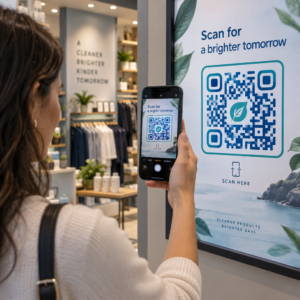
Scanning display QR code
QR 코드 사용 디스플레이 및 화면
무엇이든 디지털 경험으로 전환하세요 3분 이내에.

14일 무료 체험.

신용카드는 필요 없습니다.

첫 구매 시 30% 할인

코드를 사용하세요:

MP3 파일 공유

PDF QR 코드를 생성하려면 가입하세요

필요한 모든 것을 업로드하고 표시합니다.

  • 오디오 파일
  • 팟캐스트
  • 음악

가입 시 14일 무료 체험.
체험 기간 후 QR 코드 만료.

오디오 mp3 QR 코드를 생성하려면 가입하세요

프레임으로 더 많은 스캔 확보

QR 코드에 더 많은 프레임을 추가하려면 가입하세요

클릭 유도 문안 프레임은 고객이 QR 코드와 쉽게 상호 작용할 수 있도록 도와줍니다. 사용해 보세요!

가입 시 14일 무료 체험.
체험 기간 후 QR 코드 만료.

QR 코드에 더 많은 프레임을 추가하려면 가입하세요

도형으로 더 많은 스타일 추가

더 많은 도형을 만들려면 가입하세요

QR 코드는 정사각형일 필요가 없습니다. 브랜드 이미지에 맞게 전환해 보세요.

가입 시 14일 무료 체험.
체험 기간 후 QR 코드 만료.

더 많은 도형을 만들려면 가입하세요

QR 코드에 로고 추가

QR 코드에 로고를 추가하려면 가입하세요

로고와 브랜드를 추가하여 QR 코드를 돋보이게 만드세요.

가입 시 14일 무료 체험.
체험 기간 후 QR 코드 만료.

QR 코드에 로고를 추가하려면 가입하세요

스마트 앱 스토어 리디렉션

앱 스토어 QR 코드를 생성하려면 가입하세요

스마트 앱 스토어 QR 코드에 앱 링크를 추가하세요. 사용자는 장치에 따라 리디렉션됩니다.

가입 시 14일 무료 체험.
체험 기간 후 QR 코드 만료.

앱 스토어 QR 코드를 생성하려면 가입하세요

QR 코드에 이미지 업로드

이미지 QR 코드를 생성하려면 가입하세요

이미지를 쉽게 공유하세요. 몇 초 안에 동적으로 이미지를 변경하십시오.

가입 시 14일 무료 체험.
체험 기간 후 QR 코드 만료.

이미지 QR 코드를 생성하려면 가입하세요

PDF 파일 공유

PDF QR 코드를 생성하려면 가입하세요

필요한 모든 것을 업로드하고 표시합니다.

  • 메뉴 및 가격표
  • 명령
  • 모든 문서

가입 시 14일 무료 체험.
체험 기간 후 QR 코드 만료.

PDF QR 코드를 생성하려면 가입하세요

인쇄 없이 나중에 편집

다시 인쇄하지 않고 QR 코드를 편집하려면 가입하세요

동적 QR 코드를 사용하면 새 QR 코드를 인쇄하지 않고도 QR 코드의 내용을 변경할 수 있습니다.

가입 시 14일 무료 체험.
체험 기간 후 QR 코드 만료.

다시 인쇄하지 않고 QR 코드를 편집하려면 가입하세요

언제? 어디서? QR 코드 스캔 추적

QR 코드를 추적하려면 가입하세요

어떤 QR 코드가 가장 많이 스캔되고 무엇이 고객을 가장 흥분시키는지 알아보십시오.

가입 시 14일 무료 체험.
체험 기간 후 QR 코드 만료.

QR 코드를 추적하려면 가입하세요

인쇄 준비 파일 제공

PDF 및 SVG와 같은 벡터 QR 코드를 생성하려면 가입하세요.

.EPS, .PDF, .SVG

HD 해상도로 QR 코드를 다운로드하고 싶으신가요? 인쇄할 준비가 된 벡터 또는 픽셀 형식을 가져옵니다.

가입 시 14일 무료 체험.
체험 기간 후 QR 코드 만료.

PDF 및 SVG와 같은 벡터 QR 코드를 생성하려면 가입하세요.

기다리세요. 귀하의 QR 코드는 로드 중... 로드 중...

나만의 것으로 만들기

나중을 위해 QR 코드를 저장하려면 가입하세요.

다양한 색상, 로고 및 클릭 유도문안 프레임으로 멋진 QR 코드를 만들어 더 많은 스캔을 받으세요.

가입 시 14일 무료 체험.
체험 기간 후 QR 코드 만료.

나중을 위해 QR 코드를 저장하려면 가입하세요.