พิมพ์เขียวบนกระดาษ, แฟ้มเอกสารความปลอดภัย และบันทึกอุปกรณ์แบบแมนนวล กำลังทำให้ทีมงานของคุณช้าลงหรือไม่? เมื่อคนงานใช้เวลาไปกับการค้นหาเอกสารที่ถูกต้องแทนที่จะทำงานก่อสร้าง โครงการทั้งหมดก็ต้องจ่ายราคา คู่มือนี้จะอธิบายว่ารหัส QR แก้ปัญหานั้นได้อย่างไร – และจุดใดในไซต์งานที่รหัส QR มอบมูลค่าสูงสุด.
ทำไมการเข้าถึงเอกสารจึงเป็นปัญหาจริงในไซต์งาน
การจัดการเอกสารการก่อสร้างเป็นหนึ่งในส่วนที่ใช้เวลามากที่สุดของทุกโครงการ การวิจัยในอุตสาหกรรมพบว่าผู้เชี่ยวชาญด้านการก่อสร้างโดยเฉลี่ยใช้เวลาประมาณ 5.5 ชั่วโมงต่อสัปดาห์เพียงแค่ค้นหาข้อมูลโครงการ – นั่นคือเวลาของทีมมากกว่า 10% ที่เสียไปกับการค้นหาแทนที่จะเป็นการก่อสร้าง.
ค่าใช้จ่ายไม่ใช่แค่ชั่วโมงที่เสียไป ทีมงานที่ทำงานจากแบบแปลนที่ล้าสมัยจะทำผิดพลาด โปรโตคอลความปลอดภัยที่อยู่ในแฟ้มที่สำนักงานไซต์งานไม่ช่วยคนงานที่อยู่บนชั้นสาม อุปกรณ์ที่ขาดบันทึกการบำรุงรักษาที่เข้าถึงได้จะถูกนำไปใช้ในทางที่ผิดหรือข้ามการบริการตามกำหนด.
รหัส QR – บาร์โค้ดสองมิติที่กล้องสมาร์ทโฟนทุกเครื่องสามารถอ่านได้ในไม่กี่วินาที – มอบสะพานเชื่อมโดยตรงระหว่างตำแหน่งทางกายภาพและเอกสารดิจิทัล ติดไว้บนผนัง, ติดกับอุปกรณ์ หรือพิมพ์บนป้ายที่ทางเข้าไซต์งาน และคนงานสามารถดึงไฟล์ที่ต้องการได้อย่างแม่นยำโดยไม่ต้องโทรหาสำนักงานหรือค้นหาในแฟ้มกระดาษ.
รหัส QR ทำงานอย่างไรในบริบทของการก่อสร้าง
รหัส QR คือรูปแบบที่สามารถสแกนได้ซึ่งเข้ารหัสที่อยู่เว็บหรือลิงก์ไฟล์ เมื่อคนงานชี้กล้องโทรศัพท์ไปที่รหัส อุปกรณ์จะเปิดลิงก์นั้นโดยอัตโนมัติ – ไม่ต้องใช้แอปพลิเคชันบนสมาร์ทโฟนที่ทันสมัยส่วนใหญ่.
ประเภทที่มีประโยชน์ที่สุดสำหรับการก่อสร้างคือ รหัส QR แบบไดนามิก, ซึ่งปลายทางสามารถอัปเดตได้ตลอดเวลาผ่านแดชบอร์ดการจัดการโดยไม่ต้องเปลี่ยนหรือพิมพ์รหัสทางกายภาพใหม่ สิ่งนี้สำคัญในไซต์งานเนื่องจากเอกสารมีการเปลี่ยนแปลงตลอดเวลา: แบบแปลนได้รับการแก้ไข, โปรโตคอลความปลอดภัยได้รับการอัปเดต และข้อมูลจำเพาะของอุปกรณ์มีการพัฒนา ด้วยรหัสแบบไดนามิก สติกเกอร์หรือป้ายทางกายภาพจะยังคงอยู่กับที่ในขณะที่เนื้อหาที่เชื่อมโยงได้รับการรีเฟรชในไม่กี่วินาที.
แชร์แผนที่อัปเดตโดยไม่ต้องพิมพ์ซ้ำ ต้องการให้ทีมงานภาคสนามใช้แบบแปลนฉบับแก้ไขล่าสุดหรือไม่? ใช้ แปลงไฟล์ PDF เป็น QR Code ฟรี เพื่อเชื่อมโยงโดยตรงกับแผนปัจจุบันของคุณและอัปเดตปลายทางได้ทุกเมื่อที่มีการแก้ไข.
การใช้งานจริงของรหัส QR ในไซต์งานก่อสร้าง
แบบแปลนและข้อมูลจำเพาะปัจจุบัน
ติดตั้งป้าย QR ที่ทนทานต่อสภาพอากาศที่ทางเข้าโครงการ, ในห้องแต่ละห้อง และในพื้นที่ทำงานเฉพาะทาง คนงานสแกนเพื่อเปิดชุดแบบแปลนและข้อมูลจำเพาะล่าสุดโดยตรงบนโทรศัพท์ของพวกเขา เมื่อมีการแก้ไขแบบแปลน ให้อัปเดตไฟล์ที่เชื่อมโยง – ไม่ต้องใช้ป้ายใหม่.
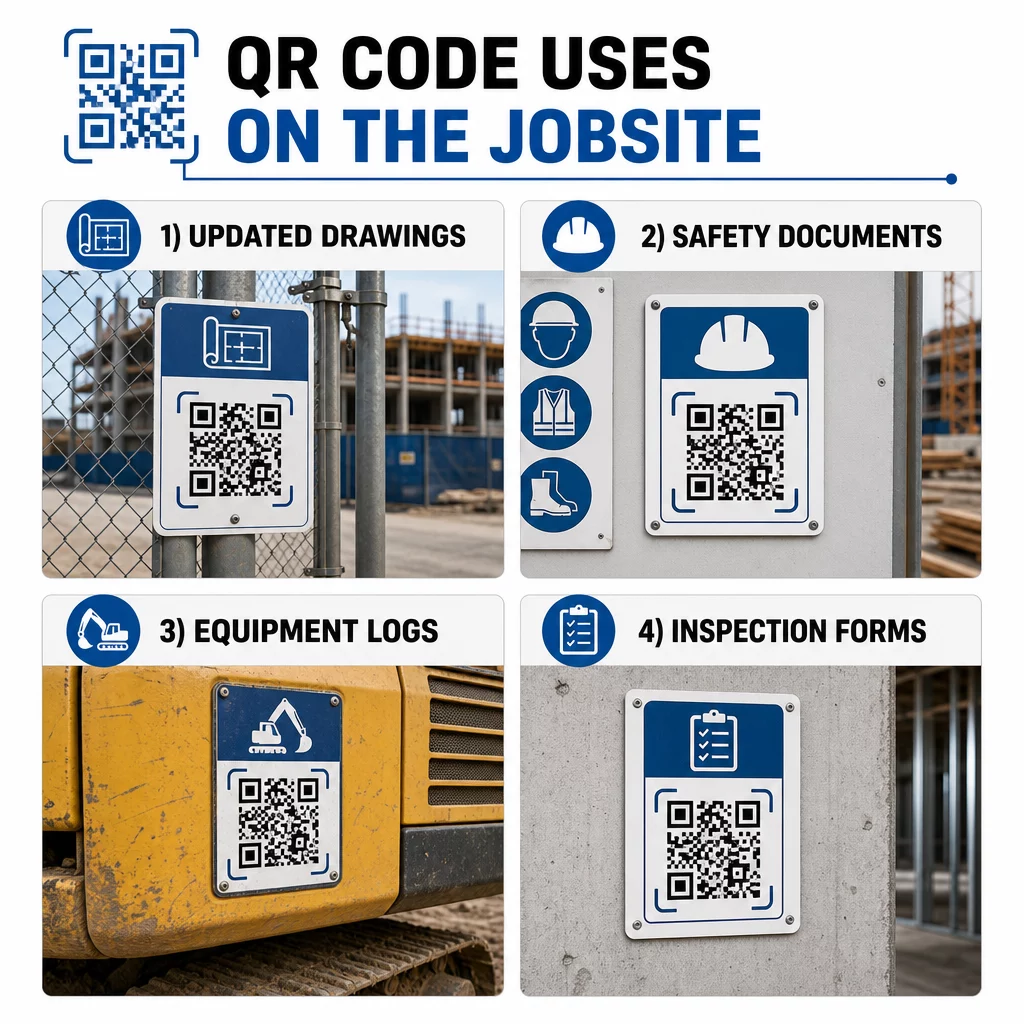
วิธีการนี้ช่วยลดความเสี่ยงที่ทีมงานจะทำงานจากแบบแปลนที่ล้าสมัย ซึ่งเป็นหนึ่งในสาเหตุที่พบบ่อยและมีค่าใช้จ่ายสูงที่สุดของการทำงานซ้ำ.
เอกสารความปลอดภัยและบันทึกของ OSHA
ติดรหัส QR บนป้ายสถานที่, ตู้เก็บอุปกรณ์ความปลอดภัย และจุดตรวจทางเข้า เพื่อเชื่อมโยงไปยัง:
- เอกสารข้อมูลความปลอดภัยสำหรับวัสดุอันตราย
- ขั้นตอนฉุกเฉินและแผนการอพยพออกจากสถานที่
- ข้อกำหนดด้านความปลอดภัยเฉพาะสำหรับแต่ละสายงาน
- บันทึกการบาดเจ็บและเจ็บป่วยของ OSHA ที่พนักงานมีสิทธิ์เข้าถึง
รหัส QR หลักที่ทางเข้าโครงการสามารถเชื่อมโยงไปยังศูนย์รวมเอกสารความปลอดภัยที่ครอบคลุมทั้งหมดข้างต้น เนื่องจากรหัสเป็นแบบไดนามิก คุณจึงสามารถเพิ่มเอกสารใหม่หรืออัปเดตเอกสารที่มีอยู่ได้โดยไม่ต้องเปลี่ยนป้าย สำหรับข้อมูลเพิ่มเติมเกี่ยวกับการปรับปรุงวิธีที่ผู้รับเหมาช่วงรับทราบข้อกำหนดด้านความปลอดภัย โปรดดู 5 วิธีที่รหัส QR ช่วยปรับปรุงการสื่อสารของผู้รับเหมาช่วง.
บันทึกอุปกรณ์และประวัติการบำรุงรักษา
ติดรหัส QR โดยตรงกับอุปกรณ์แต่ละชิ้น พนักงานและผู้ปฏิบัติงานสามารถสแกนเพื่อเข้าถึง:
- คู่มือการใช้งานและขั้นตอนการจัดการอย่างปลอดภัย
- บันทึกการบำรุงรักษาและประวัติการบริการ
- วันที่ตรวจสอบและกำหนดการบริการที่จะมาถึง
- คู่มือการแก้ไขปัญหา
สิ่งนี้จะมาแทนที่คู่มือกระดาษที่มักจะหายไป และช่วยให้ผู้จัดการมีบันทึกสถานะของสินทรัพย์แต่ละรายการแบบรวมศูนย์ เมื่ออุปกรณ์เคลื่อนย้ายระหว่างงาน ประวัติการบำรุงรักษาก็จะเคลื่อนย้ายไปพร้อมกับอุปกรณ์ด้วย.
คุณสมบัติของพนักงานและบันทึกการฝึกอบรม
วางรหัส QR ที่ไม่ซ้ำกันบนป้ายพนักงาน หมวกนิรภัย หรือเสื้อกั๊กนิรภัย ซึ่งเชื่อมโยงไปยังใบรับรองการฝึกอบรมและบันทึกคุณสมบัติของพนักงานแต่ละคน หัวหน้างานสามารถสแกนในสถานที่เพื่อยืนยันว่าพนักงานได้รับการรับรองสำหรับงานเฉพาะ และตรวจสอบว่าใบรับรองใดกำลังจะหมดอายุหรือไม่.
การตรวจสอบ รายการตรวจสอบ และการควบคุมคุณภาพ
เชื่อมโยงรหัส QR ที่วางไว้ ณ จุดตรวจสอบหรือบนแบบแปลนไปยังแบบฟอร์มดิจิทัล ผู้ตรวจสอบสแกน กรอกรายการตรวจสอบบนโทรศัพท์ และส่งข้อมูล บันทึกทั้งหมดจะถูกจัดเก็บไว้ส่วนกลางและเชื่อมโยงกับตำแหน่งหรือเอกสารเฉพาะ การใช้ รหัส QR ของ Google Form เป็นวิธีที่ตรงไปตรงมาในการใช้งานรายการตรวจสอบการตรวจสอบดิจิทัลโดยไม่ต้องสร้างระบบที่กำหนดเอง.
การรายงานความคืบหน้าทำงานในลักษณะเดียวกัน: พนักงานสแกนรหัสบนแบบแปลน ป้อนข้อมูลงานที่เสร็จสมบูรณ์ และผู้จัดการจะได้รับข้อมูลเชิงลึกแบบเรียลไทม์เกี่ยวกับเหตุการณ์สำคัญของโครงการ.
เอกสารโครงการและบันทึกประจำวัน
รหัส QR ที่จุดเช็คอินในสถานที่ช่วยให้พนักงานสแกนเพื่อบันทึกการเข้างาน เข้าถึงแผนสำหรับวันนั้น และเปิดรายการตรวจสอบงานประจำวัน บันทึกที่เสร็จสมบูรณ์จะถูกส่งแบบดิจิทัล แทนที่กระดานข่าวกระดาษและลดโอกาสในการสูญหายของบันทึก.
การแบ่งปันเอกสารโครงการขนาดใหญ่ เช่น เอกสารที่ส่ง ข้อมูลจำเพาะ RFIs ทำงานได้ดีกับ รหัส QR ของ Google Doc, ซึ่งจะเปลี่ยนเส้นทางโดยตรงไปยังเอกสารที่แชร์ซึ่งสามารถอัปเดตได้โดยไม่ต้องออกรหัสใหม่.
การติดตามปัญหาและรายการแก้ไขข้อบกพร่อง
แนบรหัส QR ไปยังรายการที่มีข้อบกพร่องหรือตำแหน่งที่มีปัญหา การสแกนจะเปิดตั๋วดิจิทัลที่แสดงคำอธิบายปัญหา ลำดับความสำคัญ ช่างเทคนิคที่ได้รับมอบหมาย และประวัติการทำงาน บันทึกใหม่จะถูกบันทึกไว้ส่วนกลางเพื่อให้ผู้จัดการและทีมงานภาคสนามเห็นสถานะปัจจุบันเสมอ สิ่งนี้ช่วยป้องกันไม่ให้รายการแก้ไขข้อบกพร่องตกหล่นระหว่างการส่งมอบ.
ป้ายรั้วกั้นพื้นที่ก่อสร้างสามารถมีคิวอาร์โค้ดที่เปิดได้ ภาพจำลองภายนอกของโครงการที่เสร็จสมบูรณ์, เพื่อให้เพื่อนบ้าน ผู้ซื้อ และผู้สัญจรไปมาสามารถเห็นสิ่งที่กำลังก่อสร้างอยู่ได้
การใช้งานรหัส QR ที่ได้รับการสแกนจริง
รหัส QR ที่พนักงานไม่สามารถอ่านได้ในภาคสนามจะทำให้วัตถุประสงค์ไม่สำเร็จ ข้อควรพิจารณาเชิงปฏิบัติบางประการ:
- ขนาดและระยะการสแกน. สำหรับป้ายบนสถานที่ก่อสร้าง รหัสควรมีความกว้างอย่างน้อย 1–2 นิ้วสำหรับการสแกนระยะใกล้ และใหญ่ขึ้นสำหรับป้ายที่มองเห็นจากระยะห่างหลายฟุต ปฏิบัติตามแนวทางที่ว่าความกว้างของรหัสประมาณ 1 นิ้วต่อระยะการมองเห็นทุก 10 นิ้ว ดู การปรับขนาดรหัส QR สำหรับวัสดุการพิมพ์ที่แตกต่างกัน สำหรับคำแนะนำเฉพาะวัสดุ.
- พื้นผิวและการจัดวาง. พื้นผิวเรียบและด้านจะสแกนได้น่าเชื่อถือกว่าพื้นผิวมันวาว โค้ง หรือเป็นลอน หลีกเลี่ยงการวางรหัสในบริเวณที่มีเงา แสงแดดส่องโดยตรง หรือสิ่งกีดขวางทางกายภาพที่จะรบกวน.
- การทนทานต่อสภาพอากาศ. ฉลากเคลือบหรือฉลากกันน้ำจะทนทานต่อสภาพกลางแจ้ง รหัสที่เสียหายหรือลอกจะหยุดทำงาน.
- ความคมชัด. รูปแบบสีเข้มบนพื้นหลังสีอ่อนเป็นการผสมผสานที่น่าเชื่อถือที่สุด ตรวจสอบ แนวทางปฏิบัติที่ดีที่สุดสำหรับการอ่านรหัส QR ก่อนที่จะตัดสินใจออกแบบ.
- ความปลอดภัย. สำหรับรหัสที่เชื่อมโยงไปยังเอกสารสำคัญ เช่น บันทึก HR ไฟล์สัญญา ข้อมูลจำเพาะที่เป็นกรรมสิทธิ์ ให้ใช้การควบคุมการเข้าถึงและลิงก์ HTTPS สำหรับคำแนะนำ โปรดดู แนวทางปฏิบัติที่ดีที่สุดในการสร้างรหัส QR ที่ปลอดภัย.
การติดตามว่ามีการใช้รหัสใดบ้าง
รหัส QR แบบไดนามิกไม่เพียงแต่ช่วยให้คุณอัปเดตปลายทางได้เท่านั้น แต่ยังบันทึกข้อมูลการสแกนด้วย ผ่านแดชบอร์ดการจัดการ คุณสามารถดูได้ว่ารหัสแต่ละรหัสถูกสแกนกี่ครั้ง เมื่อใด บนอุปกรณ์ประเภทใด และจากตำแหน่งใด สิ่งนี้จะบอกคุณว่าพนักงานกำลังเข้าถึงเอกสารใดจริง ๆ รหัสความปลอดภัยใดที่อยู่ใกล้พื้นที่อันตรายถูกละเลย และบันทึกอุปกรณ์ใดที่ต้องให้ความสนใจ.
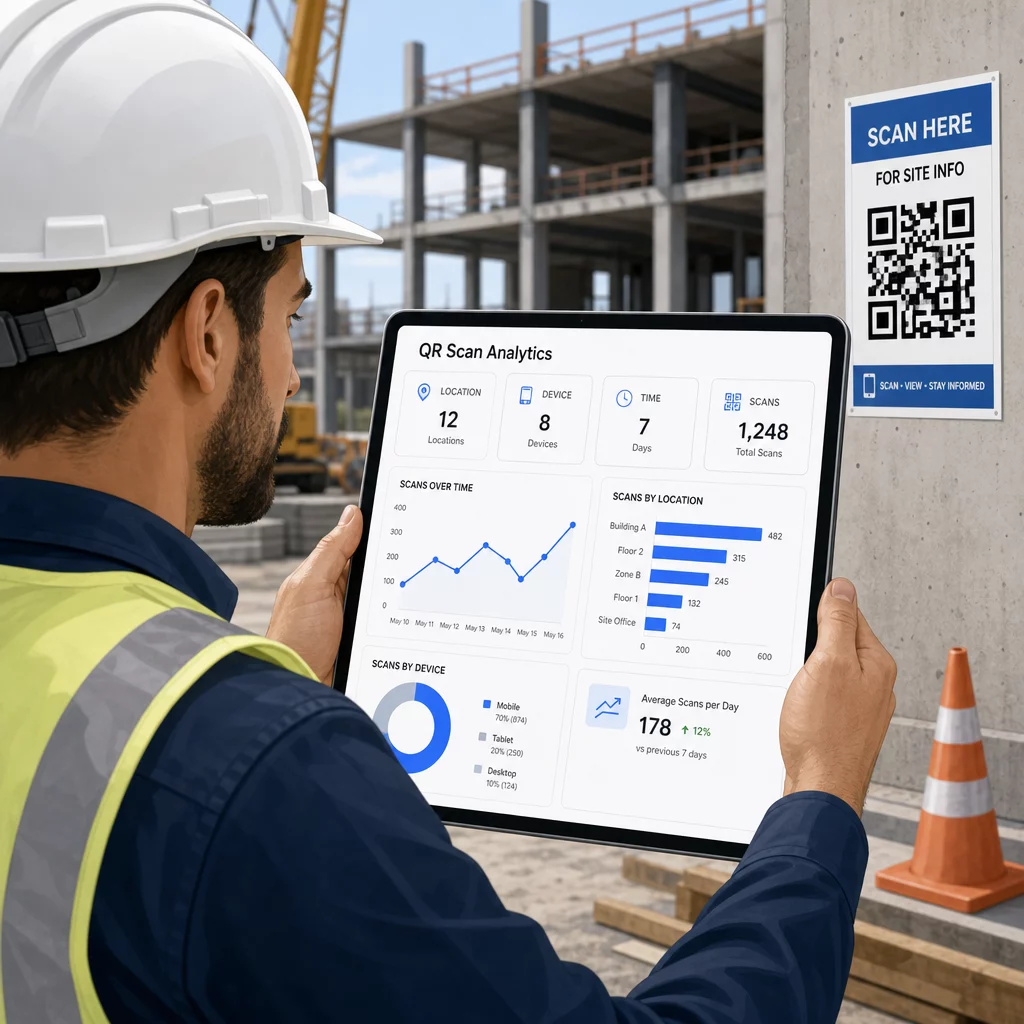
ข้อมูลดังกล่าวช่วยให้ผู้จัดการไซต์งานตัดสินใจได้อย่างมีข้อมูลว่ามีช่องว่างของเอกสารอยู่ที่ใด และรหัสใดที่ต้องมีการจัดวางหรือโปรโมตที่ดีขึ้น.
ดูว่าพนักงานกำลังสแกนที่ไหนและเมื่อใด ใช้ เครื่องสร้างรหัส QR สำหรับลิงก์ เพื่อสร้างรหัสไดนามิกที่สามารถติดตามได้สำหรับเนื้อหาที่อิงตาม URL และตรวจสอบกิจกรรมการสแกนทั่วทั้งไซต์งานของคุณจากแดชบอร์ดเดียว.
คำถามที่พบบ่อย
ไม่ แอปกล้องในตัวบนสมาร์ทโฟน iOS และ Android รุ่นใหม่ส่วนใหญ่สามารถอ่านรหัส QR ได้โดยไม่ต้องดาวน์โหลดอะไรเพิ่มเติม พนักงานเพียงแค่เล็งกล้องไปที่รหัสแล้วแตะการแจ้งเตือนที่ปรากฏขึ้น.
ด้วยคิวอาร์โค้ดแบบไดนามิก รหัสทางกายภาพจะยังคงเดิม คุณอัปเดตไฟล์ปลายทางหรือ URL ผ่านแดชบอร์ดการจัดการคิวอาร์โค้ดของคุณ และการสแกนครั้งต่อไปจะเปิดเวอร์ชันใหม่โดยอัตโนมัติ นี่คือเหตุผลว่าทำไมคิวอาร์โค้ดแบบไดนามิกจึงเป็นที่นิยมอย่างมากสำหรับเอกสารการก่อสร้าง ซึ่งมีการแก้ไขบ่อยครั้ง.
พิมพ์ลงบนวัสดุที่ทนทานต่อสภาพอากาศหรือวัสดุเคลือบ วางรหัสบนพื้นผิวเรียบที่ได้รับการป้องกันจากรังสี UV โดยตรงเท่าที่จะทำได้ และใช้การออกแบบที่มีคอนทราสต์สูงที่ยังคงอ่านได้แม้พื้นผิวจะสกปรกเล็กน้อย ตรวจสอบแนวทางการกำหนดขนาดและการอ่านรหัส QR สำหรับคำแนะนำเฉพาะเกี่ยวกับระดับการแก้ไขข้อผิดพลาดที่ช่วยให้รหัสยังคงสแกนได้แม้ว่าจะเสียหายบางส่วน.