Zpomalují vaši posádku papírové plány, šanony plné bezpečnostních dokumentů a manuální záznamy o vybavení? Když pracovníci tráví čas hledáním správného dokumentu namísto stavění, celý projekt na to doplácí. Tento průvodce vysvětluje, jak QR kódy tento problém řeší – a kde na staveništi přinášejí největší hodnotu.
Proč je přístup k dokumentům skutečným problémem na staveništích
Správa stavebních dokumentů je jednou z časově nejnáročnějších částí každého projektu. Průmyslový výzkum zjistil, že průměrný stavební profesionál stráví zhruba 5,5 hodiny týdně pouhým hledáním projektových dat – to je více než 10 % času týmu ztraceného hledáním namísto stavění.
Náklady nejsou jen ztracené hodiny. Týmy pracující s zastaralými výkresy dělají chyby. Bezpečnostní protokoly, které jsou v šanonu v kanceláři staveniště, nepomohou pracovníkovi ve třetím patře. Vybavení, které postrádá dostupné záznamy o údržbě, je zneužíváno nebo vynechává plánovaný servis.
QR kódy – dvourozměrné čárové kódy, které jakákoli kamera chytrého telefonu dokáže přečíst během několika sekund – vám poskytují přímý most mezi fyzickým umístěním a digitálním dokumentem. Umístěte jeden na zeď, připevněte jeden k zařízení nebo vytiskněte jeden na ceduli u vjezdu na staveniště a pracovníci si mohou vyvolat přesně ten soubor, který potřebují, aniž by volali do kanceláře nebo prohledávali papírové složky.
Jak fungují QR kódy ve stavebnictví
QR kód je skenovatelný vzor, který kóduje webovou adresu nebo odkaz na soubor. Když na něj pracovník namíří kameru svého telefonu, zařízení automaticky otevře tento odkaz – na většině moderních chytrých telefonů není potřeba žádná aplikace.
Nejužitečnější typ pro stavebnictví je dynamický QR kód, jehož cíl lze kdykoli aktualizovat prostřednictvím řídicího panelu, aniž by se měnil nebo znovu tiskl fyzický kód. To je důležité na staveništi, protože dokumenty se neustále mění: výkresy se revidují, bezpečnostní protokoly se aktualizují a specifikace zařízení se vyvíjejí. S dynamickým kódem zůstává fyzická nálepka nebo cedule na místě, zatímco propojený obsah je aktualizován během několika sekund.
Sdílejte aktualizované plány bez opětovného tisku Potřebujete udržet terénní týmy u nejnovější revize výkresu? Použijte QR kód PDF generátor k přímému propojení s vašimi aktuálními plány a aktualizujte cíl kdykoli je vydána revize.
Praktické využití QR kódů na staveništi
Aktuální výkresy a specifikace
Umístěte vodotěsné QR cedule u vjezdu do projektu, v jednotlivých místnostech a v pracovních oblastech specifických pro jednotlivá řemesla. Pracovníci skenují, aby si otevřeli nejnovější sadu plánů a specifikací přímo na svých telefonech. Když je vydána revize výkresu, aktualizujte propojený soubor – nejsou potřeba žádné nové cedule.
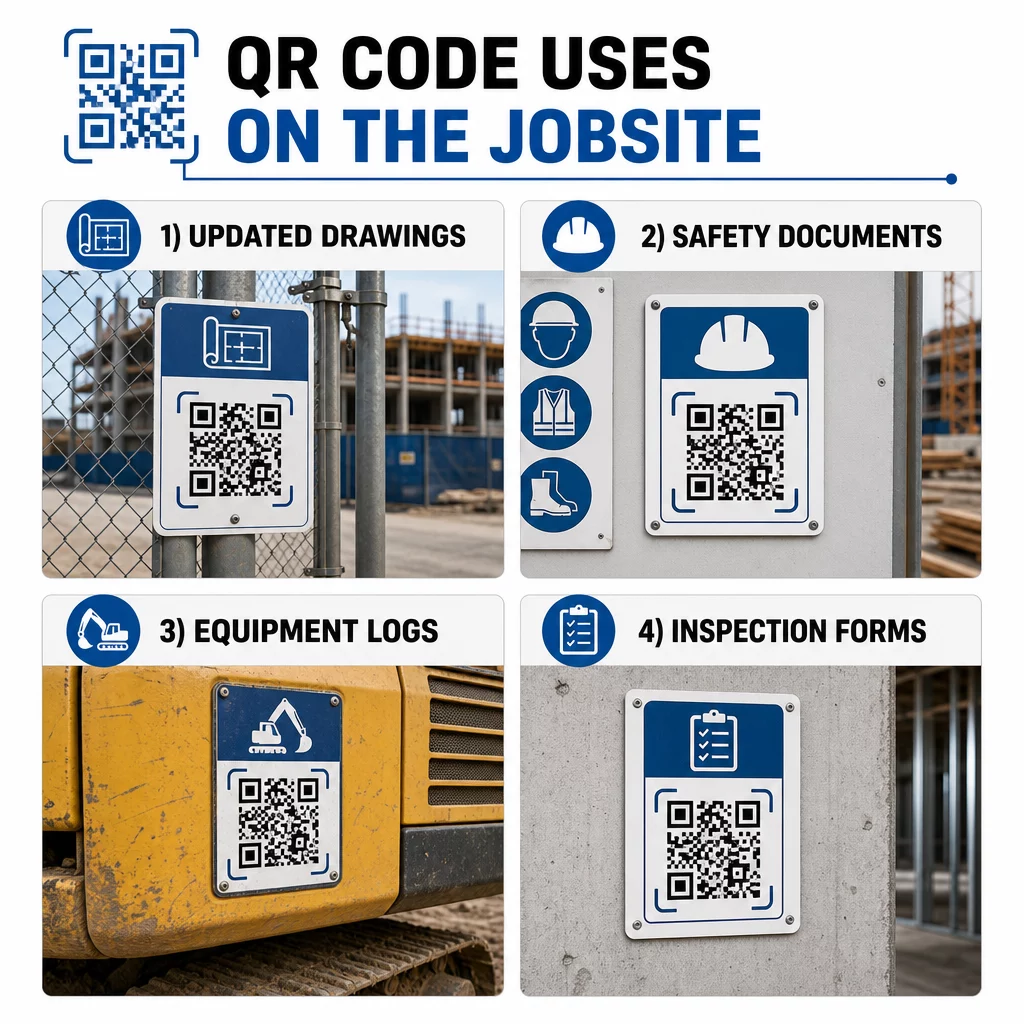
Tento přístup eliminuje riziko, že týmy budou pracovat s nahrazenými výkresy, což je jeden z nejčastějších a nejdražších zdrojů přepracování.
Bezpečnostní dokumenty a záznamy OSHA
Připojte QR kódy k označení staveniště, bezpečnostním skříním a vstupním kontrolním bodům odkazující na:
- Bezpečnostní listy pro nebezpečné materiály
- Nouzové postupy a plány evakuace staveniště
- Bezpečnostní požadavky specifické pro dané řemeslo
- Záznamy OSHA o úrazech a nemocech, ke kterým mají pracovníci právo na přístup
Hlavní QR kód u vchodu na projekt může odkazovat na centrum bezpečnostních dokumentů pokrývající vše výše uvedené. Protože je kód dynamický, můžete přidávat nové dokumenty nebo aktualizovat stávající, aniž byste museli měnit ceduli. Více o tom, jak zlepšit informovanost subdodavatelů o bezpečnostních požadavcích, naleznete zde: 5 způsobů, jak QR kódy zlepšují komunikaci se subdodavateli.
Záznamy o vybavení a údržbě
Připojte QR kód přímo ke každému kusu vybavení. Pracovníci a operátoři jej naskenují pro přístup k:
- Návody k obsluze a postupy bezpečné manipulace
- Záznamy o údržbě a servisní historie
- Termíny kontrol a nadcházející plány servisu
- Průvodci řešením problémů
To nahrazuje papírové manuály, které se ztrácejí, a poskytuje manažerům centralizovaný záznam o stavu každého aktiva. Jak se vybavení přesouvá mezi zakázkami, jeho historie údržby se přesouvá s ním.
Kvalifikace pracovníků a záznamy o školení
Umístěte jedinečné QR kódy na identifikační karty zaměstnanců, přilby nebo bezpečnostní vesty, které odkazují na certifikace školení a záznamy o kvalifikaci každého pracovníka. Vedoucí pracovníci mohou na místě skenovat, aby potvrdili, že pracovník je certifikován pro konkrétní úkol, a zkontrolovat, zda se blíží vypršení platnosti některých pověření.
Inspekce, kontrolní seznamy a kontrola kvality
Propojte QR kódy umístěné na kontrolních bodech nebo na výkresech s digitálními formuláři. Inspektoři skenují, vyplní kontrolní seznam na svém telefonu a odešlou. Všechny záznamy jsou uloženy centrálně a svázány s konkrétním místem nebo dokumentem. Použití QR kód formuláře Google je jednoduchý způsob, jak nasadit digitální kontrolní seznamy inspekcí bez nutnosti vytváření vlastního systému.
Hlášení pokroku funguje stejně: pracovníci naskenují kód na výkresu, zadají údaje o dokončené práci a manažeři získají přehled o milnících projektu v reálném čase.
Projektová dokumentace a denní záznamy
QR kódy na stanovištích pro přihlášení na staveništi umožňují pracovníkům skenovat pro zaznamenání docházky, přístup k plánům na den a otevření denních kontrolních seznamů úkolů. Vyplněné záznamy jsou odesírány digitálně, nahrazují papírové nástěnky a snižují riziko ztráty záznamů.
Sdílení větších projektových dokumentů – podání, specifikace, RFI – funguje dobře s QR kód Google Doc, který přesměruje přímo na sdílený dokument, který lze aktualizovat bez vydání nového kódu.
Sledování problémů a seznamy nedodělků
Připojte QR kód k vadné položce nebo problematickému místu. Skenování otevře digitální tiket zobrazující popis problému, prioritu, přiděleného technika a historii práce. Nové poznámky jsou ukládány centrálně, takže manažeři a terénní týmy vždy vidí aktuální stav. To zabraňuje tomu, aby položky ze seznamu nedodělků zapadly mezi předáváním.
Oplocení staveniště může také obsahovat QR kód, který otevírá vizualizace exteriéru dokončeného projektu, takže sousedé, kupující a kolemjdoucí mohou vidět, co se staví.
Nasazení QR kódů, které se skutečně skenují
QR kód, který pracovníci nemohou přečíst v terénu, ztrácí smysl. Několik praktických úvah:
- Velikost a vzdálenost skenování. Pro značení na staveništi by měl být kód široký alespoň 1–2 palce pro skenování zblízka a větší pro značky prohlížené z několika stop. Dodržujte pokyny přibližně 1 palec šířky kódu na každých 10 palců pozorovací vzdálenosti. Viz velikosti QR kódu pro různé tiskové materiály pro pokyny specifické pro materiál.
- Povrch a umístění. Ploché, matné povrchy se skenují spolehlivěji než lesklé, zakřivené nebo vlnité. Vyhněte se umisťování kódů tam, kde by mohly rušit stíny, přímé sluneční světlo nebo fyzické překážky.
- Odolnost proti povětrnostním vlivům. Laminované nebo voděodolné štítky vydrží venkovní podmínky. Poškozený nebo odlupující se kód přestane fungovat.
- Kontrast. Tmavý vzor na světlém pozadí je nejspolehlivější kombinací. Zkontrolujte osvědčené postupy pro čitelnost QR kódů předtím, než se zavážete k designu.
- Zabezpečení. Pro kódy odkazující na citlivé dokumenty – záznamy HR, soubory smluv, proprietární specifikace – použijte řízení přístupu a odkazy HTTPS. Pro pokyny viz osvědčené postupy pro bezpečnou generaci QR kódů.
Sledování používaných kódů
Dynamické QR kódy vám nejen umožňují aktualizovat cíle – zachycují také data o skenování. Prostřednictvím řídicího panelu můžete vidět, kolikrát byl každý kód naskenován, kdy, na jakém typu zařízení a z jakého místa. To vám řekne, ke kterým dokumentům pracovníci skutečně přistupují, které bezpečnostní kódy v blízkosti nebezpečných oblastí jsou ignorovány a které záznamy o vybavení vyžadují pozornost.
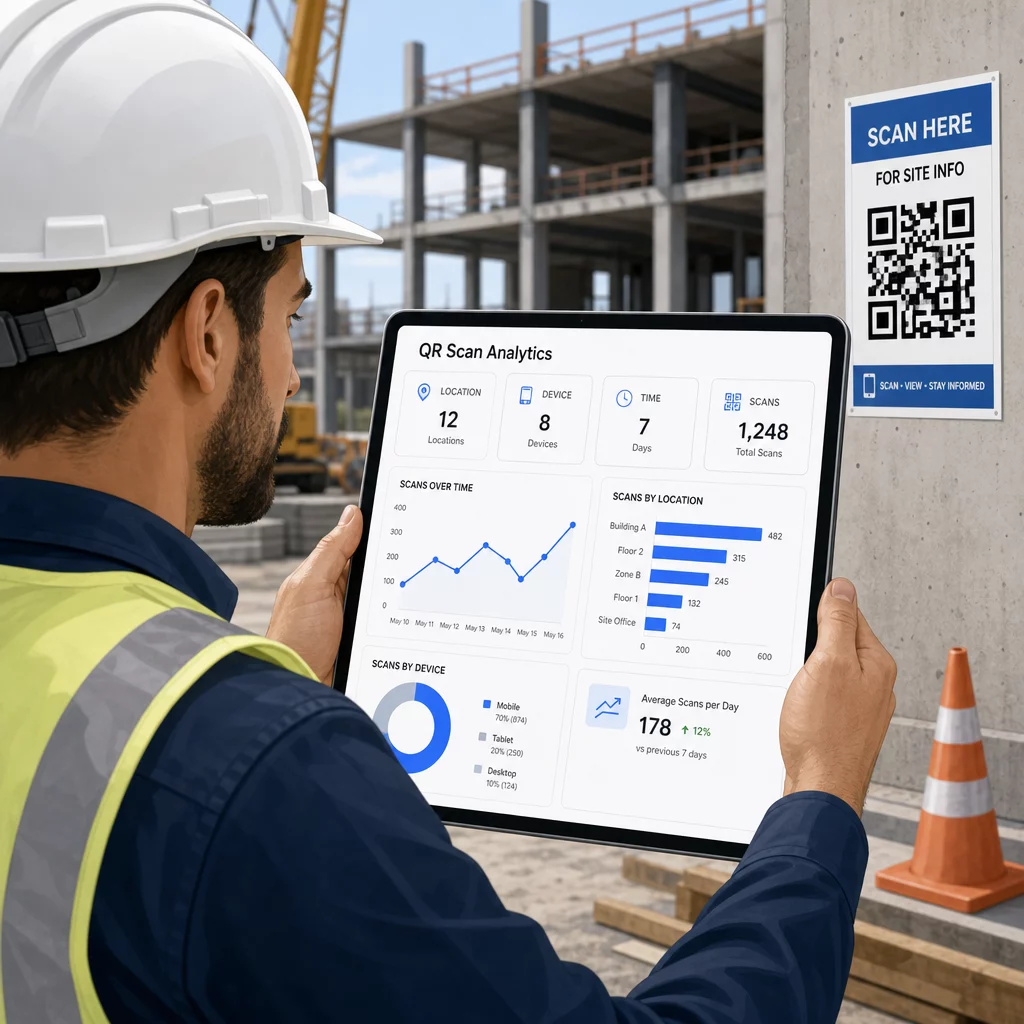
Tato data pomáhají manažerům staveniště činit informovaná rozhodnutí o tom, kde existují mezery v dokumentaci a které kódy potřebují lepší umístění nebo propagaci.
Podívejte se, kde a kdy pracovníci skenují Použijte Generátor QR kódů pro odkazy k vytváření sledovatelných dynamických kódů pro jakýkoli obsah založený na URL a monitorování aktivity skenování na vašem staveništi z jednoho řídicího panelu.
Často kladené otázky
Ne. Vestavěná aplikace fotoaparátu na většině moderních chytrých telefonů se systémy iOS a Android dokáže číst QR kódy bez stahování čehokoli dalšího. Pracovníci jednoduše namíří svůj fotoaparát na kód a klepnou na oznámení, které se objeví.
S dynamickým QR kódem zůstává fyzický kód stejný. Cílový soubor nebo URL aktualizujete prostřednictvím svého panelu pro správu QR kódů a další sken automaticky otevře novou verzi. Proto jsou dynamické kódy silně preferovány pro stavební dokumenty, které jsou často revidovány.
Tiskněte na materiály odolné proti povětrnostním vlivům nebo laminované, umisťujte kódy na rovné povrchy chráněné před přímým UV zářením, kde je to možné, a používejte vysoce kontrastní designy, které zůstanou čitelné, i když se povrch mírně zašpiní. Zkontrolujte pokyny pro velikost a čitelnost QR kódů pro konkrétní doporučení ohledně úrovní opravy chyb, které pomáhají kódům zůstat skenovatelnými, i když jsou částečně poškozené.