Czy papierowe plany, segregatory pełne dokumentów bezpieczeństwa i ręczne dzienniki sprzętu spowalniają Twoją ekipę? Kiedy pracownicy spędzają czas na szukaniu właściwego dokumentu zamiast na budowaniu, cały projekt ponosi tego konsekwencje. Ten przewodnik wyjaśnia, jak kody QR rozwiązują ten problem – i gdzie na placu budowy przynoszą największą wartość.
Dlaczego dostęp do dokumentów jest prawdziwym problemem na placach budowy
Zarządzanie dokumentami budowlanymi jest jedną z najbardziej czasochłonnych części każdego projektu. Badania branżowe wykazały, że przeciętny specjalista budowlany spędza około 5,5 godziny tygodniowo na samym szukaniu danych projektowych – to ponad 10% czasu zespołu straconego na szukanie zamiast na budowanie.
Koszt to nie tylko stracone godziny. Ekipy pracujące na przestarzałych rysunkach popełniają błędy. Protokoły bezpieczeństwa, które znajdują się w segregatorze w biurze budowy, nie pomagają pracownikowi na trzecim piętrze. Sprzęt, który nie ma dostępnych zapisów konserwacji, jest niewłaściwie używany lub pomija zaplanowane przeglądy.
Kody QR – dwuwymiarowe kody kreskowe, które każda kamera smartfona może odczytać w kilka sekund – stanowią bezpośredni pomost między fizyczną lokalizacją a dokumentem cyfrowym. Umieść jeden na ścianie, przymocuj do sprzętu lub wydrukuj na tabliczce przy wejściu na plac budowy, a pracownicy będą mogli otworzyć dokładnie ten plik, którego potrzebują, bez dzwonienia do biura czy przeszukiwania papierowych folderów.
Jak kody QR działają w kontekście budowlanym
Kod QR to skanowalny wzór, który koduje adres internetowy lub link do pliku. Kiedy pracownik skieruje na niego kamerę telefonu, urządzenie automatycznie otwiera ten link – bez konieczności posiadania aplikacji na większości nowoczesnych smartfonów.
Najbardziej użytecznym typem w budownictwie jest dynamiczny kod QR, którego miejsce docelowe można aktualizować w dowolnym momencie za pośrednictwem panelu zarządzania, bez zmiany lub ponownego drukowania fizycznego kodu. Ma to znaczenie na placu budowy, ponieważ dokumenty zmieniają się nieustannie: rysunki są poprawiane, protokoły bezpieczeństwa aktualizowane, a specyfikacje sprzętu ewoluują. Dzięki dynamicznemu kodowi fizyczna naklejka lub znak pozostaje na miejscu, podczas gdy połączona treść jest odświeżana w ciągu kilku sekund.
Udostępniaj zaktualizowane plany bez ponownego drukowania Chcesz, aby ekipy terenowe korzystały z najnowszej wersji rysunku? Użyj Generator kodów QR do PDF aby połączyć się bezpośrednio z bieżącymi planami i aktualizować miejsce docelowe za każdym razem, gdy zostanie wydana nowa wersja.
Praktyczne zastosowania kodów QR na placu budowy
Aktualne rysunki i specyfikacje
Umieść odporne na warunki atmosferyczne tabliczki z kodami QR przy wejściu na projekt, w poszczególnych pomieszczeniach oraz w obszarach pracy specyficznych dla danej branży. Pracownicy skanują, aby otworzyć najnowszy zestaw planów i specyfikacji bezpośrednio na swoich telefonach. Gdy zostanie wydana nowa wersja rysunku, zaktualizuj połączony plik – nie są wymagane nowe tabliczki.
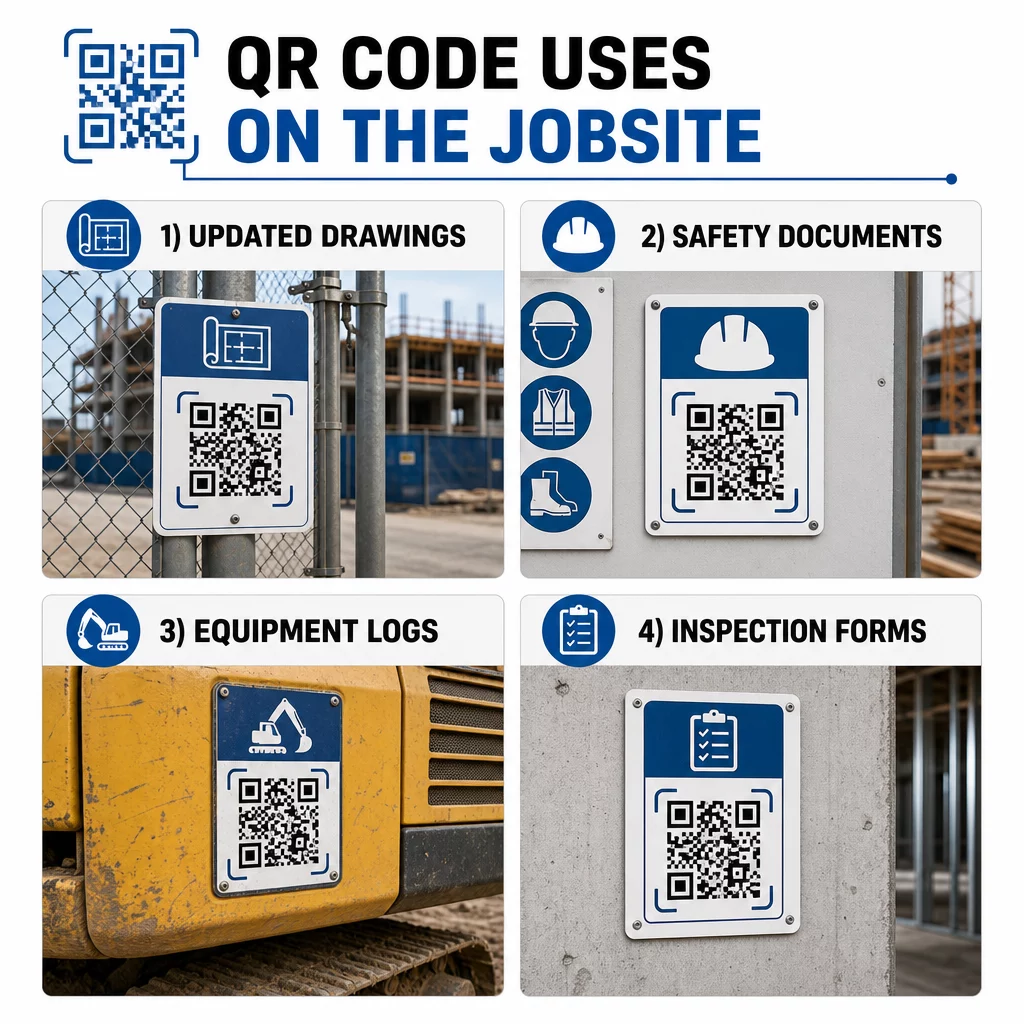
Takie podejście eliminuje ryzyko pracy ekip na przestarzałych rysunkach, co jest jednym z najczęstszych i najdroższych źródeł poprawek.
Dokumenty bezpieczeństwa i rejestry OSHA
Dołącz kody QR do oznakowania terenu, szafek bezpieczeństwa i punktów kontroli wejścia, prowadzące do:
- Karty charakterystyki substancji niebezpiecznych
- Procedury awaryjne i plany ewakuacji terenu
- Wymagania bezpieczeństwa specyficzne dla branży
- Rejestry urazów i chorób OSHA, do których pracownicy mają prawo dostępu
Główny kod QR przy wejściu na projekt może wskazywać na centrum dokumentów bezpieczeństwa obejmujące wszystkie powyższe. Ponieważ kod jest dynamiczny, można dodawać nowe dokumenty lub aktualizować istniejące bez wymiany znaku. Aby dowiedzieć się więcej o tym, jak poprawić informowanie podwykonawców o wymaganiach bezpieczeństwa, zobacz 5 sposobów, w jakie kody QR poprawiają komunikację z podwykonawcami.
Dzienniki sprzętu i rejestry konserwacji
Dołącz kod QR bezpośrednio do każdego elementu wyposażenia. Pracownicy i operatorzy skanują go, aby uzyskać dostęp do:
- Instrukcje obsługi i bezpieczne procedury postępowania
- Dzienniki konserwacji i historia serwisowa
- Daty inspekcji i nadchodzące harmonogramy serwisowe
- Przewodniki rozwiązywania problemów
Zastępuje to papierowe instrukcje, które często giną, i zapewnia menedżerom scentralizowany rejestr statusu każdego zasobu. Gdy sprzęt przemieszcza się między miejscami pracy, jego historia konserwacji przemieszcza się wraz z nim.
Kwalifikacje pracowników i rejestry szkoleń
Umieść unikalne kody QR na identyfikatorach pracowników, kaskach lub kamizelkach odblaskowych, które łączą się z certyfikatami szkoleniowymi i rejestrami kwalifikacji każdego pracownika. Przełożeni mogą skanować na miejscu, aby potwierdzić, że pracownik jest certyfikowany do konkretnego zadania i sprawdzić, czy jakiekolwiek uprawnienia zbliżają się do wygaśnięcia.
Inspekcje, Listy Kontrolne i Kontrola Jakości
Połącz kody QR umieszczone w punktach kontrolnych lub na rysunkach z formularzami cyfrowymi. Inspektorzy skanują, wypełniają listę kontrolną na swoim telefonie i przesyłają. Wszystkie zapisy są przechowywane centralnie i powiązane z konkretną lokalizacją lub dokumentem. Użycie Kod QR formularza Google jest prostym sposobem na wdrożenie cyfrowych list kontrolnych inspekcji bez budowania niestandardowego systemu.
Raportowanie postępów działa w ten sam sposób: pracownicy skanują kod na rysunku, wprowadzają dane dotyczące ukończonych prac, a menedżerowie uzyskują wgląd w czasie rzeczywistym w kamienie milowe projektu.
Dokumentacja Projektu i Dzienniki Codzienne
Kody QR na stanowiskach odprawy na placu budowy pozwalają pracownikom skanować, aby rejestrować obecność, uzyskiwać dostęp do planów na dany dzień i otwierać codzienne listy kontrolne zadań. Ukończone dzienniki są przesyłane cyfrowo, zastępując papierowe tablice ogłoszeń i zmniejszając ryzyko utraty dokumentacji.
Udostępnianie większych dokumentów projektowych – zgłoszeń, specyfikacji, zapytań o informacje (RFI) – działa dobrze z kodem QR Dokumentu Google, który przekierowuje bezpośrednio do udostępnionego dokumentu, który można aktualizować bez wydawania nowego kodu.
Śledzenie Problemów i Listy Usterek
Dołącz kod QR do wadliwego przedmiotu lub miejsca problemu. Skanowanie otwiera cyfrowy bilet pokazujący opis problemu, priorytet, przypisanego technika i historię prac. Nowe notatki są zapisywane centralnie, dzięki czemu menedżerowie i ekipy terenowe zawsze widzą aktualny status. Zapobiega to przeoczeniu pozycji z listy usterek podczas przekazywania zadań.
Płoty budowlane mogą również zawierać kod QR, który otwiera zewnętrzne wizualizacje ukończonego projektu, aby sąsiedzi, kupujący i przechodnie mogli zobaczyć, co jest budowane.
Wdrażanie Kodów QR, Które Faktycznie Są Skanowane
Kod QR, którego pracownicy nie mogą odczytać w terenie, mija się z celem. Kilka praktycznych uwag:
- Rozmiar i odległość skanowania. W przypadku oznakowania na placu budowy, kod powinien mieć co najmniej 1–2 cale szerokości dla skanowania z bliskiej odległości, a większy dla znaków oglądanych z kilku stóp. Postępuj zgodnie z wytycznymi, że na każde 10 cali odległości oglądania przypada około 1 cal szerokości kodu. Zobacz rozmiaru kodu QR dla różnych materiałów do druku w celu uzyskania wskazówek dotyczących konkretnego materiału.
- Powierzchnia i umiejscowienie. Płaskie, matowe powierzchnie skanują się bardziej niezawodnie niż błyszczące, zakrzywione lub faliste. Unikaj umieszczania kodów w miejscach, gdzie cienie, bezpośrednie światło słoneczne lub fizyczne przeszkody mogą zakłócać skanowanie.
- Odporność na warunki atmosferyczne. Laminowane lub odporne na warunki atmosferyczne etykiety wytrzymują warunki zewnętrzne. Uszkodzony lub odklejający się kod przestaje działać.
- Kontrast. Ciemny wzór na jasnym tle to najbardziej niezawodne połączenie. Przejrzyj najlepszymi praktykami w zakresie czytelności kodów QR przed zatwierdzeniem projektu.
- Bezpieczeństwo. W przypadku kodów prowadzących do wrażliwych dokumentów – akt HR, plików umów, zastrzeżonych specyfikacji – używaj kontroli dostępu i linków HTTPS. W celu uzyskania wskazówek, zobacz bezpieczne generowanie kodów QR najlepsze praktyki.
Śledzenie używanych kodów
Dynamiczne kody QR nie tylko pozwalają aktualizować miejsca docelowe – rejestrują również dane skanowania. Za pośrednictwem panelu zarządzania możesz zobaczyć, ile razy każdy kod został zeskanowany, kiedy, na jakim typie urządzenia i z jakiej lokalizacji. Dzięki temu wiesz, do których dokumentów pracownicy faktycznie uzyskują dostęp, które kody bezpieczeństwa w pobliżu obszarów niebezpiecznych są ignorowane i które rejestry sprzętu wymagają uwagi.
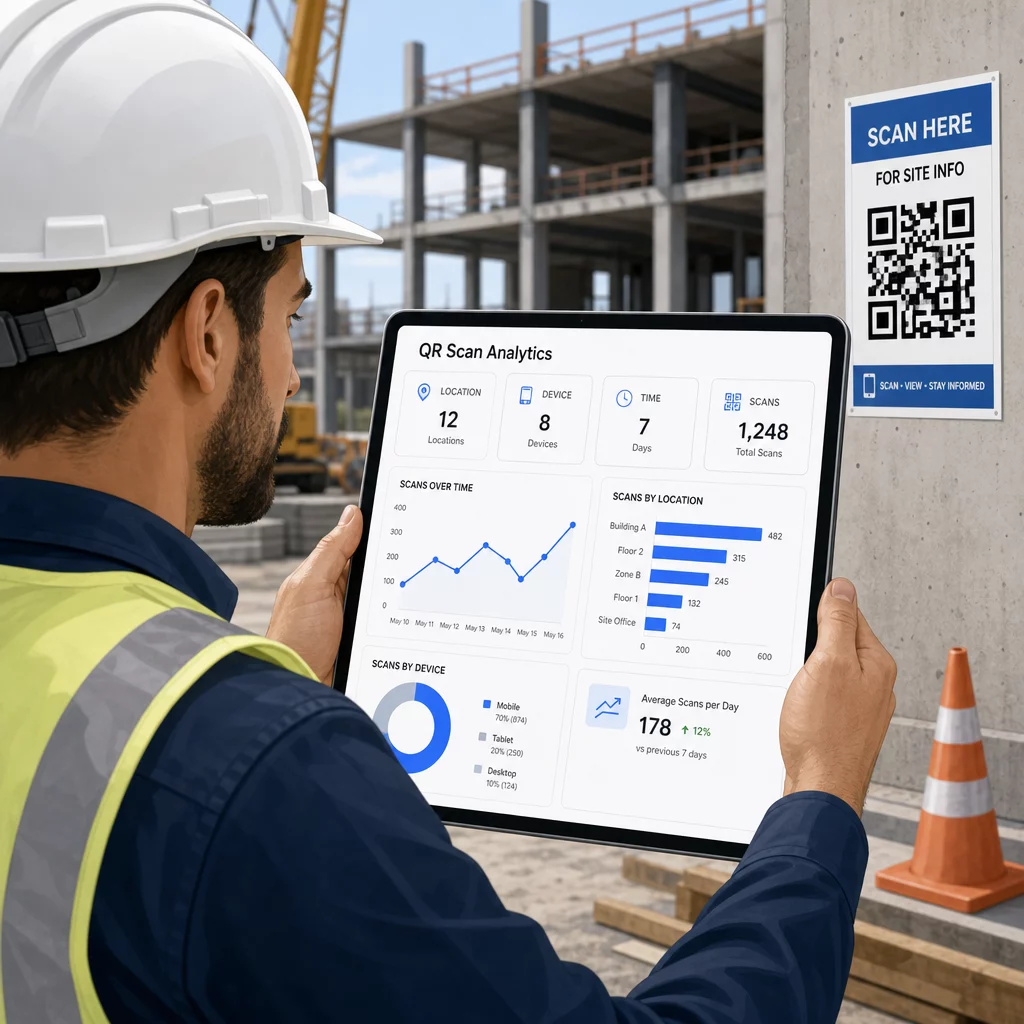
Te dane pomagają kierownikom budowy podejmować świadome decyzje dotyczące tego, gdzie istnieją luki w dokumentacji i które kody wymagają lepszego umiejscowienia lub promocji.
Zobacz, gdzie i kiedy pracownicy skanują Użyj Generator kodów QR do linków aby tworzyć śledzalne dynamiczne kody dla dowolnych treści opartych na adresach URL i monitorować aktywność skanowania na placu budowy z jednego panelu.
Najczęściej zadawane pytania
Nie. Wbudowana aplikacja aparatu na większości nowoczesnych smartfonów z systemem iOS i Android może odczytywać kody QR bez pobierania czegokolwiek dodatkowego. Pracownicy po prostu kierują aparat na kod i dotykają pojawiającego się powiadomienia.
W przypadku dynamicznego kodu QR, fizyczny kod pozostaje taki sam. Aktualizujesz plik docelowy lub adres URL za pośrednictwem panelu zarządzania kodami QR, a następne skanowanie automatycznie otwiera nową wersję. Dlatego kody dynamiczne są zdecydowanie preferowane w przypadku dokumentów budowlanych, które są często zmieniane.
Drukuj na materiałach odpornych na warunki atmosferyczne lub laminowanych, umieszczaj kody na płaskich powierzchniach chronionych przed bezpośrednim działaniem promieni UV, jeśli to możliwe, i używaj wzorów o wysokim kontraście, które pozostają czytelne, nawet jeśli powierzchnia lekko się zabrudzi. Sprawdź wytyczne dotyczące rozmiaru i czytelności kodów QR w celu uzyskania szczegółowych zaleceń dotyczących poziomów korekcji błędów, które pomagają kodom pozostać skanowalnymi nawet po częściowym uszkodzeniu.