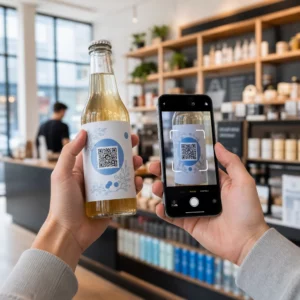
Quản lý thiết bị y tế trong một cơ sở bận rộn khó hơn nhiều so với tưởng tượng. Khi thiết bị bị thất lạc, hồ sơ bảo trì bị chậm trễ, hoặc nhân viên lãng phí thời gian tìm kiếm các công cụ quan trọng, việc chăm sóc bệnh nhân sẽ bị ảnh hưởng. Hướng dẫn này giải thích cách triển khai theo dõi thiết bị y tế bằng mã QR – từ việc chọn nền tảng phù hợp đến duy trì nhãn và tuân thủ quy định.
Tại sao theo dõi bằng mã QR lại hợp lý cho thiết bị y tế
Các quy trình kiểm kê thủ công – bảng kẹp giấy, bảng tính, nhật ký bảo trì giấy – tạo ra những lỗ hổng. Thiết bị bị thất lạc, các kỳ bảo trì bị bỏ lỡ và tài liệu tuân thủ trở nên khó xác minh nhanh chóng. Mã QR giải quyết những lỗ hổng này bằng cách liên kết mỗi thiết bị vật lý với một hồ sơ kỹ thuật số trực tiếp mà nhân viên có thể truy cập trong vài giây bằng điện thoại thông minh tiêu chuẩn.
Không giống như mã vạch truyền thống, mã QR có thể lưu trữ nhiều thông tin hơn trong một định dạng nhỏ gọn. Khi được đặt trên máy thở, bơm tiêm truyền hoặc màn hình di động, mã QR có thể hiển thị ngay lập tức:
- Lịch sử bảo trì của thiết bị và ngày bảo dưỡng định kỳ tiếp theo
- Hồ sơ hiệu chuẩn và tài liệu tuân thủ
- Hướng dẫn sử dụng hoặc video cài đặt
- Vị trí hiện tại và bộ phận được chỉ định
- Cảnh báo về sự cố hoặc yêu cầu thay thế
Loại truy cập tức thì này chính xác là những gì mà mã QR cho bệnh viện và chăm sóc sức khỏe mô hình triển khai được thiết kế để hỗ trợ.
Từ góc độ tuân thủ, Trung tâm Dịch vụ Medicare & Medicaid (CMS) yêu cầu các thiết bị quan trọng – thiết bị hỗ trợ sự sống, thiết bị hồi sức chủ chốt, thiết bị giám sát quan trọng – phải được bảo trì theo lịch trình của nhà sản xuất, và tất cả các công việc bảo trì phải được thực hiện bởi nhân viên có trình độ và được ghi chép đầy đủ. Hệ thống mã QR tạo ra một dấu vết kiểm toán tự nhiên giúp việc đáp ứng các yêu cầu này dễ quản lý và chứng minh hơn trong quá trình kiểm tra.
Chọn nền tảng mã QR cho ngành chăm sóc sức khỏe
Không phải mọi công cụ mã QR đều được xây dựng để đáp ứng các yêu cầu của môi trường lâm sàng. Khi đánh giá các nền tảng, hãy ưu tiên những điều sau:
Bảo mật và tuân thủ HIPAA. Bất kỳ nền tảng nào xử lý thông tin sức khỏe được bảo vệ (PHI) phải tuân thủ các Quy tắc về Quyền riêng tư, Bảo mật và Thông báo Vi phạm của HIPAA. Hãy tìm kiếm tính năng truyền dữ liệu được mã hóa, lưu trữ đám mây an toàn, kiểm soát truy cập dựa trên vai trò và thời gian chờ phiên tự động. Nền tảng cũng nên hỗ trợ các thỏa thuận đối tác kinh doanh nếu PHI được truyền qua đó.
Mã QR động. Không giống như mã tĩnh, mã QR động có thể được cập nhật sau khi in. Như Pageloot giải thích, một mã động “có thể được sửa đổi ngay cả sau khi [nó đã] được tạo và in,” cho phép bạn thay đổi nội dung liên kết hoặc URL đích bất cứ lúc nào mà không cần thay thế nhãn vật lý. Đối với thiết bị y tế thường xuyên trải qua các bản cập nhật phần mềm, thay đổi lịch trình hoặc sửa đổi quy định, điều này là rất cần thiết.
Phân tích thời gian thực. Khả năng theo dõi thời gian và địa điểm quét mã giúp các nhóm kỹ thuật y sinh có cái nhìn rõ ràng về các mẫu sử dụng thiết bị, giúp gắn cờ các thiết bị có thể cần chú ý và hỗ trợ các quyết định phân bổ nguồn lực. Các chỉ số như số lần quét, vị trí và loại thiết bị đều góp phần vào việc lập kế hoạch bảo trì thông minh hơn.
Tích hợp hệ thống. Nền tảng nên kết nối với hệ thống Hồ sơ Sức khỏe Điện tử (EHR), Hệ thống Quản lý Bảo trì Bằng Máy tính (CMMS) hoặc cơ sở dữ liệu tài sản hiện có của bạn thông qua API. Khi một kỹ sư y sinh hoàn thành việc bảo trì máy truyền dịch, bản cập nhật đó sẽ tự động lan truyền – không cần nhập liệu trùng lặp.
Giao diện thân thiện với người dùng. Nhân viên y tế cần các công cụ yêu cầu đào tạo ban đầu tối thiểu. Một bảng điều khiển rõ ràng cho phép nhân viên tạo, cập nhật và quản lý mã mà không làm gián đoạn quy trình làm việc của họ là điều đáng ưu tiên.
Theo dõi mọi tài sản từ một bảng điều khiển duy nhất Sử dụng Tạo mã QR động để tạo mã có thể chỉnh sửa, có thể theo dõi cho thiết bị y tế của bạn và quản lý tất cả các bản cập nhật từ một nơi.
Thiết kế mã QR hoạt động trong môi trường lâm sàng
Mã QR trong bệnh viện phải đối mặt với các điều kiện có thể làm hỏng nhãn tiêu chuẩn nhanh chóng: chất khử trùng cấp bệnh viện, xử lý thường xuyên, hơi nước và ánh sáng thay đổi. Thiết kế tốt phải tính đến tất cả những điều này trước khi in một nhãn duy nhất.
Kích thước và độ tương phản
Mã QR quá nhỏ sẽ không thể quét đáng tin cậy, đặc biệt khi nhân viên đeo găng tay hoặc làm việc trong điều kiện ánh sáng yếu. Hãy làm theo các hướng dẫn về kích thước sau:
- Kích thước tối thiểu: 0,8 x 0,8 inch (2 x 2 cm) cho dữ liệu đơn giản như URL
- Kích thước khuyến nghị cho dữ liệu phức tạp: ít nhất 1.2 x 1.2 inch (3 x 3 cm)
- Tỷ lệ khoảng cách quét: áp dụng quy tắc 10:1 – nếu mã sẽ được quét từ khoảng cách 10 inch, nó phải rộng ít nhất 1 inch
Để tạo độ tương phản, hãy sử dụng các mẫu tối trên nền sáng và duy trì tỷ lệ tương phản ít nhất 4:1 giữa mã và nền của nó. Tránh các sự kết hợp màu sắc làm giảm khả năng đọc dưới ánh sáng huỳnh quang hoặc khi xem qua camera có dải động hạn chế. Bạn có thể tìm thấy hướng dẫn bổ sung trong Pageloot’s các phương pháp hay nhất để đọc mã QR.
Vùng yên tĩnh và Vị trí đặt Logo
Để lại một đường viền rõ ràng – được gọi là “vùng yên tĩnh” – có chiều rộng ít nhất gấp bốn lần chiều rộng của một mô-đun xung quanh mã. Điều này ngăn văn bản xung quanh, nhãn thiết bị hoặc kết cấu bề mặt can thiệp vào khả năng đọc mã của máy quét.
Nếu bạn bao gồm logo bệnh viện, hãy giữ nó không quá 20% diện tích mã và đặt nó ở giữa. Sử dụng mức sửa lỗi cao (Q hoặc H) khi thêm logo, vì các mức này cho phép mã vẫn có thể đọc được ngay cả khi một phần bị che khuất.
Vật liệu nhãn bền
Nhãn giấy tiêu chuẩn không phù hợp để sử dụng trong bệnh viện. Chúng bị xuống cấp khi tiếp xúc với hóa chất tẩy rửa, độ ẩm và việc xử lý liên tục. Thay vào đó, hãy sử dụng:
- Nhãn polyester: chịu được chất khử trùng mạnh và nhiệt độ từ -40°F đến 300°F
- Nhãn vinyl với chất kết dính cấp y tế: khả năng kháng hóa chất tuyệt vời; được thiết kế để liên kết với bề mặt thép không gỉ, nhựa và kim loại sơn mà không bị bong tróc
- Nhãn cán màng: tăng khả năng chống trầy xước và độ ẩm, mặc dù cần xác minh rằng lớp cán màng không tạo ra độ chói gây cản trở việc quét
Trước khi cam kết đặt hàng đầy đủ, hãy thực hiện thử nghiệm thực địa kéo dài hai tuần: dán nhãn mẫu lên các thiết bị đại diện, đưa chúng vào quy trình vệ sinh tiêu chuẩn của bạn và kiểm tra xem có bị phai màu, bong tróc hoặc suy giảm khả năng quét hay không.
Hệ thống mã hóa màu
Hãy cân nhắc sử dụng màu viền để phân loại thiết bị một cách nhanh chóng – ví dụ, viền đỏ cho thiết bị khẩn cấp, xanh lam cho thiết bị chẩn đoán và xanh lục cho vật tư chung. Lớp trực quan này giúp nhân viên nhanh chóng xác định đúng loại thiết bị mà không cần mất thời gian đọc nhãn văn bản.
Thiết lập mã QR động để quản lý tài sản
Mã QR động đặc biệt phù hợp với thiết bị y tế vì dữ liệu liên quan đến một thiết bị thay đổi liên tục. Bảo trì được hoàn thành, ngày hiệu chuẩn được cập nhật, phần sụn được cập nhật và tài liệu tuân thủ được sửa đổi. Với mã động, nhãn vật lý trên thiết bị vẫn giữ nguyên – chỉ nội dung được liên kết thay đổi.
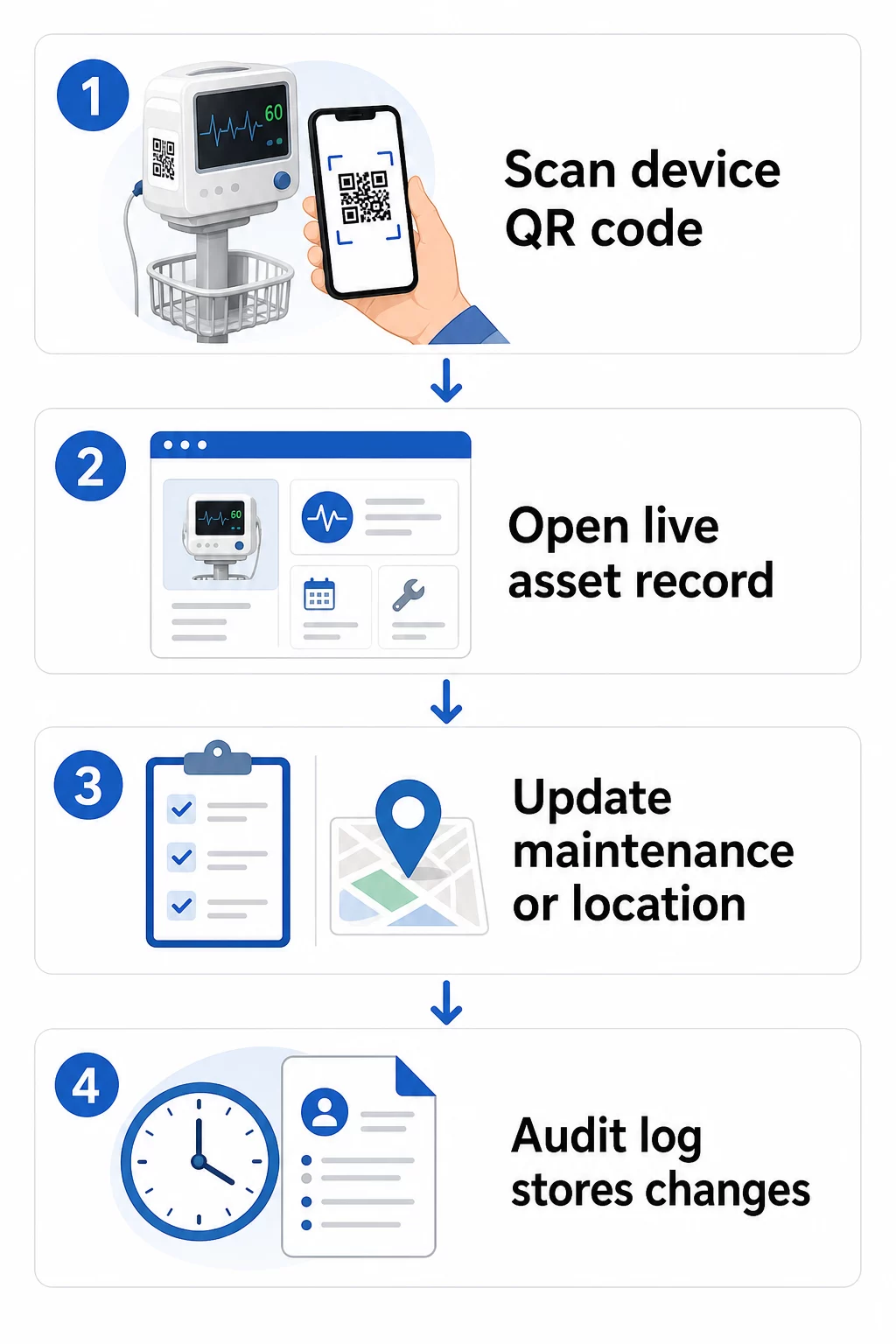
Dưới đây là quy trình làm việc thực tế để giữ hồ sơ thiết bị luôn cập nhật:
- Đăng nhập vào bảng điều khiển quản lý của bạn và định vị mã bằng ID thiết bị hoặc bộ lọc phòng ban của thiết bị
- Chỉnh sửa thông tin được liên kết – cập nhật nhật ký bảo trì, hồ sơ hiệu chuẩn, ngày bảo dưỡng tiếp theo hoặc tài liệu được liên kết
- Các thay đổi được áp dụng ngay lập tức, vì vậy bất kỳ nhân viên nào quét mã sau đó sẽ thấy dữ liệu hiện tại
- Quét mã để xác minh rằng thông tin cập nhật hiển thị chính xác trước khi rời khỏi bản ghi
- Xem lại nhật ký kiểm tra tự động, ghi lại thời gian của mọi thay đổi và người dùng đã thực hiện thay đổi đó
Để tìm hiểu sâu hơn về cách mã động xử lý các bản cập nhật thường xuyên, hãy xem cách sử dụng mã QR cho kiểm kê sản phẩm và tổng quan về Mã QR để theo dõi vòng đời sản phẩm, cả hai đều đề cập đến quy trình cập nhật áp dụng cho quản lý tài sản y tế.
Giữ Hồ Sơ Thiết Bị Luôn Cập Nhật Mà Không Cần In Lại Các Tạo mã QR động cho phép đội ngũ y sinh của bạn đẩy các bản cập nhật vào bất kỳ hồ sơ thiết bị nào ngay lập tức từ bảng điều khiển web – không cần nhãn mới.
Kết Nối Mã QR Với Hệ Thống Kiểm Kê Và Bảo Trì Của Bạn
Mã QR mang lại giá trị lớn nhất khi chúng cung cấp dữ liệu vào cơ sở hạ tầng quản lý tài sản rộng lớn hơn của bạn thay vì hoạt động như một lớp độc lập. Các điểm tích hợp cần xem xét bao gồm:
Tích hợp CMMS. Khi một kỹ thuật viên quét một thiết bị sau khi hoàn thành bảo trì, hồ sơ CMMS sẽ tự động cập nhật. Điều này loại bỏ việc nhập dữ liệu thủ công và đảm bảo nhật ký bảo trì luôn được cập nhật.
Quy trình làm việc về EHR và an toàn bệnh nhân. Nếu một thiết bị được liên kết với phòng bệnh nhân hoặc khu vực chăm sóc, việc quét mã QR của thiết bị có thể hiển thị các cảnh báo an toàn liên quan, trạng thái thu hồi hoặc cờ tương thích trong các hệ thống lâm sàng hiện có.
Theo dõi vị trí. Mỗi lần quét sẽ ghi lại vị trí của thiết bị quét, cung cấp cho quản trị viên một bức tranh liên tục về vị trí thực tế của thiết bị di động so với vị trí được ghi nhận. Điều này giúp giảm thời gian tìm kiếm thiết bị và giúp xác định các mẫu di chuyển của thiết bị giữa các khoa.
Cảnh báo tự động. Kết nối dữ liệu quét để kích hoạt thông báo khi một thiết bị quá hạn hiệu chuẩn, khi một tài sản có giá trị cao chưa được quét trong một thời gian dài bất thường, hoặc khi cần nhanh chóng định vị một nhóm thiết bị bị thu hồi.
Để có bối cảnh rộng hơn về cách mã QR hỗ trợ khả năng truy xuất nguồn gốc trong các môi trường tài sản phức tạp, Mã QR để theo dõi chuỗi cung ứng hướng dẫn này bao gồm các nguyên tắc tích hợp có thể áp dụng trực tiếp vào quy trình làm việc tài sản bệnh viện.
Gắn nhãn cho toàn bộ kho tài sản của bạn
Hệ thống theo dõi mã QR chỉ hữu ích khi phạm vi bao phủ của nó rộng. Bắt đầu với các thiết bị có giá trị cao và rủi ro cao – máy MRI, robot phẫu thuật, máy thở, màn hình bệnh nhân – sau đó mở rộng sang các thiết bị di động nhỏ hơn và cuối cùng là vật tư tiêu hao và phụ tùng thay thế.
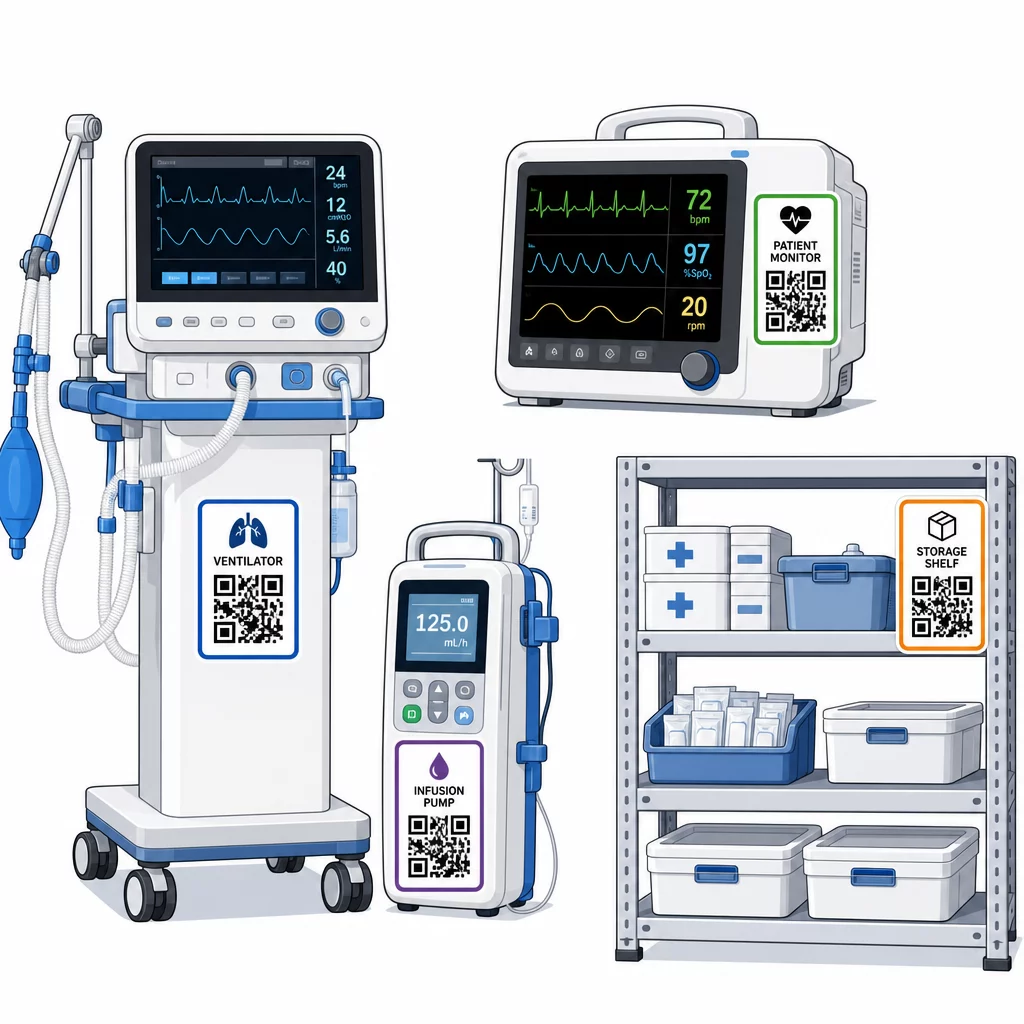
Tính nhất quán trong vị trí đặt là quan trọng. Chọn một vị trí tiêu chuẩn cho từng loại thiết bị: thanh đầu giường cho giường di động và cột truyền dịch, ngang tầm mắt cho màn hình gắn tường, một bề mặt phẳng dễ nhìn trên các thiết bị di động. Tính nhất quán giúp giảm thời gian nhân viên tìm kiếm mã trên một thiết bị không quen thuộc.
Phụ tùng và linh kiện. Gắn mã cho các phụ tùng quan trọng liên kết với mức tồn kho, ngày hết hạn và thông tin tương thích. Điều này ngăn chặn việc sử dụng linh kiện quá thời hạn sử dụng hoặc lắp đặt vào thiết bị không tương thích.
Vị trí lưu trữ. Gắn mã vào các phòng lưu trữ, kho thiết bị và tủ vật tư. Khi nhân viên quét mã vị trí lưu trữ, họ có thể ngay lập tức thấy những gì nên có ở đó, những gì đang thiếu và khi nào tài sản được di chuyển lần cuối. Điều này tạo ra một bản đồ kỹ thuật số về tài sản của cơ sở, hỗ trợ phản ứng khẩn cấp nhanh hơn và giảm tình trạng đặt hàng quá mức.
Để có thêm hướng dẫn về việc gắn thẻ tài sản vật lý ở quy mô lớn, hướng dẫn tối ưu về mã QR cho chăm sóc sức khỏe bao gồm việc triển khai trên nhiều trường hợp sử dụng trong chăm sóc sức khỏe.
Đào tạo nhân viên sử dụng hệ thống mã QR hiệu quả
Công nghệ chỉ hoạt động nếu những người sử dụng tin tưởng và biết cách sử dụng nó. Đào tạo dựa trên vai trò đảm bảo mỗi thành viên trong nhóm học được những gì họ thực sự cần mà không bị choáng ngợp bởi các tính năng không liên quan đến quy trình làm việc của họ.
- Y tá và kỹ thuật viên cần biết cách quét mã để kiểm tra tình trạng thiết bị, xem cảnh báo bảo trì và báo cáo sự cố
- Kỹ sư y sinh cần cập nhật hồ sơ bảo trì, quản lý chuyển giao và tạo báo cáo tuân thủ
- Nhân viên bảo trì sử dụng mã để ghi lại các dịch vụ đã hoàn thành và truy cập tài liệu kỹ thuật
- Các nhóm hành chính tập trung vào báo cáo, quản lý quyền người dùng và giám sát hệ thống
Cung cấp các thẻ tham khảo nhanh cho các hành động phổ biến nhất – kiểm tra lịch bảo trì, báo cáo lỗi, truy cập hướng dẫn sử dụng – và dán chúng gần các trạm quét hoặc khu vực lưu trữ thiết bị.
Chỉ định quản trị viên mã QR trong mỗi phòng ban: các thành viên nhóm có thể khắc phục sự cố quét, phê duyệt cập nhật và trả lời câu hỏi từ đồng nghiệp. Thiết lập một kênh phản hồi đơn giản để nhân viên có thể báo cáo sự cố hoặc yêu cầu đào tạo bổ sung khi quy trình làm việc phát triển.
Phân tích, Bảo mật và Tuân thủ
Sử dụng Dữ liệu Quét để Cải thiện Hoạt động
Mỗi lần quét tạo ra dữ liệu. Nếu được sử dụng tốt, dữ liệu này sẽ chuyển quản lý tài sản từ phản ứng sang dự đoán. Phân tích có thể giúp bạn:
- Xác định thiết bị nào được quét thường xuyên bất thường trong một ca làm việc – một tín hiệu tiềm ẩn về các vấn đề hiệu suất
- Phát hiện thiết bị liên tục không hoạt động ở một phòng ban trong khi phòng ban khác thiếu hụt, cho phép phân bổ lại trước khi tình trạng thiếu hụt ảnh hưởng đến việc chăm sóc
- Xây dựng lịch sử bảo trì để biện minh cho việc điều chỉnh khoảng thời gian bảo dưỡng đối với thiết bị không quan trọng, như CMS cho phép khi có đủ lịch sử bảo trì
- Đánh giá lợi tức đầu tư bằng cách theo dõi việc sử dụng thiết bị so với chi phí mua sắm và bảo trì
Các cân nhắc về bảo mật
Mã QR trong môi trường lâm sàng tiềm ẩn rủi ro bảo mật cần được chú ý cẩn thận. Kẻ tấn công có thể dán các nhãn dán QR giả mạo lên các mã hợp pháp, chuyển hướng nhân viên hoặc bệnh nhân đến các địa điểm độc hại – một hành vi được gọi là “quishing”. Vì đích đến của mã QR không hiển thị trước khi quét, người dùng có thể không phát hiện ra sự thay thế.
Để giảm thiểu những rủi ro này:
- Sử dụng kiểm soát truy cập dựa trên vai trò để chỉ nhân viên được ủy quyền mới có thể xem hoặc chỉnh sửa các hồ sơ nhạy cảm
- Đảm bảo tất cả dữ liệu được trao đổi giữa mã, thiết bị di động và hệ thống bệnh viện được mã hóa qua HTTPS
- Thực thi các chính sách quản lý thiết bị di động (MDM) – khóa màn hình, xóa từ xa, hạn chế cài đặt ứng dụng – trên các thiết bị được sử dụng để quét
- Duy trì nhật ký kiểm tra toàn diện: mỗi lần quét và mỗi thay đổi dữ liệu phải được gắn dấu thời gian và gán cho một người dùng cụ thể
- Hạn chế quản lý mã QR cho các nền tảng được phê duyệt có cung cấp thỏa thuận đối tác kinh doanh nếu có liên quan đến PHI
Không nhúng PHI dưới dạng văn bản thuần túy vào chính mã QR. Bất kỳ ai có máy quét đều có thể giải mã nó. Thay vào đó, hãy liên kết đến các hồ sơ được xác thực, kiểm soát truy cập yêu cầu thông tin đăng nhập để xem.
Duy trì và Kiểm tra Nhãn Mã QR
Kiểm tra định kỳ
Nhãn vật lý bị xuống cấp. Tích hợp việc kiểm tra nhãn vào các đợt kiểm tra thiết bị định kỳ: kiểm tra các vết trầy xước, phai màu, cạnh bong tróc và hao mòn hóa học từ chất khử trùng. Các thiết bị trải qua quá trình khử trùng thường xuyên – dụng cụ phẫu thuật, màn hình ICU – cần được kiểm tra thường xuyên hơn. Nếu nhãn bị hỏng và mã không còn quét rõ ràng, hãy đánh dấu để thay thế ngay lập tức trước khi nó hỏng hóc vào thời điểm quan trọng.
Kiểm tra nhãn theo các quy trình làm sạch thực tế của bạn, không chỉ theo thông số kỹ thuật của nhà sản xuất. Nếu một chất khử trùng cụ thể liên tục gây hỏng nhãn sớm, hãy chuyển sang vật liệu bền hơn hoặc điều chỉnh phương pháp làm sạch cho các bề mặt có nhãn trong khi vẫn duy trì các tiêu chuẩn kiểm soát nhiễm khuẩn.
Theo dõi tuổi thọ nhãn theo danh mục thiết bị. Nếu nhãn máy thở trong ICU của bạn thường cần thay thế sáu tháng một lần, hãy lên lịch thay thế đó một cách chủ động thay vì chờ đợi sự cố.
Kiểm kê hàng tồn kho
Tính toàn vẹn của nhãn vật lý và độ chính xác của dữ liệu là những vấn đề riêng biệt đòi hỏi các kiểm tra riêng biệt. Tiến hành kiểm kê hàng tồn kho ít nhất hàng quý, với các kiểm tra đột xuất thường xuyên hơn ở các đơn vị chăm sóc đặc biệt, khoa cấp cứu và phòng mổ nơi thiết bị luân chuyển nhanh chóng.
Các phát hiện kiểm toán phổ biến bao gồm dữ liệu vị trí không chính xác, hồ sơ bảo trì không được cập nhật sau chuyến thăm dịch vụ và tài sản vẫn được liệt kê trong hệ thống đã được chuyển giao hoặc loại bỏ. Khi phát hiện sự khác biệt, hãy cập nhật hồ sơ ngay lập tức và ghi lại sự điều chỉnh bằng dấu thời gian.
Tài liệu kiểm toán kỹ lưỡng phục vụ hai mục đích: nó hỗ trợ các cuộc kiểm tra theo quy định và nó làm nổi bật các vấn đề hệ thống – chẳng hạn như một bộ phận thường xuyên bỏ qua các quy trình quét – có thể được giải quyết thông qua đào tạo bổ sung hoặc điều chỉnh quy trình.
Bắt đầu
Theo dõi mã QR hoạt động tốt nhất khi được giới thiệu dần dần. Bắt đầu với thiết bị ưu tiên cao nhất của bạn – các thiết bị mà việc bỏ sót bảo trì hoặc thiếu thông tin vị trí gây ra rủi ro lớn nhất cho an toàn bệnh nhân – và mở rộng phạm vi phủ sóng khi nhóm của bạn làm quen với hệ thống.
Trước tiên, hãy tập trung vào việc tạo nhãn đúng cách: vật liệu bền, kích thước chính xác, vị trí nhất quán và khả năng quét đã được kiểm tra trong điều kiện hoạt động thực tế của bạn. Khi lớp vật lý đã vững chắc, hãy tích hợp với hệ thống CMMS và hệ thống kiểm kê của bạn, sau đó thêm vào phân tích và cảnh báo tự động.
Sử dụng Tạo mã QR miễn phí để tạo mẫu nhãn và kiểm tra quy trình làm việc trước khi cam kết triển khai đầy đủ, và sử dụng Quét mã QR để xác minh rằng mã quét đáng tin cậy trên các thiết bị mà nhân viên của bạn sử dụng hàng ngày.
Bắt đầu theo dõi thiết bị y tế bằng mã QR động Tạo mã có thể chỉnh sửa, có thể theo dõi cho mọi tài sản trong cơ sở của bạn với Tạo mã QR động – cập nhật hồ sơ theo thời gian thực, không cần in lại.
Câu hỏi thường gặp
Mã QR tĩnh mã hóa một đích đến cố định không thể thay đổi sau khi in. Mã QR động trỏ đến một liên kết chuyển hướng có thể được cập nhật bất cứ lúc nào – vì vậy nhãn vật lý vẫn còn trên thiết bị trong khi các hồ sơ bảo trì, dữ liệu hiệu chuẩn hoặc tài liệu liên quan được sửa đổi kỹ thuật số. Đối với thiết bị y tế, mã động được ưu tiên mạnh mẽ vì hồ sơ thiết bị thay đổi thường xuyên, và việc in lại nhãn mỗi khi thông tin được cập nhật sẽ không thực tế và tốn kém.
CMS yêu cầu thiết bị y tế quan trọng phải được bảo trì theo lịch trình khuyến nghị của nhà sản xuất và tất cả công việc bảo trì phải được thực hiện bởi nhân viên có trình độ và được ghi chép đầy đủ. Mã QR hỗ trợ điều này bằng cách tạo ra một dấu vết kiểm toán có dấu thời gian của mọi lần quét, mọi cập nhật bảo trì và mọi thay đổi hồ sơ. Khi một thanh tra viên yêu cầu lịch sử bảo trì của một thiết bị cụ thể, nhân viên có thể cung cấp nó chỉ bằng một lần quét thay vì tìm kiếm trong các hồ sơ giấy hoặc nhiều hệ thống không kết nối.
Các biện pháp phòng ngừa chính bao gồm sử dụng kết nối HTTPS được mã hóa cho tất cả dữ liệu được trao đổi qua các hệ thống liên kết QR, triển khai kiểm soát truy cập dựa trên vai trò để nhân viên chỉ xem thông tin liên quan đến vai trò của họ, không bao giờ nhúng thông tin sức khỏe được bảo vệ dưới dạng văn bản thuần túy vào chính mã QR, thực thi các chính sách quản lý thiết bị di động trên các thiết bị quét, và tiến hành kiểm tra định kỳ các nhãn mã QR để kiểm tra xem có bị giả mạo hoặc có nhãn dán giả mạo được đặt chồng lên các mã hợp lệ hay không. Bất kỳ nền tảng QR của bên thứ ba nào được sử dụng cũng nên có thỏa thuận đối tác kinh doanh nếu nó xử lý PHI.