Ali papirnati načrti, mape, polne varnostne dokumentacije, in ročni dnevniki opreme upočasnjujejo vašo ekipo? Ko delavci namesto gradnje porabijo čas za iskanje pravega dokumenta, celoten projekt plača ceno. Ta vodnik pojasnjuje, kako QR kode rešujejo ta problem – in kje na gradbišču prinašajo največjo vrednost.
Zakaj je dostop do dokumentov resničen problem na gradbiščih
Upravljanje gradbene dokumentacije je eden najbolj časovno potratnih delov vsakega projekta. Industrijske raziskave so pokazale, da povprečen gradbeni strokovnjak porabi približno 5,5 ure na teden zgolj za iskanje projektnih podatkov – to je več kot 10 % časa ekipe, izgubljenega z iskanjem namesto z gradnjo.
Stroški niso le izgubljene ure. Ekipe, ki delajo po zastarelih načrtih, delajo napake. Varnostni protokoli, ki so v mapi v pisarni na gradbišču, ne pomagajo delavcu v tretjem nadstropju. Oprema, ki nima dostopnih evidenc vzdrževanja, se napačno uporablja ali preskoči načrtovano servisiranje.
QR kode – dvodimenzionalne črtne kode, ki jih lahko prebere vsaka kamera pametnega telefona v nekaj sekundah – vam nudijo neposreden most med fizično lokacijo in digitalnim dokumentom. Nalepite eno na steno, pritrdite eno na kos opreme ali natisnite eno na znak pri vhodu na gradbišče, in delavci lahko prikličejo točno tisto datoteko, ki jo potrebujejo, ne da bi klicali v pisarno ali brskali po papirnatih mapah.
Kako QR kode delujejo v gradbenem kontekstu
QR koda je skenabilen vzorec, ki kodira spletni naslov ali povezavo do datoteke. Ko delavec usmeri kamero svojega telefona vanjo, naprava samodejno odpre to povezavo – na večini sodobnih pametnih telefonov ni potrebna nobena aplikacija.
Najbolj uporaben tip za gradbeništvo je dinamična QR koda, katerega destinacijo je mogoče kadar koli posodobiti prek nadzorne plošče za upravljanje, ne da bi spreminjali ali ponovno tiskali fizično kodo. To je pomembno na gradbišču, ker se dokumenti nenehno spreminjajo: načrti se revidirajo, varnostni protokoli se posodabljajo in specifikacije opreme se razvijajo. Z dinamično kodo fizična nalepka ali znak ostane na mestu, medtem ko se povezana vsebina osveži v nekaj sekundah.
Delite posodobljene načrte brez ponovnega tiskanja Morate terenske ekipe obveščati o najnovejši reviziji načrtov? Uporabite Generator QR kod za PDF za neposredno povezavo do vaših trenutnih načrtov in posodobite destinacijo vsakič, ko je izdana revizija.
Praktična uporaba QR kod na gradbišču
Trenutni načrti in specifikacije
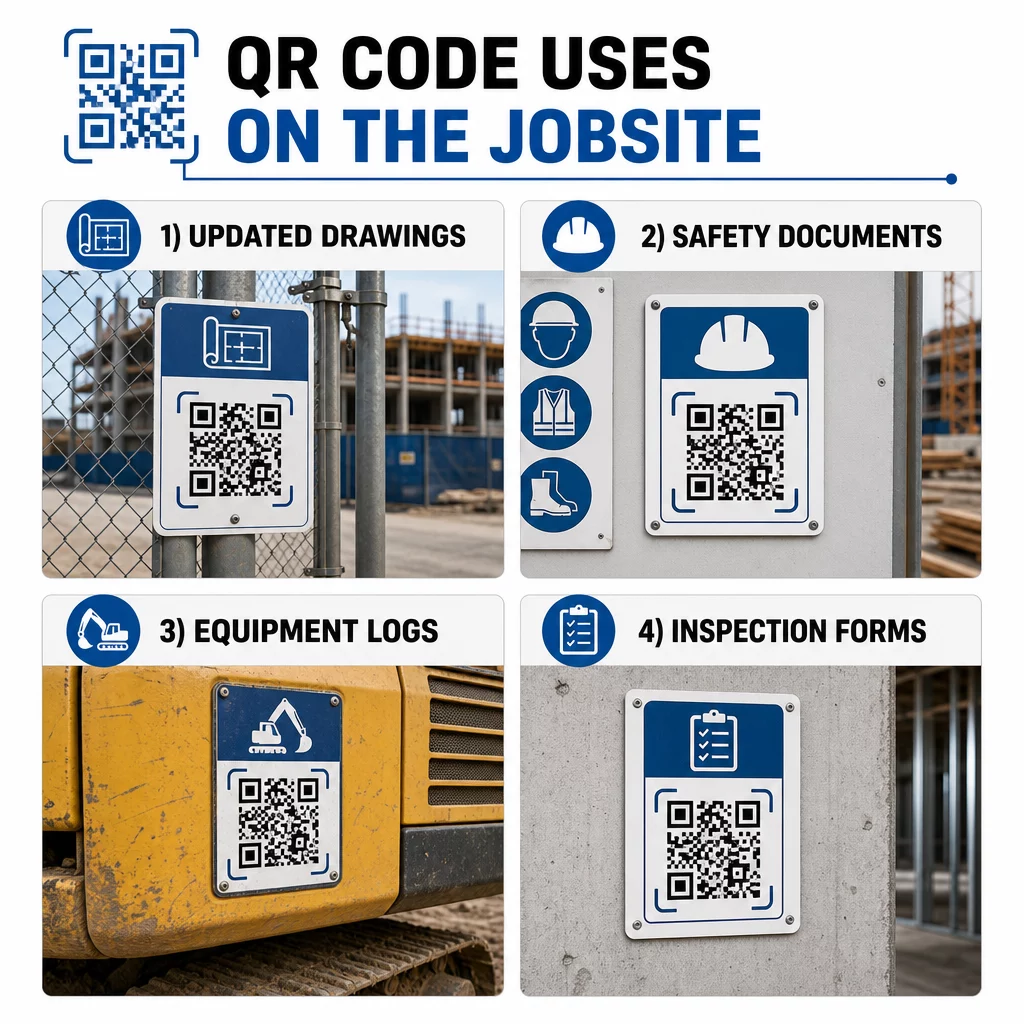
Namestite vremensko odporne QR znake pri vhodu v projekt, v posameznih prostorih in na delovnih območjih, specifičnih za posamezno obrt. Delavci skenirajo, da odprejo najnovejši komplet načrtov in specifikacij neposredno na svojih telefonih. Ko je izdana revizija načrta, posodobite povezano datoteko – novi znaki niso potrebni.
Ta pristop odpravlja tveganje, da bi ekipe delale po nadomeščenih načrtih, kar je eden najpogostejših in najdražjih virov predelave.
Varnostni dokumenti in zapisi OSHA
Pritrdite QR kode na oznake na gradbišču, varnostne omare in vstopne kontrolne točke, ki se povezujejo na:
- Varnostni listi za nevarne snovi
- Postopki v sili in načrti evakuacije gradbišča
- Varnostne zahteve, specifične za posamezno obrt
- Zapisi OSHA o poškodbah in boleznih, do katerih imajo delavci pravico dostopa
Glavna QR koda na vhodu v projekt lahko kaže na središče varnostnih dokumentov, ki zajema vse zgoraj navedeno. Ker je koda dinamična, lahko dodate nove dokumente ali posodobite obstoječe, ne da bi zamenjali znak. Za več informacij o izboljšanju obveščenosti podizvajalcev o varnostnih zahtevah, glejte 5 načinov, kako QR kode izboljšajo komunikacijo s podizvajalci.
Dnevniki opreme in zapisi o vzdrževanju
Pritrdite QR kodo neposredno na vsak kos opreme. Delavci in operaterji jo skenirajo za dostop do:
- Navodila za uporabo in postopki varnega ravnanja
- Dnevniki vzdrževanja in zgodovina servisiranja
- Datumi pregledov in prihajajoči urniki servisiranja
- Vodiči za odpravljanje težav
To nadomešča papirnate priročnike, ki se izgubijo, in daje vodjem centraliziran zapis o statusu vsakega sredstva. Ko se oprema premika med delovišči, se njena zgodovina vzdrževanja premika z njo.
Kvalifikacije delavcev in zapisi o usposabljanju
Postavite edinstvene QR kode na značke zaposlenih, čelade ali varnostne jopiče, ki se povezujejo s potrdili o usposabljanju in evidencami kvalifikacij vsakega delavca. Nadzorniki lahko na kraju samem skenirajo, da potrdijo, ali je delavec certificiran za določeno nalogo, in preverijo, ali se katerim koli poverilnicam bliža potek veljavnosti.
Inšpekcije, kontrolni seznami in nadzor kakovosti
Povežite QR kode, nameščene na inšpekcijskih točkah ali na risbah, z digitalnimi obrazci. Inšpektorji skenirajo, izpolnijo kontrolni seznam na svojem telefonu in ga oddajo. Vsi zapisi so shranjeni centralno in povezani z določeno lokacijo ali dokumentom. Uporaba Koda QR obrazca Google je preprost način za uvedbo digitalnih kontrolnih seznamov za inšpekcijske preglede, ne da bi bilo treba graditi sistem po meri.
Poročanje o napredku deluje enako: delavci skenirajo kodo na risbi, vnesejo podatke o opravljenem delu, vodje pa dobijo vpogled v mejnike projekta v realnem času.
Projektna dokumentacija in dnevni dnevniki
QR kode na prijavnih postajah na gradbišču omogočajo delavcem, da skenirajo za beleženje prisotnosti, dostop do načrtov za dan in odpiranje dnevnih kontrolnih seznamov nalog. Izpolnjeni dnevniki se oddajo digitalno, kar nadomešča papirnate oglasne deske in zmanjšuje možnost izgubljenih zapisov.
Deljenje večjih projektnih dokumentov – predložitev, specifikacij, zahtevkov za informacije (RFI) – dobro deluje z QR kodo za Google Dokument, ki preusmeri neposredno na skupni dokument, ki ga je mogoče posodobiti, ne da bi bilo treba izdati novo kodo.
Sledenje težavam in seznami pomanjkljivosti
Pritrdite QR kodo na okvarjen predmet ali problematično lokacijo. Skeniranje odpre digitalno vozovnico, ki prikazuje opis težave, prioriteto, dodeljenega tehnika in zgodovino dela. Novi zapiski so shranjeni centralno, tako da vodje in terenske ekipe vedno vidijo trenutno stanje. To preprečuje, da bi se elementi seznama pomanjkljivosti izgubili med predajami.
Gradbene ograje lahko vsebujejo tudi QR kodo, ki odpre zunanje upodobitve dokončanega projekta, da lahko sosedje, kupci in mimoidoči vidijo, kaj se gradi.
Uvedba QR kod, ki se dejansko skenirajo
QR koda, ki je delavci ne morejo prebrati na terenu, izniči namen. Nekaj praktičnih premislekov:
- Velikost in razdalja skeniranja. Za označbe na gradbišču naj bo koda široka vsaj 1–2 palca za skeniranje od blizu in večja za znake, ki so vidni z razdalje več metrov. Upoštevajte smernice približno 1 palca širine kode na vsakih 10 palcev razdalje gledanja. Glej velikosti QR kode za različne tiskane materiale za navodila, specifična za material.
- Površina in postavitev. Ravne, mat površine se skenirajo zanesljiveje kot sijoče, ukrivljene ali valovite. Izogibajte se postavljanju kod, kjer bi motile sence, neposredna sončna svetloba ali fizične ovire.
- Odpornost na vremenske vplive. Laminirane ali vremensko odporne nalepke vzdržijo zunanje pogoje. Poškodovana ali luščeča se koda preneha delovati.
- Kontrast. Temen vzorec na svetlem ozadju je najzanesljivejša kombinacija. Preglejte najboljšim praksam za berljivost QR kod preden se odločite za oblikovanje.
- Varnost. Za kode, ki se povezujejo z občutljivimi dokumenti – kadrovskimi evidencami, pogodbenimi datotekami, lastniškimi specifikacijami – uporabite nadzor dostopa in povezave HTTPS. Za navodila glejte varno generiranje QR kode najboljše prakse.
Sledenje uporabi kod
Dinamične QR kode vam ne omogočajo le posodabljanja destinacij – zajemajo tudi podatke o skeniranju. Prek nadzorne plošče za upravljanje lahko vidite, kolikokrat je bila posamezna koda skenirana, kdaj, na kakšni vrsti naprave in s katere lokacije. To vam pove, do katerih dokumentov delavci dejansko dostopajo, katere varnostne kode v bližini nevarnih območij so prezrte in katere evidence opreme potrebujejo pozornost.
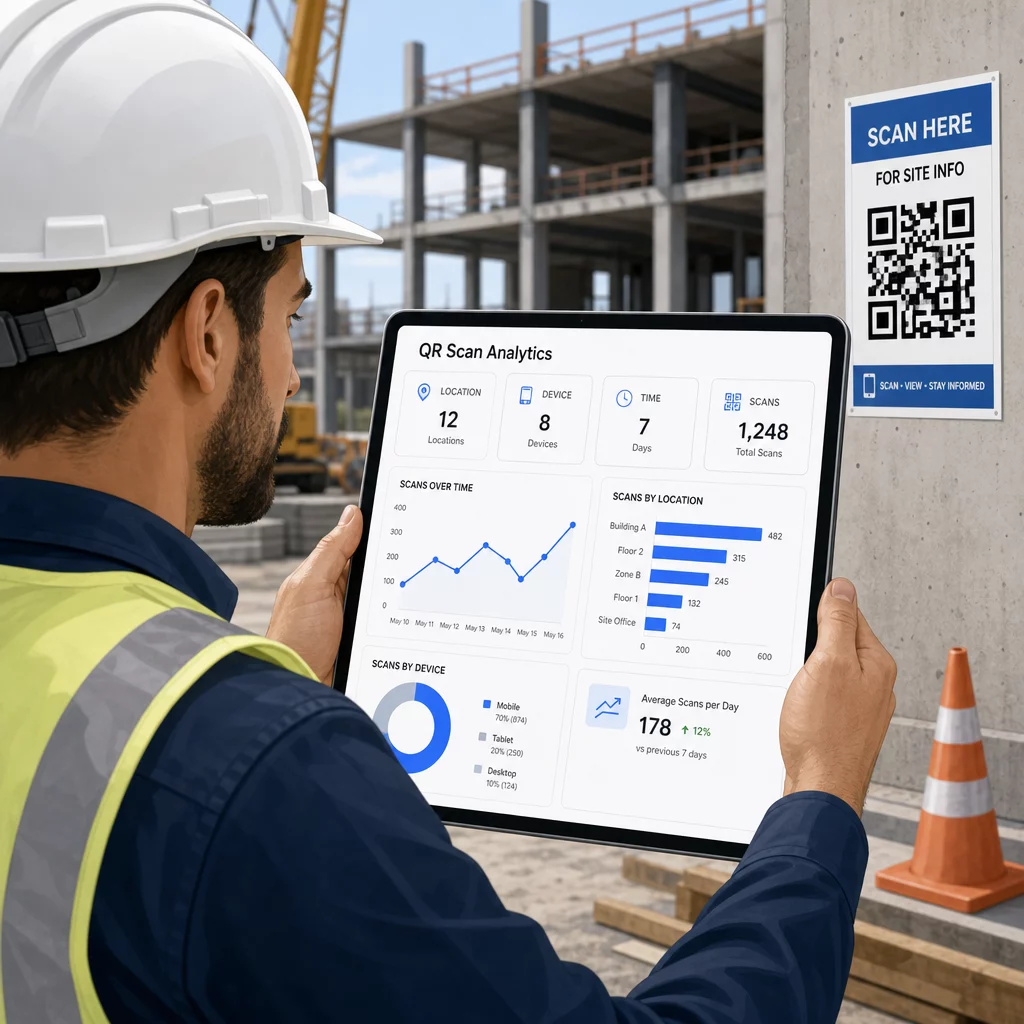
Ti podatki pomagajo vodjem lokacij pri sprejemanju informiranih odločitev o tem, kje obstajajo vrzeli v dokumentaciji in katere kode potrebujejo boljšo postavitev ali promocijo.
Poglejte, kje in kdaj delavci skenirajo Uporabi Generator QR kod za povezave za ustvarjanje sledljivih dinamičnih kod za katero koli vsebino, ki temelji na URL-ju, in spremljanje dejavnosti skeniranja na vašem delovišču z ene same nadzorne plošče.
Pogosta vprašanja
Ne. Vgrajena aplikacija za kamero na večini sodobnih pametnih telefonov iOS in Android lahko bere kode QR brez prenosa česar koli dodatnega. Delavci preprosto usmerijo svojo kamero na kodo in tapnejo obvestilo, ki se prikaže.
Z dinamično QR kodo fizična koda ostane enaka. Ciljno datoteko ali URL posodobite prek nadzorne plošče za upravljanje QR kod, in naslednje skeniranje samodejno odpre novo različico. Zato so dinamične kode močno prednostne za gradbene dokumente, ki se pogosto spreminjajo.
Tiskajte na vremensko odporne ali laminirane materiale, kode postavite na ravne površine, kjer je mogoče, zaščitene pred neposredno izpostavljenostjo UV žarkom, in uporabite visokokontrastne zasnove, ki ostanejo berljive, tudi če se površina nekoliko umaže. Preverite smernice za velikost in berljivost QR kod za specifična priporočila glede ravni popravljanja napak, ki pomagajo, da kode ostanejo skenljive, tudi če so delno poškodovane.