Adakah pelan induk kertas, pengikat penuh dokumen keselamatan, dan log peralatan manual melambatkan kru anda? Apabila pekerja menghabiskan masa mencari dokumen yang betul dan bukannya membina, keseluruhan projek menanggung kosnya. Panduan ini menerangkan bagaimana kod QR menyelesaikan masalah itu – dan di mana di tapak kerja ia memberikan nilai paling tinggi.
Mengapa Akses Dokumen Adalah Masalah Sebenar di Tapak Kerja
Mengurus dokumen pembinaan adalah salah satu bahagian yang paling memakan masa dalam mana-mana projek. Penyelidikan industri mendapati bahawa purata profesional pembinaan menghabiskan kira-kira 5.5 jam seminggu hanya mencari data projek – itu lebih daripada 10% masa pasukan hilang untuk mencari dan bukannya membina.
Kosnya bukan hanya jam yang hilang. Kru yang bekerja dari lukisan usang membuat kesilapan. Protokol keselamatan yang disimpan dalam pengikat di pejabat tapak tidak membantu pekerja di tingkat tiga. Peralatan yang kekurangan rekod penyelenggaraan yang boleh diakses disalahgunakan atau terlepas servis berjadual.
Kod QR – kod bar dua dimensi yang boleh dibaca oleh mana-mana kamera telefon pintar dalam beberapa saat – memberikan anda jambatan langsung antara lokasi fizikal dan dokumen digital. Tampal satu di dinding, lekatkan satu pada sekeping peralatan, atau cetak satu pada papan tanda di pintu masuk tapak, dan pekerja boleh mendapatkan fail yang mereka perlukan tanpa menghubungi pejabat atau mencari melalui folder kertas.
Bagaimana Kod QR Berfungsi dalam Konteks Pembinaan
Kod QR ialah corak yang boleh diimbas yang mengekod alamat web atau pautan fail. Apabila pekerja menghalakan kamera telefon mereka ke arahnya, peranti akan membuka pautan itu secara automatik – tiada aplikasi diperlukan pada kebanyakan telefon pintar moden.
Jenis yang paling berguna untuk pembinaan ialah kod QR dinamik, yang destinasinya boleh dikemas kini pada bila-bila masa melalui papan pemuka pengurusan tanpa menukar atau mencetak semula kod fizikal. Ini penting di tapak kerja kerana dokumen sentiasa berubah: lukisan disemak semula, protokol keselamatan dikemas kini, dan spesifikasi peralatan berkembang. Dengan kod dinamik, pelekat atau papan tanda fizikal kekal di tempatnya manakala kandungan yang dipautkan disegarkan dalam beberapa saat.
Kongsi Pelan Terkini Tanpa Mencetak Semula Perlu memastikan kru lapangan menggunakan semakan lukisan terkini? Gunakan Cara buat QR code untuk dokumen PDF untuk memautkan terus ke pelan semasa anda dan mengemas kini destinasi pada bila-bila masa semakan dikeluarkan.
Kegunaan Praktikal Kod QR di Tapak Pembinaan
Lukisan dan Spesifikasi Semasa
Tampal papan tanda QR kalis cuaca di pintu masuk projek, di bilik individu, dan di kawasan kerja khusus perdagangan. Pekerja mengimbas untuk membuka set pelan dan spesifikasi terkini terus pada telefon mereka. Apabila semakan lukisan dikeluarkan, kemas kini fail yang dipautkan – tiada papan tanda baharu diperlukan.
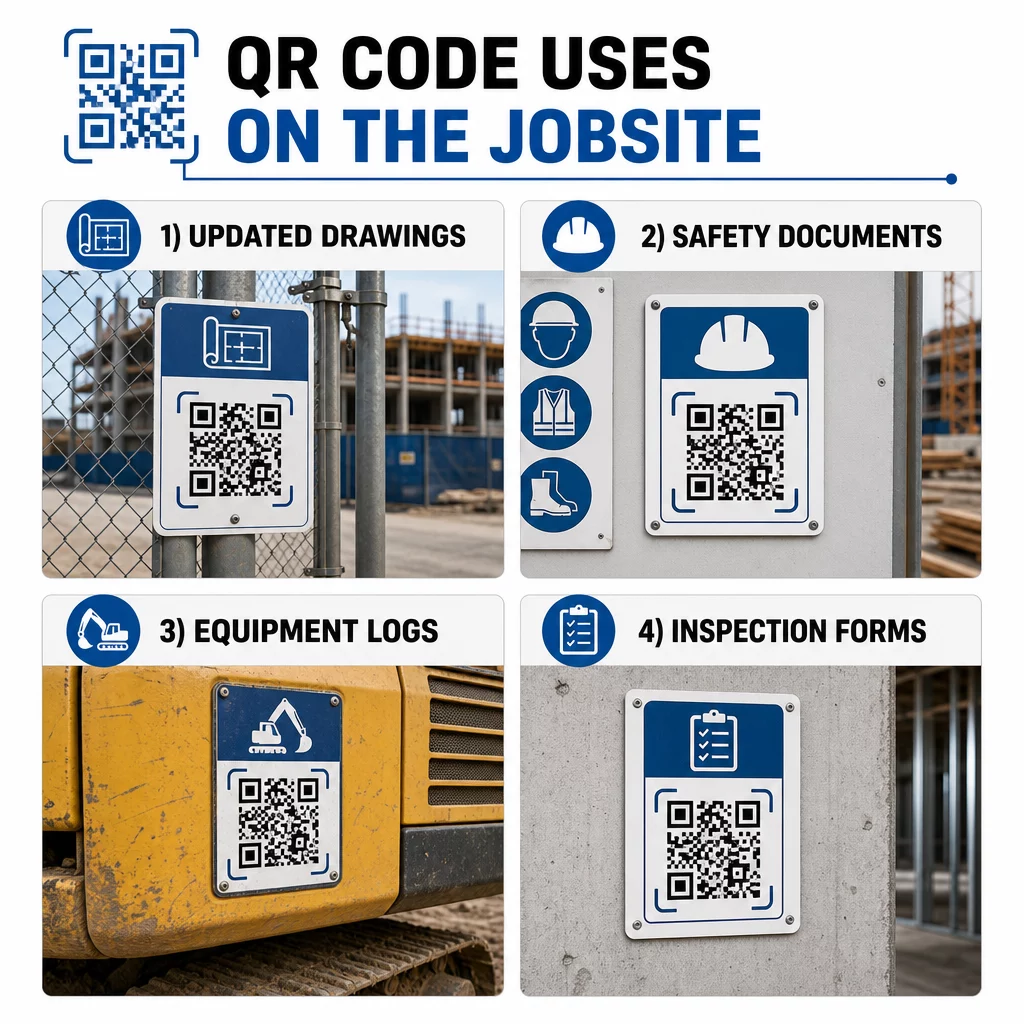
Pendekatan ini menghapuskan risiko kru bekerja dari lukisan yang digantikan, yang merupakan salah satu sumber kerja semula yang paling biasa dan mahal.
Dokumen Keselamatan dan Rekod OSHA
Lampirkan kod QR pada papan tanda tapak, kabinet keselamatan, dan pusat pemeriksaan masuk yang memaut kepada:
- Helaian data keselamatan untuk bahan berbahaya
- Prosedur kecemasan dan pelan pemindahan tapak
- Keperluan keselamatan khusus perdagangan
- Rekod kecederaan dan penyakit OSHA yang pekerja berhak akses
Kod QR induk di pintu masuk projek boleh menunjuk kepada hab dokumen keselamatan yang merangkumi semua perkara di atas. Oleh kerana kod itu dinamik, anda boleh menambah dokumen baharu atau mengemas kini yang sedia ada tanpa menggantikan papan tanda. Untuk maklumat lanjut tentang cara meningkatkan maklumat subkontraktor mengenai keperluan keselamatan, lihat 5 cara kod QR meningkatkan komunikasi subkontraktor.
Log Peralatan dan Rekod Penyelenggaraan
Lampirkan kod QR terus pada setiap peralatan. Pekerja dan pengendali mengimbasnya untuk mengakses:
- Manual operasi dan prosedur pengendalian selamat
- Log penyelenggaraan dan sejarah servis
- Tarikh pemeriksaan dan jadual servis akan datang
- Panduan penyelesaian masalah
Ini menggantikan manual kertas yang sering hilang dan memberikan pengurus rekod terpusat status setiap aset. Apabila peralatan bergerak antara kerja, sejarah penyelenggaraannya turut bergerak bersamanya.
Kelayakan Pekerja dan Rekod Latihan
Letakkan kod QR unik pada lencana pekerja, topi keselamatan, atau jaket keselamatan yang memautkan kepada sijil latihan dan rekod kelayakan setiap pekerja. Penyelia boleh mengimbas di tapak untuk mengesahkan bahawa seorang pekerja disahkan untuk tugas tertentu dan menyemak sama ada sebarang kelayakan akan tamat tempoh.
Pemeriksaan, Senarai Semak, dan Kawalan Kualiti
Pautkan kod QR yang diletakkan di titik pemeriksaan atau pada lukisan kepada borang digital. Pemeriksa mengimbas, melengkapkan senarai semak pada telefon mereka, dan menghantar. Semua rekod disimpan secara berpusat dan dikaitkan dengan lokasi atau dokumen tertentu. Menggunakan Kod QR Borang Google adalah cara mudah untuk menggunakan senarai semak pemeriksaan digital tanpa membina sistem tersuai.
Pelaporan kemajuan berfungsi dengan cara yang sama: pekerja mengimbas kod pada lukisan, memasukkan data kerja yang telah siap, dan pengurus mendapat keterlihatan masa nyata ke atas pencapaian projek.
Dokumentasi Projek dan Log Harian
Kod QR di stesen daftar masuk tapak membolehkan pekerja mengimbas untuk merekod kehadiran, mengakses rancangan untuk hari itu, dan membuka senarai semak tugas harian. Log yang telah siap dihantar secara digital, menggantikan papan buletin kertas dan mengurangkan kemungkinan kehilangan rekod.
Berkongsi dokumen projek yang lebih besar – penyerahan, spesifikasi, RFI – berfungsi dengan baik dengan kod QR Google Doc, yang mengarahkan terus ke dokumen kongsi yang boleh dikemas kini tanpa mengeluarkan kod baharu.
Penjejakan Isu dan Senarai Punch
Lampirkan kod QR pada item yang rosak atau lokasi masalah. Pengimbasan membuka tiket digital menunjukkan penerangan isu, keutamaan, juruteknik yang ditugaskan, dan sejarah kerja. Nota baharu disimpan secara berpusat supaya pengurus dan kru lapangan sentiasa melihat status semasa. Ini menghalang item senarai punch daripada terlepas pandang antara penyerahan.
Papan penghalang tapak juga boleh memaparkan kod QR yang membuka renderan luaran projek yang siap, supaya jiran, pembeli dan orang yang lalu-lalang dapat melihat apa yang sedang dibina.
Menggunakan Kod QR Yang Sebenarnya Diimbas
Kod QR yang tidak dapat dibaca oleh pekerja di lapangan akan menjejaskan tujuan. Beberapa pertimbangan praktikal:
- Saiz dan jarak imbasan. Untuk papan tanda di tapak pembinaan, kod hendaklah sekurang-kurangnya 1–2 inci lebar untuk imbasan jarak dekat, dan lebih besar untuk papan tanda yang dilihat dari beberapa kaki jauhnya. Ikuti garis panduan kira-kira 1 inci lebar kod untuk setiap 10 inci jarak pandangan. Lihat saiz kod QR untuk bahan cetakan yang berbeza untuk panduan khusus bahan.
- Permukaan dan penempatan. Permukaan rata dan pusam mengimbas dengan lebih andal berbanding yang berkilat, melengkung, atau beralun. Elakkan meletakkan kod di mana bayang-bayang, silau matahari langsung, atau halangan fizikal akan mengganggu.
- Kalis cuaca. Label berlamina atau kalis cuaca tahan dalam keadaan luar. Kod yang rosak atau mengelupas berhenti berfungsi.
- Kontras. Corak gelap pada latar belakang cerah adalah kombinasi yang paling andal. Semak semula amalan terbaik untuk kebolehbacaan kod QR sebelum membuat keputusan reka bentuk.
- Keselamatan. Untuk kod yang memaut ke dokumen sensitif – rekod HR, fail kontrak, spesifikasi proprietari – gunakan kawalan akses dan pautan HTTPS. Untuk panduan, lihat amalan terbaik penjanaan kod QR selamat.
Menjejaki Kod Mana Yang Digunakan
Kod QR dinamik bukan sahaja membolehkan anda mengemas kini destinasi – ia juga menangkap data imbasan. Melalui papan pemuka pengurusan, anda boleh melihat berapa kali setiap kod diimbas, bila, pada jenis peranti apa, dan dari lokasi mana. Ini memberitahu anda dokumen mana yang sebenarnya diakses oleh pekerja, kod keselamatan mana berhampiran kawasan berbahaya yang diabaikan, dan rekod peralatan mana yang memerlukan perhatian.
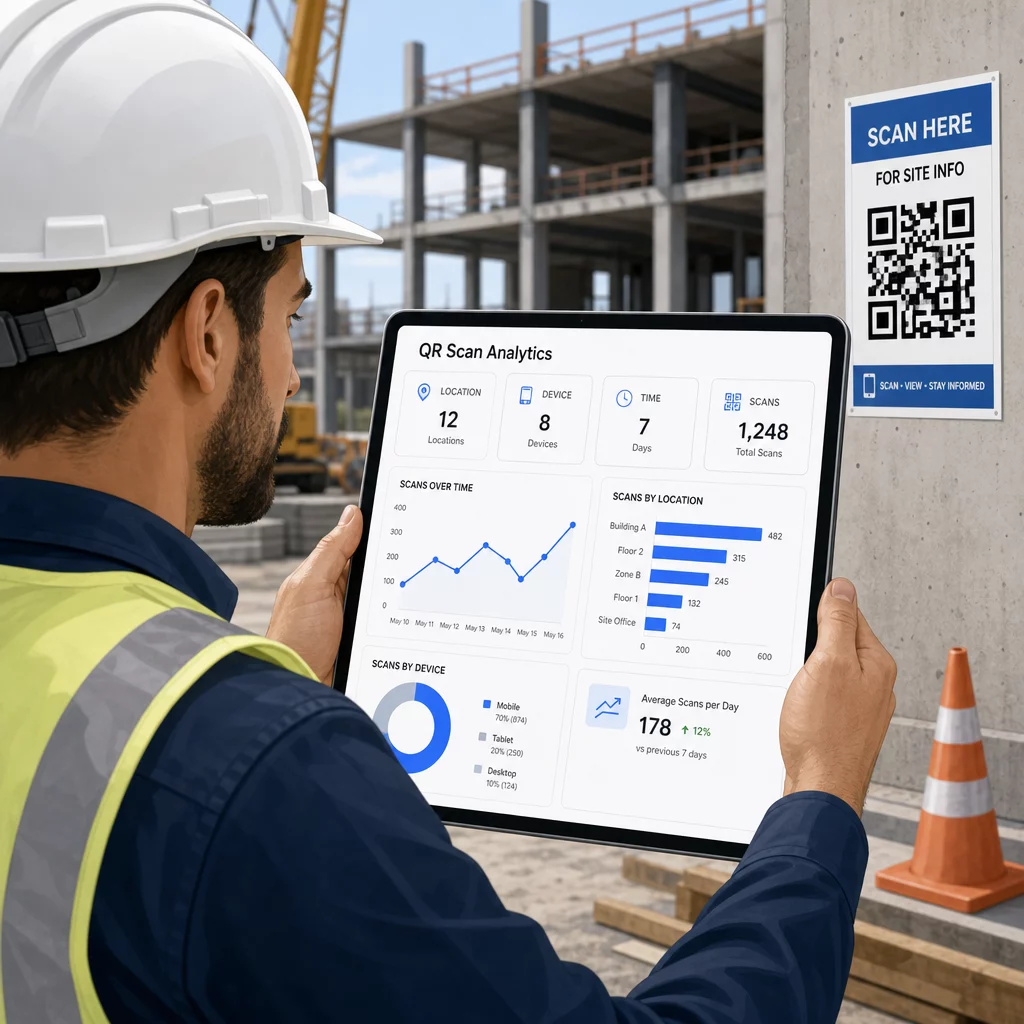
Data tersebut membantu pengurus tapak membuat keputusan termaklum tentang di mana jurang dokumentasi wujud dan kod mana yang memerlukan penempatan atau promosi yang lebih baik.
Lihat Di Mana dan Bila Pekerja Mengimbas Menggunakan Penjana Kod QR Pautan untuk mencipta kod dinamik yang boleh dijejaki untuk sebarang kandungan berasaskan URL dan memantau aktiviti imbasan di seluruh tapak kerja anda dari satu papan pemuka.
Soalan lazim
Tidak. Aplikasi kamera terbina dalam pada kebanyakan telefon pintar iOS dan Android moden boleh membaca kod QR tanpa memuat turun apa-apa tambahan. Pekerja hanya menghalakan kamera mereka pada kod tersebut dan mengetik pemberitahuan yang muncul.
Dengan kod QR dinamik, kod fizikal kekal sama. Anda mengemas kini fail destinasi atau URL melalui papan pemuka pengurusan kod QR anda, dan imbasan seterusnya secara automatik membuka versi baharu. Inilah sebabnya kod dinamik sangat diutamakan untuk dokumen pembinaan, yang kerap disemak semula.
Cetak pada bahan kalis cuaca atau berlamina, letakkan kod pada permukaan rata yang terlindung daripada pendedahan UV langsung jika boleh, dan gunakan reka bentuk kontras tinggi yang kekal boleh dibaca jika permukaan sedikit kotor. Semak garis panduan saiz dan kebolehbacaan kod QR untuk cadangan khusus mengenai tahap pembetulan ralat yang membantu kod kekal boleh diimbas walaupun rosak sebahagian.