¿Los planos en papel, las carpetas llenas de documentos de seguridad y los registros manuales de equipos están ralentizando a su equipo? Cuando los trabajadores dedican tiempo a buscar el documento correcto en lugar de construir, todo el proyecto paga el precio. Esta guía explica cómo los códigos QR resuelven ese problema, y dónde en la obra ofrecen el mayor valor.
Por qué el acceso a documentos es un problema real en las obras
La gestión de documentos de construcción es una de las partes que más tiempo consume en cualquier proyecto. Investigaciones de la industria han encontrado que el profesional de la construcción promedio dedica aproximadamente 5.5 horas por semana simplemente a buscar datos del proyecto, lo que representa más del 10% del tiempo de un equipo perdido en la búsqueda en lugar de la construcción.
El costo no es solo horas perdidas. Los equipos que trabajan con planos desactualizados cometen errores. Los protocolos de seguridad que residen en una carpeta en la oficina de la obra no ayudan a un trabajador en el tercer piso. Los equipos que carecen de registros de mantenimiento accesibles se utilizan incorrectamente o se saltan el servicio programado.
Los códigos QR —códigos de barras bidimensionales que cualquier cámara de smartphone puede leer en segundos— le brindan un puente directo entre una ubicación física y un documento digital. Coloque uno en una pared, adjúntelo a una pieza de equipo o imprímalo en un letrero en la entrada de la obra, y los trabajadores podrán acceder exactamente al archivo que necesitan sin llamar a la oficina ni buscar en carpetas de papel.
Cómo funcionan los códigos QR en un contexto de construcción
Un código QR es un patrón escaneable que codifica una dirección web o un enlace a un archivo. Cuando un trabajador apunta la cámara de su teléfono hacia él, el dispositivo abre ese enlace automáticamente, sin necesidad de una aplicación en la mayoría de los smartphones modernos.
El tipo más útil para la construcción es un código QR dinámico, cuyo destino se puede actualizar en cualquier momento a través de un panel de gestión sin cambiar ni reimprimir el código físico. Esto es importante en una obra porque los documentos cambian constantemente: los planos se revisan, los protocolos de seguridad se actualizan y las especificaciones de los equipos evolucionan. Con un código dinámico, la etiqueta o el letrero físico permanece en su lugar mientras el contenido vinculado se actualiza en segundos.
Comparta planos actualizados sin reimprimir ¿Necesita mantener a los equipos de campo con la última revisión de planos? Utilice el Generador de código QR para PDF para enlazar directamente a sus planos actuales y actualizar el destino cada vez que se emita una revisión.
Usos prácticos de los códigos QR en una obra de construcción
Planos y especificaciones actuales
Coloque letreros QR resistentes a la intemperie en la entrada del proyecto, en habitaciones individuales y en áreas de trabajo específicas por oficio. Los trabajadores escanean para abrir el último conjunto de planos y especificaciones directamente en sus teléfonos. Cuando se emite una revisión de un plano, actualice el archivo vinculado, sin necesidad de nuevos letreros.
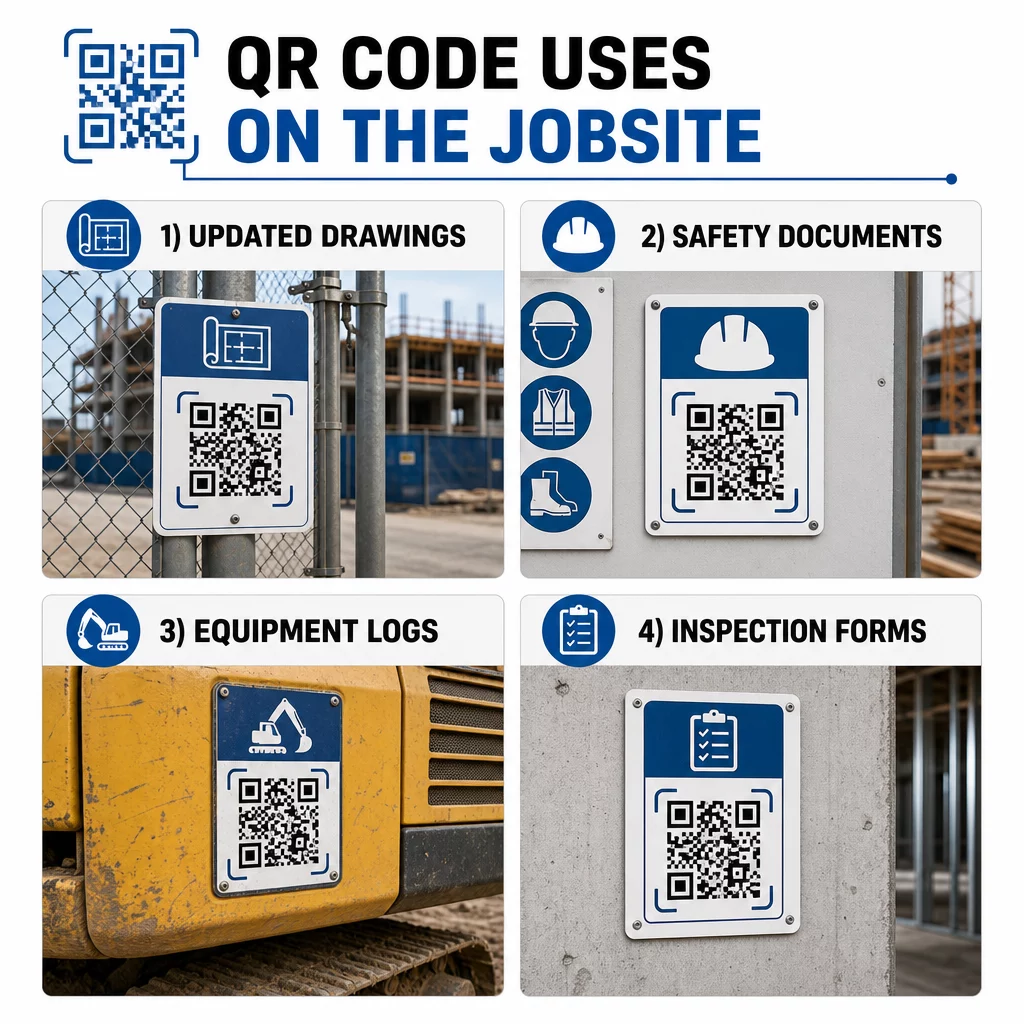
Este enfoque elimina el riesgo de que los equipos trabajen con planos obsoletos, lo cual es una de las fuentes más comunes y costosas de retrabajo.
Documentos de seguridad y registros de OSHA
Adjunte códigos QR a la señalización del sitio, gabinetes de seguridad y puntos de control de entrada que enlacen a:
- Hojas de datos de seguridad para materiales peligrosos
- Procedimientos de emergencia y planes de evacuación del sitio
- Requisitos de seguridad específicos del oficio
- Registros de lesiones y enfermedades de OSHA a los que los trabajadores tienen derecho a acceder
Un código QR maestro en la entrada del proyecto puede apuntar a un centro de documentos de seguridad que cubra todo lo anterior. Debido a que el código es dinámico, puede agregar nuevos documentos o actualizar los existentes sin reemplazar el letrero. Para obtener más información sobre cómo mejorar la forma en que los subcontratistas se mantienen informados sobre los requisitos de seguridad, consulte 5 formas en que los códigos QR mejoran la comunicación con los subcontratistas.
Registros de equipos y mantenimiento
Adjunte un código QR directamente a cada pieza de equipo. Los trabajadores y operadores lo escanean para acceder a:
- Manuales de operación y procedimientos de manejo seguro
- Registros de mantenimiento e historial de servicio
- Fechas de inspección y próximos programas de servicio
- Guías de solución de problemas
Esto reemplaza los manuales en papel que se pierden y proporciona a los gerentes un registro centralizado del estado de cada activo. A medida que el equipo se mueve entre trabajos, su historial de mantenimiento se mueve con él.
Cualificaciones de los trabajadores y registros de capacitación
Coloque códigos QR únicos en las credenciales de los empleados, cascos o chalecos de seguridad que enlacen a las certificaciones de capacitación y registros de cualificación de cada trabajador. Los supervisores pueden escanear en el sitio para confirmar que un trabajador está certificado para una tarea específica y verificar si alguna credencial está próxima a caducar.
Inspecciones, Listas de Verificación y Control de Calidad
Vincule los códigos QR colocados en los puntos de inspección o en los planos a formularios digitales. Los inspectores escanean, completan la lista de verificación en su teléfono y la envían. Todos los registros se almacenan centralmente y se vinculan a la ubicación o documento específico. Usar un Formulario de Google Código QR es una forma sencilla de implementar listas de verificación de inspección digitales sin construir un sistema personalizado.
El informe de progreso funciona de la misma manera: los trabajadores escanean un código en un plano, ingresan los datos del trabajo completado y los gerentes obtienen visibilidad en tiempo real de los hitos del proyecto.
Documentación del Proyecto y Registros Diarios
Los códigos QR en las estaciones de registro del sitio permiten a los trabajadores escanear para registrar la asistencia, acceder a los planes del día y abrir las listas de verificación de tareas diarias. Los registros completados se envían digitalmente, reemplazando los tablones de anuncios de papel y reduciendo la posibilidad de pérdida de registros.
Compartir documentos de proyectos más grandes – entregas, especificaciones, solicitudes de información (RFI) – funciona bien con un código QR de Google Doc, que redirige directamente a un documento compartido que se puede actualizar sin emitir un nuevo código.
Seguimiento de Incidencias y Listas de Pendientes
Adjunte un código QR a un artículo defectuoso o a una ubicación con problemas. El escaneo abre un ticket digital que muestra la descripción del problema, la prioridad, el técnico asignado y el historial de trabajo. Las nuevas notas se guardan centralmente para que los gerentes y los equipos de campo siempre vean el estado actual. Esto evita que los elementos de la lista de pendientes se pierdan entre las transferencias.
Las vallas de obra también pueden llevar un código QR que abre representaciones exteriores del proyecto terminado, para que vecinos, compradores y transeúntes puedan ver lo que se está construyendo.
Implementación de Códigos QR Que Realmente Se Escanean
Un código QR que los trabajadores no pueden leer en el campo anula su propósito. Algunas consideraciones prácticas:
- Tamaño y distancia de escaneo. Para la señalización en una obra de construcción, un código debe tener al menos 1-2 pulgadas de ancho para el escaneo de corto alcance, y más grande para las señales vistas desde varios pies de distancia. Siga la guía de aproximadamente 1 pulgada de ancho de código por cada 10 pulgadas de distancia de visualización. Ver dimensionamiento de códigos QR para diferentes materiales de impresión para orientación específica del material.
- Superficie y ubicación. Las superficies planas y mates se escanean de forma más fiable que las brillantes, curvas o corrugadas. Evite colocar códigos donde las sombras, el deslumbramiento directo del sol o la obstrucción física puedan interferir.
- Resistencia a la intemperie. Las etiquetas laminadas o resistentes a la intemperie soportan las condiciones exteriores. Un código dañado o despegado deja de funcionar.
- Contraste. Un patrón oscuro sobre un fondo claro es la combinación más fiable. Revise las mejores prácticas para la legibilidad de los códigos QR antes de comprometerse con un diseño.
- Seguridad. Para códigos que enlazan a documentos sensibles – registros de RRHH, archivos de contratos, especificaciones propietarias – utilice controles de acceso y enlaces HTTPS. Para obtener orientación, consulte mejores prácticas para la generación segura de códigos QR.
Seguimiento de los códigos que se están utilizando
Los códigos QR dinámicos no solo le permiten actualizar destinos, sino que también capturan datos de escaneo. A través de un panel de gestión, puede ver cuántas veces se escaneó cada código, cuándo, en qué tipo de dispositivo y desde qué ubicación. Esto le indica qué documentos están accediendo realmente los trabajadores, qué códigos de seguridad cerca de áreas peligrosas están siendo ignorados y qué registros de equipos necesitan atención.
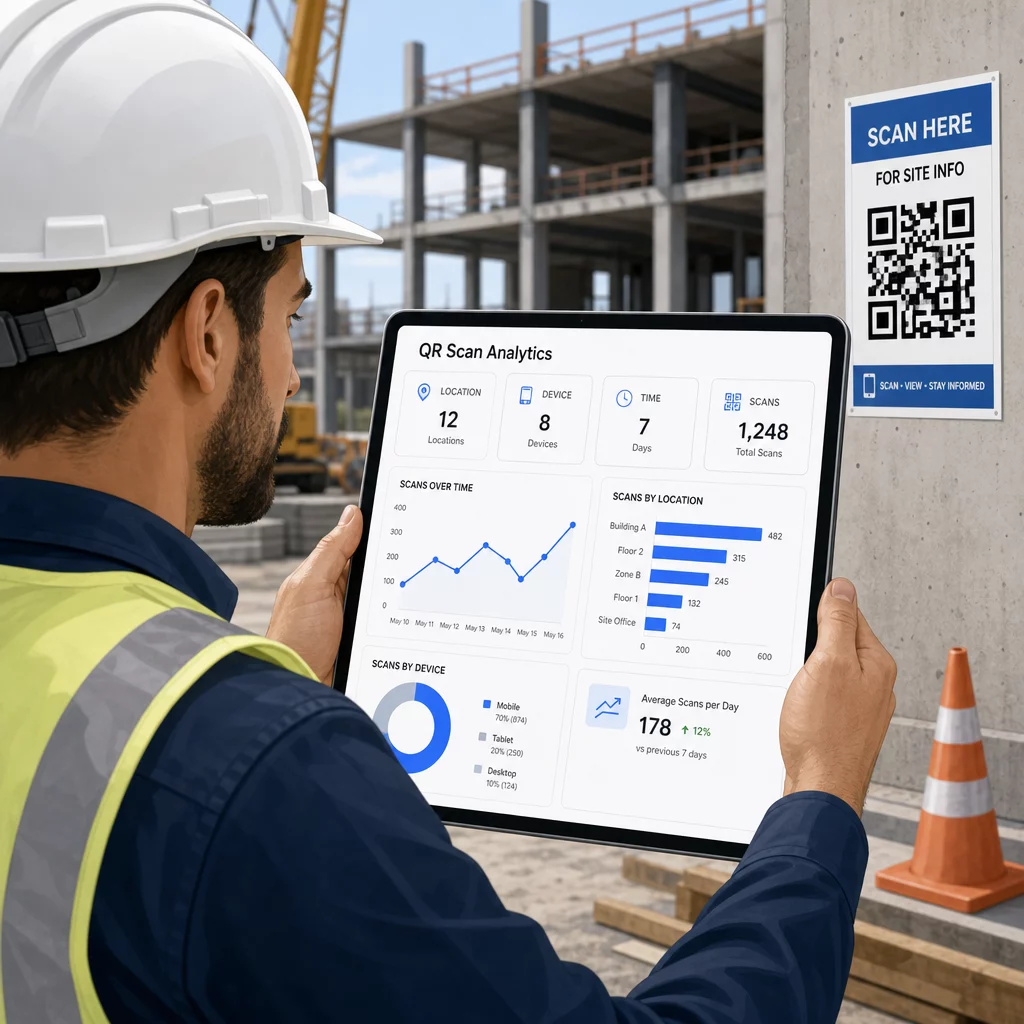
Esos datos ayudan a los gerentes de obra a tomar decisiones informadas sobre dónde existen lagunas en la documentación y qué códigos necesitan una mejor ubicación o promoción.
Vea dónde y cuándo están escaneando los trabajadores Use el Generador de códigos QR de enlace para crear códigos dinámicos rastreables para cualquier contenido basado en URL y monitorear la actividad de escaneo en su lugar de trabajo desde un único panel.
Preguntas frecuentes
No. La aplicación de cámara integrada en la mayoría de los smartphones iOS y Android modernos puede leer códigos QR sin descargar nada adicional. Los trabajadores simplemente apuntan su cámara al código y tocan la notificación que aparece.
Con un código QR dinámico, el código físico permanece igual. Usted actualiza el archivo de destino o la URL a través de su panel de control de gestión de códigos QR, y el siguiente escaneo abre automáticamente la nueva versión. Por eso los códigos dinámicos son muy preferidos para los documentos de construcción, que se revisan con frecuencia.
Imprima en materiales resistentes a la intemperie o laminados, coloque los códigos en superficies planas protegidas de la exposición directa a los rayos UV siempre que sea posible, y utilice diseños de alto contraste que sigan siendo legibles si la superficie se ensucia ligeramente. Consulte las pautas de tamaño y legibilidad de los códigos QR para obtener recomendaciones específicas sobre los niveles de corrección de errores que ayudan a que los códigos sigan siendo escaneables incluso cuando están parcialmente dañados.