Kamppailevatko potilaasi lukemaan pientä reseptipullon tekstiä tai jäävätkö kriittiset annosteluohjeet huomaamatta? Lääkityksen noudattamatta jättäminen ja annosteluvirheet johtavat ehkäistävissä oleviin terveysriskeihin ja tiheisiin apteekkikonsultaatioihin. Lisäämällä skannattavia QR-koodeja reseptietiketteihin potilaat saavat välittömän pääsyn digitaalisiin lääkeoppaisiin, ääniopasteisiin ja uusimisportaaleihin.
Mitä tietoja reseptin QR-koodit voivat tarjota?
Reseptipullojen etiketit vievät vähän tilaa. Liittovaltion ja osavaltioiden määräykset edellyttävät pakollista painettua tekstiä, mukaan lukien apteekin nimi, reseptinumero, lääkärin tiedot, potilaan nimi ja annosteluohjeet. Pikavaste (QR) -koodi toimii etiketin digitaalisena laajennuksena, joka tarjoaa lisätietoja täyttämättä pulloa.
Apteekit voivat käyttää reseptin QR-koodeja tarjotakseen potilaslähtöisiä resursseja, kuten:
- Digitaaliset lääkeoppaat: Linkitä potilaat suoraan sähköisiin potilastiedotteisiin (e-esitteisiin) tai asiakirjoihin, jotka on muotoiltu käyttämällä PDF QR-koodi generaattori.
- Ääni- ja esteettömät formaatit: Auta näkövammaisia potilaita skannaamaan pakkaus kuullakseen suulliset annosteluohjeet tai päästäkseen käsiksi suurikokoiseen tekstiin ja sähköisiin pistekirjoitusvaihtoehtoihin.
- Esittelyvideot: Näytä vaiheittaisia video-oppaita monimutkaisista lääkeannostelujärjestelmistä, kuten insuliinikynistä, inhalaattoreista tai itseinjektiolaitteista.
- Uudelleentäyttöportaalit: Ohjaa potilaat suoraan apteekin verkossa oleviin uudelleentäyttöportaaleihin lähettämään uusimispyynnöt nopeasti.
- Offline-tekstitiedot: Tallenna selkeät tekstivaroitukset, hätäyhteystiedot tai säilytysohjeet suoraan koodimatriisiin käyttämällä Tekstin QR-koodi generaattori.
Tärkeimmät edut potilasturvallisuudelle ja lääkityksen noudattamiselle
Lääkityksen noudattamatta jättäminen on merkittävä kansanterveysongelma. Tutkimukset osoittavat, että noin 50 % potilaista jättää lääkkeensä ottamatta ohjeiden mukaisesti, mikä johtaa yli 125 000 ehkäistävissä olevaan kuolemaan vuosittain. Skannattavan tiedon sijoittaminen reseptipakkauksiin auttaa ratkaisemaan yleisiä annosteluvirheiden ja sekaannusten lähteitä.
Lääkitysvirheiden vähentäminen
Standardipullojen etiketeissä käytetään pieniä fontteja, joita iäkkäiden tai näkövammaisten on vaikea lukea. Kokeellinen tutkimus, jossa verrattiin QR-koodilla varustettuja pakkauksia standardipullojen etiketteihin, osoitti, että skannattaviin digitaalisiin tietoihin pääsy johti huomattavasti useampiin oikeisiin itsehoidon päätöksiin sekä nuorempien että iäkkäämpien potilasryhmien keskuudessa.
Saavutettavuuden parantaminen
Saavutettavien reseptitietojen tarjoaminen on elintärkeää potilasturvallisuuden kannalta. Kun QR-koodit koodataan saavutettavalla tekstillä tai linkitetään ruudunlukijaystävällisille laskeutumissivuille, ne mahdollistavat heikkonäköisten potilaiden tarkistaa lääkkeiden nimet, aikataulut ja varoitukset itsenäisesti.
Hoitoon sitoutumisen seurannan ja sitoutumisen tukeminen
Skannattavia pakkauskoodeja käyttävät digitaaliset lääkkeenoton seurantaratkaisut ovat osoittaneet korkeaa kliinistä toteutettavuutta. Kliiniset tutkimukset osoittavat, että potilaiden itse ilmoittama lääkkeenotto QR-skannausten avulla saavuttaa noin 90,1 % tarkkuuden verrattuna manuaalisiin pillerilaskentoihin. Skannattavien pakkausten integrointi laajempaan sairaaloiden ja terveydenhuollon QR-koodijärjestelmiin parantaa potilasviestintää ja pitkäaikaishoidon hallintaa. Saadaksesi lisätietoja moderneista kliinisistä sovelluksista, tutustu kattavaan oppaaseemme terveydenhuollon QR-koodeista.
Toimita ajantasaiset potilasohjeet Tarvitseeko lääkeoppaita tai digitaalisia resursseja päivittää ilman fyysisten etikettien uudelleenpainatusta? Käytä Dynaaminen QR-koodi generaattori pitääksesi kohdelinkkisi muokattavina ja täsmällisinä.
Säännösten noudattaminen ja HIPAA-suojaukset apteekeille
Digitaalisten työkalujen integroiminen apteekkien työnkulkuihin vaatii tarkkaa huomiota sääntelystandardeihin ja potilaan tietosuojalakeihin.
| Vaatimusala | Standardi / Ohjeistus | Apteekin keskeinen toimenpide |
|---|---|---|
| FDA:n säännökset | Vapaaehtoinen potilastieto | Käsittele QR-koodeja vapaaehtoisina lisäyksinä; älä koskaan korvaa pakollista kirjoitettua etikettitekstiä. |
| DSCSA-serialisointi | GS1 2D Data Matrix -viivakoodit | Ylläpidä DSCSA-toimitusketjun viivakoodeja erillään kuluttajien QR-koodeista. |
| HIPAA:n tietosuojasääntö | Suojatut terveystiedot (PHI) | Älä koskaan koodaa potilaan nimiä, syntymäaikoja tai tiloja suoraan koodiin. |
| Kulunvalvonta | Todennuksen suojatoimet | Edellytä potilaan kirjautumistodennusta kaikille QR-kohteille, jotka näyttävät henkilökohtaisia terveystietoja. |
QR-koodien erottaminen toimitusketjun viivakoodeista
Lääketoimitusketjun turvallisuuslain (DSCSA) mukaan sarjanumeroidut GS1 2D Data Matrix -viivakoodit ovat pakollisia tukkupakkauksissa jakelijoiden seurantaa varten. Nämä ovat teknisiä, säänneltyjä 2D-viivakoodeja, jotka on tarkoitettu toimitusketjun skannereille. Potilaille suunnatut QR-koodit ovat sen sijaan vapaaehtoisia työkaluja, jotka on suunniteltu kuluttajien älypuhelimille koulutus- ja toiminnallisen sisällön toimittamiseen.
HIPAA-tietosuoja- ja turvallisuusstandardien noudattaminen
Apteekit ovat HIPAA-säännösten piiriin kuuluvia yksiköitä. Kun QR-koodeja otetaan käyttöön reseptipakkauksissa:
- Vältä raa'an PHI:n koodaamista: Älä koskaan upota salaamattomia potilastunnisteita, henkilötunnuksia tai tarkkoja diagnooseja staattiseen koodiin.
- Käytä suojattuja verkkokohteita: Ohjaa QR-koodit suojatuille HTTPS-sivustoille, jotka on varmistettu tiukoin pääsyhallinnoin, monivaiheisella todennuksella ja salatuilla tietokannoilla.
- Poista sääntelemätön seuranta: Varmista, että potilaille suunnatut laskeutumissivut eivät käytä kolmannen osapuolen analytiikkapikseleitä, jotka voisivat luvattomasti paljastaa tietoja.
- Tee yhteistyötä vaatimustenmukaisten toimittajien kanssa: Valitse ohjelmistoalustat, jotka noudattavat tietoturvaprotokollia ja toteuttavat Business Associate -sopimuksia (BAA). Täydellisen oikeudellisten standardien erittelyn löydät oppaastamme koskien QR-koodien tietosuojalait ja -määräykset.
Parhaat käytännöt skannattavien reseptietikettien tulostamiseen
Reseptietiketit joutuvat usein käsittelyyn, kosteuteen ja ahtaisiin tiloihin. Jos tulostettu koodi ei skannaudu, potilaiden luottamus heikkenee ja apteekin tukipuhelut lisääntyvät.
Suositeltu koodin koko
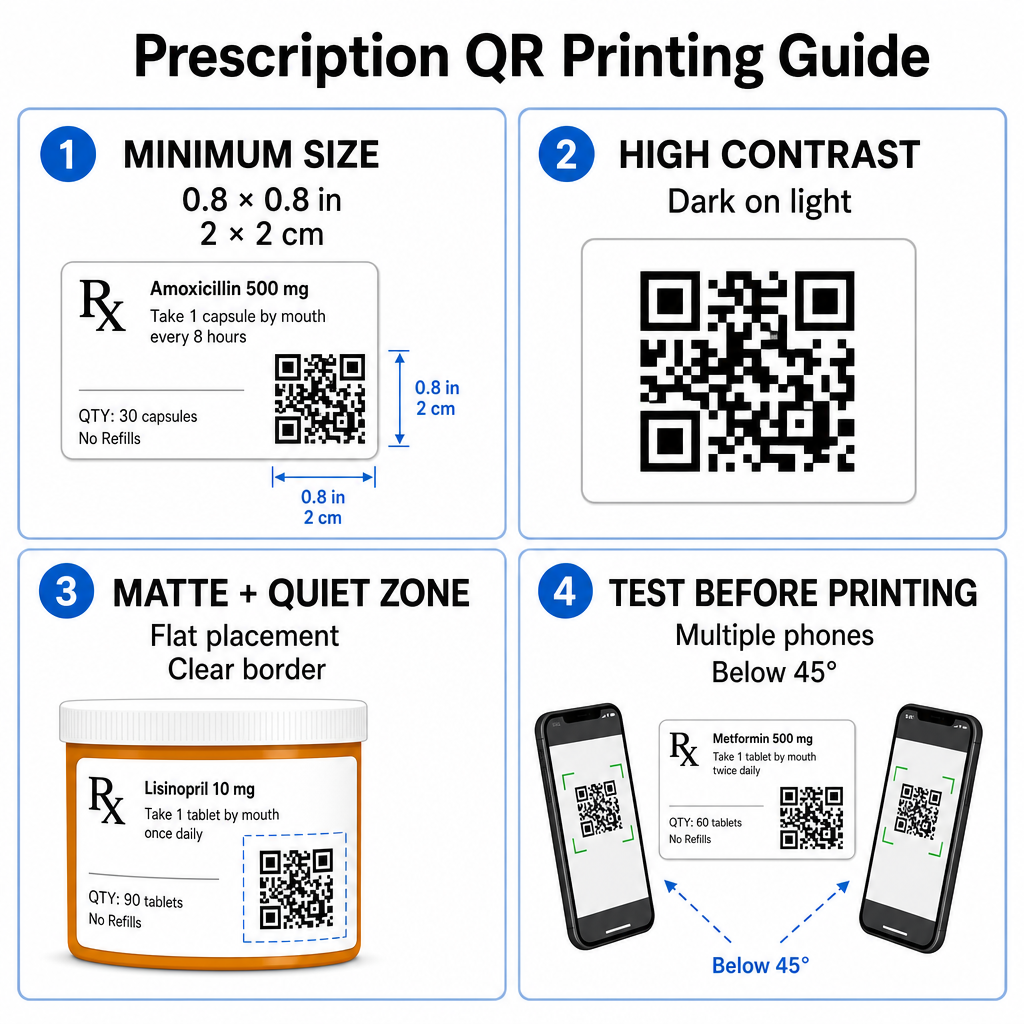
Reseptipullojen pinnat ovat rajalliset. Säilytä vähintään vakiokoko 0.8" x 0.8" (2 cm x 2 cm) luotettavaa skannausta varten. Erittäin pienissä pakkauksissa ehdoton minimitulostuskoko on 1 cm x 1 cm voidaan käyttää, edellyttäen että koodatun tiedon tiheys pysyy alhaisena. Tarkat skaalaussuhteet voit tarkistaa meidän QR-koodin kokooppaastamme.
Värikontrasti ja pintamateriaalit
Vähittäisapteekeissa yleisesti käytetyt lämpötulostimet vaativat erityisen kalibroinnin optimaalisen skannattavuuden varmistamiseksi:
- Korkea kontrasti: Tulosta yhtenäisiä tummia kuvioita (ihanteellisesti mustia) puhtaiden, läpinäkymättömien vaaleiden taustojen päälle.
- Mattapinnat: Vältä kiiltäviä etikettipinnoitteita tai läpinäkyviä muovipulloja, jotka heijastavat huonevalaistusta ja sokaisevat kamerakennot. Jos kiiltävät tai läpinäkyvät astiat ovat välttämättömiä, tulosta valkoinen mattakerros suoraan QR-koodin alle.
- Kaarevuuden hallinta: Aseta QR-koodi pullon tai laatikon tasaisimmalle osalle estääksesi geometrisen vääristymän.
Arvioidaksesi, miten lämpömusteet, substraatit ja etikettimateriaalit vaikuttavat skannausnopeuksiin, lue yksityiskohtainen analyysimme aiheesta miten tulostustekniikat vaikuttavat QR-koodin skannattavuuteen.
Hiljaiset alueet ja varmistustestaus
Pidä aina selkeä ulkoreuna – niin sanottu hiljainen alue – koodin ympärillä erottaaksesi sen ympäröivästä etikettitekstistä ja reunoista. Testaa painetut koodit useilla älypuhelinlaitteilla, eri kulmista (alle 45 astetta) ja valaistusolosuhteissa ennen massatulostusta. Tarkista perusohjeemme parhaita käytäntöjä QR-koodin luettavuudelle varmistaaksesi, että etikettiasettelusi toimii luotettavasti.
Varmista painetun etikettisi skannattavuus Haluatko testata, skannaako reseptipakkauksesi nopeasti kaikilla laitekameroilla? Testaa painetut etikettisuunnittelusi välittömästi ilmaisella online QR-koodinlukija.
Resepti-QR-koodien käyttöönotto apteekin työnkuluissa
Skannattavien etikettien käyttöönotto apteekkitoiminnoissa vaatii yksinkertaisen, jäsennellyn lähestymistavan:
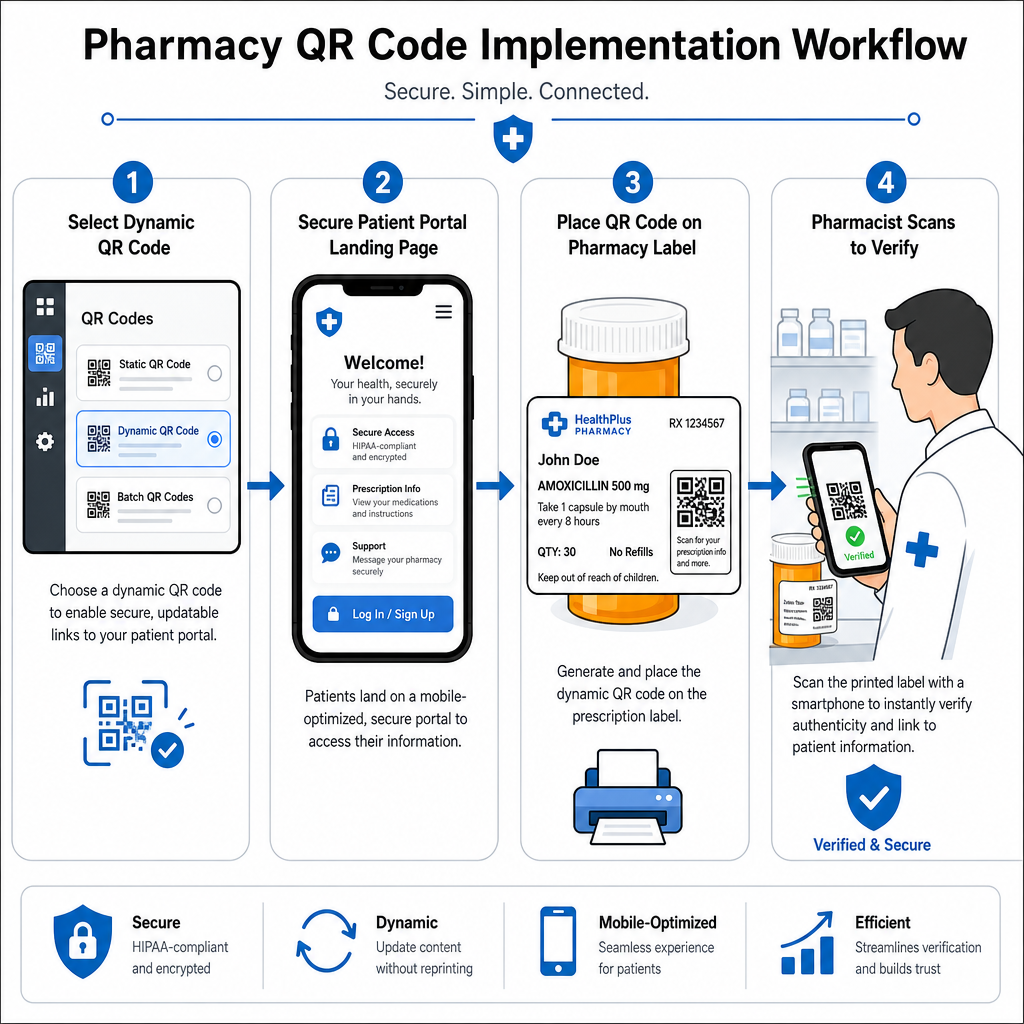
- Valitse koodityyppi: Valitse dynaamiset QR-koodit verkkolinkeille, jotta voit päivittää opetus-PDF-tiedostoja, video-URL-osoitteita tai portaalilinkkejä tulostamatta uudelleen fyysisiä säiliöetikettejä.
- Määritä turvalliset laskeutumissivut: Yhdistä kohdelinkit mobiilioptimoiduille, HIPAA-yhteensopiville potilasportaaleille tai julkisille lääkeoppaille.
- Integroi etikettimallit: Lisää luotu QR-koodi apteekkisi hallintajärjestelmän lämpötulostusmalleihin varmistaen, että koko, hiljaiset vyöhykkeet ja kontrastiparametrit ovat lukittuina.
- Kouluta apteekin henkilökuntaa: Kouluta farmaseutit ja tekniset apulaiset osoittamaan QR-koodia potilaskonsultaatioiden aikana ja kannustamaan potilaita skannaamaan pullonsa kotona.
- Varmista skannattavuus: Suorita rutiininomaisia laaduntarkastuksia annostelupisteissä verkkopohjaisella QR-koodinlukija varmistaaksesi koodin selkeyden ennen luovutusta.
Tutkimalla, miten muut alat hallinnoivat skannattavia pakkauksia, voidaan saada lisätietoa työnkulkujen kehittämiseen eri toimialojen käyttötapauksissa.
Lisäämällä skannattavia QR-koodeja reseptitarroihin saadaan yhteys fyysisten lääkepakkausten ja tärkeiden digitaalisten terveysresurssien välille. Noudattamalla asianmukaisia tulostusstandardeja, suojelemalla potilaiden yksityisyyttä ja hallitsemalla muokattavissa olevia kohdelinkkejä apteekkisi voi vähentää hallinnollisia virheitä ja parantaa potilaiden yleistä hoitotulosta. Aloita vaatimustenmukaisten, skannattavien reseptitarrojen työnkulkujen luominen Pagelootilla jo tänään.
Usein kysytyt kysymykset
Ei. Yhdysvaltain liittovaltion säännökset ja FDA:n ohjeet eivät vaadi kuluttajille suunnattuja QR-koodeja reseptipakkausten etiketissä. Pakolliset etiketoelementit (kuten potilaan nimi, lääkkeen käyttöohjeet ja apteekin tiedot) on edelleen painettava suoraan ihmisen luettavassa tekstissä. QR-koodit ovat edelleen vapaaehtoinen, täydentävä työkalu potilaiden koulutuksen ja digitaalisen saatavuuden parantamiseksi.
Apteekkien on vältettävä salaamattoman suojatun terveystiedon (PHI) – kuten potilaiden nimiä, syntymäaikoja tai lääketietoja – koodaamista suoraan QR-koodin sisälle. Sen sijaan on käytettävä turvallisia dynaamisia linkkejä, jotka ohjaavat salattuihin, salasanasuojattuihin potilasportaaleihin, jotka vaativat potilaan todennuksen ennen henkilötietojen näyttämistä.
Reseptitarrojen suositeltu vähimmäistulostuskoko on 0.8″ x 0.8″ (2 cm x 2 cm). Vaikka koodit voivat teknisesti skannautua jo 1 cm x 1 cm kokoisina pienissä pakkauksissa, suuremmat mitat vahvalla värikontrastilla ja selkeillä hiljaisilla vyöhykkeillä varmistavat luotettavan skannauksen kaikilla mobiililaitteiden kameroilla.