ホーム > ユースケース > How to Use QR Codes on Prescription Labels
Scanning a prescription label

How to Use QR Codes on Prescription Labels

Explore how QR codes on prescription labels improve medication adherence, enhance accessibility, and maintain HIPAA compliance with best printing practices.
Updated on 7月 28, 2026
目次

Are your patients struggling to read tiny prescription bottle text or missing critical dosage instructions? Medication non-adherence and administration errors lead to preventable health risks and frequent pharmacy consults. Adding scannable QR codes to prescription labels gives patients instant access to digital medication guides, audio instructions, and refill portals.

What Information Can Prescription QR Codes Provide?

Prescription container labels have limited physical space. Federal and state regulations require mandatory printed text, including the pharmacy name, prescription number, prescriber details, patient name, and dosage instructions. A quick-response (QR) code acts as a digital extension of the label, delivering additional information without cluttering the bottle.

Pharmacies can use prescription QR codes to deliver patient-facing resources, such as:

  • Digital Medication Guides: Link patients directly to electronic patient information leaflets (e-leaflets) or documents formatted using a PDF QRコードジェネレーター.
  • Audio and Accessible Formats: Help visually impaired patients scan the package to hear spoken dosage instructions or access large-print text and electronic braille options.
  • Demonstration Videos: Show step-by-step video tutorials for complex drug delivery systems, such as insulin pens, inhalers, or self-injection devices.
  • Refill Portals: Direct patients straight to pharmacy online refill portals to submit renewal requests quickly.
  • Offline Text Information: Store plain text warnings, emergency contact numbers, or storage instructions directly in the code matrix using a text QR code generator.

Key Benefits for Patient Safety and Medication Adherence

Medication non-adherence is a major public health issue. Research shows that about 50% of patients fail to take their medications as prescribed, leading to over 125,000 preventable deaths each year. Placing scannable information on prescription packaging helps resolve common sources of administration errors and confusion.

Reducing Medication Errors

Standard bottle labels use small fonts that are difficult for older adults or visually impaired individuals to read. Experimental research comparing QR code-equipped packaging with standard bottle labels found that access to scannable digital details resulted in significantly more correct self-administration decisions across both younger and older adult patient groups.

Improving Accessibility

Providing accessible prescription details is vital for patient safety. When encoded with accessible text or linked to screen-reader-friendly landing pages, QR codes enable patients with low vision to verify drug names, schedules, and caution notes independently.

Supporting Adherence Tracking and Engagement

Digital intake tracking solutions using scannable packaging codes have demonstrated high clinical feasibility. Clinical trials show that patient self-reporting via QR scans achieves approximately 90.1% accuracy compared to manual pill counts. Integrating scannable packaging into broader hospital and healthcare QR code systems enhances patient communication and long-term care management. To learn more about modern clinical applications, review our comprehensive guide to healthcare QR codes.

Deliver Up-to-Date Patient Instructions Need to update medication guides or digital resources without reprinting physical labels? Use the ダイナミックQRコードジェネレーター to keep your destination links editable and accurate.

Regulatory Compliance and HIPAA Safeguards for Pharmacies

Integrating digital tools into pharmacy workflows requires strict attention to regulatory standards and patient privacy laws.

Requirement Area Standard / Guideline Key Pharmacy Action
FDA Regulations Voluntary patient information Treat QR codes as voluntary additions; never replace required written label text.
DSCSA Serialization GS1 2D Data Matrix barcodes Maintain DSCSA supply chain barcodes separately from consumer QR codes.
HIPAA Privacy Rule Protected Health Information (PHI) Never encode patient names, dates of birth, or conditions directly into the code.
アクセス制御 Authentication safeguards Require patient login authentication for any QR destination displaying personal health data.

Differentiating QR Codes from Supply Chain Barcodes

Under the Drug Supply Chain Security Act (DSCSA), serialized GS1 2D Data Matrix barcodes are mandatory on wholesale packaging for distributor tracking. These are technical, regulated 2D barcodes meant for supply chain scanners. Patient-facing QR codes, by contrast, are voluntary tools designed for consumer smartphones to deliver educational and operational content.

Enforcing HIPAA Privacy and Security Standards

Pharmacies are HIPAA-covered entities. When deploying QR codes on prescription containers:

  • Avoid Raw PHI Encoding: Never embed unencrypted patient identifiers, social security numbers, or specific diagnoses inside a static code.
  • Use Secure Web Destinations: Point QR codes to secure HTTPS websites backed by strict access controls, multi-factor authentication, and encrypted databases.
  • Eliminate Unregulated Tracking: Ensure patient-facing landing pages do not utilize third-party analytics pixels that could impermissibly disclose data.
  • Partner with Compliant Vendors: Choose software platforms that enforce data security protocols and execute Business Associate Agreements (BAAs). For a complete breakdown of legal standards, consult our guide on QR code privacy laws and regulations.

Best Practices for Printing Scannable Prescription Labels

Prescription labels face frequent handling, moisture, and tight space limitations. If a printed code fails to scan, patient trust decreases and pharmacy support calls increase.

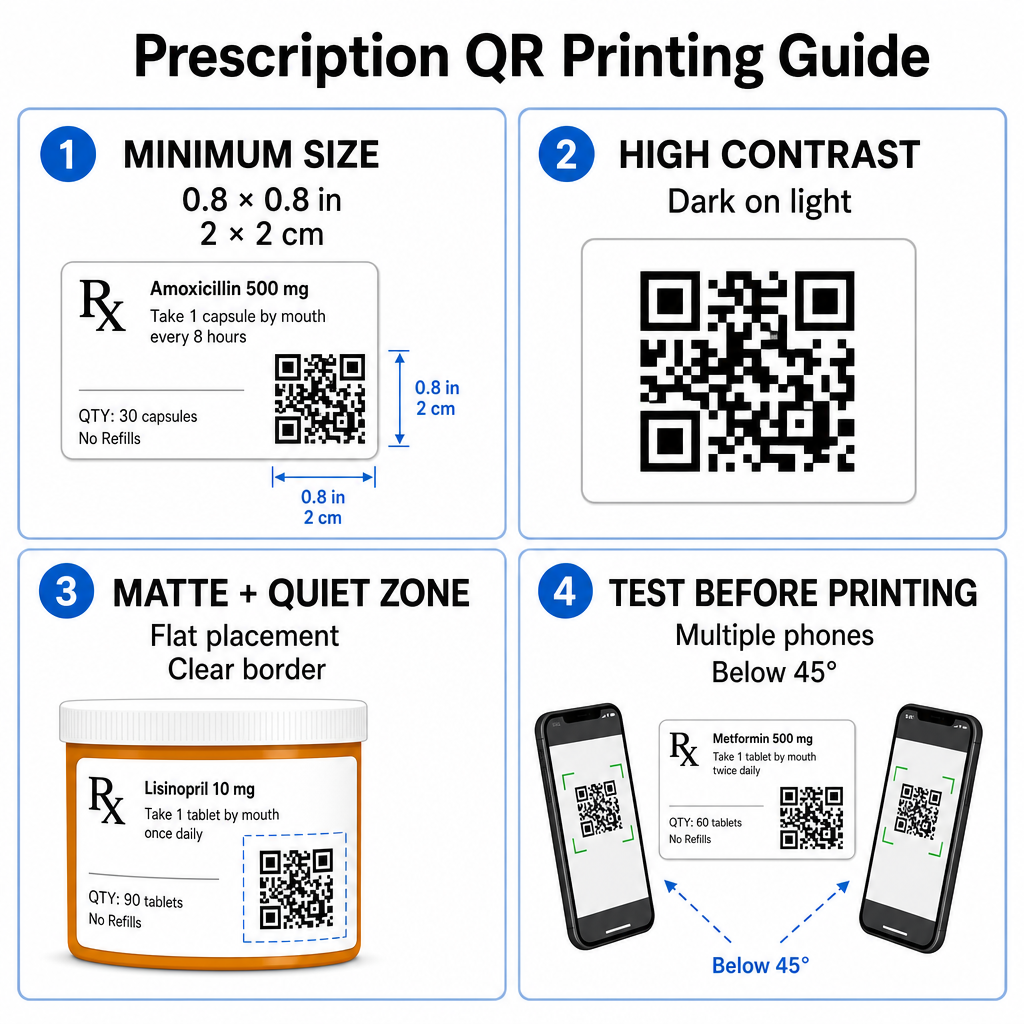
Prescription QR printing guide

Recommended Code Sizing

Prescription vial surfaces are limited. Maintain a standard size of at least 0.8″ x 0.8″ (2 cm x 2 cm) for reliable scanning. On very small packages, an absolute minimum print size of 1 cm x 1 cm may be used, provided the encoded data density remains low. You can check exact scaling ratios in our QRコードサイズガイド.

Color Contrast and Surface Materials

Thermal printers commonly used in retail pharmacies require specific calibration for optimal scannability:

  • High Contrast: Print solid dark patterns (ideally black) over clean, opaque light backgrounds.
  • Matte Finishes: Avoid glossy label coatings or clear plastic vials that reflect room lighting and blind camera sensors. If shiny or transparent containers are unavoidable, print a white matte layer directly beneath the QR code.
  • Curvature Management: Place the QR code on the flattest section of the bottle or box to prevent geometric distortion.

To evaluate how thermal inks, substrates, and label materials impact scan speeds, read our detailed analysis on how printing techniques affect QR scannability.

Quiet Zones and Verification Testing

Always maintain a clear outer border – known as a quiet zone – around the code to separate it from surrounding label text and borders. Test printed codes across multiple smartphone devices, angles (under 45 degrees), and lighting conditions before mass printing. Review our core QRコードの読みやすさに関するベストプラクティス to ensure your label layout performs reliably.

Verify Your Printed Label Scannability Want to test if your prescription packaging scans quickly on all device cameras? Test your printed label designs instantly with the free オンラインQRコードスキャナー.

Implementing Prescription QR Codes in Pharmacy Workflows

Rolling out scannable labels across pharmacy operations requires a simple, structured approach:

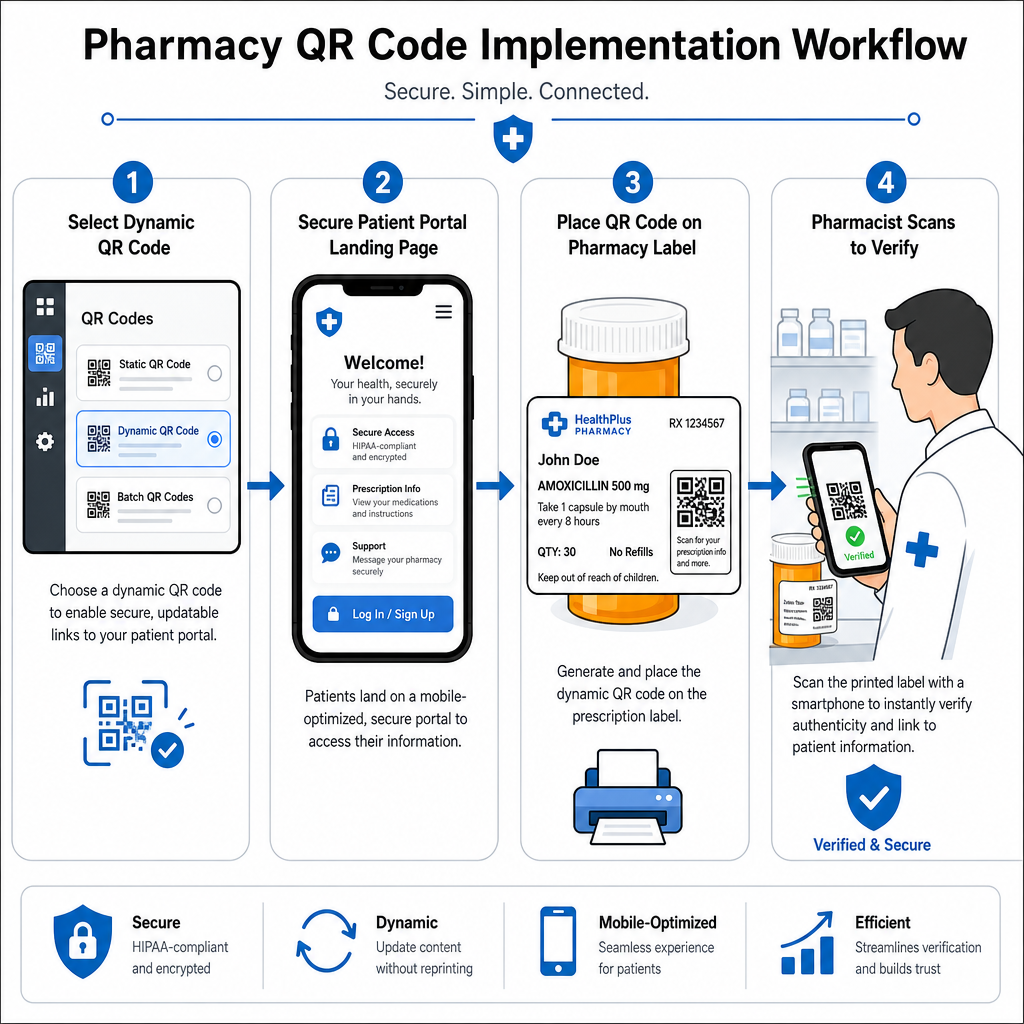
Pharmacy QR workflow steps
  • Select the Code Type: Choose dynamic QR codes for web links so you can update educational PDFs, video URLs, or portal links without reprinting physical container labels.
  • Configure Secure Landing Pages: Connect destination links to mobile-optimized, HIPAA-compliant patient portals or public medication guides.
  • Integrate Label Templates: Add the generated QR code into your pharmacy management system’s thermal print templates, ensuring size, quiet zones, and contrast parameters are locked.
  • Train Pharmacy Staff: Educate pharmacists and technicians to point out the QR code during patient consultations, encouraging patients to scan their bottle at home.
  • Verify Scannability: Perform routine quality checks at dispensing stations using a web-based QRコード読み取り装置 to confirm code clarity before handoff.

Exploring how other sectors manage scannable packaging can provide additional workflow insights across diverse industry use cases.

Adding scannable QR codes to prescription labels bridges the gap between physical medication packaging and vital digital health resources. By following proper printing standards, protecting patient privacy, and managing editable destination links, your pharmacy can reduce administration errors and improve overall patient outcomes. Start creating compliant, scannable prescription label workflows with Pageloot today.

よくある質問

Are QR codes required on prescription bottle labels by federal law?

No. U.S. federal regulations and FDA guidelines do not require consumer-facing QR codes on prescription container labels. Mandatory label elements (such as patient name, drug directions, and pharmacy details) must still be printed directly in human-readable text. QR codes remain a voluntary, supplementary tool to improve patient education and digital access.

How can pharmacies ensure QR codes on medication labels are HIPAA compliant?

Pharmacies must avoid encoding unencrypted protected health information (PHI) – such as patient names, dates of birth, or drug details – directly inside the QR code pattern. Instead, use secure dynamic links pointing to encrypted, password-protected patient portals that require patient authentication before displaying personal data.

What is the minimum recommended size for a QR code on a prescription container?

The recommended minimum print size for prescription labels is 0.8″ x 0.8″ (2 cm x 2 cm). While codes can technically scan as small as 1 cm x 1 cm on small packages, larger dimensions with strong color contrast and clear quiet zones ensure reliable scanning across all mobile device cameras.

著者について

Siim KostabiはPagelootのコンテンツリードです。Pagelootの革新的なQRコード生成サービスについて執筆しています。5年以上にわたるQRコードに関する深い専門知識を持つSiimは、この分野の専門家です。QRテクノロジーを活用してデジタルインタラクションを簡素化・拡張する上で、大きな進歩を遂げています。.

カテゴリー
について詳しくはこちら
QRビジネスカードスキャン
のQRコードを作る 名刺
✅ QRコードの#1ソリューション

オンラインでQRコードを作成する必要がある場合は QRコードを作る ここで無料で
ページルートは #1のGo-Toソリューション でQRコードを作成してスキャンすることができます。

BL-0331

ブログジェネ

売上、レビュー、フォロワーを増やすために 20,000 を超えるブランドから信頼されています。

クライアントのロゴ
トップブランドから信頼される
5 のうち 4.8 と評価しました

4.86 / 5つ星評価

ユーゴ・ローラン
ユーゴ・ローラン
レストランオーナー
最も簡単で信頼性の高いQRコードジェネレータです。PDFファイルを即座にアップロードできます。レストランのメニューがデジタル化されました。
ルーカス・ジャンセン
ルーカス・ジャンセン
不動産開発業者
これは優れたツールで、QRコードでちょうど欲しいところに連れて行ってくれます。私たちは位置情報のQRコードしか使っていませんが、とても便利な機能がたくさんあります。
エマ・モレッティ
エマ・モレッティ
小売製品
使いやすいし、早い。素晴らしい機能で、完璧な画像を作成してくれるので、社員は私のvCardをダウンロードすることができます。
ユーゴ・ローラン
ユーゴ・ローラン
レストランオーナー
最も簡単で信頼性の高いQRコードジェネレータです。PDFファイルを即座にアップロードできます。レストランのメニューがデジタル化されました。
ルーカス・ジャンセン
ルーカス・ジャンセン
不動産開発業者
これは優れたツールで、QRコードでちょうど欲しいところに連れて行ってくれます。私たちは位置情報のQRコードしか使っていませんが、とても便利な機能がたくさんあります。
エマ・モレッティ
エマ・モレッティ
小売製品
使いやすいし、早い。素晴らしい機能で、完璧な画像を作成してくれるので、社員は私のvCardをダウンロードすることができます。
QRコードをもっと見る
あらゆるものをデジタル体験に変えよう 3分以内に。

14日間の無料トライアル。

クレジットカードは必要ありません。

初回購入で30%オフ

次のコードを使用してください:

MP3ファイルを共有

PDF QRコードを作成するにはサインアップしてください

必要なものをすべてアップロードして表示する。

  • オーディオファイル
  • ポッドキャスト
  • 音楽

サインアップで14日間無料トライアル。.
トライアル終了後、QRコードは期限切れになります。.

オーディオmp3 QRコードを作成するにはサインアップしてください

フレームでより多くのスキャンを獲得

QRコードにフレームを追加するにはサインアップしてください

コールトゥアクションフレームは、お客様が簡単にQRコードと対話できるようにします。ぜひお試しください。

サインアップで14日間無料トライアル。.
トライアル終了後、QRコードは期限切れになります。.

QRコードにフレームを追加するにはサインアップしてください

シェイプでスタイルを追加

より多くの図形を作成するにはサインアップしてください

QRコードは四角いものである必要はありません。あなたのブランドのイメージに合わせて変えてみてください。

サインアップで14日間無料トライアル。.
トライアル終了後、QRコードは期限切れになります。.

より多くの図形を作成するにはサインアップしてください

QRコードにロゴを追加

QRコードにロゴを追加するにはサインアップしてください

QRコードにロゴやブランドを入れることで、目立たせることができます。

サインアップで14日間無料トライアル。.
トライアル終了後、QRコードは期限切れになります。.

QRコードにロゴを追加するにはサインアップしてください

スマートなApp Storeリダイレクト

アプリストアのQRコードを作成するにはサインアップしてください

スマートなApp StoreのQRコードに、あなたのアプリのリンクを追加します。ユーザーは、デバイスに応じてリダイレクトされます。

サインアップで14日間無料トライアル。.
トライアル終了後、QRコードは期限切れになります。.

アプリストアのQRコードを作成するにはサインアップしてください

QRコードに画像をアップロード

画像QRコードを作成するにはサインアップしてください

画像を簡単に共有できます。どんな画像も、数秒でダイナミックに変化します。

サインアップで14日間無料トライアル。.
トライアル終了後、QRコードは期限切れになります。.

画像QRコードを作成するにはサインアップしてください

PDFファイルを共有

PDF QRコードを作成するにはサインアップしてください

必要なものをすべてアップロードして表示する。

  • メニュー&プライスリスト
  • 指示
  • 任意の書類

サインアップで14日間無料トライアル。.
トライアル終了後、QRコードは期限切れになります。.

PDF QRコードを作成するにはサインアップしてください

印刷せずに後で編集

再度印刷せずにQRコードを編集するにはサインアップしてください

ダイナミックQRコードは、新たにQRコードを印刷することなく、QRコードの内容を変更することができます。

サインアップで14日間無料トライアル。.
トライアル終了後、QRコードは期限切れになります。.

再度印刷せずにQRコードを編集するにはサインアップしてください

いつ?どこで?QRコードのスキャンを追跡

QRコードを追跡するにはサインアップしてください

どのQRコードが最も多くスキャンされ、何が最も顧客を喜ばせているのかを知ることができます。

サインアップで14日間無料トライアル。.
トライアル終了後、QRコードは期限切れになります。.

QRコードを追跡するにはサインアップしてください

印刷可能なファイルが利用可能

PDFやSVGのようなベクターQRコードを作成するにはサインアップしてください

.eps、.pdf、.svg

QRコードをHD解像度でダウンロードしたいですか?すぐに印刷できるベクターまたはピクセル形式を入手しましょう。

サインアップで14日間無料トライアル。.
トライアル終了後、QRコードは期限切れになります。.

PDFやSVGのようなベクターQRコードを作成するにはサインアップしてください

しばらくお待ちください。あなたのQRコードは ロード... ロード...

あなただけのものに

サインアップしてQRコードを後で保存してください

異なる色、ロゴ、コールトゥアクションフレームで素晴らしいQRコードを作成することで、より多くのスキャンを得ることができます。

サインアップで14日間無料トライアル。.
トライアル終了後、QRコードは期限切れになります。.

サインアップしてQRコードを後で保存してください