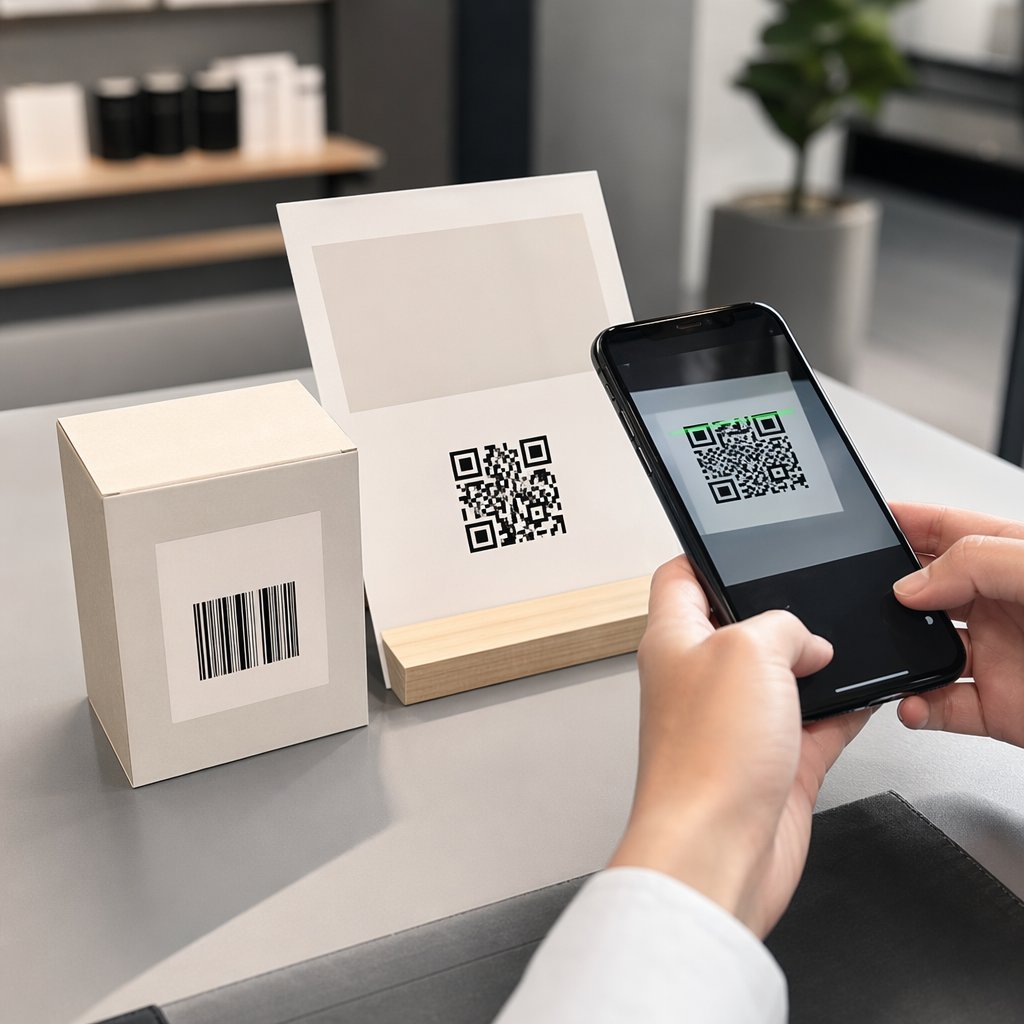
Har dine patienter svært ved at læse den lille tekst på medicinflasken eller overser de vigtige doseringsinstruktioner? Manglende medicinadhærens og administrationsfejl fører til forebyggelige sundhedsrisici og hyppige konsultationer med apoteket. Tilføjelse af scanbare QR-koder til receptetiketter giver patienterne øjeblikkelig adgang til digitale medicinvejledninger, lydinstruktioner og genbestillingsportaler.
Hvilken information kan recept-QR-koder give?
Receptetiketter på beholderen har begrænset fysisk plads. Føderale og statslige regler kræver obligatorisk trykt tekst, herunder apotekets navn, receptnummer, ordinerende læges detaljer, patientens navn og doseringsinstruktioner. En quick-response (QR) kode fungerer som en digital udvidelse af etiketten, der leverer yderligere information uden at fylde flasken.
Apoteker kan bruge recept-QR-koder til at levere patientrettede ressourcer, såsom:
- Digitale Medicinvejledninger: Link patienter direkte til elektroniske patientinformationsfoldere (e-foldere) eller dokumenter formateret ved hjælp af en PDF QR-kode generator.
- Lyd og Tilgængelige Formater: Hjælp synshandicappede patienter med at scanne pakken for at høre talte doseringsinstruktioner eller få adgang til stor skrift og elektroniske blindskriftmuligheder.
- Demonstrationsvideoer: Vis trin-for-trin video-tutorials til komplekse medicinleveringssystemer, såsom insulinpenne, inhalatorer eller selv-injektionsenheder.
- Genbestillingsportaler: Send patienter direkte til apotekets online genbestillingsportaler for hurtigt at indsende anmodninger om fornyelse.
- Offline Tekstinformation: Gem almindelige tekstadvarsler, nødtelefonnumre eller opbevaringsinstruktioner direkte i koden med en Tekst QR-kode generator.
Vigtigste fordele for patientsikkerhed og medicinadhærens
Manglende medicinadhærens er et stort folkesundhedsproblem. Forskning viser, at omkring 50% af patienterne undlader at tage deres medicin som foreskrevet, hvilket fører til over 125.000 forebyggelige dødsfald hvert år. Placering af scanbar information på receptemballagen hjælper med at løse almindelige kilder til administrationsfejl og forvirring.
Reduktion af medicinfejl
Standardetiketter til flasker bruger små skrifttyper, der er svære for ældre voksne eller synshandicappede at læse. Eksperimentel forskning, der sammenlignede QR-kodeudstyret emballage med standardetiketter til flasker, viste, at adgang til scanbare digitale detaljer resulterede i signifikant flere korrekte selvadministrationsbeslutninger på tværs af både yngre og ældre voksne patientgrupper.
Forbedring af tilgængelighed
At give tilgængelige receptdetaljer er afgørende for patientsikkerheden. Når QR-koder kodes med tilgængelig tekst eller linkes til skærmlæser-venlige landingssider, gør de det muligt for patienter med nedsat syn selvstændigt at verificere lægemiddelnavne, tidsplaner og forsigtighedsnoter.
Understøtter sporing af compliance og engagement
Digitale løsninger til sporing af indtag ved hjælp af scanbare emballeringskoder har vist høj klinisk gennemførlighed. Kliniske forsøg viser, at patienters selvrapportering via QR-scanninger opnår cirka 90,1 % nøjagtighed sammenlignet med manuel pilleoptælling. Integration af scanbar emballage i bredere hospitals- og sundheds-QR-kodesystemer forbedrer patientkommunikation og langsigtet plejeledelse. For at lære mere om moderne kliniske anvendelser kan du gennemgå vores omfattende guide til sundheds-QR-koder.
Lever opdaterede patientinstruktioner Har du brug for at opdatere medicinguider eller digitale ressourcer uden at genoptrykke fysiske etiketter? Brug Dynamisk QR-kode generator for at holde dine destinationslinks redigerbare og nøjagtige.
Lovgivningsmæssig overholdelse og HIPAA-sikkerhedsforanstaltninger for apoteker
Integration af digitale værktøjer i apotekets arbejdsgange kræver streng opmærksomhed på lovgivningsmæssige standarder og patientdatabeskyttelseslove.
| Kravområde | Standard / Retningslinje | Nøglehandling for apoteker |
|---|---|---|
| FDA-regler | Frivillig patientinformation | Behandl QR-koder som frivillige tilføjelser; erstat aldrig påkrævet skriftlig etikettekst. |
| DSCSA-serialisering | GS1 2D Data Matrix stregkoder | Hold DSCSA-forsyningskædestregkoder adskilt fra forbruger-QR-koder. |
| HIPAA Privacy Rule (HIPAA-privatlivsregel) | Beskyttede sundhedsoplysninger (PHI) | Kod aldrig patientnavne, fødselsdatoer eller tilstande direkte ind i koden. |
| Adgangskontrol | Autentificeringsforanstaltninger | Kræv patient-login-autentificering for enhver QR-destination, der viser personlige sundhedsdata. |
Forskellen mellem QR-koder og forsyningskæde-stregkoder
I henhold til Drug Supply Chain Security Act (DSCSA) er serialiserede GS1 2D Data Matrix stregkoder obligatoriske på engrosemballage til sporing af distributører. Dette er tekniske, regulerede 2D stregkoder beregnet til scannere i forsyningskæden. Patientrettede QR-koder er derimod frivillige værktøjer designet til forbruger-smartphones til at levere uddannelsesmæssigt og operationelt indhold.
Håndhævelse af HIPAA's privatlivs- og sikkerhedsstandarder
Apoteker er HIPAA-dækkede enheder. Ved implementering af QR-koder på receptbeholdere:
- Undgå kodning af rå PHI: Indlej aldrig ukrypterede patientidentifikatorer, CPR-numre eller specifikke diagnoser i en statisk kode.
- Brug sikre webdestinationer: Peg QR-koder mod sikre HTTPS-websteder, der understøttes af strenge adgangskontroller, multifaktorautentificering og krypterede databaser.
- Eliminer ureguleret sporing: Sørg for, at patientrettede landingssider ikke anvender tredjeparts analysepixels, der ulovligt kunne videregive data.
- Samarbejd med kompatible leverandører: Vælg softwareplatforme, der håndhæver datasikkerhedsprotokoller og udfører Business Associate Agreements (BAA'er). For en komplet oversigt over juridiske standarder, se vores guide om privatlivslovgivning og -regler for QR-koder.
Bedste praksis for udskrivning af scannbare receptetiketter
Receptetiketter udsættes for hyppig håndtering, fugt og stramme pladsbegrænsninger. Hvis en printet kode ikke kan scannes, falder patienternes tillid, og antallet af apoteks-supportopkald stiger.
Anbefalet kodestørrelse
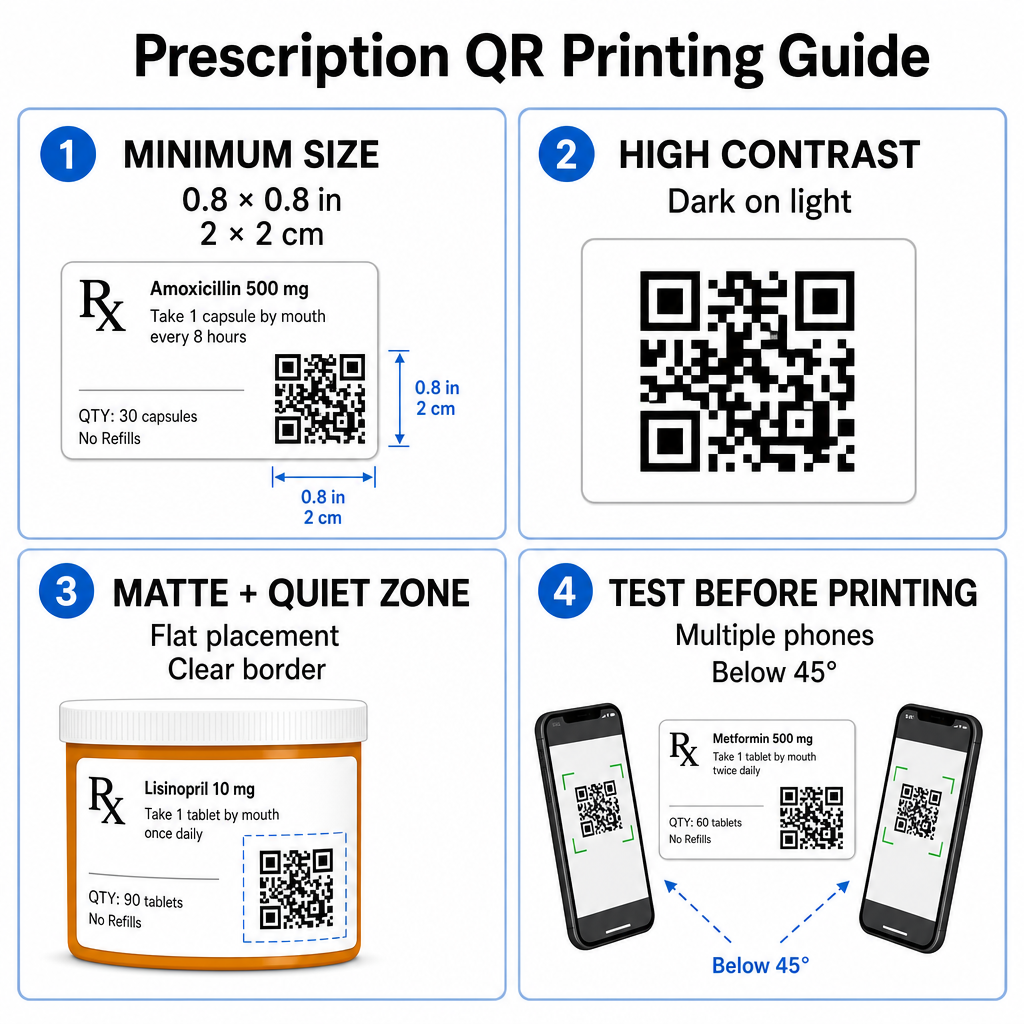
Receptglasoverflader er begrænsede. Oprethold en standardstørrelse på mindst 0.8" x 0.8" (2 cm x 2 cm) for pålidelig scanning. På meget små pakker er en absolut minimumsstørrelse for udskrivning 1 cm x 1 cm kan bruges, forudsat at den kodede datatæthed forbliver lav. Du kan kontrollere præcise skaleringsforhold i vores guide til QR-kodestørrelse.
Farvekontrast og Overfladematerialer
Termiske printere, der almindeligvis anvendes i detailapoteker, kræver specifik kalibrering for optimal scanbarhed:
- Høj kontrast: Udskriv solide mørke mønstre (ideelt sort) over rene, uigennemsigtige lyse baggrunde.
- Matte overflader: Undgå blanke etiketbelægninger eller gennemsigtige plastikhætteglas, der reflekterer rumbelysning og blænder kamerasensorer. Hvis skinnende eller gennemsigtige beholdere er uundgåelige, skal du udskrive et hvidt mat lag direkte under QR-koden.
- Håndtering af Krumning: Placer QR-koden på den fladeste del af flasken eller æsken for at forhindre geometrisk forvrængning.
For at evaluere, hvordan termiske blæk, substrater og etiketmaterialer påvirker scanningshastigheder, læs vores detaljerede analyse om hvordan printteknikker påvirker QR-scanbarhed.
Stille zoner og Verifikationstest
Oprethold altid en klar ydre kant – kendt som en stille zone – omkring koden for at adskille den fra omgivende etikettekst og grænser. Test udskrevne koder på tværs af flere smartphonenheder, vinkler (under 45 grader) og lysforhold før masseprint. Gennemgå vores kerne bedste praksis for QR-kodelæsbarhed for at sikre, at dit etiketlayout fungerer pålideligt.
Verificer din udskrevne etiketscanbarhed Vil du teste, om din receptpligtige emballage scanner hurtigt på alle enhedskameraer? Test dine udskrevne etiketdesigns øjeblikkeligt med den gratis online QR-kodescanner.
Implementering af Receptpligtige QR-koder i Apoteksarbejdsgange
Udrulning af scanbare etiketter på tværs af apoteksdrift kræver en enkel, struktureret tilgang:
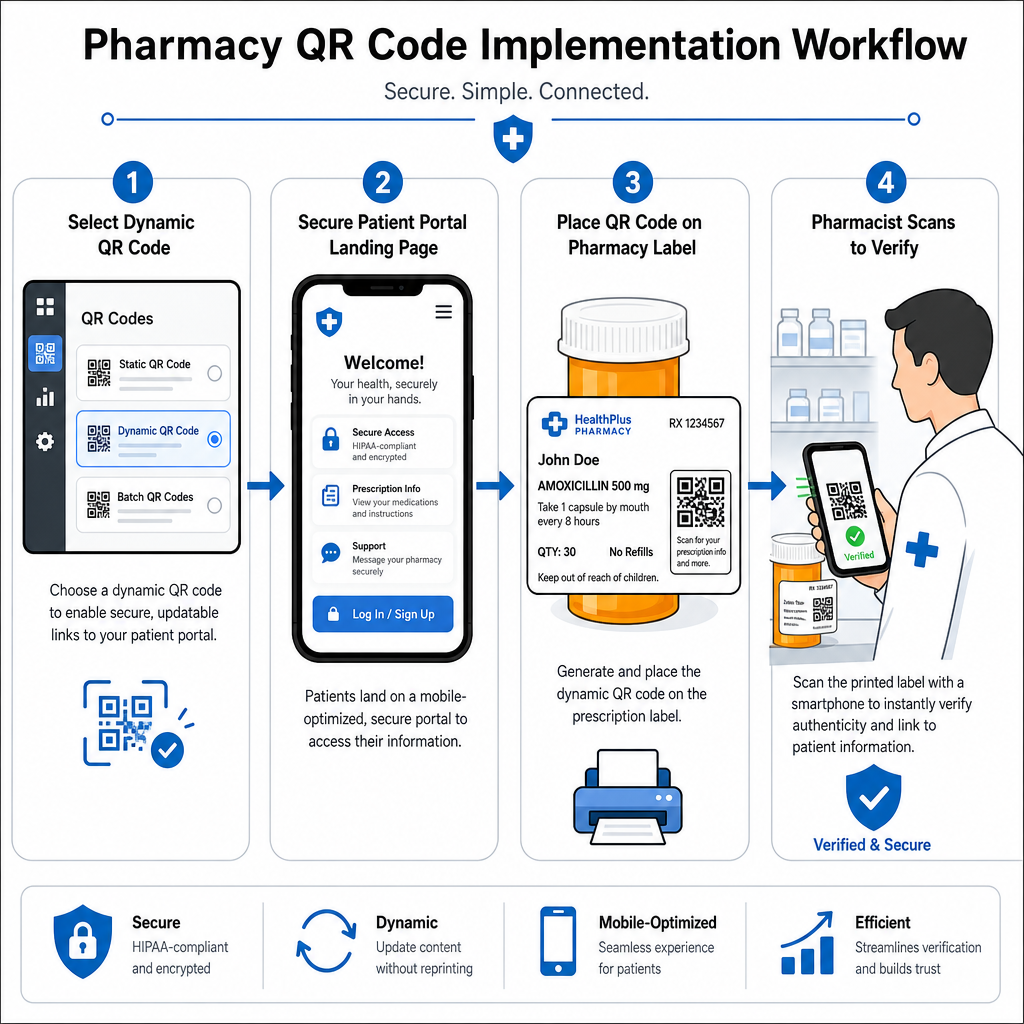
- Vælg Kodetype: Vælg dynamiske QR-koder til weblinks, så du kan opdatere pædagogiske PDF'er, video-URL'er eller portallinks uden at genudskrive fysiske beholderetiketter.
- Konfigurer sikre landingssider: Forbind destinationslinks til mobiloptimerede, HIPAA-kompatible patientportaler eller offentlige medicinvejledninger.
- Integrer etiketterskabeloner: Tilføj den genererede QR-kode til dit apoteksstyringssystems termiske printskabeloner, og sørg for, at størrelse, stillezoner og kontrastparametre er låst.
- Uddan Apotekspersonale: Uddan farmaceuter og teknikere til at gøre patienterne opmærksomme på QR-koden under konsultationer, og opfordre patienterne til at scanne deres flaske derhjemme.
- Verificer Scanbarhed: Udfør rutinemæssige kvalitetskontroller ved udleveringsstationer ved hjælp af en webbaseret QR-kodelæser for at bekræfte koden klarhed før overdragelse.
At udforske, hvordan andre sektorer håndterer scanbar emballage, kan give yderligere indsigt i arbejdsgange på tværs af forskellige industribrugsscenarier.
Tilføjelse af scanbare QR-koder til receptetiketter bygger bro mellem fysisk medicinemballage og vitale digitale sundhedsressourcer. Ved at følge korrekte printstandarder, beskytte patienters privatliv og administrere redigerbare destinationslinks kan dit apotek reducere administrative fejl og forbedre patientresultaterne. Begynd at skabe compliant, scanbare arbejdsgange for receptetiketter med Pageloot i dag.
Ofte stillede spørgsmål
Nej. Amerikanske føderale bestemmelser og FDA-retningslinjer kræver ikke forbrugerrettede QR-koder på etiketter til receptpligtige beholdere. Obligatoriske etiketelementer (såsom patientens navn, brugsanvisning for medicinen og apoteksoplysninger) skal stadig udskrives direkte i menneskelæselig tekst. QR-koder forbliver et frivilligt, supplerende værktøj til at forbedre patientuddannelse og digital adgang.
Apoteker skal undgå at indkode ukrypterede personhenførbare helbredsoplysninger (PHI) – såsom patientnavne, fødselsdatoer eller medicindetaljer – direkte i QR-kodemønsteret. I stedet skal de bruge sikre dynamiske links, der peger på krypterede, adgangskodebeskyttede patientportaler, som kræver patientautentificering, før personlige data vises.
Den anbefalede minimumsstørrelse for print af receptetiketter er 0,8" x 0,8" (2 cm x 2 cm). Selvom koder teknisk set kan scannes så små som 1 cm x 1 cm på små pakker, sikrer større dimensioner med stærk farvekontrast og tydelige stillezoner pålidelig scanning på tværs af alle mobile enheders kameraer.