Haben Ihre Patienten Schwierigkeiten, den winzigen Text auf Rezeptflaschen zu lesen oder wichtige Dosierungsanweisungen zu übersehen? Medikations-Nichtbefolgung und Verabreichungsfehler führen zu vermeidbaren Gesundheitsrisiken und häufigen Apothekenkonsultationen. Durch das Hinzufügen von scannbaren QR-Codes zu Rezeptetiketten erhalten Patienten sofortigen Zugriff auf digitale Medikationsleitfäden, Audioanweisungen und Nachfüllportale.
Welche Informationen können QR-Codes auf Rezepten liefern?
Etiketten von Medikamentenverpackungen haben begrenzten physischen Platz. Bundes- und Landesvorschriften verlangen obligatorischen gedruckten Text, einschließlich Apothekenname, Rezeptnummer, Angaben zum verschreibenden Arzt, Patientennamen und Dosierungsanweisungen. Ein Quick-Response (QR)-Code fungiert als digitale Erweiterung des Etiketts und liefert zusätzliche Informationen, ohne die Flasche zu überladen.
Apotheken können QR-Codes auf Rezepten nutzen, um patientenorientierte Ressourcen bereitzustellen, wie zum Beispiel:
- Digitale Medikationsleitfäden: Verlinken Sie Patienten direkt mit elektronischen Patienteninformationsblättern (E-Beipackzetteln) oder Dokumenten, die unter Verwendung eines formatiert sind. PDF QR-Code Generator.
- Audio- und barrierefreie Formate: Helfen Sie sehbehinderten Patienten, die Packung zu scannen, um gesprochene Dosierungsanweisungen zu hören oder Großdrucktexte und elektronische Braille-Optionen abzurufen.
- Demonstrationsvideos: Zeigen Sie Schritt-für-Schritt-Videoanleitungen für komplexe Medikamentenverabreichungssysteme wie Insulinpens, Inhalatoren oder Selbstinjektionsgeräte.
- Nachfüllportale: Leiten Sie Patienten direkt zu den Online-Nachfüllportalen der Apotheke, um Verlängerungsanträge schnell einzureichen.
- Offline-Textinformationen: Speichern Sie Klartextwarnungen, Notfallkontaktnummern oder Lageranweisungen direkt in der Codematrix unter Verwendung eines. Text QR-Code Generator.
Hauptvorteile für Patientensicherheit und Medikationsadhärenz
Die Nichteinhaltung der Medikation ist ein großes Problem für die öffentliche Gesundheit. Untersuchungen zeigen, dass etwa 50 % der Patienten ihre Medikamente nicht wie vorgeschrieben einnehmen, was jährlich zu über 125.000 vermeidbaren Todesfällen führt. Das Anbringen von scannbaren Informationen auf Medikamentenverpackungen hilft, häufige Ursachen für Verabreichungsfehler und Verwirrung zu beseitigen.
Reduzierung von Medikationsfehlern
Standardflaschenetiketten verwenden kleine Schriftarten, die für ältere Erwachsene oder sehbehinderte Personen schwer zu lesen sind. Experimentelle Forschung, die QR-Code-ausgestattete Verpackungen mit Standardflaschenetiketten verglich, zeigte, dass der Zugang zu scanbaren digitalen Details zu signifikant mehr korrekten Selbstverabreichungsentscheidungen sowohl bei jüngeren als auch bei älteren erwachsenen Patientengruppen führte.
Verbesserung der Zugänglichkeit
Die Bereitstellung zugänglicher Verschreibungsdetails ist entscheidend für die Patientensicherheit. Wenn sie mit zugänglichem Text kodiert oder mit bildschirmleserfreundlichen Landing Pages verknüpft sind, ermöglichen QR-Codes Patienten mit Sehschwäche, Medikamentennamen, Zeitpläne und Warnhinweise eigenständig zu überprüfen.
Unterstützung der Therapietreue-Verfolgung und des Engagements
Digitale Lösungen zur Erfassung der Einnahme, die scanbare Verpackungscodes verwenden, haben eine hohe klinische Machbarkeit gezeigt. Klinische Studien belegen, dass die Selbstauskunft der Patienten über QR-Scans eine Genauigkeit von etwa 90,1 % Genauigkeit im Vergleich zu manuellen Pillenzählungen. Die Integration scanbarer Verpackungen in breitere QR-Code-Systeme im Krankenhaus- und Gesundheitswesen verbessert die Patientenkommunikation und das Langzeitpflegemanagement. Um mehr über moderne klinische Anwendungen zu erfahren, lesen Sie unseren umfassenden Leitfaden zu QR-Codes im Gesundheitswesen.
Bereitstellung aktueller Patientenanweisungen Müssen Medikamentenführer oder digitale Ressourcen aktualisiert werden, ohne physische Etiketten neu zu drucken? Verwenden Sie die Dynamischer QR-Code Generator um Ihre Ziellinks bearbeitbar und präzise zu halten.
Einhaltung gesetzlicher Vorschriften und HIPAA-Schutzmaßnahmen für Apotheken
Die Integration digitaler Tools in Apothekenabläufe erfordert strenge Beachtung regulatorischer Standards und Patientendatenschutzgesetze.
| Anforderungsbereich | Standard / Richtlinie | Wichtige Apothekenaktion |
|---|---|---|
| FDA-Vorschriften | Freiwillige Patienteninformationen | Behandeln Sie QR-Codes als freiwillige Ergänzungen; ersetzen Sie niemals den vorgeschriebenen schriftlichen Etikettentext. |
| DSCSA-Serialisierung | GS1 2D Data-Matrix-Barcodes | Halten Sie DSCSA-Lieferketten-Barcodes separat von Verbraucher-QR-Codes. |
| HIPAA-Datenschutzregel | Geschützte Gesundheitsinformationen (PHI) | Niemals Patientennamen, Geburtsdaten oder Diagnosen direkt in den Code kodieren. |
| Zugriffskontrolle | Authentifizierungsschutzmaßnahmen | Für jedes QR-Ziel, das persönliche Gesundheitsdaten anzeigt, ist eine Patienten-Login-Authentifizierung erforderlich. |
Unterscheidung von QR-Codes und Lieferketten-Barcodes
Gemäß dem Drug Supply Chain Security Act (DSCSA) sind serialisierte GS1 2D Data Matrix Barcodes auf Großhandelsverpackungen zur Rückverfolgung durch den Distributor obligatorisch. Dies sind technische, regulierte 2D-Barcodes, die für Lieferkettenscanner vorgesehen sind. Patientenorientierte QR-Codes hingegen sind freiwillige Tools, die für Verbraucher-Smartphones entwickelt wurden, um Bildungs- und operative Inhalte zu liefern.
Durchsetzung der HIPAA-Datenschutz- und Sicherheitsstandards
Apotheken sind HIPAA-pflichtige Einrichtungen. Beim Einsatz von QR-Codes auf Verschreibungspackungen gilt:
- Vermeiden Sie die Kodierung von unformatierten PHI (geschützte Gesundheitsinformationen): Niemals unverschlüsselte Patientenidentifikatoren, Sozialversicherungsnummern oder spezifische Diagnosen in einen statischen Code einbetten.
- Sichere Web-Ziele verwenden: QR-Codes auf sichere HTTPS-Websites verweisen, die durch strenge Zugriffskontrollen, Multi-Faktor-Authentifizierung und verschlüsselte Datenbanken geschützt sind.
- Unregulierte Nachverfolgung eliminieren: Stellen Sie sicher, dass patientenorientierte Landingpages keine Analyse-Pixel von Drittanbietern verwenden, die Daten unzulässig offenlegen könnten.
- Mit konformen Anbietern zusammenarbeiten: Wählen Sie Softwareplattformen, die Datensicherheitsprotokolle durchsetzen und Geschäftspartnervereinbarungen (BAAs) abschließen. Eine vollständige Übersicht der rechtlichen Standards finden Sie in unserem Leitfaden zu Datenschutzgesetze und -vorschriften für QR-Codes.
Best Practices für den Druck von scannbaren Rezeptetiketten
Rezeptetiketten sind häufiger Handhabung, Feuchtigkeit und engen Platzverhältnissen ausgesetzt. Wenn ein gedruckter Code nicht scannt, sinkt das Patientenvertrauen und die Anrufe beim Apotheken-Support steigen.
Empfohlene Codegröße
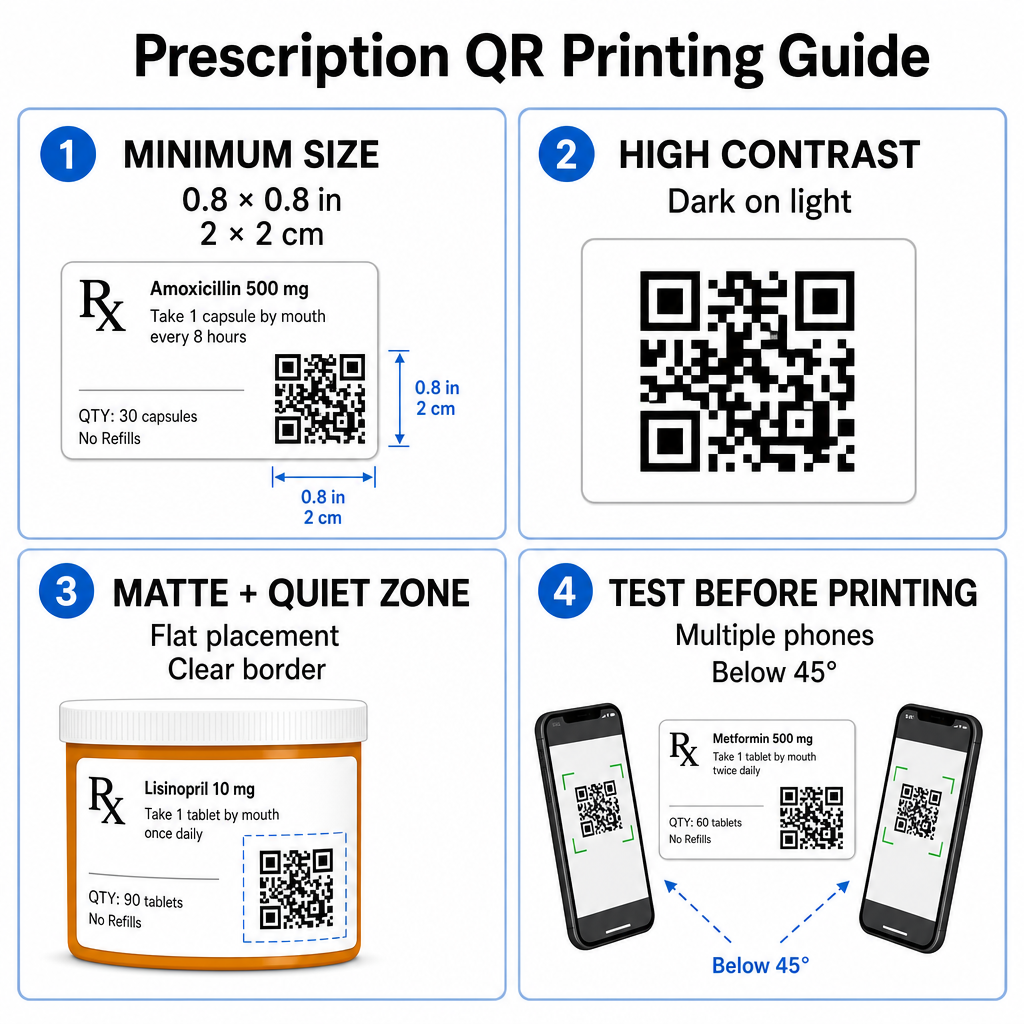
Die Oberflächen von Rezeptfläschchen sind begrenzt. Halten Sie eine Standardgröße von mindestens 0.8″ x 0.8″ (2 cm x 2 cm) für zuverlässiges Scannen. Bei sehr kleinen Packungen beträgt die absolute Mindestdruckgröße 1 cm x 1 cm kann verwendet werden, vorausgesetzt, die Dichte der kodierten Daten bleibt gering. Die genauen Skalierungsverhältnisse können Sie in unserem Leitfaden zur QR-Code-Größe.
Farbkontrast und Oberflächenmaterialien
Thermodrucker, die häufig in Apotheken eingesetzt werden, erfordern eine spezifische Kalibrierung für optimale Scanbarkeit:
- Hoher Kontrast: Drucken Sie durchgehende dunkle Muster (idealerweise schwarz) auf saubere, undurchsichtige helle Hintergründe.
- Matte Oberflächen: Vermeiden Sie glänzende Etikettenbeschichtungen oder durchsichtige Kunststofffläschchen, die Raumbeleuchtung reflektieren und Kamerasensoren blenden. Wenn glänzende oder transparente Behälter unvermeidlich sind, drucken Sie eine weiße, matte Schicht direkt unterhalb des QR-Codes.
- Krümmungsmanagement: Platzieren Sie den QR-Code auf dem flachsten Bereich der Flasche oder Schachtel, um geometrische Verzerrungen zu vermeiden.
Um zu beurteilen, wie thermische Tinten, Substrate und Etikettenmaterialien die Scan-Geschwindigkeiten beeinflussen, lesen Sie unsere detaillierte Analyse zu wie Drucktechniken die Scanbarkeit von QR-Codes beeinflussen.
Ruhezonen und Verifikationstests
Halten Sie immer einen klaren äußeren Rand – bekannt als Ruhezone – um den Code herum ein, um ihn von umgebendem Etikettentext und Rändern zu trennen. Testen Sie gedruckte Codes auf verschiedenen Smartphone-Geräten, Winkeln (unter 45 Grad) und Lichtverhältnissen vor dem Massendruck. Überprüfen Sie unsere Kern- Best Practices für die Lesbarkeit von QR-Codes um sicherzustellen, dass Ihr Etikettenlayout zuverlässig funktioniert.
Überprüfen Sie die Scanbarkeit Ihres gedruckten Etiketts Möchten Sie testen, ob Ihre Rezeptverpackung mit allen Gerätekameras schnell gescannt werden kann? Testen Sie Ihre gedruckten Etikettendesigns sofort mit dem kostenlosen Online-QR-Code-Scanner.
Implementierung von Rezept-QR-Codes in Apotheken-Arbeitsabläufen
Die Einführung scannbarer Etiketten in Apothekenabläufen erfordert einen einfachen, strukturierten Ansatz:
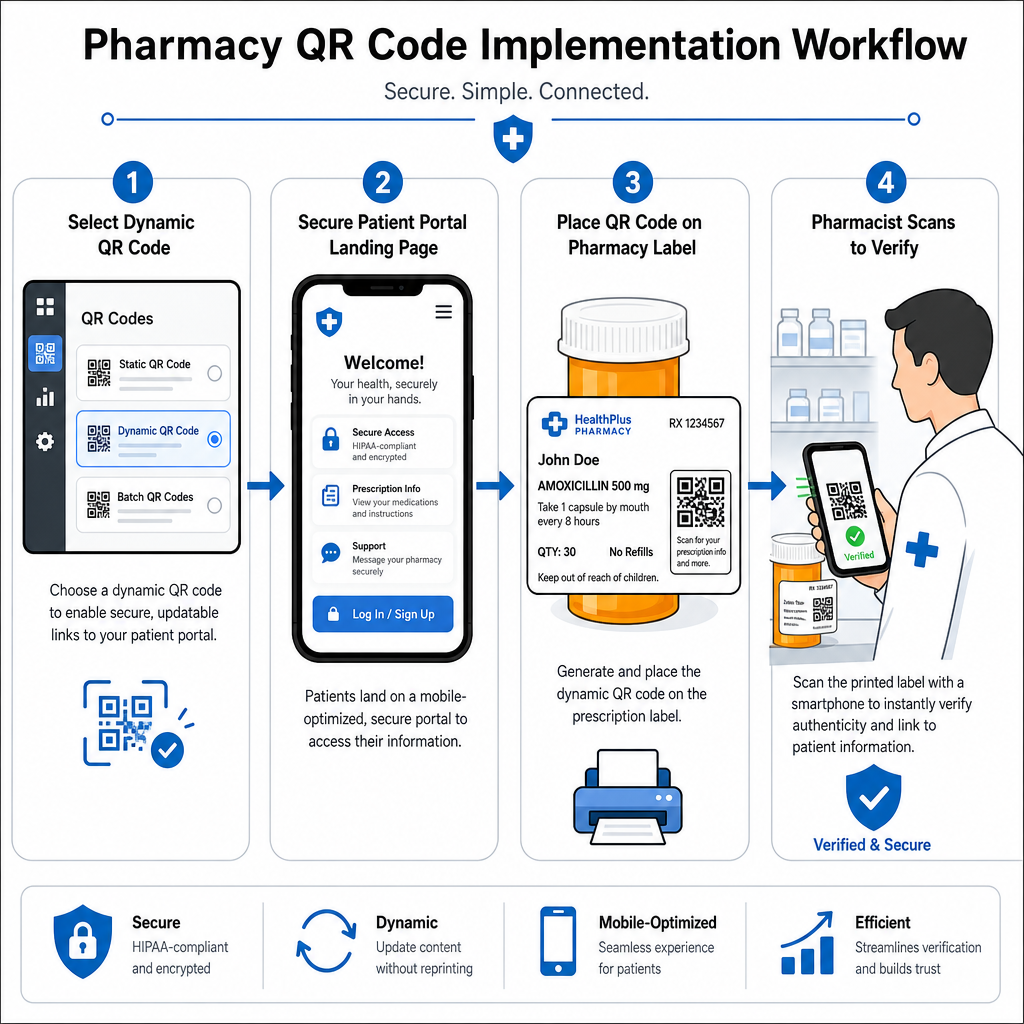
- Wählen Sie den Codetyp: Wählen Sie dynamische QR-Codes für Weblinks, damit Sie Bildungs-PDFs, Video-URLs oder Portallinks aktualisieren können, ohne physische Behälteretiketten neu drucken zu müssen.
- Sichere Landing Pages konfigurieren: Verknüpfen Sie Ziellinks mit mobiloptimierten, HIPAA-konformen Patientenportalen oder öffentlichen Medikamentenleitfäden.
- Etikettenvorlagen integrieren: Fügen Sie den generierten QR-Code in die Thermodruckvorlagen Ihres Apothekenverwaltungssystems ein und stellen Sie sicher, dass Größe, Ruhezonen und Kontrastparameter festgelegt sind.
- Schulen Sie das Apothekenpersonal: Schulen Sie Apotheker und Techniker, den QR-Code während der Patientenberatung hervorzuheben und Patienten zu ermutigen, ihre Flasche zu Hause zu scannen.
- Überprüfen Sie die Scannbarkeit: Führen Sie routinemäßige Qualitätskontrollen an den Abgabestationen mithilfe eines webbasierten QR-Code-Leser durch, um die Lesbarkeit des Codes vor der Übergabe zu bestätigen.
Die Untersuchung, wie andere Sektoren scannbare Verpackungen handhaben, kann zusätzliche Einblicke in Arbeitsabläufe in verschiedenen Anwendungsfällen der Branche.
Das Hinzufügen von scannbaren QR-Codes zu Rezeptetiketten überbrückt die Lücke zwischen physischen Medikamentenverpackungen und wichtigen digitalen Gesundheitsressourcen. Durch die Einhaltung geeigneter Druckstandards, den Schutz der Privatsphäre der Patienten und die Verwaltung bearbeitbarer Ziellinks kann Ihre Apotheke Verwaltungsfehler reduzieren und die Patientenergebnisse insgesamt verbessern. Beginnen Sie noch heute mit Pageloot, konforme, scannbare Arbeitsabläufe für Rezeptetiketten zu erstellen.
Häufig gestellte Fragen
Nein. US-Bundesvorschriften und FDA-Richtlinien verlangen keine verbraucherorientierten QR-Codes auf Etiketten von verschreibungspflichtigen Medikamentenbehältern. Obligatorische Etikettenelemente (wie Patientenname, Gebrauchsanweisungen und Apothekendetails) müssen weiterhin direkt in menschenlesbarem Text gedruckt werden. QR-Codes bleiben ein freiwilliges, ergänzendes Hilfsmittel, um die Patientenaufklärung und den digitalen Zugang zu verbessern.
Apotheken müssen es vermeiden, unverschlüsselte geschützte Gesundheitsinformationen (PHI) – wie Patientennamen, Geburtsdaten oder Medikamentendetails – direkt im QR-Code-Muster zu kodieren. Stattdessen sollten sichere dynamische Links verwendet werden, die auf verschlüsselte, passwortgeschützte Patientenportale verweisen, welche eine Patientenauthentifizierung erfordern, bevor persönliche Daten angezeigt werden.
Die empfohlene Mindestdruckgröße für Rezeptetiketten beträgt 0,8″ x 0,8″ (2 cm x 2 cm). Obwohl Codes auf kleinen Verpackungen technisch bis zu 1 cm x 1 cm gescannt werden können, gewährleisten größere Abmessungen mit starkem Farbkontrast und klaren Ruhezonen eine zuverlässige Abtastung durch alle mobilen Gerätekameras.