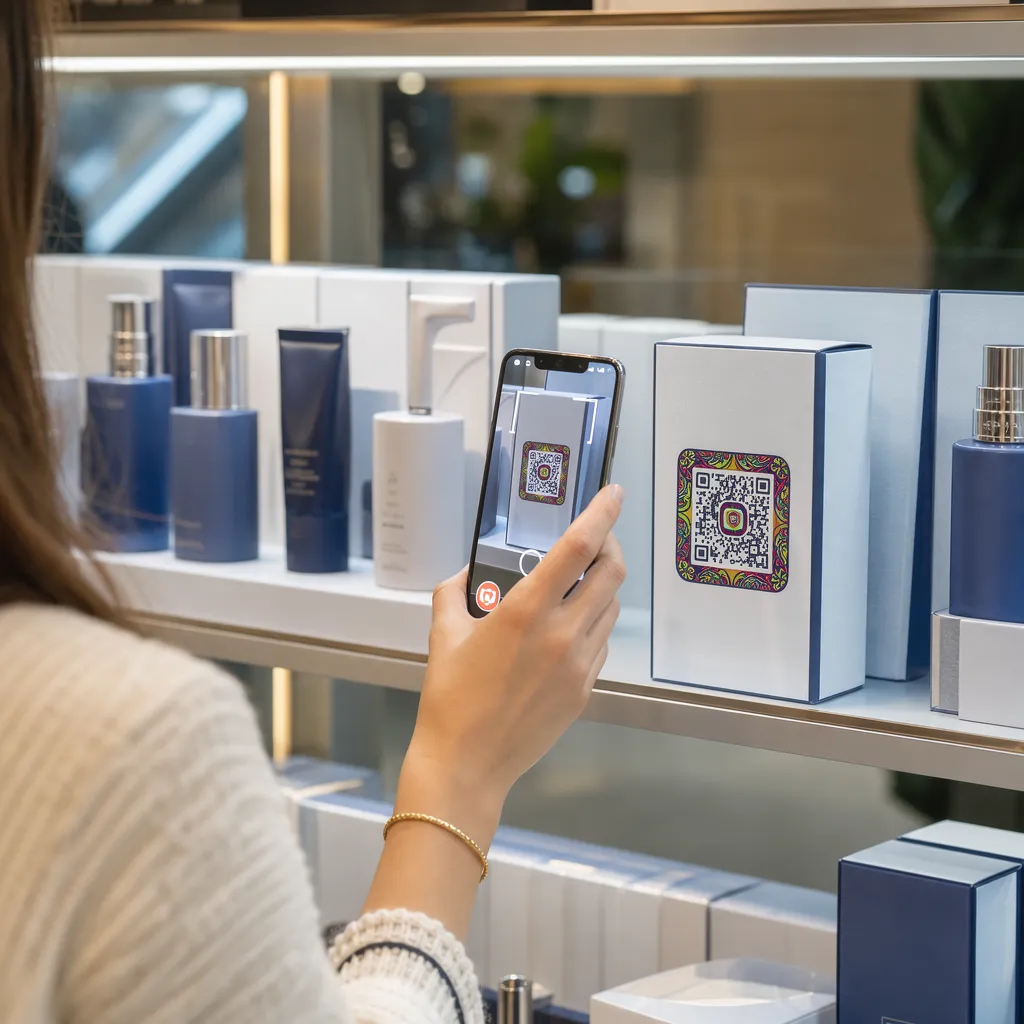
Чи вашим пацієнтам важко читати дрібний текст на пляшечках з ліками або вони пропускають критично важливі інструкції щодо дозування? Недотримання режиму прийому ліків та помилки у введенні призводять до запобіжних ризиків для здоров'я та частих консультацій з фармацевтом. Додавання сканованих QR-кодів до етикеток на рецептах надає пацієнтам миттєвий доступ до цифрових посібників з медикаментів, аудіоінструкцій та порталів для поповнення рецептів.
Яку інформацію можуть надати QR-коди на рецептах?
Етикетки на упаковках ліків мають обмежений фізичний простір. Федеральні та державні нормативи вимагають обов'язкового друкованого тексту, включаючи назву аптеки, номер рецепта, дані лікаря, ім'я пацієнта та інструкції щодо дозування. QR-код (швидкої відповіді) діє як цифрове розширення етикетки, надаючи додаткову інформацію без перевантаження пляшечки.
Аптеки можуть використовувати QR-коди на рецептах для надання пацієнтам таких ресурсів, як:
- Цифрові посібники з медикаментів: Напрямок пацієнтів безпосередньо до електронних інформаційних листівок (е-листівок) або документів, відформатованих за допомогою QR-код у форматі PDF.
- Аудіо та доступні формати: Допоможіть пацієнтам з вадами зору сканувати упаковку, щоб почути голосові інструкції щодо дозування або отримати доступ до тексту великим шрифтом та електронних варіантів шрифту Брайля.
- Демонстраційні відео: Показуйте покрокові відеоуроки для складних систем доставки ліків, таких як інсулінові ручки, інгалятори або пристрої для самостійних ін'єкцій.
- Портали для поповнення рецептів: Направляйте пацієнтів безпосередньо до онлайн-порталів аптек для швидкого подання запитів на поновлення.
- Офлайн текстова інформація: Зберігайте текстові попередження, номери екстрених контактів або інструкції зі зберігання безпосередньо в матриці коду за допомогою QR код текст: генератор.
Ключові переваги для безпеки пацієнтів та дотримання режиму прийому ліків
Недотримання режиму прийому ліків є серйозною проблемою громадського здоров'я. Дослідження показують, що близько 50% пацієнтів не приймають ліки за призначенням, що призводить до понад 125 000 смертей, яких можна уникнути, щороку. Розміщення сканованої інформації на упаковці ліків допомагає усунути поширені причини помилок у введенні та плутанини.
Зменшення помилок при прийомі ліків
Стандартні етикетки на пляшках використовують дрібний шрифт, який важко читати літнім людям або людям з вадами зору. Експериментальне дослідження, що порівнювало упаковку з QR-кодами зі стандартними етикетками на пляшках, показало, що доступ до сканованих цифрових деталей призвів до значно більшої кількості правильних рішень щодо самостійного застосування як у молодших, так і в літніх групах пацієнтів.
Покращення доступності
Надання доступної інформації про рецепти є життєво важливим для безпеки пацієнтів. Закодовані доступним текстом або пов'язані зі зручними для екранних читачів цільовими сторінками, QR-коди дозволяють пацієнтам зі слабким зором самостійно перевіряти назви ліків, графіки та застереження.
Підтримка відстеження дотримання режиму лікування та залучення
Цифрові рішення для відстеження прийому ліків за допомогою сканованих кодів на упаковці продемонстрували високу клінічну доцільність. Клінічні випробування показують, що самостійне звітування пацієнтів за допомогою QR-сканування досягає приблизно 90,1% точності порівняно з ручним підрахунком таблеток. Інтеграція сканованої упаковки в ширші лікарняні та медичні системи QR-кодів покращує спілкування з пацієнтами та довгострокове управління доглядом. Щоб дізнатися більше про сучасні клінічні застосування, перегляньте наш вичерпний посібник з QR-кодів у сфері охорони здоров'я.
Надавайте актуальні інструкції для пацієнтів Потрібно оновити посібники з медикаментів або цифрові ресурси без повторного друку фізичних етикеток? Використовуйте Динамічний QR код: генератор щоб ваші посилання призначення залишалися редагованими та точними.
Дотримання нормативних вимог та заходи захисту HIPAA для аптек
Інтеграція цифрових інструментів у робочі процеси аптек вимагає суворої уваги до нормативних стандартів та законів про конфіденційність пацієнтів.
| Область вимог | Стандарт / Керівництво | Ключова дія аптеки |
|---|---|---|
| Правила FDA | Добровільна інформація для пацієнтів | Розглядайте QR-коди як добровільні доповнення; ніколи не замінюйте обов'язковий письмовий текст етикетки. |
| Серіалізація DSCSA | Двовимірні штрих-коди GS1 Data Matrix | Зберігайте штрих-коди ланцюга поставок DSCSA окремо від споживчих QR-кодів. |
| Правило конфіденційності HIPAA | Захищена медична інформація (PHI) | Ніколи не кодуйте імена пацієнтів, дати народження або стани безпосередньо в код. |
| Контроль доступу | Заходи безпеки для автентифікації | Вимагайте автентифікацію пацієнта через логін для будь-якого QR-призначення, що відображає особисті дані про здоров'я. |
Розрізнення QR-кодів від штрих-кодів ланцюга поставок
Згідно з Законом про безпеку ланцюга поставок ліків (DSCSA), серіалізовані 2D штрих-коди GS1 Data Matrix є обов'язковими на оптовій упаковці для відстеження дистриб'юторами. Це технічні, регульовані 2D штрих-коди, призначені для сканерів ланцюга поставок. На відміну від них, QR-коди, призначені для пацієнтів, є добровільними інструментами, розробленими для споживчих смартфонів для надання освітнього та операційного контенту.
Забезпечення стандартів конфіденційності та безпеки HIPAA
Аптеки є суб'єктами, що підпадають під дію HIPAA. При розгортанні QR-кодів на контейнерах для рецептів:
- Уникайте кодування необробленої PHI: Ніколи не вбудовуйте незашифровані ідентифікатори пацієнтів, номери соціального страхування або конкретні діагнози всередину статичного коду.
- Використовуйте безпечні веб-призначення: Направляйте QR-коди на безпечні веб-сайти HTTPS, що підтримуються суворим контролем доступу, багатофакторною автентифікацією та зашифрованими базами даних.
- Усуньте нерегульоване відстеження: Переконайтеся, що цільові сторінки для пацієнтів не використовують сторонні аналітичні пікселі, які можуть недопустимо розкривати дані.
- Співпрацюйте з відповідними постачальниками: Вибирайте програмні платформи, які забезпечують протоколи безпеки даних та укладають угоди про ділову асоціацію (BAA). Для повного ознайомлення з правовими стандартами зверніться до нашого посібника щодо законів та нормативних актів про конфіденційність QR-кодів.
Найкращі практики для друку сканованих етикеток рецептів
Етикетки рецептів часто піддаються обробці, вологості та обмеженням у просторі. Якщо надрукований код не сканується, довіра пацієнтів знижується, а кількість звернень до служби підтримки аптеки зростає.
Рекомендований розмір коду
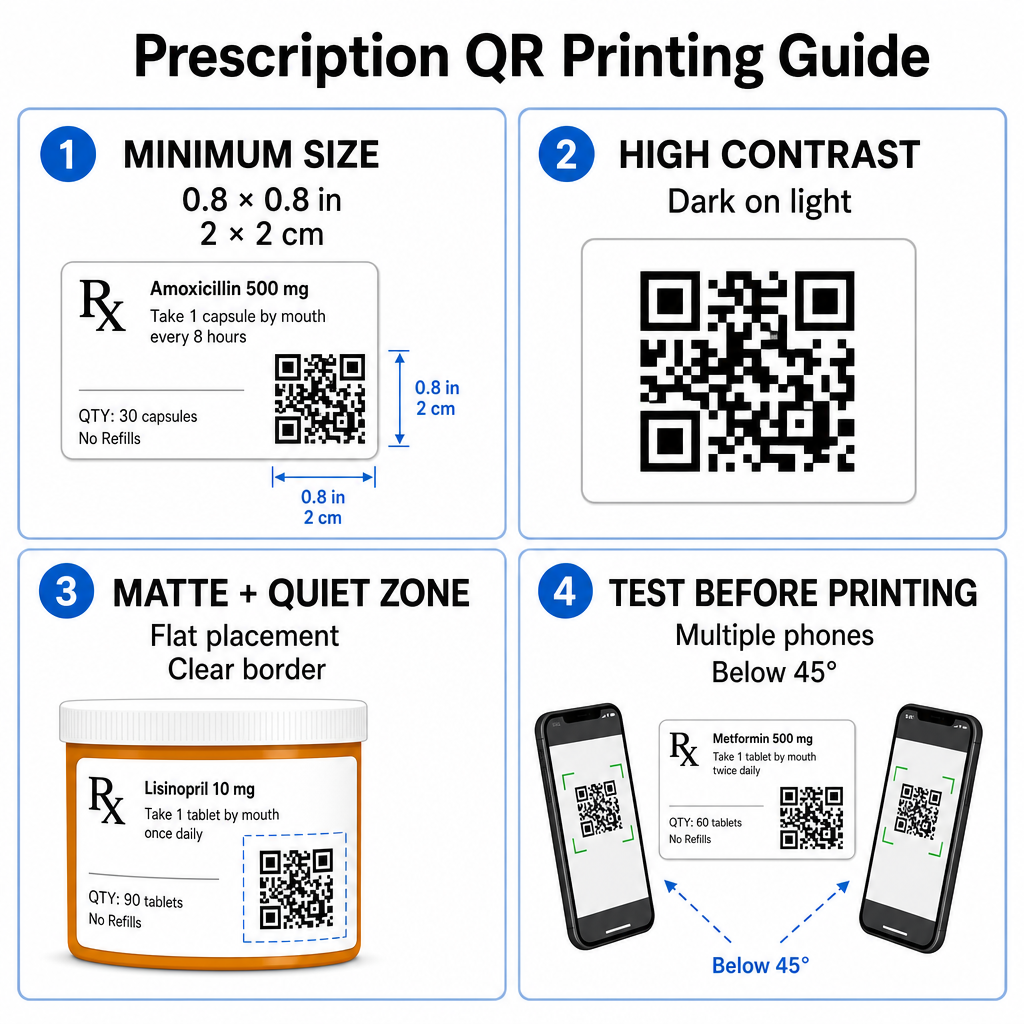
Поверхні флаконів для рецептів обмежені. Підтримуйте стандартний розмір щонайменше 0.8″ x 0.8″ (2 см x 2 см) для надійного сканування. На дуже маленьких упаковках абсолютний мінімальний розмір друку 1 см x 1 см можна використовувати, за умови, що щільність закодованих даних залишається низькою. Ви можете перевірити точні коефіцієнти масштабування в нашій посібнику з розмірів QR-кодів.
Контраст кольорів та матеріали поверхні
Термопринтери, які зазвичай використовуються в роздрібних аптеках, вимагають спеціального калібрування для оптимальної здатності до сканування:
- Високий контраст: Друкуйте суцільні темні візерунки (в ідеалі чорні) на чистих, непрозорих світлих фонах.
- Матові покриття: Уникайте глянцевих покриттів етикеток або прозорих пластикових флаконів, які відбивають кімнатне освітлення та засліплюють датчики камери. Якщо блискучі або прозорі контейнери неминучі, надрукуйте білий матовий шар безпосередньо під QR-кодом.
- Управління кривизною: Розмістіть QR-код на найрівнішій ділянці пляшки або коробки, щоб запобігти геометричним спотворенням.
Щоб оцінити, як термальні чорнила, основи та матеріали етикеток впливають на швидкість сканування, прочитайте наш детальний аналіз як методи друку впливають на здатність QR до сканування.
Тихі зони та верифікаційне тестування
Завжди підтримуйте чітку зовнішню межу – відому як тиха зона – навколо коду, щоб відокремити його від навколишнього тексту етикетки та меж. Тестуйте надруковані коди на кількох пристроях смартфонів, під різними кутами (менше 45 градусів) та в різних умовах освітлення перед масовим друком. Перегляньте наші основні найкращих практик для читабельності QR-кодів щоб переконатися, що ваш макет етикетки працює надійно.
Перевірте здатність вашої надрукованої етикетки до сканування Хочете перевірити, чи швидко сканується ваша упаковка ліків на всіх камерах пристроїв? Миттєво протестуйте свої надруковані макети етикеток за допомогою безкоштовного онлайн-сканером QR-кодів.
Впровадження QR-кодів рецептів у робочі процеси аптеки
Впровадження сканованих етикеток у всіх аптечних операціях вимагає простого, структурованого підходу:
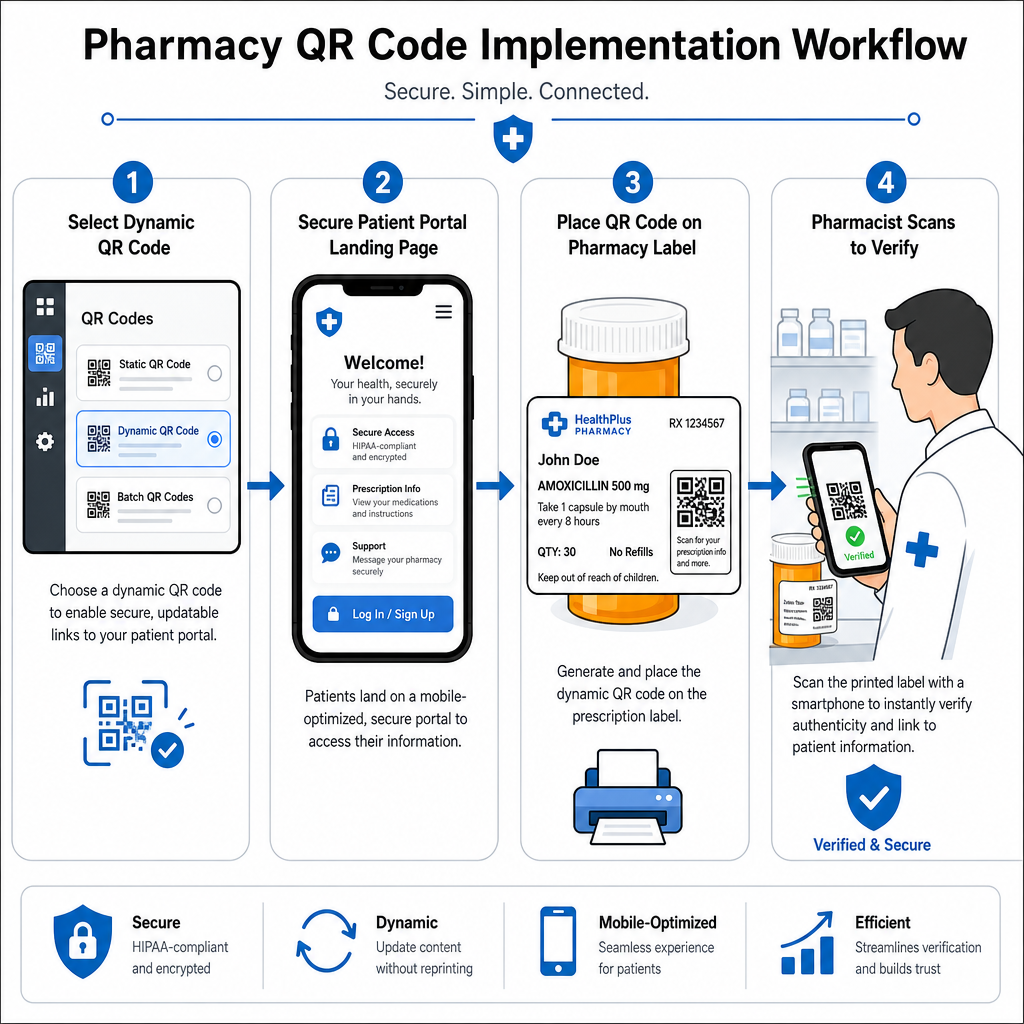
- Виберіть тип коду: Обирайте динамічні QR-коди для веб-посилань, щоб ви могли оновлювати освітні PDF-файли, URL-адреси відео або посилання на портали без повторного друку фізичних етикеток контейнерів.
- Налаштуйте безпечні цільові сторінки: Підключіть цільові посилання до мобільно-оптимізованих, HIPAA-сумісних порталів пацієнтів або публічних довідників з ліків.
- Інтегруйте шаблони етикеток: Додайте згенерований QR-код у шаблони термального друку вашої системи управління аптекою, переконавшись, що розмір, тихі зони та параметри контрасту зафіксовані.
- Навчання персоналу аптеки: Навчіть фармацевтів і техніків вказувати на QR-код під час консультацій з пацієнтами, заохочуючи пацієнтів сканувати свою упаковку вдома.
- Перевірка можливості сканування: Виконуйте рутинні перевірки якості на пунктах відпуску за допомогою веб-інтерфейсу Зчитувач QR-кодів для підтвердження чіткості коду перед передачею.
Дослідження того, як інші сектори керують сканованою упаковкою, може надати додаткові відомості про робочі процеси в різних випадках використання в галузі.
Додавання сканованих QR-кодів до етикеток рецептів долає розрив між фізичною упаковкою ліків та життєво важливими цифровими ресурсами охорони здоров'я. Дотримуючись належних стандартів друку, захищаючи конфіденційність пацієнтів та керуючи редагованими посиланнями призначення, ваша аптека може зменшити адміністративні помилки та покращити загальні результати для пацієнтів. Почніть створювати сумісні, скановані робочі процеси для етикеток рецептів з Pageloot вже сьогодні.
Поширені запитання
Ні. Федеральні правила США та вказівки FDA не вимагають QR-кодів, що орієнтовані на споживача, на етикетках контейнерів для рецептурних препаратів. Обов'язкові елементи етикетки (такі як ім'я пацієнта, вказівки щодо ліків та дані аптеки) все ще повинні бути надруковані безпосередньо у зрозумілому для людини тексті. QR-коди залишаються добровільним, допоміжним інструментом для покращення освіти пацієнтів та цифрового доступу.
Аптеки повинні уникати кодування незашифрованої захищеної медичної інформації (ЗМІ) – такої як імена пацієнтів, дати народження або деталі ліків – безпосередньо в шаблоні QR-коду. Замість цього, використовуйте безпечні динамічні посилання, що ведуть до зашифрованих, захищених паролем пацієнтських порталів, які вимагають автентифікації пацієнта перед відображенням персональних даних.
Рекомендований мінімальний розмір друку для етикеток рецептів становить 0.8″ x 0.8″ (2 см x 2 см). Хоча технічно коди можуть скануватися розміром до 1 см x 1 см на невеликих упаковках, більші розміри з сильним колірним контрастом та чіткими тихими зонами забезпечують надійне сканування всіма камерами мобільних пристроїв.