Adakah pesakit anda menghadapi kesukaran membaca teks kecil pada botol preskripsi atau terlepas arahan dos yang penting? Ketidakpatuhan ubat dan kesilapan pentadbiran menyebabkan risiko kesihatan yang boleh dicegah dan perundingan farmasi yang kerap. Menambah kod QR yang boleh diimbas pada label preskripsi memberikan pesakit akses segera kepada panduan ubat digital, arahan audio dan portal pengisian semula.
Apakah Maklumat yang Boleh Diberikan oleh Kod QR Preskripsi?
Label bekas preskripsi mempunyai ruang fizikal yang terhad. Peraturan persekutuan dan negeri memerlukan teks bercetak mandatori, termasuk nama farmasi, nombor preskripsi, butiran preskriber, nama pesakit, dan arahan dos. Kod tindak balas pantas (QR) bertindak sebagai lanjutan digital label, menyampaikan maklumat tambahan tanpa memenuhkan botol.
Farmasi boleh menggunakan kod QR preskripsi untuk menyampaikan sumber yang berhadapan dengan pesakit, seperti:
- Panduan Ubat Digital: Pautkan pesakit terus ke risalah maklumat pesakit elektronik (e-risalah) atau dokumen yang diformatkan menggunakan Cara buat QR code untuk dokumen PDF.
- Format Audio dan Boleh Diakses: Bantu pesakit cacat penglihatan mengimbas pakej untuk mendengar arahan dos yang diucapkan atau mengakses teks cetakan besar dan pilihan braille elektronik.
- Video Demonstrasi: Tunjukkan tutorial video langkah demi langkah untuk sistem penghantaran ubat yang kompleks, seperti pen insulin, penyedut, atau peranti suntikan sendiri.
- Portal Pengisian Semula: Arahkan pesakit terus ke portal pengisian semula dalam talian farmasi untuk menghantar permintaan pembaharuan dengan cepat.
- Maklumat Teks Luar Talian: Simpan amaran teks biasa, nombor hubungan kecemasan, atau arahan penyimpanan terus dalam matriks kod menggunakan Penjana tulisan QR.
Faedah Utama untuk Keselamatan Pesakit dan Kepatuhan Ubat
Ketidakpatuhan ubat adalah isu kesihatan awam yang utama. Penyelidikan menunjukkan bahawa kira-kira 50% pesakit gagal mengambil ubat mereka seperti yang ditetapkan, menyebabkan lebih 125,000 kematian yang boleh dicegah setiap tahun. Meletakkan maklumat yang boleh diimbas pada pembungkusan preskripsi membantu menyelesaikan punca-punca biasa kesilapan pentadbiran dan kekeliruan.
Mengurangkan Kesilapan Ubat
Label botol standard menggunakan fon kecil yang sukar dibaca oleh orang dewasa yang lebih tua atau individu cacat penglihatan. Penyelidikan eksperimen yang membandingkan pembungkusan dilengkapi kod QR dengan label botol standard mendapati bahawa akses kepada butiran digital yang boleh diimbas menghasilkan lebih banyak keputusan pengurusan kendiri yang betul di seluruh kumpulan pesakit dewasa muda dan lebih tua.
Meningkatkan Kebolehcapaian
Menyediakan butiran preskripsi yang boleh diakses adalah penting untuk keselamatan pesakit. Apabila dikodkan dengan teks yang boleh diakses atau dihubungkan ke halaman pendaratan yang mesra pembaca skrin, kod QR membolehkan pesakit dengan penglihatan rendah untuk mengesahkan nama ubat, jadual, dan nota amaran secara bebas.
Menyokong Penjejakan Kepatuhan dan Penglibatan
Penyelesaian penjejakan pengambilan digital menggunakan kod pembungkusan yang boleh diimbas telah menunjukkan kebolehlaksanaan klinikal yang tinggi. Ujian klinikal menunjukkan bahawa pelaporan kendiri pesakit melalui imbasan QR mencapai kira-kira ketepatan 90.1% berbanding dengan kiraan pil manual. Mengintegrasikan pembungkusan yang boleh diimbas ke dalam sistem yang lebih luas sistem kod QR hospital dan penjagaan kesihatan meningkatkan komunikasi pesakit dan pengurusan penjagaan jangka panjang. Untuk mengetahui lebih lanjut mengenai aplikasi klinikal moden, semak komprehensif kami panduan kepada kod QR penjagaan kesihatan.
Menyampaikan Arahan Pesakit Terkini Perlu mengemas kini panduan ubat atau sumber digital tanpa mencetak semula label fizikal? Gunakan Penjana dynamic QR code untuk memastikan pautan destinasi anda boleh diedit dan tepat.
Pematuhan Peraturan dan Perlindungan HIPAA untuk Farmasi
Mengintegrasikan alat digital ke dalam aliran kerja farmasi memerlukan perhatian yang ketat terhadap piawaian peraturan dan undang-undang privasi pesakit.
| Bidang Keperluan | Standard / Garis Panduan | Tindakan Utama Farmasi |
|---|---|---|
| Peraturan FDA | Maklumat pesakit sukarela | Anggap kod QR sebagai tambahan sukarela; jangan sekali-kali menggantikan teks label bertulis yang diperlukan. |
| Pensekuelan DSCSA | Kod bar Matriks Data 2D GS1 | Kekalkan kod bar rantaian bekalan DSCSA secara berasingan daripada kod QR pengguna. |
| Peraturan Privasi HIPAA | Maklumat Kesihatan Terlindung (PHI) | Jangan sekali-kali mengekod nama pesakit, tarikh lahir, atau keadaan secara langsung ke dalam kod. |
| Kawalan Akses | Perlindungan pengesahan | Memerlukan pengesahan log masuk pesakit untuk sebarang destinasi QR yang memaparkan data kesihatan peribadi. |
Membezakan Kod QR daripada Kod Bar Rantaian Bekalan
Di bawah Akta Keselamatan Rantaian Bekalan Dadah (DSCSA), kod bar Matriks Data 2D GS1 bersiri adalah wajib pada pembungkusan borong untuk penjejakan pengedar. Ini adalah kod bar 2D teknikal yang dikawal selia, bertujuan untuk pengimbas rantaian bekalan. Kod QR berhadapan pesakit, sebaliknya, adalah alat sukarela yang direka untuk telefon pintar pengguna untuk menyampaikan kandungan pendidikan dan operasi.
Menguatkuasakan Piawaian Privasi dan Keselamatan HIPAA
Farmasi adalah entiti yang dilindungi HIPAA. Apabila menggunakan kod QR pada bekas preskripsi:
- Elakkan Pengekodan PHI Mentah: Jangan sekali-kali membenamkan pengecam pesakit yang tidak disulitkan, nombor keselamatan sosial, atau diagnosis tertentu di dalam kod statik.
- Gunakan Destinasi Web Selamat: Arahkan kod QR ke laman web HTTPS selamat yang disokong oleh kawalan akses yang ketat, pengesahan berbilang faktor, dan pangkalan data yang disulitkan.
- Hapuskan Penjejakan Tidak Terkawal: Pastikan halaman pendaratan yang berhadapan pesakit tidak menggunakan piksel analitik pihak ketiga yang boleh mendedahkan data secara tidak dibenarkan.
- Bekerjasama dengan Vendor yang Patuh: Pilih platform perisian yang menguatkuasakan protokol keselamatan data dan melaksanakan Perjanjian Rakan Niaga (BAA). Untuk pecahan lengkap piawaian undang-undang, rujuk panduan kami mengenai undang-undang dan peraturan privasi kod QR.
Amalan Terbaik untuk Mencetak Label Preskripsi Boleh Imbas
Label preskripsi sering terdedah kepada pengendalian, kelembapan, dan batasan ruang yang ketat. Jika kod yang dicetak gagal diimbas, kepercayaan pesakit akan berkurangan dan panggilan sokongan farmasi akan meningkat.
Saiz Kod yang Disyorkan
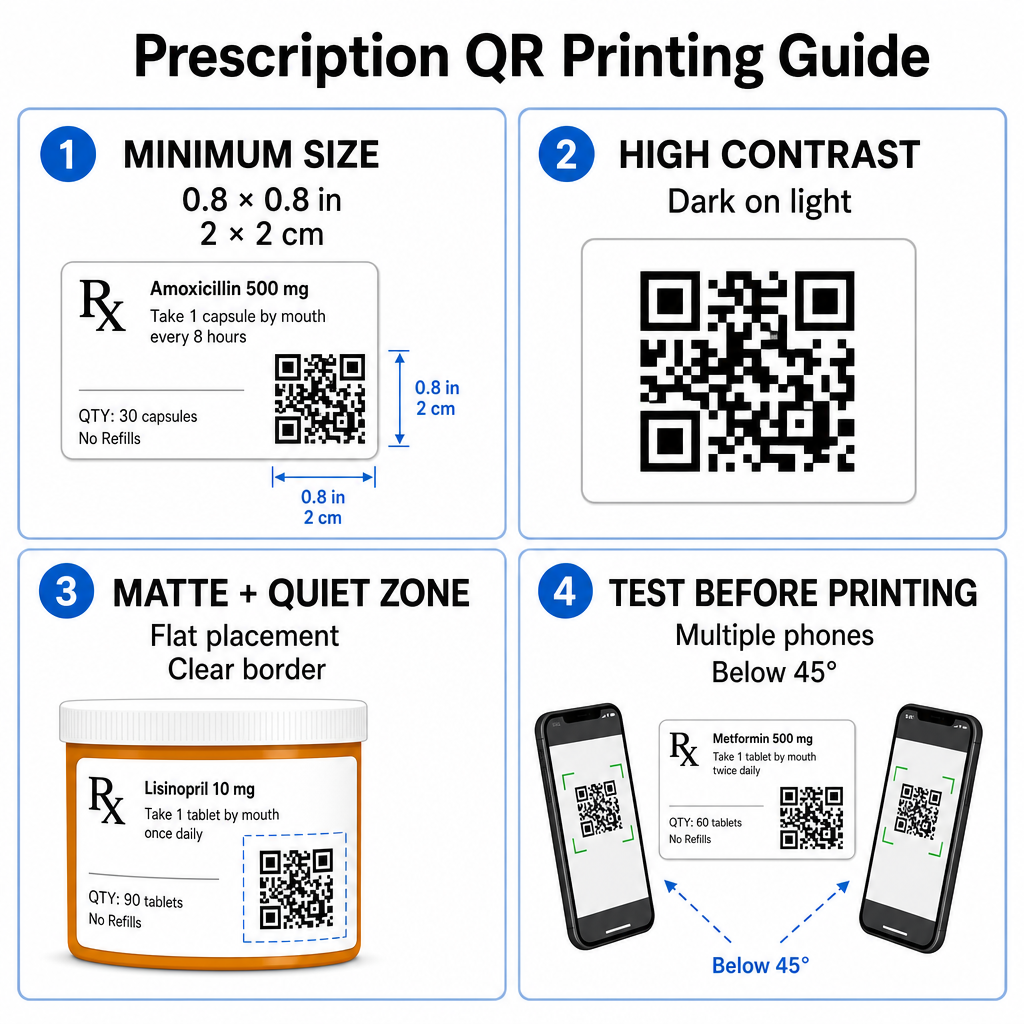
Permukaan vial preskripsi adalah terhad. Kekalkan saiz standard sekurang-kurangnya 0.8″ x 0.8″ (2 cm x 2 cm) untuk pengimbasan yang boleh dipercayai. Pada bungkusan yang sangat kecil, saiz cetakan minimum mutlak ialah 1 cm x 1 cm boleh digunakan, dengan syarat kepadatan data yang dikodkan kekal rendah. Anda boleh menyemak nisbah penskalaan tepat dalam panduan saiz kod QR.
Kontras Warna dan Bahan Permukaan
Pencetak terma yang biasa digunakan di farmasi runcit memerlukan penentukuran khusus untuk kebolehimbasan yang optimum:
- Kontras Tinggi: Cetak corak gelap pejal (sebaik-baiknya hitam) di atas latar belakang terang yang bersih dan legap.
- Kemasan Matt: Elakkan salutan label berkilat atau botol plastik jernih yang memantulkan cahaya bilik dan membutakan sensor kamera. Jika bekas berkilat atau lutsinar tidak dapat dielakkan, cetak lapisan matt putih terus di bawah kod QR.
- Pengurusan Kelengkungan: Letakkan kod QR pada bahagian paling rata pada botol atau kotak untuk mengelakkan herotan geometri.
Untuk menilai bagaimana dakwat terma, substrat, dan bahan label mempengaruhi kelajuan imbasan, baca analisis terperinci kami mengenai bagaimana teknik percetakan mempengaruhi kebolehimbasan QR.
Zon Tenang dan Ujian Pengesahan
Sentiasa kekalkan sempadan luar yang jelas – dikenali sebagai zon tenang – di sekeliling kod untuk memisahkannya daripada teks label dan sempadan sekeliling. Uji kod bercetak merentasi pelbagai peranti telefon pintar, sudut (di bawah 45 darjah), dan keadaan pencahayaan sebelum percetakan besar-besaran. Semak teras kami amalan terbaik untuk kebolehbacaan kod QR untuk memastikan susun atur label anda berfungsi dengan andal.
Sahkan Kebolehimbasan Label Bercetak Anda Ingin menguji sama ada pembungkusan preskripsi anda dapat diimbas dengan cepat pada semua kamera peranti? Uji reka bentuk label bercetak anda serta-merta dengan percuma pengimbas kod QR dalam talian.
Melaksanakan Kod QR Preskripsi dalam Aliran Kerja Farmasi
Melancarkan label yang boleh diimbas merentasi operasi farmasi memerlukan pendekatan yang mudah dan berstruktur:
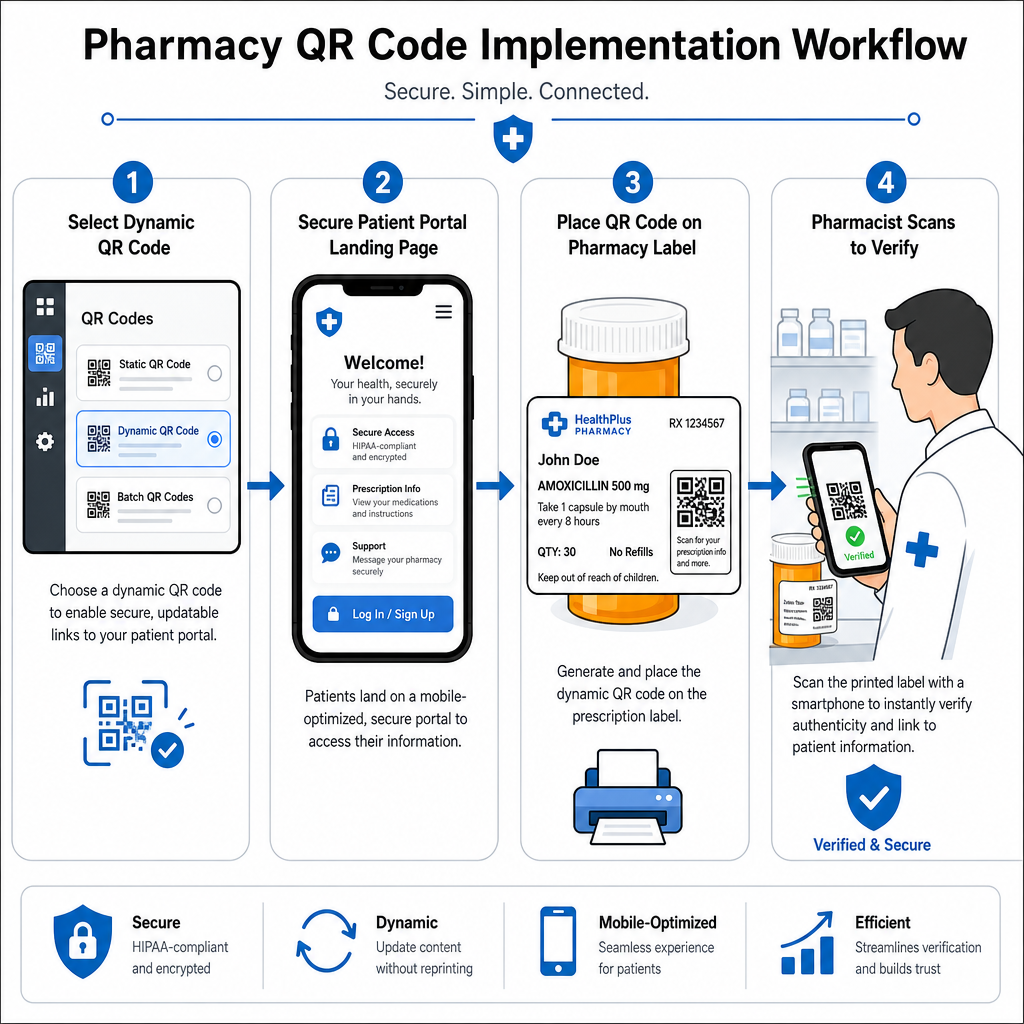
- Pilih Jenis Kod: Pilih kod QR dinamik untuk pautan web supaya anda boleh mengemas kini PDF pendidikan, URL video, atau pautan portal tanpa mencetak semula label bekas fizikal.
- Konfigurasi Halaman Pendaratan Selamat: Sambungkan pautan destinasi ke portal pesakit yang dioptimumkan untuk mudah alih, mematuhi HIPAA atau panduan ubat-ubatan awam.
- Integrasikan Templat Label: Tambahkan kod QR yang dijana ke dalam templat cetakan terma sistem pengurusan farmasi anda, memastikan saiz, zon senyap, dan parameter kontras dikunci.
- Latih Kakitangan Farmasi: Didik ahli farmasi dan juruteknik untuk menunjukkan kod QR semasa konsultasi pesakit, menggalakkan pesakit mengimbas botol mereka di rumah.
- Sahkan Kebolehimbasan: Lakukan pemeriksaan kualiti rutin di stesen pembekalan menggunakan berasaskan web Pembaca kod QR untuk mengesahkan kejelasan kod sebelum serahan.
Meneroka cara sektor lain mengurus pembungkusan boleh imbas boleh memberikan pandangan aliran kerja tambahan merentasi pelbagai kes penggunaan industri.
Menambahkan kod QR boleh imbas pada label preskripsi merapatkan jurang antara pembungkusan ubat fizikal dan sumber kesihatan digital yang penting. Dengan mematuhi piawaian percetakan yang betul, melindungi privasi pesakit, dan mengurus pautan destinasi yang boleh diedit, farmasi anda boleh mengurangkan ralat pentadbiran dan meningkatkan hasil pesakit secara keseluruhan. Mula mencipta aliran kerja label preskripsi yang patuh dan boleh imbas dengan Pageloot hari ini.
Soalan lazim
Tidak. Peraturan persekutuan A.S. dan garis panduan FDA tidak mewajibkan kod QR yang berhadapan dengan pengguna pada label bekas preskripsi. Elemen label mandatori (seperti nama pesakit, arahan ubat, dan butiran farmasi) masih perlu dicetak secara langsung dalam teks yang boleh dibaca manusia. Kod QR kekal sebagai alat sukarela, tambahan untuk meningkatkan pendidikan pesakit dan akses digital.
Farmasi mesti mengelakkan pengekodan maklumat kesihatan terlindung (PHI) yang tidak disulitkan – seperti nama pesakit, tarikh lahir, atau butiran ubat – secara langsung dalam corak kod QR. Sebaliknya, gunakan pautan dinamik yang selamat yang menunjuk ke portal pesakit yang disulitkan dan dilindungi kata laluan yang memerlukan pengesahan pesakit sebelum memaparkan data peribadi.
Saiz cetakan minimum yang disyorkan untuk label preskripsi ialah 0.8″ x 0.8″ (2 cm x 2 cm). Walaupun kod secara teknikalnya boleh diimbas sekecil 1 cm x 1 cm pada pakej kecil, dimensi yang lebih besar dengan kontras warna yang kuat dan zon senyap yang jelas memastikan pengimbasan yang boleh dipercayai merentasi semua kamera peranti mudah alih.