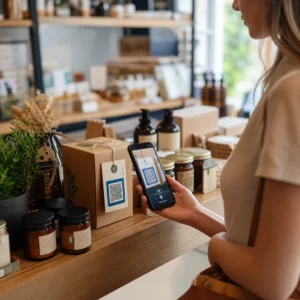
Sliter pasientene dine med å lese liten tekst på reseptflasker eller går de glipp av avgjørende doseringsinstruksjoner? Manglende medisinoverholdelse og administrasjonsfeil fører til forebyggbare helserisikoer og hyppige konsultasjoner med apoteket. Ved å legge til skannbare QR-koder på reseptetiketter får pasienter umiddelbar tilgang til digitale medisineringsguider, lydinstruksjoner og påfyllingsportaler.
Hvilken informasjon kan QR-koder for resepter gi?
Etiketter på reseptbeholdere har begrenset fysisk plass. Føderale og statlige forskrifter krever obligatorisk trykt tekst, inkludert apotekets navn, reseptnummer, forskriverdetaljer, pasientens navn og doseringsinstruksjoner. En QR-kode (quick-response) fungerer som en digital utvidelse av etiketten, og leverer tilleggsinformasjon uten å overfylle flasken.
Apoteker kan bruke resept-QR-koder for å levere pasientrettede ressurser, slik som:
- Digitale medisineringsguider: Koble pasienter direkte til elektroniske pasientinformasjonsbrosjyrer (e-brosjyrer) eller dokumenter formatert med en Lag QR-kode for PDF.
- Lyd og tilgjengelige formater: Hjelp synshemmede pasienter med å skanne pakken for å høre muntlige doseringsinstruksjoner eller få tilgang til stor skrift og elektroniske blindeskriftalternativer.
- Demonstrasjonsvideoer: Vis trinnvise videoopplæringer for komplekse medikamentleveringssystemer, som insulinpenner, inhalatorer eller selvinjeksjonsenheter.
- Påfyllingsportaler: Led pasienter direkte til apotekets online påfyllingsportaler for raskt å sende inn fornyelsesanmodninger.
- Frakoblet tekstinformasjon: Lagre enkle tekstadvarsler, nødtelefonnumre eller lagringsinstruksjoner direkte i kodematrisen ved hjelp av en Lag QR-kode fra tekst.
Nøkkelgevinster for pasientsikkerhet og medisinoverholdelse
Manglende medisinoverholdelse er et stort folkehelseproblem. Forskning viser at omtrent 50 % av pasientene unnlater å ta medisinene sine som foreskrevet, noe som fører til over 125 000 forebyggbare dødsfall hvert år. Ved å plassere skannbar informasjon på reseptemballasjen bidrar man til å løse vanlige årsaker til administrasjonsfeil og forvirring.
Redusere medisinfeil
Standard flaskeetiketter bruker liten skrift som er vanskelig for eldre voksne eller synshemmede personer å lese. Eksperimentell forskning som sammenligner QR-kode-utstyrt emballasje med standard flaskeetiketter, fant at tilgang til skannbare digitale detaljer resulterte i betydelig flere korrekte selvmedisineringsbeslutninger på tvers av både yngre og eldre pasientgrupper.
Forbedring av tilgjengelighet
Å tilby tilgjengelige reseptdetaljer er avgjørende for pasientsikkerheten. Når de er kodet med tilgjengelig tekst eller koblet til skjermleservennlige landingssider, gjør QR-koder det mulig for pasienter med nedsatt syn å verifisere legemiddelnavn, doseringsplaner og forsiktighetsmerknader uavhengig.
Støtte for sporbarhet av etterlevelse og engasjement
Digitale inntakssporingsløsninger som bruker skannbare emballasjekoder har vist høy klinisk gjennomførbarhet. Kliniske studier viser at pasientenes selvrapportering via QR-skanning oppnår omtrent 90,1 % nøyaktighet sammenlignet med manuell pilletelling. Integrering av skannbar emballasje i bredere sykehus- og helsevesenets QR-kodesystemer forbedrer pasientkommunikasjon og langsiktig omsorgsstyring. For å lære mer om moderne kliniske applikasjoner, se vår omfattende guide til QR-koder i helsevesenet.
Lever oppdaterte pasientinstruksjoner Trenger du å oppdatere medisineringsguider eller digitale ressurser uten å trykke nye fysiske etiketter? Bruk Dynamisk QR-kode generator for å holde destinasjonslenkene dine redigerbare og nøyaktige.
Overholdelse av regelverk og HIPAA-sikkerhetstiltak for apotek
Integrering av digitale verktøy i apotekets arbeidsflyt krever streng oppmerksomhet til regulatoriske standarder og lover om pasientvern.
| Kravområde | Standard / Retningslinje | Viktig apotekhandling |
|---|---|---|
| FDA-forskrifter | Frivillig pasientinformasjon | Behandle QR-koder som frivillige tillegg; erstatt aldri påkrevd skriftlig etiketttekst. |
| DSCSA-serialisering | GS1 2D Data Matrix strekkoder | Vedlikehold DSCSA forsyningskjede-strekkoder adskilt fra forbruker-QR-koder. |
| HIPAA personvernregel | Beskyttet helseinformasjon (PHI) | Krypter aldri pasientnavn, fødselsdatoer eller tilstander direkte inn i koden. |
| Tilgangskontroll | Autentiseringssikkerhet | Krev pasientpåloggingsautentisering for alle QR-destinasjoner som viser personlige helsedata. |
Skille QR-koder fra strekkoder for forsyningskjeden
I henhold til Drug Supply Chain Security Act (DSCSA) er serialiserte GS1 2D Data Matrix-strekkoder obligatoriske på engrospakninger for distributørsporing. Dette er tekniske, regulerte 2D-strekkoder ment for skannere i forsyningskjeden. Pasientrettede QR-koder er derimot frivillige verktøy designet for forbrukeres smarttelefoner for å levere pedagogisk og operasjonelt innhold.
Håndheve HIPPA personvern- og sikkerhetsstandarder
Apotek er HIPAA-dekket. Ved bruk av QR-koder på reseptbeholdere:
- Unngå rå PHI-koding: Aldri bygg inn u krypterte pasientidentifikatorer, personnumre eller spesifikke diagnoser i en statisk kode.
- Bruk sikre webdestinasjoner: Pek QR-koder til sikre HTTPS-nettsteder støttet av strenge tilgangskontroller, multifaktorautentisering og krypterte databaser.
- Eliminer uregulert sporing: Sørg for at pasientrettede landingssider ikke bruker tredjeparts analysepiksler som ulovlig kan avsløre data.
- Samarbeid med kompatible leverandører: Velg programvareplattformer som håndhever datasikkerhetsprotokoller og utfører Business Associate Agreements (BAA). For en komplett oversikt over juridiske standarder, se vår veiledning om Personvernlovgivning og forskrifter for QR-koder.
Beste praksis for utskrift av skannbare reseptetiketter
Reseptetiketter utsettes ofte for håndtering, fuktighet og trange plassbegrensninger. Hvis en trykt kode ikke kan skannes, reduseres pasienttilliten og antall støttesamtaler til apoteket øker.
Anbefalt kodestørrelse
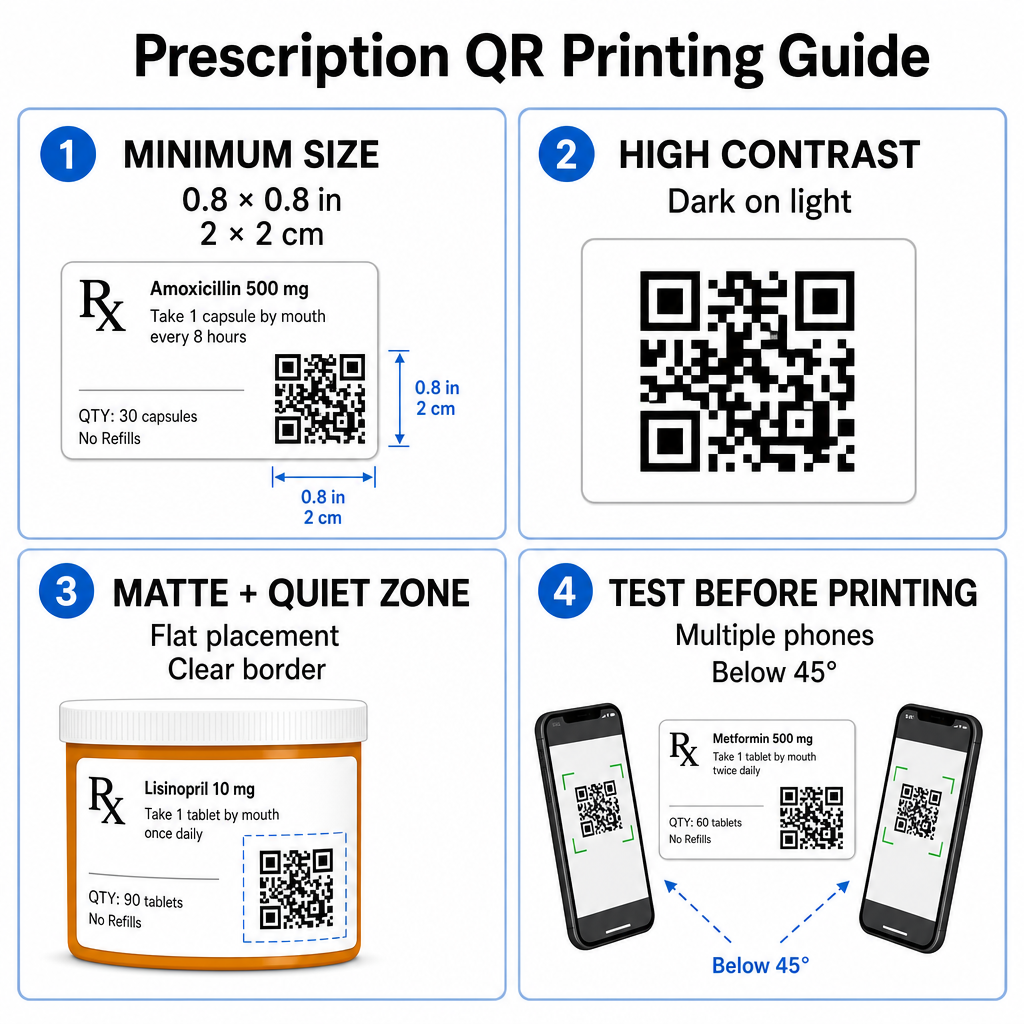
Overflatene på reseptglass er begrenset. Oppretthold en standardstørrelse på minst 0.8" x 0.8" (2 cm x 2 cm) for pålitelig skanning. På svært små pakker er en absolutt minimumsstørrelse på 1 cm x 1 cm kan brukes, forutsatt at datatettheten forblir lav. Du kan sjekke eksakte skaleringsforhold i vår størrelsesguide for QR-koder.
Fargekontrast og Overflatematerialer
Termiske skrivere som vanligvis brukes i apoteker krever spesifikk kalibrering for optimal skannbarhet:
- Høy kontrast: Skriv ut solide mørke mønstre (helst svarte) over rene, ugjennomsiktige lyse bakgrunner.
- Matte overflater: Unngå blanke etikettbelegg eller klare plastampuller som reflekterer rombelysning og blender kamerasensorer. Hvis skinnende eller gjennomsiktige beholdere er uunngåelige, skriv ut et hvitt matt lag direkte under QR-koden.
- Krummingshåndtering: Plasser QR-koden på den flateste delen av flasken eller esken for å forhindre geometrisk forvrengning.
For å evaluere hvordan termisk blekk, underlag og etikettmaterialer påvirker skannehastigheter, les vår detaljerte analyse om hvordan utskriftsteknikker påvirker QR-skannbarhet.
Stillesoner og Verifiseringstesting
Oppretthold alltid en tydelig ytre kant – kjent som en stillesone – rundt koden for å skille den fra omgivende etiketttekst og kanter. Test utskrevne koder på tvers av flere smarttelefonenheter, vinkler (under 45 grader) og lysforhold før masseutskrift. Gjennomgå våre kjerne- beste praksis for lesbarhet av QR-koder for å sikre at etikettoppsettet ditt fungerer pålitelig.
Verifiser skannbarheten til den trykte etiketten din Vil du teste om reseptemballasjen din skanner raskt på alle enhetskameraer? Test dine trykte etikettutforminger umiddelbart med den gratis online QR-kodeskanner.
Implementering av resept-QR-koder i apotekarbeidsflyter
Utplassering av skannbare etiketter på tvers av apotekets drift krever en enkel, strukturert tilnærming:
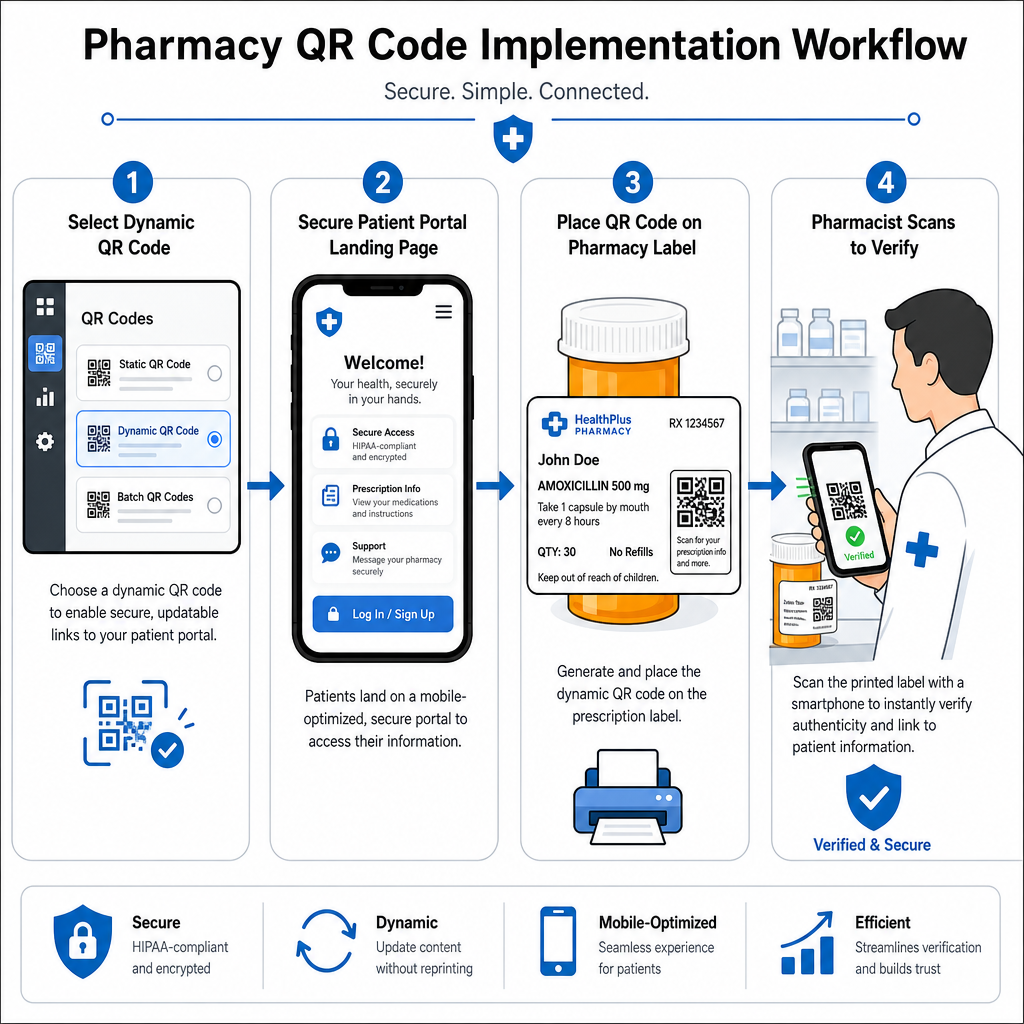
- Velg kodetype: Velg dynamiske QR-koder for nettlenker slik at du kan oppdatere pedagogiske PDF-er, video-URL-er eller portalenker uten å trykke opp fysiske beholderetiketter på nytt.
- Konfigurer sikre landingssider: Koble destinasjonslenker til mobiloptimaliserte, HIPAA-kompatible pasientportaler eller offentlige medisinveiledninger.
- Integrer etikettmaler: Legg til den genererte QR-koden i apotekets styringssystems termiske utskriftsmaler, og sørg for at størrelse, stille soner og kontrastparametere er låst.
- Tren apotekansatte: Utdann farmasøyter og teknikere til å peke ut QR-koden under pasientkonsultasjoner, og oppmuntre pasienter til å skanne flasken sin hjemme.
- Bekreft skannbarhet: Utfør rutinemessige kvalitetskontroller ved utleveringsstasjoner ved hjelp av en nettbasert QR-kodeleser for å bekrefte kodens klarhet før overlevering.
Å utforske hvordan andre sektorer håndterer skannbar emballasje kan gi ytterligere innsikt i arbeidsflyten på tvers av ulike bransjeapplikasjoner.
Å legge til skannbare QR-koder på reseptetiketter bygger bro mellom fysisk medisinemballasje og viktige digitale helseressurser. Ved å følge riktige utskriftsstandarder, beskytte pasientens personvern og administrere redigerbare destinasjonslenker, kan apoteket ditt redusere administrasjonsfeil og forbedre de generelle pasientresultatene. Begynn å lage kompatible, skannbare arbeidsflyter for reseptetiketter med Pageloot i dag.
Ofte stilte spørsmål
Nei. Amerikanske føderale forskrifter og FDA-retningslinjer krever ikke forbrukerrettede QR-koder på reseptetiketter. Obligatoriske etikettelementer (som pasientnavn, legemiddelinstruksjoner og apotekdetaljer) må fortsatt skrives ut direkte i menneskelesbar tekst. QR-koder forblir et frivillig, supplerende verktøy for å forbedre pasientopplæring og digital tilgang.
Apotek må unngå å kode ukryptert beskyttet helseinformasjon (PHI) – slik som pasientnavn, fødselsdatoer eller legemiddeldetaljer – direkte inne i QR-koden. Bruk i stedet sikre dynamiske lenker som peker til krypterte, passordbeskyttede pasientportaler som krever pasientautentisering før personlige data vises.
Anbefalt minimum utskriftsstørrelse for reseptetiketter er 0,8″ x 0,8″ (2 cm x 2 cm). Selv om koder teknisk sett kan skannes så små som 1 cm x 1 cm på små pakker, sikrer større dimensjoner med sterk fargekontrast og klare stille soner pålitelig skanning på tvers av alle mobilkameraer.