ผู้ป่วยของคุณประสบปัญหาในการอ่านข้อความบนฉลากยาที่มีขนาดเล็ก หรือพลาดคำแนะนำการใช้ยาที่สำคัญหรือไม่? การไม่ปฏิบัติตามคำแนะนำการใช้ยาและข้อผิดพลาดในการบริหารยา นำไปสู่ความเสี่ยงด้านสุขภาพที่ป้องกันได้ และการปรึกษาเภสัชกรบ่อยครั้ง การเพิ่มรหัส QR ที่สแกนได้บนฉลากยา ช่วยให้ผู้ป่วยเข้าถึงคู่มือการใช้ยาแบบดิจิทัล คำแนะนำเสียง และพอร์ทัลการเติมยาได้ทันที
รหัส QR บนฉลากยาสามารถให้ข้อมูลอะไรได้บ้าง?
ฉลากภาชนะบรรจุยามีพื้นที่จำกัด ข้อบังคับของรัฐบาลกลางและรัฐกำหนดให้มีข้อความที่พิมพ์บังคับ รวมถึงชื่อร้านขายยา, หมายเลขใบสั่งยา, รายละเอียดของผู้สั่งยา, ชื่อผู้ป่วย และคำแนะนำการใช้ยา รหัสคิวอาร์ (QR) ทำหน้าที่เป็นส่วนขยายดิจิทัลของฉลากยา โดยให้ข้อมูลเพิ่มเติมโดยไม่ทำให้ขวดบรรจุยาดูรก
ร้านขายยาสามารถใช้รหัส QR บนฉลากยาเพื่อนำเสนอแหล่งข้อมูลสำหรับผู้ป่วย เช่น:
- คู่มือการใช้ยาแบบดิจิทัล: เชื่อมโยงผู้ป่วยโดยตรงไปยังเอกสารข้อมูลผู้ป่วยอิเล็กทรอนิกส์ (e-leaflets) หรือเอกสารที่จัดรูปแบบโดยใช้ แปลงไฟล์ PDF เป็น QR Code ฟรี.
- รูปแบบเสียงและรูปแบบที่เข้าถึงได้: ช่วยให้ผู้ป่วยที่มีความบกพร่องทางการมองเห็นสแกนบรรจุภัณฑ์เพื่อฟังคำแนะนำการใช้ยาด้วยเสียง หรือเข้าถึงข้อความขนาดใหญ่และตัวเลือกอักษรเบรลล์อิเล็กทรอนิกส์
- วิดีโอสาธิตการใช้งาน: แสดงวิดีโอสอนการใช้งานทีละขั้นตอนสำหรับระบบการนำส่งยาที่ซับซ้อน เช่น ปากกาอินซูลิน, ยาพ่น หรืออุปกรณ์ฉีดเอง
- พอร์ทัลการเติมยา: นำผู้ป่วยตรงไปยังพอร์ทัลการเติมยาออนไลน์ของร้านขายยา เพื่อส่งคำขอต่ออายุได้อย่างรวดเร็ว
- ข้อมูลข้อความออฟไลน์: จัดเก็บคำเตือนข้อความธรรมดา, หมายเลขติดต่อฉุกเฉิน, หรือคำแนะนำในการจัดเก็บโดยตรงในเมทริกซ์โค้ดโดยใช้ สร้างคิวอาร์โค้ด ข้อความ.
ประโยชน์หลักสำหรับความปลอดภัยของผู้ป่วยและการปฏิบัติตามคำแนะนำการใช้ยา
การไม่ปฏิบัติตามคำแนะนำการใช้ยาเป็นปัญหาสุขภาพสาธารณะที่สำคัญ การวิจัยแสดงให้เห็นว่าประมาณ ผู้ป่วย 50% ไม่สามารถรับประทานยาตามที่แพทย์สั่งได้ทำให้มีผู้เสียชีวิตที่ป้องกันได้มากกว่า 125,000 รายในแต่ละปี การวางข้อมูลที่สามารถสแกนได้บนบรรจุภัณฑ์ยาตามใบสั่งแพทย์ช่วยแก้ไขแหล่งที่มาทั่วไปของข้อผิดพลาดในการบริหารยาและความสับสน
ลดข้อผิดพลาดในการใช้ยา
ฉลากขวดยามาตรฐานมักใช้ฟอนต์ขนาดเล็กที่อ่านยากสำหรับผู้สูงอายุหรือผู้ที่มีความบกพร่องทางการมองเห็น งานวิจัยเชิงทดลองที่เปรียบเทียบบรรจุภัณฑ์ที่มี QR โค้ดกับฉลากขวดยามาตรฐานพบว่าการเข้าถึงข้อมูลดิจิทัลที่สามารถสแกนได้ส่งผลให้มีการตัดสินใจใช้ยาด้วยตนเองได้อย่างถูกต้องมากขึ้นอย่างมีนัยสำคัญในกลุ่มผู้ป่วยทั้งวัยหนุ่มสาวและผู้สูงอายุ
การปรับปรุงการเข้าถึง
การให้รายละเอียดใบสั่งยาที่เข้าถึงได้เป็นสิ่งสำคัญต่อความปลอดภัยของผู้ป่วย เมื่อมีการเข้ารหัสด้วยข้อความที่เข้าถึงได้หรือเชื่อมโยงไปยังหน้าเว็บที่เข้ากันได้กับโปรแกรมอ่านหน้าจอ QR โค้ดจะช่วยให้ผู้ป่วยที่มีสายตาเลือนรางสามารถตรวจสอบชื่อยา ตารางการใช้ยา และข้อควรระวังได้ด้วยตนเอง
สนับสนุนการติดตามการปฏิบัติตามแผนการรักษาและการมีส่วนร่วม
โซลูชันการติดตามการบริโภคยาแบบดิจิทัลที่ใช้รหัสบรรจุภัณฑ์ที่สามารถสแกนได้แสดงให้เห็นถึงความเป็นไปได้ทางคลินิกในระดับสูง การทดลองทางคลินิกแสดงให้เห็นว่าการรายงานผลด้วยตนเองของผู้ป่วยผ่านการสแกน QR โค้ดมีความแม่นยำประมาณ ความแม่นยำ 90.1% เมื่อเทียบกับการนับยาด้วยตนเอง การรวมบรรจุภัณฑ์ที่สแกนได้เข้ากับระบบที่กว้างขึ้น ระบบ QR โค้ดของโรงพยาบาลและบริการด้านสุขภาพ ช่วยเพิ่มประสิทธิภาพการสื่อสารกับผู้ป่วยและการจัดการการดูแลระยะยาว หากต้องการเรียนรู้เพิ่มเติมเกี่ยวกับการประยุกต์ใช้ทางคลินิกที่ทันสมัย โปรดดู คู่มือ QR โค้ดสำหรับบริการด้านสุขภาพ.
นำส่งคำแนะนำสำหรับผู้ป่วยที่ทันสมัยอยู่เสมอ ต้องการอัปเดตคู่มือการใช้ยาหรือแหล่งข้อมูลดิจิทัลโดยไม่ต้องพิมพ์ฉลากใหม่ใช่หรือไม่? ใช้ สร้าง Dynamic QR Code เพื่อรักษาลิงก์ปลายทางของคุณให้สามารถแก้ไขได้และแม่นยำ
การปฏิบัติตามข้อกำหนดและมาตรการป้องกัน HIPAA สำหรับร้านขายยา
การรวมเครื่องมือดิจิทัลเข้ากับขั้นตอนการทำงานของร้านขายยาต้องให้ความสำคัญอย่างเคร่งครัดต่อมาตรฐานข้อบังคับและกฎหมายความเป็นส่วนตัวของผู้ป่วย
| ด้านข้อกำหนด | มาตรฐาน / แนวทางปฏิบัติ | การดำเนินการหลักของร้านขายยา |
|---|---|---|
| ข้อบังคับของ อย. (FDA) | ข้อมูลผู้ป่วยโดยสมัครใจ | ถือว่า QR โค้ดเป็นส่วนเพิ่มเติมโดยสมัครใจ ห้ามใช้แทนข้อความฉลากที่จำเป็น |
| การจัดลำดับตาม DSCSA | บาร์โค้ด GS1 2D Data Matrix | แยกบาร์โค้ดห่วงโซ่อุปทาน DSCSA ออกจาก QR โค้ดสำหรับผู้บริโภค |
| กฎการคุ้มครองข้อมูลส่วนบุคคล (HIPAA Privacy Rule) | ข้อมูลสุขภาพที่ได้รับการคุ้มครอง (PHI) | ห้ามเข้ารหัสชื่อผู้ป่วย, วันเกิด, หรือเงื่อนไขทางการแพทย์โดยตรงลงในรหัส |
| การควบคุมการเข้าถึง | มาตรการป้องกันการยืนยันตัวตน | กำหนดให้ผู้ป่วยยืนยันตัวตนด้วยการเข้าสู่ระบบสำหรับปลายทาง QR ใดๆ ที่แสดงข้อมูลสุขภาพส่วนบุคคล |
การแยกความแตกต่างระหว่างรหัส QR กับบาร์โค้ดสำหรับห่วงโซ่อุปทาน
ภายใต้พระราชบัญญัติความปลอดภัยของห่วงโซ่อุปทานยา (DSCSA) บาร์โค้ด GS1 2D Data Matrix ที่มีหมายเลขกำกับเป็นข้อบังคับสำหรับบรรจุภัณฑ์ขายส่งเพื่อการติดตามของผู้จัดจำหน่าย บาร์โค้ดเหล่านี้เป็นบาร์โค้ด 2 มิติทางเทคนิคที่อยู่ภายใต้การควบคุม ซึ่งมีไว้สำหรับเครื่องสแกนในห่วงโซ่อุปทาน ในทางตรงกันข้าม รหัส QR ที่ผู้ป่วยใช้งานเป็นเครื่องมือสมัครใจที่ออกแบบมาสำหรับสมาร์ทโฟนของผู้บริโภคเพื่อส่งมอบเนื้อหาด้านการศึกษาและการดำเนินงาน
การบังคับใช้มาตรฐานความเป็นส่วนตัวและความปลอดภัยของ HIPAA
ร้านขายยาเป็นหน่วยงานที่อยู่ภายใต้การคุ้มครองของ HIPAA เมื่อใช้งานรหัส QR บนบรรจุภัณฑ์ยาตามใบสั่งแพทย์:
- หลีกเลี่ยงการเข้ารหัส PHI (ข้อมูลสุขภาพที่ระบุตัวตนได้) ดิบ: ห้ามฝังข้อมูลระบุตัวตนผู้ป่วยที่ไม่ได้เข้ารหัส, หมายเลขประกันสังคม, หรือการวินิจฉัยเฉพาะเจาะจงลงในรหัสแบบคงที่
- ใช้ปลายทางเว็บที่ปลอดภัย: ชี้รหัส QR ไปยังเว็บไซต์ HTTPS ที่ปลอดภัย ซึ่งได้รับการสนับสนุนจากการควบคุมการเข้าถึงที่เข้มงวด, การยืนยันตัวตนแบบหลายปัจจัย และฐานข้อมูลที่เข้ารหัส
- กำจัดการติดตามที่ไม่ได้รับการควบคุม: ตรวจสอบให้แน่ใจว่าหน้า Landing Page ที่ผู้ป่วยเข้าถึงไม่ได้ใช้พิกเซลวิเคราะห์ของบุคคลที่สาม ซึ่งอาจเปิดเผยข้อมูลโดยไม่ได้รับอนุญาต
- ร่วมมือกับผู้ขายที่ปฏิบัติตามข้อกำหนด: เลือกแพลตฟอร์มซอฟต์แวร์ที่บังคับใช้โปรโตคอลความปลอดภัยของข้อมูลและดำเนินการข้อตกลงผู้ร่วมธุรกิจ (BAA) สำหรับรายละเอียดที่สมบูรณ์ของมาตรฐานทางกฎหมาย โปรดดูคำแนะนำของเราเกี่ยวกับ กฎหมายและข้อบังคับความเป็นส่วนตัวของรหัส QR.
แนวปฏิบัติที่ดีที่สุดสำหรับการพิมพ์ฉลากยาตามใบสั่งแพทย์ที่สามารถสแกนได้
ฉลากยาตามใบสั่งแพทย์ต้องเผชิญกับการสัมผัสบ่อยครั้ง, ความชื้น และข้อจำกัดด้านพื้นที่ หากรหัสที่พิมพ์ไม่สามารถสแกนได้ ความเชื่อมั่นของผู้ป่วยจะลดลงและจำนวนการโทรขอความช่วยเหลือจากร้านขายยาจะเพิ่มขึ้น
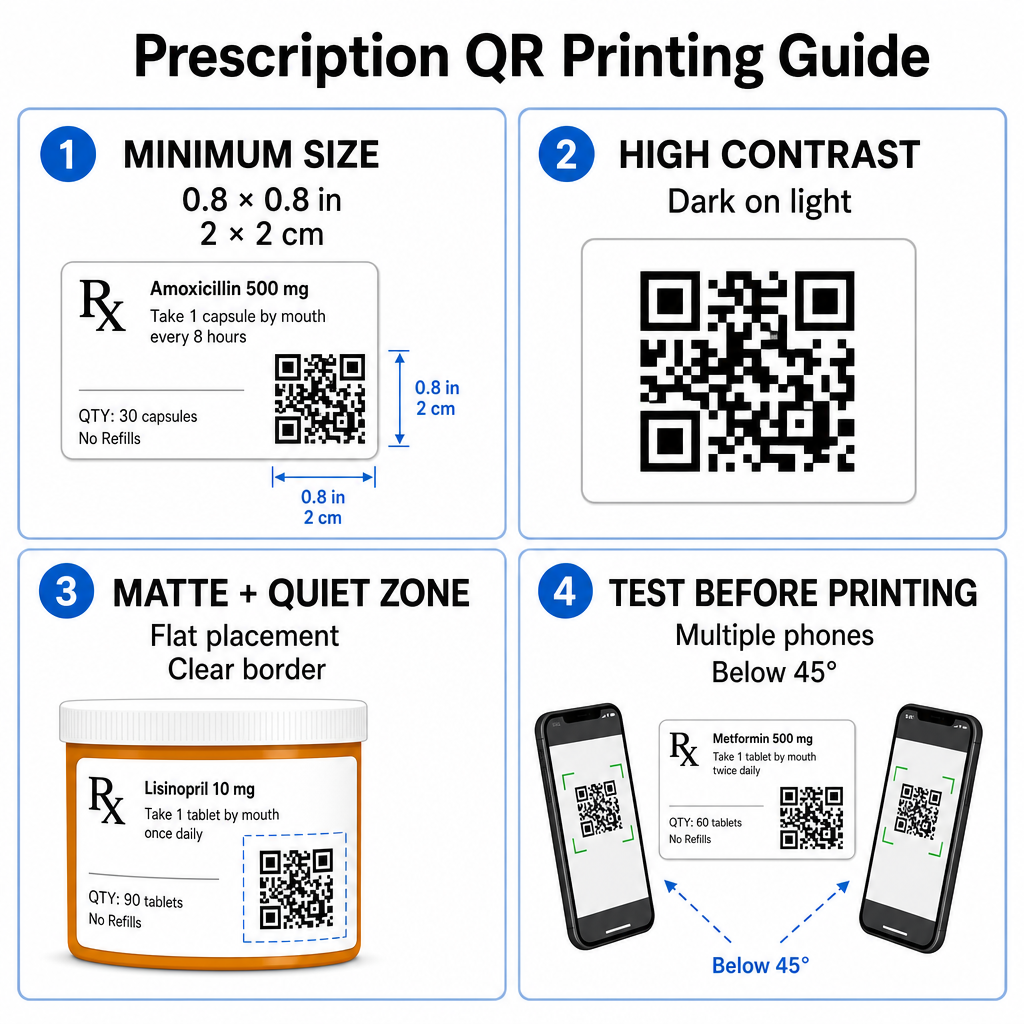
ขนาดรหัสที่แนะนำ
พื้นผิวของขวดยาตามใบสั่งแพทย์มีจำกัด รักษารหัสให้มีขนาดมาตรฐานอย่างน้อย 0.8" x 0.8" (2 ซม. x 2 ซม.) เพื่อให้สแกนได้อย่างน่าเชื่อถือ สำหรับบรรจุภัณฑ์ที่เล็กมาก ขนาดการพิมพ์ขั้นต่ำที่สุดคือ 1 ซม. x 1 ซม. อาจใช้ได้ โดยที่ความหนาแน่นของข้อมูลที่เข้ารหัสยังคงต่ำ คุณสามารถตรวจสอบอัตราส่วนการปรับขนาดที่แน่นอนได้ใน คู่มือขนาดรหัส QR.
ความคมชัดของสีและวัสดุพื้นผิว
เครื่องพิมพ์ความร้อนที่ใช้กันทั่วไปในร้านขายยาปลีกต้องมีการปรับเทียบเฉพาะเพื่อให้สามารถสแกนได้อย่างเหมาะสมที่สุด:
- ความคมชัดสูง: พิมพ์ลวดลายสีเข้มทึบ (ควรเป็นสีดำ) บนพื้นหลังสีอ่อนที่สะอาดและทึบ
- พื้นผิวแบบด้าน: หลีกเลี่ยงการเคลือบฉลากมันวาวหรือขวดพลาสติกใสที่สะท้อนแสงในห้องและทำให้เซ็นเซอร์กล้องมองไม่เห็น หากไม่สามารถหลีกเลี่ยงภาชนะที่มันวาวหรือโปร่งใสได้ ให้พิมพ์ชั้นสีขาวแบบด้านใต้รหัส QR โดยตรง
- การจัดการความโค้ง: วางรหัส QR บนส่วนที่แบนที่สุดของขวดหรือกล่องเพื่อป้องกันการบิดเบี้ยวทางเรขาคณิต
หากต้องการประเมินว่าหมึกความร้อน วัสดุรองรับ และวัสดุฉลากส่งผลต่อความเร็วในการสแกนอย่างไร โปรดอ่านการวิเคราะห์โดยละเอียดของเราเกี่ยวกับ เทคนิคการพิมพ์ส่งผลต่อความสามารถในการสแกน QR อย่างไร.
Quiet Zone และการทดสอบการตรวจสอบ
รักษากรอบด้านนอกที่ชัดเจน หรือที่เรียกว่า quiet zone รอบรหัสเสมอ เพื่อแยกออกจากข้อความและขอบฉลากโดยรอบ ทดสอบรหัสที่พิมพ์บนอุปกรณ์สมาร์ทโฟนหลายเครื่อง ในมุมต่างๆ (ไม่เกิน 45 องศา) และสภาพแสงต่างๆ ก่อนการพิมพ์จำนวนมาก ตรวจสอบหลักการของเรา แนวทางปฏิบัติที่ดีที่สุดสำหรับการอ่านรหัส QR เพื่อให้แน่ใจว่าเค้าโครงฉลากของคุณทำงานได้อย่างน่าเชื่อถือ
ตรวจสอบความสามารถในการสแกนฉลากที่พิมพ์ของคุณ ต้องการทดสอบว่าบรรจุภัณฑ์ยาของคุณสามารถสแกนได้อย่างรวดเร็วบนกล้องของอุปกรณ์ทุกชนิดหรือไม่? ทดสอบการออกแบบฉลากที่พิมพ์ของคุณได้ทันทีด้วย เครื่องสแกนโค้ด QR ออนไลน์.
การนำรหัส QR สำหรับใบสั่งยาไปใช้ในขั้นตอนการทำงานของร้านขายยา
การนำฉลากที่สแกนได้ไปใช้ทั่วทั้งการดำเนินงานของร้านขายยาต้องใช้แนวทางที่เรียบง่ายและมีโครงสร้างดังนี้:
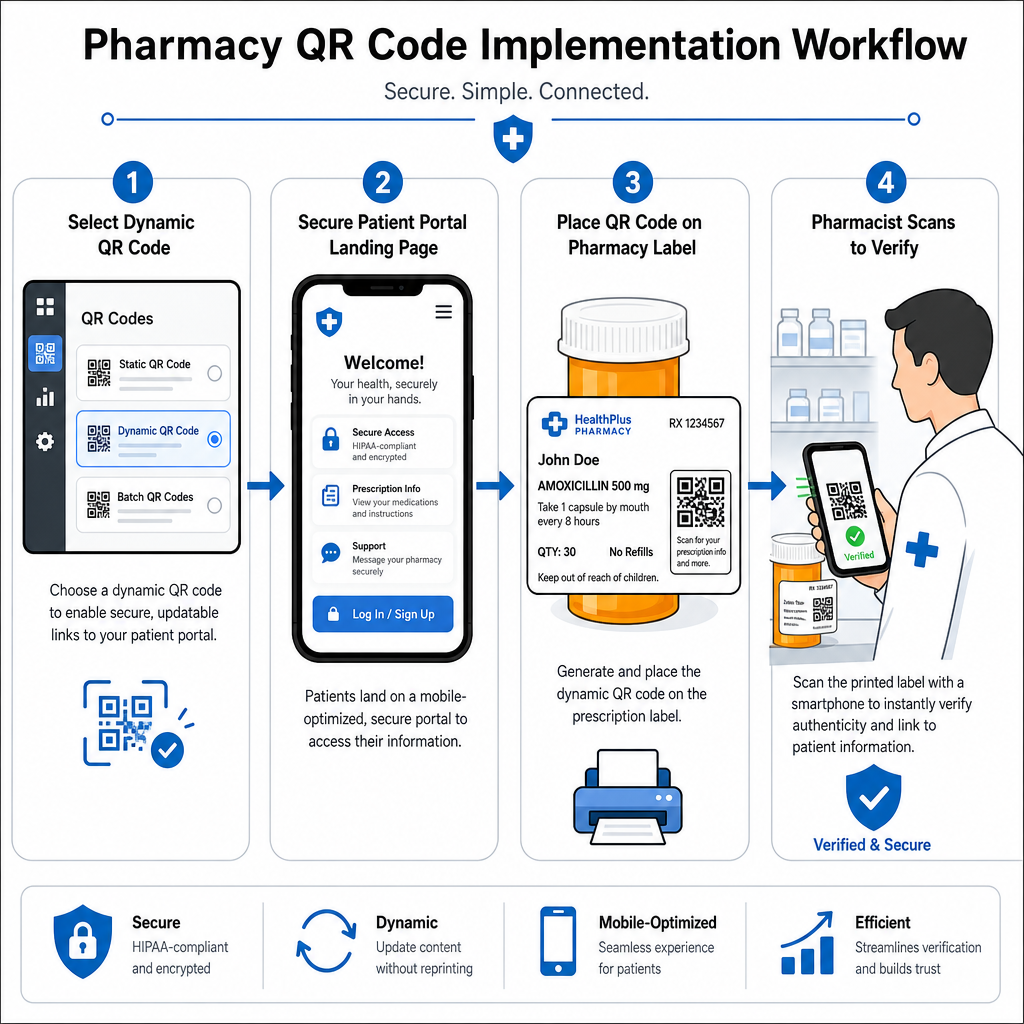
- เลือกประเภทของรหัส: เลือกรหัส QR แบบไดนามิกสำหรับลิงก์เว็บ เพื่อให้คุณสามารถอัปเดตไฟล์ PDF เพื่อการศึกษา, URL วิดีโอ หรือลิงก์พอร์ทัลได้โดยไม่ต้องพิมพ์ฉลากภาชนะบรรจุใหม่
- กำหนดค่าหน้า Landing Page ที่ปลอดภัย: เชื่อมโยงลิงก์ปลายทางไปยังพอร์ทัลผู้ป่วยที่ปรับให้เหมาะกับมือถือและเป็นไปตามข้อกำหนด HIPAA หรือคู่มือยาสำหรับประชาชน
- รวมเทมเพลตฉลาก: เพิ่มรหัส QR ที่สร้างขึ้นลงในเทมเพลตการพิมพ์ความร้อนของระบบจัดการร้านขายยาของคุณ เพื่อให้มั่นใจว่าขนาด, พื้นที่ว่างรอบรหัส (quiet zones) และพารามิเตอร์ความคมชัดถูกล็อคไว้
- ฝึกอบรมเจ้าหน้าที่ร้านขายยา: ให้ความรู้แก่เภสัชกรและช่างเทคนิคให้ชี้จุดรหัส QR ในระหว่างการปรึกษาผู้ป่วย เพื่อกระตุ้นให้ผู้ป่วยสแกนขวดยาของตนเองที่บ้าน
- ตรวจสอบความสามารถในการสแกน: ทำการตรวจสอบคุณภาพเป็นประจำที่จุดจ่ายยาโดยใช้แพลตฟอร์มบนเว็บ เครื่องอ่านรหัส QR เพื่อยืนยันความชัดเจนของรหัสก่อนส่งมอบ
การสำรวจว่าภาคส่วนอื่น ๆ จัดการบรรจุภัณฑ์ที่สแกนได้นั้น สามารถให้ข้อมูลเชิงลึกเพิ่มเติมเกี่ยวกับขั้นตอนการทำงานในหลากหลาย กรณีการใช้งานในอุตสาหกรรม.
การเพิ่มรหัส QR ที่สามารถสแกนได้ลงในฉลากยาตามใบสั่งแพทย์ช่วยเชื่อมโยงช่องว่างระหว่างบรรจุภัณฑ์ยาจริงกับแหล่งข้อมูลสุขภาพดิจิทัลที่สำคัญ การปฏิบัติตามมาตรฐานการพิมพ์ที่เหมาะสม การปกป้องความเป็นส่วนตัวของผู้ป่วย และการจัดการลิงก์ปลายทางที่แก้ไขได้ ร้านขายยาของคุณสามารถลดข้อผิดพลาดในการบริหารจัดการและปรับปรุงผลลัพธ์โดยรวมของผู้ป่วย เริ่มสร้างขั้นตอนการทำงานฉลากยาตามใบสั่งแพทย์ที่สอดคล้องและสแกนได้ด้วย Pageloot วันนี้
คำถามที่พบบ่อย
ไม่ กฎระเบียบของรัฐบาลกลางสหรัฐฯ และแนวทางปฏิบัติของ FDA ไม่ได้กำหนดให้มีคิวอาร์โค้ดสำหรับผู้บริโภคบนฉลากบรรจุภัณฑ์ยาตามใบสั่งแพทย์ องค์ประกอบฉลากที่บังคับ (เช่น ชื่อผู้ป่วย วิธีใช้ยา และรายละเอียดร้านยา) ยังคงต้องพิมพ์โดยตรงในรูปแบบข้อความที่มนุษย์อ่านได้ คิวอาร์โค้ดยังคงเป็นเครื่องมือเสริมโดยสมัครใจเพื่อปรับปรุงการให้ความรู้แก่ผู้ป่วยและการเข้าถึงข้อมูลดิจิทัล
ร้านขายยาต้องหลีกเลี่ยงการเข้ารหัสข้อมูลสุขภาพที่ได้รับการคุ้มครองซึ่งไม่ได้เข้ารหัส (PHI) เช่น ชื่อผู้ป่วย วันเกิด หรือรายละเอียดของยา โดยตรงในรูปแบบรหัส QR แต่ควรใช้ลิงก์แบบไดนามิกที่ปลอดภัย ซึ่งชี้ไปยังพอร์ทัลผู้ป่วยที่เข้ารหัสและมีการป้องกันด้วยรหัสผ่าน และต้องมีการยืนยันตัวตนของผู้ป่วยก่อนที่จะแสดงข้อมูลส่วนบุคคล
ขนาดการพิมพ์ขั้นต่ำที่แนะนำสำหรับฉลากยาตามใบสั่งแพทย์คือ 0.8" x 0.8" (2 ซม. x 2 ซม.) แม้ว่าโดยทางเทคนิคแล้วรหัสสามารถสแกนได้เล็กถึง 1 ซม. x 1 ซม. บนบรรจุภัณฑ์ขนาดเล็ก แต่ขนาดที่ใหญ่ขึ้นพร้อมความคมชัดของสีที่สูงและพื้นที่ว่างรอบรหัส (quiet zones) ที่ชัดเจน จะช่วยให้มั่นใจได้ว่าการสแกนจะเชื่อถือได้บนกล้องของอุปกรณ์มือถือทุกรุ่น