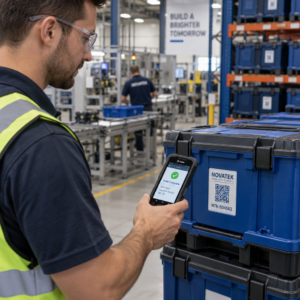
I tuoi pazienti faticano a leggere il testo minuscolo sulle etichette dei flaconi dei farmaci o non capiscono le istruzioni critiche di dosaggio? La non aderenza ai farmaci e gli errori di somministrazione portano a rischi per la salute prevenibili e frequenti consulti in farmacia. L'aggiunta di codici QR scansionabili alle etichette dei farmaci offre ai pazienti accesso istantaneo a guide digitali sui farmaci, istruzioni audio e portali di ricarica.
Quali informazioni possono fornire i codici QR per le prescrizioni?
Le etichette dei contenitori dei farmaci hanno uno spazio fisico limitato. Le normative federali e statali richiedono testo stampato obbligatorio, inclusi il nome della farmacia, il numero di prescrizione, i dettagli del prescrittore, il nome del paziente e le istruzioni di dosaggio. Un codice a risposta rapida (QR) agisce come un'estensione digitale dell'etichetta, fornendo informazioni aggiuntive senza ingombrare il flacone.
Le farmacie possono utilizzare i codici QR per le prescrizioni per fornire risorse rivolte al paziente, come:
- Guide digitali sui farmaci: Collega i pazienti direttamente a foglietti illustrativi elettronici (e-leaflet) o documenti formattati utilizzando un Generatore di QR code per PDF.
- Formati audio e accessibili: Aiuta i pazienti con problemi di vista a scansionare la confezione per ascoltare le istruzioni di dosaggio vocali o accedere a testo a caratteri grandi e opzioni braille elettroniche.
- Video dimostrativi: Mostra tutorial video passo-passo per sistemi complessi di somministrazione di farmaci, come penne per insulina, inalatori o dispositivi autoiniettanti.
- Portali di ricarica: Indirizza i pazienti direttamente ai portali online della farmacia per le ricariche per inviare rapidamente le richieste di rinnovo.
- Informazioni testuali offline: Archivia avvisi di testo semplice, numeri di contatto di emergenza o istruzioni di conservazione direttamente nella matrice del codice utilizzando un Generatore di QR code da testo.
Principali vantaggi per la sicurezza del paziente e l'aderenza ai farmaci
La non aderenza ai farmaci è un grave problema di salute pubblica. La ricerca mostra che circa il 50% dei pazienti non assume i farmaci come prescritto, causando oltre 125.000 decessi prevenibili ogni anno. Posizionare informazioni scansionabili sulla confezione dei farmaci aiuta a risolvere le fonti comuni di errori di somministrazione e confusione.
Riduzione degli errori farmacologici
Le etichette standard delle bottiglie utilizzano caratteri piccoli, difficili da leggere per gli anziani o le persone con problemi di vista. Una ricerca sperimentale che ha confrontato l'imballaggio dotato di codice QR con le etichette standard delle bottiglie ha rilevato che l'accesso a dettagli digitali scansionabili ha portato a decisioni di auto-somministrazione significativamente più corrette in entrambi i gruppi di pazienti adulti, giovani e anziani.
Migliorare l'accessibilità
Fornire dettagli accessibili sulle prescrizioni è vitale per la sicurezza del paziente. Quando codificati con testo accessibile o collegati a pagine di destinazione compatibili con i lettori di schermo, i codici QR consentono ai pazienti con problemi di vista di verificare in modo indipendente nomi di farmaci, orari e note di cautela.
Supportare il monitoraggio dell'aderenza e il coinvolgimento
Le soluzioni digitali di monitoraggio dell'assunzione che utilizzano codici di imballaggio scansionabili hanno dimostrato un'elevata fattibilità clinica. Gli studi clinici mostrano che l'auto-segnalazione dei pazienti tramite scansioni QR raggiunge circa il 90,1% di accuratezza rispetto ai conteggi manuali delle pillole. L'integrazione di imballaggi scansionabili in sistemi più ampi di codici QR per ospedali e assistenza sanitaria migliora la comunicazione con i pazienti e la gestione delle cure a lungo termine. Per saperne di più sulle moderne applicazioni cliniche, consulta la nostra guida completa ai codici QR nell'assistenza sanitaria.
Fornire istruzioni aggiornate per i pazienti Hai bisogno di aggiornare le guide sui farmaci o le risorse digitali senza ristampare le etichette fisiche? Utilizza il Generatore di QR code dinamici per mantenere i tuoi link di destinazione modificabili e accurati.
Conformità normativa e salvaguardie HIPAA per le farmacie
L'integrazione di strumenti digitali nei flussi di lavoro delle farmacie richiede una rigorosa attenzione agli standard normativi e alle leggi sulla privacy dei pazienti.
| Ambito di Requisito | Standard / Linea Guida | Azione chiave della farmacia |
|---|---|---|
| Regolamentazioni FDA | Informazioni volontarie per i pazienti | Tratta i codici QR come aggiunte volontarie; non sostituire mai il testo richiesto dell'etichetta scritta. |
| Serializzazione DSCSA | Codici a barre GS1 2D Data Matrix | Mantenere i codici a barre della catena di approvvigionamento DSCSA separati dai codici QR per i consumatori. |
| Regola sulla privacy HIPAA | Informazioni Sanitarie Protette (PHI) | Non codificare mai direttamente nel codice nomi di pazienti, date di nascita o condizioni mediche. |
| Controllo degli accessi | Salvaguardie di autenticazione | Richiedere l'autenticazione tramite login del paziente per qualsiasi destinazione QR che visualizzi dati sanitari personali. |
Differenziare i codici QR dai codici a barre della catena di approvvigionamento
Ai sensi del Drug Supply Chain Security Act (DSCSA), i codici a barre Data Matrix 2D GS1 serializzati sono obbligatori sugli imballaggi all'ingrosso per la tracciabilità da parte dei distributori. Si tratta di codici a barre 2D tecnici e regolamentati, destinati agli scanner della catena di approvvigionamento. I codici QR rivolti ai pazienti, al contrario, sono strumenti volontari progettati per gli smartphone dei consumatori per fornire contenuti educativi e operativi.
Applicazione degli standard di privacy e sicurezza HIPAA
Le farmacie sono entità soggette a HIPAA. Quando si implementano codici QR sui contenitori di prescrizioni:
- Evitare la codifica di PHI non elaborati: Non incorporare mai identificatori di pazienti non crittografati, numeri di previdenza sociale o diagnosi specifiche all'interno di un codice statico.
- Utilizzare destinazioni web sicure: Indirizzare i codici QR a siti web HTTPS sicuri, supportati da rigorosi controlli di accesso, autenticazione a più fattori e database crittografati.
- Eliminare il tracciamento non regolamentato: Assicurarsi che le landing page rivolte ai pazienti non utilizzino pixel di analisi di terze parti che potrebbero divulgare dati in modo inammissibile.
- Collaborare con fornitori conformi: Scegliere piattaforme software che applichino protocolli di sicurezza dei dati ed eseguano accordi di associazione commerciale (BAA). Per una ripartizione completa degli standard legali, consultare la nostra guida su leggi e regolamenti sulla privacy dei codici QR.
Migliori pratiche per la stampa di etichette di prescrizione scansionabili
Le etichette delle prescrizioni sono soggette a manipolazione frequente, umidità e limiti di spazio ristretti. Se un codice stampato non riesce a essere scansionato, la fiducia del paziente diminuisce e le chiamate all'assistenza farmaceutica aumentano.
Dimensioni del codice consigliate
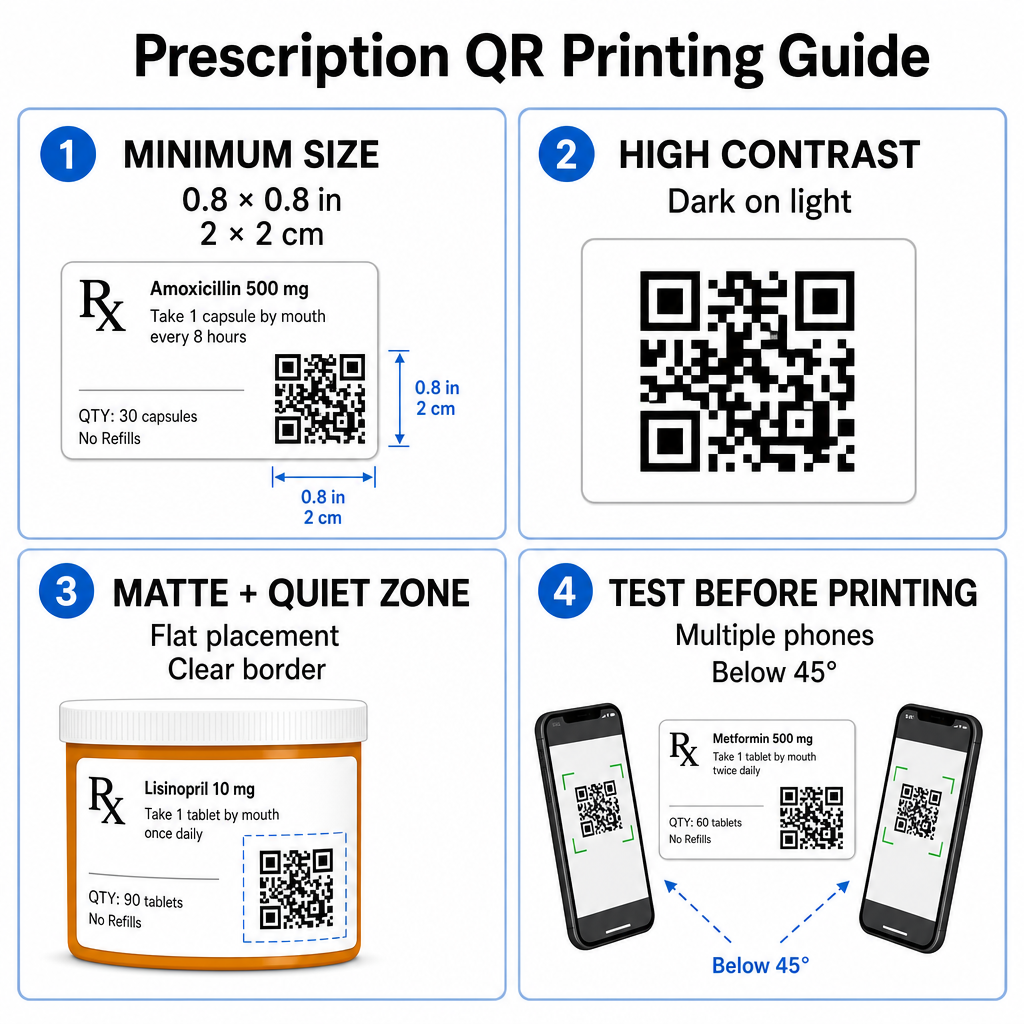
Le superfici dei flaconi delle prescrizioni sono limitate. Mantenere una dimensione standard di almeno 0.8" x 0.8" (2 cm x 2 cm) per una scansione affidabile. Su pacchetti molto piccoli, una dimensione di stampa minima assoluta di 1 cm x 1 cm può essere utilizzato, a condizione che la densità dei dati codificati rimanga bassa. Puoi controllare i rapporti di scala esatti nel nostro guida alle dimensioni dei codici QR.
Contrasto Colore e Materiali Superficiali
Le stampanti termiche comunemente utilizzate nelle farmacie al dettaglio richiedono una calibrazione specifica per una leggibilità ottimale:
- Alto Contrasto: Stampa motivi scuri e solidi (idealmente neri) su sfondi chiari, puliti e opachi.
- Finiture Opache: Evita rivestimenti lucidi per etichette o flaconi di plastica trasparenti che riflettono l'illuminazione della stanza e accecano i sensori della fotocamera. Se i contenitori lucidi o trasparenti sono inevitabili, stampa uno strato bianco opaco direttamente sotto il codice QR.
- Gestione della Curvatura: Posiziona il codice QR sulla sezione più piatta della bottiglia o della scatola per prevenire la distorsione geometrica.
Per valutare come gli inchiostri termici, i substrati e i materiali delle etichette influiscono sulle velocità di scansione, leggi la nostra analisi dettagliata su come le tecniche di stampa influenzano la leggibilità dei QR.
Zone Silenziose e Test di Verifica
Mantieni sempre un bordo esterno chiaro – noto come zona silenziosa – attorno al codice per separarlo dal testo e dai bordi dell'etichetta circostante. Testa i codici stampati su più dispositivi smartphone, angolazioni (inferiori a 45 gradi) e condizioni di illuminazione prima della stampa in massa. Rivedi i nostri principi fondamentali le migliori pratiche per la leggibilità dei codici QR per garantire che il layout dell'etichetta funzioni in modo affidabile.
Verifica la Scansionabilità della Tua Etichetta Stampata Vuoi testare se il tuo packaging per prescrizioni viene scansionato rapidamente su tutte le fotocamere dei dispositivi? Testa i tuoi design di etichette stampate istantaneamente con il gratuito scanner di codici QR online.
Implementazione dei Codici QR per Prescrizioni nei Flussi di Lavoro della Farmacia
L'implementazione di etichette scansionabili in tutte le operazioni di farmacia richiede un approccio semplice e strutturato:
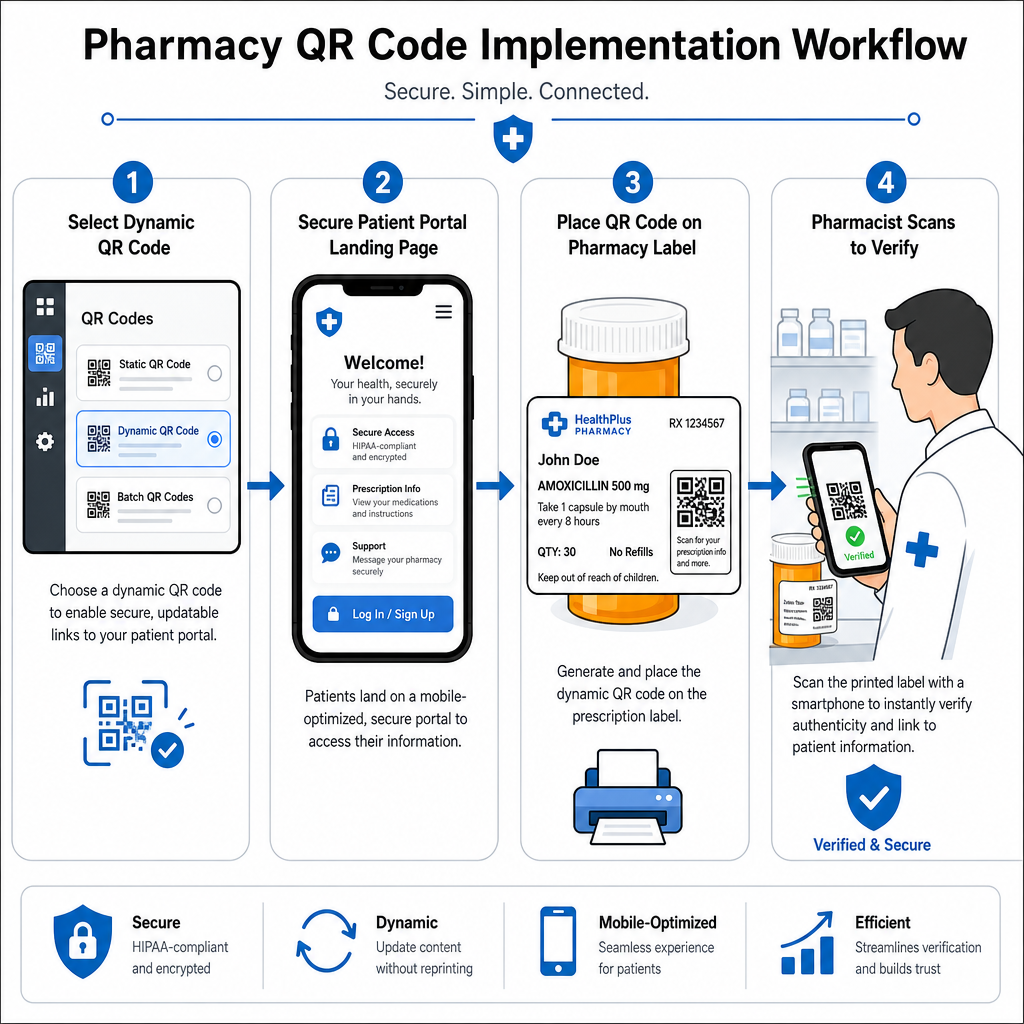
- Seleziona il Tipo di Codice: Scegli codici QR dinamici per i link web in modo da poter aggiornare PDF educativi, URL di video o link a portali senza ristampare le etichette fisiche dei contenitori.
- Configura Pagine di Destinazione Sicure: Collega i link di destinazione a portali pazienti ottimizzati per dispositivi mobili e conformi a HIPAA o a guide pubbliche sui farmaci.
- Integra Modelli di Etichette: Aggiungere il codice QR generato nei modelli di stampa termica del sistema di gestione della farmacia, assicurandosi che le dimensioni, le zone di silenzio e i parametri di contrasto siano bloccati.
- Formare il personale della farmacia: Educare farmacisti e tecnici a indicare il codice QR durante le consulenze con i pazienti, incoraggiandoli a scansionare la propria confezione a casa.
- Verificare la scansionabilità: Eseguire controlli di qualità di routine presso le stazioni di dispensazione utilizzando uno strumento basato sul web Lettore di codici QR per confermare la chiarezza del codice prima della consegna.
Esplorare come altri settori gestiscono gli imballaggi scansionabili può fornire ulteriori intuizioni sul flusso di lavoro attraverso diverse casi d'uso del settore.
L'aggiunta di codici QR scansionabili alle etichette delle prescrizioni colma il divario tra l'imballaggio fisico dei farmaci e le vitali risorse digitali per la salute. Seguendo standard di stampa appropriati, proteggendo la privacy dei pazienti e gestendo collegamenti di destinazione modificabili, la vostra farmacia può ridurre gli errori amministrativi e migliorare i risultati complessivi per i pazienti. Iniziate oggi stesso a creare flussi di lavoro per etichette di prescrizione conformi e scansionabili con Pageloot.
Domande frequenti
No. Le normative federali statunitensi e le linee guida della FDA non richiedono codici QR rivolti al consumatore sulle etichette dei contenitori di prescrizione. Gli elementi obbligatori dell'etichetta (come il nome del paziente, le istruzioni sul farmaco e i dettagli della farmacia) devono comunque essere stampati direttamente in testo leggibile dall'uomo. I codici QR rimangono uno strumento volontario e supplementare per migliorare l'educazione del paziente e l'accesso digitale.
Le farmacie devono evitare di codificare informazioni sanitarie protette non crittografate (PHI) – come nomi dei pazienti, date di nascita o dettagli sui farmaci – direttamente all'interno del pattern del codice QR. Invece, utilizzare link dinamici sicuri che puntano a portali pazienti crittografati e protetti da password che richiedono l'autenticazione del paziente prima di visualizzare i dati personali.
La dimensione minima di stampa raccomandata per le etichette delle prescrizioni è 0.8″ x 0.8″ (2 cm x 2 cm). Sebbene i codici possano tecnicamente essere scansionati anche a 1 cm x 1 cm su piccoli imballaggi, dimensioni maggiori con un forte contrasto cromatico e zone di silenzio chiare garantiscono una scansione affidabile su tutte le fotocamere dei dispositivi mobili.