Apakah pasien Anda kesulitan membaca teks kecil pada botol resep atau melewatkan instruksi dosis penting? Ketidakpatuhan pengobatan dan kesalahan administrasi menyebabkan risiko kesehatan yang dapat dicegah dan konsultasi farmasi yang sering. Menambahkan kode QR yang dapat dipindai ke label resep memberikan pasien akses instan ke panduan obat digital, instruksi audio, dan portal isi ulang.
Informasi Apa yang Dapat Diberikan Kode QR Resep?
Label wadah resep memiliki ruang fisik terbatas. Peraturan federal dan negara bagian mewajibkan teks tercetak, termasuk nama apotek, nomor resep, detail dokter penulis resep, nama pasien, dan instruksi dosis. Kode respons cepat (QR) berfungsi sebagai ekstensi digital label, memberikan informasi tambahan tanpa memenuhi botol.
Apotek dapat menggunakan kode QR resep untuk menyediakan sumber daya yang dihadapi pasien, seperti:
- Panduan Obat Digital: Menghubungkan pasien langsung ke leaflet informasi pasien elektronik (e-leaflet) atau dokumen yang diformat menggunakan Ubah PDF ke QR Code.
- Format Audio dan Aksesibel: Membantu pasien tunanetra memindai kemasan untuk mendengarkan instruksi dosis lisan atau mengakses teks cetak besar dan opsi braille elektronik.
- Video Demonstrasi: Menunjukkan tutorial video langkah demi langkah untuk sistem pemberian obat yang kompleks, seperti pena insulin, inhaler, atau perangkat injeksi mandiri.
- Portal Isi Ulang: Mengarahkan pasien langsung ke portal isi ulang online apotek untuk mengajukan permintaan perpanjangan dengan cepat.
- Informasi Teks Offline: Menyimpan peringatan teks biasa, nomor kontak darurat, atau instruksi penyimpanan langsung dalam matriks kode menggunakan Generator QR Code Teks.
Manfaat Utama untuk Keselamatan Pasien dan Kepatuhan Pengobatan
Ketidakpatuhan pengobatan adalah masalah kesehatan masyarakat yang utama. Penelitian menunjukkan bahwa sekitar 50% pasien gagal minum obat sesuai resep, menyebabkan lebih dari 125.000 kematian yang dapat dicegah setiap tahun. Penempatan informasi yang dapat dipindai pada kemasan resep membantu mengatasi sumber umum kesalahan administrasi dan kebingungan.
Mengurangi Kesalahan Pengobatan
Label botol standar menggunakan huruf kecil yang sulit dibaca oleh lansia atau individu dengan gangguan penglihatan. Penelitian eksperimental yang membandingkan kemasan ber-QR code dengan label botol standar menemukan bahwa akses ke detail digital yang dapat dipindai menghasilkan keputusan pemberian obat sendiri yang jauh lebih akurat pada kelompok pasien dewasa muda maupun lansia.
Meningkatkan Aksesibilitas
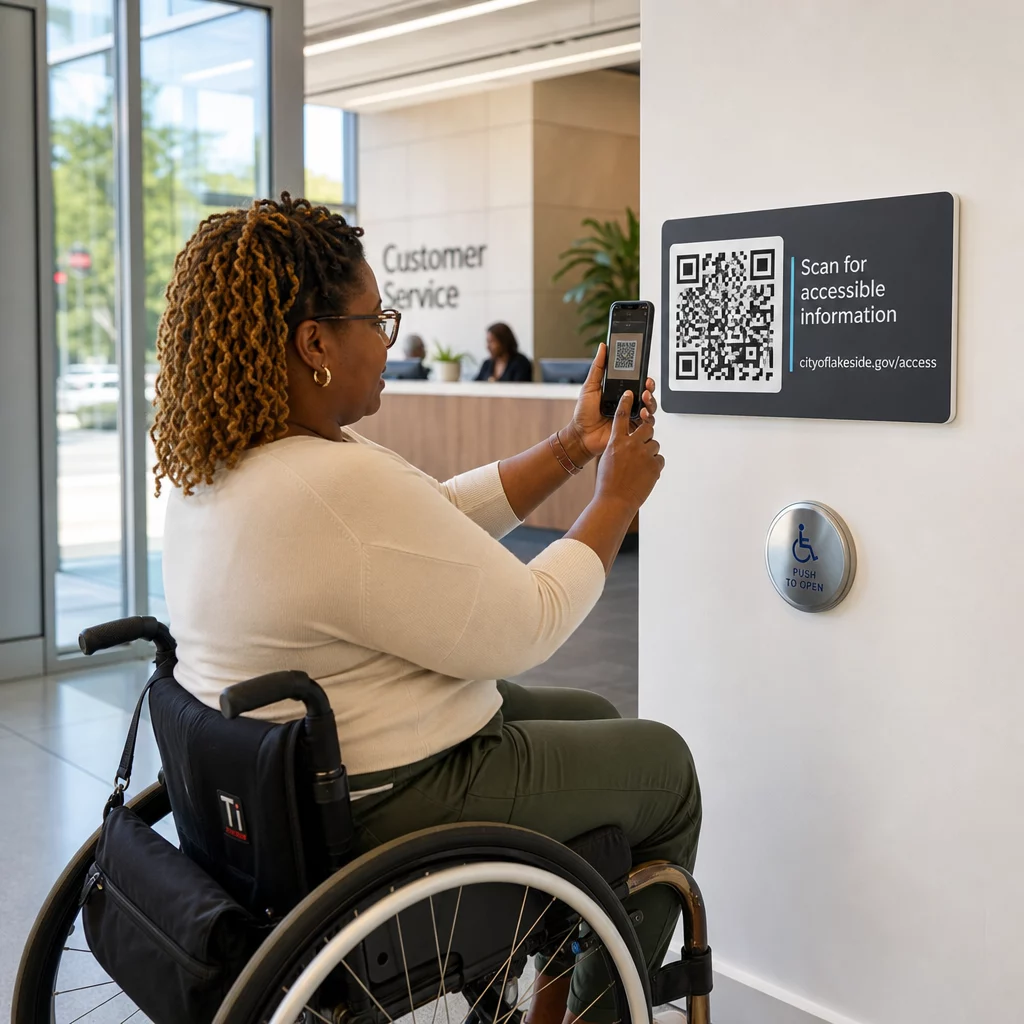
Menyediakan detail resep yang mudah diakses sangat penting untuk keselamatan pasien. Ketika dikodekan dengan teks yang mudah diakses atau dihubungkan ke halaman arahan yang ramah pembaca layar, kode QR memungkinkan pasien dengan penglihatan rendah untuk memverifikasi nama obat, jadwal, dan catatan peringatan secara mandiri.
Mendukung Pelacakan Kepatuhan dan Keterlibatan
Solusi pelacakan asupan digital menggunakan kode kemasan yang dapat dipindai telah menunjukkan kelayakan klinis yang tinggi. Uji klinis menunjukkan bahwa pelaporan mandiri pasien melalui pemindaian QR mencapai kira-kira akurasi 90,1% dibandingkan dengan hitungan pil manual. Mengintegrasikan kemasan yang dapat dipindai ke dalam sistem kode QR rumah sakit dan layanan kesehatan yang lebih luas meningkatkan komunikasi pasien dan manajemen perawatan jangka panjang. Untuk mempelajari lebih lanjut tentang aplikasi klinis modern, tinjau panduan lengkap kami tentang kode QR layanan kesehatan.
Sampaikan Instruksi Pasien Terkini Perlu memperbarui panduan obat atau sumber daya digital tanpa mencetak ulang label fisik? Gunakan Generator QR Code Dinamis untuk menjaga tautan tujuan Anda tetap dapat diedit dan akurat.
Kepatuhan Regulasi dan Perlindungan HIPAA untuk Apotek
Mengintegrasikan alat digital ke dalam alur kerja apotek membutuhkan perhatian ketat terhadap standar regulasi dan undang-undang privasi pasien.
| Area Persyaratan | Standar / Pedoman | Tindakan Utama Apotek |
|---|---|---|
| Regulasi FDA | Informasi pasien sukarela | Perlakukan kode QR sebagai tambahan sukarela; jangan pernah mengganti teks label tertulis yang wajib. |
| Serialisasi DSCSA | Kode batang Matriks Data 2D GS1 | Pisahkan kode batang rantai pasok DSCSA dari kode QR konsumen. |
| Aturan Privasi HIPAA | Informasi Kesehatan Terlindungi (PHI) | Jangan pernah menyandikan nama pasien, tanggal lahir, atau kondisi langsung ke dalam kode. |
| Kontrol Akses | Pengamanan Autentikasi | Wajibkan autentikasi login pasien untuk setiap tujuan QR yang menampilkan data kesehatan pribadi. |
Membedakan Kode QR dari Barcode Rantai Pasokan
Di bawah Drug Supply Chain Security Act (DSCSA), barcode GS1 2D Data Matrix berseri wajib ada pada kemasan grosir untuk pelacakan distributor. Ini adalah barcode 2D teknis dan teregulasi yang ditujukan untuk pemindai rantai pasokan. Kode QR yang menghadap pasien, sebaliknya, adalah alat sukarela yang dirancang untuk ponsel pintar konsumen untuk menyampaikan konten edukasi dan operasional.
Menegakkan Standar Privasi dan Keamanan HIPAA
Apotek adalah entitas yang dicakup HIPAA. Saat menyebarkan kode QR pada wadah resep:
- Hindari Penyandian PHI Mentah: Jangan pernah menyematkan pengidentifikasi pasien yang tidak terenkripsi, nomor jaminan sosial, atau diagnosis spesifik di dalam kode statis.
- Gunakan Tujuan Web yang Aman: Arahkan kode QR ke situs web HTTPS yang aman yang didukung oleh kontrol akses ketat, autentikasi multi-faktor, dan basis data terenkripsi.
- Hilangkan Pelacakan Tidak Teregulasi: Pastikan halaman arahan yang menghadap pasien tidak menggunakan piksel analitik pihak ketiga yang dapat mengungkapkan data secara tidak sah.
- Bermitra dengan Vendor yang Patuh: Pilih platform perangkat lunak yang menerapkan protokol keamanan data dan melaksanakan Perjanjian Asosiasi Bisnis (BAA). Untuk rincian lengkap standar hukum, konsultasikan panduan kami tentang undang-undang dan peraturan privasi kode QR.
Praktik Terbaik untuk Mencetak Label Resep yang Dapat Dipindai
Label resep sering mengalami penanganan, kelembapan, dan keterbatasan ruang yang ketat. Jika kode yang dicetak gagal dipindai, kepercayaan pasien menurun dan panggilan dukungan farmasi meningkat.
Ukuran Kode yang Direkomendasikan
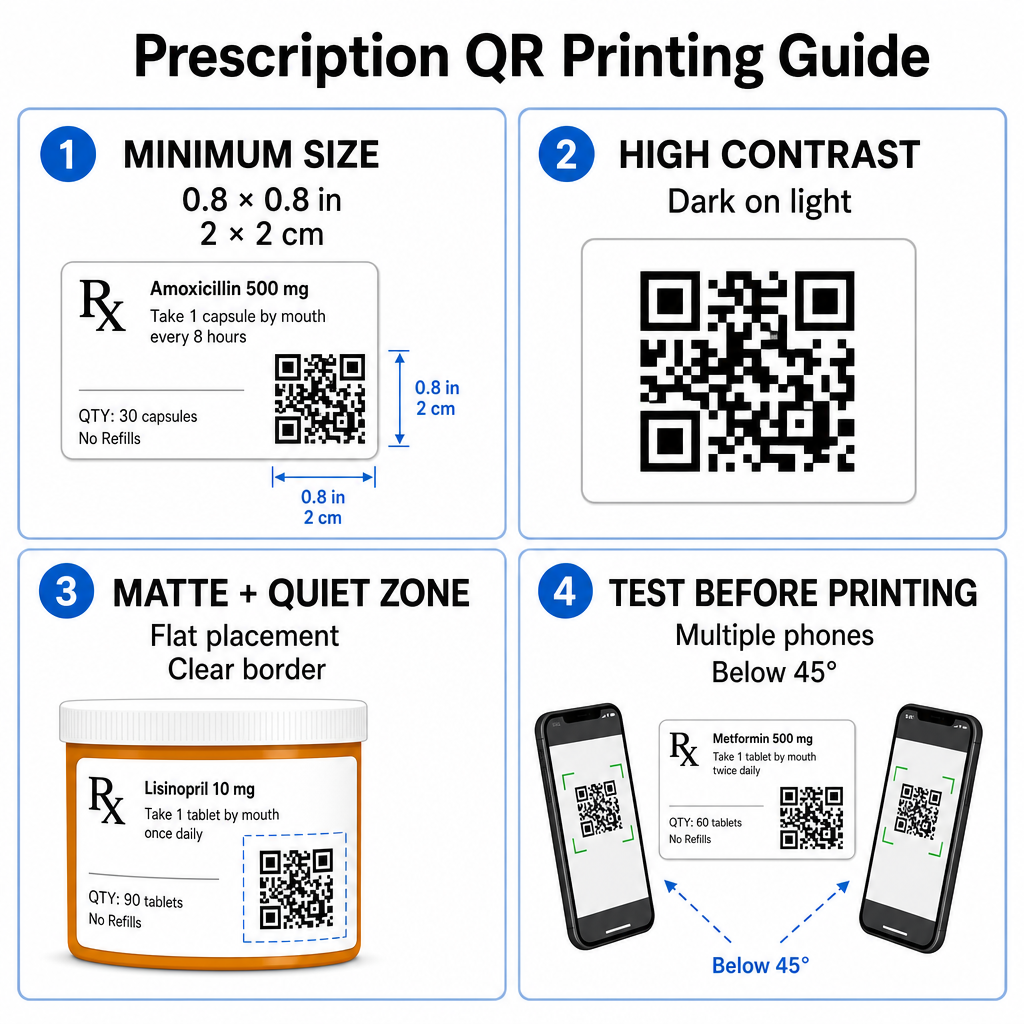
Permukaan wadah resep terbatas. Pertahankan ukuran standar setidaknya 0,8" x 0,8" (2 cm x 2 cm) untuk pemindaian yang andal. Pada kemasan yang sangat kecil, ukuran cetak minimum mutlak 1 cm x 1 cm dapat digunakan, asalkan kepadatan data yang dienkode tetap rendah. Anda dapat memeriksa rasio penskalaan yang tepat di panduan ukuran kode QR.
Kontras Warna dan Bahan Permukaan
Printer termal yang umum digunakan di apotek ritel memerlukan kalibrasi khusus untuk kemampuan pindai yang optimal:
- Kontras Tinggi: Cetak pola gelap padat (idealnya hitam) di atas latar belakang terang yang bersih dan buram.
- Hasil Akhir Matte: Hindari lapisan label mengkilap atau vial plastik bening yang memantulkan cahaya ruangan dan membutakan sensor kamera. Jika wadah mengkilap atau transparan tidak dapat dihindari, cetak lapisan matte putih tepat di bawah kode QR.
- Manajemen Kelengkungan: Tempatkan kode QR pada bagian botol atau kotak yang paling datar untuk mencegah distorsi geometris.
Untuk mengevaluasi bagaimana tinta termal, substrat, dan bahan label memengaruhi kecepatan pemindaian, baca analisis terperinci kami tentang bagaimana teknik pencetakan memengaruhi kemampuan pindai QR.
Zona Tenang dan Pengujian Verifikasi
Selalu pertahankan batas luar yang jelas – dikenal sebagai zona tenang – di sekitar kode untuk memisahkannya dari teks dan batas label di sekitarnya. Uji kode yang dicetak di berbagai perangkat smartphone, sudut (di bawah 45 derajat), dan kondisi pencahayaan sebelum pencetakan massal. Tinjau inti kami praktik terbaik untuk keterbacaan kode QR untuk memastikan tata letak label Anda berfungsi dengan andal.
Verifikasi Kemampuan Pindai Label Cetak Anda Ingin menguji apakah kemasan resep Anda dapat dipindai dengan cepat di semua kamera perangkat? Uji desain label cetak Anda secara instan dengan yang gratis pemindai kode QR online.
Menerapkan Kode QR Resep dalam Alur Kerja Apotek
Menerapkan label yang dapat dipindai di seluruh operasi apotek memerlukan pendekatan yang sederhana dan terstruktur:
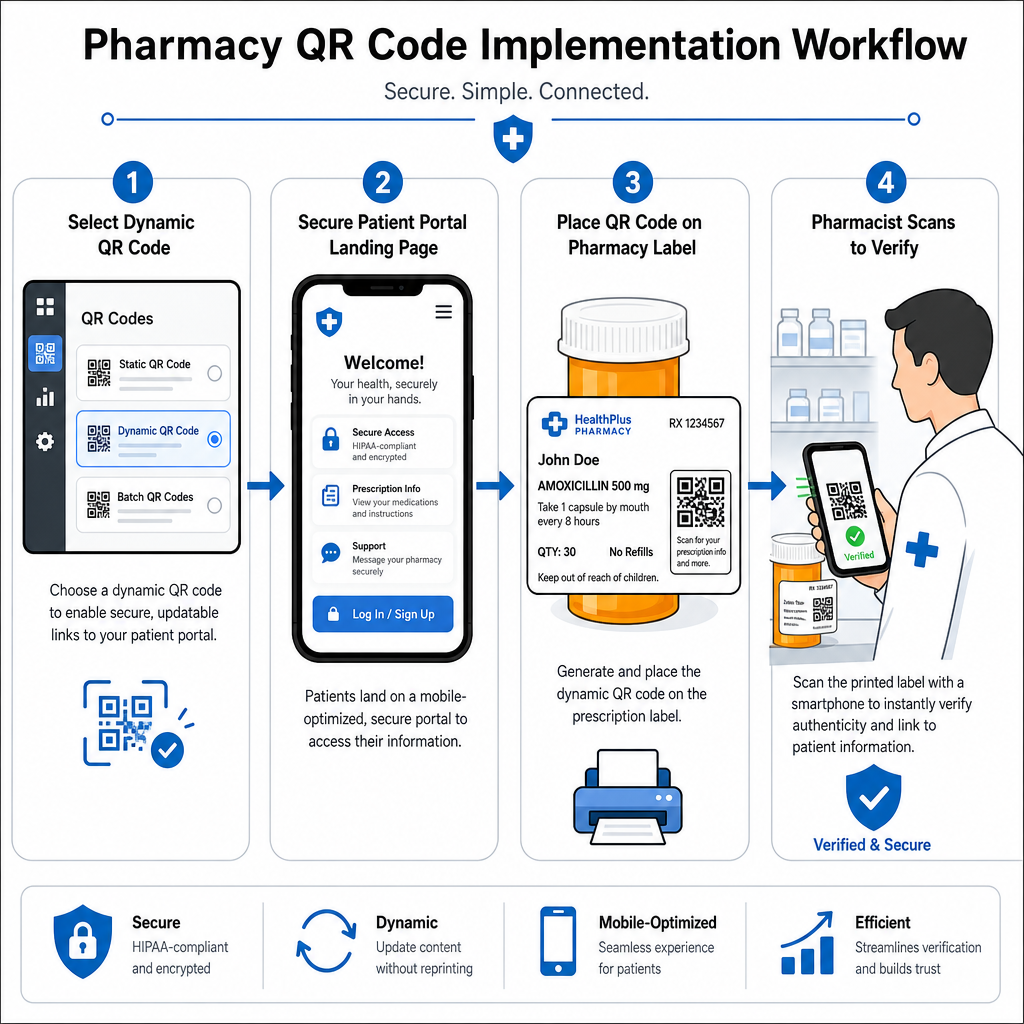
- Pilih Jenis Kode: Pilih kode QR dinamis untuk tautan web sehingga Anda dapat memperbarui PDF edukasi, URL video, atau tautan portal tanpa mencetak ulang label wadah fisik.
- Konfigurasi Halaman Landing Aman: Hubungkan tautan tujuan ke portal pasien yang dioptimalkan untuk seluler dan sesuai HIPAA atau panduan obat publik.
- Integrasikan Template Label: Tambahkan kode QR yang dihasilkan ke dalam templat cetak termal sistem manajemen farmasi Anda, memastikan ukuran, zona tenang, dan parameter kontras terkunci.
- Latih Staf Farmasi: Edukasi apoteker dan teknisi untuk menunjukkan kode QR selama konsultasi pasien, mendorong pasien untuk memindai botol mereka di rumah.
- Verifikasi Kemampuan Pindai: Lakukan pemeriksaan kualitas rutin di stasiun peracikan menggunakan berbasis web Pembaca kode QR untuk memastikan kejelasan kode sebelum diserahkan.
Mengeksplorasi bagaimana sektor lain mengelola kemasan yang dapat dipindai dapat memberikan wawasan alur kerja tambahan di berbagai kasus penggunaan industri.
Menambahkan kode QR yang dapat dipindai ke label resep menjembatani kesenjangan antara kemasan obat fisik dan sumber daya kesehatan digital yang vital. Dengan mengikuti standar pencetakan yang tepat, melindungi privasi pasien, dan mengelola tautan tujuan yang dapat diedit, farmasi Anda dapat mengurangi kesalahan administrasi dan meningkatkan hasil pasien secara keseluruhan. Mulailah membuat alur kerja label resep yang sesuai dan dapat dipindai dengan Pageloot hari ini.
Pertanyaan yang sering diajukan
Tidak. Regulasi federal AS dan pedoman FDA tidak mewajibkan kode QR yang menghadap konsumen pada label wadah resep. Elemen label wajib (seperti nama pasien, petunjuk obat, dan detail farmasi) masih harus dicetak langsung dalam teks yang dapat dibaca manusia. Kode QR tetap menjadi alat sukarela dan pelengkap untuk meningkatkan edukasi pasien dan akses digital.
Farmasi harus menghindari pengodean informasi kesehatan terlindungi (PHI) yang tidak terenkripsi – seperti nama pasien, tanggal lahir, atau detail obat – langsung di dalam pola kode QR. Sebaliknya, gunakan tautan dinamis aman yang mengarah ke portal pasien terenkripsi dan terlindungi kata sandi yang memerlukan autentikasi pasien sebelum menampilkan data pribadi.
Ukuran cetak minimum yang direkomendasikan untuk label resep adalah 0.8" x 0.8" (2 cm x 2 cm). Meskipun kode secara teknis dapat dipindai sekecil 1 cm x 1 cm pada kemasan kecil, dimensi yang lebih besar dengan kontras warna yang kuat dan zona tenang yang jelas memastikan pemindaian yang Andal di semua kamera perangkat seluler.