Bệnh nhân của bạn có đang gặp khó khăn khi đọc chữ nhỏ trên chai thuốc kê đơn hoặc bỏ lỡ các hướng dẫn liều dùng quan trọng không? Việc không tuân thủ dùng thuốc và lỗi sử dụng dẫn đến các rủi ro sức khỏe có thể phòng ngừa và thường xuyên phải tham vấn dược sĩ. Thêm mã QR có thể quét được vào nhãn thuốc kê đơn giúp bệnh nhân truy cập ngay lập tức vào hướng dẫn sử dụng thuốc kỹ thuật số, hướng dẫn âm thanh và cổng thông tin nạp thuốc.
Mã QR trên đơn thuốc có thể cung cấp thông tin gì?
Nhãn bao bì thuốc kê đơn có không gian vật lý hạn chế. Các quy định của liên bang và tiểu bang yêu cầu phải in các thông tin bắt buộc, bao gồm tên nhà thuốc, số đơn thuốc, chi tiết người kê đơn, tên bệnh nhân và hướng dẫn liều dùng. Mã phản hồi nhanh (QR) đóng vai trò là phần mở rộng kỹ thuật số của nhãn, cung cấp thông tin bổ sung mà không làm lộn xộn chai thuốc.
Các nhà thuốc có thể sử dụng mã QR trên đơn thuốc để cung cấp các tài nguyên hướng tới bệnh nhân, như:
- Hướng dẫn sử dụng thuốc kỹ thuật số: Liên kết bệnh nhân trực tiếp đến các tờ thông tin bệnh nhân điện tử (e-leaflets) hoặc tài liệu được định dạng bằng một Chuyển PDF sang QR.
- Định dạng âm thanh và dễ tiếp cận: Giúp bệnh nhân khiếm thị quét bao bì để nghe hướng dẫn liều dùng bằng giọng nói hoặc truy cập văn bản in lớn và các tùy chọn chữ nổi điện tử.
- Video hướng dẫn: Hiển thị video hướng dẫn từng bước cho các hệ thống phân phối thuốc phức tạp, như bút tiêm insulin, ống hít hoặc thiết bị tự tiêm.
- Cổng thông tin nạp thuốc: Hướng dẫn bệnh nhân trực tiếp đến các cổng thông tin nạp thuốc trực tuyến của nhà thuốc để gửi yêu cầu gia hạn nhanh chóng.
- Thông tin văn bản ngoại tuyến: Lưu trữ các cảnh báo văn bản thuần túy, số liên hệ khẩn cấp hoặc hướng dẫn bảo quản trực tiếp trong ma trận mã bằng cách sử dụng một Tạo mã QR văn bản.
Lợi ích chính cho an toàn bệnh nhân và tuân thủ dùng thuốc
Việc không tuân thủ dùng thuốc là một vấn đề sức khỏe cộng đồng lớn. Nghiên cứu cho thấy khoảng 50% bệnh nhân không dùng thuốc theo đúng chỉ định, dẫn đến hơn 125.000 ca tử vong có thể phòng ngừa mỗi năm. Việc đặt thông tin có thể quét được trên bao bì thuốc kê đơn giúp giải quyết các nguồn lỗi sử dụng và nhầm lẫn phổ biến.
Giảm thiểu lỗi dùng thuốc
Nhãn chai tiêu chuẩn sử dụng cỡ chữ nhỏ gây khó khăn cho người lớn tuổi hoặc người khiếm thị khi đọc. Nghiên cứu thực nghiệm so sánh bao bì có mã QR với nhãn chai tiêu chuẩn cho thấy việc truy cập vào thông tin kỹ thuật số có thể quét được đã giúp đưa ra các quyết định tự dùng thuốc chính xác hơn đáng kể ở cả nhóm bệnh nhân người lớn trẻ tuổi và người lớn tuổi.
Cải thiện khả năng tiếp cận
Cung cấp thông tin kê đơn dễ tiếp cận là rất quan trọng đối với sự an toàn của bệnh nhân. Khi được mã hóa bằng văn bản dễ tiếp cận hoặc liên kết đến các trang đích thân thiện với trình đọc màn hình, mã QR cho phép bệnh nhân có thị lực kém xác minh tên thuốc, lịch trình và các lưu ý thận trọng một cách độc lập.
Hỗ trợ theo dõi sự tuân thủ và tương tác
Các giải pháp theo dõi lượng thuốc kỹ thuật số sử dụng mã bao bì có thể quét được đã chứng minh tính khả thi lâm sàng cao. Các thử nghiệm lâm sàng cho thấy việc bệnh nhân tự báo cáo thông qua quét QR đạt được độ chính xác xấp xỉ độ chính xác 90.1% so với việc đếm thuốc thủ công. Tích hợp bao bì có thể quét được vào các hệ thống rộng hơn hệ thống mã QR bệnh viện và chăm sóc sức khỏe tăng cường giao tiếp với bệnh nhân và quản lý chăm sóc dài hạn. Để tìm hiểu thêm về các ứng dụng lâm sàng hiện đại, hãy xem xét hướng dẫn toàn diện của chúng tôi về hướng dẫn về mã QR trong chăm sóc sức khỏe.
Cung cấp Hướng dẫn bệnh nhân cập nhật Cần cập nhật hướng dẫn dùng thuốc hoặc tài nguyên kỹ thuật số mà không cần in lại nhãn vật lý? Sử dụng Tạo mã QR động để giữ cho các liên kết đích của bạn có thể chỉnh sửa và chính xác.
Tuân thủ quy định và biện pháp bảo vệ HIPAA cho nhà thuốc
Tích hợp các công cụ kỹ thuật số vào quy trình làm việc của nhà thuốc đòi hỏi sự chú ý nghiêm ngặt đến các tiêu chuẩn quy định và luật riêng tư của bệnh nhân.
| Lĩnh vực yêu cầu | Tiêu chuẩn / Hướng dẫn | Hành động chính của nhà thuốc |
|---|---|---|
| Quy định của FDA | Thông tin bệnh nhân tự nguyện | Coi mã QR là phần bổ sung tự nguyện; không bao giờ thay thế văn bản nhãn viết tay bắt buộc. |
| Tuần tự hóa DSCSA | Mã vạch GS1 2D Data Matrix | Duy trì mã vạch chuỗi cung ứng DSCSA riêng biệt với mã QR của người tiêu dùng. |
| Quy tắc bảo mật HIPAA | Thông tin sức khỏe được bảo vệ (PHI) | Không bao giờ mã hóa tên bệnh nhân, ngày sinh hoặc tình trạng sức khỏe trực tiếp vào mã. |
| Kiểm soát truy cập | Các biện pháp bảo vệ xác thực | Yêu cầu xác thực đăng nhập của bệnh nhân đối với bất kỳ điểm đến QR nào hiển thị dữ liệu sức khỏe cá nhân. |
Phân biệt Mã QR với Mã vạch Chuỗi Cung ứng
Theo Đạo luật An ninh Chuỗi Cung ứng Thuốc (DSCSA), mã vạch GS1 2D Data Matrix đã được tuần tự hóa là bắt buộc trên bao bì bán buôn để nhà phân phối theo dõi. Đây là các mã vạch 2D kỹ thuật, được quy định, dành cho máy quét chuỗi cung ứng. Ngược lại, mã QR hướng tới bệnh nhân là các công cụ tự nguyện được thiết kế cho điện thoại thông minh của người tiêu dùng để cung cấp nội dung giáo dục và vận hành.
Thực thi các Tiêu chuẩn Bảo mật và Quyền riêng tư của HIPAA
Nhà thuốc là các thực thể thuộc phạm vi điều chỉnh của HIPAA. Khi triển khai mã QR trên hộp đựng thuốc kê đơn:
- Tránh Mã hóa PHI Thô: Không bao giờ nhúng các số nhận dạng bệnh nhân chưa được mã hóa, số an sinh xã hội hoặc chẩn đoán cụ thể vào bên trong một mã tĩnh.
- Sử dụng các Điểm đến Web An toàn: Hướng mã QR đến các trang web HTTPS an toàn được hỗ trợ bởi các biện pháp kiểm soát truy cập nghiêm ngặt, xác thực đa yếu tố và cơ sở dữ liệu được mã hóa.
- Loại bỏ Theo dõi Không được Quy định: Đảm bảo các trang đích dành cho bệnh nhân không sử dụng pixel phân tích của bên thứ ba có thể tiết lộ dữ liệu một cách không được phép.
- Hợp tác với các Nhà cung cấp Tuân thủ: Chọn các nền tảng phần mềm thực thi các giao thức bảo mật dữ liệu và thực hiện Thỏa thuận Đối tác Kinh doanh (BAA). Để biết chi tiết đầy đủ về các tiêu chuẩn pháp lý, hãy tham khảo hướng dẫn của chúng tôi về luật và quy định về quyền riêng tư của mã QR.
Các Thực hành Tốt nhất để In Nhãn Thuốc Kê đơn có thể Quét được
Nhãn thuốc kê đơn phải đối mặt với việc xử lý thường xuyên, độ ẩm và giới hạn không gian chật hẹp. Nếu mã in không quét được, lòng tin của bệnh nhân sẽ giảm và số lượng cuộc gọi hỗ trợ nhà thuốc sẽ tăng lên.
Kích thước Mã được Đề xuất
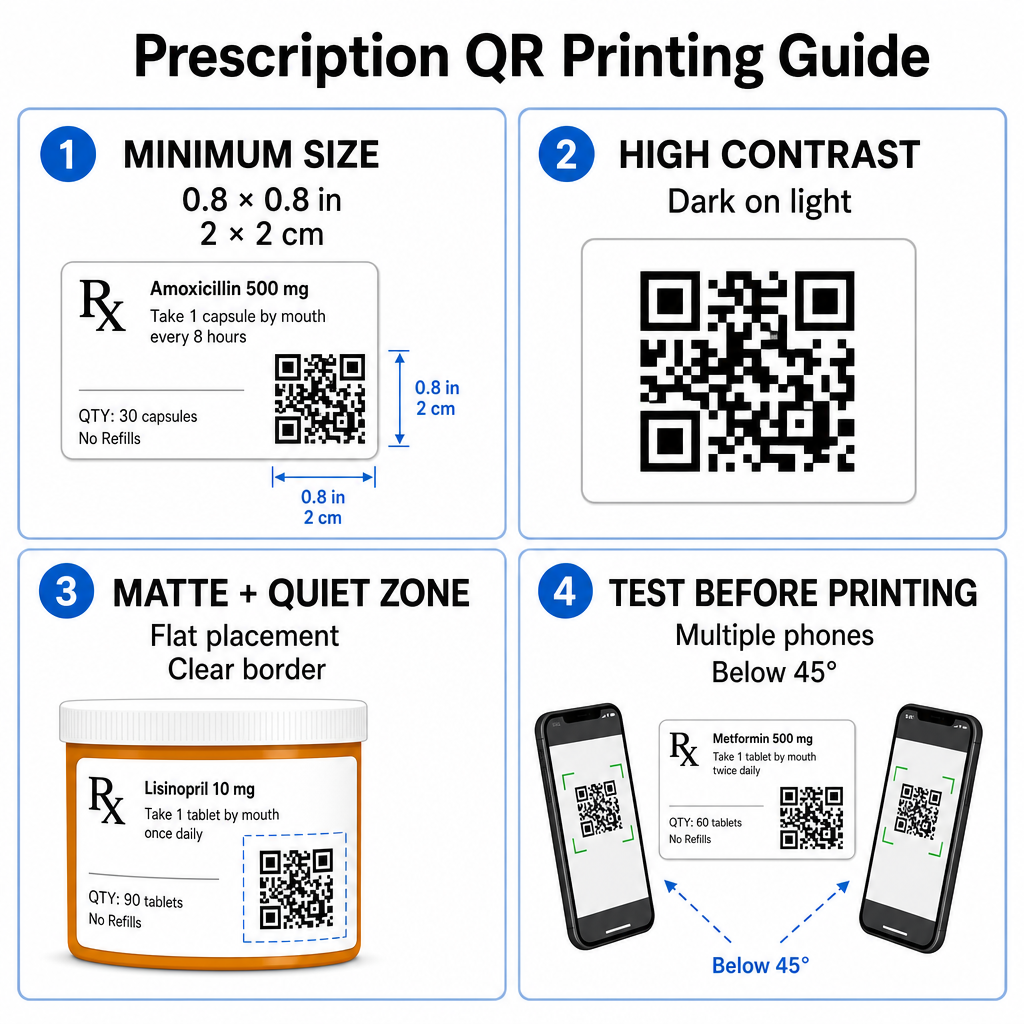
Bề mặt lọ thuốc kê đơn bị hạn chế. Duy trì kích thước tiêu chuẩn tối thiểu là 0,8″ x 0,8″ (2 cm x 2 cm) để quét đáng tin cậy. Trên các gói rất nhỏ, kích thước in tối thiểu tuyệt đối là 1 cm x 1 cm có thể được sử dụng, miễn là mật độ dữ liệu được mã hóa vẫn thấp. Bạn có thể kiểm tra tỷ lệ thu phóng chính xác trong hướng dẫn kích thước mã QR của chúng tôi.
Độ Tương Phản Màu Sắc và Vật Liệu Bề Mặt
Máy in nhiệt thường được sử dụng trong các nhà thuốc bán lẻ yêu cầu hiệu chuẩn cụ thể để đảm bảo khả năng quét tối ưu:
- Độ Tương Phản Cao: In các họa tiết màu tối đặc (lý tưởng là màu đen) trên nền sáng, không trong suốt và sạch sẽ.
- Bề Mặt Mờ: Tránh các lớp phủ nhãn bóng hoặc lọ nhựa trong suốt phản chiếu ánh sáng phòng và làm chói cảm biến máy ảnh. Nếu không thể tránh khỏi các hộp đựng sáng bóng hoặc trong suốt, hãy in một lớp màu trắng mờ ngay bên dưới mã QR.
- Quản Lý Độ Cong: Đặt mã QR vào phần phẳng nhất của chai hoặc hộp để tránh biến dạng hình học.
Để đánh giá cách mực nhiệt, vật liệu nền và vật liệu nhãn ảnh hưởng đến tốc độ quét, hãy đọc phân tích chi tiết của chúng tôi về các kỹ thuật in ảnh hưởng đến khả năng quét QR như thế nào.
Vùng Yên Tĩnh và Thử Nghiệm Xác Minh
Luôn duy trì một đường viền ngoài rõ ràng – được gọi là vùng yên tĩnh – xung quanh mã để tách nó khỏi văn bản và đường viền nhãn xung quanh. Kiểm tra các mã đã in trên nhiều thiết bị điện thoại thông minh, các góc (dưới 45 độ) và điều kiện ánh sáng trước khi in hàng loạt. Xem lại các nguyên tắc cốt lõi của chúng tôi các phương pháp hay nhất để đọc mã QR để đảm bảo bố cục nhãn của bạn hoạt động đáng tin cậy.
Xác Minh Khả Năng Quét Nhãn Đã In Của Bạn Bạn muốn kiểm tra xem bao bì thuốc của mình có quét nhanh trên tất cả các camera thiết bị không? Kiểm tra ngay lập tức các thiết kế nhãn đã in của bạn bằng công cụ miễn phí máy quét mã QR trực tuyến.
Triển Khai Mã QR Kê Đơn Trong Quy Trình Làm Việc Của Nhà Thuốc
Việc triển khai nhãn có thể quét được trong hoạt động của nhà thuốc đòi hỏi một phương pháp tiếp cận đơn giản, có cấu trúc:
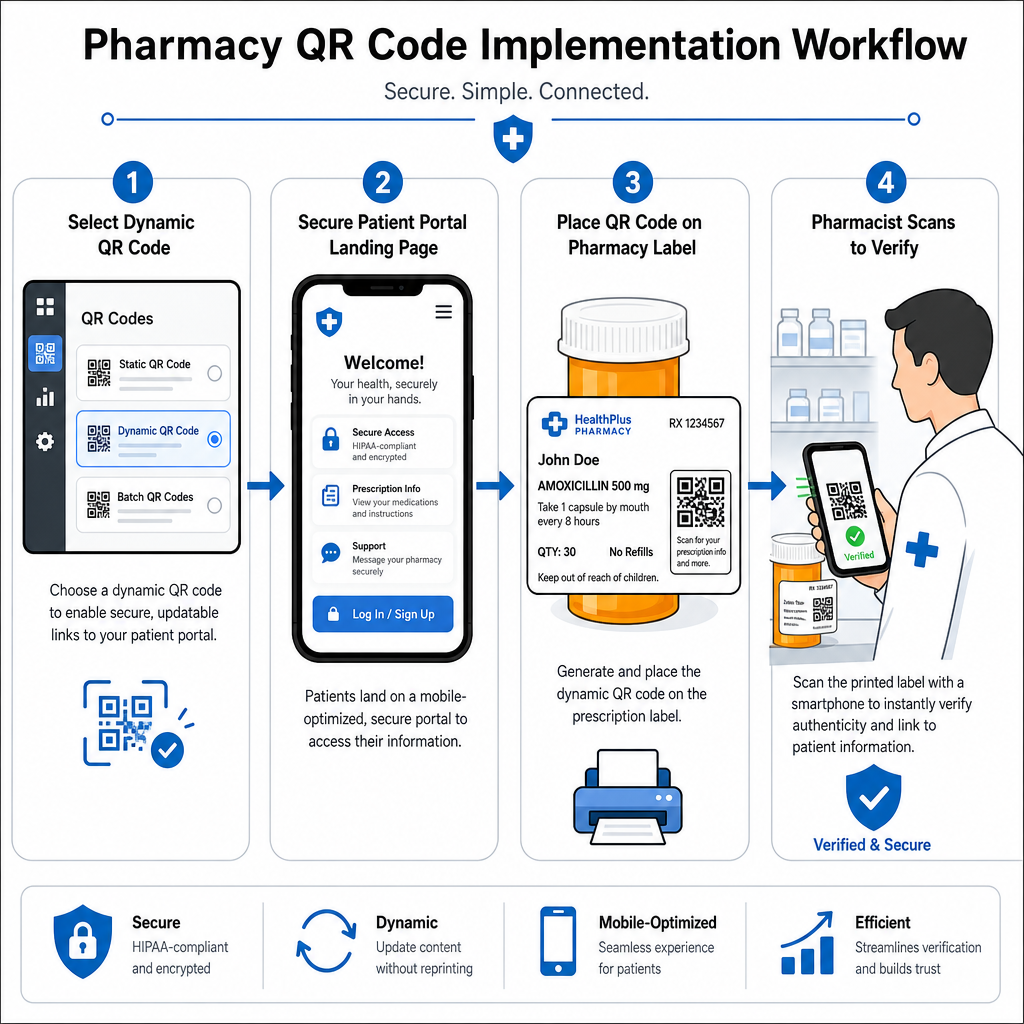
- Chọn Loại Mã: Chọn mã QR động cho các liên kết web để bạn có thể cập nhật các tệp PDF giáo dục, URL video hoặc liên kết cổng thông tin mà không cần in lại nhãn vật lý của hộp đựng.
- Cấu Hình Trang Đích Bảo Mật: Kết nối các liên kết đích đến cổng thông tin bệnh nhân được tối ưu hóa cho thiết bị di động, tuân thủ HIPAA hoặc hướng dẫn sử dụng thuốc công khai.
- Tích Hợp Mẫu Nhãn: Thêm mã QR đã tạo vào các mẫu in nhiệt của hệ thống quản lý nhà thuốc của bạn, đảm bảo kích thước, vùng yên tĩnh và các thông số độ tương phản được khóa.
- Đào tạo nhân viên nhà thuốc: Hướng dẫn dược sĩ và kỹ thuật viên chỉ ra mã QR trong quá trình tư vấn bệnh nhân, khuyến khích bệnh nhân quét chai thuốc của họ tại nhà.
- Xác minh khả năng quét: Thực hiện kiểm tra chất lượng định kỳ tại các quầy cấp phát bằng cách sử dụng một ứng dụng web Đầu đọc mã QR để xác nhận độ rõ ràng của mã trước khi giao.
Nghiên cứu cách các lĩnh vực khác quản lý bao bì có thể quét được có thể cung cấp thêm thông tin chi tiết về quy trình làm việc trên nhiều trường hợp sử dụng trong ngành.
Việc thêm mã QR có thể quét được vào nhãn thuốc giúp thu hẹp khoảng cách giữa bao bì thuốc vật lý và các nguồn tài nguyên sức khỏe kỹ thuật số quan trọng. Bằng cách tuân thủ các tiêu chuẩn in ấn phù hợp, bảo vệ quyền riêng tư của bệnh nhân và quản lý các liên kết đích có thể chỉnh sửa, nhà thuốc của bạn có thể giảm lỗi hành chính và cải thiện kết quả tổng thể cho bệnh nhân. Bắt đầu tạo quy trình làm việc nhãn thuốc có thể quét được, tuân thủ quy định với Pageloot ngay hôm nay.
Câu hỏi thường gặp
Không. Các quy định liên bang của Hoa Kỳ và hướng dẫn của FDA không yêu cầu mã QR dành cho người tiêu dùng trên nhãn hộp thuốc kê đơn. Các yếu tố nhãn bắt buộc (như tên bệnh nhân, hướng dẫn dùng thuốc và chi tiết nhà thuốc) vẫn phải được in trực tiếp bằng văn bản dễ đọc. Mã QR vẫn là một công cụ tự nguyện, bổ sung để cải thiện giáo dục bệnh nhân và khả năng tiếp cận kỹ thuật số.
Các nhà thuốc phải tránh mã hóa thông tin sức khỏe được bảo vệ (PHI) chưa được mã hóa – như tên bệnh nhân, ngày sinh hoặc chi tiết thuốc – trực tiếp vào mẫu mã QR. Thay vào đó, hãy sử dụng các liên kết động an toàn trỏ đến các cổng thông tin bệnh nhân được mã hóa, bảo vệ bằng mật khẩu, yêu cầu bệnh nhân xác thực trước khi hiển thị dữ liệu cá nhân.
Kích thước in tối thiểu được khuyến nghị cho nhãn thuốc là 0.8″ x 0.8″ (2 cm x 2 cm). Mặc dù mã có thể quét được về mặt kỹ thuật nhỏ tới 1 cm x 1 cm trên các gói nhỏ, nhưng kích thước lớn hơn với độ tương phản màu sắc mạnh và các vùng yên tĩnh rõ ràng đảm bảo quét đáng tin cậy trên tất cả các camera của thiết bị di động.