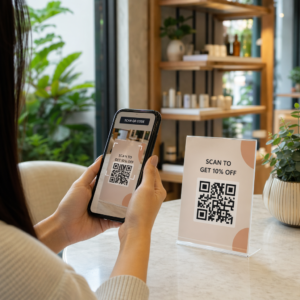
Os seus pacientes estão com dificuldade para ler o texto minúsculo do frasco de medicamentos ou a perder instruções de dosagem críticas? A não adesão à medicação e erros de administração levam a riscos de saúde evitáveis e consultas frequentes na farmácia. Adicionar códigos QR escaneáveis aos rótulos de medicamentos dá aos pacientes acesso instantâneo a guias digitais de medicação, instruções em áudio e portais de recarga.
Que Informações os Códigos QR de Prescrição Podem Fornecer?
Os rótulos dos recipientes de medicamentos têm espaço físico limitado. Regulamentos federais e estaduais exigem texto impresso obrigatório, incluindo o nome da farmácia, número da receita, detalhes do prescritor, nome do paciente e instruções de dosagem. Um código de resposta rápida (QR) atua como uma extensão digital do rótulo, fornecendo informações adicionais sem sobrecarregar o frasco.
As farmácias podem usar códigos QR de prescrição para fornecer recursos voltados para o paciente, como:
- Guias Digitais de Medicação: Linke os pacientes diretamente para folhetos de informação eletrónica para pacientes (e-leaflets) ou documentos formatados usando um [QR CODE]. Gerador de QR Code de PDF.
- Formatos de Áudio e Acessíveis: Ajude pacientes com deficiência visual a escanear a embalagem para ouvir instruções de dosagem faladas ou aceder a texto em letra grande e opções de braille eletrónico.
- Vídeos Demonstrativos: Mostre tutoriais em vídeo passo a passo para sistemas complexos de entrega de medicamentos, como canetas de insulina, inaladores ou dispositivos de auto-injeção.
- Portais de Recarga: Direcione os pacientes diretamente para os portais de recarga online da farmácia para submeter rapidamente pedidos de renovação.
- Informação de Texto Offline: Armazene avisos de texto simples, números de contacto de emergência ou instruções de armazenamento diretamente na matriz do código usando um [QR CODE]. Gerador de QR Code de Texto.
Principais Benefícios para a Segurança do Paciente e Adesão à Medicação
A não adesão à medicação é um grande problema de saúde pública. Pesquisas mostram que cerca de 50% dos pacientes não tomam os seus medicamentos conforme prescrito, levando a mais de 125.000 mortes evitáveis a cada ano. A colocação de informações escaneáveis na embalagem dos medicamentos ajuda a resolver fontes comuns de erros de administração e confusão.
Redução de Erros de Medicação
Rótulos de frascos padrão usam fontes pequenas que são difíceis de ler para idosos ou indivíduos com deficiência visual. Pesquisas experimentais comparando embalagens equipadas com códigos QR com rótulos de frascos padrão descobriram que o acesso a detalhes digitais escaneáveis resultou em decisões de autoadministração significativamente mais corretas em grupos de pacientes adultos jovens e idosos.
Melhorando a Acessibilidade
Fornecer detalhes de prescrição acessíveis é vital para a segurança do paciente. Quando codificados com texto acessível ou vinculados a páginas de destino amigáveis para leitores de tela, os códigos QR permitem que pacientes com baixa visão verifiquem nomes de medicamentos, horários e notas de precaução de forma independente.
Apoiar o Rastreamento de Adesão e o Engajamento
Soluções digitais de rastreamento de ingestão usando códigos de embalagem escaneáveis demonstraram alta viabilidade clínica. Ensaios clínicos mostram que o autorrelato do paciente via leitura de QR atinge aproximadamente 90.1% de precisão em comparação com a contagem manual de pílulas. A integração de embalagens escaneáveis em sistemas mais amplos de códigos QR para hospitais e saúde aprimora a comunicação com o paciente e o gerenciamento de cuidados de longo prazo. Para saber mais sobre aplicações clínicas modernas, consulte nosso abrangente guia de códigos QR para saúde.
Entregar Instruções Atualizadas ao Paciente Precisa atualizar guias de medicamentos ou recursos digitais sem reimprimir rótulos físicos? Use o Gerador de QR Code Dinâmico para manter seus links de destino editáveis e precisos.
Conformidade Regulatória e Salvaguardas HIPAA para Farmácias
A integração de ferramentas digitais nos fluxos de trabalho da farmácia exige atenção rigorosa aos padrões regulatórios e às leis de privacidade do paciente.
| Área de Requisito | Padrão / Diretriz | Ação Chave da Farmácia |
|---|---|---|
| Regulamentos da FDA | Informações voluntárias ao paciente | Trate os códigos QR como adições voluntárias; nunca substitua o texto obrigatório do rótulo escrito. |
| Serialização DSCSA | Códigos de barras GS1 2D Data Matrix | Mantenha os códigos de barras da cadeia de suprimentos DSCSA separados dos códigos QR do consumidor. |
| Regra de Privacidade HIPAA | Informações de Saúde Protegidas (PHI) | Nunca codifique nomes de pacientes, datas de nascimento ou condições diretamente no código. |
| Controle de Acesso | Salvaguardas de autenticação | Exija autenticação de login do paciente para qualquer destino de QR que exiba dados de saúde pessoais. |
Diferenciando Códigos QR de Códigos de Barras da Cadeia de Suprimentos
De acordo com o Drug Supply Chain Security Act (DSCSA), códigos de barras GS1 2D Data Matrix serializados são obrigatórios em embalagens de atacado para rastreamento do distribuidor. Estes são códigos de barras 2D técnicos e regulamentados, destinados a scanners da cadeia de suprimentos. Códigos QR voltados para o paciente, por outro lado, são ferramentas voluntárias projetadas para smartphones de consumidores, a fim de fornecer conteúdo educacional e operacional.
Aplicando os Padrões de Privacidade e Segurança da HIPAA
As farmácias são entidades cobertas pela HIPAA. Ao implementar códigos QR em embalagens de prescrição:
- Evite a Codificação de PHI Bruta: Nunca incorpore identificadores de paciente não criptografados, números de segurança social ou diagnósticos específicos dentro de um código estático.
- Use Destinos Web Seguros: Aponte códigos QR para sites HTTPS seguros, apoiados por controles de acesso rigorosos, autenticação multifator e bancos de dados criptografados.
- Elimine o Rastreamento Não Regulamentado: Garanta que as páginas de destino voltadas para o paciente não utilizem pixels de análise de terceiros que possam divulgar dados de forma indevida.
- Faça Parceria com Fornecedores Complacentes: Escolha plataformas de software que apliquem protocolos de segurança de dados e executem Acordos de Associação Comercial (BAAs). Para uma análise completa dos padrões legais, consulte nosso guia sobre leis e regulamentos de privacidade de códigos QR.
Melhores Práticas para Imprimir Etiquetas de Prescrição Escaneáveis
As etiquetas de prescrição enfrentam manuseio frequente, umidade e limitações de espaço apertado. Se um código impresso falhar na leitura, a confiança do paciente diminui e as chamadas de suporte da farmácia aumentam.
Tamanho de Código Recomendado
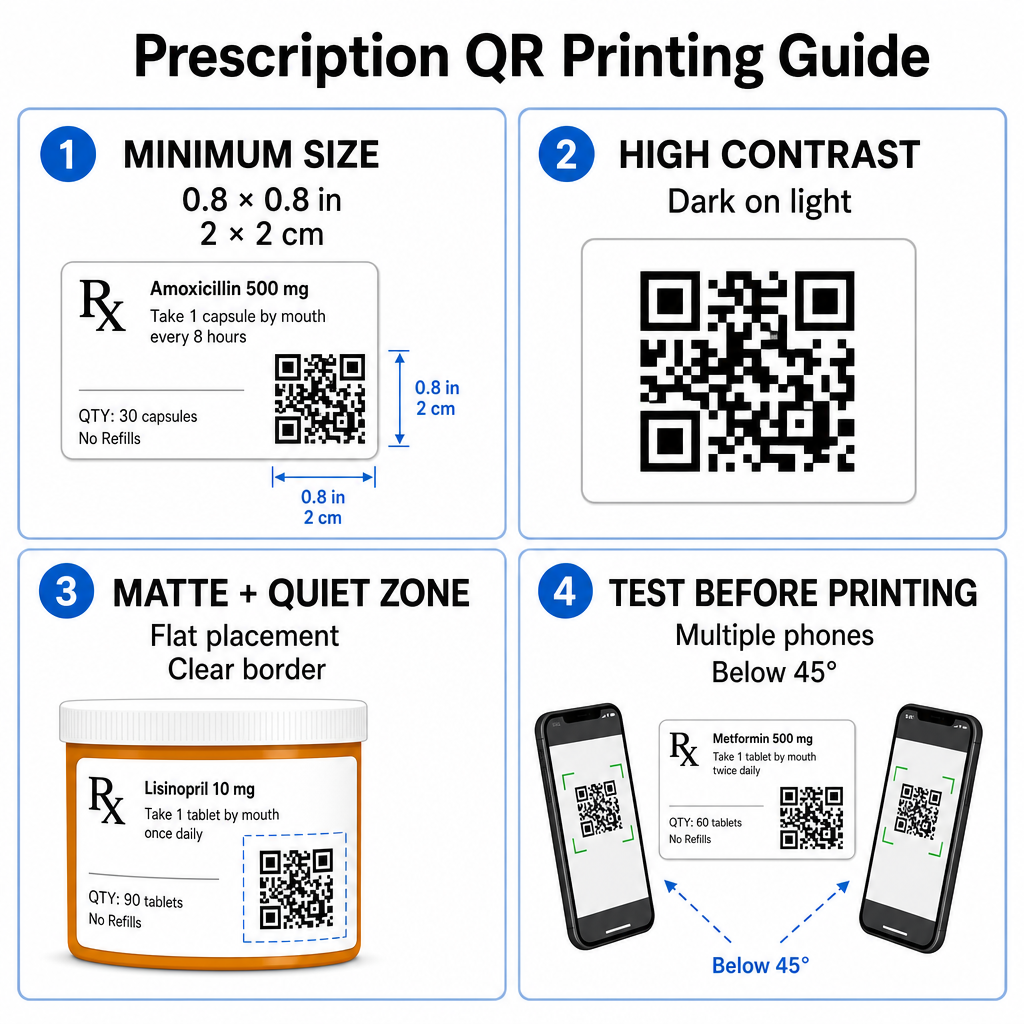
As superfícies dos frascos de prescrição são limitadas. Mantenha um tamanho padrão de pelo menos 0.8" x 0.8" (2 cm x 2 cm) para uma leitura confiável. Em embalagens muito pequenas, um tamanho mínimo absoluto de impressão de 1 cm x 1 cm podem ser usados, desde que a densidade dos dados codificados permaneça baixa. Você pode verificar as taxas de escala exatas em nosso guia de tamanho de código QR.
Contraste de Cores e Materiais de Superfície
As impressoras térmicas comumente usadas em farmácias de varejo exigem calibração específica para uma escaneabilidade ideal:
- Alto Contraste: Imprima padrões escuros sólidos (idealmente pretos) sobre fundos claros, limpos e opacos.
- Acabamentos Foscos: Evite revestimentos de etiquetas brilhantes ou frascos de plástico transparentes que reflitam a iluminação do ambiente e 'ceguem' os sensores da câmera. Se recipientes brilhantes ou transparentes forem inevitáveis, imprima uma camada branca fosca diretamente abaixo do código QR.
- Gestão de Curvatura: Coloque o código QR na seção mais plana do frasco ou caixa para evitar distorção geométrica.
Para avaliar como as tintas térmicas, substratos e materiais de etiquetas impactam as velocidades de leitura, leia nossa análise detalhada sobre como as técnicas de impressão afetam a escaneabilidade do QR.
Zonas Silenciosas e Testes de Verificação
Sempre mantenha uma borda externa clara – conhecida como zona silenciosa – ao redor do código para separá-lo do texto e das bordas da etiqueta circundante. Teste os códigos impressos em vários dispositivos smartphone, ângulos (abaixo de 45 graus) e condições de iluminação antes da impressão em massa. Revise nossos princípios de melhores práticas para legibilidade de códigos QR para garantir que o layout da sua etiqueta tenha um desempenho confiável.
Verifique a Escaneabilidade de Suas Etiquetas Impressas Quer testar se sua embalagem de prescrição escaneia rapidamente em todas as câmeras de dispositivos? Teste seus designs de etiquetas impressas instantaneamente com o scanner de código QR online.
Implementando Códigos QR para Prescrições em Fluxos de Trabalho de Farmácia
A implantação de etiquetas escaneáveis em todas as operações da farmácia requer uma abordagem simples e estruturada:
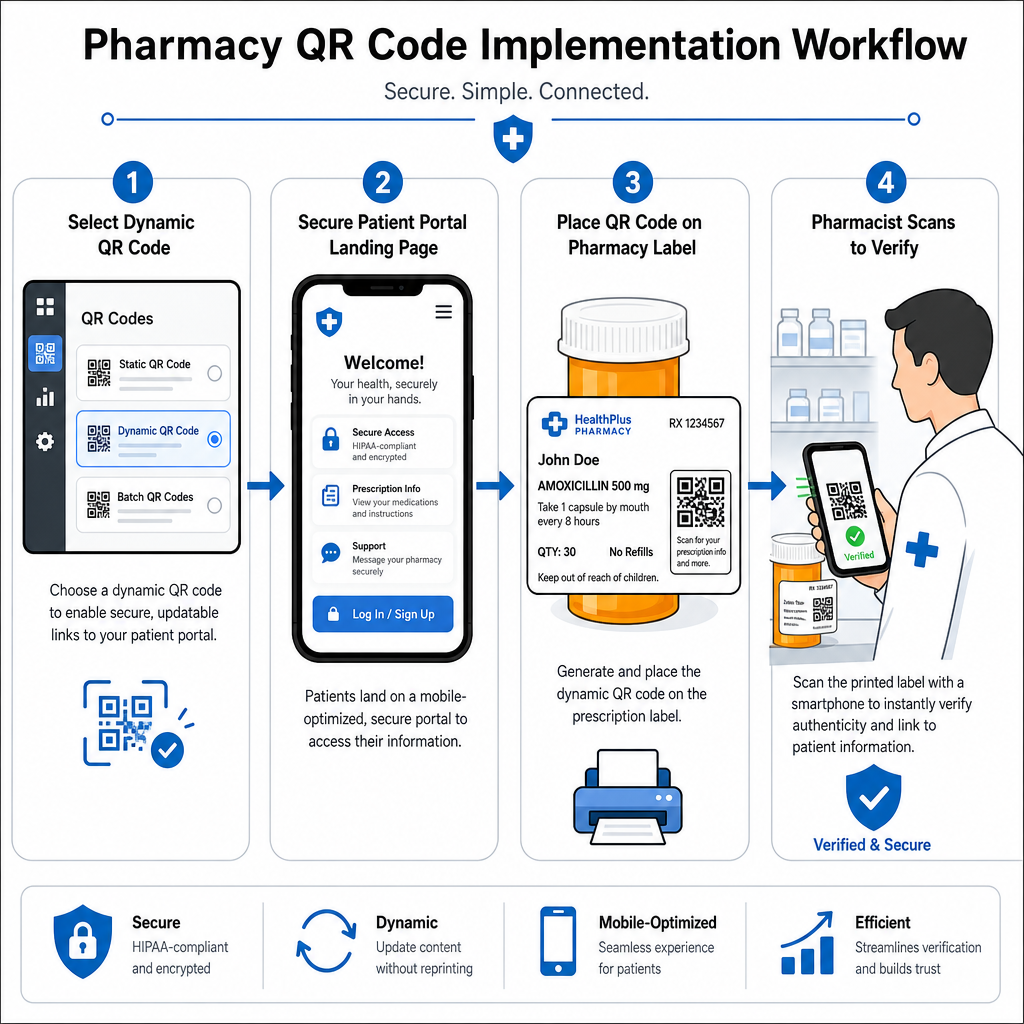
- Selecione o Tipo de Código: Escolha códigos QR dinâmicos para links da web para que você possa atualizar PDFs educacionais, URLs de vídeo ou links de portal sem reimprimir as etiquetas físicas dos recipientes.
- Configure Páginas de Destino Seguras: Conecte links de destino a portais de pacientes otimizados para celular e em conformidade com a HIPAA ou a guias de medicamentos públicos.
- Integre Modelos de Etiqueta: Adicione o código QR gerado nos modelos de impressão térmica do seu sistema de gestão de farmácia, garantindo que o tamanho, as zonas de silêncio e os parâmetros de contraste estejam bloqueados.
- Treinar a Equipa da Farmácia: Eduque farmacêuticos e técnicos a apontar o código QR durante as consultas com os pacientes, incentivando os pacientes a digitalizar o frasco em casa.
- Verificar Capacidade de Leitura: Realize verificações de qualidade de rotina nas estações de dispensação usando um(a) baseado(a) na web Leitor de código QR para confirmar a clareza do código antes da entrega.
Explorar como outros setores gerenciam embalagens escaneáveis pode fornecer insights adicionais sobre fluxos de trabalho em diversos casos de uso da indústria.
Adicionar códigos QR escaneáveis aos rótulos de prescrição preenche a lacuna entre as embalagens físicas de medicamentos e os recursos vitais de saúde digital. Ao seguir os padrões de impressão adequados, proteger a privacidade do paciente e gerenciar links de destino editáveis, sua farmácia pode reduzir erros administrativos e melhorar os resultados gerais dos pacientes. Comece a criar fluxos de trabalho de rótulos de prescrição compatíveis e escaneáveis com Pageloot hoje.
Perguntas frequentes
Não. As regulamentações federais dos EUA e as diretrizes da FDA não exigem códigos QR voltados para o consumidor em rótulos de recipientes de prescrição. Elementos obrigatórios do rótulo (como nome do paciente, instruções do medicamento e detalhes da farmácia) ainda devem ser impressos diretamente em texto legível por humanos. Os códigos QR continuam sendo uma ferramenta voluntária e suplementar para melhorar a educação do paciente e o acesso digital.
Farmácias devem evitar codificar informações de saúde protegidas não criptografadas (PHI) – como nomes de pacientes, datas de nascimento ou detalhes de medicamentos – diretamente no padrão do código QR. Em vez disso, use links dinâmicos seguros que apontam para portais de pacientes criptografados e protegidos por senha que exigem autenticação do paciente antes de exibir dados pessoais.
O tamanho mínimo de impressão recomendado para rótulos de prescrição é 0,8″ x 0,8″ (2 cm x 2 cm). Embora os códigos possam tecnicamente ser escaneados em embalagens pequenas com apenas 1 cm x 1 cm, dimensões maiores com forte contraste de cores e zonas de silêncio claras garantem uma digitalização confiável em todas as câmeras de dispositivos móveis.