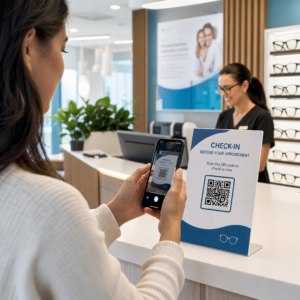
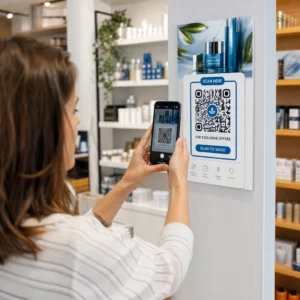
Kas teie patsiendid näevad vaeva pisikese retseptipudeli teksti lugemisega või jäävad neil märkamata kriitilised annustamisjuhised? Ravimite mittejärgimine ja manustamisvead põhjustavad ennetatavaid terviseriske ja sagedasi apteegikonsultatsioone. Skaneeritavate QR-koodide lisamine retseptisiltidele annab patsientidele kohese juurdepääsu digitaalsetele ravijuhenditele, helijuhistele ja korduvretseptide portaalidele.
Millist teavet saavad retsepti QR-koodid pakkuda?
Retseptipakendi siltidel on piiratud füüsiline ruum. Föderaalsed ja osariigi regulatsioonid nõuavad kohustuslikku trükitud teksti, sealhulgas apteegi nime, retseptinumbrit, retsepti väljastaja andmeid, patsiendi nime ja annustamisjuhiseid. Kiirvastuse (QR) kood toimib sildi digitaalse laiendusena, pakkudes lisateavet pudelit üle koormamata.
Apteegid saavad kasutada retsepti QR-koode patsientidele suunatud ressursside pakkumiseks, näiteks:
- Digitaalsed ravijuhendid: Lingi patsiendid otse elektroonilistele patsienditeabelehtedele (e-infolehed) või dokumentidele, mis on vormindatud kasutades PDF QR-koodi generaator.
- Heli- ja ligipääsetavad vormingud: Aidake nägemispuudega patsientidel pakendit skaneerida, et kuulata suulisi annustamisjuhiseid või pääseda ligi suurele kirjale ja elektroonilise punktkirja valikutele.
- Demonstratsioonivideod: Näita samm-sammult videost juhendmaterjale keeruliste ravimite manustamissüsteemide, nagu insuliinipliiatsid, inhalaatorid või isesüstimise seadmed, kohta.
- Korduvretseptide portaalid: Suunake patsiendid otse apteegi veebipõhistele korduvretseptide portaalidele, et esitada uuendamistaotlusi kiiresti.
- Võrguväline tekstiteave: Salvestage lihtteksti hoiatused, hädaabinumbrid või säilitamisjuhised otse koodimaatriksisse, kasutades Teksti QR koodi loomine.
Peamised eelised patsiendi ohutuse ja ravimite järgimise seisukohast
Ravimite mittejärgimine on suur rahvatervise probleem. Uuringud näitavad, et umbes 50% patsientidest ei võta oma ravimeid ettenähtud viisil, põhjustades igal aastal üle 125 000 ennetatava surma. Skaneeritava teabe paigutamine retseptipakendile aitab lahendada levinud manustamisvigade ja segaduse allikaid.
Ravimivigade vähendamine
Standardsete pudelisiltide väike tekst on eakatele või nägemispuudega inimestele raskesti loetav. Eksperimentaalne uuring, mis võrdles QR-koodiga pakendeid standardsete pudelisiltidega, leidis, et skaneeritavatele digitaalsetele andmetele ligipääs tõi kaasa märkimisväärselt rohkem õigeid ise manustamise otsuseid nii nooremate kui ka vanemate patsientide rühmade puhul.
Juurdepääsetavuse parandamine
Juurdepääsetavate retseptiandmete pakkumine on patsiendi ohutuse jaoks elutähtis. Kui QR-koodid on kodeeritud juurdepääsetava tekstiga või lingitud ekraanilugeja-sõbralike maandumislehtedega, võimaldavad need kehva nägemisega patsientidel iseseisvalt kontrollida ravimite nimesid, manustamisgraafikuid ja hoiatusmärkusi.
Ravi järgimise jälgimise ja kaasatuse toetamine
Skaneeritavate pakendikoodide abil digitaalsed ravimi võtmise jälgimise lahendused on näidanud suurt kliinilist teostatavust. Kliinilised uuringud näitavad, et patsientide enesearuandlus QR-skannide kaudu saavutab ligikaudu 90,1% täpsus võrreldes käsitsi pillide loendamisega. Skaneeritavate pakendite integreerimine laiematesse haigla ja tervishoiu QR-koodisüsteemidesse parandab patsientide suhtlust ja pikaajalist hooldust. Kaasaegsete kliiniliste rakenduste kohta lisateabe saamiseks vaadake meie põhjalikku tervishoiu QR-koodide juhendit.
Esitage ajakohastatud patsiendijuhiseid Kas on vaja uuendada ravimijuhendeid või digitaalseid ressursse ilma füüsilisi silte uuesti printimata? Kasutage Dünaamilise QR koodi generaator oma sihtlinkide muudetavana ja täpsena hoidmiseks.
Regulatiivne vastavus ja HIPAA kaitsemeetmed apteekidele
Digitaalsete tööriistade integreerimine apteegi töövoogudesse nõuab ranget tähelepanu regulatiivsetele standarditele ja patsientide privaatsusseadustele.
| Nõudevaldkond | Standard / Juhend | Peamine apteegi tegevus |
|---|---|---|
| FDA regulatsioonid | Vabatahtlik patsienditeave | Käsitlege QR-koode vabatahtlike lisadena; ärge kunagi asendage nõutud kirjalikku silditeksti. |
| DSCSA serialiseerimine | GS1 2D Data Matrix vöötkoodid | Hoidke DSCSA tarneahela vöötkoodid tarbija QR-koodidest eraldi. |
| HIPAA privaatsuse reegel | Kaitstud terviseandmed (PHI) | Ärge kunagi kodeerige patsiendi nimesid, sünnikuupäevi ega seisundeid otse koodi. |
| Juurdepääsukontroll | Autentimiskaitsed | Nõudke patsiendi sisselogimise autentimist igale isiklikke terviseandmeid kuvavale QR-sihtkohale. |
QR-koodide eristamine tarneahela vöötkoodidest
Ravimitarneahela turvalisuse seaduse (DSCSA) alusel on hulgipakenditel turustaja jälgimiseks kohustuslikud serialiseeritud GS1 2D Data Matrix vöötkoodid. Need on tehnilised, reguleeritud 2D vöötkoodid, mis on mõeldud tarneahela skanneritele. Patsiendile suunatud QR-koodid on seevastu vabatahtlikud tööriistad, mis on loodud tarbijate nutitelefonide jaoks haridusliku ja operatiivse sisu edastamiseks.
HIPAA privaatsus- ja turvastandardite jõustamine
Apteegid on HIPAA-ga hõlmatud üksused. QR-koodide kasutamisel retseptipakenditel:
- Vältige töötlemata PHI kodeerimist: Ärge kunagi manustage krüpteerimata patsiendi identifikaatoreid, sotsiaalkindlustusnumbreid ega konkreetseid diagnoose staatilise koodi sisse.
- Kasutage turvalisi veebisihtkohti: Suunake QR-koodid turvalistele HTTPS-veebisaitidele, mida toetavad ranged juurdepääsukontrollid, mitmefaktoriline autentimine ja krüpteeritud andmebaasid.
- Kõrvaldage reguleerimata jälgimine: Veenduge, et patsiendile suunatud sihtlehed ei kasutaks kolmandate osapoolte analüütikapiksleid, mis võiksid andmeid lubamatult avaldada.
- Tehke koostööd nõuetele vastavate müüjatega: Valige tarkvaraplatvormid, mis jõustavad andmeturbeprotokolle ja täidavad äripartneri lepinguid (BAA-sid). Õigusstandardite täielikuks ülevaateks vaadake meie juhendit teemal QR-koodi privaatsusseadused ja -määrused.
Skannitavate retseptisiltide printimise parimad tavad
Retseptisildid puutuvad kokku sagedase käsitsemise, niiskuse ja piiratud ruumiga. Kui prinditud kood ei skaneeru, väheneb patsientide usaldus ja apteegi tugikõned suurenevad.
Soovitatav koodisuurus
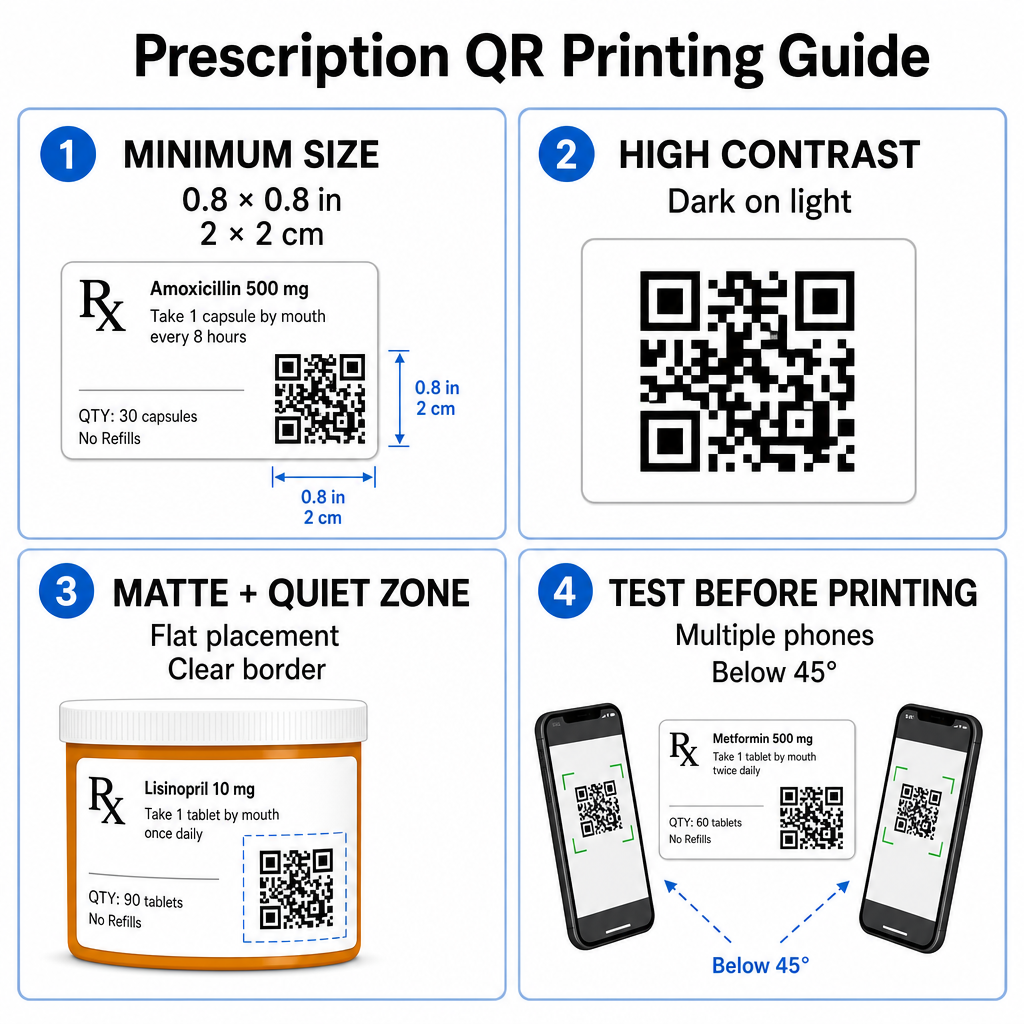
Retseptipudelite pinnad on piiratud. Hoidke standardset suurust vähemalt 0.8" x 0.8" (2 cm x 2 cm) usaldusväärseks skaneerimiseks. Väga väikestel pakenditel on absoluutne minimaalne printimissuurus 1 cm x 1 cm võib kasutada, tingimusel et kodeeritud andmete tihedus jääb madalaks. Täpsed skaleerimissuhted leiate meie QR-koodi suuruse juhendist.
Värvikontrast ja pinnamaterjalid
Jaekaubanduse apteekides tavaliselt kasutatavad termoprinterid vajavad optimaalse skaneeritavuse tagamiseks spetsiifilist kalibreerimist:
- Kõrge kontrast: Trükkige ühtlasi tumedaid mustreid (ideaalis musta) puhtale, läbipaistmatule heledale taustale.
- Mattviimistlused: Vältige läikivaid etiketikatteid või läbipaistvaid plastikampulle, mis peegeldavad ruumi valgust ja pimestavad kaameraandureid. Kui läikivad või läbipaistvad anumad on vältimatud, trükkige valge mattkiht otse QR-koodi alla.
- Kumeruse haldamine: Asetage QR-kood pudeli või karbi kõige lamedamale osale, et vältida geomeetrilisi moonutusi.
Et hinnata, kuidas termotindid, aluspinnad ja etiketimaterjalid mõjutavad skaneerimiskiirust, lugege meie üksikasjalikku analüüsi teemal kuidas printimistehnikad mõjutavad QR-koodi skaneeritavust.
Vaiksed tsoonid ja valideerimistestid
Hoidke koodi ümber alati selge välispiir – tuntud kui vaikne tsoon – et eraldada see ümbritsevast etiketitekstist ja piiridest. Enne massprintimist testige trükitud koode mitme nutitelefoni, nurga (alla 45 kraadi) ja valgustingimustes. Vaadake üle meie põhilised QR-koodi loetavuse parimaid tavasid et tagada teie etiketipaigutuse usaldusväärne toimimine.
Kontrollige oma trükitud etiketi skaneeritavust Kas soovite testida, kas teie retseptipakend skaneerib kiiresti kõigil seadmekaameratel? Testige oma trükitud etiketikujundusi koheselt tasuta veebipõhist QR-koodi skannerit.
Retsepti QR-koodide rakendamine apteegi töövoogudes
Skaneeritavate etikettide kasutuselevõtt apteegi tegevuses nõuab lihtsat ja struktureeritud lähenemist:
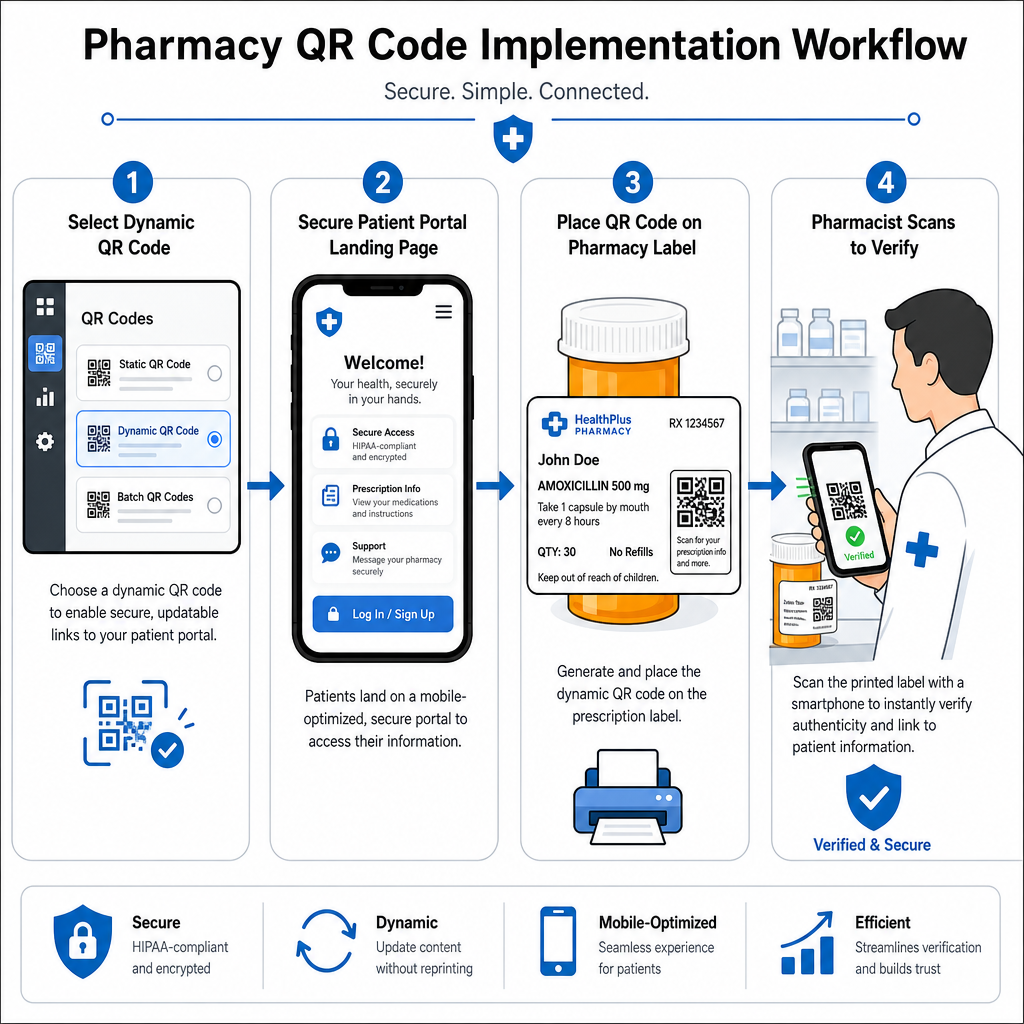
- Valige kooditüüp: Valige veebilinkide jaoks dünaamilised QR-koodid, et saaksite värskendada hariduslikke PDF-e, videolinke või portaalilinke ilma füüsilisi konteinerietikette uuesti printimata.
- Konfigureerige turvalised sihtlehed: Ühendage sihtlingid mobiilile optimeeritud, HIPAA-le vastavate patsiendiportaalide või avalike ravimijuhenditega.
- Integreerige etiketimallid: Lisa loodud QR-kood apteegi haldussüsteemi termoprindi mallidesse, tagades suuruse, vaikse tsooni ja kontrasti parameetrite lukustamise.
- Koolita apteegi personali: Õpeta proviisoreid ja tehnikuid patsiendikonsultatsioonide ajal QR-koodile tähelepanu juhtima, julgustades patsiente oma pudelit kodus skannima.
- Kontrolli skannitavust: Teosta rutiinseid kvaliteedikontrolle väljastuspunktides, kasutades veebipõhist QR-koodi lugeja koodi selguse kinnitamiseks enne üleandmist.
Uurides, kuidas teised sektorid skannitavat pakendit haldavad, saab pakkuda täiendavat ülevaadet töövoogude kohta erinevates tööstuslikes kasutusjuhtudes.
Skannitavate QR-koodide lisamine retseptisiltidele ühendab füüsilise ravimipakendi ja elutähtsad digitaalsed terviseressursid. Järgides õigeid printimisstandardeid, kaitstes patsiendi privaatsust ja hallates muudetavaid sihtkohtade linke, saab teie apteek vähendada haldusvigu ja parandada patsientide üldisi tulemusi. Alustage nõuetele vastavate, skannitavate retseptisildi töövoogude loomist Pagelootiga juba täna.
Korduma kippuvad küsimused
Ei. USA föderaalmäärused ja FDA juhised ei nõua tarbijatele suunatud QR-koode retseptipakendite etikettidel. Kohustuslikud etiketielemendid (nagu patsiendi nimi, ravimi juhised ja apteegi andmed) peavad siiski olema trükitud otse inimloetavas tekstis. QR-koodid jäävad vabatahtlikuks, täiendavaks vahendiks patsientide harimiseks ja digitaalse juurdepääsu parandamiseks.
Apteegid peavad vältima krüpteerimata kaitstud terviseinfo (PHI) – nagu patsiendi nimed, sünniajad või ravimite üksikasjad – kodeerimist otse QR-koodi mustrisse. Selle asemel kasutage turvalisi dünaamilisi linke, mis viitavad krüpteeritud, parooliga kaitstud patsiendiportaalidele, mis nõuavad patsiendi autentimist enne isikuandmete kuvamist.
Retseptisiltide soovitatav minimaalne printimissuurus on 0.8″ x 0.8″ (2 cm x 2 cm). Kuigi koodid võivad tehniliselt skannida nii väikestena kui 1 cm x 1 cm väikestel pakenditel, tagavad suuremad mõõtmed tugeva värvikontrasti ja selgete vaiksete tsoonidega usaldusväärse skannimise kõikides mobiilseadmete kaamerates.