> 사용 사례 > How to Use QR Codes on Prescription Labels
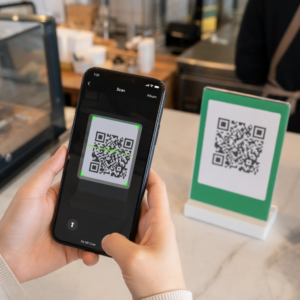
Scanning a prescription label

How to Use QR Codes on Prescription Labels

Explore how QR codes on prescription labels improve medication adherence, enhance accessibility, and maintain HIPAA compliance with best printing practices.
Updated on 7월 28, 2026
목차

Are your patients struggling to read tiny prescription bottle text or missing critical dosage instructions? Medication non-adherence and administration errors lead to preventable health risks and frequent pharmacy consults. Adding scannable QR codes to prescription labels gives patients instant access to digital medication guides, audio instructions, and refill portals.

What Information Can Prescription QR Codes Provide?

Prescription container labels have limited physical space. Federal and state regulations require mandatory printed text, including the pharmacy name, prescription number, prescriber details, patient name, and dosage instructions. A quick-response (QR) code acts as a digital extension of the label, delivering additional information without cluttering the bottle.

Pharmacies can use prescription QR codes to deliver patient-facing resources, such as:

  • Digital Medication Guides: Link patients directly to electronic patient information leaflets (e-leaflets) or documents formatted using a PDF QR 코드 생성기.
  • Audio and Accessible Formats: Help visually impaired patients scan the package to hear spoken dosage instructions or access large-print text and electronic braille options.
  • Demonstration Videos: Show step-by-step video tutorials for complex drug delivery systems, such as insulin pens, inhalers, or self-injection devices.
  • Refill Portals: Direct patients straight to pharmacy online refill portals to submit renewal requests quickly.
  • Offline Text Information: Store plain text warnings, emergency contact numbers, or storage instructions directly in the code matrix using a text QR code generator.

Key Benefits for Patient Safety and Medication Adherence

Medication non-adherence is a major public health issue. Research shows that about 50% of patients fail to take their medications as prescribed, leading to over 125,000 preventable deaths each year. Placing scannable information on prescription packaging helps resolve common sources of administration errors and confusion.

Reducing Medication Errors

Standard bottle labels use small fonts that are difficult for older adults or visually impaired individuals to read. Experimental research comparing QR code-equipped packaging with standard bottle labels found that access to scannable digital details resulted in significantly more correct self-administration decisions across both younger and older adult patient groups.

Improving Accessibility

Providing accessible prescription details is vital for patient safety. When encoded with accessible text or linked to screen-reader-friendly landing pages, QR codes enable patients with low vision to verify drug names, schedules, and caution notes independently.

Supporting Adherence Tracking and Engagement

Digital intake tracking solutions using scannable packaging codes have demonstrated high clinical feasibility. Clinical trials show that patient self-reporting via QR scans achieves approximately 90.1% accuracy compared to manual pill counts. Integrating scannable packaging into broader hospital and healthcare QR code systems enhances patient communication and long-term care management. To learn more about modern clinical applications, review our comprehensive guide to healthcare QR codes.

Deliver Up-to-Date Patient Instructions Need to update medication guides or digital resources without reprinting physical labels? Use the 동적 QR 코드 생성기 to keep your destination links editable and accurate.

Regulatory Compliance and HIPAA Safeguards for Pharmacies

Integrating digital tools into pharmacy workflows requires strict attention to regulatory standards and patient privacy laws.

Requirement Area Standard / Guideline Key Pharmacy Action
FDA Regulations Voluntary patient information Treat QR codes as voluntary additions; never replace required written label text.
DSCSA Serialization GS1 2D Data Matrix barcodes Maintain DSCSA supply chain barcodes separately from consumer QR codes.
HIPAA Privacy Rule Protected Health Information (PHI) Never encode patient names, dates of birth, or conditions directly into the code.
접근 제어 Authentication safeguards Require patient login authentication for any QR destination displaying personal health data.

Differentiating QR Codes from Supply Chain Barcodes

Under the Drug Supply Chain Security Act (DSCSA), serialized GS1 2D Data Matrix barcodes are mandatory on wholesale packaging for distributor tracking. These are technical, regulated 2D barcodes meant for supply chain scanners. Patient-facing QR codes, by contrast, are voluntary tools designed for consumer smartphones to deliver educational and operational content.

Enforcing HIPAA Privacy and Security Standards

Pharmacies are HIPAA-covered entities. When deploying QR codes on prescription containers:

  • Avoid Raw PHI Encoding: Never embed unencrypted patient identifiers, social security numbers, or specific diagnoses inside a static code.
  • Use Secure Web Destinations: Point QR codes to secure HTTPS websites backed by strict access controls, multi-factor authentication, and encrypted databases.
  • Eliminate Unregulated Tracking: Ensure patient-facing landing pages do not utilize third-party analytics pixels that could impermissibly disclose data.
  • Partner with Compliant Vendors: Choose software platforms that enforce data security protocols and execute Business Associate Agreements (BAAs). For a complete breakdown of legal standards, consult our guide on QR code privacy laws and regulations.

Best Practices for Printing Scannable Prescription Labels

Prescription labels face frequent handling, moisture, and tight space limitations. If a printed code fails to scan, patient trust decreases and pharmacy support calls increase.

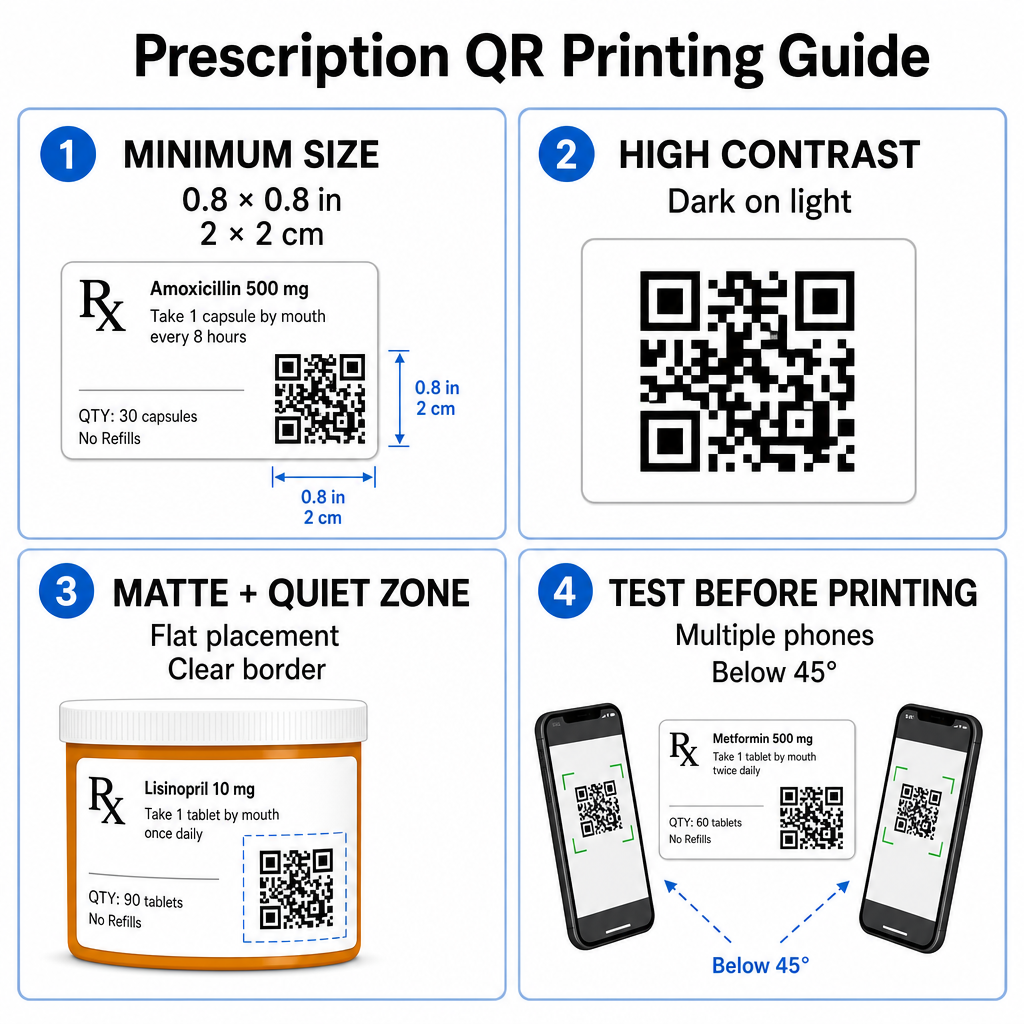
Prescription QR printing guide

Recommended Code Sizing

Prescription vial surfaces are limited. Maintain a standard size of at least 0.8″ x 0.8″ (2 cm x 2 cm) for reliable scanning. On very small packages, an absolute minimum print size of 1 cm x 1 cm may be used, provided the encoded data density remains low. You can check exact scaling ratios in our QR 코드 크기 가이드.

Color Contrast and Surface Materials

Thermal printers commonly used in retail pharmacies require specific calibration for optimal scannability:

  • High Contrast: Print solid dark patterns (ideally black) over clean, opaque light backgrounds.
  • Matte Finishes: Avoid glossy label coatings or clear plastic vials that reflect room lighting and blind camera sensors. If shiny or transparent containers are unavoidable, print a white matte layer directly beneath the QR code.
  • Curvature Management: Place the QR code on the flattest section of the bottle or box to prevent geometric distortion.

To evaluate how thermal inks, substrates, and label materials impact scan speeds, read our detailed analysis on how printing techniques affect QR scannability.

Quiet Zones and Verification Testing

Always maintain a clear outer border – known as a quiet zone – around the code to separate it from surrounding label text and borders. Test printed codes across multiple smartphone devices, angles (under 45 degrees), and lighting conditions before mass printing. Review our core QR 코드 가독성을 위한 모범 사례 to ensure your label layout performs reliably.

Verify Your Printed Label Scannability Want to test if your prescription packaging scans quickly on all device cameras? Test your printed label designs instantly with the free 온라인 QR 코드 스캐너.

Implementing Prescription QR Codes in Pharmacy Workflows

Rolling out scannable labels across pharmacy operations requires a simple, structured approach:

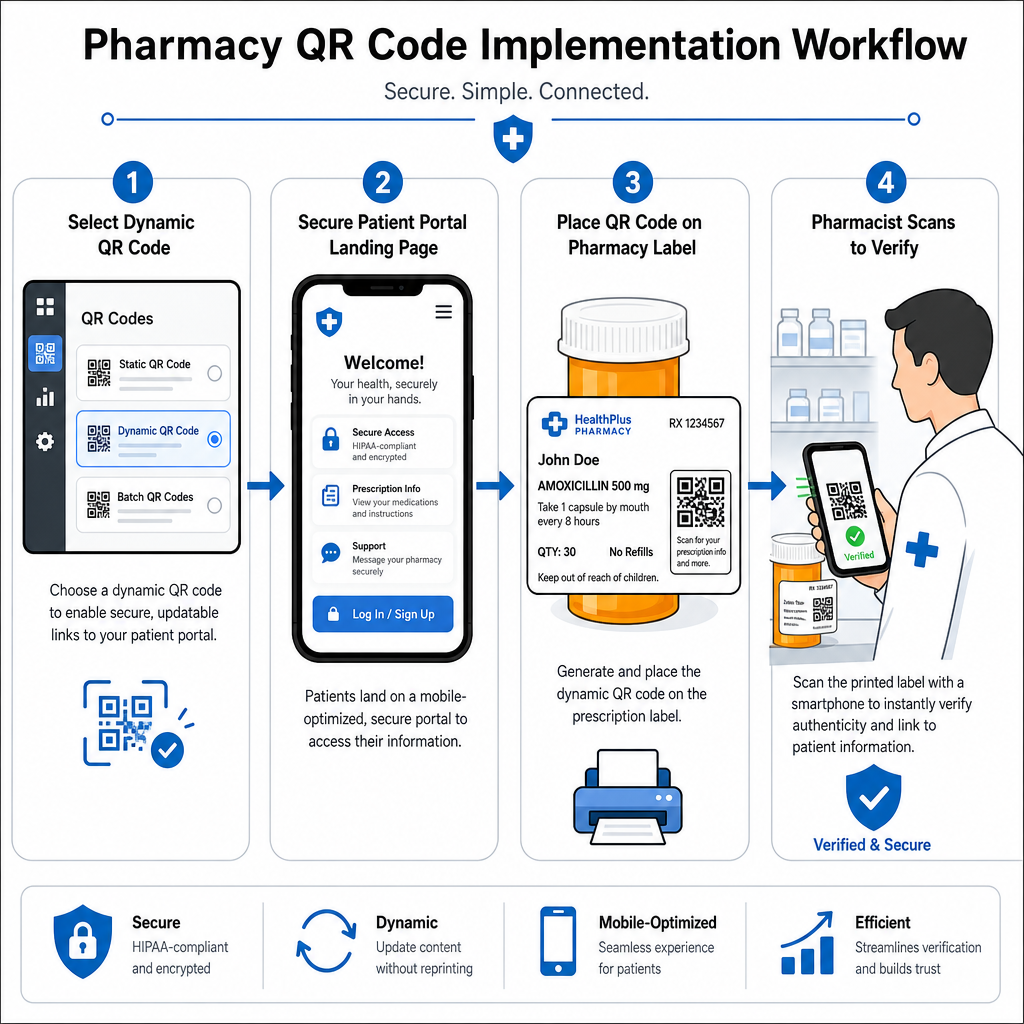
Pharmacy QR workflow steps
  • Select the Code Type: Choose dynamic QR codes for web links so you can update educational PDFs, video URLs, or portal links without reprinting physical container labels.
  • Configure Secure Landing Pages: Connect destination links to mobile-optimized, HIPAA-compliant patient portals or public medication guides.
  • Integrate Label Templates: Add the generated QR code into your pharmacy management system’s thermal print templates, ensuring size, quiet zones, and contrast parameters are locked.
  • Train Pharmacy Staff: Educate pharmacists and technicians to point out the QR code during patient consultations, encouraging patients to scan their bottle at home.
  • Verify Scannability: Perform routine quality checks at dispensing stations using a web-based QR 코드 리더 to confirm code clarity before handoff.

Exploring how other sectors manage scannable packaging can provide additional workflow insights across diverse industry use cases.

Adding scannable QR codes to prescription labels bridges the gap between physical medication packaging and vital digital health resources. By following proper printing standards, protecting patient privacy, and managing editable destination links, your pharmacy can reduce administration errors and improve overall patient outcomes. Start creating compliant, scannable prescription label workflows with Pageloot today.

자주 묻는 질문

Are QR codes required on prescription bottle labels by federal law?

No. U.S. federal regulations and FDA guidelines do not require consumer-facing QR codes on prescription container labels. Mandatory label elements (such as patient name, drug directions, and pharmacy details) must still be printed directly in human-readable text. QR codes remain a voluntary, supplementary tool to improve patient education and digital access.

How can pharmacies ensure QR codes on medication labels are HIPAA compliant?

Pharmacies must avoid encoding unencrypted protected health information (PHI) – such as patient names, dates of birth, or drug details – directly inside the QR code pattern. Instead, use secure dynamic links pointing to encrypted, password-protected patient portals that require patient authentication before displaying personal data.

What is the minimum recommended size for a QR code on a prescription container?

The recommended minimum print size for prescription labels is 0.8″ x 0.8″ (2 cm x 2 cm). While codes can technically scan as small as 1 cm x 1 cm on small packages, larger dimensions with strong color contrast and clear quiet zones ensure reliable scanning across all mobile device cameras.

작성자 정보

시임 코스타비는 페이지루트의 콘텐츠 책임자입니다. 그는 페이지루트의 혁신적인 QR 코드 생성 서비스에 대한 글을 쓰고 있습니다. 5년 이상 QR 코드 분야에서 쌓아온 깊이 있는 전문 지식을 바탕으로, 시임은 이 분야의 전문가로 인정받고 있습니다. 그는 QR 기술을 활용하여 디지털 상호작용을 간소화하고 향상시키는 데 크게 기여하고 있습니다.

범주
에 대해 자세히 알아보기
그룹 QR 코드 스캔
QR 코드 Facebook 그룹

온라인으로 QR 코드를 생성해야하는 경우 QR 코드 만들기 무료로 여기!
Pageloot는 #1 Go-To 솔루션 QR 코드를 만들고 스캔합니다.

BL-0331

블로그 세대

20,000개 이상의 브랜드로부터 신뢰를 받아 더 많은 매출, 리뷰, 팔로워를 확보했습니다.

클라이언트 로고
최고 브랜드의 신뢰
5 중 4.8 평가

4.86 / 5 별점

휴고 로랑
휴고 로랑
레스토랑 주인
가장 쉽고 안정적인 QR 코드 생성기. PDF 파일을 즉시 업로드할 수 있습니다. 이제 레스토랑 메뉴가 디지털화되었습니다.
루카스 얀센
루카스 얀센
부동산 개발사
이것은 훌륭한 도구이며 QR 코드를 사용하면 원하는 곳으로 이동할 수 있습니다. 우리는 위치 QR 코드만 사용하지만 유용한 기능이 너무 많습니다.
엠마 모레티
엠마 모레티
소매 제품
사용하기 쉽고 빠릅니다. 그것은 훌륭하게 작동하고 완벽한 이미지를 생성하므로 직원들이 내 vCard를 다운로드할 수 있습니다.
휴고 로랑
휴고 로랑
레스토랑 주인
가장 쉽고 안정적인 QR 코드 생성기. PDF 파일을 즉시 업로드할 수 있습니다. 이제 레스토랑 메뉴가 디지털화되었습니다.
루카스 얀센
루카스 얀센
부동산 개발사
이것은 훌륭한 도구이며 QR 코드를 사용하면 원하는 곳으로 이동할 수 있습니다. 우리는 위치 QR 코드만 사용하지만 유용한 기능이 너무 많습니다.
엠마 모레티
엠마 모레티
소매 제품
사용하기 쉽고 빠릅니다. 그것은 훌륭하게 작동하고 완벽한 이미지를 생성하므로 직원들이 내 vCard를 다운로드할 수 있습니다.
더 많은 QR 코드보기
휴대폰으로 QR 포스터 스캔
QR 코드 스캔 스마트 폰
무엇이든 디지털 경험으로 전환하세요 3분 이내에.

14일 무료 체험.

신용카드는 필요 없습니다.

첫 구매 시 30% 할인

코드를 사용하세요:

MP3 파일 공유

PDF QR 코드를 생성하려면 가입하세요

필요한 모든 것을 업로드하고 표시합니다.

  • 오디오 파일
  • 팟캐스트
  • 음악

가입 시 14일 무료 체험.
체험 기간 후 QR 코드 만료.

오디오 mp3 QR 코드를 생성하려면 가입하세요

프레임으로 더 많은 스캔 확보

QR 코드에 더 많은 프레임을 추가하려면 가입하세요

클릭 유도 문안 프레임은 고객이 QR 코드와 쉽게 상호 작용할 수 있도록 도와줍니다. 사용해 보세요!

가입 시 14일 무료 체험.
체험 기간 후 QR 코드 만료.

QR 코드에 더 많은 프레임을 추가하려면 가입하세요

도형으로 더 많은 스타일 추가

더 많은 도형을 만들려면 가입하세요

QR 코드는 정사각형일 필요가 없습니다. 브랜드 이미지에 맞게 전환해 보세요.

가입 시 14일 무료 체험.
체험 기간 후 QR 코드 만료.

더 많은 도형을 만들려면 가입하세요

QR 코드에 로고 추가

QR 코드에 로고를 추가하려면 가입하세요

로고와 브랜드를 추가하여 QR 코드를 돋보이게 만드세요.

가입 시 14일 무료 체험.
체험 기간 후 QR 코드 만료.

QR 코드에 로고를 추가하려면 가입하세요

스마트 앱 스토어 리디렉션

앱 스토어 QR 코드를 생성하려면 가입하세요

스마트 앱 스토어 QR 코드에 앱 링크를 추가하세요. 사용자는 장치에 따라 리디렉션됩니다.

가입 시 14일 무료 체험.
체험 기간 후 QR 코드 만료.

앱 스토어 QR 코드를 생성하려면 가입하세요

QR 코드에 이미지 업로드

이미지 QR 코드를 생성하려면 가입하세요

이미지를 쉽게 공유하세요. 몇 초 안에 동적으로 이미지를 변경하십시오.

가입 시 14일 무료 체험.
체험 기간 후 QR 코드 만료.

이미지 QR 코드를 생성하려면 가입하세요

PDF 파일 공유

PDF QR 코드를 생성하려면 가입하세요

필요한 모든 것을 업로드하고 표시합니다.

  • 메뉴 및 가격표
  • 명령
  • 모든 문서

가입 시 14일 무료 체험.
체험 기간 후 QR 코드 만료.

PDF QR 코드를 생성하려면 가입하세요

인쇄 없이 나중에 편집

다시 인쇄하지 않고 QR 코드를 편집하려면 가입하세요

동적 QR 코드를 사용하면 새 QR 코드를 인쇄하지 않고도 QR 코드의 내용을 변경할 수 있습니다.

가입 시 14일 무료 체험.
체험 기간 후 QR 코드 만료.

다시 인쇄하지 않고 QR 코드를 편집하려면 가입하세요

언제? 어디서? QR 코드 스캔 추적

QR 코드를 추적하려면 가입하세요

어떤 QR 코드가 가장 많이 스캔되고 무엇이 고객을 가장 흥분시키는지 알아보십시오.

가입 시 14일 무료 체험.
체험 기간 후 QR 코드 만료.

QR 코드를 추적하려면 가입하세요

인쇄 준비 파일 제공

PDF 및 SVG와 같은 벡터 QR 코드를 생성하려면 가입하세요.

.EPS, .PDF, .SVG

HD 해상도로 QR 코드를 다운로드하고 싶으신가요? 인쇄할 준비가 된 벡터 또는 픽셀 형식을 가져옵니다.

가입 시 14일 무료 체험.
체험 기간 후 QR 코드 만료.

PDF 및 SVG와 같은 벡터 QR 코드를 생성하려면 가입하세요.

기다리세요. 귀하의 QR 코드는 로드 중... 로드 중...

나만의 것으로 만들기

나중을 위해 QR 코드를 저장하려면 가입하세요.

다양한 색상, 로고 및 클릭 유도문안 프레임으로 멋진 QR 코드를 만들어 더 많은 스캔을 받으세요.

가입 시 14일 무료 체험.
체험 기간 후 QR 코드 만료.

나중을 위해 QR 코드를 저장하려면 가입하세요.