Vos patients ont-ils du mal à lire le texte minuscule des flacons de médicaments ou manquent-ils des instructions de dosage cruciales ? La non-observance thérapeutique et les erreurs d'administration entraînent des risques pour la santé évitables et de fréquentes consultations en pharmacie. L'ajout de codes QR scannables sur les étiquettes de prescription donne aux patients un accès instantané à des guides médicamenteux numériques, des instructions audio et des portails de renouvellement.
Quelles informations les codes QR de prescription peuvent-ils fournir ?
Les étiquettes des récipients de médicaments ont un espace physique limité. Les réglementations fédérales et étatiques exigent un texte imprimé obligatoire, incluant le nom de la pharmacie, le numéro de prescription, les détails du prescripteur, le nom du patient et les instructions de dosage. Un code QR (réponse rapide) agit comme une extension numérique de l'étiquette, fournissant des informations supplémentaires sans encombrer le flacon.
Les pharmacies peuvent utiliser les codes QR de prescription pour fournir des ressources destinées aux patients, telles que :
- Guides médicamenteux numériques: Lier les patients directement aux notices d'information électroniques (e-leaflets) ou aux documents formatés à l'aide d'un Générateur de QR code PDF.
- Formats audio et accessibles: Aider les patients malvoyants à scanner l'emballage pour entendre les instructions de dosage orales ou accéder à des textes en gros caractères et à des options de braille électronique.
- Vidéos de démonstration: Montrer des tutoriels vidéo étape par étape pour des systèmes complexes d'administration de médicaments, tels que les stylos à insuline, les inhalateurs ou les dispositifs d'auto-injection.
- Portails de renouvellement: Diriger les patients directement vers les portails de renouvellement en ligne de la pharmacie pour soumettre rapidement des demandes de renouvellement.
- Informations textuelles hors ligne: Stocker des avertissements en texte clair, des numéros de contact d'urgence ou des instructions de stockage directement dans la matrice du code à l'aide d'un Générateur de QR code texte.
Avantages clés pour la sécurité des patients et l'observance thérapeutique
La non-observance thérapeutique est un problème majeur de santé publique. La recherche montre qu'environ 50 % des patients ne prennent pas leurs médicaments comme prescrits, entraînant plus de 125 000 décès évitables chaque année. Le fait de placer des informations scannables sur l'emballage des médicaments aide à résoudre les sources courantes d'erreurs d'administration et de confusion.
Réduction des erreurs médicamenteuses
Les étiquettes de bouteilles standard utilisent de petites polices difficiles à lire pour les personnes âgées ou malvoyantes. Une recherche expérimentale comparant les emballages équipés de codes QR aux étiquettes de bouteilles standard a révélé que l'accès à des informations numériques scannables entraînait des décisions d'auto-administration significativement plus correctes chez les groupes de patients adultes, jeunes et âgés.
Améliorer l'accessibilité
Fournir des détails de prescription accessibles est vital pour la sécurité du patient. Lorsqu'ils sont encodés avec du texte accessible ou liés à des pages de destination compatibles avec les lecteurs d'écran, les codes QR permettent aux patients malvoyants de vérifier indépendamment les noms des médicaments, les posologies et les précautions.
Soutenir le suivi de l'observance et l'engagement
Les solutions numériques de suivi de la prise de médicaments utilisant des codes d'emballage scannables ont démontré une faisabilité clinique élevée. Les essais cliniques montrent que l'auto-déclaration des patients via des scans QR atteint environ 90,1 % de précision par rapport aux décomptes manuels de pilules. L'intégration d'emballages scannables dans des systèmes plus larges de codes QR pour hôpitaux et soins de santé améliore la communication avec les patients et la gestion des soins à long terme. Pour en savoir plus sur les applications cliniques modernes, consultez notre guide complet sur les codes QR dans le secteur de la santé.
Fournir des instructions patient à jour Besoin de mettre à jour les guides de médicaments ou les ressources numériques sans réimprimer les étiquettes physiques ? Utilisez la Générateur de QR code dynamique pour maintenir vos liens de destination modifiables et précis.
Conformité réglementaire et mesures de protection HIPAA pour les pharmacies
L'intégration d'outils numériques dans les flux de travail des pharmacies exige une attention stricte aux normes réglementaires et aux lois sur la confidentialité des patients.
| Domaine d'exigence | Norme / Ligne directrice | Action clé pour les pharmacies |
|---|---|---|
| Réglementations de la FDA | Informations patient volontaires | Traitez les codes QR comme des ajouts volontaires ; ne remplacez jamais le texte d'étiquette écrit obligatoire. |
| Sérialisation DSCSA | Codes-barres GS1 Data Matrix 2D | Maintenez les codes-barres de la chaîne d'approvisionnement DSCSA séparés des codes QR destinés aux consommateurs. |
| Règle de confidentialité HIPAA | Informations de santé protégées (PHI) | Ne jamais encoder directement les noms de patients, les dates de naissance ou les affections dans le code. |
| Contrôle d'accès | Mesures de protection par authentification | Exiger une authentification par connexion du patient pour toute destination QR affichant des données de santé personnelles. |
Différencier les codes QR des codes-barres de la chaîne d'approvisionnement
En vertu du Drug Supply Chain Security Act (DSCSA), les codes-barres sérialisés GS1 2D Data Matrix sont obligatoires sur les emballages de gros pour le suivi par les distributeurs. Il s'agit de codes-barres 2D techniques et réglementés destinés aux scanners de la chaîne d'approvisionnement. Les codes QR destinés aux patients, en revanche, sont des outils volontaires conçus pour les smartphones des consommateurs afin de fournir du contenu éducatif et opérationnel.
Appliquer les normes de confidentialité et de sécurité HIPAA
Les pharmacies sont des entités couvertes par la HIPAA. Lors du déploiement de codes QR sur les contenants de prescriptions :
- Éviter l'encodage de PHI brutes: Ne jamais intégrer d'identifiants de patient non chiffrés, de numéros de sécurité sociale ou de diagnostics spécifiques dans un code statique.
- Utiliser des destinations web sécurisées: Diriger les codes QR vers des sites web HTTPS sécurisés, soutenus par des contrôles d'accès stricts, une authentification multi-facteurs et des bases de données chiffrées.
- Éliminer le suivi non réglementé: S'assurer que les pages de destination destinées aux patients n'utilisent pas de pixels d'analyse tiers susceptibles de divulguer des données de manière inadmissible.
- Collaborer avec des fournisseurs conformes: Choisir des plateformes logicielles qui appliquent des protocoles de sécurité des données et exécutent des accords de partenariat commercial (BAA). Pour une ventilation complète des normes légales, consultez notre guide sur les lois et réglementations sur la confidentialité des codes QR.
Meilleures pratiques pour l'impression d'étiquettes de prescription scannables
Les étiquettes de prescription sont soumises à des manipulations fréquentes, à l'humidité et à des contraintes d'espace. Si un code imprimé ne parvient pas à être scanné, la confiance des patients diminue et les appels au support de la pharmacie augmentent.
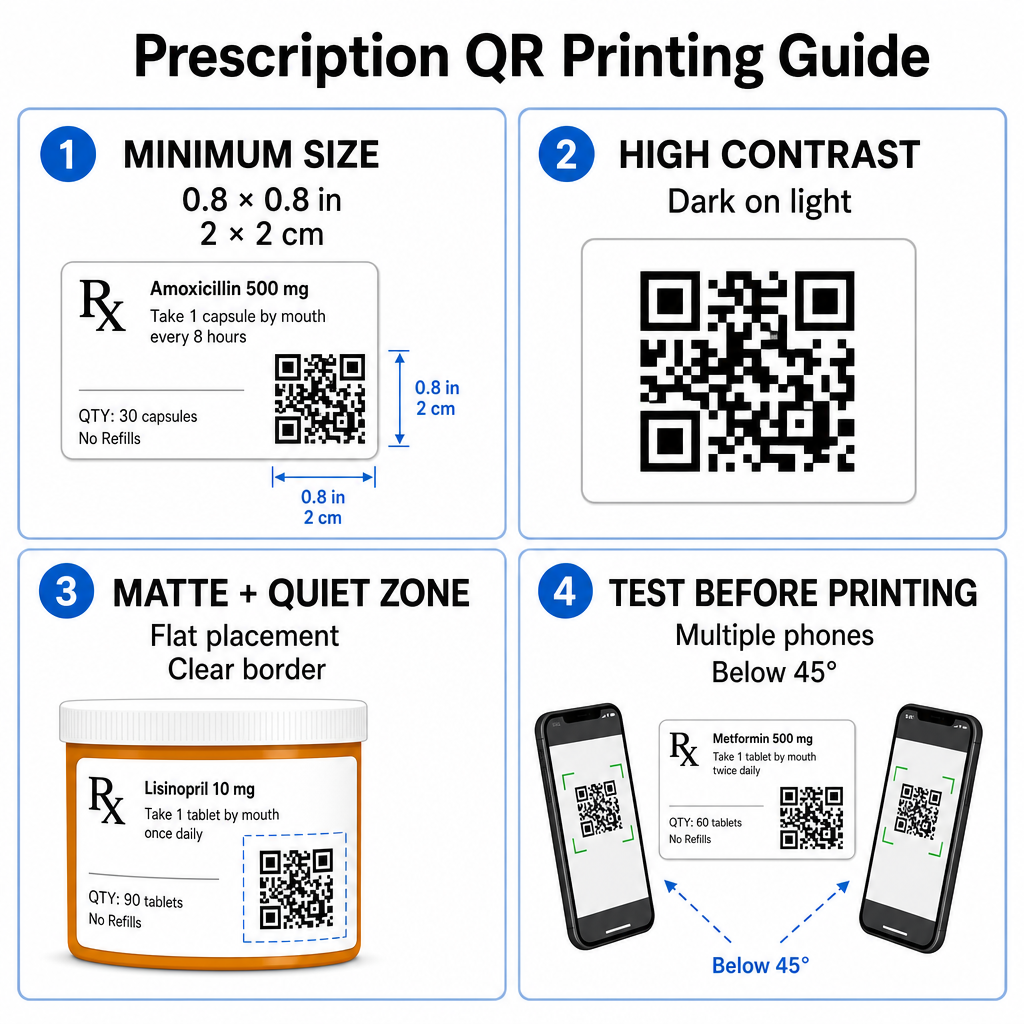
Taille de code recommandée
Les surfaces des flacons de prescription sont limitées. Maintenir une taille standard d'au moins 0.8" x 0.8" (2 cm x 2 cm) pour une numérisation fiable. Sur les très petits emballages, une taille d'impression minimale absolue de 1 cm x 1 cm peut être utilisée, à condition que la densité des données encodées reste faible. Vous pouvez vérifier les ratios de mise à l'échelle exacts dans notre document sur la guide des tailles de codes QR.
Contraste des Couleurs et Matériaux de Surface
Les imprimantes thermiques couramment utilisées dans les pharmacies de détail nécessitent un calibrage spécifique pour une scannabilité optimale :
- Contraste Élevé: Imprimez des motifs foncés et solides (idéalement noirs) sur des fonds clairs, propres et opaques.
- Finitions Mates: Évitez les revêtements d'étiquettes brillants ou les flacons en plastique transparent qui réfléchissent l'éclairage ambiant et aveuglent les capteurs de l'appareil photo. Si les récipients brillants ou transparents sont inévitables, imprimez une couche mate blanche directement sous le code QR.
- Gestion de la Courbure: Placez le code QR sur la section la plus plate de la bouteille ou de la boîte pour éviter la distorsion géométrique.
Pour évaluer l'impact des encres thermiques, des substrats et des matériaux d'étiquettes sur les vitesses de lecture, lisez notre analyse détaillée sur comment les techniques d'impression affectent la scannabilité des QR codes.
Zones de Silence et Tests de Vérification
Maintenez toujours une bordure extérieure claire – appelée zone de silence – autour du code pour le séparer du texte et des bordures de l'étiquette environnants. Testez les codes imprimés sur plusieurs smartphones, sous différents angles (inférieurs à 45 degrés) et conditions d'éclairage avant l'impression en masse. Passez en revue nos principes fondamentaux les meilleures pratiques pour la lisibilité des codes QR pour vous assurer que la disposition de votre étiquette fonctionne de manière fiable.
Vérifiez la Scannabilité de Votre Étiquette Imprimée Vous voulez vérifier si l'emballage de votre ordonnance se scanne rapidement sur toutes les caméras d'appareil ? Testez instantanément vos conceptions d'étiquettes imprimées avec l'outil gratuit scanner de code QR en ligne.
Mise en Œuvre des Codes QR de Prescription dans les Flux de Travail des Pharmacies
Le déploiement d'étiquettes scannables dans les opérations de pharmacie nécessite une approche simple et structurée :
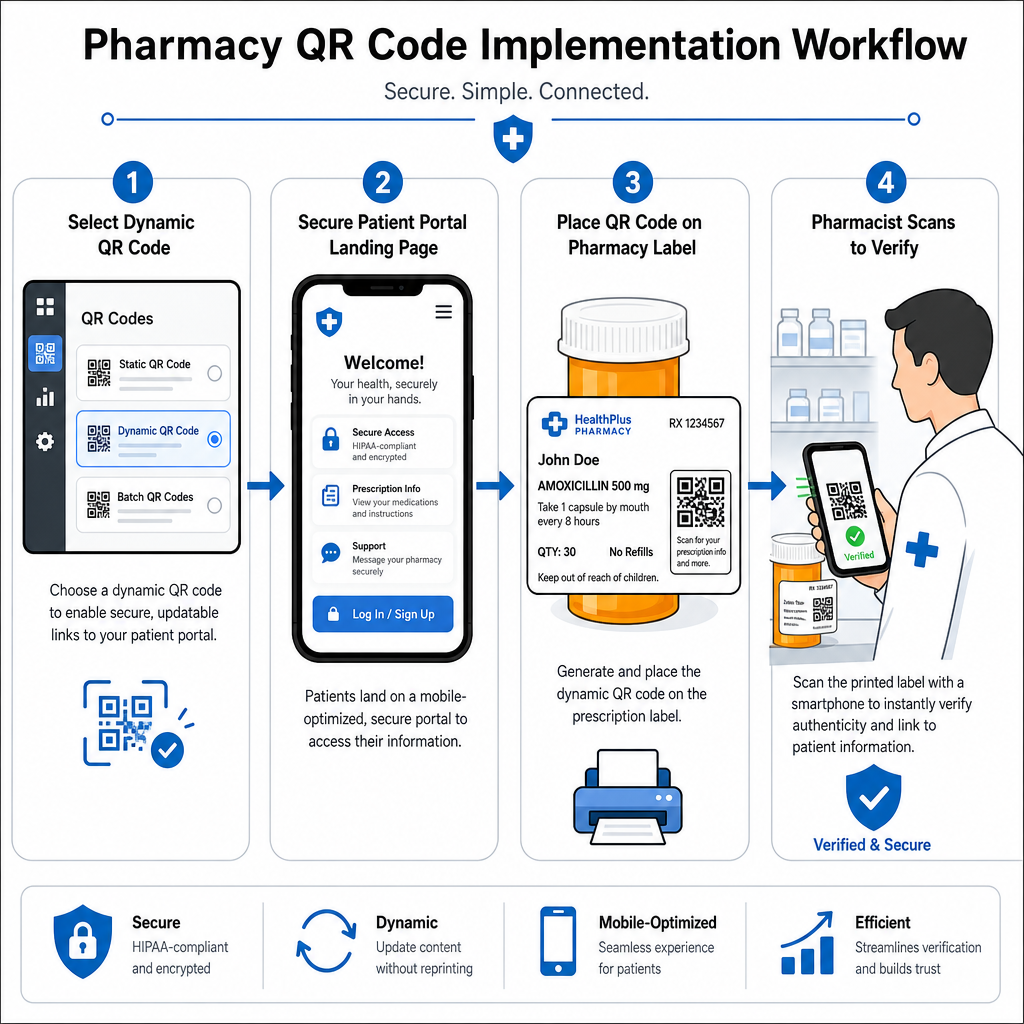
- Sélectionnez le Type de Code: Choisissez des codes QR dynamiques pour les liens web afin de pouvoir mettre à jour des PDF éducatifs, des URL de vidéos ou des liens de portails sans réimprimer les étiquettes physiques des contenants.
- Configurez des Pages de Destination Sécurisées: Connectez les liens de destination à des portails patients optimisés pour mobile et conformes HIPAA, ou à des guides publics de médicaments.
- Intégrez les Modèles d'Étiquettes: Ajoutez le code QR généré dans les modèles d'impression thermique de votre système de gestion de pharmacie, en vous assurant que la taille, les zones silencieuses et les paramètres de contraste sont verrouillés.
- Former le personnel de la pharmacie: Éduquez les pharmaciens et les techniciens à signaler le code QR lors des consultations avec les patients, en encourageant les patients à scanner leur flacon à domicile.
- Vérifier la scannabilité: Effectuez des contrôles de qualité de routine aux postes de distribution à l'aide d'un outil basé sur le web Lecteur de code QR pour confirmer la clarté du code avant la remise.
L'exploration de la manière dont d'autres secteurs gèrent les emballages scannables peut fournir des informations supplémentaires sur les flux de travail à travers divers cas d'utilisation industriels.
L'ajout de codes QR scannables aux étiquettes de prescription comble le fossé entre l'emballage physique des médicaments et les ressources numériques vitales en matière de santé. En suivant les normes d'impression appropriées, en protégeant la confidentialité des patients et en gérant les liens de destination modifiables, votre pharmacie peut réduire les erreurs d'administration et améliorer les résultats globaux pour les patients. Commencez dès aujourd'hui à créer des flux de travail conformes et scannables pour les étiquettes de prescription avec Pageloot.
Questions fréquentes
Non. Les réglementations fédérales américaines et les directives de la FDA n'exigent pas de codes QR destinés aux consommateurs sur les étiquettes des contenants de médicaments sur ordonnance. Les éléments obligatoires de l'étiquette (tels que le nom du patient, les instructions pour le médicament et les coordonnées de la pharmacie) doivent toujours être imprimés directement en texte lisible par l'homme. Les codes QR restent un outil volontaire et supplémentaire pour améliorer l'éducation des patients et l'accès numérique.
Les pharmacies doivent éviter de coder les informations de santé protégées (ISP) non chiffrées – telles que les noms de patients, les dates de naissance ou les détails sur les médicaments – directement dans le motif du code QR. Au lieu de cela, utilisez des liens dynamiques sécurisés pointant vers des portails patients chiffrés et protégés par mot de passe qui exigent une authentification du patient avant d'afficher les données personnelles.
La taille d'impression minimale recommandée pour les étiquettes de prescription est de 0,8 po x 0,8 po (2 cm x 2 cm). Bien que les codes puissent techniquement être scannés aussi petits que 1 cm x 1 cm sur de petits emballages, des dimensions plus grandes avec un fort contraste de couleur et des zones silencieuses claires garantissent une lecture fiable sur toutes les caméras d'appareils mobiles.