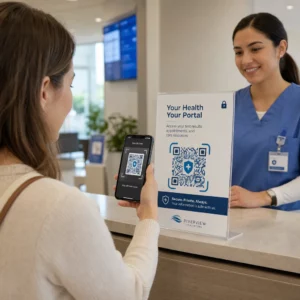
Hastalarınız küçük reçete şişesi metnini okumakta zorlanıyor mu yoksa kritik dozaj talimatlarını mı kaçırıyor? İlaç uyumsuzluğu ve uygulama hataları önlenebilir sağlık risklerine ve sık eczane danışmanlıklarına yol açar. Reçete etiketlerine taranabilir QR kodları eklemek, hastalara dijital ilaç rehberlerine, sesli talimatlara ve tekrar doldurma portallarına anında erişim sağlar.
Reçete QR Kodları Hangi Bilgileri Sağlayabilir?
Reçete kabı etiketlerinin fiziksel alanı sınırlıdır. Federal ve eyalet düzenlemeleri, eczane adı, reçete numarası, reçete yazan hekim bilgileri, hasta adı ve dozaj talimatları dahil olmak üzere zorunlu basılı metin gerektirir. Hızlı yanıt (QR) kodu, etiketin dijital bir uzantısı olarak işlev görür ve şişeyi karmaşıklaştırmadan ek bilgi sunar.
Eczaneler, reçete QR kodlarını hasta odaklı kaynaklar sunmak için kullanabilir, örneğin:
- Dijital İlaç Rehberleri: Hastaları doğrudan elektronik hasta bilgi broşürlerine (e-broşürler) veya kullanılarak biçimlendirilmiş belgelere bağlayın PDF QR Kod Oluşturucu.
- Sesli ve Erişilebilir Formatlar: Görme engelli hastaların, konuşulan dozaj talimatlarını duymak veya büyük punto metin ve elektronik braille seçeneklerine erişmek için paketi taramalarına yardımcı olun.
- Tanıtım Videoları: İnsülin kalemleri, inhalerler veya kendi kendine enjeksiyon cihazları gibi karmaşık ilaç dağıtım sistemleri için adım adım video eğitimleri gösterin.
- Tekrar Doldurma Portalları: Hastaları, yenileme taleplerini hızla göndermeleri için doğrudan eczane çevrimiçi tekrar doldurma portallarına yönlendirin.
- Çevrimdışı Metin Bilgileri: Düz metin uyarılarını, acil durum iletişim numaralarını veya saklama talimatlarını doğrudan kod matrisine kullanarak depolayın Metin QR Kod Oluşturucu.
Hasta Güvenliği ve İlaç Uyumuna Yönelik Temel Faydalar
İlaç uyumsuzluğu önemli bir halk sağlığı sorunudur. Araştırmalar şunu gösteriyor ki, yaklaşık Hastaların 'si ilaçlarını reçete edildiği gibi almamaktadır, bu da her yıl 125.000'den fazla önlenebilir ölüme yol açmaktadır. Reçete ambalajına taranabilir bilgiler yerleştirmek, yaygın uygulama hataları ve karışıklık kaynaklarını çözmeye yardımcı olur.
İlaç Hatalarını Azaltma
Standart şişe etiketleri, yaşlıların veya görme engelli bireylerin okumasını zorlaştıran küçük yazı tipleri kullanır. QR kodlu ambalajları standart şişe etiketleriyle karşılaştıran deneysel araştırmalar, taranabilir dijital ayrıntılara erişimin hem genç hem de yaşlı hasta gruplarında önemli ölçüde daha doğru kendi kendine uygulama kararlarına yol açtığını bulmuştur.
Erişilebilirliği İyileştirme
Erişilebilir reçete detayları sağlamak hasta güvenliği için hayati öneme sahiptir. Erişilebilir metinlerle kodlandığında veya ekran okuyucu dostu açılış sayfalarına bağlandığında, QR kodları görme engelli hastaların ilaç adlarını, dozaj programlarını ve uyarı notlarını bağımsız olarak doğrulamasına olanak tanır.
Uyum Takibini ve Katılımı Destekleme
Taranabilir ambalaj kodları kullanan dijital alım takibi çözümleri yüksek klinik uygulanabilirlik göstermiştir. Klinik araştırmalar, QR taramaları aracılığıyla hastaların kendi bildirimlerinin yaklaşık olarak 90.1% doğruluk manuel hap sayımlarına kıyasla. Taranabilir ambalajın daha geniş hastane ve sağlık hizmetleri QR kod sistemlerine entegrasyonu hasta iletişimini ve uzun vadeli bakım yönetimini geliştirir. Modern klinik uygulamalar hakkında daha fazla bilgi edinmek için kapsamlı sağlık hizmetleri QR kodları rehberimize.
Güncel Hasta Talimatlarını Sunun Fiziksel etiketleri yeniden bastırmadan ilaç kılavuzlarını veya dijital kaynakları güncellemeniz mi gerekiyor? Kullanın: Dinamik QR Kod Oluşturucu hedef bağlantılarınızı düzenlenebilir ve doğru tutmak için.
Eczaneler İçin Yasal Uyumluluk ve HIPAA Tedbirleri
Dijital araçları eczane iş akışlarına entegre etmek, düzenleyici standartlara ve hasta gizliliği yasalarına sıkı dikkat gerektirir.
| Gereksinim Alanı | Standart / Yönerge | Ana Eczane Eylemi |
|---|---|---|
| FDA Düzenlemeleri | Gönüllü hasta bilgileri | QR kodlarını gönüllü eklemeler olarak değerlendirin; zorunlu yazılı etiket metnini asla değiştirmeyin. |
| DSCSA Serileştirme | GS1 2D Veri Matrisi barkodları | DSCSA tedarik zinciri barkodlarını tüketici QR kodlarından ayrı tutun. |
| HIPAA Gizlilik Kuralı | Korunan Sağlık Bilgileri (PHI) | Hasta adlarını, doğum tarihlerini veya rahatsızlıkları doğrudan koda asla kodlamayın. |
| Erişim Kontrolü | Kimlik doğrulama önlemleri | Kişisel sağlık verilerini gösteren herhangi bir QR hedefi için hasta giriş kimlik doğrulaması gereklidir. |
QR Kodlarını Tedarik Zinciri Barkodlarından Ayırma
İlaç Tedarik Zinciri Güvenliği Yasası (DSCSA) kapsamında, distribütör takibi için toptan satış ambalajlarında seri numaralı GS1 2D Data Matrix barkodları zorunludur. Bunlar, tedarik zinciri tarayıcıları için tasarlanmış teknik, düzenlenmiş 2D barkodlardır. Hasta odaklı QR kodları ise, eğitimsel ve operasyonel içerik sunmak amacıyla tüketici akıllı telefonları için tasarlanmış gönüllü araçlardır.
HIPAA Gizlilik ve Güvenlik Standartlarını Uygulama
Eczaneler HIPAA kapsamındaki kuruluşlardır. Reçete kaplarında QR kodları dağıtırken:
- Ham PHI Kodlamasından Kaçının: Şifrelenmemiş hasta tanımlayıcılarını, sosyal güvenlik numaralarını veya belirli teşhisleri statik bir kodun içine asla gömmeyin.
- Güvenli Web Hedefleri Kullanın: QR kodlarını, katı erişim kontrolleri, çok faktörlü kimlik doğrulama ve şifrelenmiş veritabanları ile desteklenen güvenli HTTPS web sitelerine yönlendirin.
- Düzenlenmemiş Takibi Ortadan Kaldırın: Hasta odaklı açılış sayfalarının, verileri izin verilmeyen bir şekilde ifşa edebilecek üçüncü taraf analiz pikselleri kullanmadığından emin olun.
- Uyumlu Satıcılarla Ortaklık Kurun: Veri güvenliği protokollerini uygulayan ve İş Ortağı Sözleşmeleri (BAA'lar) imzalayan yazılım platformlarını seçin. Yasal standartların tam bir dökümü için, rehberimize başvurun: QR kodu gizlilik yasa ve düzenlemeleri.
Taranabilir Reçete Etiketleri Basımı için En İyi Uygulamalar
Reçete etiketleri sık kullanıma, neme ve sınırlı alana maruz kalır. Basılı bir kod taranamadığında, hasta güveni azalır ve eczane destek çağrıları artar.
Önerilen Kod Boyutlandırması
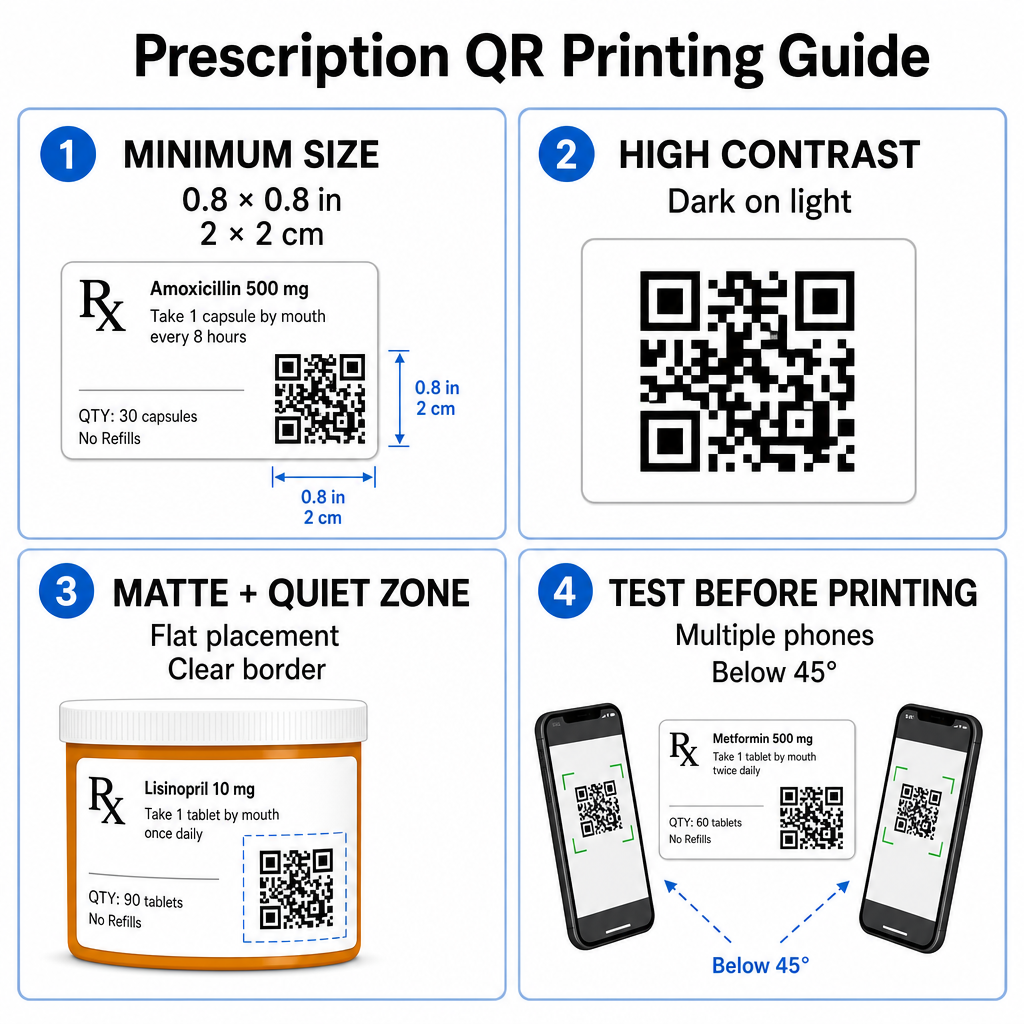
Reçete flakon yüzeyleri sınırlıdır. En az şu standart boyutu koruyun: 0.8" x 0.8" (2 cm x 2 cm) güvenilir tarama için. Çok küçük paketlerde, mutlak minimum baskı boyutu: 1 cm x 1 cm kodlanmış veri yoğunluğu düşük kaldığı sürece kullanılabilir. Tam ölçekleme oranlarını şurada kontrol edebilirsiniz QR kodu boyut kılavuzu.
Renk Kontrastı ve Yüzey Malzemeleri
Perakende eczanelerde yaygın olarak kullanılan termal yazıcılar, optimum taranabilirlik için özel kalibrasyon gerektirir:
- Yüksek Kontrast: Temiz, opak açık arka planlar üzerine düz koyu desenler (ideal olarak siyah) yazdırın.
- Mat Yüzeyler: Oda ışığını yansıtan ve kamera sensörlerini kör eden parlak etiket kaplamalarından veya şeffaf plastik flakonlardan kaçının. Parlak veya şeffaf kaplar kaçınılmazsa, QR kodunun hemen altına beyaz mat bir katman yazdırın.
- Eğrilik Yönetimi: Geometrik bozulmayı önlemek için QR kodunu şişenin veya kutunun en düz bölümüne yerleştirin.
Termal mürekkeplerin, alt tabakaların ve etiket malzemelerinin tarama hızlarını nasıl etkilediğini değerlendirmek için, konulu ayrıntılı analizimizi okuyun baskı tekniklerinin QR taranabilirliğini nasıl etkilediği.
Sessiz Bölgeler ve Doğrulama Testi
Kodu çevreleyen etiket metninden ve kenarlıklarından ayırmak için kodun çevresinde her zaman sessiz bölge olarak bilinen net bir dış kenarlık bırakın. Toplu baskı öncesinde basılı kodları birden fazla akıllı telefon cihazında, açıda (45 derecenin altında) ve aydınlatma koşullarında test edin. Temel QR kodu okunabilirliği için en iyi uygulamaları etiket düzeninizin güvenilir bir şekilde performans gösterdiğinden emin olmak için.
Basılı Etiketinizin Taranabilirliğini Doğrulayın Reçete ambalajınızın tüm cihaz kameralarında hızlı tarandığını test etmek ister misiniz? Basılı etiket tasarımlarınızı ücretsiz olarak anında test edin çevrimiçi QR kod tarayıcı.
Eczane İş Akışlarında Reçete QR Kodlarının Uygulanması
Eczane operasyonlarında taranabilir etiketlerin yaygınlaştırılması basit, yapılandırılmış bir yaklaşım gerektirir:
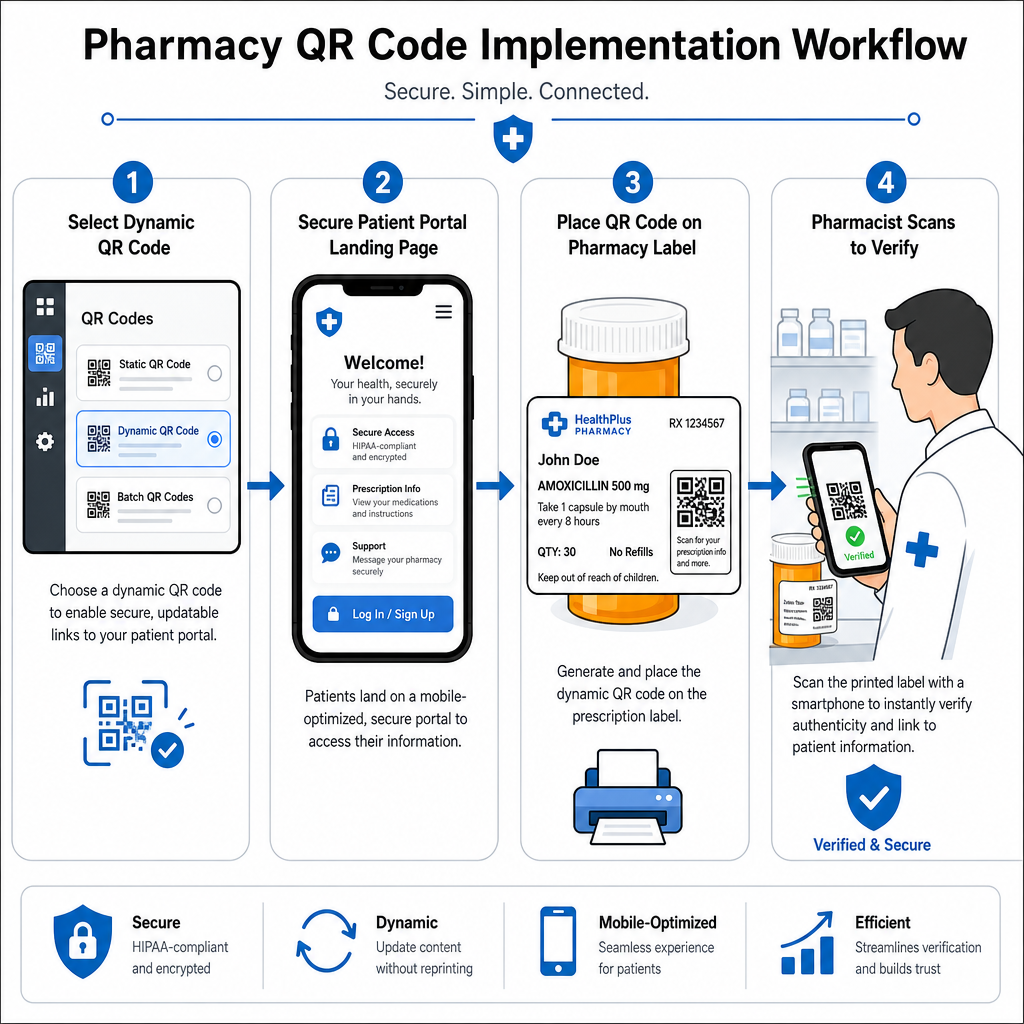
- Kod Tipini Seçin: Web bağlantıları için dinamik QR kodlarını seçin, böylece eğitim PDF'lerini, video URL'lerini veya portal bağlantılarını fiziksel kap etiketlerini yeniden basmadan güncelleyebilirsiniz.
- Güvenli Açılış Sayfalarını Yapılandırın: Hedef bağlantıları mobil uyumlu, HIPAA uyumlu hasta portallarına veya genel ilaç kılavuzlarına bağlayın.
- Etiket Şablonlarını Entegre Edin: Oluşturulan QR kodunu eczane yönetim sisteminiz’in termal baskı şablonlarına ekleyin, boyut, sessiz bölgeler ve kontrast parametrelerinin kilitli olduğundan emin olun.
- Eczane Personelini Eğitin: Eczacıları ve teknisyenleri, hasta danışmanlıkları sırasında QR kodunu belirtmeleri konusunda eğitin, hastaları evde şişelerini taramaya teşvik edin.
- Taranabilirliği Doğrulayın: Dağıtım istasyonlarında web tabanlı bir kullanarak rutin kalite kontrolleri gerçekleştirin QR kod okuyucu teslim etmeden önce kod netliğini doğrulamak için.
Diğer sektörlerin taranabilir ambalajı nasıl yönettiğini keşfetmek, çeşitli genelinde ek iş akışı bilgileri sağlayabilir endüstriyel kullanım durumları.
Reçete etiketlerine taranabilir QR kodları eklemek, fiziksel ilaç ambalajı ile hayati dijital sağlık kaynakları arasındaki boşluğu doldurur. Doğru baskı standartlarını takip ederek, hasta gizliliğini koruyarak ve düzenlenebilir hedef bağlantılarını yöneterek, eczaneniz yönetim hatalarını azaltabilir ve genel hasta sonuçlarını iyileştirebilir. Pageloot ile bugün uyumlu, taranabilir reçete etiketi iş akışları oluşturmaya başlayın.
Sıkça sorulan sorular
Hayır. ABD federal düzenlemeleri ve FDA yönergeleri, reçeteli ilaç ambalajı etiketlerinde tüketiciye yönelik QR kodları zorunlu kılmamaktadır. Zorunlu etiket unsurları (hasta adı, ilaç talimatları ve eczane bilgileri gibi) yine de doğrudan okunabilir metin olarak basılmalıdır. QR kodları, hasta eğitimini ve dijital erişimi geliştirmek için gönüllü, tamamlayıcı bir araç olmaya devam etmektedir.
Eczaneler, hasta adları, doğum tarihleri veya ilaç detayları gibi şifrelenmemiş korunan sağlık bilgilerini (PHI) doğrudan QR kodu deseninin içine kodlamaktan kaçınmalıdır. Bunun yerine, kişisel verileri görüntülemeden önce hasta kimlik doğrulaması gerektiren şifrelenmiş, parola korumalı hasta portallarına işaret eden güvenli dinamik bağlantılar kullanın.
Reçete etiketleri için önerilen minimum baskı boyutu 0.8″ x 0.8″ (2 cm x 2 cm)'dir. Kodlar teknik olarak küçük paketlerde 1 cm x 1 cm kadar küçük taranabilse de, güçlü renk kontrastına ve net sessiz bölgelere sahip daha büyük boyutlar, tüm mobil cihaz kameralarında güvenilir tarama sağlar.