Potýkají se vaši pacienti s čtením drobného textu na lahvičkách s léky nebo jim chybí kritické instrukce k dávkování? Nedodržování léčby a chyby v podávání léků vedou k preventabilním zdravotním rizikům a častým konzultacím v lékárnách. Přidání skenovatelných QR kódů na etikety léků poskytuje pacientům okamžitý přístup k digitálním příbalovým letákům, zvukovým instrukcím a portálům pro opakované předpisy.
Jaké informace mohou QR kódy na předpisech poskytnout?
Etikety obalů na léky mají omezený fyzický prostor. Federální a státní předpisy vyžadují povinný tištěný text, včetně názvu lékárny, čísla předpisu, údajů o předepisujícím lékaři, jména pacienta a pokynů k dávkování. Kód rychlé odezvy (QR) funguje jako digitální rozšíření etikety a poskytuje další informace, aniž by lahvičku přeplnil.
Lékárny mohou používat QR kódy na předpisech k poskytování zdrojů pro pacienty, jako jsou:
- Digitální příbalové letáky: Přímé propojení pacientů s elektronickými informačními letáky pro pacienty (e-letáky) nebo dokumenty formátovanými pomocí QR kód PDF generátor.
- Zvukové a přístupné formáty: Pomozte zrakově postiženým pacientům skenovat obal, aby si poslechli mluvené pokyny k dávkování nebo získali přístup k textům s velkým písmem a možnostem elektronického braillova písma.
- Demonstrační videa: Ukažte podrobné video tutoriály pro komplexní systémy podávání léků, jako jsou inzulínová pera, inhalátory nebo zařízení pro samotné vstřikování.
- Portály pro opakované předpisy: Nasměrujte pacienty přímo na online portály lékáren pro opakované předpisy, aby rychle odeslali žádosti o obnovení.
- Offline textové informace: Ukládejte jednoduché textové varování, nouzová kontaktní čísla nebo pokyny k uchovávání přímo do matice kódu pomocí QR kód text: generátor.
Klíčové výhody pro bezpečnost pacientů a dodržování léčby
Nedodržování léčby je závažným problémem veřejného zdraví. Výzkum ukazuje, že přibližně 50 % pacientů neužívá své léky podle předpisu, což vede k více než 125 000 preventabilním úmrtím ročně. Umístění skenovatelných informací na obaly léků pomáhá řešit běžné zdroje chyb v podávání a zmatku.
Snížení chyb v podávání léků
Standardní etikety na lahvích používají malá písma, která jsou pro starší dospělé nebo zrakově postižené osoby obtížně čitelná. Experimentální výzkum srovnávající obaly vybavené QR kódy se standardními etiketami na lahvích zjistil, že přístup ke skenovatelným digitálním detailům vedl k výrazně správnějším rozhodnutím o samopodávání léku u mladších i starších skupin dospělých pacientů.
Zlepšení dostupnosti
Poskytování přístupných detailů o předpisech je zásadní pro bezpečnost pacienta. Když jsou QR kódy zakódovány přístupným textem nebo propojeny s přistávacími stránkami přívětivými pro čtečky obrazovky, umožňují pacientům se zrakovým postižením samostatně ověřit názvy léků, dávkování a poznámky k opatrnosti.
Podpora sledování dodržování léčby a zapojení
Digitální řešení pro sledování příjmu léků využívající skenovatelné kódy na obalech prokázala vysokou klinickou proveditelnost. Klinické studie ukazují, že vlastní hlášení pacientů prostřednictvím skenování QR kódem dosahuje přibližně 90,1% přesnosti ve srovnání s ručním počítáním pilulek. Integrace skenovatelných obalů do širších systémů QR kódů pro nemocnice a zdravotnictví zlepšuje komunikaci s pacienty a dlouhodobou správu péče. Chcete-li se dozvědět více o moderních klinických aplikacích, prostudujte si naše komplexní průvodce QR kódy ve zdravotnictví.
Doručujte aktuální pokyny pro pacienty Potřebujete aktualizovat příbalové letáky nebo digitální zdroje bez přetisknutí fyzických etiket? Použijte Dynamický QR kód pro udržení editovatelnosti a přesnosti vašich odkazů.
Soulad s regulacemi a ochranná opatření HIPAA pro lékárny
Integrace digitálních nástrojů do lékárenských pracovních postupů vyžaduje přísnou pozornost k regulačním normám a zákonům o ochraně soukromí pacientů.
| Oblast požadavku | Standard / Směrnice | Klíčová akce lékárny |
|---|---|---|
| Předpisy FDA | Dobrovolné informace pro pacienta | S QR kódy zacházejte jako s dobrovolnými doplňky; nikdy nenahrazujte požadovaný text na etiketě. |
| DSCSA serializace | GS1 2D Data Matrix čárové kódy | Udržujte čárové kódy dodavatelského řetězce DSCSA odděleně od spotřebitelských QR kódů. |
| Pravidlo soukromí HIPAA | Chráněné zdravotnické informace (PHI) | Nikdy nekódujte jména pacientů, data narození ani diagnózy přímo do kódu. |
| Řízení přístupu | Ochranná opatření pro ověřování | Vyžadujte ověření přihlášením pacienta pro jakýkoli cíl QR kódu zobrazující osobní zdravotní údaje. |
Rozdíl mezi QR kódy a čárovými kódy dodavatelského řetězce
Podle zákona o bezpečnosti dodavatelského řetězce léčiv (DSCSA) jsou serializované 2D čárové kódy GS1 Data Matrix povinné na velkoobchodním balení pro sledování distributorem. Jedná se o technické, regulované 2D čárové kódy určené pro skenery v dodavatelském řetězci. QR kódy určené pro pacienty jsou naproti tomu dobrovolné nástroje navržené pro chytré telefony spotřebitelů k poskytování vzdělávacího a provozního obsahu.
Vymáhání standardů ochrany soukromí a bezpečnosti podle HIPAA
Lékárny jsou subjekty spadající pod HIPAA. Při nasazování QR kódů na obaly s recepty:
- Vyhněte se přímému kódování nezpracovaných PHI: Nikdy nevkládejte nešifrované identifikátory pacientů, čísla sociálního pojištění nebo specifické diagnózy do statického kódu.
- Používejte zabezpečené webové destinace: Směřujte QR kódy na zabezpečené HTTPS webové stránky podporované přísnými kontrolami přístupu, vícefaktorovou autentizací a šifrovanými databázemi.
- Zabraňte neregulovanému sledování: Zajistěte, aby vstupní stránky pro pacienty nevyužívaly analytické pixely třetích stran, které by mohly nepřípustně zveřejňovat data.
- Spolupracujte s vyhovujícími dodavateli: Vyberte si softwarové platformy, které prosazují protokoly zabezpečení dat a uzavírají dohody o obchodní spolupráci (BAA). Pro kompletní přehled právních standardů se podívejte do našeho průvodce na téma Zákony a předpisy o ochraně soukromí QR kódů.
Osvědčené postupy pro tisk skenovatelných štítků na recepty
Štítky na recepty jsou často manipulovány, vystaveny vlhkosti a mají omezený prostor. Pokud se tištěný kód nepodaří naskenovat, klesá důvěra pacientů a zvyšuje se počet volání na podporu lékárny.
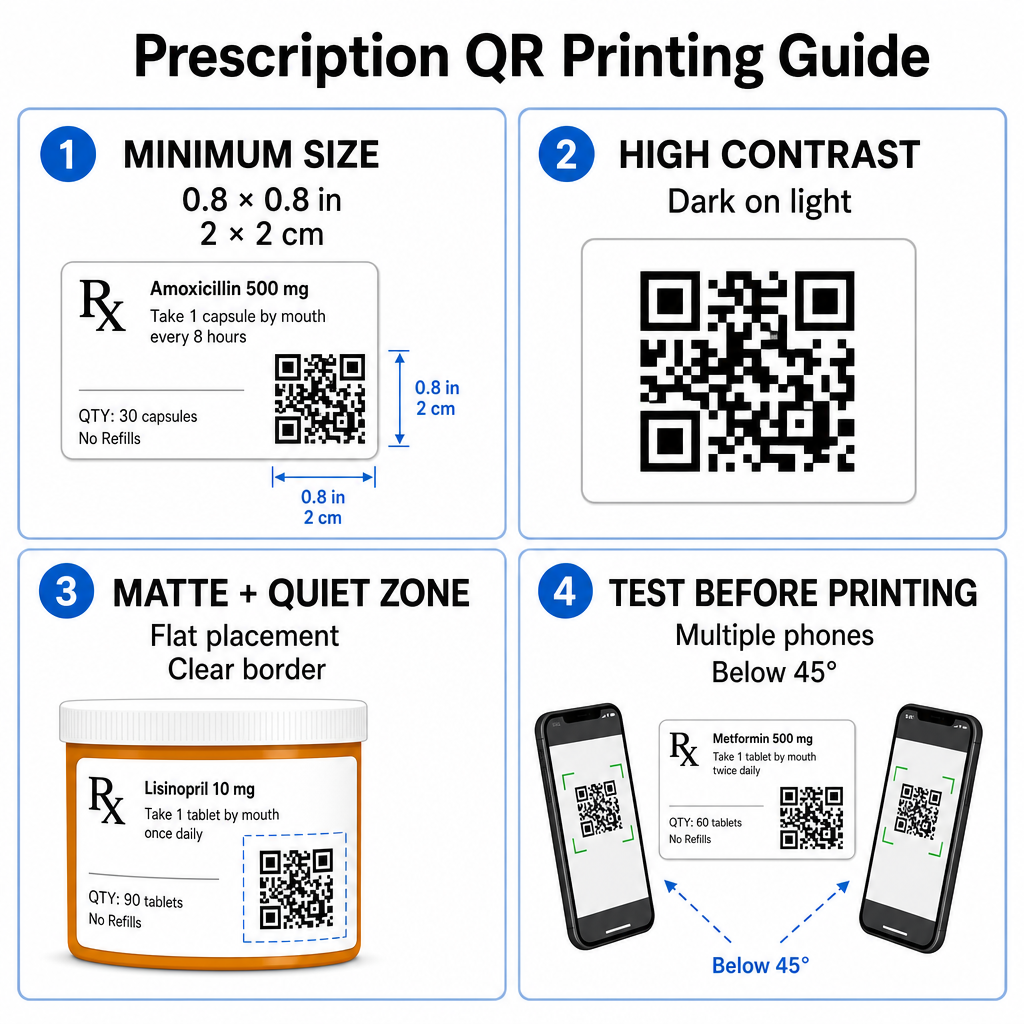
Doporučená velikost kódu
Povrchy lékovkových lahviček jsou omezené. Zachovejte standardní velikost alespoň 0.8″ x 0.8″ (2 cm x 2 cm) pro spolehlivé skenování. Na velmi malých baleních je absolutní minimální velikost tisku 1 cm x 1 cm lze použít za předpokladu, že hustota zakódovaných dat zůstává nízká. Přesné poměry měřítka můžete zkontrolovat v našem průvodci velikostí QR kódů.
Barevný kontrast a povrchové materiály
Termální tiskárny běžně používané v maloobchodních lékárnách vyžadují specifickou kalibraci pro optimální skenovatelnost:
- Vysoký kontrast: Tiskněte plné tmavé vzory (ideálně černé) na čisté, neprůhledné světlé pozadí.
- Matné povrchy: Vyhněte se lesklým povrchům etiket nebo průhledným plastovým lahvičkám, které odrážejí osvětlení místnosti a oslepují snímače kamer. Pokud jsou lesklé nebo průhledné nádoby nevyhnutelné, vytiskněte bílou matnou vrstvu přímo pod QR kód.
- Správa zakřivení: Umístěte QR kód na nejrovnější část láhve nebo krabice, abyste zabránili geometrickému zkreslení.
Chcete-li vyhodnotit, jak termální inkousty, substráty a materiály etiket ovlivňují rychlost skenování, přečtěte si naši podrobnou analýzu na téma jak tiskové techniky ovlivňují skenovatelnost QR kódů.
Tiché zóny a ověřovací testování
Vždy udržujte jasný vnější okraj – známý jako tichá zóna – kolem kódu, aby byl oddělen od okolního textu etikety a okrajů. Před hromadným tiskem otestujte vytištěné kódy na více chytrých telefonech, v různých úhlech (pod 45 stupňů) a světelných podmínkách. Zkontrolujte naše základní osvědčené postupy pro čitelnost QR kódů abyste zajistili spolehlivý výkon rozložení vaší etikety.
Ověřte skenovatelnost vaší vytištěné etikety Chcete otestovat, zda se vaše balení na předpis rychle skenuje na všech kamerách zařízení? Okamžitě otestujte návrhy svých vytištěných etiket pomocí bezplatného nástroje online skener QR kódů.
Implementace QR kódů na předpisy do lékárenských pracovních postupů
Zavádění skenovatelných etiket v rámci lékárenských provozů vyžaduje jednoduchý a strukturovaný přístup:
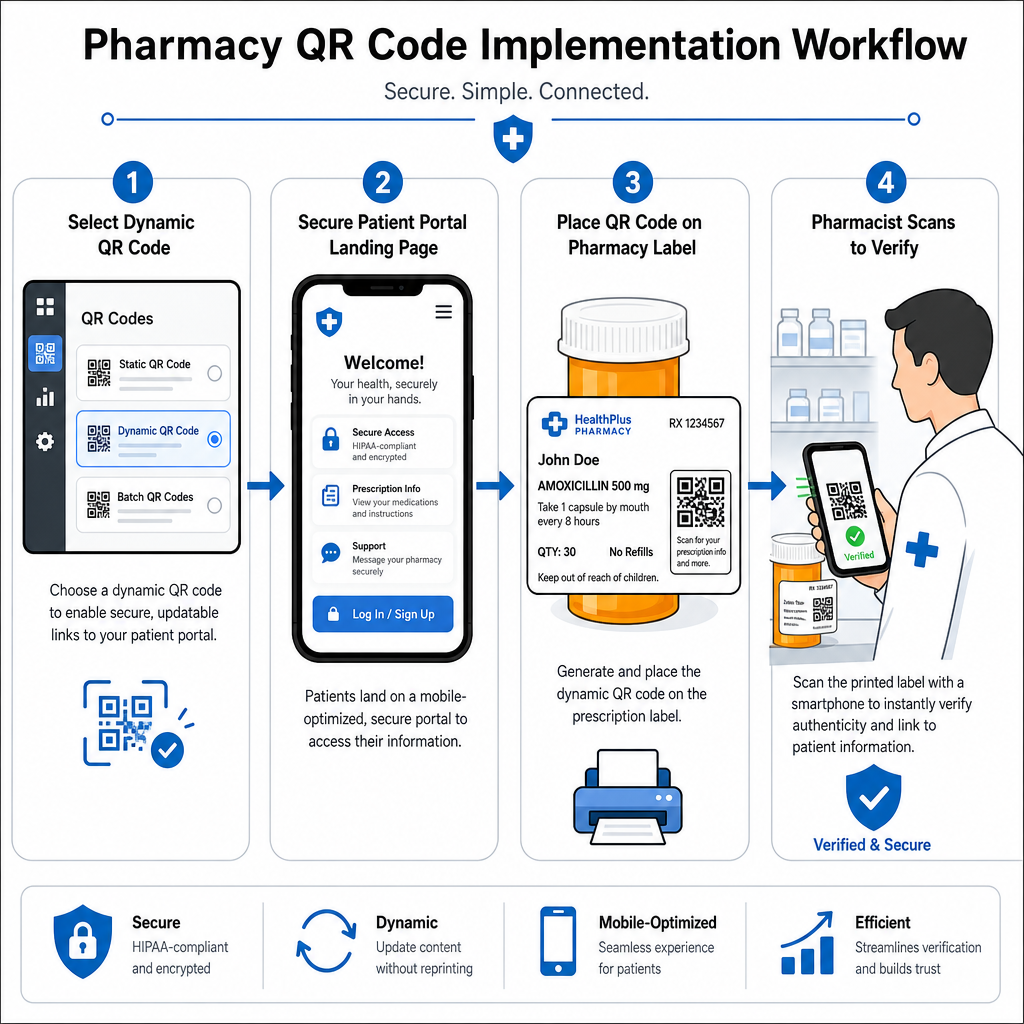
- Vyberte typ kódu: Zvolte dynamické QR kódy pro webové odkazy, abyste mohli aktualizovat vzdělávací PDF, URL videa nebo odkazy na portály bez opětovného tisku fyzických etiket nádob.
- Nakonfigurujte zabezpečené vstupní stránky: Propojte cílové odkazy s mobilně optimalizovanými, HIPAA-kompatibilními pacientskými portály nebo veřejnými průvodci léky.
- Integrujte šablony etiket: Přidejte vygenerovaný QR kód do šablon termotisku vašeho systému pro správu lékárny, zajistěte, aby byly uzamčeny parametry velikosti, klidových zón a kontrastu.
- Školení personálu lékárny: Poučte lékárníky a techniky, aby upozorňovali na QR kód během konzultací s pacienty a povzbuzovali pacienty, aby si láhev naskenovali doma.
- Ověření skenovatelnosti: Provádějte pravidelné kontroly kvality na výdejních místech pomocí webového Čtečka QR kódů k potvrzení čitelnosti kódu před předáním.
Zkoumání, jak jiné sektory spravují skenovatelné obaly, může poskytnout další poznatky o pracovních postupech napříč různými průmyslovými případy použití.
Přidání skenovatelných QR kódů na štítky léků překlenuje propast mezi fyzickým balením léků a životně důležitými digitálními zdravotními zdroji. Dodržováním správných tiskových standardů, ochranou soukromí pacientů a správou editovatelných cílových odkazů může vaše lékárna snížit administrativní chyby a zlepšit celkové výsledky pacientů. Začněte vytvářet vyhovující, skenovatelné pracovní postupy pro štítky léků s Pageloot ještě dnes.
Často kladené otázky
Ne. Americké federální předpisy a směrnice FDA nevyžadují QR kódy určené pro spotřebitele na štítcích obalů léků na předpis. Povinné prvky štítku (jako je jméno pacienta, pokyny k léku a podrobnosti o lékárně) musí být stále vytištěny přímo v lidsky čitelném textu. QR kódy zůstávají dobrovolným, doplňkovým nástrojem pro zlepšení vzdělávání pacientů a digitálního přístupu.
Lékárny se musí vyhnout kódování nešifrovaných chráněných zdravotních informací (PHI) – jako jsou jména pacientů, data narození nebo detaily o lécích – přímo do vzoru QR kódu. Namísto toho používejte zabezpečené dynamické odkazy vedoucí na šifrované, heslem chráněné pacientské portály, které vyžadují ověření pacienta před zobrazením osobních údajů.
Doporučená minimální velikost tisku pro štítky léků je 0.8″ x 0.8″ (2 cm x 2 cm). Zatímco kódy lze technicky skenovat již od 1 cm x 1 cm na malých baleních, větší rozměry se silným barevným kontrastem a jasnými klidovými zónami zajišťují spolehlivé skenování na všech kamerách mobilních zařízení.