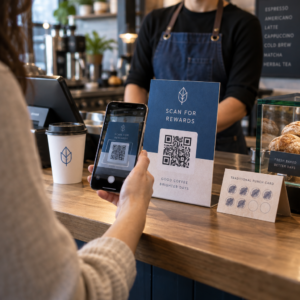
האם לקוחות מדלגים על תהליך רישום המוצר שלכם כי הוא מרגיש כמו יותר מדי עבודה? שיעורי רישום נמוכים פירושם נתוני בעלות חלקיים, תגובות איטיות יותר לקריאות תיקון, והחמצת הזדמנויות לבניית קשרים לאחר המכירה. עמוד זה מראה לכם כיצד קודי QR מסירים את החיכוך הזה והופכים את הרישום לסריקה מהירה וחלקה.
מדוע רישום מוצר מסורתי אינו מספק
לכרטיסי אחריות מנייר יש שיעור השלמה נמוך באופן ידוע לשמצה. לקוחות מקבלים כרטיס, מניחים אותו בצד, ולעתים רחוקות שולחים אותו בחזרה בדואר. אפילו טפסים מבוססי אינטרנט משפרים את המצב רק במעט אם לקוחות צריכים להקליד ידנית כתובת URL ארוכה או לחפש באריזה כדי למצוא קישור לרישום.
התוצאה היא פער בנתונים. אתם שולחים מוצרים אך יש לכם מעט נראות לגבי מי הבעלים שלהם. כאשר מתעוררת בעיית בטיחות או קריאת תיקון, הודעה ישירה הופכת לקשה או בלתי אפשרית. עבור יצרנים של מוצרי תינוקות או פעוטות עמידים, זו לא רק בעיה עסקית – 16 CFR חלק 1130 דורש שמירה על רישומי פרטי קשר של צרכנים ומחייב אפשרות רישום אלקטרונית במיוחד מכיוון שה-CPSC מכיר בכך ששיעורי תגובה לקריאות תיקון הם אתגר מתועד.
גם מחוץ לקטגוריות מוסדרות, העלות התפעולית של רישום נמוך היא אמיתית: הונאת אחריות קשה יותר לזיהוי, בקשות שירות קשות יותר לאימות, ונתוני מחזור חיי המוצר נשארים דלים.
כיצד קוד QR פותר את בעיית הרישום
קוד QR המודפס על אריזה, כרטיסון, או המוצר עצמו מעניק ללקוחות נתיב ללא חיכוך לרישום. הם פותחים את מצלמת הטלפון שלהם, סורקים את הקוד, ונוחתים ישירות על טופס רישום או דף נחיתה ממותג – ללא הקלדה, ללא חיפוש, ללא דואר.
ברגע שהם שולחים את הטופס, אתם מקבלים נתוני בעלות מובנים: שם, פרטי קשר, תאריך רכישה, וכל שדות מותאמים אישית שתגדירו. מידע זה מוזן ישירות לרישומים שלכם ללא הזנת נתונים ידנית משני הצדדים.
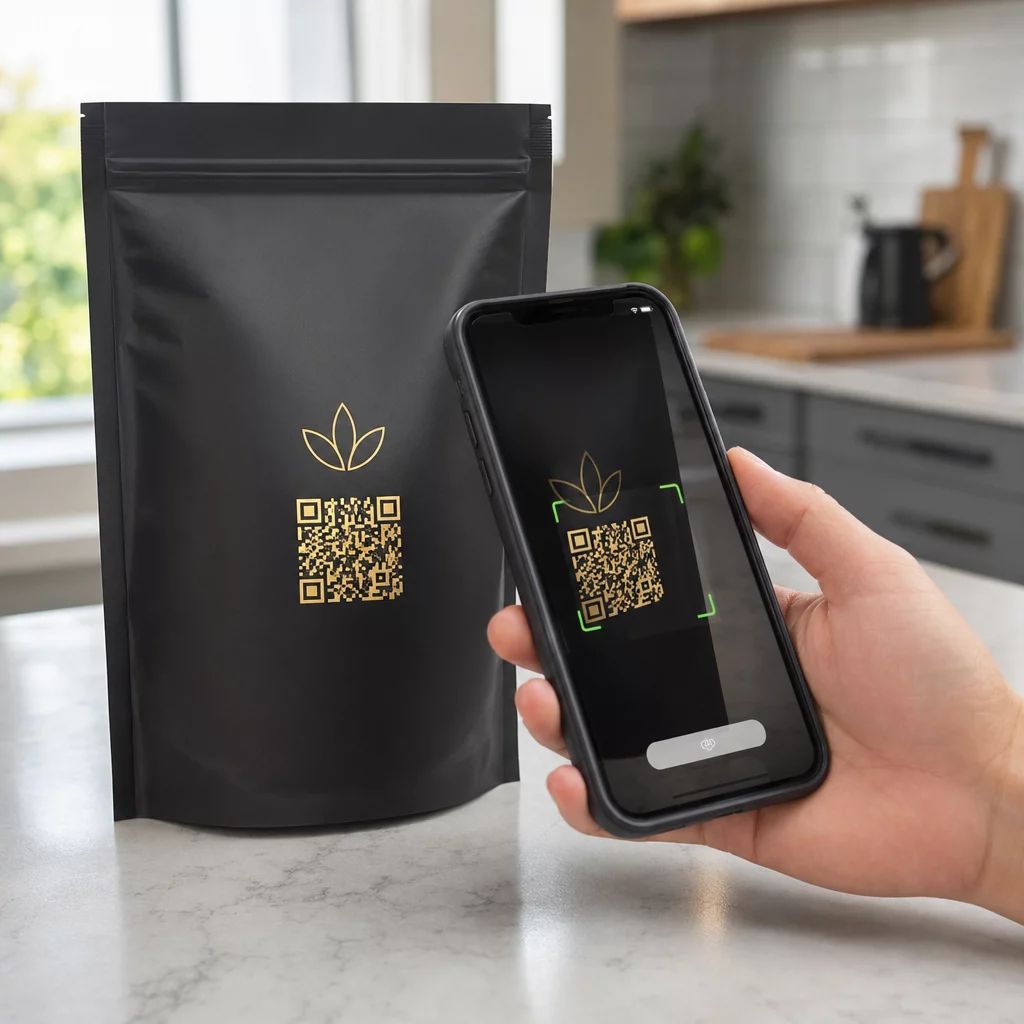
גישה זו מתיישרת עם המעבר הרחב יותר באריזות מוצרים לכיוון חיבור פריטים פיזיים לתוכן דיגיטלי. הכרה כלל-תעשייתית שקודי QR על אריזות יכולים לשמש כשערים קבועים למידע על מוצרים, פרטי אחריות ורישום משקפת פונקציה שחורגת הרבה מעבר למה שברקוד מסורתי יכול לשאת. קודי QR על אריזות מוצרים יכולים לשאת קישור רישום זה ישירות לידי הלקוח ברגע שהוא פותח את הקופסה.
מוכנים להוסיף קודי QR לרישום למוצרים שלכם? צרו קודי QR ניתנים למעקב ועריכה עבור האריזות או הכרטיסונים שלכם באמצעות ה מחולל QR דינמי. עדכנו את יעד הטופס המקושר בכל עת – אין צורך בהדפסה מחדש.
בחירת סוג קוד ה-QR הנכון לרישום
לא כל קודי ה-QR משרתים תהליך רישום אחריות באותה מידה. ההבחנה הקריטית היא בין קודים סטטיים לדינמיים.
א קוד QR סטטי מקודד כתובת URL קבועה ישירות לתוך התבנית שלו. לאחר ההדפסה, אינכם יכולים לשנות לאן הוא מצביע. אם כתובת ה-URL של טופס הרישום שלכם משתנה, הקוד על אלפי יחידות הופך לחסר תועלת.
א קוד QR דינמי מקודד כתובת URL קצרה להפניה מחדש שאתם שולטים בה מלוח מחוונים. אתם יכולים לעדכן את היעד בכל עת מבלי לגעת בקוד המודפס. זה חשוב לרישום אחריות מכיוון שטפסי רישום מועברים בין פלטפורמות, דפים עונתיים או ספציפיים לקו מוצרים מוחלפים, וייתכן שתצטרכו להפנות סריקות לדף הודעה במהלך עדכון מוצר או קריאת תיקון.
לרישום מוצר, קודי QR דינמיים הם ברירת המחדל המעשית. היכולת ל לערוך יעדים לאחר ההדפסה – בשילוב עם ניתוח סריקות – הופכת אותם להרבה יותר שימושיים לאיסוף נתוני בעלות מתמשכים. אתם יכולים לבחון את הפירוט המלא של היכולות ב השוואה בין קודי QR סטטיים לדינמיים.
הגדרת תהליך עבודה לרישום באמצעות קוד QR
בניית מערכת רישום והפעלת אחריות מבוססת QR פשוטה יותר ממה שהיא עשויה להיראות. השלבים הבאים מכסים את ההגדרה המלאה, מבחירת טופס ועד למעקב לאחר ההשקה.
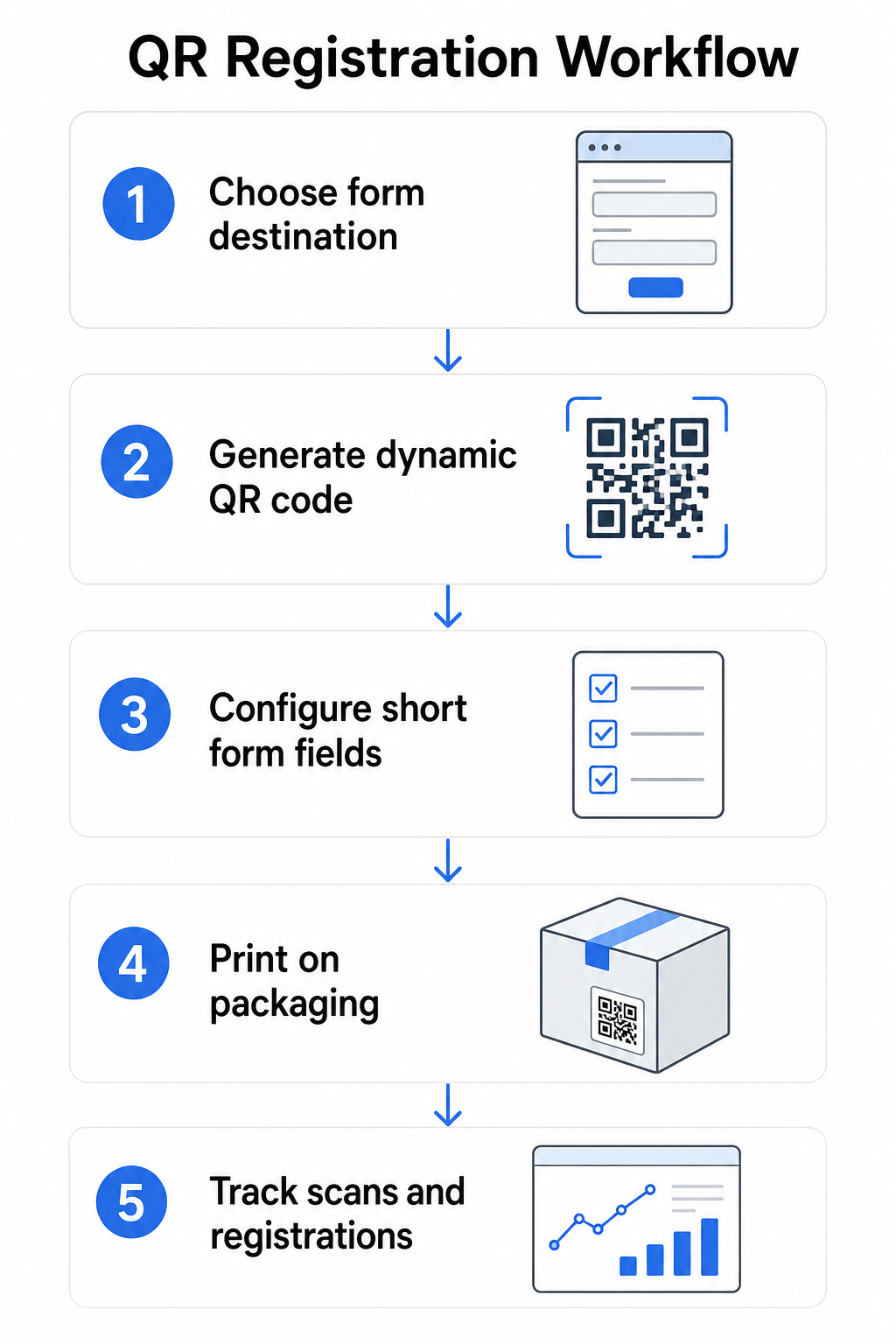
שלב 1: בחרו את יעד הטופס שלכם
יש לכם שתי אפשרויות עיקריות למה שקוד ה-QR מקשר אליו. א טופס Google מהיר להגדרה ועובד היטב לאיסוף שדות מובנים. השתמשו ב יצירת ברקוד גוגל לטופס כדי להמיר את קישור השיתוף של הטופס שלכם לקוד שניתן לסרוק.
א דף נחיתה ממותג הוא דף מותאם לנייד המציג את טופס הרישום שלכם לצד פרטי מוצר, תנאי אחריות וחזות מותג. של Pageloot תכונת דפי נחיתה מאפשר לך לבנות ולעדכן דפים אלה ללא עזרה טכנית. אפשרות דף הנחיתה נוטה לתפקד טוב יותר לחוויית לקוח מכיוון שאתה שולט בעיצוב המלא, יכול להציג תנאי אחריות בבירור, ויכול לכלול מספר קישורים או קריאות לפעולה – כגון קישור למדריך המוצר לצד טופס הרישום.
שלב 2: צור קוד QR דינמי
צור את קוד ה-QR באמצעות Pageloot’s מחולל QR דינמי והפנה אותו ליעד שבחרת. הוסף את לוגו המותג והצבעים שלך כדי להפוך את הקוד לזיהוי על האריזה. שמור את הלוגו בטווח 30% משטח הקוד כדי לשמר את יכולת הסריקה, והשתמש ברמת תיקון שגיאות גבוהה (Q או H) בעת הוספת מיתוג ויזואלי.
שלב 3: הגדר את שדות טופס הרישום
אסוף את מה שאתה באמת צריך למטרות אחריות ובעלות. שדות אופייניים כוללים:
- שם לקוח וכתובת דוא"ל
- תאריך רכישה
- מקום רכישה (קמעונאי או ערוץ)
- מספר סידורי של המוצר (אם לא מולא מראש)
- אופציונלי: משוב על המוצר או שיטת יצירת קשר מועדפת
מזעור נתונים אינו רק שיטת עבודה מומלצת לפרטיות – הוא גם משפר את שיעורי ההשלמה. טפסים קצרים יותר מקבלים יותר הגשות.
שלב 4: מקם את קוד ה-QR על אריזות או עלונים
לסריקה אמינה, מיקום על אריזת המוצר עוקב אחר כמה עקרונות עקביים:
- גודל הקוד לפחות 1 אינץ' (2.5 ס"מ) רוחב
- הדפס על משטח שטוח וחלק – הימנע מקפלים, תפרים או אזורים מעוגלים
- השתמש בניגודיות גבוהה (שחור על לבן עובד הכי טוב; שמור על יחס ניגודיות של לפחות 3:1)
- השאר אזור שקט ברור – שוליים ריקים – סביב הקוד
- בדוק את הקוד המודפס על המצע בפועל לפני סיום סדרות הייצור
למבט מעמיק יותר על שיקולים ספציפיים לתוויות, ראה את ה מדריך לקודי QR על תוויות מוצרים ו כיצד להדפיס קוד QR על תווית.
שלב 5: עקוב אחר רישומים ונתוני סריקה
ברגע שהקוד פעיל, לוח המחוונים של Pageloot שלך מציג ספירת סריקות, מיקום גיאוגרפי של סריקות, סוג מכשיר ושעת היום. זה אומר לך לא רק כמה לקוחות נרשמו, אלא מתי והיכן הם התקשרו – שימושי לזיהוי אם מיקום האריזה עובד והאם לשווקים או ערוצים מסוימים יש שיעורי רישום נמוכים יותר מאחרים.
ראה מי נרשם – ומי לא להשתמש מעקב סריקת קוד QR כדי לנטר מעורבות רישום לפי אזור, מכשיר וזמן. זהה נטישות מוקדם ועדכן את יעד הטופס שלך ללא הדפסה מחדש.
אילו נתונים אתה יכול לאסוף – ומה כדאי לך
קודי QR תומכים בשתי שכבות נפרדות של איסוף נתונים, והבנת ההבדל עוזרת לך להגדיר את התוכנית שלך נכון מההתחלה.
נתונים ברמת סריקה נאספים אוטומטית כאשר מישהו סורק קוד QR דינמי. זה כולל ספירת סריקות, מיקום סריקה (מדינה ואזור), סוג מכשיר (iOS או Android), וחותמת זמן. נתונים אלה נאספים מבלי שהלקוח יספק מידע אישי כלשהו – הם משקפים מעורבות עם הקוד עצמו. לפירוט מלא של מה שנלכד, ראה אילו נתונים אוספים קודי QR דינמיים.
נתוני רישום – שמות, כתובות דוא"ל, תאריכי רכישה ופרטי יצירת קשר – נאספים רק כאשר לקוח משלים מרצונו את הטופס בדף המקושר. אלו נתוני צד ראשון, המסופקים ישירות ועם מודעות על ידי הלקוח. הפלטפורמה של Pageloot תומכת במודל זה: לקוחות משתפים מידע באמצעות טפסים או דפי נחיתה לאחר סריקה, ושומרים על איסוף הנתונים מבוסס הסכמה ושקוף.
למטרות אחריות ובעלות, אתה צריך נתוני רישום. כדי להבין אם תוכנית הרישום שלך עובדת בקנה מידה, נתונים ברמת סריקה מספקים הקשר יקר ערך.
שיקולי פרטיות ומשפט
איסוף נתוני רישום מוצר נושא עמו חובות ציות המשתנות לפי קטגוריית מוצר ותחום שיפוט.
ל מוצרי תינוקות או פעוטות עמידים מוסדר תחת 16 CFR חלק 1130, ה-CPSC דורש ממך:
- ספק כרטיס רישום פיזי בתשלום מראש עם כל יחידה
- הצע אפשרות רישום אלקטרונית (אתר אינטרנט או דוא"ל) כתוספת – לא כתחליף – לכרטיס הפיזי
- שמור תיעוד של שמות נרשמים, כתובות וכתובות דוא"ל
- השתמש בנתוני רישום רק להתראות בטיחות וריקולים, לא למטרות שיווק
קוד QR המקשר לטופס הרישום המקוון שלך עונה על דרישת הרישום האלקטרוני במסגרת זו, אך הוא אינו מחליף את דרישת הכרטיס הפיזי עבור מוצרים מכוסים.
לרישום אחריות באופן רחב יותר, ה חוק האחריות של מגנוסון-מוס מבחין בין אחריות מלאה ומוגבלת. מוצרים עם אחריות “מלאה” אינם יכולים לדרוש רישום כתנאי לכיסוי. מוצרים עם אחריות “מוגבלת” עשויים לדרוש רישום רק אם הדרישה נחשפת בבירור לפני הרכישה. כל תנאי רישום חייב להופיע בתנאי האחריות שצרכנים יכולים לגשת אליהם לפני המכירה.
לפרטיות נתונים, עסקים בארה"ב שאוספים מידע אישי באמצעות טפסי רישום מקוונים צריכים לספק הודעת פרטיות בנקודת האיסוף או לפניה, המתארת איזה נתונים נאספים, מדוע, וכמה זמן הם יישמרו. תחת ה-CPRA של קליפורניה, איסוף ושמירה חייבים להיות מוגבלים למה שנדרש באופן סביר למטרה הגלויה. אם המוצרים שלך עשויים להגיע למשפחות עם ילדים מתחת לגיל 13, ודא שטופס הרישום המקוון שלך עומד בדרישות COPPA להסכמת הורים ניתנת לאימות לפני איסוף נתונים אישיים מקבוצת גיל זו.
לפרטים נוספים על חובות פרטיות נתונים של קודי QR ברחבי תחומי שיפוט, ראה חוקי פרטיות קודי QR: תקנות מפתח.
שימוש בקודי QR לאורך מחזור חיי המוצר
רישום אחריות הוא חלק אחד מהזדמנות רחבה יותר. אותו קוד QR על המוצר שלך יכול לשרת מספר פונקציות לאורך כל מסע הבעלות:
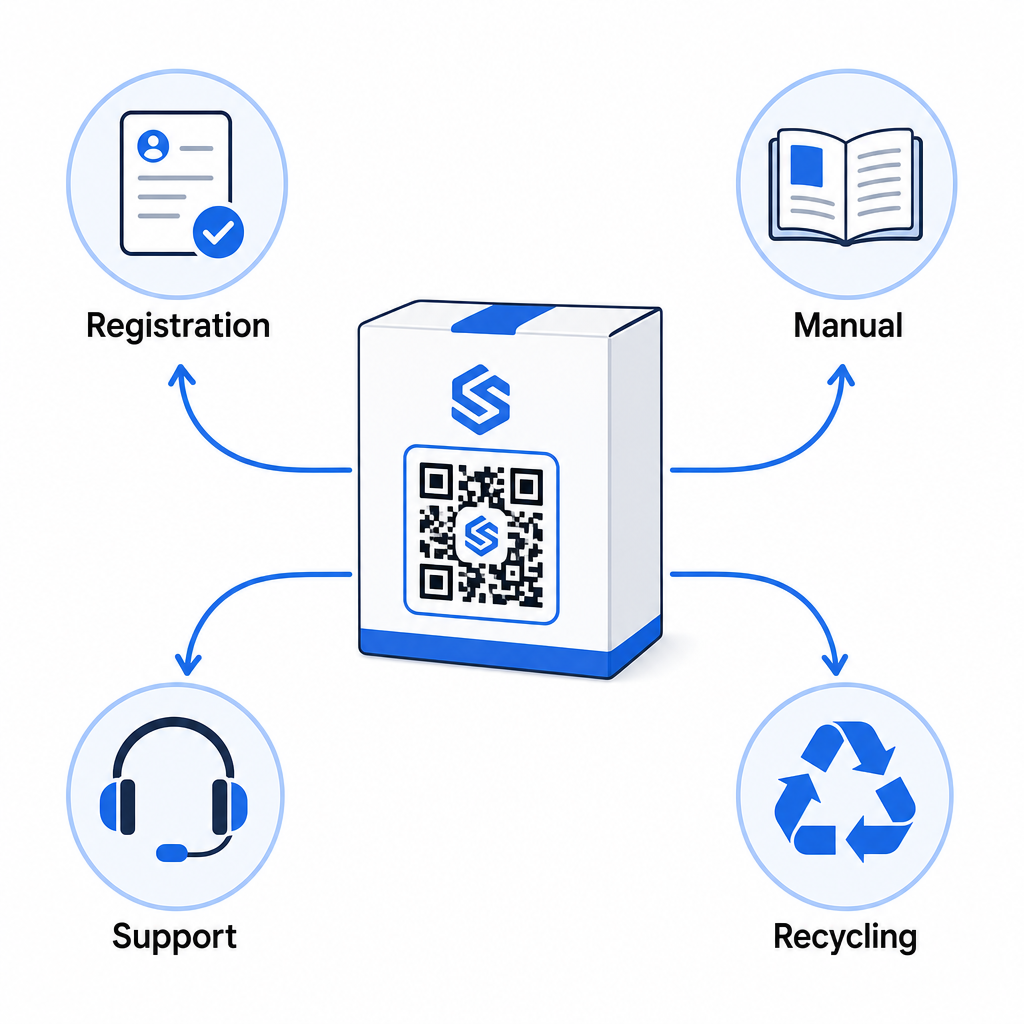
- בפתיחת האריזה: מפנה לטופס הרישום והפעלת אחריות
- במהלך הבעלות: מקשר למדריך המוצר, שאלות נפוצות, או סרטוני הדרכה
- לתמיכה: מתחבר לטופס בקשת שירות או צ'אט חי
- בסוף חיי המוצר: מספק הוראות מיחזור או טרייד-אין
מכיוון שקודי QR דינמיים מאפשרים לך לעדכן את היעד ללא הדפסה מחדש, אתה יכול לפתח את מה שהקוד עושה לאורך זמן. קוד שהודפס היום לרישום יכול מאוחר יותר להפנות לדף עדכון קושחה, הודעת ריקול, או תוכנית נאמנות – ללא כל שינוי באריזה הפיזית.
גישת מחזור חיים זו נחקרת בהרחבה ב- קודי QR למעקב אחר מחזור חיי המוצר ו קודי QR בייצור: מעקב אחר חומרים ומוצרים.
עבור יצרנים המנהלים רישום מוצרים על פני מק"טים מרובים או קווי מוצרים, לוח מחוונים מרכזי לניהול קודי QR הופך חיוני. ראה כלי ניהול קודי QR ארגוניים להדרכה על ניהול קודי QR בקנה מידה גדול, כולל יצירה בכמות גדולה וניתוח לכל קוד.
תחילת העבודה
קוד QR לרישום מוצר אינו פרויקט טכני – זוהי החלטת אריזה. אתה מייצר קוד דינמי, מפנה אותו לטופס הרישום או לדף הנחיתה שלך, מדפיס אותו על העלון או הקופסה, ומתחיל לאסוף נתוני בעלות ברגע שהמוצרים מגיעים ללקוחות.
ההבדל בין כרטיס רישום פיזי לבין קוד QR הוא ההבדל בין לבקש ממישהו לשלוח מכתב בדואר לבין לתת לו טלפון. לקוחות שלעולם לא יחזירו כרטיס יסרקו קוד בפחות מ-10 שניות.
התחל עם קו מוצרים אחד. צור קוד QR דינמי באמצעות ה- מחולל קוד QR של Pageloot, קשר אותו לטופס הרישום שלך, ועקוב אחר איך שיעורי הסריקה וההגשה משתווים לשיטת הרישום הקודמת שלך. ברגע שתראה את ההבדל במעורבות, הרחבה לקטלוג המלא שלך היא פשוטה.
שאלות נפוצות
לא. תחת 16 CFR חלק 1130, יצרנים ויבואנים של מוצרי תינוקות או פעוטות עמידים חייבים לכלול כרטיס רישום פיזי עם דמי משלוח משולמים מראש עם כל יחידה. רישום מקוון באמצעות קוד QR עונה על אפשרות הרישום האלקטרוני הנדרשת אך חייב להשלים את הכרטיס הפיזי, לא להחליף אותו. שניהם נדרשים.
אם אתה משתמש בקוד QR דינמי, אתה יכול לעדכן את כתובת ה-URL של היעד מלוח המחוונים שלך בכל עת ללא הדפסה מחדש או שינוי הקוד הפיזי. זו אחת הסיבות העיקריות שקודי QR דינמיים מומלצים לרישום מוצרים – זה מגן עליך מקישורים שבורים כאשר טפסים מועברים או מתעדכנים. קודי QR סטטיים לא ניתנים לשינוי לאחר ההדפסה.
אסוף רק את מה שאתה באמת צריך כדי למלא את מטרת הרישום – בדרך כלל שם לקוח, כתובת אימייל, תאריך רכישה, מקום רכישה, ומספר סידורי של המוצר. תחת עקרונות מזעור נתונים הנדרשים על ידי חוקים כמו ה-CPRA של קליפורניה, האיסוף צריך להיות מוגבל למה שנדרש באופן סביר למטרה המוצהרת. פחות שדות גם משפרים את שיעורי השלמת הטפסים, כך שטופס רזה משרת גם מטרות ציות וגם מטרות עסקיות.