¿Tus suscriptores ignoran los enlaces de texto al leer los mensajes en sus computadoras? Cuando los destinatarios abren correos electrónicos en una computadora, obligarlos a buscar manualmente aplicaciones móviles o escribir direcciones web largas genera inconvenientes innecesarios. Incorporar códigos escaneables en tu marketing por correo electrónico crea un puente directo entre la visualización en computadora y la ejecución en dispositivos móviles.
Cómo los códigos QR acortan la brecha entre el escritorio y el móvil
La mayoría de las campañas de correo electrónico se enfrentan a un obstáculo multidispositivo: los suscriptores suelen leer los correos electrónicos promocionales en un ordenador de sobremesa o portátil, pero la acción prevista, como instalar una aplicación móvil, guardar una tarjeta de contacto o añadir un pase para un evento, debe realizarse en un teléfono inteligente.
Colocar un gráfico escaneable dentro de un correo electrónico permite a los destinatarios abrir la cámara de su teléfono inteligente, apuntarla a la pantalla de su computadora y activar inmediatamente una acción en su dispositivo móvil. Esta interacción entre dispositivos reduce las tasas de abandono en los flujos de trabajo que requieren participación móvil. Los especialistas en marketing también pueden utilizar esta estrategia multicanal para conectar las redes sociales y el marketing por correo electrónico, guiando a los lectores de boletines informativos de escritorio directamente a perfiles sociales activos.
Casos de uso prácticos para campañas de marketing por correo electrónico
Incluir un elemento escaneable en un correo electrónico siempre debe tener una función clara. A continuación, se presentan algunos ejemplos clave donde agregar un código escaneable ofrece mejores resultados que los enlaces de texto estándar:
- Descargas de aplicaciones de conducción: Dirige a los lectores de escritorio directamente a la App Store de iOS o a Google Play Store según el sistema operativo de su teléfono.
- Agregar tarjetas de fidelización a la billeteraTransfiere pases para eventos, entradas o cupones digitales desde pantallas de escritorio directamente a Apple Wallet o Google Wallet.
- Actualizar datos de contacto: Permitir que los contactos comerciales guarden los datos de los representantes de ventas directamente en su agenda telefónica mediante vCards.
- Activación de mensajes predefinidos: Abra clientes de correo electrónico móviles o aplicaciones de mensajería que ya contengan la información del destinatario y el texto de la consulta.
- Simplificando el envío de formularios: Dirija a los lectores a encuestas optimizadas para móviles o páginas de gestión de suscripciones. Si realiza campañas de boletines informativos, puede conectar sin problemas elementos escaneables con Flujos de trabajo de correo electrónico de Mailchimp para agilizar el proceso de registro de suscriptores.
Crea códigos de campaña de correo electrónico flexibles ¿Necesitas actualizar tu enlace promocional después de enviar un correo electrónico? Utiliza el Generador de códigos QR dinámicos para modificar los enlaces de destino en cualquier momento y supervisar el rendimiento del escaneo en tiempo real.
Buenas prácticas fundamentales para la accesibilidad y la facilidad de escaneo del correo electrónico.
Al insertar gráficos escaneables en plantillas de correo electrónico, la ejecución técnica determina si los suscriptores pueden interactuar correctamente con el contenido. Seguir los estándares visuales y de accesibilidad establecidos garantiza que todos los suscriptores puedan participar sin barreras técnicas.
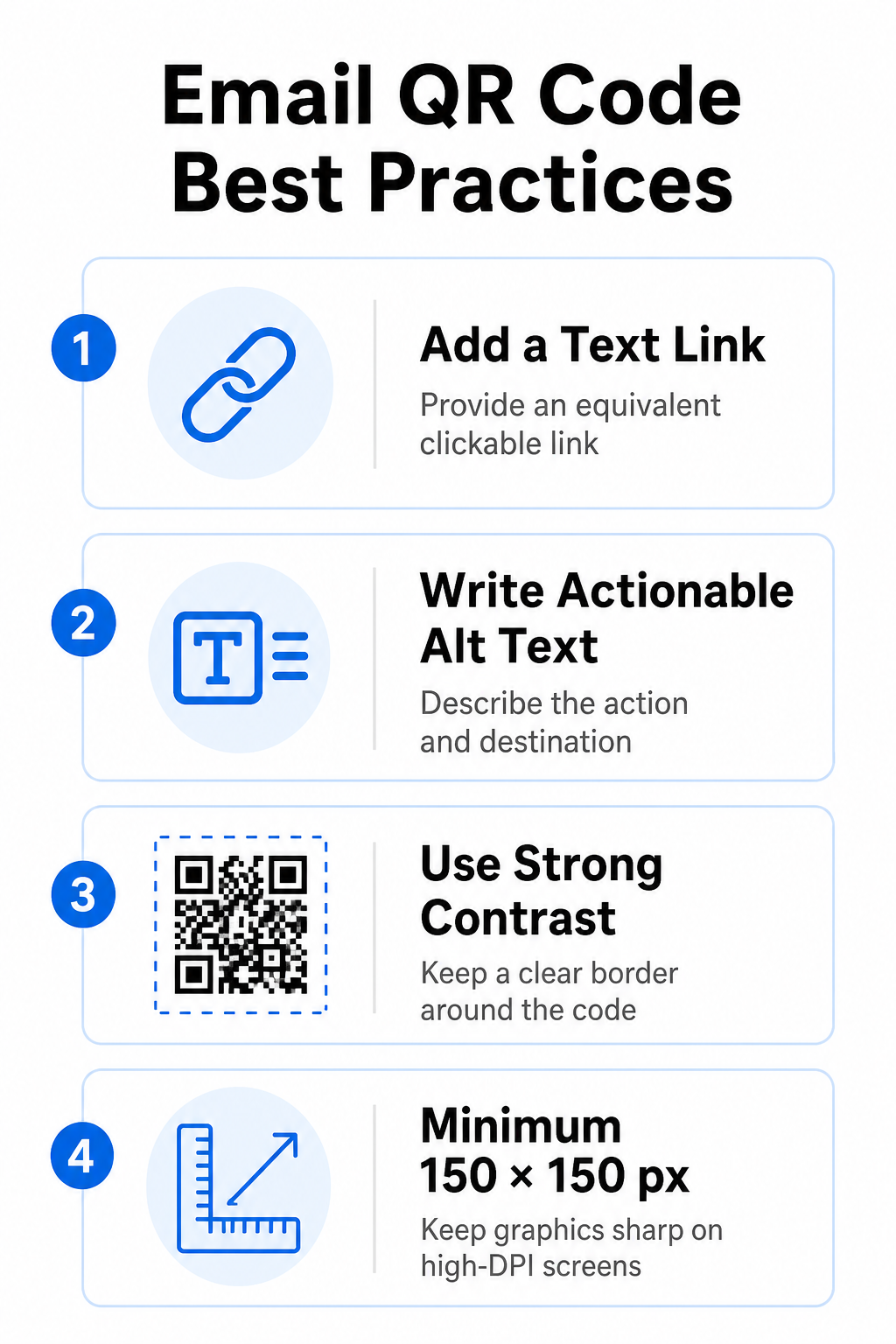
Proporcione siempre un enlace de texto equivalente.
Un gráfico escaneable nunca debe ser el único método para acceder a la información en un correo electrónico. Las normas de accesibilidad exigen un hipervínculo estándar en el que se pueda hacer clic, ubicado junto al gráfico o justo debajo de él. Esto garantiza que los suscriptores que lean el correo electrónico en un dispositivo móvil —donde es imposible escanear la pantalla— o quienes utilicen lectores de pantalla puedan acceder fácilmente al enlace.
Incluir texto alternativo interactivo
Los clientes de correo electrónico suelen bloquear las imágenes por defecto. Si la imagen no se carga inmediatamente, los lectores de pantalla y los suscriptores dependen del texto alternativo para comprender el contenido. Utilice un texto alternativo descriptivo que explique la acción y el destino específicos, como `alt="Escanee el código QR para obtener su cupón de descuento 20%"`, en lugar de describir la imagen visualmente.
Garantizar un alto contraste de color y zonas silenciosas.
Los escáneres requieren un alto contraste entre los patrones oscuros en primer plano y los espacios claros en el fondo. Los códigos oscuros colocados sobre fondos claros maximizan la absorción de luz y garantizan una detección rápida por parte de la cámara. Evite usar códigos de colores claros sobre fondos claros o patrones oscuros sobre secciones oscuras de la plantilla de correo electrónico. Además, mantenga un borde despejado, conocido como zona silenciosa, alrededor del perímetro del código para evitar que los elementos de diseño del correo electrónico circundantes interfieran con el reconocimiento del escáner. Revise estos parámetros estructurales en nuestra guía sobre las mejores prácticas para la legibilidad de los códigos QR antes de crear tus plantillas.
Tamaño de gráficos para pantallas de alta resolución (DPI)
Para garantizar que el gráfico se visualice con claridad en pantallas de alta resolución sin desenfoque ni pixelación, muestre la imagen con un tamaño mínimo de 150 x 150 píxeles (2 cm x 2 cm). Exporte sus imágenes en formatos vectoriales de alta resolución utilizando un programa fiable. generador de códigos QR de enlaces Mantiene la densidad de datos bajo control y las líneas nítidas en las pantallas de escritorio.
| Parámetro de diseño | Recomendación | Razón técnica |
|---|---|---|
| Dimensiones mínimas | 150 x 150 píxeles (2 x 2 cm) | Evita fallos de enfoque de la cámara y pixelación en pantallas de escritorio de alta resolución (DPI). |
| Color de primer plano | Oscuro (por ejemplo, negro, azul marino) | Maximiza la absorción de luz para una detección rápida por la cámara. |
| Color de fondo | Claro (por ejemplo, blanco, gris claro) | Proporciona el contraste necesario con los módulos de datos en primer plano. |
| Contenido de texto alternativo | “Escanee el código QR para [actuar]” | Proporciona un contexto de enlace claro cuando los clientes de correo electrónico tienen las imágenes deshabilitadas. |
Crea códigos QR personalizados con tu marca. ¿Listo para integrar códigos escaneables en el diseño de tus boletines informativos por correo electrónico? Genera códigos personalizados de alta resolución de forma gratuita utilizando nuestra herramienta principal. Generador de códigos QR hoy.
Códigos QR estáticos frente a dinámicos en campañas de correo electrónico
Elegir el formato técnico correcto para sus gráficos escaneables afecta tanto a la flexibilidad de la campaña como a la precisión de los informes.
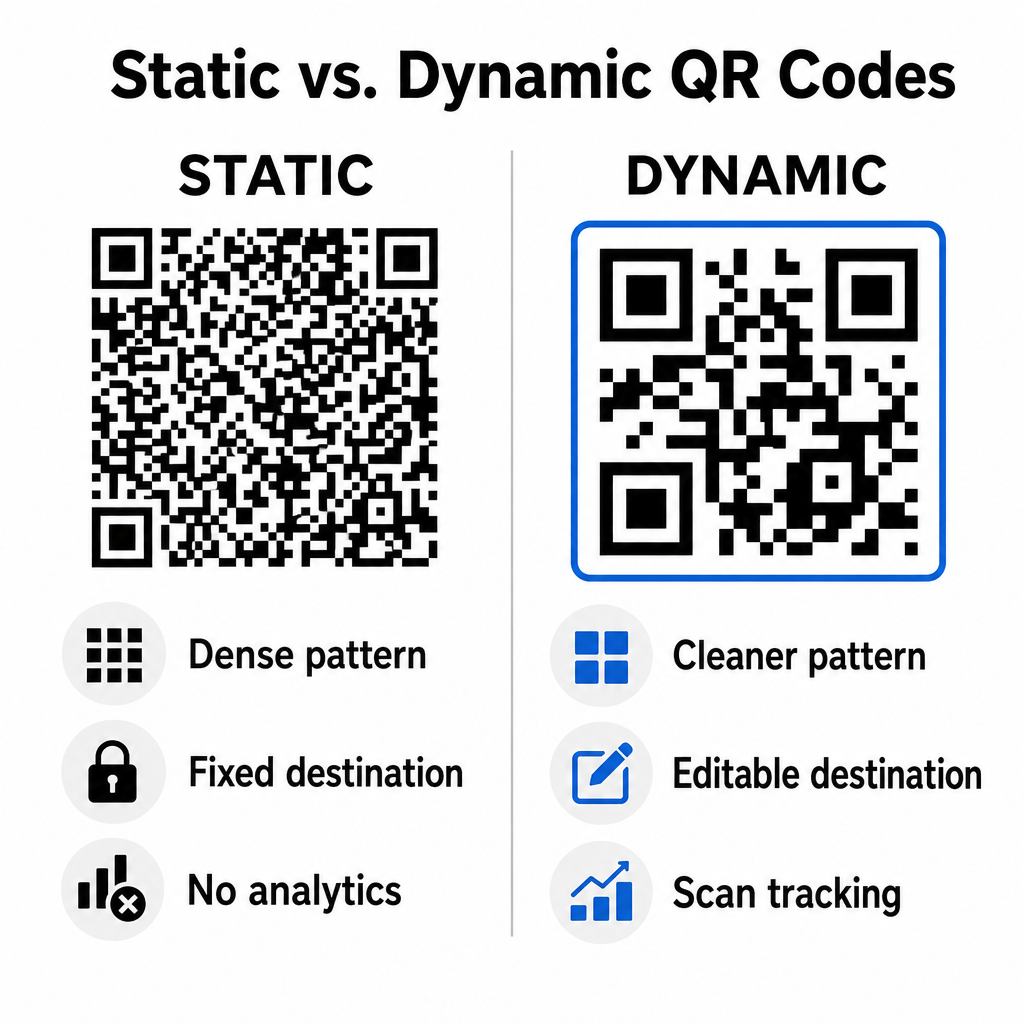
Los códigos estáticos almacenan la URL de destino directamente en la matriz visual. Dado que las direcciones web largas requieren más módulos de datos, los códigos estáticos muestran patrones densos y complejos que las cámaras de los smartphones tienen más dificultades para decodificar en las pantallas de los ordenadores. Además, los códigos estáticos no ofrecen métricas de seguimiento y no se pueden editar una vez enviado el boletín informativo por correo electrónico.
Los códigos dinámicos insertan una URL de redireccionamiento corta en lugar de la dirección completa de la página de destino. Esta diferencia estructural crea un patrón visual más limpio y de menor densidad que se escanea instantáneamente incluso en tamaños más pequeños. Los códigos dinámicos permiten a los administradores de campañas actualizar los enlaces de destino después de la implementación y capturar análisis completos. Comprender las diferencias entre códigos QR estáticos vs dinámicos Te ayuda a seleccionar el formato adecuado para secuencias de boletines recurrentes. Al utilizar URL de redireccionamiento dinámicas, obtienes acceso a información esencial. Métricas de seguimiento de códigos QR incluyendo el número total de escaneos, los sistemas operativos de los dispositivos, las marcas de tiempo de los escaneos y la distribución geográfica.
Errores comunes que se deben evitar en las campañas de correo electrónico
Evitar errores previsibles de diseño y experiencia de usuario protege las tasas de participación de tu campaña y preserva la confianza de los suscriptores:
- Omitir instrucciones claras de escaneoMostrar un código sin etiquetar, sin explicar la recompensa ni el siguiente paso, reduce la participación.
- Dirigir a los usuarios a páginas que no respondenEnviar escáneres móviles a páginas de destino exclusivas para ordenadores de escritorio genera fricción y aumenta la tasa de rebote.
- Personalización excesiva de elementos visualesColocar logotipos grandes o degradados de fondo de bajo contraste sobre la matriz de datos compromete la capacidad de escaneo de la cámara.
- Omitir las pruebas de renderizado entre clientesNo probar la apariencia del código en Gmail, Outlook y Apple Mail, tanto en modo claro como en modo oscuro, provoca diseños defectuosos.
Lanzamiento de su estrategia de código QR por correo electrónico
Combinar hipervínculos de texto con gráficos dinámicos escaneables establece una ruta eficiente desde la lectura de correo electrónico en el escritorio hasta la acción en dispositivos móviles. Mantener un fuerte contraste de color, proporcionar texto alternativo descriptivo y verificar que las páginas de destino estén optimizadas para pantallas móviles garantiza una experiencia fluida entre dispositivos para su audiencia. Implemente estos estándares en su próxima secuencia utilizando el Generador de códigos QR dinámicos Para crear, personalizar y realizar un seguimiento de los enlaces escaneables en todas tus campañas de marketing por correo electrónico.
Preguntas frecuentes
Los lectores de móviles no pueden escanear fácilmente un código que aparece en la pantalla de su propio dispositivo. Siempre combine los gráficos escaneables con un enlace de texto adyacente en el que se pueda hacer clic, para que los usuarios de móviles puedan acceder al destino con solo pulsar un botón.
Muestra la imagen con un tamaño mínimo de 150 x 150 píxeles (o 2 cm x 2 cm). Esto garantiza que las cámaras de los smartphones puedan decodificar la matriz al escanear la pantalla de un ordenador portátil o de sobremesa.
Sí, siempre que utilice un generador de códigos QR dinámico. Los códigos dinámicos registran métricas de escaneo, como la duración del escaneo, el sistema operativo del dispositivo y la ubicación geográfica, sin necesidad de parámetros URL complejos.